Page 512 of 573
511
uuCleaning uInterior Care
Maintenance
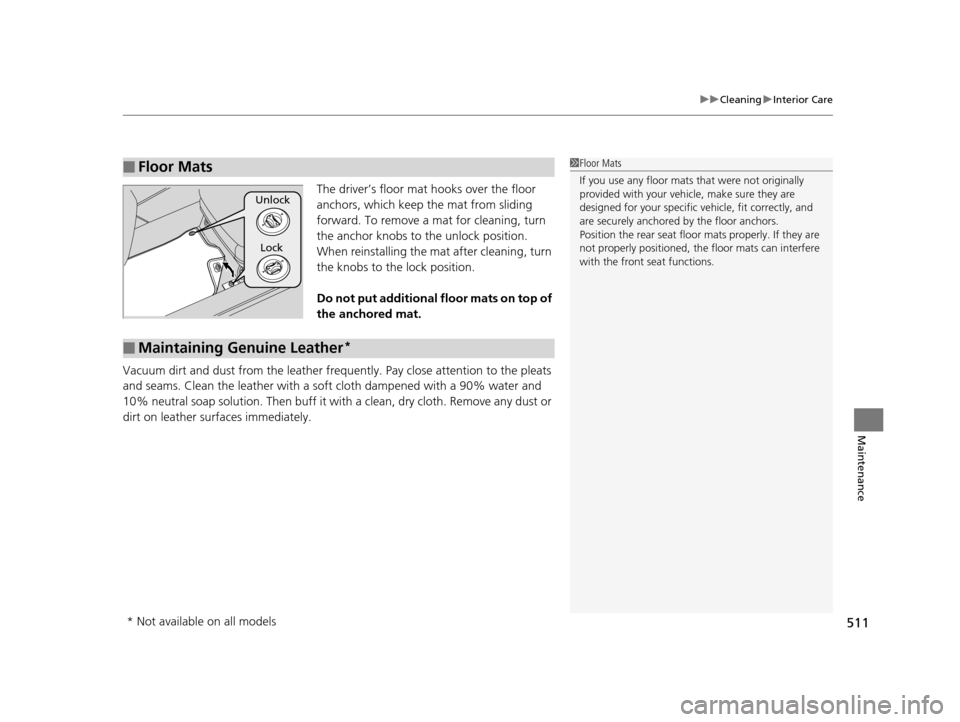
The driver’s floor mat hooks over the floor
anchors, which keep the mat from sliding
forward. To remove a mat for cleaning, turn
the anchor knobs to the unlock position.
When reinstalling the mat after cleaning, turn
the knobs to the lock position.
Do not put additional floor mats on top of
the anchored mat.
Vacuum dirt and dust from the leather frequ ently. Pay close attention to the pleats
and seams. Clean the leather with a so ft cloth dampened with a 90% water and
10% neutral soap solution. Then buff it with a clean, dry cloth. Remove any dust or
dirt on leather surfaces immediately.
■Floor Mats1 Floor Mats
If you use any floor mats that were not originally
provided with your vehicle, make sure they are
designed for your specific ve hicle, fit correctly, and
are securely anchored by the floor anchors.
Position the rear seat floor mats properly. If they are
not properly positioned, the floor mats can interfere
with the front seat functions.
Lock
Unlock
■Maintaining Genuine Leather*
* Not available on all models
15 CROSSTOUR-31TP66500.book 511 ページ 2014年7月31日 木曜日 午後3時23分
Page 516 of 573
515
Handling the Unexpected
This chapter explains how to handle unexpected troubles.
ToolsTypes of Tools .................................. 516
If a Tire Goes Flat Changing a Flat Tire ......................... 517
Engine Does Not Start Checking the Engine ........................ 525
If the Smart Entry Remote Battery is Weak .......................................... 526
Emergency Engine Stop ................... 527
Jump Starting .................................... 528
Shift Lever Does Not Move .............. 531Overheating
How to Handle Overheating............. 532
Indicator, Coming On/Blinking
If the Low Oil Pressure Indicator Comes On................................................ 534
If the Charging System Indicator Comes
On ................................................. 534
If the Malfunction Indicator Lamp Comes On or Blinks ................................... 535
If the Brake System Indicator (Red) Comes On ................................................... 536 If the Electric Power Steering (EPS) System
Indicator Comes On .............................536
If the Low Tire Pressure Indicator Comes On ................................................. 537
If the TPMS Indicator Comes On ...... 537
Fuses Fuse Locations ................................. 538
Inspecting and Changing Fuses ........ 541
Emergency Towing ........................... 542
When You Cannot Unlock the Fuel Fill Door ................................................. 543
When You Cannot Open the Tailgate .. 544
15 CROSSTOUR-31TP66500.book 515 ページ 2014年7月31日 木曜日 午後3時23分
Page 518 of 573
517Continued
Handling the Unexpected
If a Tire Goes Flat
Changing a Flat Tire
If a tire goes flat while driving, grasp the steering wheel firmly, and brake gradually
to reduce speed. Then, stop in a safe plac e. Replace the flat tire with a compact
spare tire. Go to a dealer as soon as possib le to have the full-size tire repaired or
replaced.
1. Park the vehicle on firm, level, and non- slippery surface and apply the parking
brake.
2. Move the shift lever to
(P.
3. Turn on the hazard warning lights an d turn the ignition switch to LOCK
(0*1.
*1: Models with the smart entry system have an ENGINE START/STOP button instead of an
ignition switch.
1 Changing a Flat Tire
Periodically check the tire pressure of the compact
spare. It should be set to the specified pressure.
Specified Pressure: 60 psi (420 kPa, 4.2 kgf/cm
2)
When driving with the compact spare tire, keep the
vehicle speed under 50 mph (80 km/h). Replace with
a full-size tire as soon as possible.
The compact spare tire and wheel in your vehicle are
specifically for this model.
Do not use them with another vehicle.
Do not use another type of compact spare tire or
wheel with your vehicle.
Do not mount tire chains on a compact spare tire.
If a chain-mounted front tire goes flat, remove one of
the full-size rear tires and replace it with the compact
spare tire. Remove the flat front tire and replace it
with the full-size tire that was removed from the rear.
Mount the tire chains on the front tire.
Do not use a puncture-repairi ng agent on a flat tire,
as it can damage the tire pressure sensor.
15 CROSSTOUR-31TP66500.book 517 ページ 2014年7月31日 木曜日 午後3時23分
Page 521 of 573
520
uuIf a Tire Goes Flat uChanging a Flat Tire
Handling the Unexpected
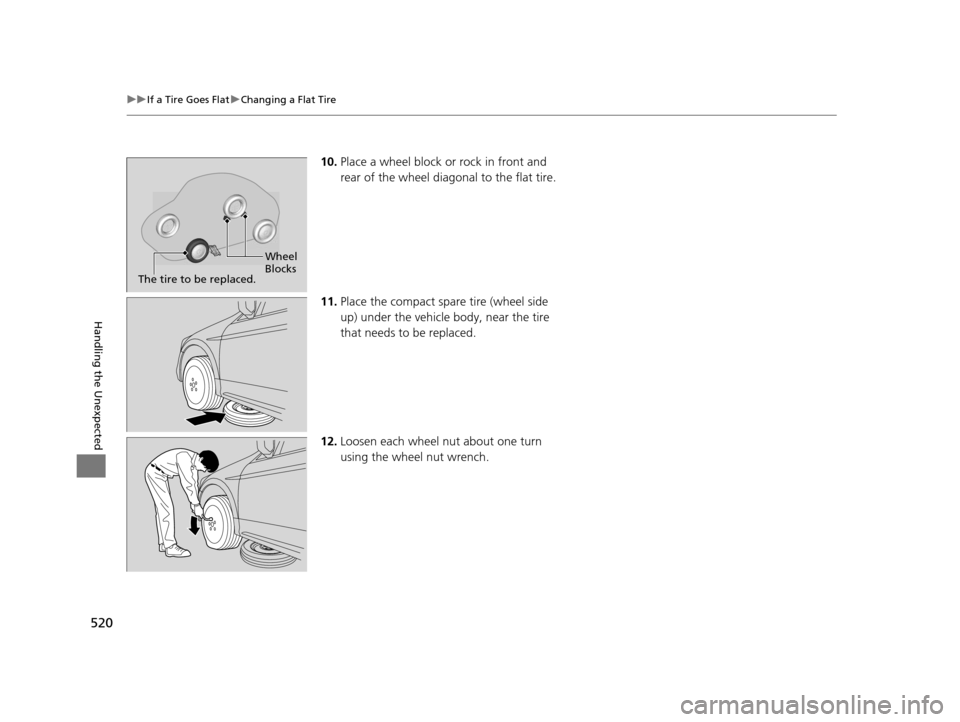
10. Place a wheel block or rock in front and
rear of the wheel diagonal to the flat tire.
11. Place the compact spare tire (wheel side
up) under the vehicle body, near the tire
that needs to be replaced.
12. Loosen each wheel nut about one turn
using the wheel nut wrench.
Wheel
Blocks
The tire to be replaced.
15 CROSSTOUR-31TP66500.book 520 ページ 2014年7月31日 木曜日 午後3時23分
Page 522 of 573

Continued521
uuIf a Tire Goes Flat uChanging a Flat Tire
Handling the Unexpected
1. Place the jack under the jacking point
closest to the tire to be changed.
2. Turn the end bracket (as shown in the
image) clockwise until the top of the jack
contacts the jacking point.
u Make sure that the jacking point tab is
resting in the jack notch.
3. Raise the vehicle, using the jack handle bar
and the jack handle, until the tire is off the
ground.
■How to Set Up the Jack1How to Set Up the Jack
Do not use the jack with people or luggage in the
vehicle.
Use the jack provided in your vehicle.
Other jacks may not support the weight (“load”) or
their shape may not match.
The following instructions must be followed to use
the jack safely.
•Do not use while the engine is running.
•Use only where the ground is firm and level.
•Use only at the jacking points.•Do not get in the vehicl e while using the jack.
•Do not put anything on top of or underneath the
jack.
3WARNING
The vehicle can easily roll off the jack,
seriously injuring anyone underneath.
Follow the directions for changing a tire
exactly, and never get under the vehicle
when it is supported only by the jack.
Jack
Handle
Bar Wheel Nut
Wrench as Jack Handle
15 CROSSTOUR-31TP66500.book 521 ページ 2014年7月31日 木曜日 午後3時23分
Page 528 of 573
527
uuEngine Does Not Start uEmergency Engine Stop
Handling the Unexpected
Emergency Engine Stop
The ENGINE START/STOP button may be used to stop the engine due to an
emergency situation even while driving. If you must stop the engine, do either of the
following operations:
• Press and hold the ENGINE START/STOP button for about two seconds.
• Firmly press the ENGINE START/STOP button twice.
The steering wheel will not lock. However, because turning off the engine disables
the power assist the engine provides to the steering and braking systems, it will
require significantly more physical effort an d time to steer and slow the vehicle. Use
both feet on the brake pedal to slow down the vehicle and stop immediately in a
safe place.
The power mode is in ACCESSORY when the engine is stopped.
To change the mode to VEHICLE OFF, move the shift lever to
(P after the vehicle
comes to a complete stop. Then press the ENGINE START/STOP button twice
without depressing the brake pedal.
Models with smart entry system
1 Emergency Engine Stop
Do not press the button while driving unless it is
absolutely necessary for th e engine to be switched
off.
15 CROSSTOUR-31TP66500.book 527 ページ 2014年7月31日 木曜日 午後3時23分
Page 532 of 573
531
Handling the Unexpected
Shift Lever Does Not Move
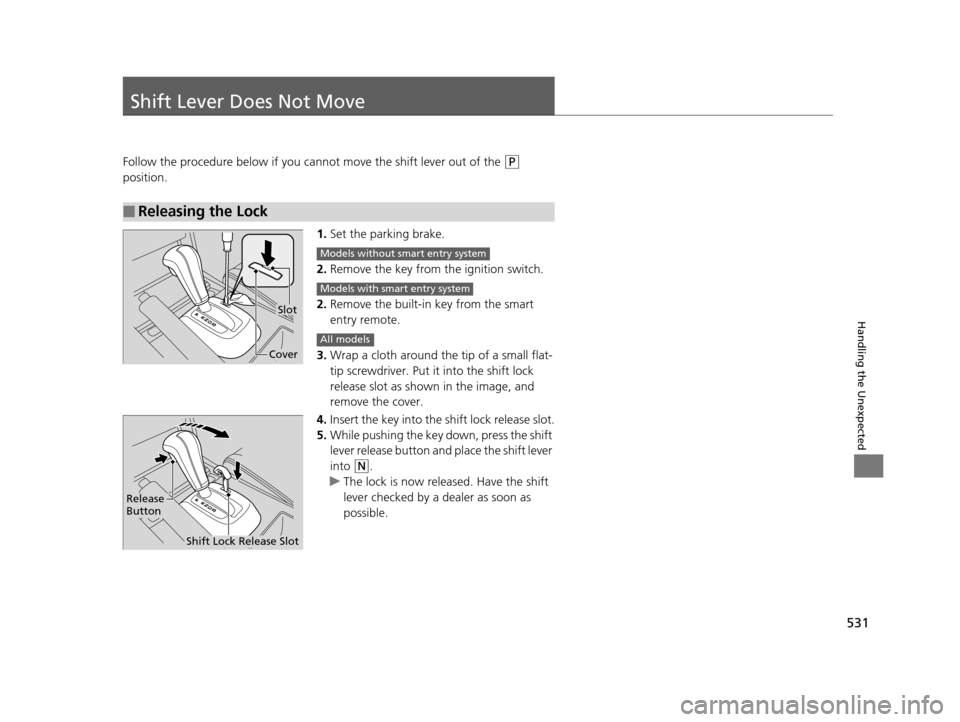
Follow the procedure below if you cannot move the shift lever out of the (P
position.
1.Set the parking brake.
2. Remove the key from th e ignition switch.
2. Remove the built-in key from the smart
entry remote.
3. Wrap a cloth around the tip of a small flat-
tip screwdriver. Put it into the shift lock
release slot as shown in the image, and
remove the cover.
4. Insert the key into the shift lock release slot.
5. While pushing the key down, press the shift
lever release button and place the shift lever
into
(N.
u The lock is now released. Have the shift
lever checked by a de aler as soon as
possible.
■Releasing the Lock
Slot
Cover
Models without smart entry system
Models with smart entry system
All models
Release
Button
Shift Lock Release Slot
15 CROSSTOUR-31TP66500.book 531 ページ 2014年7月31日 木曜日 午後3時23分
Page 539 of 573

538
Handling the Unexpected
Fuses
Fuse Locations
If any electrical devices are not working,
turn the ignition switch to LOCK
(0*1 and
check to see if any appl icable fuse is blown.
Located near the brake fluid reservoir. Push
the tabs to open the box.
Fuse locations are shown on the fuse box
cover. Locate the fuse in question by the
fuse number and box cover number.
■Engine Compartment Fuse Box
■Circuit protected and fuse rating
Circuit ProtectedAmps
1
Battery120 A*3
Battery100 A*2
Passenger’s Fuse Box40 A
2
ESP MTR70 A
VSA SFR40 A
VSA Motor30 A
AS F/B OP40 A
Headlight washer*30 A
−−
3
IG Main50 A
−−
Passenger Side Light Main30 A
DR F/B STD60 A
Driver Side Light Main30 A
Main Fan30 A
Wiper Motor30 A
Sub Fan30 A
4 Fan Relay 7.5 A
5Rear Defroster40 A
6Sub Fan Motor*220 A
*1:Models with the sma rt entry system have
an ENGINE START/STOP button
instead of an ignition switch.
*2:4-cylinder models
*3:6-cylinder models
7Hazard15 A
8 Horn, STOP 20 A
9−−
10 Trailer 15 A
11IG Coil15 A
12 FI Sub 15 A
13IGI Main 1*330 A
14 IGI Main 2*330 A
15Back up10 A
16 Interior Lights 7.5 A
17FI Main15 A
18 DBW 15 A
19ACM*320 A
20 Heater Motor 40 A
21MG Clutch7.5 A
Circuit ProtectedAmps
* Not available on all models
15 CROSSTOUR-31TP66500.book 538 ページ 2014年7月31日 木曜日 午後3時23分