Page 298 of 573
297
uuCustomized Features*u
Continued
Features
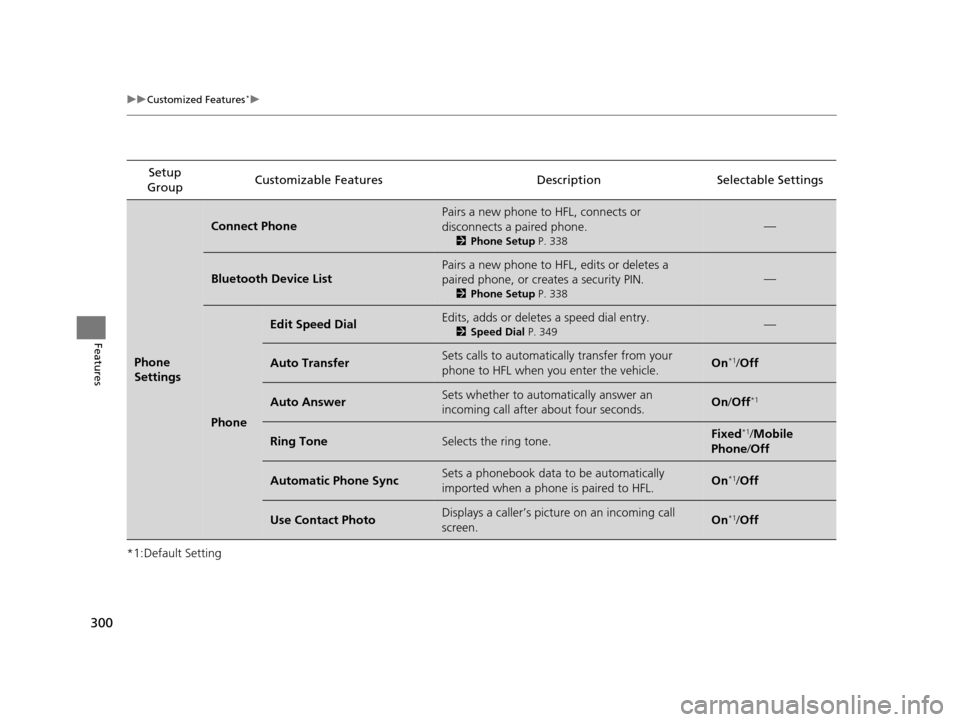
*1:Default SettingSetup
Group Customizable Features Description Selectable Settings
Vehicle
Settings Door
SetupAuto Door Lock
Changes the setting
for when the doors
automatically lock. With Vehicle Speed
*1/
Shift from P /Off
Auto Door Unlock Changes the setting
for when the doors
automatically unlock. Driver Door with Shift
to P
*1/
All Doors with
Shift to P /Driver Door
with IGN Off/ All Doors
with IGN Off /Off
Key And Remote Unlock
Mode Sets up either the driver’s door or all doors to
unlock on the first push of the remote. Driver Door
*1/
All
Doors
Keyless Lock Answer Back LOCK/UNLOCK- The exterior lights flash.
LOCK (2nd push)- The beeper sounds. On
*1/
Off
Security Relock Timer Changes the time it takes for the doors and the
tailgate to relock and the security system to set
after you unlock the vehicle without opening any
door or the tailgate. 90seconds
/
60seconds /
30seconds
*1
Mainte-
nance
Info. Maintenance Reset
Resets the engine oil life display when you have
performed the maintenance service. —
Default
All
Cancels/Resets all customized items in the
Vehicle Settings group as default. Yes
/No
15 CROSSTOUR-31TP66500.book 297 ページ 2014年7月31日 木曜日 午後3時23分
Page 301 of 573
300
uuCustomized Features*u
Features
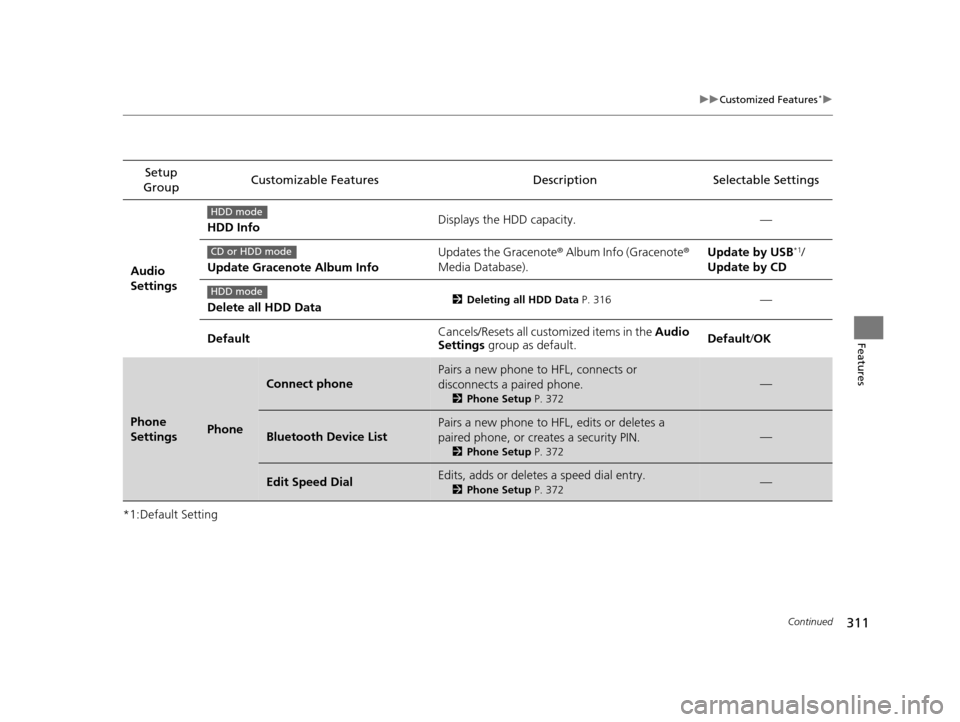
*1:Default SettingSetup
Group Customizable Features Descri
ption Selectable Settings
Phone
Settings
Connect Phone
Pairs a new phone to HFL, connects or
disconnects a paired phone.
2Phone Setup P. 338
—
Bluetooth Device List
Pairs a new phone to HFL, edits or deletes a
paired phone, or creates a security PIN.
2Phone Setup P. 338
—
Phone
Edit Speed DialEdits, adds or deletes a speed dial entry.
2Speed Dial P. 349—
Auto TransferSets calls to automatically transfer from your
phone to HFL when you enter the vehicle.On*1/Off
Auto AnswerSets whether to automatically answer an
incoming call after about four seconds.On /Off*1
Ring ToneSelects the ring tone.Fixed*1/Mobile
Phone /Off
Automatic Phone SyncSets a phonebook data to be automatically
imported when a phone is paired to HFL.On*1/Off
Use Contact PhotoDisplays a caller’s picture on an incoming call
screen.On*1/Off
15 CROSSTOUR-31TP66500.book 300 ページ 2014年7月31日 木曜日 午後3時23分
Page 304 of 573
303
uuCustomized Features*u
Continued
Features
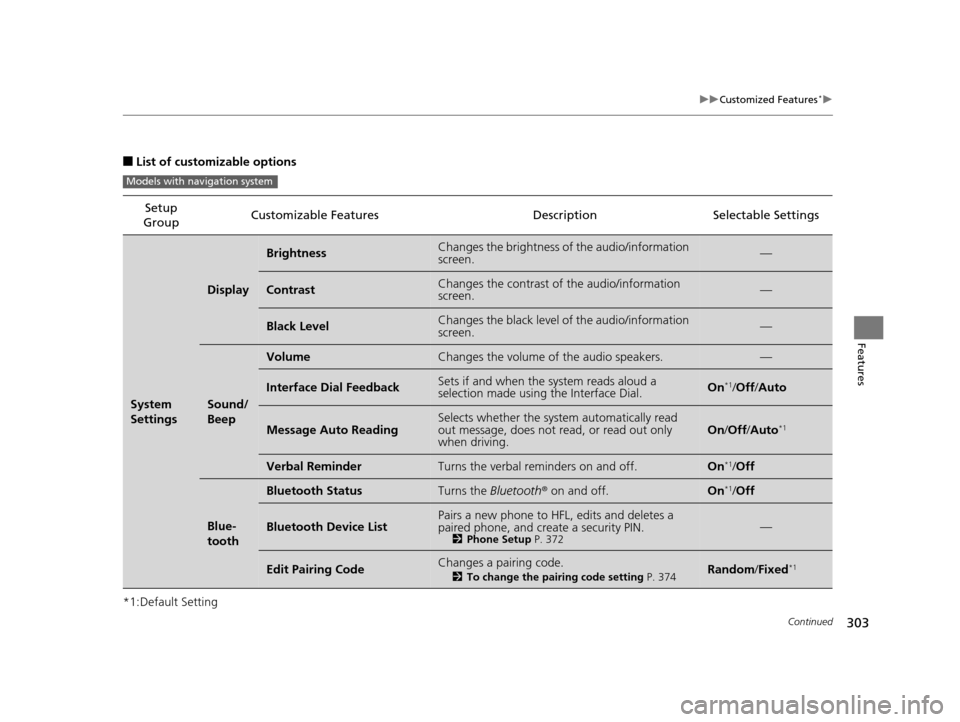
■List of customizable options
*1:Default Setting Setup
Group Customizable Features Description Selectable Settings
System
Settings
Display
BrightnessChanges the brightness of the audio/information
screen.—
ContrastChanges the contrast of the audio/information
screen.—
Black LevelChanges the black level of the audio/information
screen.—
Sound/
Beep
VolumeChanges the volume of the audio speakers.—
Interface Dial FeedbackSets if and when the
system reads aloud a
selection made using the Interface Dial.On*1/ Off /Auto
Message Auto ReadingSelects whether the system automatically read
out message, does not read, or read out only
when driving.On /Off /Auto*1
Verbal ReminderTurns the verbal reminders on and off.On*1/Off
Blue-
tooth
Bluetooth StatusTurns the Bluetooth® on and off.On*1/Off
Bluetooth Device ListPairs a new phone to HFL, edits and deletes a
paired phone, and create a security PIN.
2 Phone Setup P. 372—
Edit Pairing CodeChanges a pairing code.
2To change the pairing code setting P. 374Random/Fixed*1
Models with navigation system
15 CROSSTOUR-31TP66500.book 303 ページ 2014年7月31日 木曜日 午後3時23分
Page 309 of 573
308
uuCustomized Features*u
Features
*1:Default SettingSetup
Group Customizable Features Descri
ption Selectable Settings
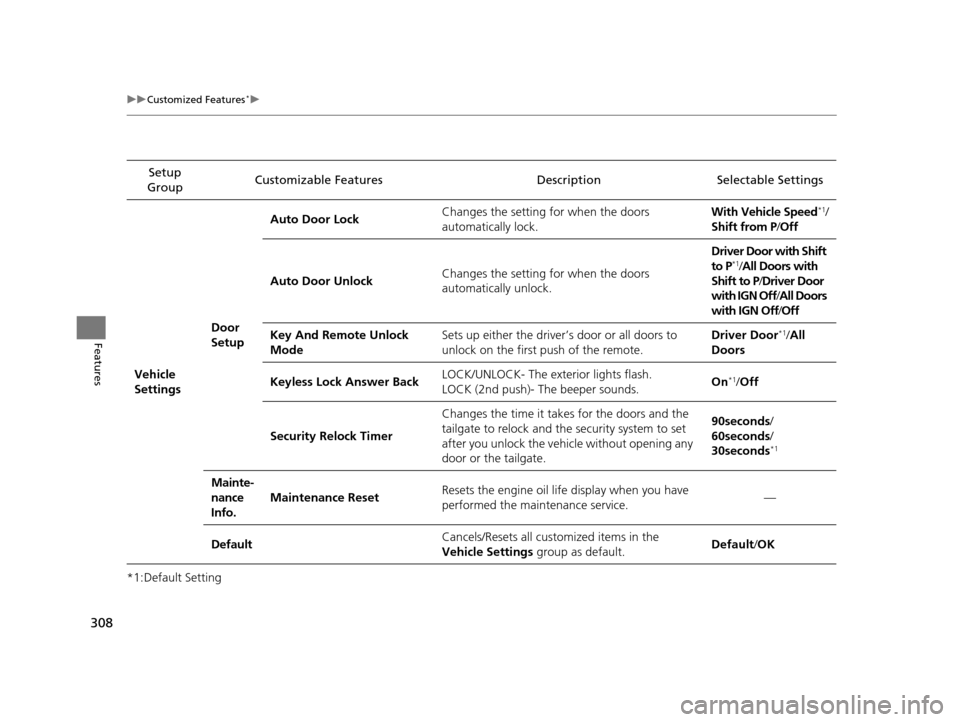
Vehicle
Settings Door
SetupAuto Door Lock
Changes the setting for when the doors
automatically lock. With Vehicle Speed
*1/
Shift from P/ Off
Auto Door Unlock Changes the setting for when the doors
automatically unlock. Driver Door with Shift
to P
*1/
All Doors with
Shift to P /Driver Door
with IGN Off /All Doors
with IGN Off /Off
Key And Remote Unlock
Mode Sets up either the driver
’s door or all doors to
unlock on the first push of the remote. Driver Door
*1/
All
Doors
Keyless Lock Answer Back LOCK/UNLOCK- The exterior lights flash.
LOCK (2nd push)- The beeper sounds. On
*1/
Off
Security Relock Timer Changes the time it takes for the doors and the
tailgate to relock and the security system to set
after you unlock the vehicle without opening any
door or the tailgate. 90seconds/
60seconds/
30seconds
*1
Mainte-
nance
Info.
Maintenance Reset
Resets the engine oil life display when you have
performed the maintenance service. —
Default Cancels/Resets all cust
omized items in the
Vehicle Settings group as default. Default
/OK
15 CROSSTOUR-31TP66500.book 308 ページ 2014年7月31日 木曜日 午後3時23分
Page 312 of 573
311
uuCustomized Features*u
Continued
Features
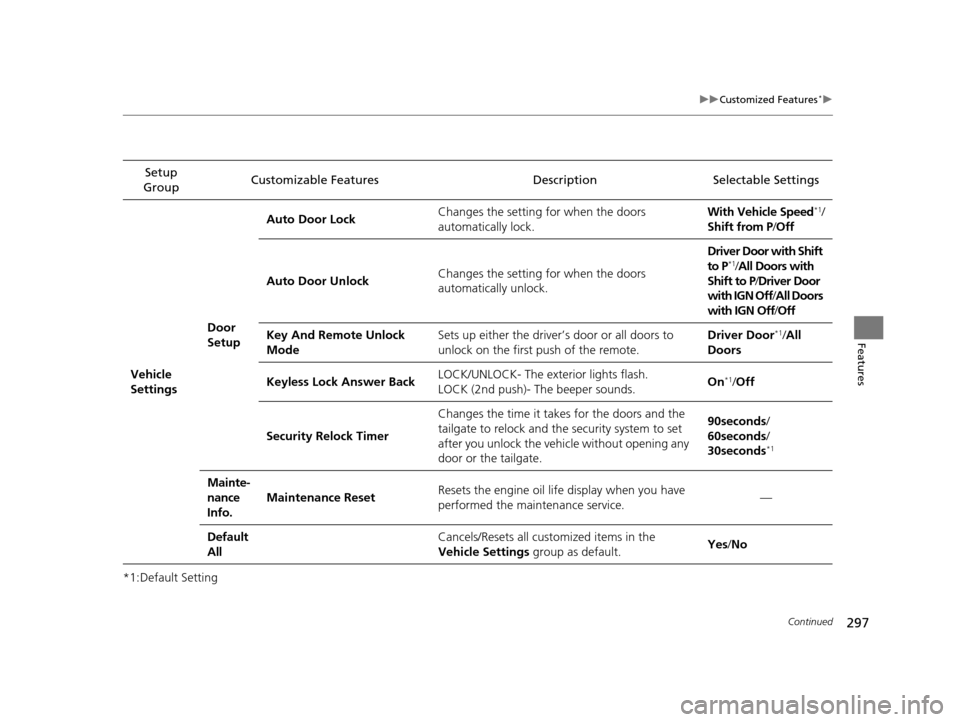
*1:Default SettingSetup
Group Customizable Features Description Selectable Settings
Audio
Settings HDD Info
Displays the HDD capacity. —
Update Gracenote Album Info Updates the Gracenote
® Album Info (Gracenote ®
Media Database). Update by USB
*1/
Update by CD
Delete all HDD Data
2 Deleting all HDD Data P. 316—
Default Cancels/Resets all customized items in the
Audio
Settings group as default. Default/
OK
Phone
SettingsPhone
Connect phone
Pairs a new phone to HFL, connects or
disconnects a paired phone.
2Phone Setup P. 372
—
Bluetooth Device List
Pairs a new phone to HFL, edits or deletes a
paired phone, or creates a security PIN.
2Phone Setup P. 372
—
Edit Speed DialEdits, adds or deletes a speed dial entry.
2Phone Setup P. 372—
HDD mode
CD or HDD mode
HDD mode
15 CROSSTOUR-31TP66500.book 311 ページ 2014年7月31日 木曜日 午後3時23分
Page 318 of 573
317Continued
Features
HomeLink® Universal Transceiver*
The HomeLink ® Universal Transceiver can be programmed to operate up to three
remote controlled devices around your home, such as garage doors, lighting, or
home security systems.
Refer to the safety information that came wi th your garage door opener to test that
the safety features are functioning prope rly. If you do not have the safety
information, contact the manufacturer.
Before programming HomeLink, make sure that people and objects are out of the
way of the garage or gate to prevent potential injury or damage.
When programming a garage door opener, park just outside the garage door’s
path.
Training HomeLink
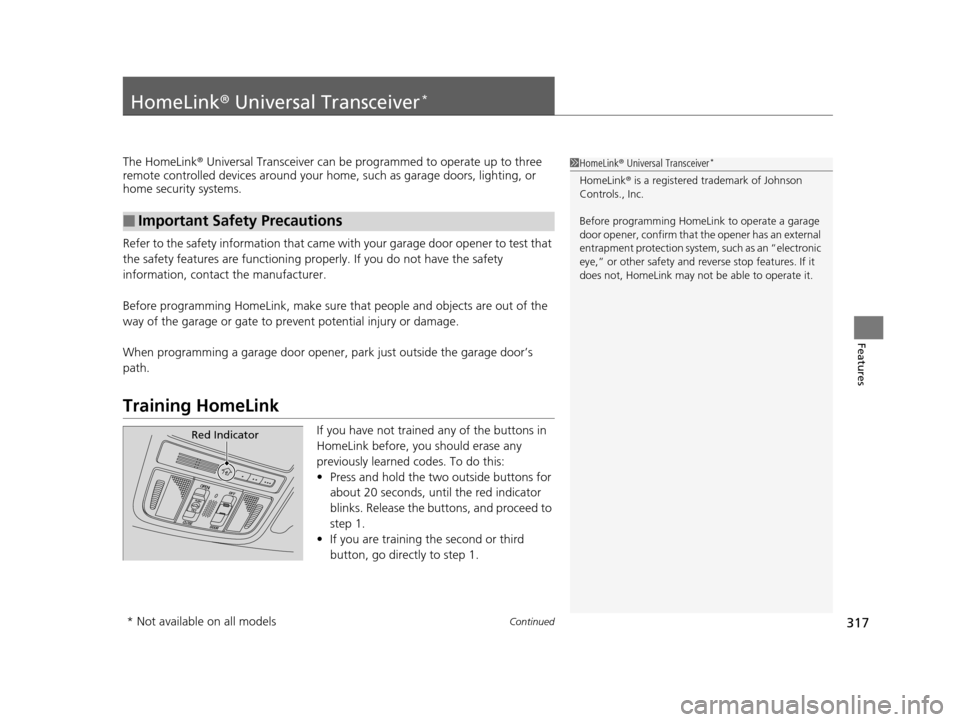
If you have not trained any of the buttons in
HomeLink before, you should erase any
previously learned codes. To do this:
• Press and hold the two outside buttons for
about 20 seconds, until the red indicator
blinks. Release the bu ttons, and proceed to
step 1.
• If you are training the second or third
button, go directly to step 1.
■Important Safety Precautions
1HomeLink ® Universal Transceiver*
HomeLink® is a registered tra demark of Johnson
Controls., Inc.
Before programming HomeLi nk to operate a garage
door opener, confirm that the opener has an external
entrapment protection system, such as an “electronic
eye,” or other safety and re verse stop features. If it
does not, HomeLink may not be able to operate it.
Red Indicator
* Not available on all models
15 CROSSTOUR-31TP66500.book 317 ページ 2014年7月31日 木曜日 午後3時23分
Page 323 of 573
322
uuBluetooth ® HandsFreeLink ®u HFL Menus
Features
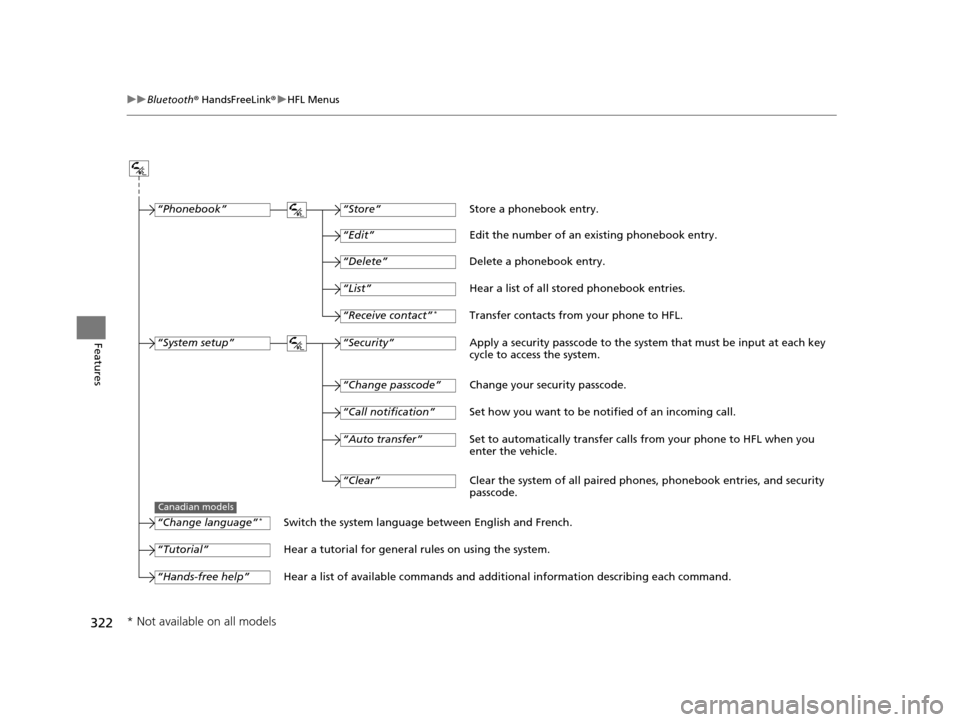
“Change passcode”
Store a phonebook entry.
Edit the number of an existing phonebook entry.
Delete a phonebook entry.
Hear a list of all stored phonebook entries.
Transfer contacts from your phone to HFL.
Apply a security passcode to the syste m that must be input at each key
cycle to access the system.
Change your security passcode.
Set how you want to be notified of an incoming call.
Set to automatically transfer calls from your phone to HFL when you
enter the vehicle.
Switch the system language between English and French.
Hear a tutorial for general rules on using the system.
Hear a list of available commands and additional information describing each command. “Store”
“Edit”
“Delete”
“List”
“Receive contact”*
“Security”
“Call notification”
“Auto transfer”
“Phonebook”
“System setup”
“Change language”*
“Tutorial”
“Hands-free help”
Clear the system of all paired phones, phonebook entries, and security
passcode.
“Clear”
Canadian models
* Not available on all models
15 CROSSTOUR-31TP66500.book 322 ページ 2014年7月31日 木曜日 午後3時23分
Page 330 of 573
Continued329
uuBluetooth ® HandsFreeLink ®u HFL Menus
Features
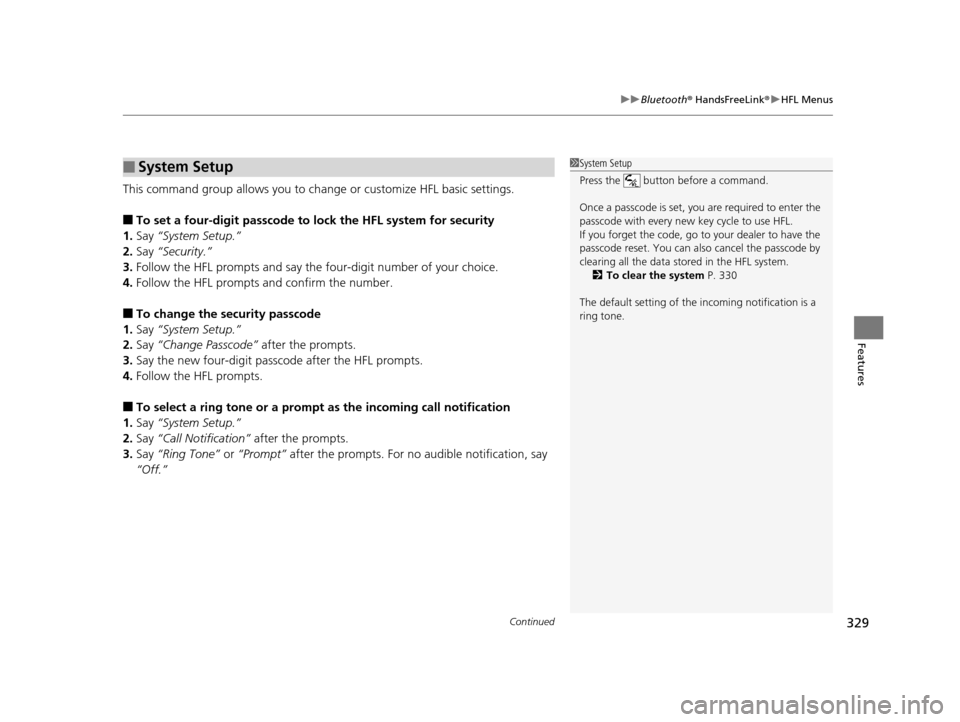
This command group allows you to ch ange or customize HFL basic settings.
■To set a four-digit passcode to lock the HFL system for security
1. Say “System Setup.”
2. Say “Security.”
3. Follow the HFL prompts and say the four-digit number of your choice.
4. Follow the HFL prompts and confirm the number.
■To change the security passcode
1. Say “System Setup.”
2. Say “Change Passcode” after the prompts.
3. Say the new four-digit passcode after the HFL prompts.
4. Follow the HFL prompts.
■To select a ring tone or a prompt as the incoming call notification
1. Say “System Setup.”
2. Say “Call Notification” after the prompts.
3. Say “Ring Tone” or “Prompt” after the prompts. For no audible notification, say
“Off.”
■System Setup1 System Setup
Press the button before a command.
Once a passcode is set, y ou are required to enter the
passcode with every new key cycle to use HFL.
If you forget the code, go to your dealer to have the
passcode reset. You can also cancel the passcode by
clearing all the data stored in the HFL system. 2 To clear the system P. 330
The default setting of the incoming notification is a
ring tone.
15 CROSSTOUR-31TP66500.book 329 ページ 2014年7月31日 木曜日 午後3時23分