Page 319 of 569
318
uuCustomized Features u
Features
Show with Turn Signal
Reference Lines
Next Maneuver Pop up
Fixed GuidelineDynamic Guideline
Default
Default
Source Select Popup
Cover Art
*1
Connect Bluetooth Audio Device
*1
Bluetooth Device List
*1
Recording from CD
*1
Recording Quality
*1
HDD Info
*1
Update Gracenote Album Info
*1
Delete All HDD Data
*1
Camera
Settings
Rear
Camera
LaneWatch
Display
BrightnessContrastBlack Level
ColorTint
*1: May change depending on your currently selected source.
CD/HDD
Bluetooth
Other
DefaultAudio
Settings
Page 320 of 569
319
uuCustomized Features u
Continued
Features
Add Bluetooth
DeviceDisconnect
Default
Phone
Connect phone
Edit Bluetooth DeviceAdd Bluetooth Device
Bluetooth Device
List
Edit Speed DialAuto TransferAuto AnswerRing Tone
Automatic Phone SyncUse Contact Photo
Default
Default
Enable Text/EmailSelect Account
New Text/Email Alert
Text/Email
Phone
Settings
Page 322 of 569
321
uuCustomized Features u
Continued
Features
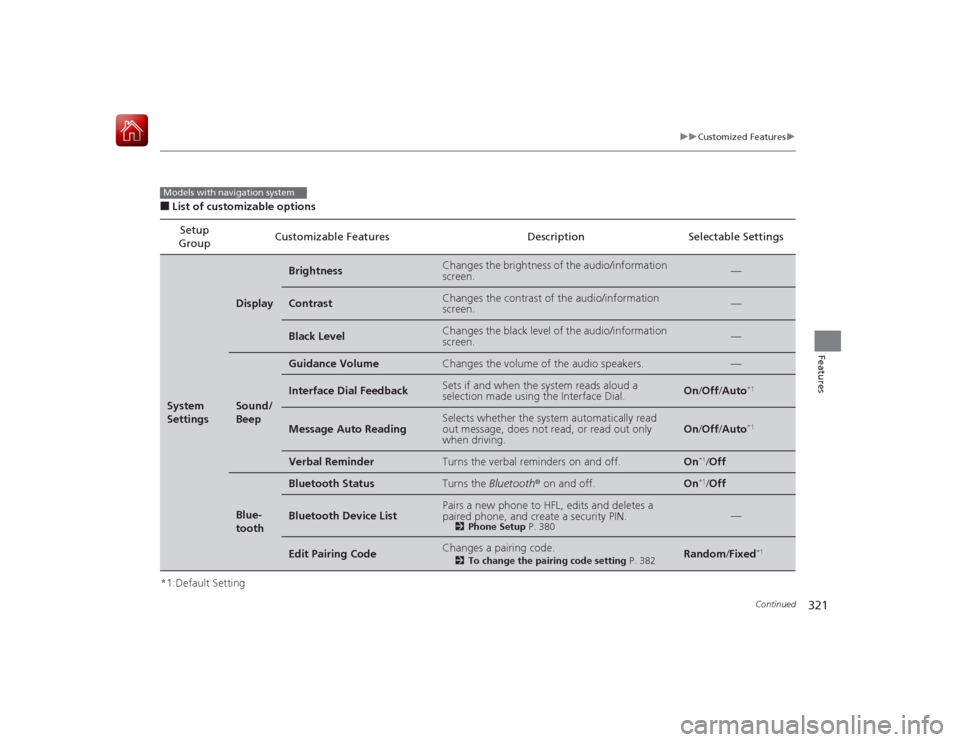
■List of customizable options
*1:Default Setting Setup
Group Customizable Features Description Selectable SettingsSystem
Settings
Display
Brightness
Changes the brightness of the audio/information
screen.
—
Contrast
Changes the contrast of the audio/information
screen.
—
Black Level
Changes the black level of the audio/information
screen.
—
Sound/
Beep
Guidance Volume
Changes the volume of the audio speakers.
—
Interface Dial Feedback
Sets if and when the system reads aloud a
selection made using the Interface Dial.
On
/Off /Auto
*1
Message Auto Reading
Selects whether the system automatically read
out message, does not read, or read out only
when driving.
On /Off /Auto
*1
Verbal Reminder
Turns the verbal reminders on and off.
On
*1/Off
Blue-
tooth
Bluetooth Status
Turns the Bluetooth® on and off.
On
*1/Off
Bluetooth Device List
Pairs a new phone to HFL, edits and deletes a
paired phone, and create a security PIN.
2 Phone Setup P. 380
—
Edit Pairing Code
Changes a pairing code.
2To change the pairing code setting P. 382
Random/Fixed
*1
Models with navigation system
Page 324 of 569

323
uuCustomized Features u
Continued
Features
*1:Default SettingSetup
Group Customizable Features Description Selectable SettingsSystem
Settings
Clock
Auto Daylight
*
Sets the navigation system to automatically adjust
the clock (“spring ahead” or “fall back” by one
hour) when a daylight saving time change occurs.
On
*1/
Off
Clock Reset
Resets the settings of all items in the Clock group.
—
Others
Units
Changes the distance unit on the navigation map
screen.
mile
*1/km (U.S.)
mile /km*1 (Canada)
Language
Changes the display language.
English
*1/ French /
Spanish
Voice Command Tips
Alerts you when manual control of the system is
disabled to prevent distraction while driving. Only
voice commands are available.
On
*1/ Off
Background Color
Changes the background color of the audio/
information screen and the audio with touch screen.
Blue
*1/Amber /Red /
Green
Header Clock Display
Selects whether the clock display comes on.
On
*1/ Off
System Device Information
Displays the system/Device information.
—
Factory Data Reset
Resets all the settings to their factory default.
2 Defaulting All the Settings P. 333
—
Default
Cancels /Resets all customized items in the
System Settings group as default.
Default/OK
* Not available on all models
Page 329 of 569
328
uuCustomized Features u
Features
*1:Default SettingSetup
Group Customizable Features Description Selectable SettingsAudio
SettingsCD/HDD
Recording from CD
Selects whether the songs on music CDs are
automatically recorded to the HDD.
Auto/
Manual
*1
Recording Quality Selects the quality of the music files recorded
to the HDD.
Standard
*1/
High
HDD Info Displays the HDD capacity. —
Update Gracenote Album
Info Updates the Gracenote
® Album Info
(Gracenote ® Media Database). Update by USB
*1/
Update by CD
Delete All HDD Data
2 Deleting All HDD Data P. 334
—
Bluetooth Bluetooth Device List Edits or deletes a
Bluetooth® Audio device
paired to HFL. —
Connect Bluetooth Audio
DeviceConnects, disconnects or pairs a
Bluetooth®
Audio device to HFL. —CD modeCD modeHDD modeCD or HDD modeHDD modeBluetooth
® Audio, Pandora ®
* or
Aha
TM mode
Bluetooth ® Audio, Pandora ®
* or
Aha
TM mode
* Not available on all models
Page 330 of 569
329
uuCustomized Features u
Continued
Features
*1:Default SettingSetup
Group Customizable Features Description Selectable SettingsAudio
SettingsOther
Source Select Popup
Selects whether the list
of selectable audio sources
comes on when the AUDIO button is pressed. On
/Off
*1
Cover Art Turns on and off the cover art display.
On
*1/Off
Default Cancels/Resets all customized items in the
Audio
Settings group as default. Default/
OK
Phone
Settings
Phone
Connect phone
Pairs a new phone to HFL, connects or
disconnects a paired phone.
2Phone Setup P. 380
—
Bluetooth Device List
Pairs a new phone to HFL, edits or deletes a
paired phone, or creates a security PIN.
2Phone Setup P. 380
—
Edit Speed Dial
Edits, adds or deletes a speed dial entry.
2Phone Setup P. 380
—
CD (MP3/WMA/AAC), iPod, USB,
Pandora®
* or Aha
TM mode
* Not available on all models
Page 338 of 569

337
Continued
Features
Bluetooth® HandsFreeLink ®Bluetooth® HandsFreeLink ® (HFL) allows you to place and receive phone calls using
your vehicle’s audio system, without handling your cell phone.Using HFL
(Pick-up) button: Press to answer an incoming call.
(Hang-up/back) button: Press to end a call or to cancel a command.
(Talk) button: Press to call a number with a stored voice tag, a phonebook
name, or a number.
PHONE button: Press to go directly to the Phone screen.
Selector knob: Rotate to select an item on the screen, then press .
■
HFL Buttons
1Bluetooth ® HandsFreeLink ®
To use HFL, you need a Bluetooth-compatible cell
phone. For a list of compatible phones, pairing
procedures, and special feature capabilities:•U.S.: Visit www.handsfreelink.honda.com , or call
1-888-528-7876.•Canada: Visit www.handsfreelink.ca , or call 1-888-
528 -7876.
To use HFL, the Bluetooth On/Off setting must be On .
2 Customized Features P. 297
Voice control tips•Aim the vents away from the ceiling and close the
windows, as noise coming from them may interfere
with the microphone.•Press and release the button when you want to
call a number using a stored voice tag, a
phonebook name, or a number. Speak clearly and
naturally after a beep.•If the microphone picks up voices other than yours,
the command may be misinterpreted.•To change the volume level, use the audio system's
volume knob or the remote audio controls on the
steering wheel.
State or local laws may prohibit the operation of
handheld electronic devices while operating a vehicle.
If you receive a call while using the audio system, the
system resumes its operation after ending the call.
Models without navigation systemModels with one display
Talk Button
Volume up
MicrophoneHang-up/Back Button
Pick-up
Button
Volume down
Selector
KnobPHONE
Button
Page 339 of 569

uuBluetooth ® HandsFreeLink ®u Using HFL
338Features
(Pick-up) button: Press to display the phone menu on half of the screen, or to
answer an incoming call.
(Hang-up/back) button: Press to end a call or to cancel a command.
(Talk) button: Press to call a number with a stored voice tag, a phonebook
name, or a number.
Selector knob: Rotate to select an item on the screen, then press .
To go to the Phone screen:
1. Press the DISP button to switch the display to the Function Change screen.
2. Rotate to select Phone, then press .
1Bluetooth ® HandsFreeLink ®
Bluetooth ® Wireless Technology
The Bluetooth ® word mark and logos are registered
trademarks owned by Bluetooth SIG, Inc., and any
use of such marks by Honda Motor Co., Ltd., is under
license. Other trademarks and trade names are those
of their respective owners.
HFL Limitations
An incoming call on HFL will interrupt the audio
system when it is playing. It will resume when the call
is ended.
Models with two displays
Talk Button
Volume up
Microphone
Hang-up/Back Button
Pick-up
Button
Volume down
Selector
Knob
DISP
Button


