Page 300 of 569
299
uuCustomized Features u
Continued
Features
■Customization flowModels without navigation system
Clock Format
Background ColorHeader Clock DisplayFactory Data ResetClock Adjustment
Press the SETTINGS button.
Press and hold the DISP button.Models with one displayModels with two displays
Language
Default
Edit Pairing CodeBluetooth On/OffBluetooth Device List
Voice PromptBrightnessContrastBlack Level
Beep
Clock/
Wallpaper
Type
Clock TypeWallpaper
System
Settings
Voice
RecogBluetoothDisplayClockOthers
Page 302 of 569
301
uuCustomized Features u
Continued
Features
Wallpaper
Source Select Popup
Clock Type
Sound
*1
Default
Cover Art
*2
Connect Bluetooth Audio Device
*2
Bluetooth Device List
*2
Default
Clock AdjustmentClock Format
Audio
Settings
Clock/
Wallpaper Type
Info
Settings
*1: Models with one display
*2: May change depending on your currently selected source.
Page 303 of 569
302
uuCustomized Features u
Features
Add Bluetooth Device
DisconnectEdit Speed DialAuto Transfer
Auto AnswerRing Tone
Automatic Phone Sync
Default
Use Contact Photo
*2
Enable Text Message
*1,
Enable Text/Email
*2
Select Account
*2
Message Auto ReadingNew Text Message Alert
*1,
New Text/Email Alert
*2
*1: Models with one display
*2: Models with two displays
Phone
Settings
Connect PhoneText
Message
*1,
Text/Email
*2
Bluetooth
Device ListPhone
Page 305 of 569
304
uuCustomized Features u
Features
■List of customizable options
*1:Default Setting Setup
Group Customizable Features Description Selectable SettingsSystem
Settings
Display
Brightness
Changes the brightness of the audio/information
screen.
—
Contrast
Changes the contrast of the audio/information
screen.
—
Black Level
Changes the black level of the audio/information
screen.
—
Beep
Selects whether a beeper sounds when you
operate the selector knob.
On
*1/
Off
Blue-
tooth
Bluetooth On/Off
Turns the Bluetooth ® on and off.
On
*1/Off
Bluetooth Device List
Pairs a new phone to HFL , edits and deletes a
paired phone, and create a security PIN.
2 Phone Setup P. 345
—
Edit Pairing Code
Changes a pairing code.
2To change the pairing code setting P. 347
Random/Fixed
*1
Voice
Recog
Voice Prompt
Turns the voice prompt on and off.
Beginner
*1/Expert
Models without navigation system
Page 306 of 569

305
uuCustomized Features u
Continued
Features
*1:Default SettingSetup
Group Customizable Features Description Selectable SettingsSystem
Settings
Clock
Clock/
Wallpaper
Type
Clock Type
Changes the clock display type.
Analog
/Digital
*1/
Small Digital /Off
Wallpaper
●Changes the wallpaper type.●Imports an image file for a new wallpaper.●Deletes an image file for a wallpaper.2 Wallpaper Setup P. 182, 208
Blank/Galaxy
*1/
Metallic /Add New
Clock Adjustment
Adjusts Clock.
2 Clock P. 114
—
Clock Format
Selects the digital clock display from 12H to 24H.
12H
*1/24H
Others
Language
Changes the display language.
English
*1/ French /
Spanish
Background Color
Changes the background color of the audio/
information screen and the audio with touch
screen
*.
Blue
*1/ Amber /Red /
Green
Header Clock Display
Selects whether the clock display comes on.
On
*1/ Off
Factory Data Reset
Resets all the settings to their factory default.
2 Defaulting All the Settings P. 332
Yes /No
Default
Cancels/Resets all customized items in the
System Settings group as default.
Yes/No
* Not available on all models
Page 310 of 569

309
uuCustomized Features u
Continued
Features
*1:Default Setting
*2:Models with one displaySetup
Group Customizable Features Description Selectable SettingsAudio
Settings
Sound
*2
Adjusts the settings of the audio speaker’s sound.
2
Adjusting the Sound P. 184
-6 ~ C
*1 ~ +6 (Bass ,
Treble and SUBW
*), -9
~ C
*1 ~ +9 (Fader and
Balance ), Off/Low/
Mid*1/ High (SVC )
Source Select Popup
Selects whether the list of selectable audio sources
comes on when the AUDIO button is pressed.
Selects whether the list of selectable audio
sources comes on when Audio is selected on the
Function Change screen.
On/Off
*1
Cover Art
Turns on and off the cover art display.
On
*1/Off
Connect Bluetooth Audio Device
Connects, disconnects or pairs a Bluetooth®
Audio device to HFL.
—
Bluetooth Device List
Edits or deletes a Bluetooth® Audio device paired
to HFL.
—
Default
Cancels/Resets all customized items in the Audio
Settings group as default.
Yes/No
Models with one displayModels with two displays
iPod, USB, Pandora ®
* or Aha
TM * mode
Bluetooth® Audio, Pandora ®
* or Aha
TM* mode
Bluetooth® Audio, Pandora ®
* or Aha
TM* mode
* Not available on all models
Page 312 of 569
311
uuCustomized Features u
Continued
Features
*1:Default Setting
*2:Models with two displaysSetup
Group Customizable Features Description Selectable SettingsPhone
Settings
Connect Phone
Pairs a new phone to HFL, connects or
disconnects a paired phone.
2
Phone Setup P. 345
—
Bluetooth Device List
Pairs a new phone to HFL, edits or deletes a
paired phone, or creates a security PIN.
2Phone Setup P. 345
—
Phone
Edit Speed Dial
Edits, adds or deletes a speed dial entry.
2Speed Dial P. 356
—
Auto Transfer
Sets calls to automatically transfer from your
phone to HFL when you enter the vehicle.
On
*1/Off
Auto Answer
Sets whether to automatically answer an
incoming call after about four seconds.
On /Off
*1
Ring Tone
Selects the ring tone.
Fixed /Mobile
Phone
*1/ Off
Automatic Phone Sync
Sets a phonebook data to be automatically
imported when a phone is paired to HFL.
On
*1/Off
Use Contact Photo
*2
Displays a caller’s picture on an incoming call
screen.
On
*1/Off
Page 316 of 569
315
uuCustomized Features u
Continued
Features
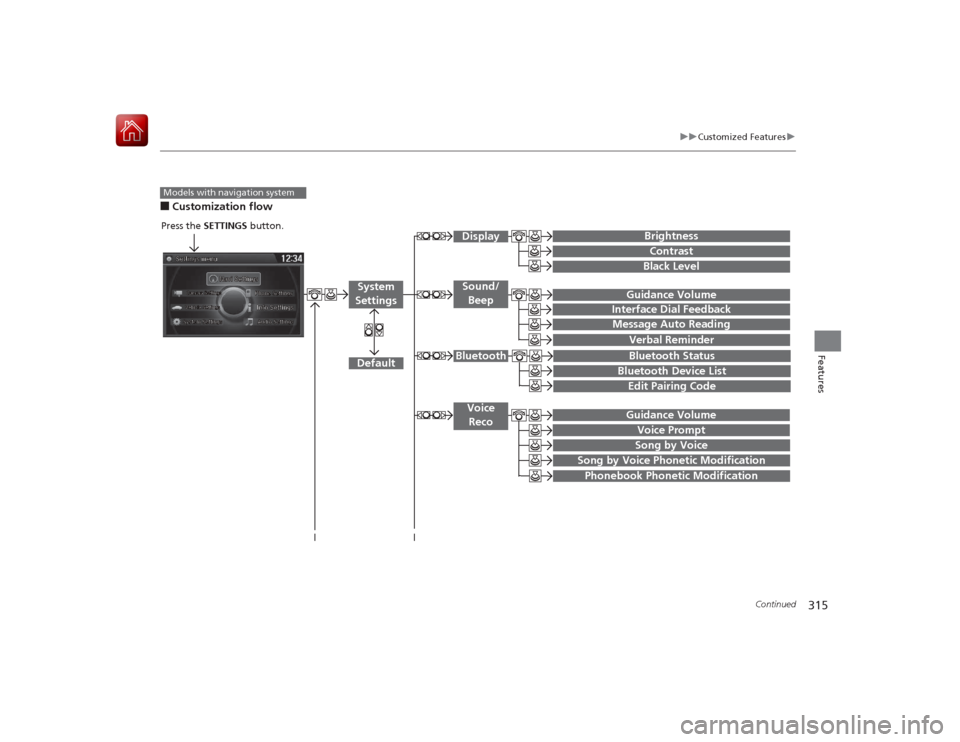
■Customization flowModels with navigation system
Song by Voice
Song by Voice Phonetic ModificationPhonebook Phonetic Modification
Press the SETTINGS button.
Guidance VolumeVoice Prompt
Message Auto Reading
Guidance Volume
Interface Dial Feedback
Verbal Reminder
BrightnessContrastBlack Level
Bluetooth StatusBluetooth Device ListEdit Pairing Code
Default
Sound/BeepDisplay
System
Settings
BluetoothVoice Reco