Page 20 of 569

19Quick Reference Guide
Instrument Panel
(P 73)
CanadaU.S.
Low Fuel Indicator
Anti-lock Brake
System ( ABS)
Indicator
Parking Brake
and Brake System
Indicator (Red)
Canada U.S.
READY Indicator
System Indicators
Malfunction
Indicator Lamp
Low Oil Pressure
Indicator
12-Volt Battery
Charging System
Indicator
Vehicle Stability
Assist (VSA ®) System
Indicator
VSA ® OFF Indicator
Low Tire Pressure/
TPMS Indicator
Electric Power
Steering (EPS) System
Indicator
Lights Indicators
Lights On Indicator
High Beam Indicator
Immobilizer System
Indicator
Seat Belt Reminder
Indicator
EV Indicator
POWER
/CHARGE
Gauge Speedometer
Fuel Gauge
Security System
Alarm Indicator
Shift Lever Position
Indicator
Gauges
(P 95)
/Multi-Information Display
(P 97)
/System Indicators
(P 74)Turn Signal and
Hazard Warning
Indicators
System Indicators
High Voltage Battery
Charge Level Gauge
POWER SYSTEM
IndicatorSmart Entry System
Indicator
System Message
Indicator
ECON mode
Indicator
Forward Collision
Warning (
FCW
) Indicator
*
Lane Departure Warning
(LDW
) Indicator
*
Brake System
Indicator (Amber)
Supplemental
Restraint System
IndicatorEV Mode Indicator
System Indicators
Multi-Information Display
* Not available on all models
Page 21 of 569
20Quick Reference Guide
Controls
(P 113)
Clock
(P 114)
a
Enter the Clock Adjustment screen.
2 Adjusting the Clock (P 114)
b
Rotate to change hour, then press
.
c
Rotate to change minute, then
press .
The navigation system receives signals from
GPS satellites, updating the clock
automatically.
Models without navigation systemModels with navigation system
POWER Button
(P 137)
Press the button to change the vehicle’s
power mode.
Turn Signals
(P 140)
Turn Signal Control Lever
Right
Left
Lights
(P 140)
Wipers and Washers
(P 144)
Light Control Switches
Low Beam High Beam
FlashingWiper/Washer Control Lever Adjustment Ring: Long Delay: Short Delay
MIST
OFF
INT: Low speed with intermittent
LO : Low speed wipe
HI: High speed wipe Pull toward
you to spray
washer fluid.
Page 82 of 569
81
uuIndicators u
Continued
Instrument Panel
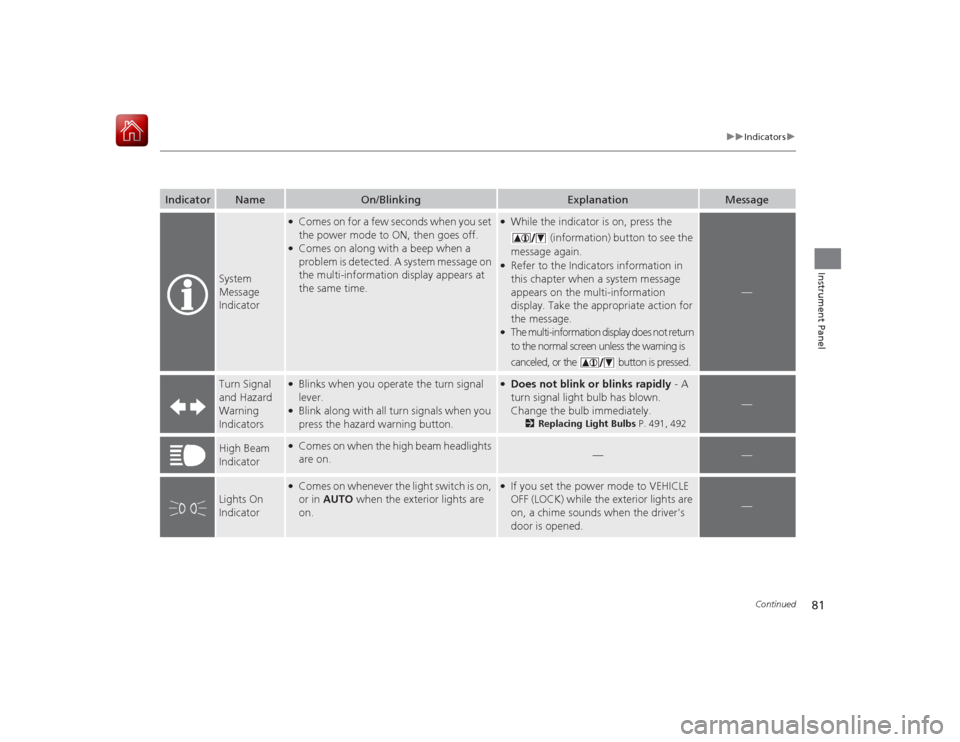
Indicator
Name
On/Blinking
Explanation
Message
System
Message
Indicator
●Comes on for a few seconds when you set
the power mode to ON, then goes off.●Comes on along with a beep when a
problem is detected. A system message on
the multi-information display appears at
the same time.
●While the indicator is on, press the
(information) button to see the
message again.●Refer to the Indicators information in
this chapter when a system message
appears on the multi-information
display. Take the appropriate action for
the message.●The multi-information display does not return
to the normal screen unless the warning is
canceled, or the button is pressed.
—
Turn Signal
and Hazard
Warning
Indicators
●Blinks when you operate the turn signal
lever.●Blink along with all turn signals when you
press the hazard warning button.
●Does not blink or blinks rapidly - A
turn signal light bulb has blown.
Change the bulb immediately.
2 Replacing Light Bulbs P. 491, 492
—
High Beam
Indicator
●Comes on when the high beam headlights
are on.
—
—
Lights On
Indicator
●Comes on whenever the light switch is on,
or in AUTO when the exterior lights are
on.
●If you set the power mode to VEHICLE
OFF (LOCK) while the exterior lights are
on, a chime sounds when the driver's
door is opened.
—
Page 88 of 569

87
uuIndicators uMulti-Information Display Warning and Information Messages
Continued
Instrument Panel
Message
Condition
Explanation
●Appears if there is a problem with the automatic
lighting control system.
●Appears while driving - Manually turn the lights on,
and have your vehicle checked by a dealer.
●Appears if there is a problem with the low beam
headlights.
●Appears while driving - The low beam headlights
may not be on. When conditions allow you to drive
safely, have your vehicle checked by a dealer as soon as
possible.
●Appears if there is a problem with the acoustic
vehicle alerting system.
●Have your vehicle checked by a dealer.
●Appears while you are customizing the settings and
the shift lever is moved out of
(P
.
2 Customized Features P. 104
●Appears if you try to go to Vehicle Settings from
the multi-information display while the audio/
information screen shows the same menu.
●Select either display to customize a setting. You cannot
have Vehicle Settings displayed on the multi-
information display and audio/information screen
simultaneously.
2 Customized Features P. 104, 297
Models with LED
low beam
headlights
Page 141 of 569

140
uuOperating the Switches Around the Steering Wheel uTurn Signals
Controls
Turn Signals
The turn signals can be used when the power
mode is in ON.■One-touch turn signal
When you lightly push up or down and release
the turn signal lever, the exterior turn signals
and turn signal indicator blink three times.
This feature can be used when signaling for a
lane change.
Light Switches
Rotating the light switch turns the lights on
and off, regardless of the power mode
setting.■High beams
Push the lever forward until you hear a click.■Low beams
When in high beams, pull the lever back to
return to low beams.■Flashing the high beams
Pull the lever back, and release it.
Right Turn
Left Turn■
Manual Operation
1 Light Switches
If you leave the power mode in VEHICLE OFF (LOCK)
while the lights are on, a chime sounds when the
driver’s door is opened.
When the lights are on, the lights on indicator in the
instrument panel will be on.
2 Lights On Indicator P. 81
If you sense that the level of the headlights is
abnormal, have your vehicle inspected by a dealer.
Do not leave the lights on when the power system is
off because it will cause the 12-volt battery to
discharge.
High Beams
Flashing the high beams
Low Beams
Turns on parking, side marker,
tail, and rear license plate lights
Turns on headlights, parking, side
marker, tail, and rear license plate
lights
Page 489 of 569
488Maintenance
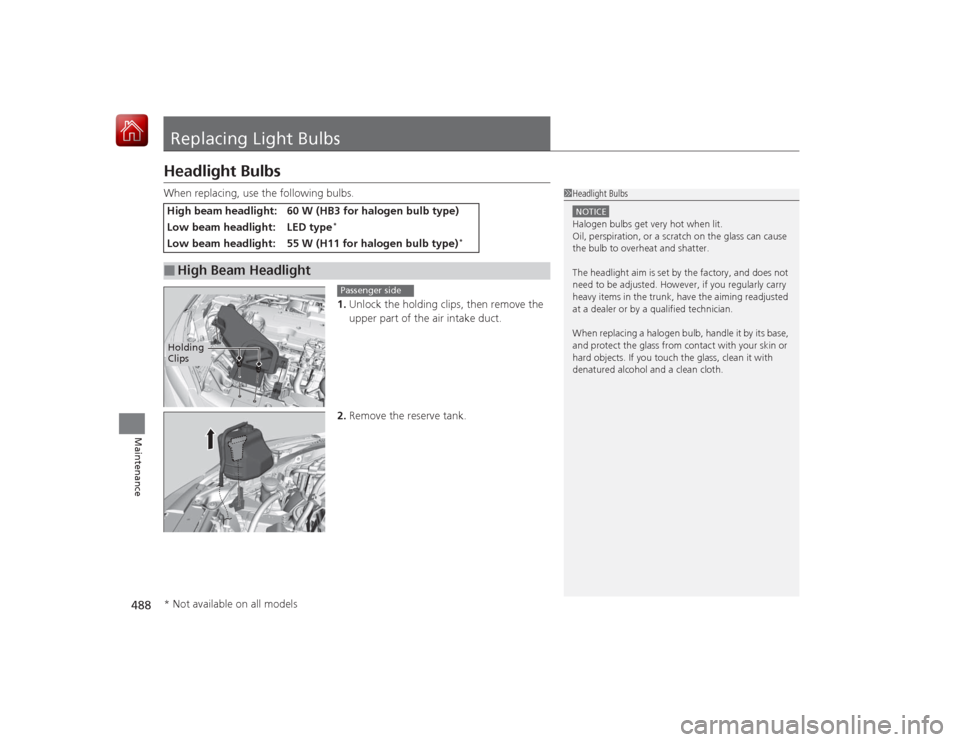
Replacing Light BulbsHeadlight BulbsWhen replacing, use the following bulbs.1.Unlock the holding clips, then remove the
upper part of the air intake duct.
2. Remove the reserve tank.High beam headlight:
60 W (HB3 for halogen bulb type)
Low beam headlight:
LED type
*
Low beam headlight:
55 W (H11 for halo gen bulb type)
*
■
High Beam Headlight
1Headlight BulbsNOTICEHalogen bulbs get very hot when lit.
Oil, perspiration, or a scratch on the glass can cause
the bulb to overheat and shatter.
The headlight aim is set by the factory, and does not
need to be adjusted. However, if you regularly carry
heavy items in the trunk, have the aiming readjusted
at a dealer or by a qualified technician.
When replacing a halogen bulb, handle it by its base,
and protect the glass from contact with your skin or
hard objects. If you touch the glass, clean it with
denatured alcohol and a clean cloth.
Holding
Clips
Passenger side
* Not available on all models
Page 491 of 569

uuReplacing Light Bulbs uHeadlight Bulbs
490Maintenance
1. Turn the steering wheel all the way to the
opposite side from the light being replaced.
Passenger side: Turn the steering wheel
to the left.
Driver side: Turn the steering wheel to the
right.
2. Remove the holding clip and screw, and
pull the inner fender back.
3. Push the tab to remove the coupler.
4. Rotate the old bulb to the left to remove.
5. Insert a new bulb into the headlight
assembly and turn it to the right.
6. Insert the coupler into the connector of the
bulb.
■
Low Beam Headlights
1Low Beam Headlights
Low beam headlight bulbs are LED type. Have an
authorized Honda dealer inspect and replace the light
assembly.
Insert a flat-tip screwdriver, lift and remove the center
pin to remove the clip.
Insert the cl ip with the center pin raised, and push
until it is flat.Models with LED low beam headlightsModels with halogen low beam headlightsCenter pin
Push until the
pin is flat.
Models with halogen low beam headlights
Screw
Holding Clip
Bulb
Coupler Tab
Page 492 of 569
491
uuReplacing Light Bulbs uFront Turn Signal/Side Marker Light Bulbs
Maintenance
Front Turn Signal/Side Marker Light BulbsWhen replacing, use the following bulbs.
Turn the steering wheel and pull the inner fender back in the same way as when
replacing the halogen low beam headlight bulbs
*.
2 Low Beam Headlights P. 490
1.Turn the socket to the left and remove it.
2. Push in the old bulb, rotate to the left until
it unlocks, and remove.
3. Insert a new bulb.
Side Turn Signal/Emergency Indicator Light BulbsDoor mirrors have the side turn lights. Have an authorized Honda dealer inspect and
replace the light assembly.Parking/Daytime Running Light BulbsParking/daytime running light bulbs are LED typ e. Have an authorized Honda dealer
inspect and replace the light assembly.Front Turn Signal/Side Marker Light: 27/8 W (Amber)
Bulb Socket
* Not available on all models