2015 FORD MUSTANG automatic transmission
[x] Cancel search: automatic transmissionPage 144 of 441

WARNINGS
Always set the parking brake fully
and make sure that the transmission
is securely latched in park (P)
(automatic transmission) or first gear (1)
(manual transmission). To set the parking brake, pull the parking
brake handle up as far as possible.
To release the parking brake:
1. Press and hold the button located at
the end of the parking brake handle.
2. Pull the handle up slightly, then push the handle down.
HILL START ASSIST WARNINGS
The system does not replace the
parking brake. When you leave your
vehicle, always apply the parking
brake and shift the transmission into park
(P) for automatic transmission or first gear
for manual transmission. You must remain in your vehicle once
you have activated the system.
During all times, you are responsible
for controlling your vehicle,
supervising the system and
intervening, if required. If the engine is revved excessively, or
if a malfunction is detected, the
system will be deactivated.
The system makes it easier to pull away
when your vehicle is on a slope without the
need to use the parking brake. When the system is active, your vehicle will
remain stationary on the slope for two to
three seconds after you release the brake
pedal. This allows you time to move your
foot from the brake to the accelerator
pedal. The brakes are released
automatically once the engine has
developed sufficient drive to prevent your
vehicle from rolling down the slope. This
is an advantage when pulling away on a
slope, for example from a car park ramp,
traffic lights or when reversing uphill into
a parking space.
The system will activate automatically on
any slope that will cause significant vehicle
rollback. For vehicles with a manual
transmission, you can switch this feature
off using the information display. See
Information Displays (page 83). The
system will remain on or off depending on
how it was last set.
Using Hill Start Assist
1. Press the brake pedal to bring your vehicle to a complete standstill. Keep
the brake pedal pressed.
2. If the sensors detect that your vehicle is on a slope, the system will activate
automatically.
3. When you remove your foot from the brake pedal, your vehicle will remain
on the slope without rolling away for
about two or three seconds. This hold
time will automatically be extended if
you are in the process of driving off.
4. Drive off in the normal manner. The brakes will release automatically.
141
Mustang (), enUSA, First Printing Brakes
Page 147 of 441
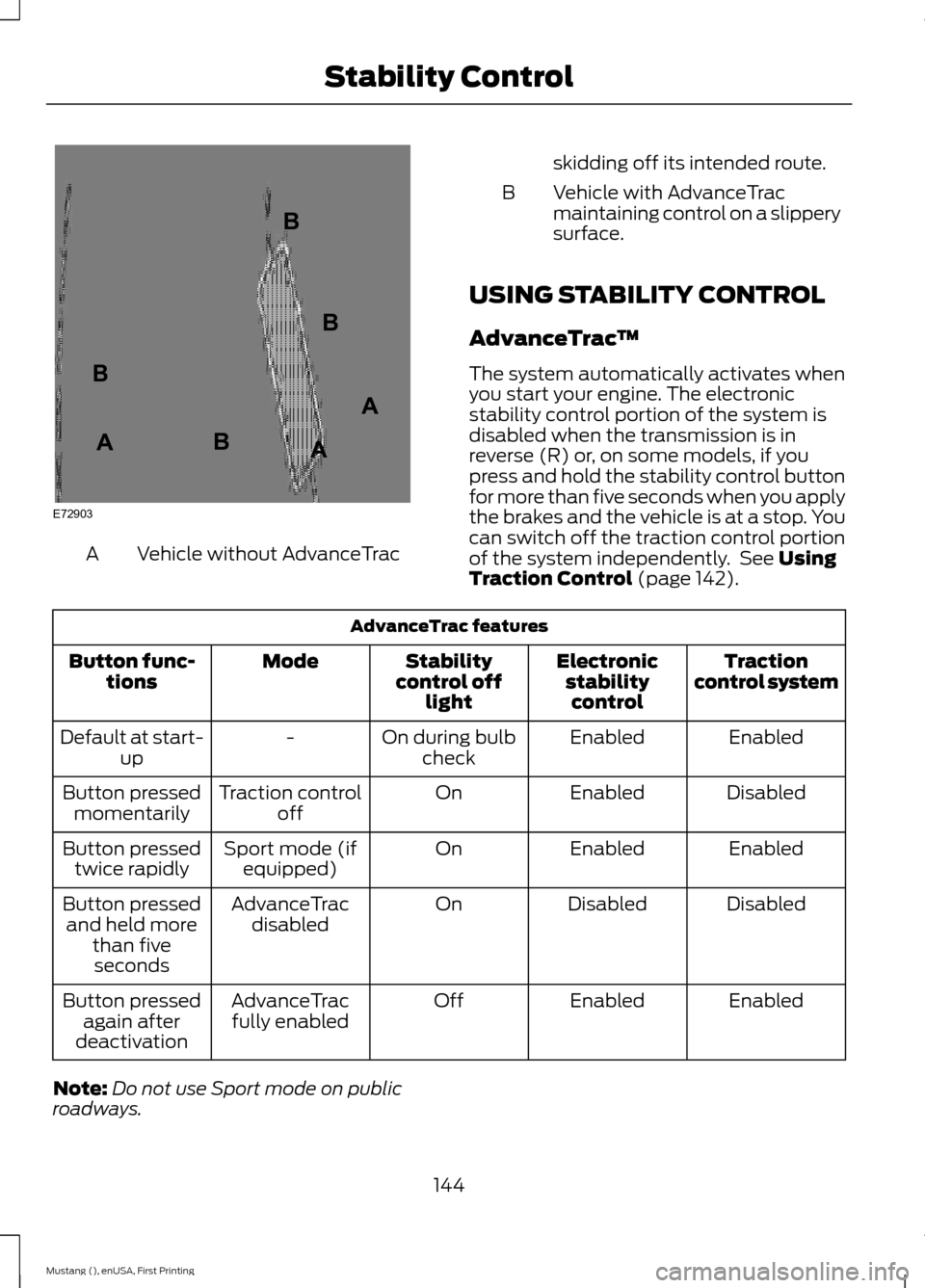
Vehicle without AdvanceTrac
A skidding off its intended route.
Vehicle with AdvanceTrac
maintaining control on a slippery
surface.
B
USING STABILITY CONTROL
AdvanceTrac ™
The system automatically activates when
you start your engine. The electronic
stability control portion of the system is
disabled when the transmission is in
reverse (R) or, on some models, if you
press and hold the stability control button
for more than five seconds when you apply
the brakes and the vehicle is at a stop. You
can switch off the traction control portion
of the system independently. See Using
Traction Control (page 142). AdvanceTrac features
Traction
control system
Electronic
stabilitycontrol
Stability
control off light
Mode
Button func-
tions
Enabled
Enabled
On during bulb
check
-
Default at start-
up
Disabled
Enabled
On
Traction control
off
Button pressed
momentarily
Enabled
Enabled
On
Sport mode (if
equipped)
Button pressed
twice rapidly
Disabled
Disabled
On
AdvanceTrac
disabled
Button pressed
and held more than fiveseconds
Enabled
Enabled
Off
AdvanceTrac
fully enabled
Button pressed
again after
deactivation
Note: Do not use Sport mode on public
roadways.
144
Mustang (), enUSA, First Printing Stability ControlE72903A
AA
B
BB
B
Page 148 of 441
Some models may also come equipped
with a sport mode which allows the driver
to reduce normal AdvanceTrac system
intervention and provide a more spirited
driving experience. To enter sport mode,
toggle the stability control button twice
rapidly. The message appears in the
information display that the system is now
in sport mode.
For vehicles equipped with the selectable
drive mode feature, AdvanceTrac sport
mode is not available. You can utilize the
performance oriented AdvanceTrac mode
by selecting track drive mode. In this mode,
AdvanceTrac intervention is reduced and
tuned specifically for track use only and is
not for use on public roads. In all of the
selectable drive modes, you can disable
traction control and AdvanceTrac with the
AdvanceTrac switch.
Line Lock (If Equipped)
Line Lock is a feature intended for use at
tracks only and should not be used on
public roadways. Use of this feature will
result in significantly increased rear tire
wear. It is intended to condition the rear
tires to maximum traction prior to track
use. Line Lock maintains brake force at the
front wheels, allowing the rear wheels to
spin with minimal vehicle movement.
This feature is located in the Track Apps
menu. Make selections through the 5-way
information display control and OK button
located on the steering wheel.
Using Line Lock
There are three Line Lock stages:
• Initiated.
• Engaged.
• Off. Initiating Line Lock
The initiation stage verifies that the vehicle
is ready for Line Lock function, and
confirms driver intent. Follow the prompts
in the information display in to initiate Line
Lock.
The following conditions must be met to
initialize Line Lock:
•
The vehicle is on a level surface.
• The engine is running.
• The vehicle is traveling less than 25
mph (40 km/h).
• Selectable Drive Mode is not in wet
mode (if equipped).
• There are no AdvanceTrac faults.
If you want to cancel Line Lock once it is
initialized, press the left information
display control. Once initiated, Line Lock
is prepared for activation and will remain
initiated up to 25 mph (40 km/h). If vehicle
speed exceeds 25 mph (40 km/h), Line
Lock will be automatically canceled.
Engaging Line Lock
Follow the prompts in the information
display to engage Line Lock after it is
initialized. To engage, firmly apply the
brakes. Then press the OK button. Once
engaged, release the brake pedal. The
front brakes will remain applied and the
rear brakes will release. At this point, the
engagement timer is initiated and shown
on the driver information display.
The following conditions must be met to
engage Line Lock:
• The vehicle is on a level surface.
• The engine is running.
• The vehicle is stopped.
• The parking brake is not applied.
• The driver door is closed.
• The transmission is in a forward gear.
145
Mustang (), enUSA, First Printing Stability Control
Page 150 of 441

PARKING AID (If Equipped)
WARNINGS
To help avoid personal injury, please
read and understand the limitations
of the system as contained in this
section. Sensing is only an aid for some
(generally large and fixed) objects when
moving on a flat surface at parking speeds.
Certain objects with surfaces that absorb
ultrasonic waves, traffic control systems,
fluorescent lamps, inclement weather, air
brakes, and external motors and fans may
also affect the function of the sensing
system; this may include reduced
performance or a false activation. To help avoid personal injury, always
use caution when in reverse (R) and
when using the sensing system.
This system is not designed to
prevent contact with small or moving
objects. The system is designed to
provide a warning to assist the driver in
detecting large stationary objects to avoid
damaging the vehicle. The system may not
detect smaller objects, particularly those
close to the ground. Certain add-on devices such as large
trailer hitches, bike or surfboard racks
and any device that may block the
normal detection zone of the system, may
create false beeps. Note:
Keep the sensors, located on the
bumper or fascia, free from snow, ice and
large accumulations of dirt. If the sensors
are covered, the system ’s accuracy can be
affected. Do not clean the sensors with
sharp objects.
Note: If your vehicle sustains damage to
the bumper or fascia, leaving it misaligned
or bent, the sensing zone may be altered
causing inaccurate measurement of
obstacles or false alarms. Note:
If your vehicle is equipped with
MyKey, it is possible to prevent turning the
sensing system off. See
Principle of
Operation (page 50).
The sensing system warns the driver of
obstacles within a certain range of the
bumper area. The system turns on
automatically whenever the ignition is
switched on.
When receiving a detection warning, the
radio volume is reduced to a
predetermined level. After the warning
goes away, the radio volume returns to the
previous level.
Rear Sensing System
The rear sensors are only active when the
transmission is in reverse (R). As your
vehicle moves closer to the obstacle, the
rate of the audible warning increases.
When the obstacle is fewer than
12 in
(30 cm) away, the warning sounds
continuously. If a stationary or receding
object is detected farther than
12 in
(30 cm) from the side of your vehicle, the
tone sounds for only three seconds. Once
the system detects an object approaching,
the warning sounds again.
147
Mustang (), enUSA, First Printing Parking Aids
Page 154 of 441
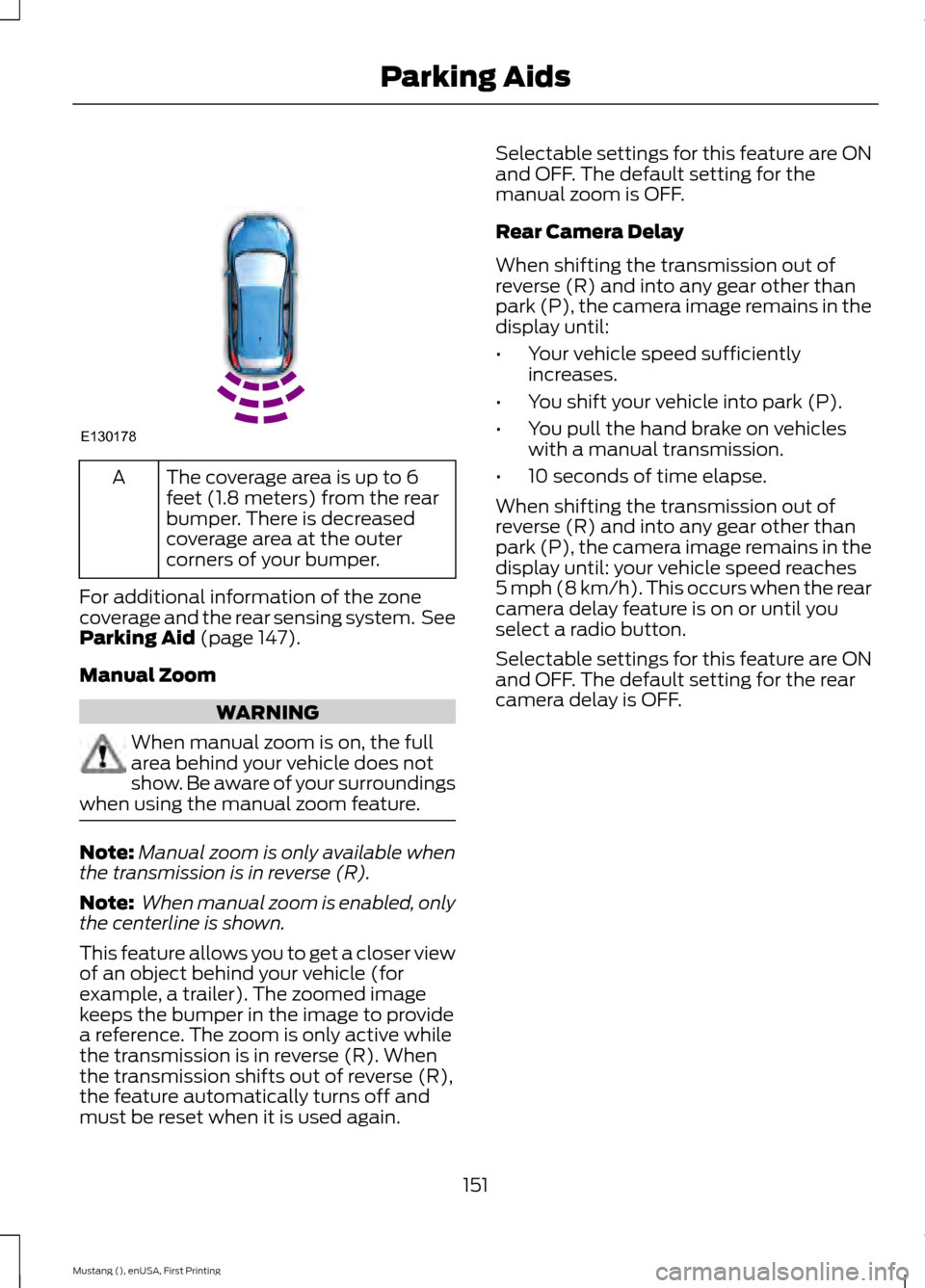
The coverage area is up to 6
feet (1.8 meters) from the rear
bumper. There is decreased
coverage area at the outer
corners of your bumper.
A
For additional information of the zone
coverage and the rear sensing system. See
Parking Aid (page 147).
Manual Zoom WARNING
When manual zoom is on, the full
area behind your vehicle does not
show. Be aware of your surroundings
when using the manual zoom feature. Note:
Manual zoom is only available when
the transmission is in reverse (R).
Note: When manual zoom is enabled, only
the centerline is shown.
This feature allows you to get a closer view
of an object behind your vehicle (for
example, a trailer). The zoomed image
keeps the bumper in the image to provide
a reference. The zoom is only active while
the transmission is in reverse (R). When
the transmission shifts out of reverse (R),
the feature automatically turns off and
must be reset when it is used again. Selectable settings for this feature are ON
and OFF. The default setting for the
manual zoom is OFF.
Rear Camera Delay
When shifting the transmission out of
reverse (R) and into any gear other than
park (P), the camera image remains in the
display until:
•
Your vehicle speed sufficiently
increases.
• You shift your vehicle into park (P).
• You pull the hand brake on vehicles
with a manual transmission.
• 10 seconds of time elapse.
When shifting the transmission out of
reverse (R) and into any gear other than
park (P), the camera image remains in the
display until: your vehicle speed reaches
5 mph (8 km/h). This occurs when the rear
camera delay feature is on or until you
select a radio button.
Selectable settings for this feature are ON
and OFF. The default setting for the rear
camera delay is OFF.
151
Mustang (), enUSA, First Printing Parking AidsE130178
Page 185 of 441
When Towing a Trailer
•
Do not drive faster than 70 mph (113
km/h) during the first 500 miles (800
kilometers).
• Do not make full-throttle starts.
• Check your hitch, electrical connections
and trailer wheel lug nuts thoroughly
after you have traveled 50 miles (80
kilometers).
• When stopped in congested or heavy
traffic during hot weather, place the
gearshift in park (P) (automatic
transmission) or neutral (manual
transmission) to aid engine and
transmission cooling and to help air
conditioning performance.
• Switch off the speed control with
heavy loads or in hilly terrain. The
speed control may turn off
automatically when you are towing on
long, steep grades.
• Shift to a lower gear when driving down
a long or steep hill. Do not apply the
brakes continuously, as they may
overheat and become less effective.
• If your transmission is equipped with a
Grade Assist or Tow/Haul feature, use
this feature when towing. This provides
engine braking and helps eliminate
excessive transmission shifting for
optimum fuel economy and
transmission cooling.
• Allow more distance for stopping with
a trailer attached. Anticipate stops and
brake gradually.
• Avoid parking on a grade. However, if
you must park on a grade:
1. Turn the steering wheel to point your vehicle tires away from traffic flow.
2. Set your vehicle parking brake.
3. Place the automatic transmission in park (P) or manual transmission in a
low gear. 4. Place wheel chocks in front and back
of the trailer wheels. (Chocks not
included with vehicle.)
Launching or Retrieving a Boat or
Personal Watercraft (PWC)
Note: Disconnect the wiring to the trailer
before backing the trailer into the water.
Note: Reconnect the wiring to the trailer
after
removing the trailer from the water.
When backing down a ramp during boat
launching or retrieval:
• Do not allow the static water level to
rise above the bottom edge of the rear
bumper.
• Do not allow waves to break higher
than 6 inches (15 centimeters) above
the bottom edge of the rear bumper.
Exceeding these limits may allow water to
enter vehicle components:
• Causing internal damage to the
components.
• Affecting driveability, emissions, and
reliability.
Any time the rear axle submerges in water,
replace the rear axle lubricant. Water may
contaminate the rear axle lubricant, which
is not a normal maintenance inspection
item unless there is a possibility of a leak
or other axle repair is required.
182
Mustang (), enUSA, First Printing Towing
Page 196 of 441

Should your vehicle shut off after a
collision, you may restart your vehicle. For
vehicles equipped with a push button start
system:
1. Press the START/STOP button to
switch off the ignition.
2. Press the brake pedal (automatic transmission) or the clutch pedal
(manual transmission) and press the
START/STOP
button to start the
vehicle.
3. Remove your foot from the brake or clutch pedal and press the
START/STOP
button to switch off
the ignition.
4. Press the brake or clutch pedal and the
START/STOP
button, or switch on
the ignition only by pressing the
START/STOP
button without
pressing the brake or clutch pedal. Both
ways re-enable the fuel system.
Note: When you try to restart your vehicle
after a fuel shutoff, the vehicle makes sure
that various systems are safe to restart.
Once your vehicle determines that the
systems are safe, then the vehicle will allow
you to restart.
Note: In the event that your vehicle does
not restart after your third attempt, contact
an authorized dealer.
JUMP STARTING THE VEHICLE WARNINGS
The gases around the battery can
explode if exposed to flames, sparks,
or lit cigarettes. An explosion could
result in personal injury or vehicle damage. Batteries contain sulfuric acid which
can burn skin, eyes and clothing, if
contacted.
Use only an adequate-sized cable
with insulated clamps. Preparing Your Vehicle
Note:
Do not attempt to push-start your
automatic transmission vehicle. Automatic
transmissions do not have push-start
capability. Attempting to push-start a
vehicle with an automatic transmission may
cause transmission damage.
Note: Use only a 12-volt supply to start your
vehicle.
Note: Do not disconnect the battery of the
disabled vehicle as this could damage the
vehicle's electrical system.
Park the booster vehicle close to the hood
of the disabled vehicle, making sure the
two vehicles do not touch. Turn all
accessories off.
Connecting the Jumper Cables WARNING
Do not attach the cables to fuel lines,
engine rocker covers, the intake
manifold or electrical components
as grounding points. Stay clear of moving
parts. To avoid reverse polarity
connections, make sure that you correctly
identify the positive (+) and negative (-)
terminals on both the disabled and booster
vehicles before connecting the cables. Note:
In the illustration, the bottom vehicle
represents the booster vehicle.
193
Mustang (), enUSA, First Printing Roadside Emergencies
Page 221 of 441
You have limited engine power when in the
fail-safe mode, so drive your vehicle with
caution. Your vehicle will not maintain
high-speed operation and the engine will
operate poorly.
Remember that the engine is capable of
automatically shutting down to prevent
engine damage. In this situation:
1. Pull off the road as soon as safely
possible and switch off the engine.
2. Tow your vehicle to an authorized dealer.
3. If this is not possible, wait a short period for the engine to cool.
4. Check the coolant level and add if low.
5. Re-start the engine and drive your vehicle to an authorized dealer.
Note: Driving your vehicle without repair
increases the chance of engine damage.
Contact an authorized dealer as soon as
possible.
Engine Fluid Temperature
Management (If Equipped) WARNINGS
To reduce the risk of crash and injury,
be prepared that the vehicle speed
may reduce and the vehicle may not
be able to accelerate with full power until
the fluid temperatures reduce. Never remove the coolant reservoir
cap while the engine is running or hot.
Your vehicle can pull a trailer, but because
of the added load, your vehicle
’s engine
may temporarily reach higher
temperatures during severe operating
conditions such as ascending a long or
steep grade while pulling a trailer in high
temperatures. At this time, you may notice your engine
coolant temperature gauge needle move
toward the H and the POWER REDUCED
TO LOWER TEMP message may appear
in the information display.
You may notice a reduction in vehicle
speed caused by reduced engine power.
In order to manage the engine fluid
temperatures, your vehicle may enter this
mode if certain high-temperature and
high-load conditions take place. The
amount of speed reduction depends on
many factors such as vehicle loading,
towing, grade and ambient temperature.
If this occurs, there is no need to pull off
the road. You can continue to drive your
vehicle while this message is active.
The air conditioning may also cycle on and
off during severe operating conditions to
protect overheating of the engine. When
the engine coolant temperature decreases
to a normal operating temperature, the air
conditioning will turn on once again.
If the engine coolant temperature gauge
moves fully into the red (hot) area, or if the
coolant temperature warning or service
engine soon messages appear in your
information display:
1. Pull off the road as soon as safely possible and shift the transmission into
P
.
2. Leave the engine running until the coolant temperature gauge needle
moves away from the red (hot) area.
After several minutes, if the
temperature does not drop, follow the
remaining steps.
3. Switch the engine off and wait for it to
cool before checking the coolant level.
4. If the coolant level is normal, restart your engine and continue.
218
Mustang (), enUSA, First Printing Maintenance