2015 FORD MUSTANG audio
[x] Cancel search: audioPage 4 of 441

Introduction
About This Manual...........................................7
Symbols Glossary
.............................................7
Data Recording
..................................................9
California Proposition 65..............................11
Perchlorate.........................................................11
Ford Credit
..........................................................11
Replacement Parts Recommendation
........................................11
Special Notices................................................12
Mobile Communications Equipment.....................................................13
Export Unique Options..................................13
At a Glance
At a Glance........................................................14
Child Safety
General Information
.......................................18
Installing Child Seats.....................................19
Booster Seats..................................................25
Child Seat Positioning...................................27
Safety Belts
Principle of Operation..................................29
Fastening the Safety Belts
.........................30
Safety Belt Warning Lamp and Indicator Chime
..............................................................32
Safety Belt Minder.........................................32
Child Restraint and Safety Belt Maintenance................................................34
Personal Safety System ™
Personal Safety System ™
..........................35
Supplementary Restraints System
Principle of Operation..................................36
Driver and Passenger Airbags....................37
Front Passenger Sensing System
............38 Side Airbags
.....................................................40
Driver and Passenger Knee Airbags........42
Safety Canopy ™ -
Coupe...........................42
Crash Sensors and Airbag Indicator........43
Airbag Disposal...............................................44
Keys and Remote Controls
General Information on Radio Frequencies..................................................45
Remote Control
..............................................46
Replacing a Lost Key or Remote Control...........................................................49
MyKey ™
Principle of Operation..................................50
Creating a MyKey.............................................51
Clearing All MyKeys
........................................51
Checking MyKey System Status...............53
Using MyKey With Remote Start Systems.........................................................54
MyKey Troubleshooting
...............................54
Locks
Locking and Unlocking
.................................56
Interior Luggage Compartment Release..........................................................60
Security
Passive Anti-Theft System.........................62
Anti-Theft Alarm
............................................63
Steering Wheel
Adjusting the Steering Wheel...................64
Audio Control..................................................64
Voice Control
...................................................65
Cruise Control..................................................65
Information Display Control.......................65
Wipers and Washers
Windshield Wipers
........................................66
1
Mustang (), enUSA, First Printing Table of Contents
Page 7 of 441

Maintenance
General Information....................................210
Opening and Closing the Hood
...............210
Under Hood Overview -
2.3L
EcoBoost™..................................................211
Under Hood Overview - 3.7L.....................212
Under Hood Overview -
5.0L 32V
Ti-VCT...........................................................213
Engine Oil Dipstick
.......................................214
Engine Oil Check...........................................214
Engine Coolant Check
.................................215
Manual Transmission Fluid Check.........219
Automatic Transmission Fluid Check............................................................219
Brake and Clutch Fluid Check..................219
Power Steering Fluid Check......................219
Washer Fluid Check....................................220
Fuel Filter
........................................................220
Changing the 12V Battery.........................220
Checking the Wiper Blades......................222
Changing the Wiper Blades.....................222
Adjusting the Headlamps
.........................223
Changing a Bulb...........................................224
Bulb Specification Chart...........................226
Changing the Engine Air Filter.................227
Vehicle Care
General Information...................................228
Cleaning Products.......................................228
Cleaning the Exterior..................................228
Waxing.............................................................229
Cleaning the Engine....................................229
Cleaning the Windows and Wiper Blades..........................................................230
Cleaning the Interior...................................230
Cleaning the Instrument Panel and Instrument Cluster Lens.......................230
Cleaning Leather Seats..............................231
Repairing Minor Paint Damage
...............232
Cleaning the Alloy Wheels.......................232 Vehicle Storage
.............................................232
Wheels and Tires
Temporary Mobility Kit
..............................235
Tire Care
...........................................................241
Using Summer Tires
...................................256
Using Snow Chains.....................................256
Tire Pressure Monitoring System...........257
Changing a Road Wheel...........................260
Driving at High Speed................................265
Technical Specifications..........................266
Capacities and Specific- ations
Engine Specifications.................................267
Motorcraft Parts
..........................................268
Vehicle Identification Number
...............268
Vehicle Certification Label.......................269
Transmission Code Designation............270
Capacities and Specifications -
2.3L
EcoBoost™.................................................271
Capacities and Specifications - 3.7L.....275
Capacities and Specifications -
5.0L 32V
Ti-VCT..........................................................279
Audio System
General Information
...................................283
Audio Unit - Vehicles With: AM/FM/CD/ SYNC/
Satellite Radio............................284
Audio Unit - Vehicles With: Premium AM/ FM/CD..........................................................287
Digital Radio
..................................................288
Satellite Radio
..............................................290
Audio Input Jack...........................................293
USB Port
.........................................................294
Media Hub......................................................294
SYNC™
General Information...................................295
Using Voice Recognition............................297
4
Mustang (), enUSA, First Printing Table of Contents
Page 19 of 441
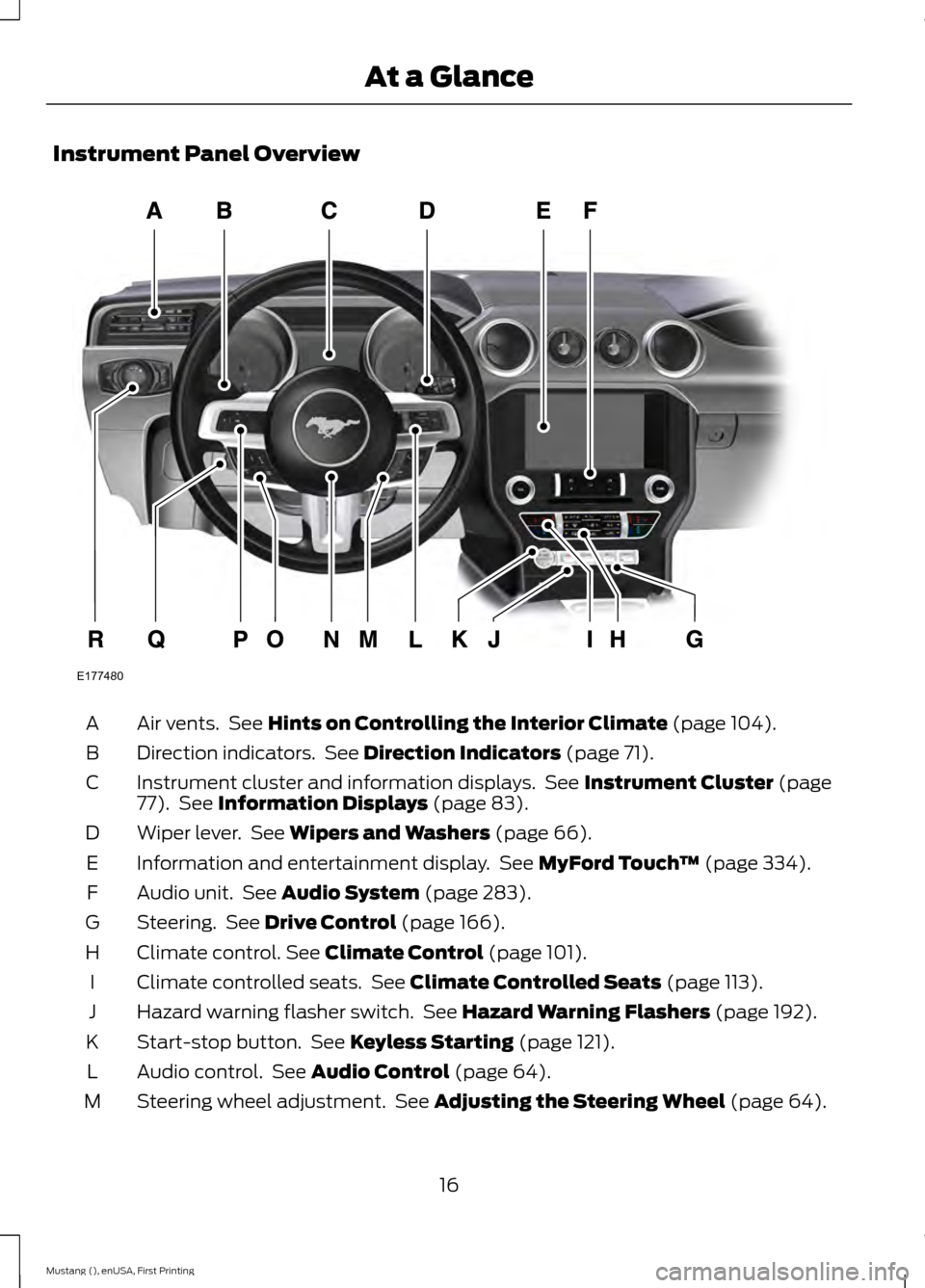
Instrument Panel Overview
Air vents. See Hints on Controlling the Interior Climate (page 104).
A
Direction indicators. See
Direction Indicators (page 71).
B
Instrument cluster and information displays. See
Instrument Cluster (page
77). See Information Displays (page 83).
C
Wiper lever. See
Wipers and Washers (page 66).
D
Information and entertainment display. See
MyFord Touch ™ (page 334).
E
Audio unit. See
Audio System (page 283).
F
Steering. See
Drive Control (page 166).
G
Climate control.
See Climate Control (page 101).
H
Climate controlled seats. See
Climate Controlled Seats (page 113).
I
Hazard warning flasher switch. See
Hazard Warning Flashers (page 192).
J
Start-stop button. See
Keyless Starting (page 121).
K
Audio control. See
Audio Control (page 64).
L
Steering wheel adjustment. See
Adjusting the Steering Wheel (page 64).
M
16
Mustang (), enUSA, First Printing At a GlanceE177480
Page 53 of 441
PRINCIPLE OF OPERATION
MyKey allows you to program keys with
restricted driving modes to promote good
driving habits. All but one of the keys
programmed to the vehicle can be
activated with these restricted modes.
Any keys that have not been programmed
are referred to as administrator keys or
admin keys. These can be used to:
•
Create a MyKey.
• Program configurable MyKey settings.
• Clear all MyKey features.
When you have programmed a MyKey, you
can access the following information using
the information display:
• How many admin keys and MyKeys are
programmed to your vehicle.
• The total distance your vehicle has
traveled using a MyKey.
Note: All MyKeys are programmed to the
same settings. You cannot program them
individually.
Note: For vehicles with intelligent access
with push-button start, when both a MyKey
and an admin intelligent access key fob are
present, the admin fob will be recognized
by the vehicle while switching the ignition
on to start the vehicle.
Non-configurable Settings
The following settings cannot be changed
by an admin key user:
• Belt-Minder. You cannot disable this
feature. The audio system will mute
when the front seat occupants’ safety
belts are not fastened.
• Early low fuel. The low-fuel warning
activates earlier, giving the MyKey user
more time to refuel. •
Driver assist features, if equipped on
your vehicle, are forced on: parking aid,
blind spot information system (BLIS)
with cross traffic alert, lane departure
warning and forward collision warning
system.
• Track Mode, if your vehicle is equipped
with this feature, will be disabled.
Configurable Settings
With an admin key, you can configure
certain MyKey settings when you first
create a MyKey and before you recycle the
key or restart the vehicle. You can also
change the settings afterward with an
admin key.
• A vehicle speed limit can be set.
Warnings will be shown in the display
followed by an audible tone when your
vehicle reaches the set speed. You
cannot override the set speed by fully
depressing the accelerator pedal or by
setting cruise control.
• Vehicle speed minders of 45 mph
(75 km/h), 55 mph (90 km/h) or
65 mph (105 km/h). Once you select
a speed, it will be shown in the display,
followed by an audible tone when the
preselected vehicle speed is exceeded.
• Audio system maximum volume of
45%. A message will be shown in the
display when you attempt to exceed
the limited volume. Also, the
speed-sensitive or compensated
automatic volume control will be
disabled.
• Always on setting. When this is
selected, you will not be able to turn
off Advance Trac, Emergency Assist
and Do Not Disturb (if your vehicle is
equipped with these features), and
Sport Mode will not be available to
MyKey drivers.
50
Mustang (), enUSA, First Printing MyKey
™
Page 67 of 441
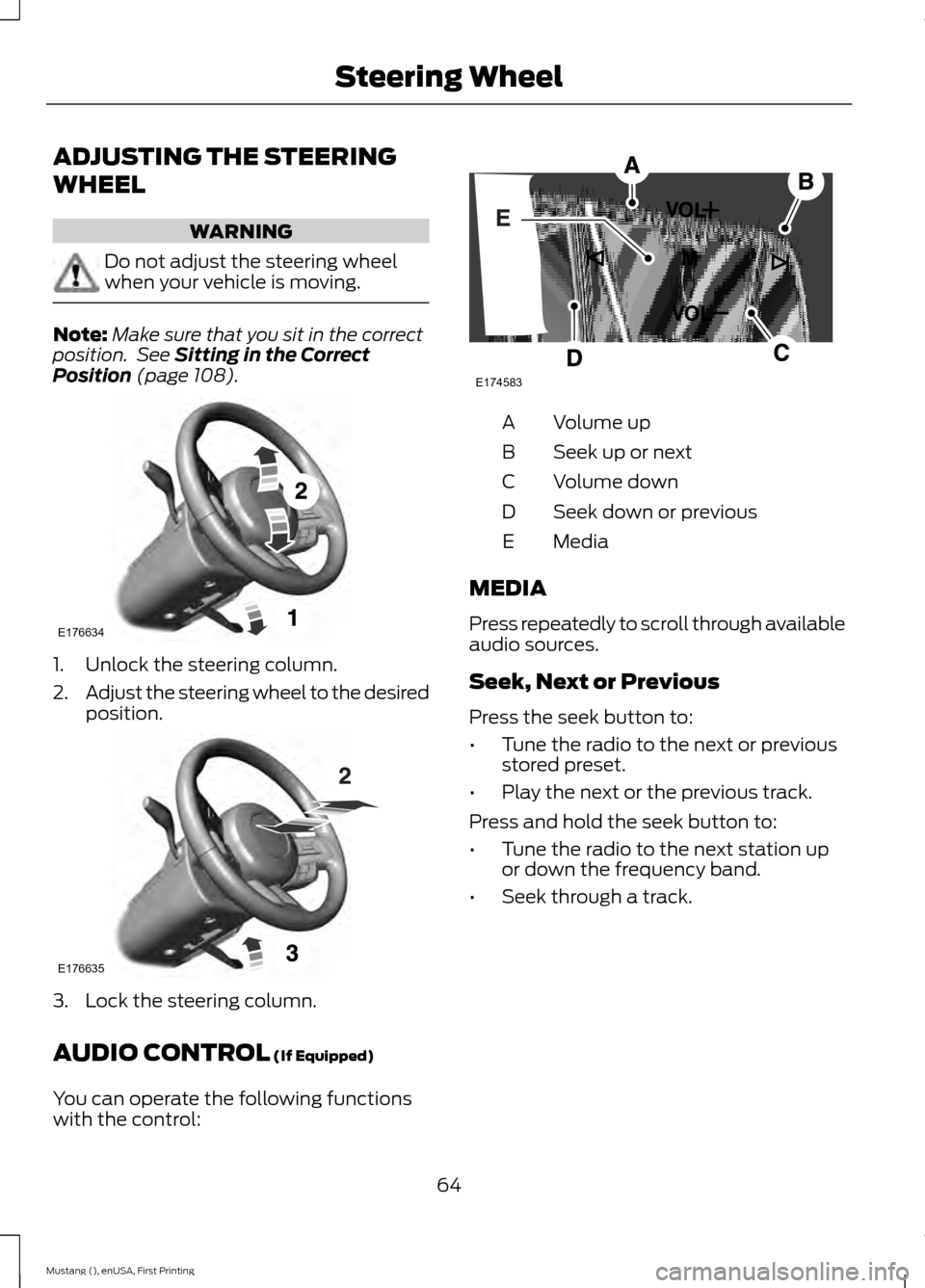
ADJUSTING THE STEERING
WHEEL
WARNING
Do not adjust the steering wheel
when your vehicle is moving.
Note:
Make sure that you sit in the correct
position. See Sitting in the Correct
Position (page 108). 1. Unlock the steering column.
2.
Adjust the steering wheel to the desired
position. 3. Lock the steering column.
AUDIO CONTROL
(If Equipped)
You can operate the following functions
with the control: Volume up
A
Seek up or next
B
Volume down
C
Seek down or previous
D
Media
E
MEDIA
Press repeatedly to scroll through available
audio sources.
Seek, Next or Previous
Press the seek button to:
• Tune the radio to the next or previous
stored preset.
• Play the next or the previous track.
Press and hold the seek button to:
• Tune the radio to the next station up
or down the frequency band.
• Seek through a track.
64
Mustang (), enUSA, First Printing Steering WheelE176634 E176635 E174583
Page 100 of 441
Action
Message
MyKey is in use and the MyKey speed limit is on and the vehiclespeed is approaching 80 mph (130 km/h).
Near Vehicle Top Speed
You have reached the speed limit set for your MyKey.
Vehicle at Top Speed of
MyKey Setting
You have an active MyKey with a programmed set speed limit.
Check Speed Drive
Safely
Belt-Minder turns on with a MyKey in use.
Buckle Up to Unmute
Audio
With a MyKey in use, AdvanceTrac turns on.
AdvanceTrac On -
MyKey Setting
With a MyKey in use, traction control turns on.
Traction Control On -
MyKey Setting
With a MyKey in use, park aid is always on.
MyKey Park Aid Cannot
be Deactivated
Park Aid Action
Message
The system has detected a condition that requires service.
Contact an authorized dealer. See Parking Aid (page 147).
Check Rear Park Aid
Displays the park aid status.
Rear Park Aid On Off
Park Brake Action
Message
You have set the parking brake and you have driven the vehiclemore than 3 mph (5 km/h). If the warning stays on after you
have released the parking brake, contact an authorized dealer.
Park Brake Engaged
Remote Start Action
Message
A reminder to apply the brake and push the start button todrive your vehicle after a remote start.
To Drive: Press Brake
and Start Button
97
Mustang (), enUSA, First Printing Information Displays
Page 123 of 441
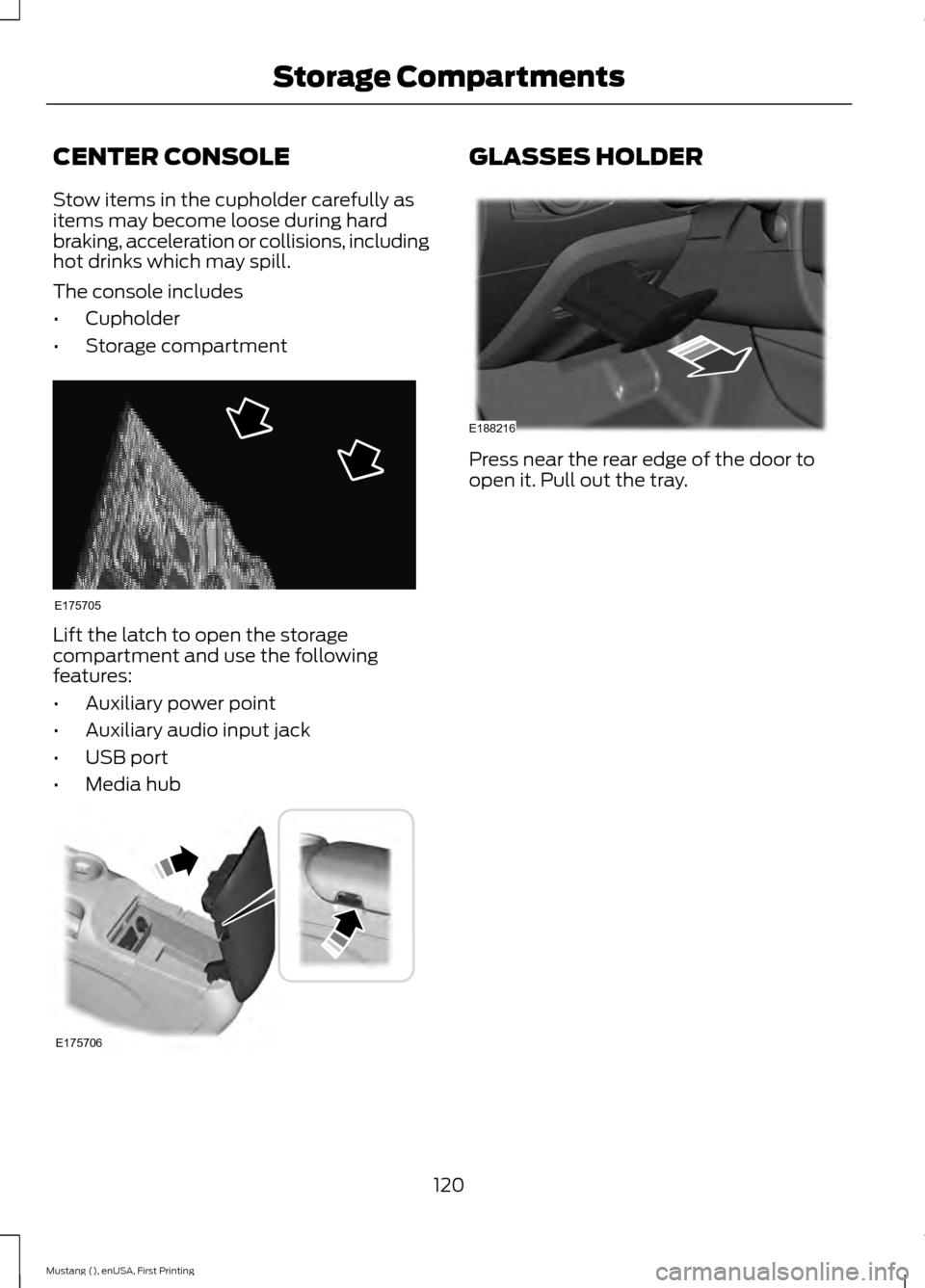
CENTER CONSOLE
Stow items in the cupholder carefully as
items may become loose during hard
braking, acceleration or collisions, including
hot drinks which may spill.
The console includes
•
Cupholder
• Storage compartment Lift the latch to open the storage
compartment and use the following
features:
•
Auxiliary power point
• Auxiliary audio input jack
• USB port
• Media hub GLASSES HOLDER
Press near the rear edge of the door to
open it. Pull out the tray.
120
Mustang (), enUSA, First Printing Storage CompartmentsE175705 E175706 E188216
Page 151 of 441
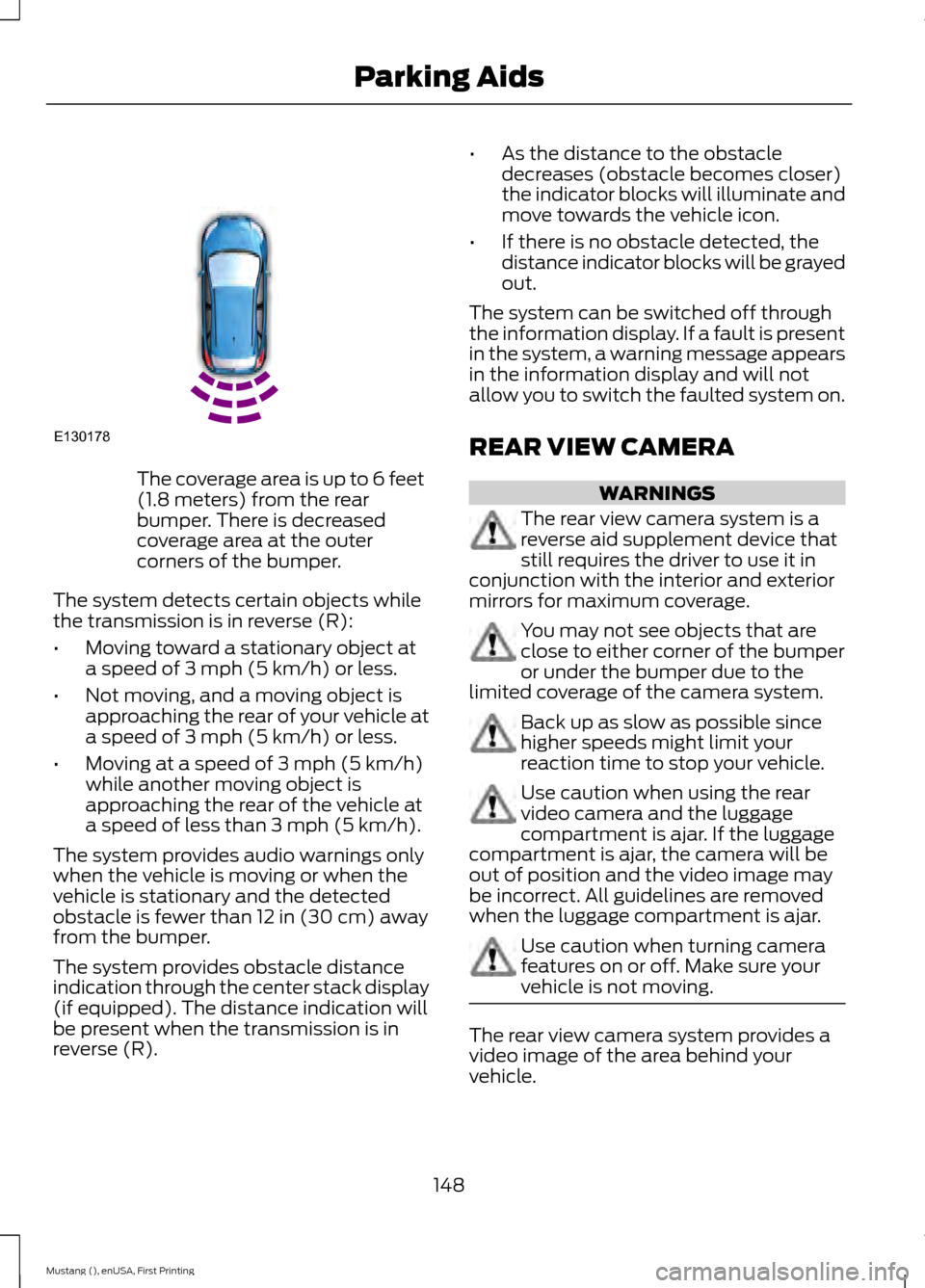
The coverage area is up to 6 feet
(1.8 meters) from the rear
bumper. There is decreased
coverage area at the outer
corners of the bumper.
The system detects certain objects while
the transmission is in reverse (R):
• Moving toward a stationary object at
a speed of 3 mph (5 km/h) or less.
• Not moving, and a moving object is
approaching the rear of your vehicle at
a speed of
3 mph (5 km/h) or less.
• Moving at a speed of
3 mph (5 km/h)
while another moving object is
approaching the rear of the vehicle at
a speed of less than
3 mph (5 km/h).
The system provides audio warnings only
when the vehicle is moving or when the
vehicle is stationary and the detected
obstacle is fewer than
12 in (30 cm) away
from the bumper.
The system provides obstacle distance
indication through the center stack display
(if equipped). The distance indication will
be present when the transmission is in
reverse (R). •
As the distance to the obstacle
decreases (obstacle becomes closer)
the indicator blocks will illuminate and
move towards the vehicle icon.
• If there is no obstacle detected, the
distance indicator blocks will be grayed
out.
The system can be switched off through
the information display. If a fault is present
in the system, a warning message appears
in the information display and will not
allow you to switch the faulted system on.
REAR VIEW CAMERA WARNINGS
The rear view camera system is a
reverse aid supplement device that
still requires the driver to use it in
conjunction with the interior and exterior
mirrors for maximum coverage. You may not see objects that are
close to either corner of the bumper
or under the bumper due to the
limited coverage of the camera system. Back up as slow as possible since
higher speeds might limit your
reaction time to stop your vehicle.
Use caution when using the rear
video camera and the luggage
compartment is ajar. If the luggage
compartment is ajar, the camera will be
out of position and the video image may
be incorrect. All guidelines are removed
when the luggage compartment is ajar. Use caution when turning camera
features on or off. Make sure your
vehicle is not moving.
The rear view camera system provides a
video image of the area behind your
vehicle.
148
Mustang (), enUSA, First Printing Parking AidsE130178