Page 93 of 369
•
Energy History - This view from left to
right starts with the Budget View gauge
and adds historical Energy Use and
Budget data. The data is represented
as an average for time intervals of
either 1, 2 or 6 minutes, with the
leftmost interval being the most recent.
Total time for the five intervals is
shown at the bottom of the view.
Interval time can be selected in the
Options menu. Intervals shown in grey
color are from the previous drive. •
Energy Coach - This view provides a
comparison of your recent
Acceleration, Braking and Cruising
behavior to what is recommended for
most efficient use of energy under
present conditions. The horizontal bars
fill from left to right with best efficiency
(and Blue color) shown as at least half
full. When the bars are less than half
full, the color is Amber, suggesting that
a change in behavior is needed to
achieve better energy efficiency.
Info In this mode, you can view
different vehicle system
information and perform a
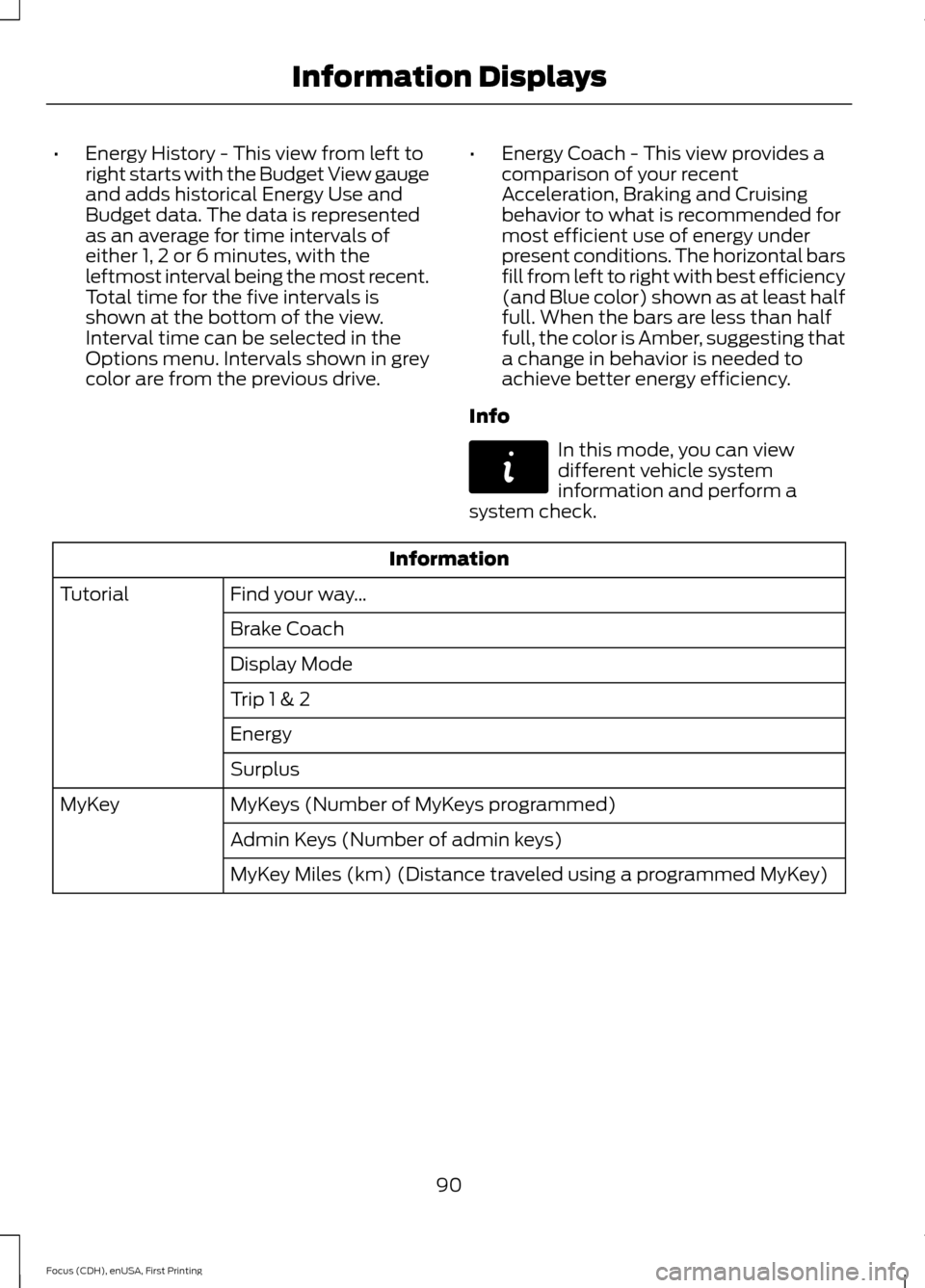
system check. Information
Find your way …
Tutorial
Brake Coach
Display Mode
Trip 1 & 2
Energy
Surplus
MyKeys (Number of MyKeys programmed)
MyKey
Admin Keys (Number of admin keys)
MyKey Miles (km) (Distance traveled using a programmed MyKey)
90
Focus (CDH), enUSA, First Printing Information DisplaysE144642
Page 94 of 369
Information
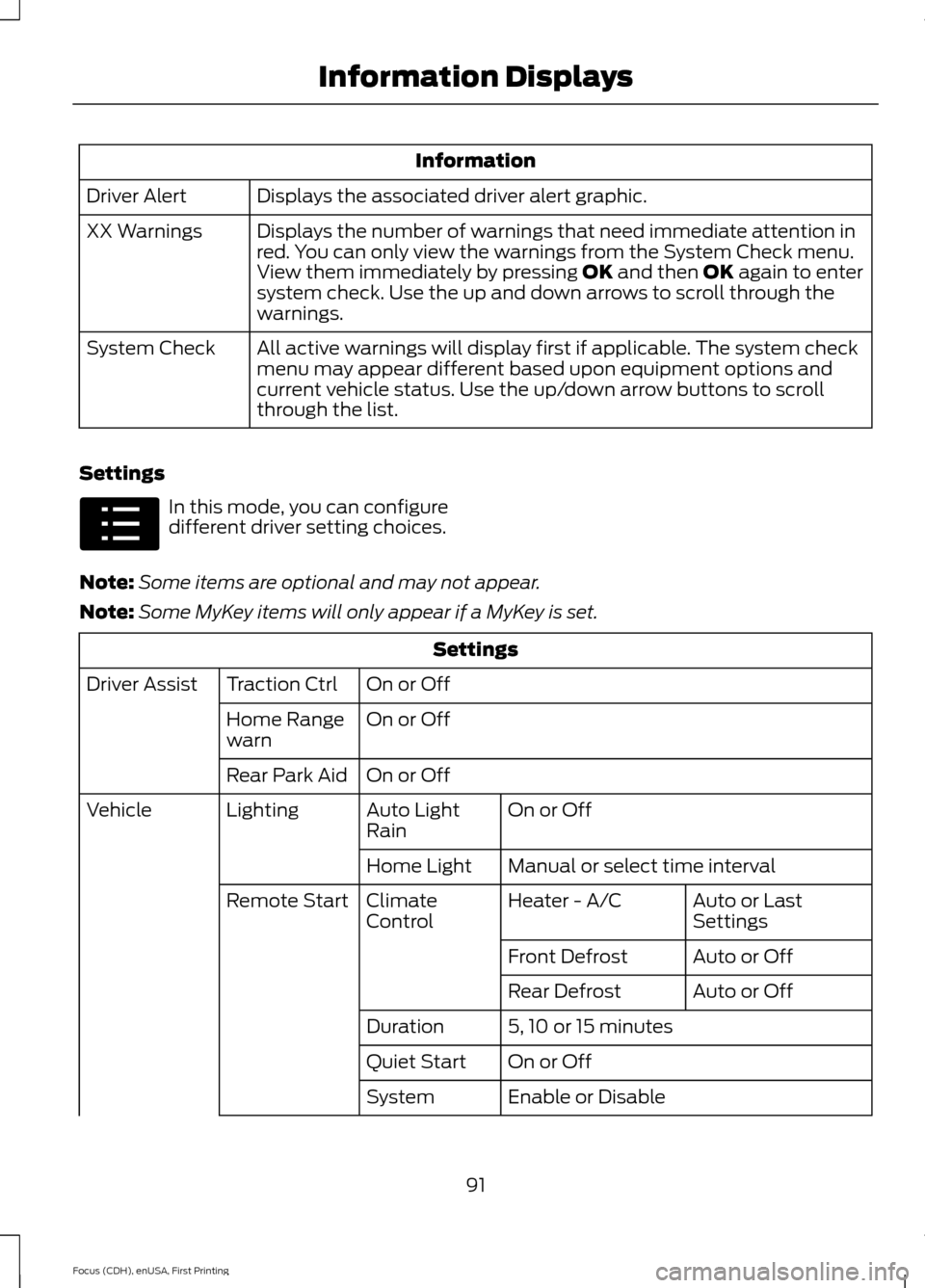
Displays the associated driver alert graphic.
Driver Alert
Displays the number of warnings that need immediate attention in
red. You can only view the warnings from the System Check menu.
View them immediately by pressing OK and then OK again to enter
system check. Use the up and down arrows to scroll through the
warnings.
XX Warnings
All active warnings will display first if applicable. The system check
menu may appear different based upon equipment options and
current vehicle status. Use the up/down arrow buttons to scroll
through the list.
System Check
Settings In this mode, you can configure
different driver setting choices.
Note: Some items are optional and may not appear.
Note: Some MyKey items will only appear if a MyKey is set. Settings
On or Off
Traction Ctrl
Driver Assist
On or Off
Home Range
warn
On or Off
Rear Park Aid
On or Off
Auto Light
Rain
Lighting
Vehicle
Manual or select time interval
Home Light
Auto or Last
Settings
Heater - A/C
Climate
Control
Remote Start
Auto or Off
Front Defrost
Auto or Off
Rear Defrost
5, 10 or 15 minutes
Duration
On or Off
Quiet Start
Enable or Disable
System
91
Focus (CDH), enUSA, First Printing Information DisplaysE100023
Page 95 of 369
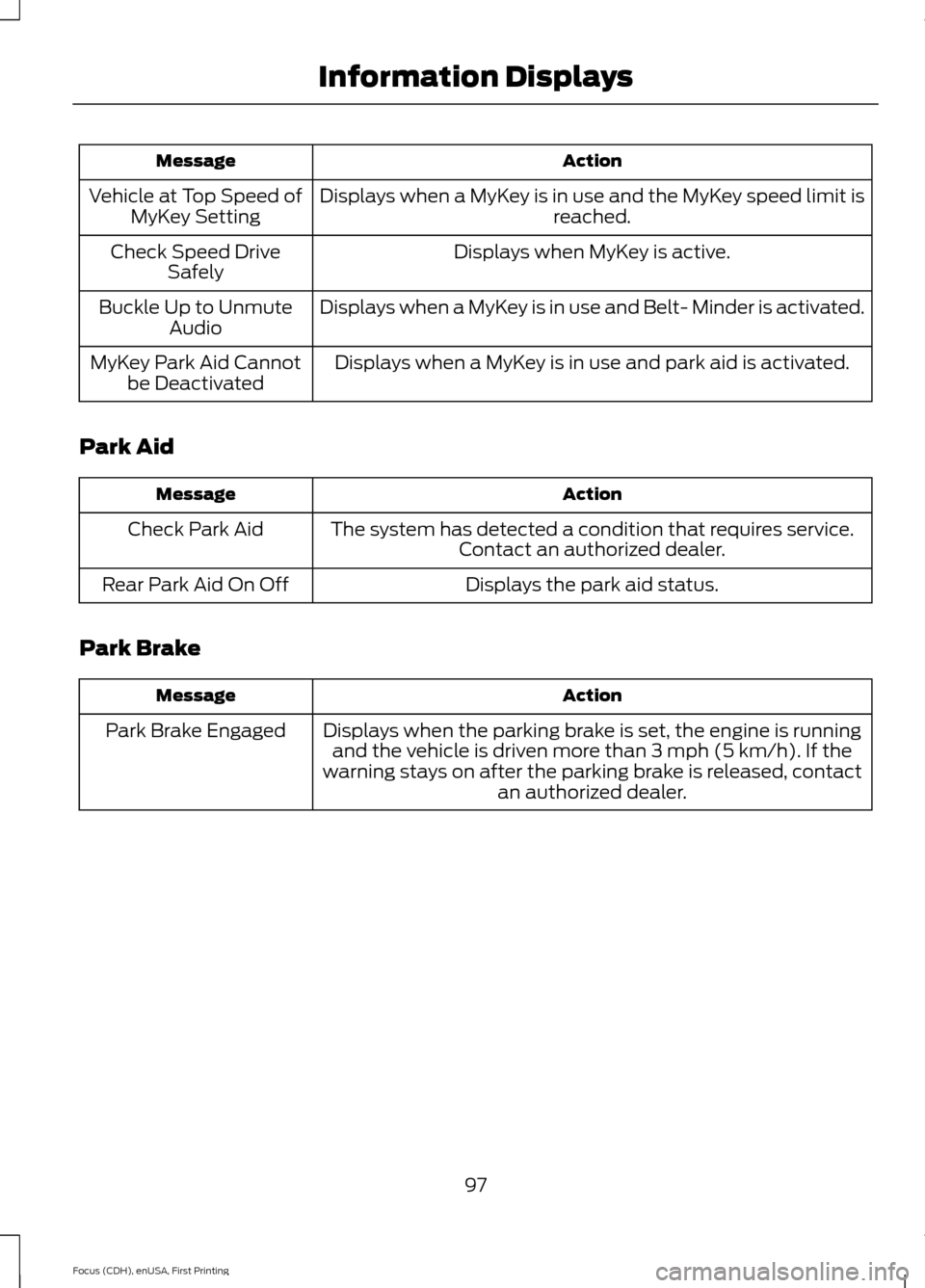
Settings
Select number of years
Tire Mobility
Kit
Hold OK to Create MyKey
Create MyKey
MyKey
Always On or User Selectable
Traction
Control
Choose desired speed or off
Max Speed
Choose desired speed or off
Speed Minder
On or Off
Volume
Limiter
Hold OK to Clear All MyKeys
Clear MyKeys
Select the desired language
Language
Display
Miles or km
Distance
Units
Fahrenheit (°F) or Celsius (°C)
Temperature
On or Off
Brake Coach
On or Off
Regen Display
Hold OK to Reset
Lifetime
Summary
INFORMATION MESSAGES
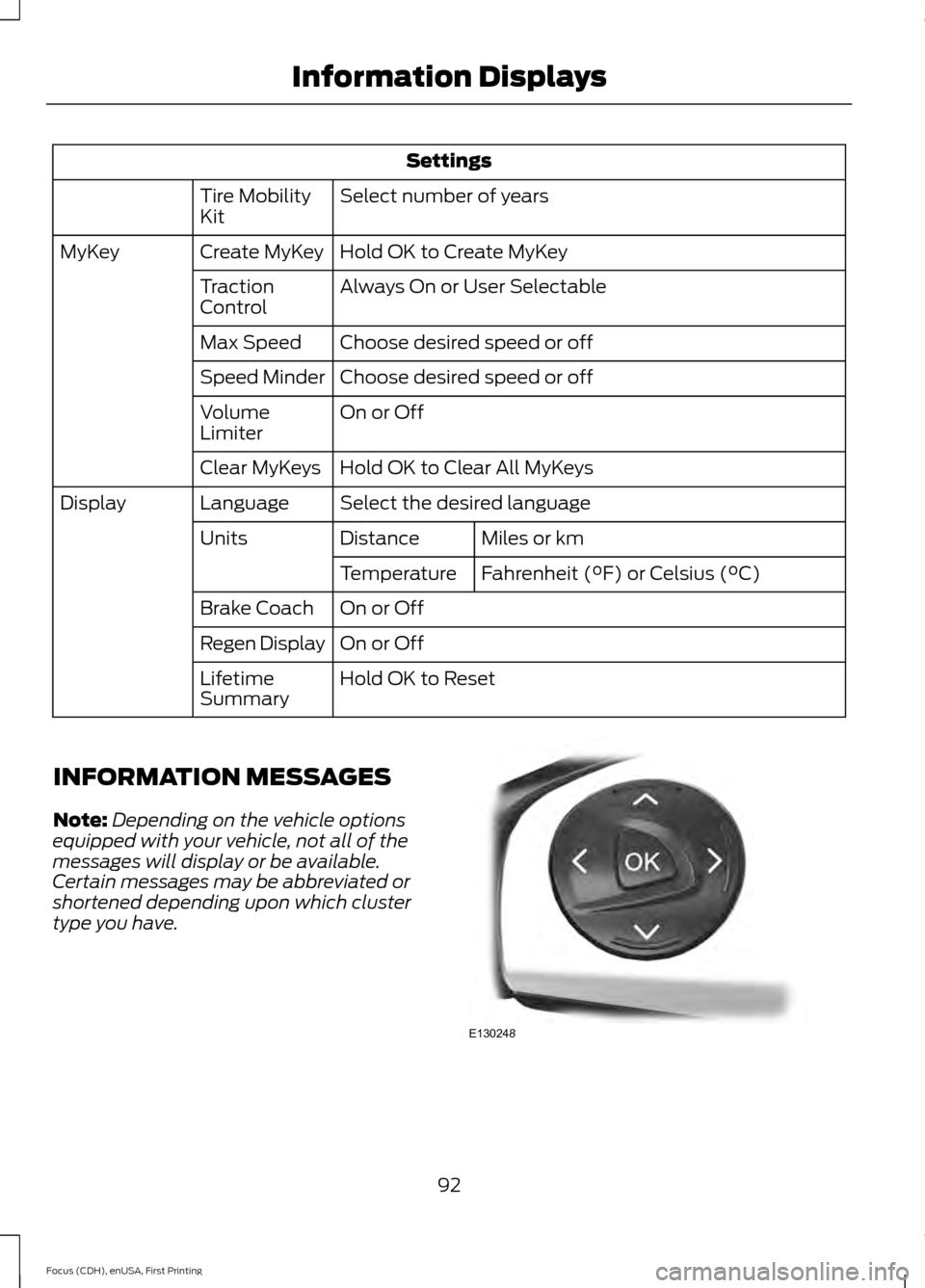
Note: Depending on the vehicle options
equipped with your vehicle, not all of the
messages will display or be available.
Certain messages may be abbreviated or
shortened depending upon which cluster
type you have. 92
Focus (CDH), enUSA, First Printing Information DisplaysE130248
Page 96 of 369
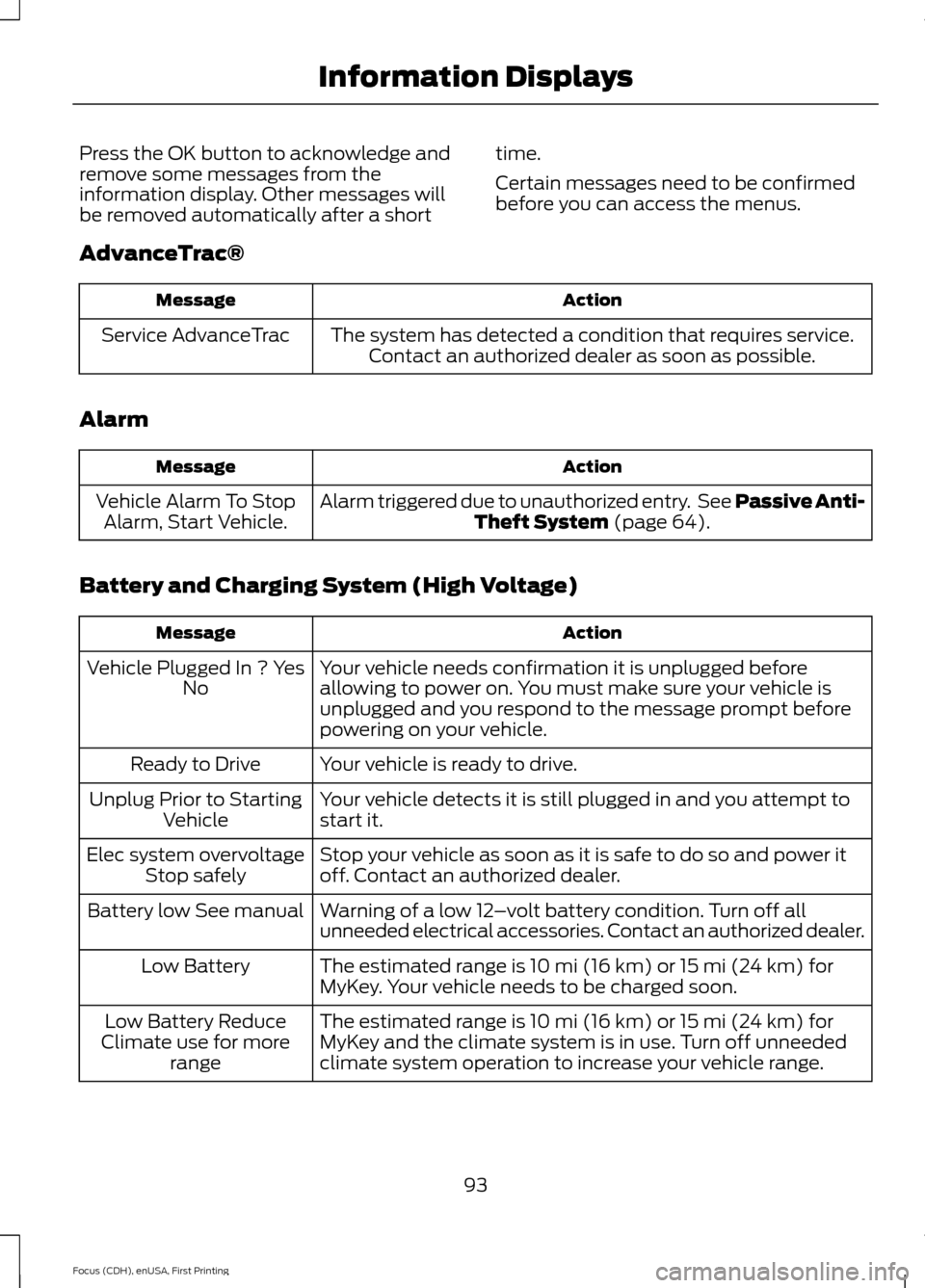
Press the OK button to acknowledge and
remove some messages from the
information display. Other messages will
be removed automatically after a short
time.
Certain messages need to be confirmed
before you can access the menus.
AdvanceTrac® Action
Message
The system has detected a condition that requires service.Contact an authorized dealer as soon as possible.
Service AdvanceTrac
Alarm Action
Message
Alarm triggered due to unauthorized entry. See Passive Anti-Theft System (page 64).
Vehicle Alarm To Stop
Alarm, Start Vehicle.
Battery and Charging System (High Voltage) Action
Message
Your vehicle needs confirmation it is unplugged before
allowing to power on. You must make sure your vehicle is
unplugged and you respond to the message prompt before
powering on your vehicle.
Vehicle Plugged In ? Yes
No
Your vehicle is ready to drive.
Ready to Drive
Your vehicle detects it is still plugged in and you attempt to
start it.
Unplug Prior to Starting
Vehicle
Stop your vehicle as soon as it is safe to do so and power it
off. Contact an authorized dealer.
Elec system overvoltage
Stop safely
Warning of a low 12–volt battery condition. Turn off all
unneeded electrical accessories. Contact an authorized dealer.
Battery low See manual
The estimated range is 10 mi (16 km) or 15 mi (24 km) for
MyKey. Your vehicle needs to be charged soon.
Low Battery
The estimated range is 10 mi (16 km) or 15 mi (24 km) for
MyKey and the climate system is in use. Turn off unneeded
climate system operation to increase your vehicle range.
Low Battery Reduce
Climate use for more range
93
Focus (CDH), enUSA, First Printing Information Displays
Page 98 of 369
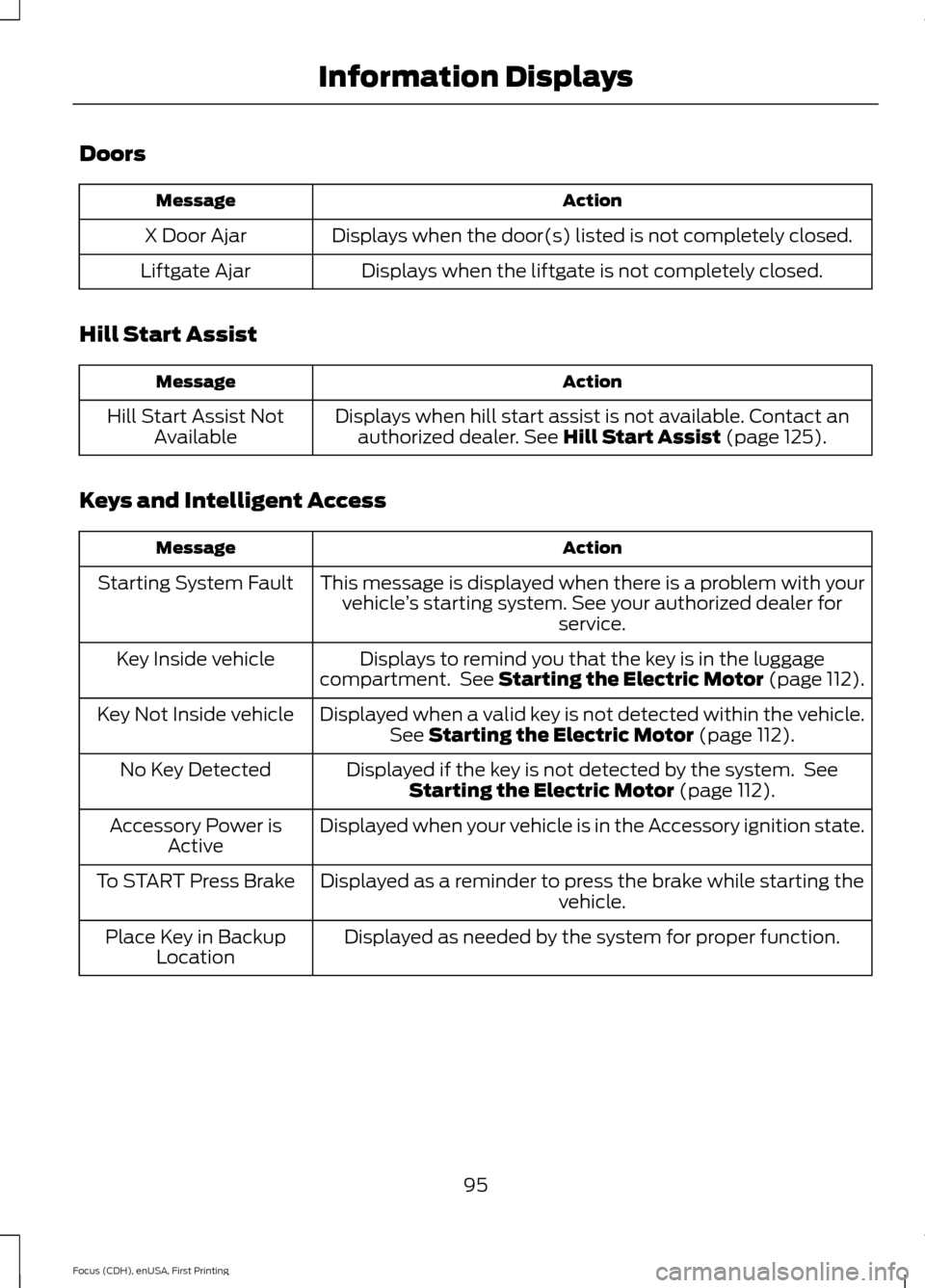
Doors
Action
Message
Displays when the door(s) listed is not completely closed.
X Door Ajar
Displays when the liftgate is not completely closed.
Liftgate Ajar
Hill Start Assist Action
Message
Displays when hill start assist is not available. Contact anauthorized dealer. See Hill Start Assist (page 125).
Hill Start Assist Not
Available
Keys and Intelligent Access Action
Message
This message is displayed when there is a problem with yourvehicle ’s starting system. See your authorized dealer for
service.
Starting System Fault
Displays to remind you that the key is in the luggage
compartment. See Starting the Electric Motor (page 112).
Key Inside vehicle
Displayed when a valid key is not detected within the vehicle.See
Starting the Electric Motor (page 112).
Key Not Inside vehicle
Displayed if the key is not detected by the system. SeeStarting the Electric Motor
(page 112).
No Key Detected
Displayed when your vehicle is in the Accessory ignition state.
Accessory Power is
Active
Displayed as a reminder to press the brake while starting the vehicle.
To START Press Brake
Displayed as needed by the system for proper function.
Place Key in Backup
Location
95
Focus (CDH), enUSA, First Printing Information Displays
Page 99 of 369
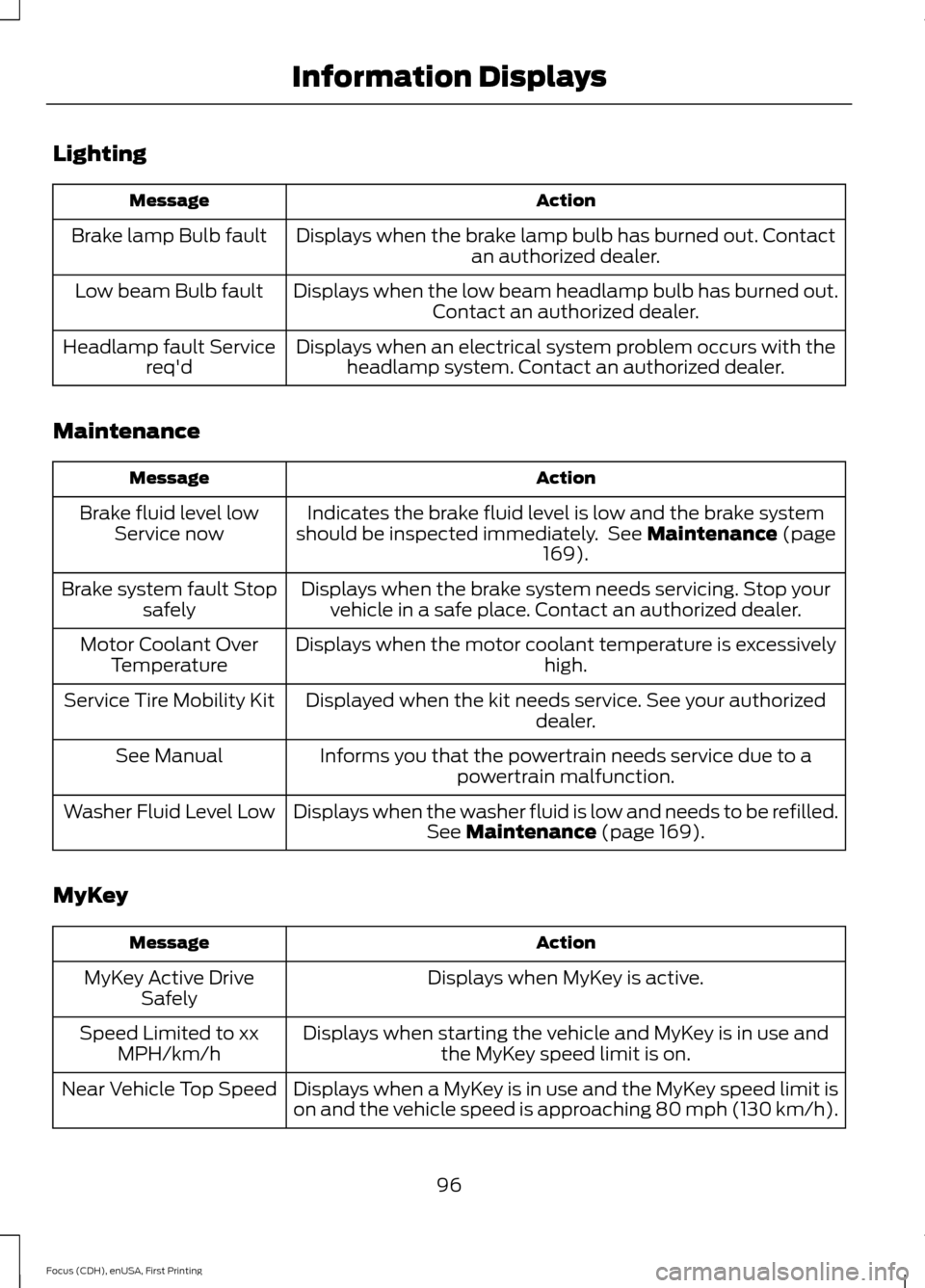
Lighting
Action
Message
Displays when the brake lamp bulb has burned out. Contact an authorized dealer.
Brake lamp Bulb fault
Displays when the low beam headlamp bulb has burned out.Contact an authorized dealer.
Low beam Bulb fault
Displays when an electrical system problem occurs with theheadlamp system. Contact an authorized dealer.
Headlamp fault Service
req'd
Maintenance Action
Message
Indicates the brake fluid level is low and the brake system
should be inspected immediately. See Maintenance (page
169).
Brake fluid level low
Service now
Displays when the brake system needs servicing. Stop yourvehicle in a safe place. Contact an authorized dealer.
Brake system fault Stop
safely
Displays when the motor coolant temperature is excessively high.
Motor Coolant Over
Temperature
Displayed when the kit needs service. See your authorized dealer.
Service Tire Mobility Kit
Informs you that the powertrain needs service due to apowertrain malfunction.
See Manual
Displays when the washer fluid is low and needs to be refilled.See
Maintenance (page 169).
Washer Fluid Level Low
MyKey Action
Message
Displays when MyKey is active.
MyKey Active Drive
Safely
Displays when starting the vehicle and MyKey is in use andthe MyKey speed limit is on.
Speed Limited to xx
MPH/km/h
Displays when a MyKey is in use and the MyKey speed limit is
on and the vehicle speed is approaching 80 mph (130 km/h).
Near Vehicle Top Speed
96
Focus (CDH), enUSA, First Printing Information Displays
Page 100 of 369
Action
Message
Displays when a MyKey is in use and the MyKey speed limit is reached.
Vehicle at Top Speed of
MyKey Setting
Displays when MyKey is active.
Check Speed Drive
Safely
Displays when a MyKey is in use and Belt- Minder is activated.
Buckle Up to Unmute
Audio
Displays when a MyKey is in use and park aid is activated.
MyKey Park Aid Cannot
be Deactivated
Park Aid Action
Message
The system has detected a condition that requires service.Contact an authorized dealer.
Check Park Aid
Displays the park aid status.
Rear Park Aid On Off
Park Brake Action
Message
Displays when the parking brake is set, the engine is runningand the vehicle is driven more than 3 mph (5 km/h). If the
warning stays on after the parking brake is released, contact an authorized dealer.
Park Brake Engaged
97
Focus (CDH), enUSA, First Printing Information Displays
Page 108 of 369
Note:
Adjust the seatback to an upright
driving position before adjusting the head
restraint. Adjust the head restraint so that
the top of it is level with the top of your head
and as far forward as possible. Make sure
that you remain comfortable. If you are
extremely tall, adjust the head restraint to
its highest position.
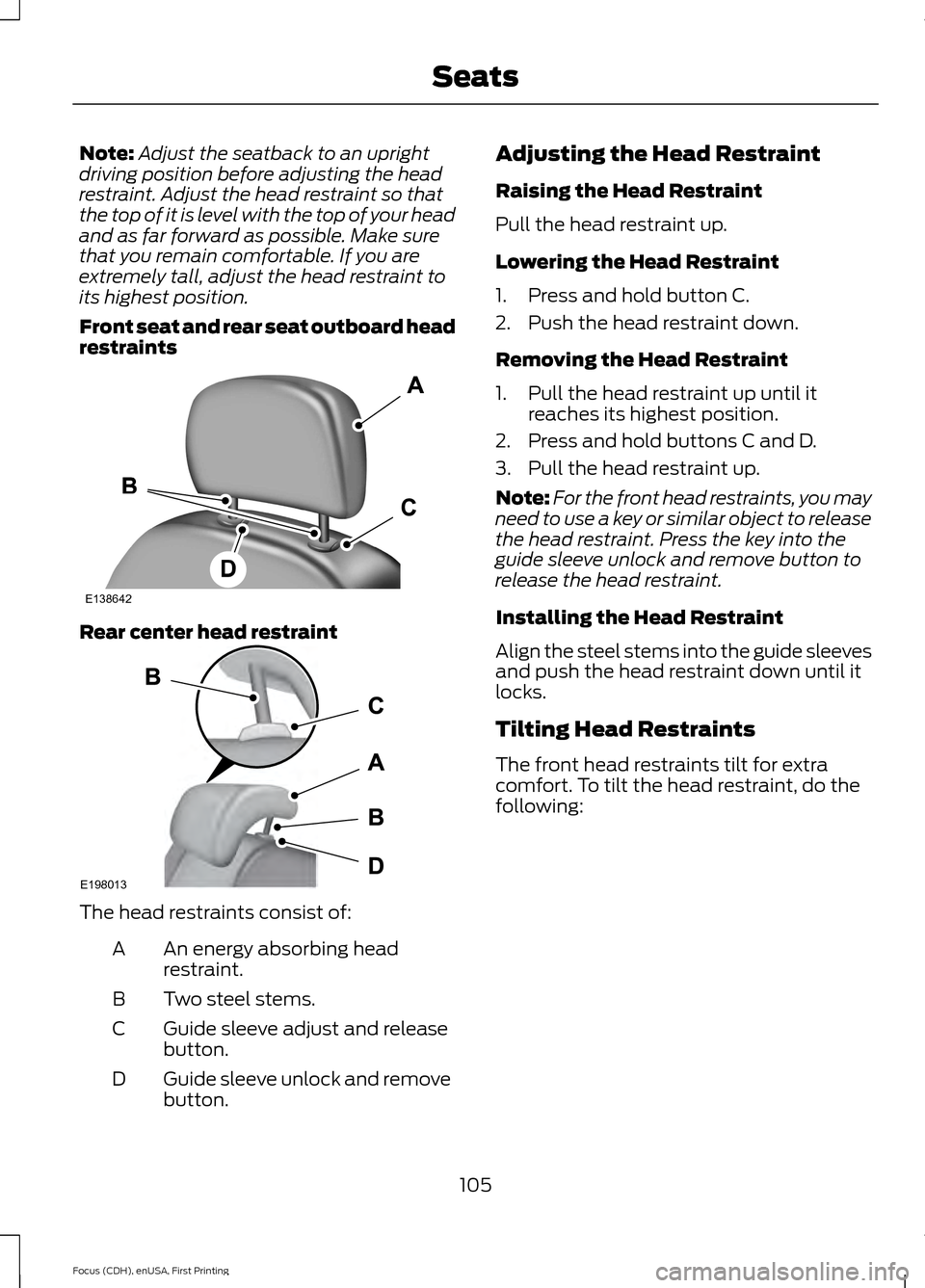
Front seat and rear seat outboard head
restraints Rear center head restraint
The head restraints consist of:
An energy absorbing head
restraint.
A
Two steel stems.
B
Guide sleeve adjust and release
button.
C
Guide sleeve unlock and remove
button.
D Adjusting the Head Restraint
Raising the Head Restraint
Pull the head restraint up.
Lowering the Head Restraint
1. Press and hold button C.
2. Push the head restraint down.
Removing the Head Restraint
1. Pull the head restraint up until it
reaches its highest position.
2. Press and hold buttons C and D.
3. Pull the head restraint up.
Note: For the front head restraints, you may
need to use a key or similar object to release
the head restraint. Press the key into the
guide sleeve unlock and remove button to
release the head restraint.
Installing the Head Restraint
Align the steel stems into the guide sleeves
and push the head restraint down until it
locks.
Tilting Head Restraints
The front head restraints tilt for extra
comfort. To tilt the head restraint, do the
following:
105
Focus (CDH), enUSA, First Printing SeatsE138642 E198013