2015 FORD EXPLORER panel
[x] Cancel search: panelPage 146 of 596

E.MAX A/C:Turn the temperature control dial all the way past the full
cool position to maximize cooling. Recirculated air flows through the
instrument panel vents, air conditioning automatically turns on, and the
fan automatically adjusts to the highest speed.
F.Front temperature control:Controls the temperature of the airflow
in the front of your vehicle. Adjust to select the desired temperature.
G.Rear fan speed control:Controls the volume of air circulated in the
rear of your vehicle. Press+or-to select the desired fan speed.
H.Rear temperature control:Controls the temperature of the airflow
in the rear of your vehicle. PressTEMP +andTEMP -to select the
desired temperature.
I.REAR CTRL:Press to change control of the rear climate controls
system from the front controls to the rear controls.
J.Rear climate control system power:Press the button to turn the
rear climate system on and off.
K.Front fan speed control:Controls the volume of air circulated in
your vehicle. Adjust to select the desired fan speed.
L.Heated rear window:Turns the heated rear window on and off. See
Heated windows and mirrorslater in this chapter for more
information.
M.Defrost:Press the button to distribute air to the windshield vents
and de-mister. Air distribution to instrument panel and footwell vents
turn off. You can use this setting to defog and clear the windshield of a
thin covering of ice.
Climate Control145
2015 Explorer(exp)
Owners Guide gf, 2nd Printing, September 2014
USA(fus)
Page 147 of 596
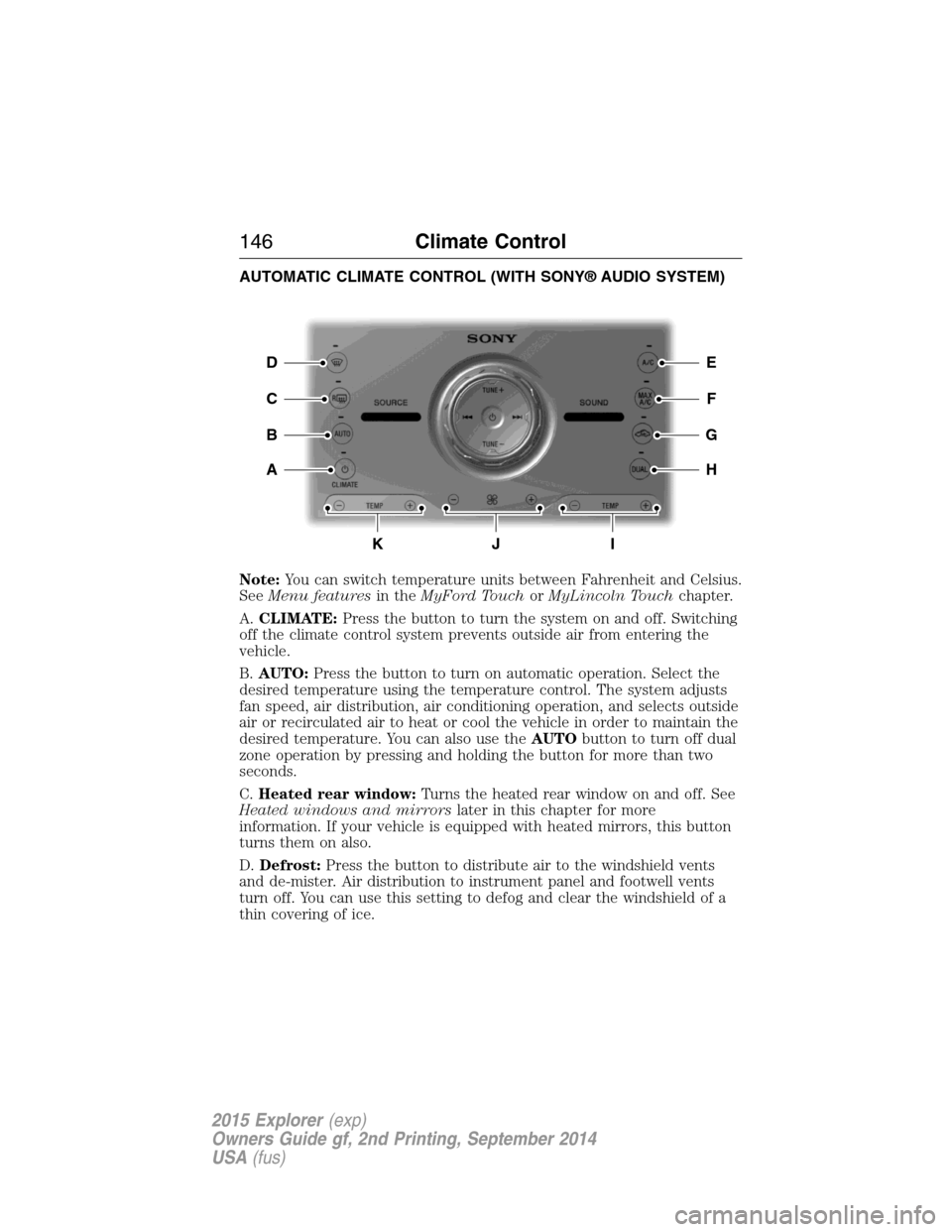
AUTOMATIC CLIMATE CONTROL (WITH SONY® AUDIO SYSTEM)
Note:You can switch temperature units between Fahrenheit and Celsius.
SeeMenu featuresin theMyFord TouchorMyLincoln Touchchapter.
A.CLIMATE:Press the button to turn the system on and off. Switching
off the climate control system prevents outside air from entering the
vehicle.
B.AUTO:Press the button to turn on automatic operation. Select the
desired temperature using the temperature control. The system adjusts
fan speed, air distribution, air conditioning operation, and selects outside
air or recirculated air to heat or cool the vehicle in order to maintain the
desired temperature. You can also use theAUTObutton to turn off dual
zone operation by pressing and holding the button for more than two
seconds.
C.Heated rear window:Turns the heated rear window on and off. See
Heated windows and mirrorslater in this chapter for more
information. If your vehicle is equipped with heated mirrors, this button
turns them on also.
D.Defrost:Press the button to distribute air to the windshield vents
and de-mister. Air distribution to instrument panel and footwell vents
turn off. You can use this setting to defog and clear the windshield of a
thin covering of ice.
E
F
G
H
D
C
A
B
KJI
146Climate Control
2015 Explorer(exp)
Owners Guide gf, 2nd Printing, September 2014
USA(fus)
Page 148 of 596
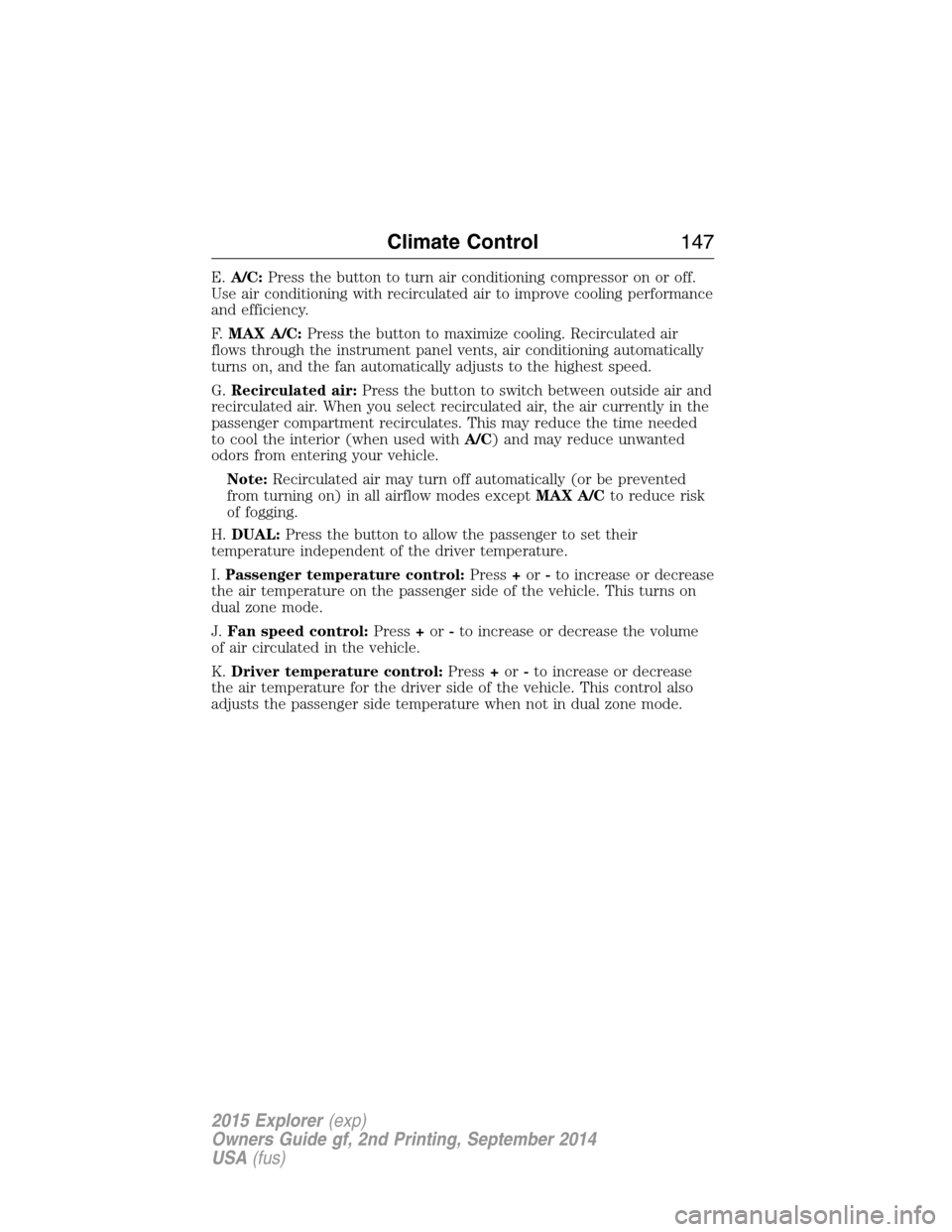
E.A/C:Press the button to turn air conditioning compressor on or off.
Use air conditioning with recirculated air to improve cooling performance
and efficiency.
F.MAX A/C:Press the button to maximize cooling. Recirculated air
flows through the instrument panel vents, air conditioning automatically
turns on, and the fan automatically adjusts to the highest speed.
G.Recirculated air:Press the button to switch between outside air and
recirculated air. When you select recirculated air, the air currently in the
passenger compartment recirculates. This may reduce the time needed
to cool the interior (when used withA/C) and may reduce unwanted
odors from entering your vehicle.
Note:Recirculated air may turn off automatically (or be prevented
from turning on) in all airflow modes exceptMAX A/Cto reduce risk
of fogging.
H.DUAL:Press the button to allow the passenger to set their
temperature independent of the driver temperature.
I.Passenger temperature control:Press+or-to increase or decrease
the air temperature on the passenger side of the vehicle. This turns on
dual zone mode.
J.Fan speed control:Press+or-to increase or decrease the volume
of air circulated in the vehicle.
K.Driver temperature control:Press+or-to increase or decrease
the air temperature for the driver side of the vehicle. This control also
adjusts the passenger side temperature when not in dual zone mode.
Climate Control147
2015 Explorer(exp)
Owners Guide gf, 2nd Printing, September 2014
USA(fus)
Page 149 of 596
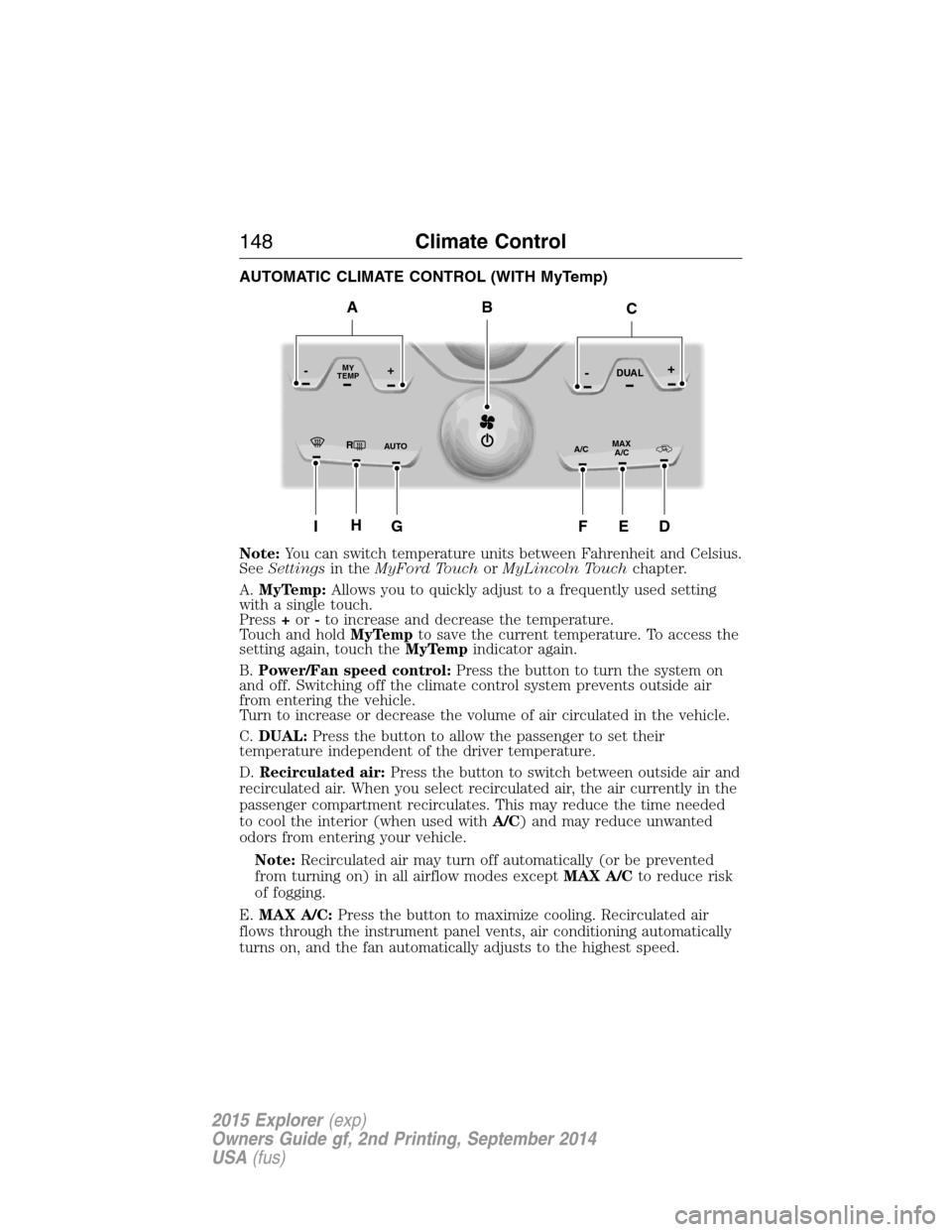
AUTOMATIC CLIMATE CONTROL (WITH MyTemp)
Note:You can switch temperature units between Fahrenheit and Celsius.
SeeSettingsin theMyFord TouchorMyLincoln Touchchapter.
A.MyTemp:Allows you to quickly adjust to a frequently used setting
with a single touch.
Press+or-to increase and decrease the temperature.
Touch and holdMyTempto save the current temperature. To access the
setting again, touch theMyTempindicator again.
B.Power/Fan speed control:Press the button to turn the system on
and off. Switching off the climate control system prevents outside air
from entering the vehicle.
Turn to increase or decrease the volume of air circulated in the vehicle.
C.DUAL:Press the button to allow the passenger to set their
temperature independent of the driver temperature.
D.Recirculated air:Press the button to switch between outside air and
recirculated air. When you select recirculated air, the air currently in the
passenger compartment recirculates. This may reduce the time needed
to cool the interior (when used withA/C) and may reduce unwanted
odors from entering your vehicle.
Note:Recirculated air may turn off automatically (or be prevented
from turning on) in all airflow modes exceptMAX A/Cto reduce risk
of fogging.
E.MAX A/C:Press the button to maximize cooling. Recirculated air
flows through the instrument panel vents, air conditioning automatically
turns on, and the fan automatically adjusts to the highest speed.
RMAX
A/C A/C
TEMP
AU TO
MY-+DUAL-+
IG
B
HEDF
AC
148Climate Control
2015 Explorer(exp)
Owners Guide gf, 2nd Printing, September 2014
USA(fus)
Page 150 of 596

F.A/C:Press the button to turn air conditioning compressor on or off.
Use air conditioning with recirculated air to improve cooling performance
and efficiency.
G.
AUTO:Press the button to turn on automatic operation. Select the
desired temperature using the temperature control. The system adjusts fan
speed, air distribution, air conditioning operation, and selects outside air or
recirculated air to heat or cool the vehicle in order to maintain the desired
temperature. You can also use theAUTObutton to turn off dual zone
operation by pressing and holding the button for more than two seconds.
H.Heated rear window:Turns the heated rear window on and off. See
Heated windows and mirrorslater in this chapter for more
information. If your vehicle is equipped with heated mirrors, this button
turns them on also.
I.Defrost:Press the button to distribute air to the windshield vents and
de-mister. Air distribution to instrument panel and footwell vents turn
off. You can use this setting to defog and clear the windshield of a thin
covering of ice.
REAR PASSENGER CLIMATE CONTROLS
A.Fan control:Controls the volume of air circulated in the rear of your
vehicle. Adjust to select the desired fan speed.
B.Panel:Press to select air flow direction to the panel.
C.Floor:Press to direct air flow to the floor vents.
D.Panel and floor:Press to direct air flow to the panel and floor vents.
E.REAR LOCK:Illuminates when the rear (auxiliary) climate system is
being controlled by the front controls. The rear (auxiliary) climate
controls do not work when this graphic is illuminated
F.Temperature control:Controls the temperature of the airflow in the
rear of your vehicle.
ABCDEF
Climate Control149
2015 Explorer(exp)
Owners Guide gf, 2nd Printing, September 2014
USA(fus)
Page 151 of 596
GENERAL OPERATING TIPS
General Hints
Note:Prolonged use of recirculated air may cause the windows to fog
up.
Note:You may feel a small amount of air from the footwell air vents
regardless of the air distribution setting.
Note:To reduce humidity build-up inside your vehicle, do not drive with
the system switched off or with recirculated air always switched on.
Note:Do not place objects under the front seats as this may interfere
with the airflow to the rear seats.
Note:Remove any snow, ice or leaves from the air intake area at the
base of the windshield.
Note:To improve the time to reach comfort in hot weather, drive with
the windows slightly open for 2-3 minutes after start-up or until your
vehicle airs out.
Manual Climate Control
Note:To reduce fogging of the windshield during humid weather, adjust
the air distribution control to the windshield air vents position.
Automatic Climate Control
Note:Adjusting the settings when your vehicle interior is extremely hot
or cold is not necessary. The system automatically adjusts to heat or cool
the cabin to your selected temperature as quickly as possible. For the
system to function efficiently, the instrument panel and side air vents
should be fully open.
Note:If you selectAUTOduring cold outside temperatures, the system
directs airflow to the windshield and side window vents. In addition, the
fan may run at a slower speed until the engine warms up.
Note:If you selectAUTOduring hot outside temperatures, or when the
inside of the vehicle is hot, the system automatically uses recirculated air
to maximize interior cooling. When the interior reaches the selected
temperature, the system automatically switches to using outside air.
150Climate Control
2015 Explorer(exp)
Owners Guide gf, 2nd Printing, September 2014
USA(fus)
Page 153 of 596
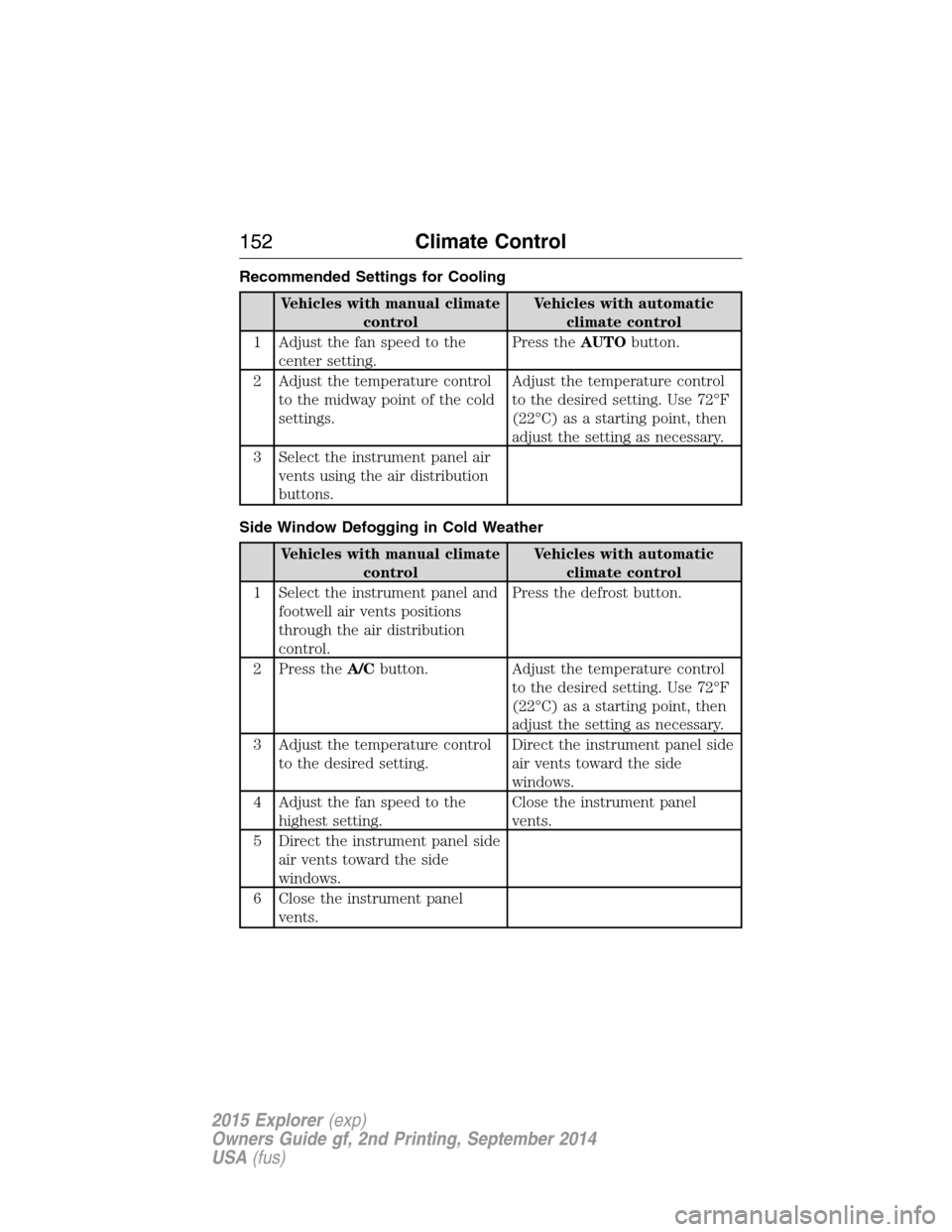
Recommended Settings for Cooling
Vehicles with manual climate
controlVehicles with automatic
climate control
1 Adjust the fan speed to the
center setting.Press theAUTObutton.
2 Adjust the temperature control
to the midway point of the cold
settings.Adjust the temperature control
to the desired setting. Use 72°F
(22°C) as a starting point, then
adjust the setting as necessary.
3 Select the instrument panel air
vents using the air distribution
buttons.
Side Window Defogging in Cold Weather
Vehicles with manual climate
controlVehicles with automatic
climate control
1 Select the instrument panel and
footwell air vents positions
through the air distribution
control.Press the defrost button.
2 Press theA/Cbutton. Adjust the temperature control
to the desired setting. Use 72°F
(22°C) as a starting point, then
adjust the setting as necessary.
3 Adjust the temperature control
to the desired setting.Direct the instrument panel side
air vents toward the side
windows.
4 Adjust the fan speed to the
highest setting.Close the instrument panel
vents.
5 Direct the instrument panel side
air vents toward the side
windows.
6 Close the instrument panel
vents.
152Climate Control
2015 Explorer(exp)
Owners Guide gf, 2nd Printing, September 2014
USA(fus)
Page 177 of 596
Note:In order to allow the seat to complete the stowed position, do not
place objects under the seat before stowing. Remove all objects from the
seat and stowage tub.
Note:In the unlikely event that the third-row power seat stops
prematurely or travels to an unexpected position, press the FOLD button
(C) to reset the seat and return it to a normal position.
These seats feature a power one-touch operation that allows you fold
and stow the seats.
•The power fold seats work only when the transmission is in park (P)
and the liftgate is open.
•If the ignition is off and the feature is still running, the battery saver
will turn it off after 10 minutes. Press unlock on the remote entry key
transmitter to reactivate the power seats or unlock it with the keyless
entry keypad. See theKeys and Remote Controlchapter.
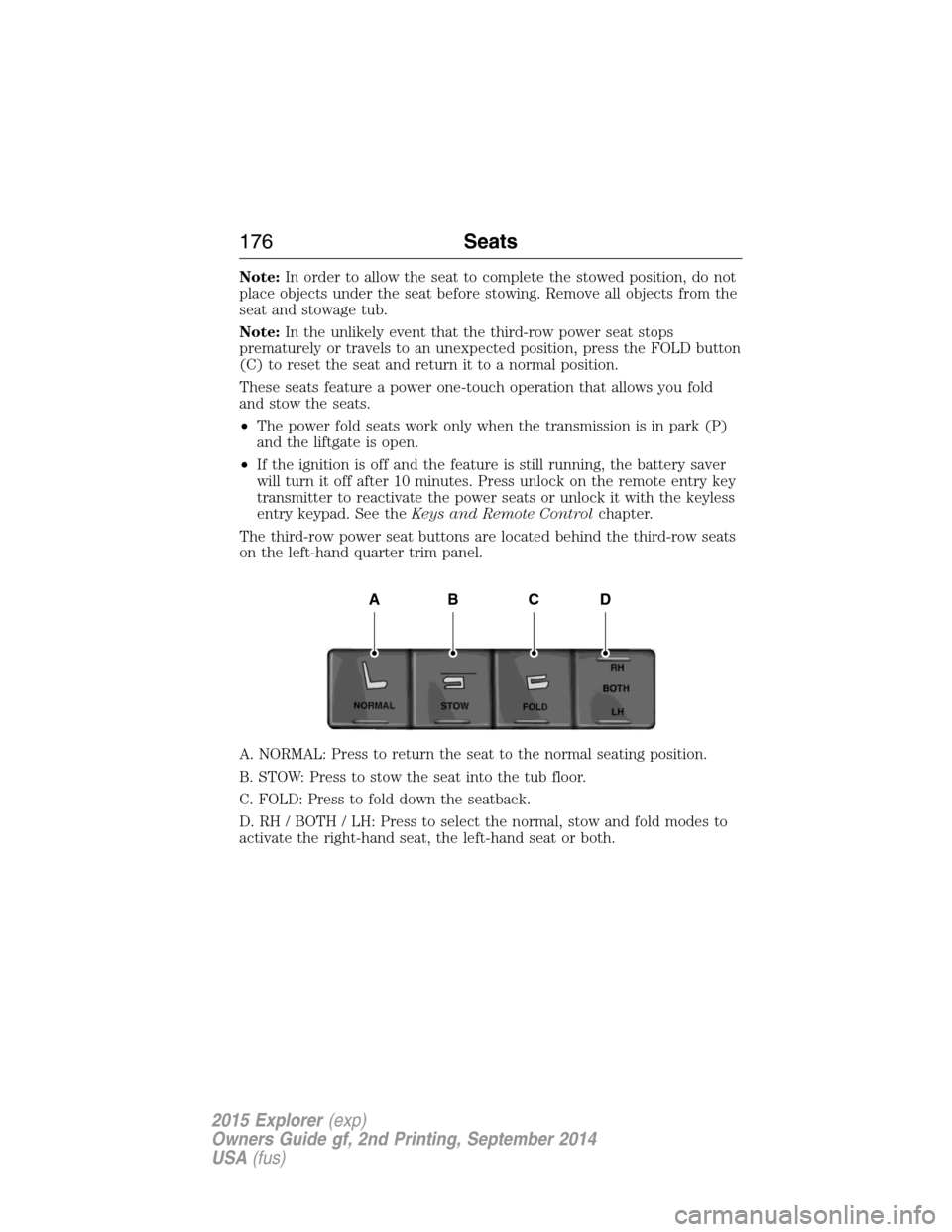
The third-row power seat buttons are located behind the third-row seats
on the left-hand quarter trim panel.
A. NORMAL: Press to return the seat to the normal seating position.
B. STOW: Press to stow the seat into the tub floor.
C. FOLD: Press to fold down the seatback.
D. RH / BOTH / LH: Press to select the normal, stow and fold modes to
activate the right-hand seat, the left-hand seat or both.
ABCD
176Seats
2015 Explorer(exp)
Owners Guide gf, 2nd Printing, September 2014
USA(fus)