2015 FORD EXPLORER instrument panel
[x] Cancel search: instrument panelPage 8 of 596

Maintenance 310
General information...................................310
Opening and closing the hood............................311
Under hood overview..................................312
Engine oil dipstick....................................315
Engine oil check......................................316
Engine coolant check..................................316
Automatic transmission fluid check........................322
Brake fluid check.....................................326
Fuel filter...........................................327
Washer fluid check....................................327
Battery ............................................327
Checking the wiper blades..............................330
Air filter(s).........................................331
Adjusting the headlamps................................333
Changing a bulb......................................335
Bulb specification chart.................................339
Vehicle Care 341
Cleaning products.....................................341
Cleaning the exterior..................................341
Waxing.............................................343
Repairing minor paint damage............................343
Cleaning the engine...................................343
Cleaning the windows and wiper blades.....................344
Cleaning the interior...................................345
Cleaning the instrument panel and instrument cluster lens.......345
Cleaning leather seats..................................346
Cleaning the alloy wheels...............................347
Vehiclestorage.......................................348
Table of Contents7
2015 Explorer(exp)
Owners Guide gf, 2nd Printing, September 2014
USA(fus)
Page 54 of 596

•Recline the seat slightly (one or two degrees) from the upright
position.
After all occupants have adjusted their seats and put on safety belts, it is
very important that they continue to sit properly. Properly seated
occupants sit upright, lean against the seat back, and center themselves
on the seat cushion, with their feet comfortably extended on the floor.
Sitting improperly can increase the chance of injury in a crash event. For
example, if an occupant slouches, lies down, turns sideways, sits forward,
leans forward or sideways, or puts one or both feet up, the chance of
injury during a crash is greatly increased.
Children and Airbags
WARNING:Airbags can kill or injure a child in a child seat.
Never place a rear-facing child seat in front of an active airbag. If
you must use a forward-facing child seat in the front seat, move the
seat upon which the child seat is installed all the way back.
Children must always be properly
restrained. Accident statistics
suggest that children are safer when
properly restrained in the rear
seating positions than in the front
seating position. Failure to follow
these instructions may increase the
risk of injury in a crash.
Knee Airbag System (Passenger Side Only)
The knee airbag is located under the instrument panel. During a crash,
the restraints control module may activate the passenger knee airbag
based on crash severity and occupant conditions. Under certain crash
and occupant conditions, the passenger knee airbag may deploy but the
passenger front airbag may not activate.
As with front and side airbags, it is important to be properly seated and
restrained to reduce the risk of death or serious injury.
Supplementary Restraints System53
2015 Explorer(exp)
Owners Guide gf, 2nd Printing, September 2014
USA(fus)
Page 55 of 596

FRONT PASSENGER SENSING SYSTEM
WARNING:Even with Advanced Restraints Systems, children 12
and under should be properly restrained in a rear seating position.
Failure to follow this could seriously increase the risk of injury or death.
WARNING:Sitting improperly out of position or with the seat
back reclined too far can take off weight from the seat cushion
and affect the decision of the front passenger sensing system, resulting
in serious injury or death in a crash.
Always sit upright against your seat back, with your feet on the floor.
WARNING:Any alteration or modification to the front passenger
seat may affect the performance of the front passenger sensing
system which could seriously increase the risk of injury or death.
This system works with sensors that are part of the front passenger’s
seat and safety belt to detect the presence of a properly seated occupant
and determine if the front passenger’s frontal airbag should be enabled
(may inflate) or not.
The front passenger sensing system
uses a passenger airbag status
indicator which will illuminate
indicating that the front passenger
frontal airbag is either ON (enabled)
or OFF (disabled). The indicator
lamp is located in the center stack of
the instrument panel.
Note:When the ignition is first turned on, the passenger airbag status
indicator OFF and ON lamps will illuminate for a short period of time to
confirm they are functional.
54Supplementary Restraints System
2015 Explorer(exp)
Owners Guide gf, 2nd Printing, September 2014
USA(fus)
Page 68 of 596

The remote start system will not work if:
•the ignition is on
•the alarm system is triggered
•you disable the feature
•the hood is open
•the transmission is not inP
•the vehicle battery voltage is too low
•the fuel is too low
•the service engine soon light is on.
Remote Starting the Vehicle
Note:You must press each button within three seconds of each other.
Your vehicle will not remote start and the horn will not sound if you do
not follow this sequence.
The label on your transmitter
details the starting procedure.
To remote start your vehicle:
1. Press the lock button to lock all the doors.
2. Press the remote start button twice. The exterior lamps will flash twice.
The horn will sound if the system fails to start.
Note:If you remote start your vehicle with an integrated keyhead
transmitter, you must switch the ignition on before driving your vehicle.
If you remote start your vehicle with an intelligent access transmitter,
you must have a programmed intelligent access key inside your vehicle
and press theSTART/STOPbutton on the instrument panel once while
applying the brake pedal before driving your vehicle.
The power windows will not work during the remote start and the radio
will not turn on automatically.
The parking lamps will remain on and your vehicle will run for 5, 10, or
15 minutes, depending on the setting. See theInformation Displays
chapter to select the duration of the remote start system.
Keys and Remote Control67
2015 Explorer(exp)
Owners Guide gf, 2nd Printing, September 2014
USA(fus)
Page 80 of 596

Power Liftgate (If Equipped)
WARNING:Make sure all persons are clear of the power liftgate
area before using the power liftgate control.
WARNING:Keep keys out of reach of children. Do not allow
children to play near an open or moving power liftgate.
Note:Cycling the ignition while the liftgate is power closing and is near
the latch may cause the liftgate to reverse to full open position. Make
sure that you close the liftgate before operating or moving the vehicle,
especially in an enclosure like a garage or a parking structure. You could
damage the liftgate or its components.
Note:Do not drive with the liftgate open without first disabling the
power function and securing the liftgate to the vehicle.
Note:In case of operation in extreme cold -40°F (-40°C), or on extreme
inclines, manual operation of the liftgate is suggested.
You can enable or disable the power liftgate using the information
display. The remote control and instrument panel button will still operate
the liftgate regardless of the setting.
Opening and Closing the Power Liftgate
Note:You can reverse the liftgate movement direction with a second
press of the instrument panel button, or the control button on the
liftgate, or a second double press of the transmitter button.
The liftgate will only operate with the transmission inP.
A chime will sound three times as the liftgate begins to power close. A
single chime indicates a problem with the close request, caused by:
•the ignition is on and the transmission is not inP;or
•the battery voltage is below the minimum operating voltage; or
•the vehicle speed is at or above 3 mph (5 km/h).
If the liftgate reverses and starts to close after an open request, a fast
continuous chime indicates excessive load on the gate or a possible strut
failure. Have your vehicle checked by an authorized dealer if you still
have a fast chime after you remove the load.
Locks79
2015 Explorer(exp)
Owners Guide gf, 2nd Printing, September 2014
USA(fus)
Page 81 of 596
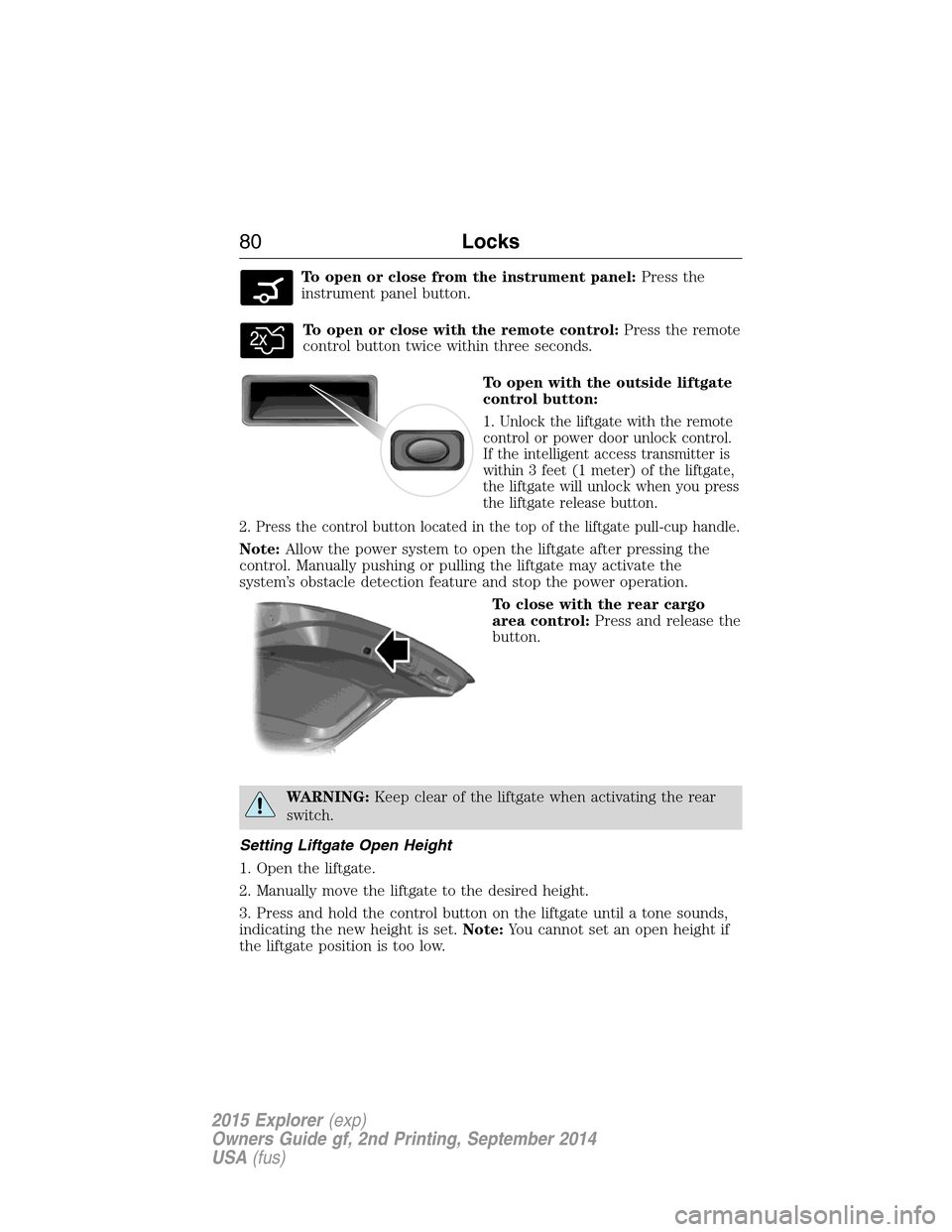
To open or close from the instrument panel:Press the
instrument panel button.
To open or close with the remote control:Press the remote
control button twice within three seconds.
To open with the outside liftgate
control button:
1. Unlock the liftgate with the remote
control or power door unlock control.
If the intelligent access transmitter is
within 3 feet (1 meter) of the liftgate,
the liftgate will unlock when you press
the liftgate release button.
2. Press the control button located in the top of the liftgate pull-cup handle.
Note:Allow the power system to open the liftgate after pressing the
control. Manually pushing or pulling the liftgate may activate the
system’s obstacle detection feature and stop the power operation.
To close with the rear cargo
area control:Press and release the
button.
WARNING:Keep clear of the liftgate when activating the rear
switch.
Setting Liftgate Open Height
1. Open the liftgate.
2. Manually move the liftgate to the desired height.
3. Press and hold the control button on the liftgate until a tone sounds,
indicating the new height is set.Note:You cannot set an open height if
the liftgate position is too low.
80Locks
2015 Explorer(exp)
Owners Guide gf, 2nd Printing, September 2014
USA(fus)
Page 82 of 596
The new open liftgate height will now be recalled when the power
liftgate is opened. To change the programmed height, repeat the above
procedure. Once you open the power liftgate you can manually move it
to a different height.
When operating the power liftgate after a set height lower than full-open
is set, you can fully open the liftgate by manually pushing it upward to
the maximum open position.
Obstacle Detection
When closing:The system will reverse to full open when it detects an
obstacle. A tone will sound three times as the liftgate begins to reopen.
Remove the obstacle to close the liftgate.
Note:Entering the vehicle while the liftgate is closing can cause the
vehicle to bounce and activate obstacle detection. To prevent this, allow
the power liftgate to fully close before entering the vehicle. Before
driving off, check the instrument cluster for a liftgate or door ajar
message or warning indicator. Driving off without first checking for the
liftgate or door ajar message or warning indicator could result in
unintentionally leaving the liftgate open while you are driving.
When opening:The system will stop and a tone will sound three times
when it detects an obstacle. Remove the obstacle to operate the liftgate.
Resetting the Power Liftgate
The liftgate may not operate properly and you may need to reset it if any
of these conditions occur:
•A low voltage or dead battery
•A disconnected battery
•You manually close the liftgate and leave it ajar (unlatched)
To reset the power liftgate:
1. Disconnect the battery for 20 seconds then, reconnect the battery.
2. Manually close and fully latch the liftgate.
3. Power open the liftgate by using the transmitter or the instrument
panel control button.
Locks81
2015 Explorer(exp)
Owners Guide gf, 2nd Printing, September 2014
USA(fus)
Page 99 of 596
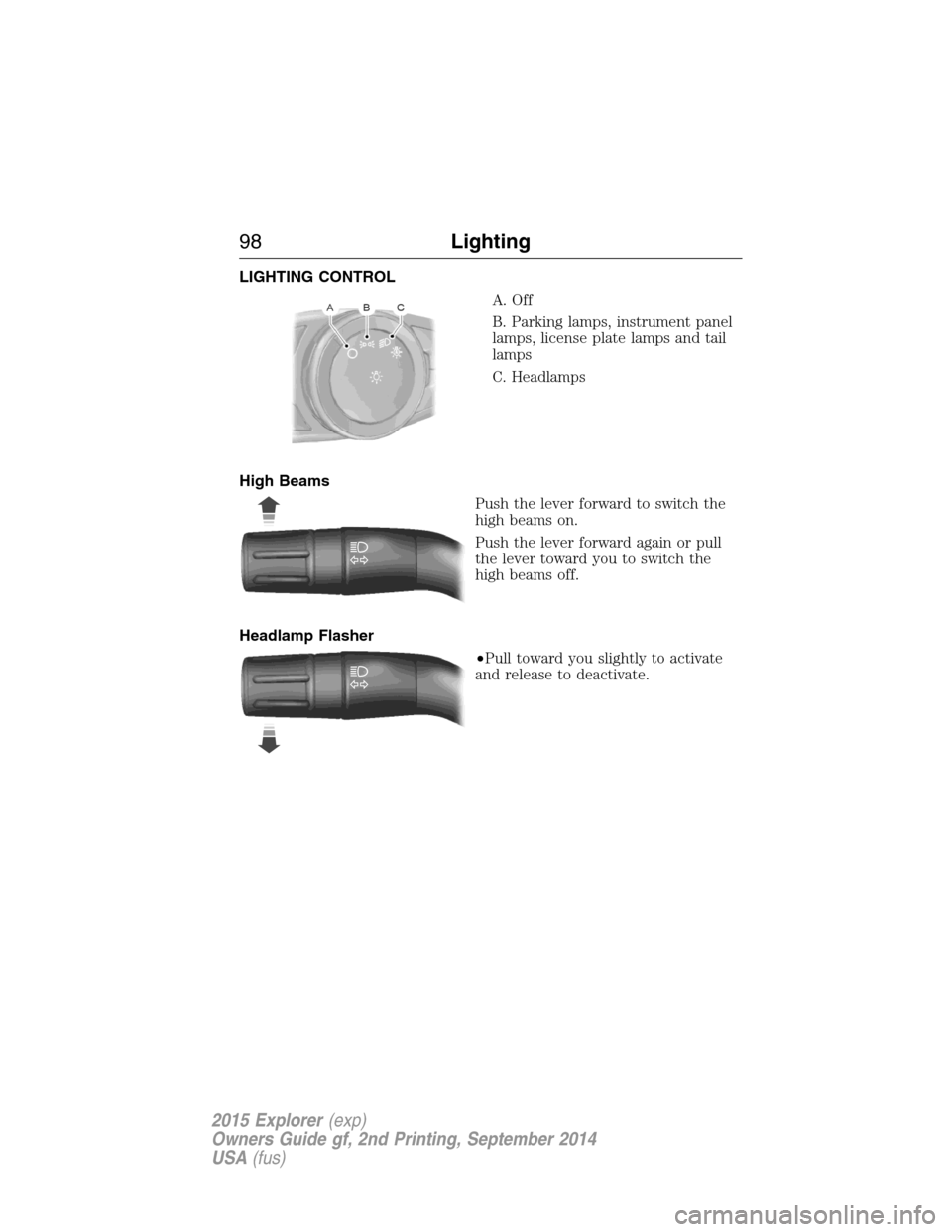
LIGHTING CONTROL
A. Off
B. Parking lamps, instrument panel
lamps, license plate lamps and tail
lamps
C. Headlamps
High Beams
Push the lever forward to switch the
high beams on.
Push the lever forward again or pull
the lever toward you to switch the
high beams off.
Headlamp Flasher
•Pull toward you slightly to activate
and release to deactivate.
98Lighting
2015 Explorer(exp)
Owners Guide gf, 2nd Printing, September 2014
USA(fus)