2015 FORD EXPLORER fuel
[x] Cancel search: fuelPage 130 of 596
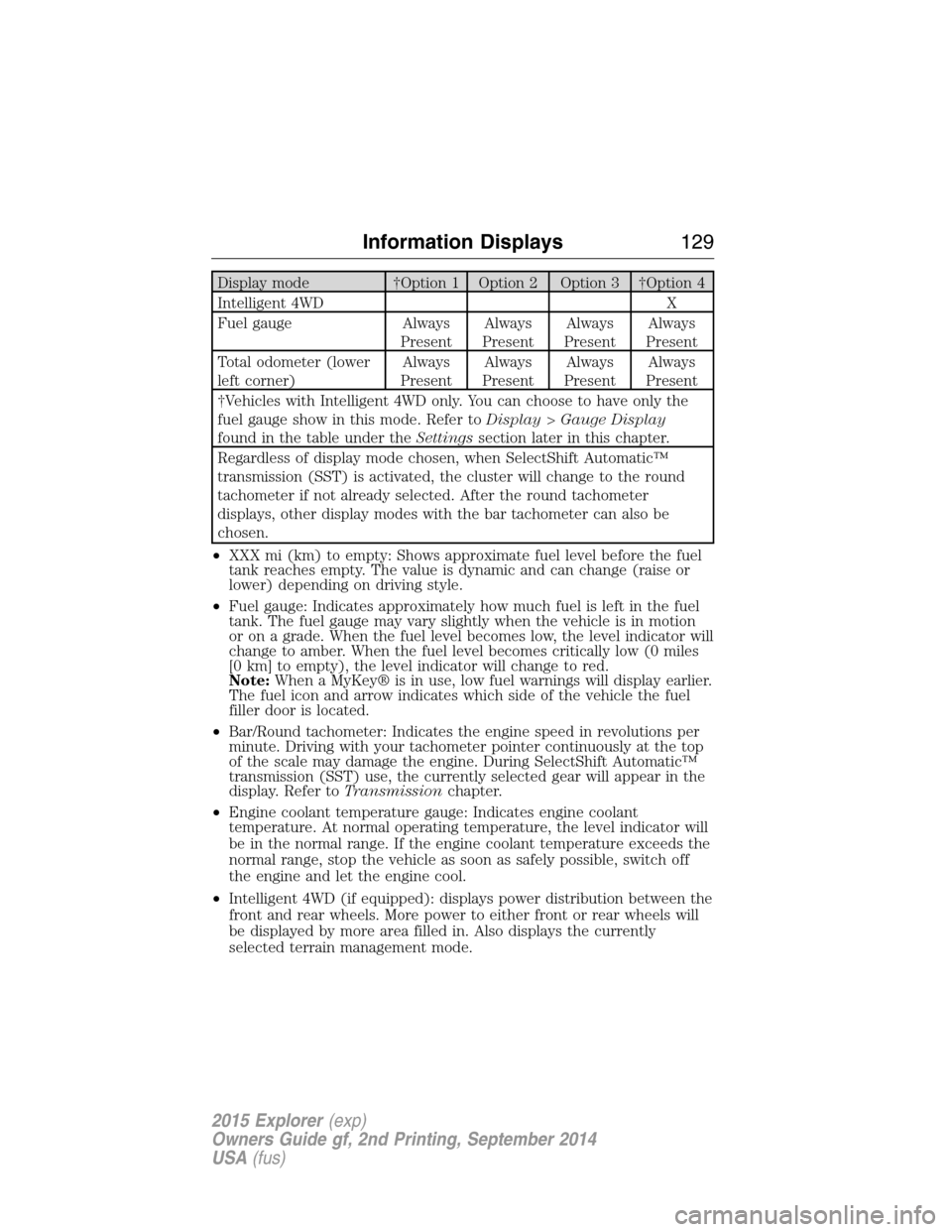
Display mode †Option 1 Option 2 Option 3 †Option 4
Intelligent 4WD X
Fuel gauge Always
PresentAlways
PresentAlways
PresentAlways
Present
Total odometer (lower
left corner)Always
PresentAlways
PresentAlways
PresentAlways
Present
†Vehicles with Intelligent 4WD only. You can choose to have only the
fuel gauge show in this mode. Refer toDisplay>Gauge Display
found in the table under theSettingssection later in this chapter.
Regardless of display mode chosen, when SelectShift Automatic™
transmission (SST) is activated, the cluster will change to the round
tachometer if not already selected. After the round tachometer
displays, other display modes with the bar tachometer can also be
chosen.
•XXX mi (km) to empty: Shows approximate fuel level before the fuel
tank reaches empty. The value is dynamic and can change (raise or
lower) depending on driving style.
•Fuel gauge: Indicates approximately how much fuel is left in the fuel
tank. The fuel gauge may vary slightly when the vehicle is in motion
or on a grade. When the fuel level becomes low, the level indicator will
change to amber. When the fuel level becomes critically low (0 miles
[0 km] to empty), the level indicator will change to red.
Note:When a MyKey® is in use, low fuel warnings will display earlier.
The fuel icon and arrow indicates which side of the vehicle the fuel
filler door is located.
•Bar/Round tachometer: Indicates the engine speed in revolutions per
minute. Driving with your tachometer pointer continuously at the top
of the scale may damage the engine. During SelectShift Automatic™
transmission (SST) use, the currently selected gear will appear in the
display. Refer toTransmissionchapter.
•Engine coolant temperature gauge: Indicates engine coolant
temperature. At normal operating temperature, the level indicator will
be in the normal range. If the engine coolant temperature exceeds the
normal range, stop the vehicle as soon as safely possible, switch off
the engine and let the engine cool.
•Intelligent 4WD (if equipped): displays power distribution between the
front and rear wheels. More power to either front or rear wheels will
be displayed by more area filled in. Also displays the currently
selected terrain management mode.
Information Displays129
2015 Explorer(exp)
Owners Guide gf, 2nd Printing, September 2014
USA(fus)
Page 131 of 596

Trip1&2
Choose between the following trip displays.
Trip1&2
Trip1&2Trip distance
Average fuel economy
Elapsed trip time
Hold OK to Reset
Estimated amount of fuel consumed
Total odometer (lower left corner)
Press and hold OK to reset the currently displayed trip information.
•Trip distance — shows the accumulated trip distance.
•Elapsed trip time— timer stops when the vehicle is turned off and
restarts when the vehicle is restarted.
•Average fuel economy — shows the average fuel economy for a given
trip.
Fuel Economy
Use the left/right arrow buttons to choose the desired fuel economy
display.
Fuel Economy
Fuel EconomyInst Fuel
EconomyXX. Min Fuel
History
Instantaneous fuel usage X
Fuel usage over a 30 minute time
spanX
Average fuel economy Always Present
XXX mi (km) to empty Always Present
Total odometer (lower left corner)
Press and hold OK to reset the currently displayed fuel usage
information.
•Inst. Fuel Economy: This display shows a visual graph of your
instantaneous fuel economy.
•XX. Min Fuel History: This display shows a bar chart of your fuel
history.
130Information Displays
2015 Explorer(exp)
Owners Guide gf, 2nd Printing, September 2014
USA(fus)
Page 134 of 596

Settings (cont’d)
*MyKey MyKey Status MyKeys / Admin Keys
Create MyKey Hold OK to Create MyKey
911 Assist Always On / User Selectable
Traction
ControlAlways On / User Selectable
Max Speed Choose desired speed or off
Speed
WarningChoose desired speed or off
Volume
LimiterOn / Off
Do Not
DisturbAlways On / User Selectable
Clear MyKeys Hold OK to Clear All MyKeys
*Some MyKey items will only appear if a MyKey is set.
Settings (cont’d)
Display Distance Miles & GAL, l/100km or km/l
Gauge
DisplayFuel Gauge / Fuel + Tach
Language Select your applicable language
Temperature Fahrenheit (°F) / Celsius (°C)
INFORMATION MESSAGES
Note:Depending on the vehicle options equipped with your vehicle, not
all of the messages will display or be available. Certain messages may be
abbreviated or shortened depending upon which cluster type you have.
Press the OK button to acknowledge
and remove some messages from the
information display. Other messages
will be removed automatically after a
short time. Certain messages need to
be confirmed before you can access
the menus.
Message indicators:Some messages will be supplemented by a system
specific symbol.
Information Displays133
2015 Explorer(exp)
Owners Guide gf, 2nd Printing, September 2014
USA(fus)
Page 139 of 596

Door Messages Action / Description
X Door Ajar Displayed when a door is not completely
closed.
Liftgate Ajar Displayed when the liftgate is not completely
closed.
Driver Alert
MessagesAction / Description
Driver Alert Warning
Rest NowStop and rest as soon as it is safe to do so.
Driver Alert Warning
Rest suggestedTake a rest break soon.
Fuel Messages Action / Description
Check Fuel Fill Inlet Displayed when the fuel fill inlet may not be
properly closed.
Fuel Level Low Displayed as an early reminder of a low fuel
condition.
Keys and Intelligent
Access MessagesAction / Description
No Key Detected Displayed if the intelligent access key is not
detected by the system in the following three
scenarios:
•When the start/stop button is pressed in an
attempt to either start the engine or cycle
through the ignition states.
•When the engine is running and a door is
opened then closed.
•When the vehicle’s speed exceeds 10 mph
(16 km/h) for the first time after starting.
Key Programmed x
Keys TotalDisplayed during spare key programming,
when an intelligent access key is programmed
to the system.
Max Number of Keys
ProgrammedDisplayed during spare key programming when
the maximum number of keys have been
programmed.
138Information Displays
2015 Explorer(exp)
Owners Guide gf, 2nd Printing, September 2014
USA(fus)
Page 154 of 596
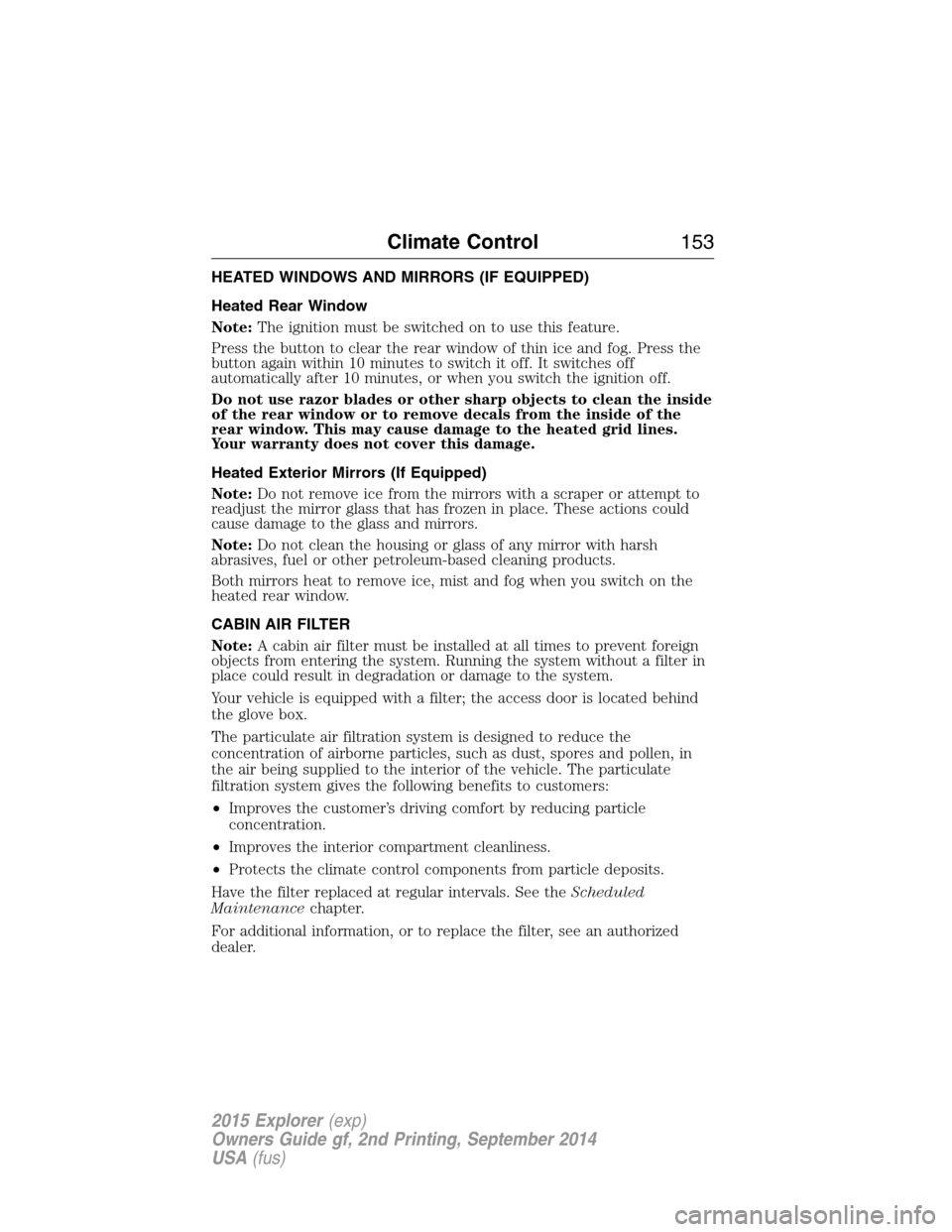
HEATED WINDOWS AND MIRRORS (IF EQUIPPED)
Heated Rear Window
Note:The ignition must be switched on to use this feature.
Press the button to clear the rear window of thin ice and fog. Press the
button again within 10 minutes to switch it off. It switches off
automatically after 10 minutes, or when you switch the ignition off.
Do not use razor blades or other sharp objects to clean the inside
of the rear window or to remove decals from the inside of the
rear window. This may cause damage to the heated grid lines.
Your warranty does not cover this damage.
Heated Exterior Mirrors (If Equipped)
Note:Do not remove ice from the mirrors with a scraper or attempt to
readjust the mirror glass that has frozen in place. These actions could
cause damage to the glass and mirrors.
Note:Do not clean the housing or glass of any mirror with harsh
abrasives, fuel or other petroleum-based cleaning products.
Both mirrors heat to remove ice, mist and fog when you switch on the
heated rear window.
CABIN AIR FILTER
Note:A cabin air filter must be installed at all times to prevent foreign
objects from entering the system. Running the system without a filter in
place could result in degradation or damage to the system.
Your vehicle is equipped with a filter; the access door is located behind
the glove box.
The particulate air filtration system is designed to reduce the
concentration of airborne particles, such as dust, spores and pollen, in
the air being supplied to the interior of the vehicle. The particulate
filtration system gives the following benefits to customers:
•Improves the customer’s driving comfort by reducing particle
concentration.
•Improves the interior compartment cleanliness.
•Protects the climate control components from particle deposits.
Have the filter replaced at regular intervals. See theScheduled
Maintenancechapter.
For additional information, or to replace the filter, see an authorized
dealer.
Climate Control153
2015 Explorer(exp)
Owners Guide gf, 2nd Printing, September 2014
USA(fus)
Page 195 of 596
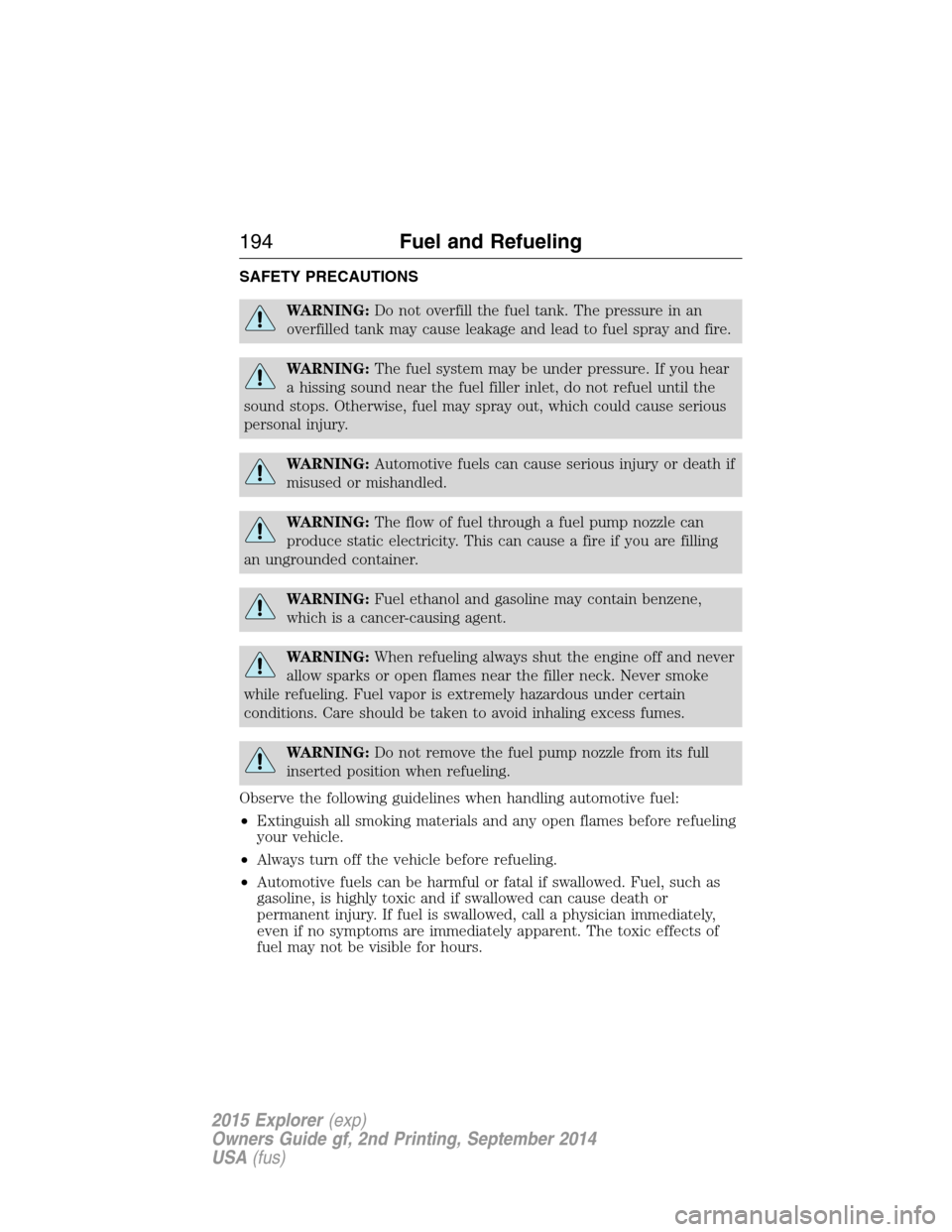
SAFETY PRECAUTIONS
WARNING:Do not overfill the fuel tank. The pressure in an
overfilled tank may cause leakage and lead to fuel spray and fire.
WARNING:The fuel system may be under pressure. If you hear
a hissing sound near the fuel filler inlet, do not refuel until the
sound stops. Otherwise, fuel may spray out, which could cause serious
personal injury.
WARNING:Automotive fuels can cause serious injury or death if
misused or mishandled.
WARNING:The flow of fuel through a fuel pump nozzle can
produce static electricity. This can cause a fire if you are filling
an ungrounded container.
WARNING:Fuel ethanol and gasoline may contain benzene,
which is a cancer-causing agent.
WARNING:When refueling always shut the engine off and never
allow sparks or open flames near the filler neck. Never smoke
while refueling. Fuel vapor is extremely hazardous under certain
conditions. Care should be taken to avoid inhaling excess fumes.
WARNING:Do not remove the fuel pump nozzle from its full
inserted position when refueling.
Observe the following guidelines when handling automotive fuel:
•Extinguish all smoking materials and any open flames before refueling
your vehicle.
•Always turn off the vehicle before refueling.
•Automotive fuels can be harmful or fatal if swallowed. Fuel, such as
gasoline, is highly toxic and if swallowed can cause death or
permanent injury. If fuel is swallowed, call a physician immediately,
even if no symptoms are immediately apparent. The toxic effects of
fuel may not be visible for hours.
194Fuel and Refueling
2015 Explorer(exp)
Owners Guide gf, 2nd Printing, September 2014
USA(fus)
Page 196 of 596
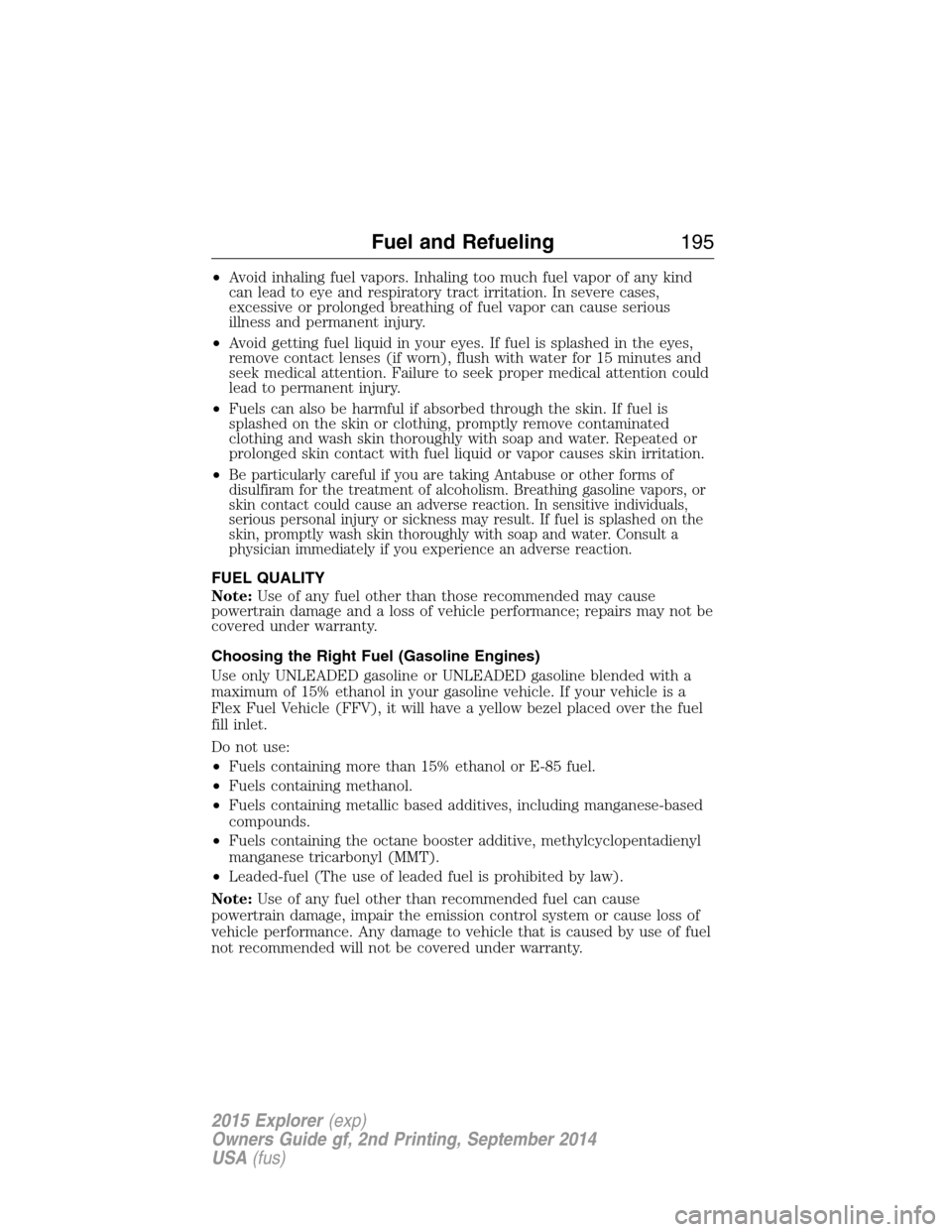
•Avoid inhaling fuel vapors. Inhaling too much fuel vapor of any kind
can lead to eye and respiratory tract irritation. In severe cases,
excessive or prolonged breathing of fuel vapor can cause serious
illness and permanent injury.
•Avoid getting fuel liquid in your eyes. If fuel is splashed in the eyes,
remove contact lenses (if worn), flush with water for 15 minutes and
seek medical attention. Failure to seek proper medical attention could
lead to permanent injury.
•Fuels can also be harmful if absorbed through the skin. If fuel is
splashed on the skin or clothing, promptly remove contaminated
clothing and wash skin thoroughly with soap and water. Repeated or
prolonged skin contact with fuel liquid or vapor causes skin irritation.
•
Be particularly careful if you are taking Antabuse or other forms of
disulfiram for the treatment of alcoholism. Breathing gasoline vapors, or
skin contact could cause an adverse reaction. In sensitive individuals,
serious personal injury or sickness may result. If fuel is splashed on the
skin, promptly wash skin thoroughly with soap and water. Consult a
physician immediately if you experience an adverse reaction.
FUEL QUALITY
Note:Use of any fuel other than those recommended may cause
powertrain damage and a loss of vehicle performance; repairs may not be
covered under warranty.
Choosing the Right Fuel (Gasoline Engines)
Use only UNLEADED gasoline or UNLEADED gasoline blended with a
maximum of 15% ethanol in your gasoline vehicle. If your vehicle is a
Flex Fuel Vehicle (FFV), it will have a yellow bezel placed over the fuel
fill inlet.
Do not use:
•Fuels containing more than 15% ethanol or E-85 fuel.
•Fuels containing methanol.
•Fuels containing metallic based additives, including manganese-based
compounds.
•Fuels containing the octane booster additive, methylcyclopentadienyl
manganese tricarbonyl (MMT).
•Leaded-fuel (The use of leaded fuel is prohibited by law).
Note:Use of any fuel other than recommended fuel can cause
powertrain damage, impair the emission control system or cause loss of
vehicle performance. Any damage to vehicle that is caused by use of fuel
not recommended will not be covered under warranty.
Fuel and Refueling195
2015 Explorer(exp)
Owners Guide gf, 2nd Printing, September 2014
USA(fus)
Page 197 of 596
Choosing the Right Fuel With a Flex Fuel Vehicle (If Equipped)
Use only UNLEADED gasoline or UNLEADED gasoline blended with a
maximum of 85% ethanol (E-85) in your Flex Fuel Vehicle (FFV). If
your vehicle is flex fuel capable, it will have a yellow bezel placed over
the fuel fill inlet
Do not use:
•fuels containing more than 85% ethanol or E-100 fuel
•fuels containing methanol
•fuels containing metallic based additives, including manganese-based
compounds
•fuels containing the octane booster additive, methylcyclopentadienyl
manganese tricarbonyl (MMT)
•leaded-fuel (The use of leaded fuel is prohibited by law)
Note:Use of any fuel other than recommended fuel can cause
powertrain damage, impair the emission control system or cause loss of
vehicle performance. Any damage to a vehicle that is caused by the use
of fuel not recommended will not be covered under warranty.
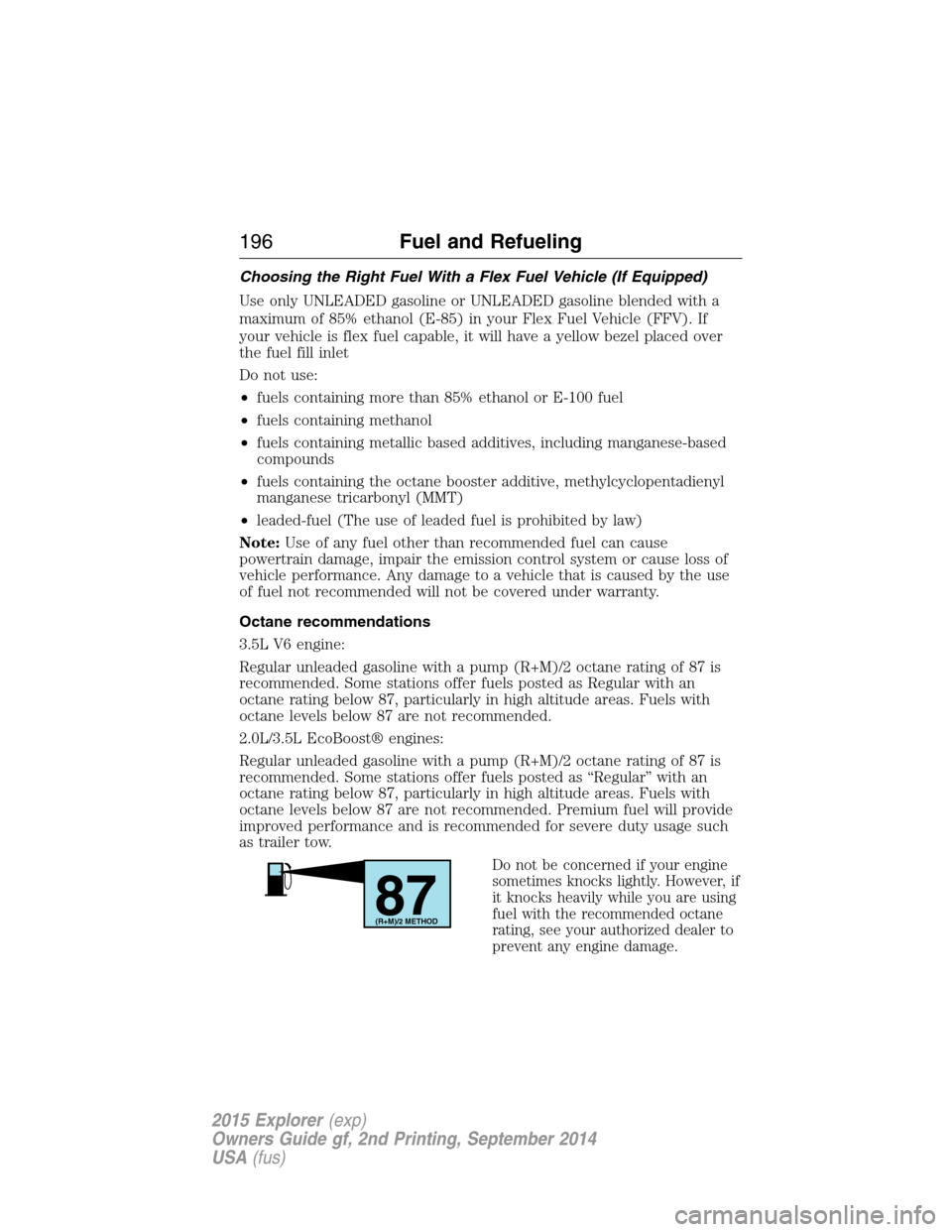
Octane recommendations
3.5L V6 engine:
Regular unleaded gasoline with a pump (R+M)/2 octane rating of 87 is
recommended. Some stations offer fuels posted as Regular with an
octane rating below 87, particularly in high altitude areas. Fuels with
octane levels below 87 are not recommended.
2.0L/3.5L EcoBoost® engines:
Regular unleaded gasoline with a pump (R+M)/2 octane rating of 87 is
recommended. Some stations offer fuels posted as “Regular” with an
octane rating below 87, particularly in high altitude areas. Fuels with
octane levels below 87 are not recommended. Premium fuel will provide
improved performance and is recommended for severe duty usage such
as trailer tow.
Do not be concerned if your engine
sometimes knocks lightly. However, if
it knocks heavily while you are using
fuel with the recommended octane
rating, see your authorized dealer to
prevent any engine damage.
87(R+M)/2 METHOD
196Fuel and Refueling
2015 Explorer(exp)
Owners Guide gf, 2nd Printing, September 2014
USA(fus)