2015 FORD EXPLORER fuel
[x] Cancel search: fuelPage 512 of 596
Traffic On Route and Traffic Nearby
Touch these buttons to identify traffic incidents on your route, nearby
your vehicle’s current location or near any of your favorite places, if
programmed.
Fuel Prices
Touch this button to view fuel prices at stations close to your vehicle’s
location or on an active navigation route.
Movie Listings
Touch this button to view nearby movie theaters and their show times, if
available.
Weather
Touch this button to view the nearby weather, current weather, or the
five day forecast for the chosen area. SelectMapto see the weather
map, which can show storms, radar information, charts and winds. Select
Areato select from a listing of weather locations.
Sports Info
Touch this button to view scores and schedules from a variety of sports.
You can also save up to 10 favorite teams for easier access. The score
automatically refreshes when a game is in progress.
Ski Conditions
Touch this button to view ski conditions for a specific area.
Sirius Travel Link Voice Commands
Note:In order to use Sirius Travel Link, your vehicle must be equipped
with navigation and your navigation SD card must be in the SD card slot.
Press the voice button on the steering wheel controls and, when
prompted, say any of the following:
Travel Link voice commands
“5–day weather forecast” “Sports scores”*
“Fuel prices” “Traffic”
“Movie listings” “Travel Link”**
MyFord Touch® (If Equipped)511
2015 Explorer(exp)
Owners Guide gf, 2nd Printing, September 2014
USA(fus)
Page 513 of 596
Travel Link voice commands
“Sports headlines”*“Weather”
“Sports schedule”*“Weather map”
*If you have said, “Sports headlines”, “Sports schedule” or “Sports
scores”, you may say any of the commands in the “Sports headlines,
Sports schedules and Sports scores” commands chart:
**If you have said, “Travel Link”, you may say any of the commands in
the “Travel Link” chart:
Sports headlines, sports schedules and sports scores voice commands
“Baseball” “My teams”
“College basketball” “NBA”
“College football” “NFL”
“Golf” “NHL”
“MLS” “WNBA”
“Motor sports”
“TRAVEL LINK”
“5–day weather forecast” “Golf schedule” “NBA scores”
“Baseball headlines” “MLS headlines” “NFL headlines”
“Baseball schedule” “MLS schedule” “NFL schedule”
“Baseball scores” “MLS scores” “NFL scores”
“College basketball
headlines”“Motor sports” “NHL headlines”
“College basketball
schedule”“Motor sports order” “NHL schedule”
“College basketball
scores”“Motor sports
schedule”“NHL scores”
“College football
headlines”“Movie listings” “Traffic”
“College football
schedule”“My team headlines” “Weather”
“College football scores” “My teams schedule” “Weather map”
“Fuel prices” “My teams scores” “WNBA headlines”
“Golf headlines” “NBA headlines” “WNBA schedule”
“Golf leaderboard” “NBA schedule” “WNBA scores”
512MyFord Touch® (If Equipped)
2015 Explorer(exp)
Owners Guide gf, 2nd Printing, September 2014
USA(fus)
Page 515 of 596
Note:Before setting this feature on, make sure that you read the 911
Assist privacy notice later in this section for important information.
Note:If any user turns 911 Assist on or off, that setting applies for all
paired phones. If 911 Assist is turned off, either a voice message plays or
a display message (or icon) comes on (or both) when your vehicle is
started after a previously paired phone connects.
Note:Every phone operates differently. While SYNC 911 Assist works
with most cellular phones, some may have trouble using this feature.
If a crash deploys an airbag (excludes knee airbags and rear inflatable
safety belts [if equipped]) or activates the fuel pump shut-off, your
SYNC-equipped vehicle may be able to contact emergency services by
dialing 911 through a paired and connected Bluetooth-enabled phone.
You can learn more about the 911 Assist feature, visit
www.SYNCMyRide.com, www.SYNCMyRide.ca or www.syncmaroute.ca.
•For information on airbag deployment, see theSupplementary
Restraints Systemchapter.
•For information on the fuel pump shut-off, see theRoadside
Emergencieschapter.
Setting 911 Assist On
If your vehicle is equipped with Navigation, touch the i
(Information) button to access these features. If your vehicle is
not equipped with Navigation, touch the corner of the
touchscreen with the green tab.
PressApps>911 Assist,>On.
You can also access 911 Assist by:
•Pressing the Settings icon >Settings>Phone>911
Assist,or
•Pressing the Settings icon >Help>911 Assist.
To Make Sure that 911 Assist Works Properly
•SYNC must be powered and working properly at the time of the
incident and throughout feature activation and use.
•The 911 Assist feature must be set on before the incident.
•You must pair and connect a Bluetooth-enabled and compatible phone
to SYNC.
•A connected Bluetooth-enabled phone must have the ability to make
and maintain an outgoing call at the time of the incident.
•A connected Bluetooth-enabled phone must have adequate network
coverage, battery power and signal strength.
514MyFord Touch® (If Equipped)
2015 Explorer(exp)
Owners Guide gf, 2nd Printing, September 2014
USA(fus)
Page 516 of 596
•The vehicle must have battery power and be located in the United
States, Canada or in a territory in which 911 is the emergency
number.
In the Event of a Crash
Not all crashes deploy an airbag or activate the fuel pump shut-off
(which would trigger 911 Assist); however, SYNC tries to contact
emergency services if 911 Assist triggers. If a connected phone sustains
damage or loses connection to SYNC, SYNC searches for, and tries to
connect to, any available previously paired phone and tries to make the
call to 911.
Before making the call:
•SYNC provides a short window of time (about 10 seconds) to cancel
the call. If you fail to cancel the call, SYNC attempts to dial 911.
•SYNC says the following, or a similar message: “SYNC will attempt to
call 911, to cancel the call, press Cancel on your screen or press and
hold the phone button on your steering wheel.”
If you do not cancel the call, and SYNC makes a successful call, a
pre-recorded message plays for the 911 operator, and then the
occupant(s) in your vehicle is able to talk with the operator. Be prepared
to provide your name, phone number and location immediately, because
not all 911 systems are capable of receiving this information
electronically.
911 Assist May Not Work If
•Your cellular phone or 911 Assist hardware sustains damage in a
crash.
•The vehicle’s battery or SYNC system has no power.
•The phones(s) previously paired or connected to the system are
thrown from the vehicle.
911 Assist Privacy Notice
When you turn on 911 Assist, it may disclose to emergency services that
your vehicle has been in a crash involving the deployment of an airbag or
activation of the fuel pump shut-off. Certain versions or updates to 911
Assist may also be capable of electronically or verbally disclosing to 911
operators your vehicle location or other details about your vehicle or
crash to assist 911 operators to provide the most appropriate emergency
services. If you do not want to disclose this information, do not turn the
feature on.
MyFord Touch® (If Equipped)515
2015 Explorer(exp)
Owners Guide gf, 2nd Printing, September 2014
USA(fus)
Page 535 of 596

Your navigation system is comprised of two main features, destination
mode and map mode.
To set a destination, press the green corner of your touchscreen, then
Destwhen it appears. SeeSetting a destinationlater in this chapter.
To view the navigation map and your vehicle’s current location, touch the
green bar in the upper right hand corner of the touchscreen, or, press
Dest>Map.SeeMap modelater in this chapter.
Setting a Destination
Press the green corner of your touchscreen, thenDestwhen it appears.
Choose any of the following:
Destination selections
My Home Street Address
Favorites Intersection
Previous Destinations City Center
Point of Interest Map
Emergency Edit Route Cancel Route
1. Enter the necessary information into the highlighted text fields (in
any order). For address destination entry,Go!appears once you
enter all the necessary information. PressingGo!makes the address
location appear on the map. If you choosePrevious Destination,
the last 20 destinations you have selected appear.
2. SelectSet as Destto make this your destination. You can also
choose to set this as a waypoint (have the system route to this point
on the way to your current destination) or save it as a favorite. The
system considers anyAvoid Areasselections in its route calculation.
3. Choose from up to three different types of routes, and then select
Start Route.
•Fastest Route:Uses the fastest moving roads possible.
•Shortest Route:Uses the shortest distance possible.
•Eco Route:Uses the most fuel-efficient route.
You can cancel the route or have the system demo the route for you.
SelectRoute Prefsto set route preferences like avoiding freeways,
tollroads, ferries and car trains as well as to use or not use
high-occupancy vehicle lanes. (High-occupancy vehicle lanes are also
known as carpool or diamond lanes. People who ride in buses, vanpools
or carpools use these lanes.)
Note:If your vehicle is on a recognized road and you do not press the
Start Routebutton, the system defaults to theFastest Routeoption
and begins guidance.
534MyFord Touch® (If Equipped)
2015 Explorer(exp)
Owners Guide gf, 2nd Printing, September 2014
USA(fus)
Page 587 of 596
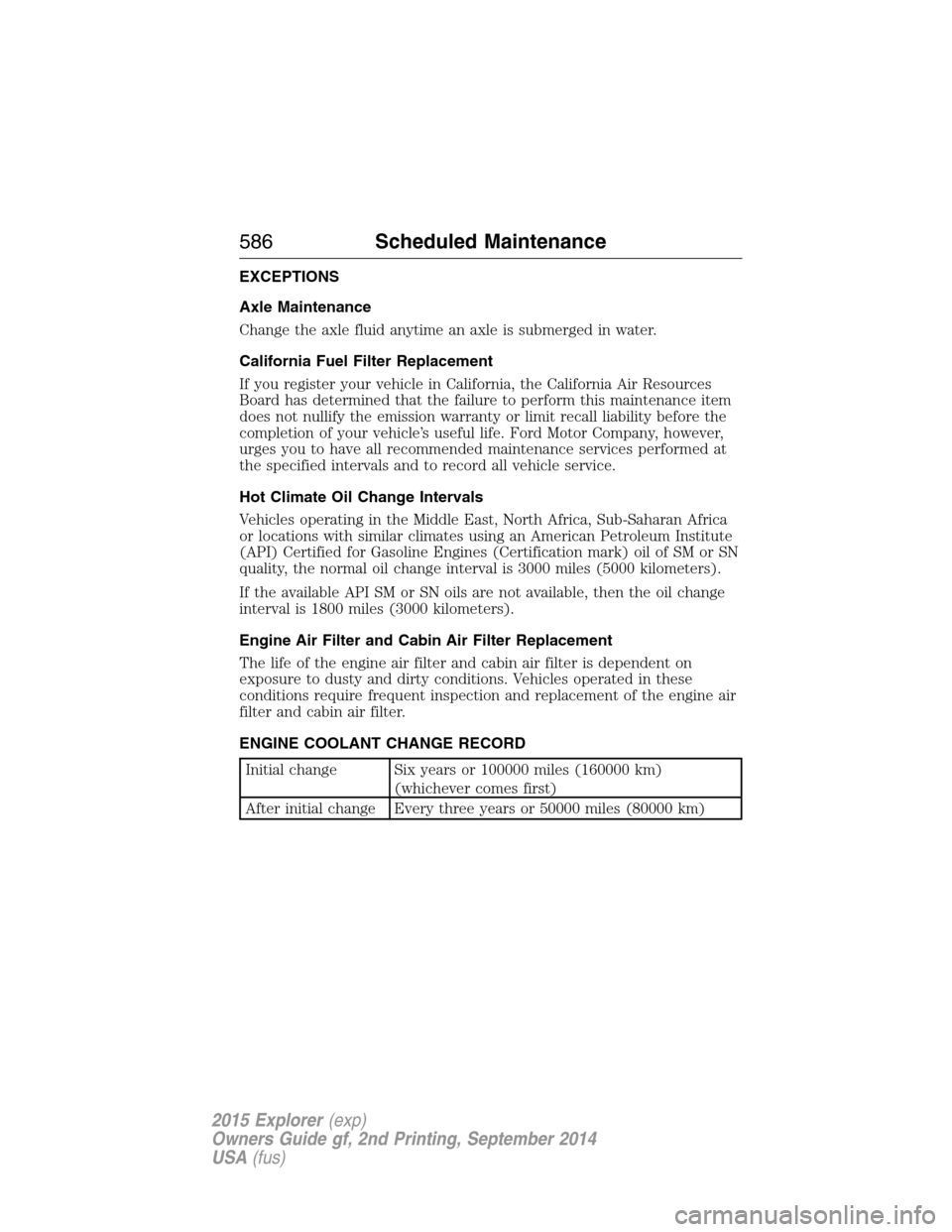
EXCEPTIONS
Axle Maintenance
Change the axle fluid anytime an axle is submerged in water.
California Fuel Filter Replacement
If you register your vehicle in California, the California Air Resources
Board has determined that the failure to perform this maintenance item
does not nullify the emission warranty or limit recall liability before the
completion of your vehicle’s useful life. Ford Motor Company, however,
urges you to have all recommended maintenance services performed at
the specified intervals and to record all vehicle service.
Hot Climate Oil Change Intervals
Vehicles operating in the Middle East, North Africa, Sub-Saharan Africa
or locations with similar climates using an American Petroleum Institute
(API) Certified for Gasoline Engines (Certification mark) oil of SM or SN
quality, the normal oil change interval is 3000 miles (5000 kilometers).
If the available API SM or SN oils are not available, then the oil change
interval is 1800 miles (3000 kilometers).
Engine Air Filter and Cabin Air Filter Replacement
The life of the engine air filter and cabin air filter is dependent on
exposure to dusty and dirty conditions. Vehicles operated in these
conditions require frequent inspection and replacement of the engine air
filter and cabin air filter.
ENGINE COOLANT CHANGE RECORD
Initial change Six years or 100000 miles (160000 km)
(whichever comes first)
After initial change Every three years or 50000 miles (80000 km)
586Scheduled Maintenance
2015 Explorer(exp)
Owners Guide gf, 2nd Printing, September 2014
USA(fus)
Page 591 of 596

Dipstick
automatic transmission
fluid ..........................................322
engine oil .................................315
Display settings .........................519
Driver alert ................................248
Driving under special
conditions ..................211, 214, 216
sand .........................................215
snow and ice ...........................217
through water .................216, 284
Dual automatic temperature
control (DATC) .................146, 148
E
Electronic message center .......123
Electronic stability control ......224
Emergencies, roadside
jump-starting ..........................289
running out of fuel .................197
Emergency brake
(see Parking brake) ..................220
Emission control system ..........202
End user license agreement ....552
Engine ........................................384
cleaning ...................................343
coolant .....................................316
fail-safe cooling .......................320
idle speed control ...................327
lubrication specifications .......386
refill capacities ........................386
service points ..................312–314
Engine block heater .................192
Engine oil
checking and adding ..............315
dipstick ....................................315
filter, specifications ................391refill capacities ........................386
specifications ..........................386
Event data recording ..................13
Exhaust fumes ..........................192
F
Fail safe cooling ........................320
Fleet MyKey programming ........69
Floor mats .................................284
Fluid capacities .........................386
Fuel
cap ...........................................199
capacity ...................................386
choosing the right fuel ...195–196
filler funnel .............................197
filling your vehicle with fuel ..199
filter, specifications ........327, 391
fuel pump shut-off ..................288
octane rating ...........................384
quality ......................................195
running out of fuel .................197
safety information relating to
automotive fuels .....................194
Fuel and distance computer ....127
outside temperature
indicator ..................................127
to empty indicator ..................127
trip distance ............................127
trip/reset button .....................127
Fuel - flex fuel vehicle
(FFV) .........................................196
Fuses ..................................300, 306
G
Garage door opener ..................177
Gas cap (see Fuel cap) ............199
590Index
2015 Explorer(exp)
Owners Guide gf, 2nd Printing, September 2014
USA(fus)