2015 FORD EXPLORER keyless
[x] Cancel search: keylessPage 189 of 596
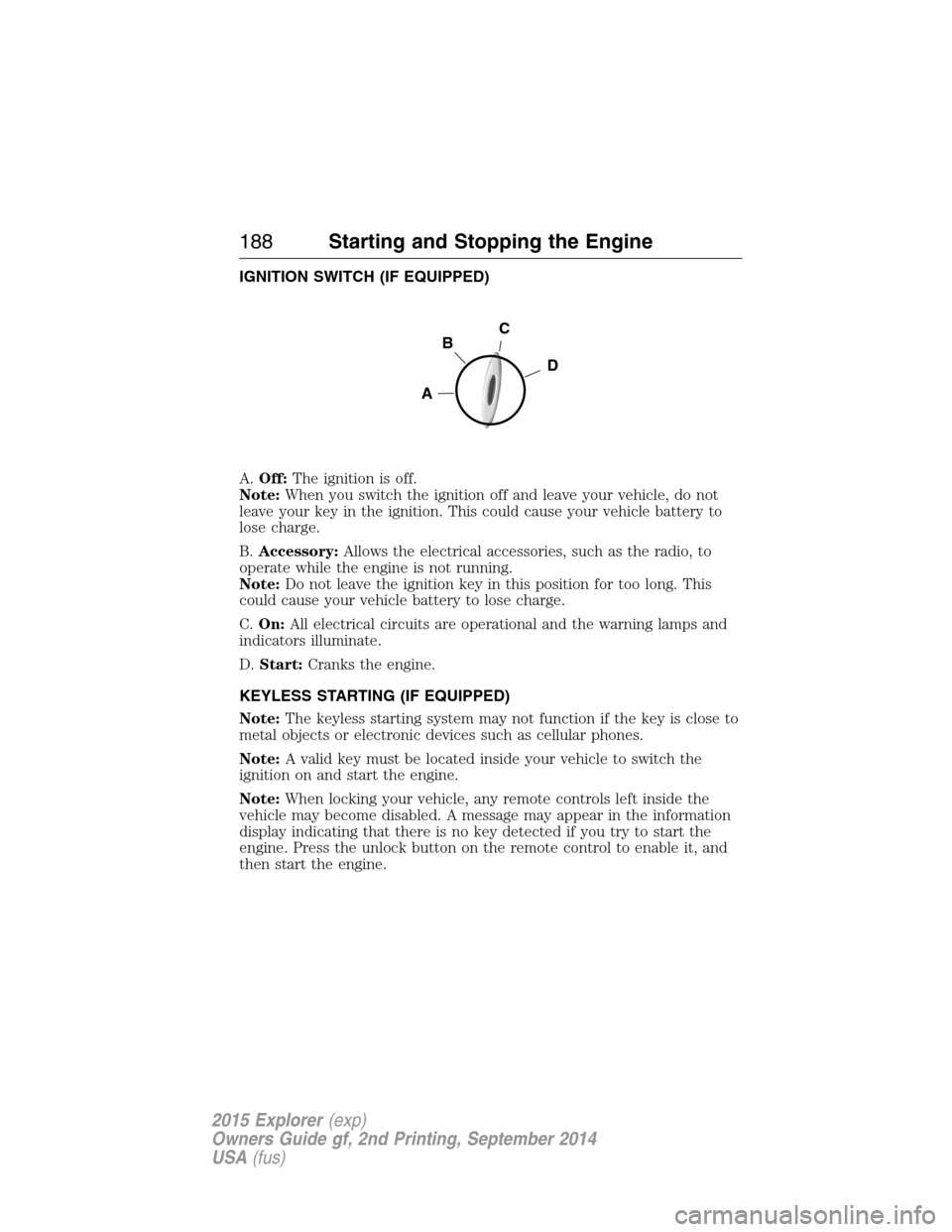
IGNITION SWITCH (IF EQUIPPED)
A.Off:The ignition is off.
Note:When you switch the ignition off and leave your vehicle, do not
leave your key in the ignition. This could cause your vehicle battery to
lose charge.
B.Accessory:Allows the electrical accessories, such as the radio, to
operate while the engine is not running.
Note:Do not leave the ignition key in this position for too long. This
could cause your vehicle battery to lose charge.
C.On:All electrical circuits are operational and the warning lamps and
indicators illuminate.
D.Start:Cranks the engine.
KEYLESS STARTING (IF EQUIPPED)
Note:The keyless starting system may not function if the key is close to
metal objects or electronic devices such as cellular phones.
Note:A valid key must be located inside your vehicle to switch the
ignition on and start the engine.
Note:When locking your vehicle, any remote controls left inside the
vehicle may become disabled. A message may appear in the information
display indicating that there is no key detected if you try to start the
engine. Press the unlock button on the remote control to enable it, and
then start the engine.
C
D
B
A
188Starting and Stopping the Engine
2015 Explorer(exp)
Owners Guide gf, 2nd Printing, September 2014
USA(fus)
Page 191 of 596
Before starting the engine check the following:
•Make sure all occupants have fastened their safety belts.
•Make sure the headlamps and electrical accessories are off.
•Make sure the parking brake is on.
•Make sure the gearshift is in positionP.
•Turn the ignition key to the on position. If your vehicle is equipped
with a keyless ignition, see the following instructions.
Vehicles with an Ignition Key
Note:Do not touch the accelerator pedal.
1. Fully press the brake pedal.
2. Turn the key to the start position. Release the key when the engine
starts.
Note:The engine may continue cranking for up to 15 seconds or until it
starts.
Note:If you cannot start the engine on the first try, wait for a short
period and try again.
Vehicles with Keyless Start
Note:Do not touch the accelerator pedal.
1. Fully press the brake pedal.
2. Press the button.
The system does not function if:
•The key frequencies are jammed.
•The key battery has no charge.
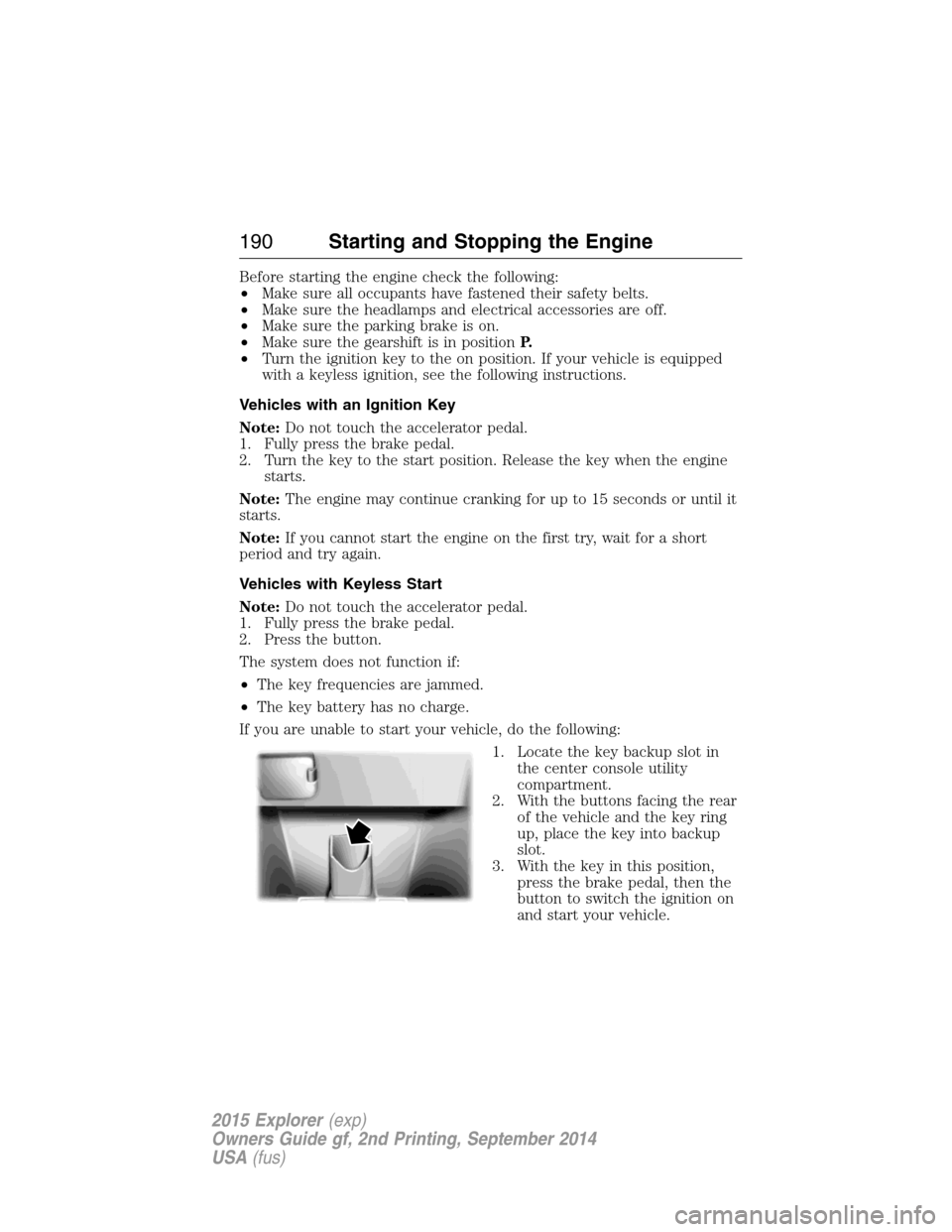
If you are unable to start your vehicle, do the following:
1. Locate the key backup slot in
the center console utility
compartment.
2. With the buttons facing the rear
of the vehicle and the key ring
up, place the key into backup
slot.
3. With the key in this position,
press the brake pedal, then the
button to switch the ignition on
and start your vehicle.
190Starting and Stopping the Engine
2015 Explorer(exp)
Owners Guide gf, 2nd Printing, September 2014
USA(fus)
Page 192 of 596
Fast Restart (Vehicles with Keyless Start)
The fast restart feature allows you to restart the engine within
20 seconds of switching it off, even if a valid key is not present.
Within 20 seconds of switching the engine off, press the brake pedal and
press the button. After 20 seconds have expired, you can no longer start
the engine without the key present inside your vehicle.
Once the engine has started, it remains running until you press the
button, even if the system does not detect a valid key. If you open and
close a door while the engine is running, the system searches for a valid
key. You cannot start the engine if the system does not detect a valid key
within 20 seconds.
Failure to Start
If you cannot start the engine after three attempts, wait 10 seconds and
follow this procedure:
1. Fully press the brake pedal.
2. Fully press the accelerator pedal and hold it there.
3. Start the engine.
Stopping the Engine When Your Vehicle is Stationary
1. Move the transmission selector lever to positionP.
2. If your vehicle has an ignition key, turn the key to the off position. If
your vehicle has a keyless start system, press the button once.
3. Apply the parking brake.
Note:This switches off the ignition, all electrical circuits, warning lamps
and indicators.
Stopping the Engine When Your Vehicle is Moving
WARNING:Switching off the engine when the vehicle is still
moving will result in a loss of brake and steering assistance. The
steering will not lock, but higher effort will be required. When the
ignition is switched off, some electrical circuits, including air bags,
warning lamps and indicators may also be off. If the ignition was turned
off accidentally, you can shift into Neutral and restart the engine.
1.If your vehicle has an ignition key,move the transmission
selector lever to positionNand use the brakes to bring your vehicle
to a safe stop. When your vehicle has stopped, move the transmission
selector lever to positionPand turn the key to the off position.
Starting and Stopping the Engine191
2015 Explorer(exp)
Owners Guide gf, 2nd Printing, September 2014
USA(fus)
Page 193 of 596
2.If your vehicle has a keyless start system,move the transmission
selector lever to positionNand use the brakes to bring your vehicle
to a safe stop. When your vehicle has stopped, move the transmission
selector lever to positionPand switch the ignition off by pressing
and holding the button for one second, or pressing it three times
within two seconds.
3. Apply the parking brake.
Guarding Against Exhaust Fumes
WARNING:If you smell exhaust fumes inside your vehicle, have
this checked immediately. Do not drive your vehicle if you smell
exhaust fumes. Carbon monoxide is present in exhaust fumes. Take
precautions to avoid its dangerous effects.
Important Ventilating Information
If you stop your vehicle and leave the engine idling for long periods, we
recommend that you do one of the following:
•Open the windows at least 1 inch (2.5 centimeters).
•Set your climate control to outside air.
ENGINE BLOCK HEATER (IF EQUIPPED)
WARNING:Failure to follow engine block heater instructions
could result in property damage or personal injury.
WARNING:Do not use your heater with ungrounded electrical
systems or two-pronged (cheater) adapters. There is a risk of
electrical shock.
Note:The heater is most effective when outdoor temperatures are below
0°F (-18°C).
The heater acts as a starting aid by warming the engine coolant. This
allows the climate control system to respond quickly. The equipment
includes a heater element (installed in the engine block) and a wire
harness. You can connect the system to a grounded 120–volt A/C
electrical source.
192Starting and Stopping the Engine
2015 Explorer(exp)
Owners Guide gf, 2nd Printing, September 2014
USA(fus)
Page 198 of 596
RUNNING OUT OF FUEL
Avoid running out of fuel because this situation may have an adverse
effect on powertrain components.
If you have run out of fuel:
•You may need to cycle the ignition from off to on several times after
refueling to allow the fuel system to pump the fuel from the tank to
the engine. On restarting, crank time will be a few seconds longer
than normal. With keyless ignition, just start the engine. Crank time
will be longer than usual.
•Normally, adding 1 gallon (3.8 liters) of fuel is enough to restart the
engine. If the vehicle is out of fuel and on a steep grade, more than
1 gallon (3.8 liters) may be required.
•The service engine soon indicator may come on. For more information
on the service engine soon indicator, seeWarning Lamps and
Indicatorsin theInstrument Clusterchapter.
Refilling with a Portable Fuel Container
WARNING:Do not insert the nozzle of a portable fuel container
or aftermarket funnel into the capless fuel system. This could
damage the fuel system and its seal, and may cause fuel to run onto the
ground instead of filling the tank, which could result in serious personal
injury.
WARNING:Do not try to pry open or push open the capless fuel
system with foreign objects. This could damage the fuel system
and its seal and cause injury to you or others.
Note:Do not use aftermarket funnels; they will not work with the
capless fuel system and can damage it. The included funnel has been
specially designed to work safely with your vehicle.
When filling the vehicle’s fuel tank from a portable fuel container, use the
funnel included with the vehicle.
1. Locate the white plastic funnel in the spare tire compartment.
Fuel and Refueling197
2015 Explorer(exp)
Owners Guide gf, 2nd Printing, September 2014
USA(fus)
Page 396 of 596
Peace of mind
•Keyless entry keypad
•Cargo shade
•Vehicle security systems
•Locking gas plug
•Wheel locks
•Remote start
•Parking sensors*
*The accessory manufacturer designs, develops and therefore warrants
Ford Licensed Accessories, and does not design or test these accessories
to Ford Motor Company engineering requirements. Contact an
authorized Ford dealer for the manufacturer’s limited warranty details,
and request a copy of the Ford Licensed Accessories product limited
warranty from the accessory manufacturer.
For maximum vehicle performance, keep the following information in
mind when adding accessories or equipment to your vehicle:
•When adding accessories, equipment, passengers and luggage to your
vehicle, do not exceed the total weight capacity of the vehicle or of
the front or rear axle (GVWR or GAWR as indicated on the Safety
Compliance Certification label). Ask an authorized dealer for specific
weight information.
•The Federal Communications Commission (FCC) and Canadian Radio
Telecommunications Commission (CRTC) regulate the use of mobile
communications systems that are equipped with radio transmitters, for
example, two-way radios, telephones and theft alarms. Any such
equipment installed in your vehicle should comply with Federal
Communications Commission (FCC) and Canadian Radio
Telecommunications Commission (CRTC) regulations and should be
installed only by an authorized dealer.
•An authorized dealer needs to install mobile communications systems.
Improper installation may harm the operation of your vehicle,
particularly if the manufacturer did not design the mobile
communication system specifically for automotive use.
•
If you or an authorized Ford dealer add any non-Ford electrical or
electronic accessories or components to your vehicle, you may adversely
affect battery performance and durability. In addition, you may also
adversely affect the performance of other electrical systems in the vehicle.
Accessories395
2015 Explorer(exp)
Owners Guide gf, 2nd Printing, September 2014
USA(fus)
Page 522 of 596
Door Keypad Code
To change the keypad code for your keyless entry keypad system:
1. Press the Settings icon >Vehicle>Door Keypad Code.
2. Enter your current factory code, then, when prompted, enter your
new code.
Camera Settings
This menu allows you to access settings for your rear view camera.
Press the Settings icon >Vehicle>Camera Settings,then select from
the following settings:
•Enhanced Park Aids.
•Rear Camera Delay.
Enable Valet Mode
Valet mode allows you to lock the system. No information is accessible
until the system is unlocked with the correct PIN.
1. Press the Settings icon >Vehicle>Enable Valet Mode.
2. Enter a four-digit pin twice, as prompted.
After you press Continue, the system locks until you enter the PIN again.
Note:If the system locks, and you need to reset the PIN, enter 3681 and
the system unlocks.
Settings
Access and adjust system settings, voice features, as well as phone,
navigation and wireless settings.
System
Press the Settings icon >Settings>System,then select from
the following:
System
LanguageSelect to have the touchscreen display in
English, Spanish or French.
DistanceSelect to display units in kilometers or miles.
TemperatureSelect to display units in Celsius or
Fahrenheit.
System Prompt
VolumeAdjust the volume of voice prompts from the
system.
Touch Screen Button
BeepSelect to have the system beep to confirm
choices made through the touchscreen.
MyFord Touch® (If Equipped)521
2015 Explorer(exp)
Owners Guide gf, 2nd Printing, September 2014
USA(fus)
Page 592 of 596
Gauges ...............................115–116
odometer .................................127
trip odometer ..........................127
H
Hazard flashers .........................288
HD Radio™ ...............................481
Headlamps
aiming ......................................333
bulb specifications ..................339
flash to pass ..............................98
high beam .........................98, 101
Head restraints .........................156
Heated steering wheel ..............530
Heating ......................144, 146, 148
Help ............................................529
Hill descent mode .....................226
Hill start assist ..........................221
Homelink wireless control
system ........................................177
Hood ..........................................311
How to use voice commands ...475
I
Ignition ...............................188, 384
Illuminated visor mirror ...112–113
Information displays .................123
Inspection/maintenance (I/M)
testing ........................................204
Instrument panel
cleaning ...................................345
cluster ......................................117
Intelligent Access Key ................63J
Jack ............................................375
positioning ...............................375
storage .....................................375
Joining two calls
(multiparty/conference call) ....425
Jump-starting your vehicle ......289
K
Keyless entry system
autolock .....................................76
keypad .......................................82
locking and unlocking doors ....84
programming entry code .........82
Keys .......................................63, 85
positions of the ignition .........188
L
Lamps
bulb replacement
specifications chart ................339
headlamps, flash to pass ..........98
interior lamps .................104–105
Lane keeping system ................250
LATCH anchors ...........................31
Liftgate ............................74, 78–79
Lights, warning and indicator ..117
Listening to music ....................478
Loading instructions .................272
Load limits .................................265
Locks
autolock .....................................76
childproof ..................................37
doors ..........................................73
Lubricant specifications ...........386
Index591
2015 Explorer(exp)
Owners Guide gf, 2nd Printing, September 2014
USA(fus)