2015 DODGE CHARGER SRT warning
[x] Cancel search: warningPage 317 of 429
WARNING!
ALWAYS drive safely and obey all applicable
laws. You should only use Uconnect® features
when it is safe to do so. Failure to do so may result
in an accident involving serious injury or death.
The Uconnect® Phone is driven through your
Bluetooth® “Hands-Free Profile” mobile phone.
Uconnect® features Bluetooth® technology - the global
standard that enables different electronic devices to con-
nect to each other without wires or a docking station, so
Uconnect® Phone works no matter where you stow your
mobile phone (be it your purse, pocket, or briefcase), as
long as your phone is turned on and has been paired to
the vehicle’s Uconnect® Phone. The Uconnect® Phone
allows up to ten mobile phones or audio devices to be
linked to the system. Only one linked (or paired) mobile
phone and one audio device can be used with the system
at a time.
Uconnect® Phone Button
The Uconnect® Phonebutton on your steering
wheel is used to get into the phone mode
and make calls, show recent, incoming, out-
going calls, view phonebook etc., When you
press the button you will hear a BEEP. The
beep is your signal to give a command.
Uconnect® Voice Command Button
The Uconnect® Voice Commandbutton on your
steering wheel is only used for “barge in”
and when you are already in a call and you
want to send Tones or make another call.
Thebutton on your steering wheel is also used to
access the Voice Commands for the Uconnect® Voice
Command features if your vehicle is equipped. Please
see the Uconnect® Voice Command section for direc-
tion on how to use thebutton.
316 Uconnect® 8.4AN — If Equipped
Page 335 of 429
Even though international dialing for most number com-
binations is supported, some shortcut dialing number
combinations may not be supported.
Far End Audio Performance
Audio quality is maximized under:
•Low-To-Medium Blower Setting
•Low-To-Medium Vehicle Speed
•Low Road Noise
•Smooth Road Surface
•Fully Closed Windows
•Dry Weather Conditions
•Operation From The Driver’s Seat
Performance such as audio clarity, echo, and loudness to
a large degree rely on the phone and network, and not
the Uconnect® Phone.
Echo at the far end can sometimes be reduced by
lowering the in-vehicle audio volume.
In a convertible vehicle, system performance may be
compromised with the convertible top down.
Voice Text Reply
WARNING!
ALWAYS drive safely and obey all applicable
laws. You should only use Uconnect® features
when it is safe to do so. Failure to do so may result
in an accident involving serious injury or death.
334 Uconnect® 8.4AN — If Equipped
Page 337 of 429
Voice Texting (Must Be Registered With Uconnect®
Access And Have A Current Subscription, U.S.
Residents Only)
WARNING!
ALWAYS drive safely and obey all applicable
laws. You should only use Uconnect® features
when it is safe to do so. Failure to do so may result
in an accident involving serious injury or death.
Want to dictate a personal message? Register with
Uconnect® Access to take advantage of a new, cloud-
based Voice Texting service, an enhancement to Voice
Text Reply.
Voice Texting allows you to compose a new text or reply
to an incoming text message. Before you attempt to use
the Voice Texting feature, check to ensure you have the
following:
1. A Paired, Bluetooth® enabled phone with the Message
Access Profile (MAP). Not all Bluetooth® enabled
phones support MAP. VisitUconnectPhone.comfor
system and device compatibility information.
2. An active Uconnect® Access trial or paid subscription.
Press the “Apps” button on the lower right hand
corner of the touchscreen to begin the registration
process.
3. Accept the Allow MAP profile request on your smart
phone. (Please refer to device manufacturer instruc-
tions for details).
336 Uconnect® 8.4AN — If Equipped
Page 382 of 429
View Map — Settings
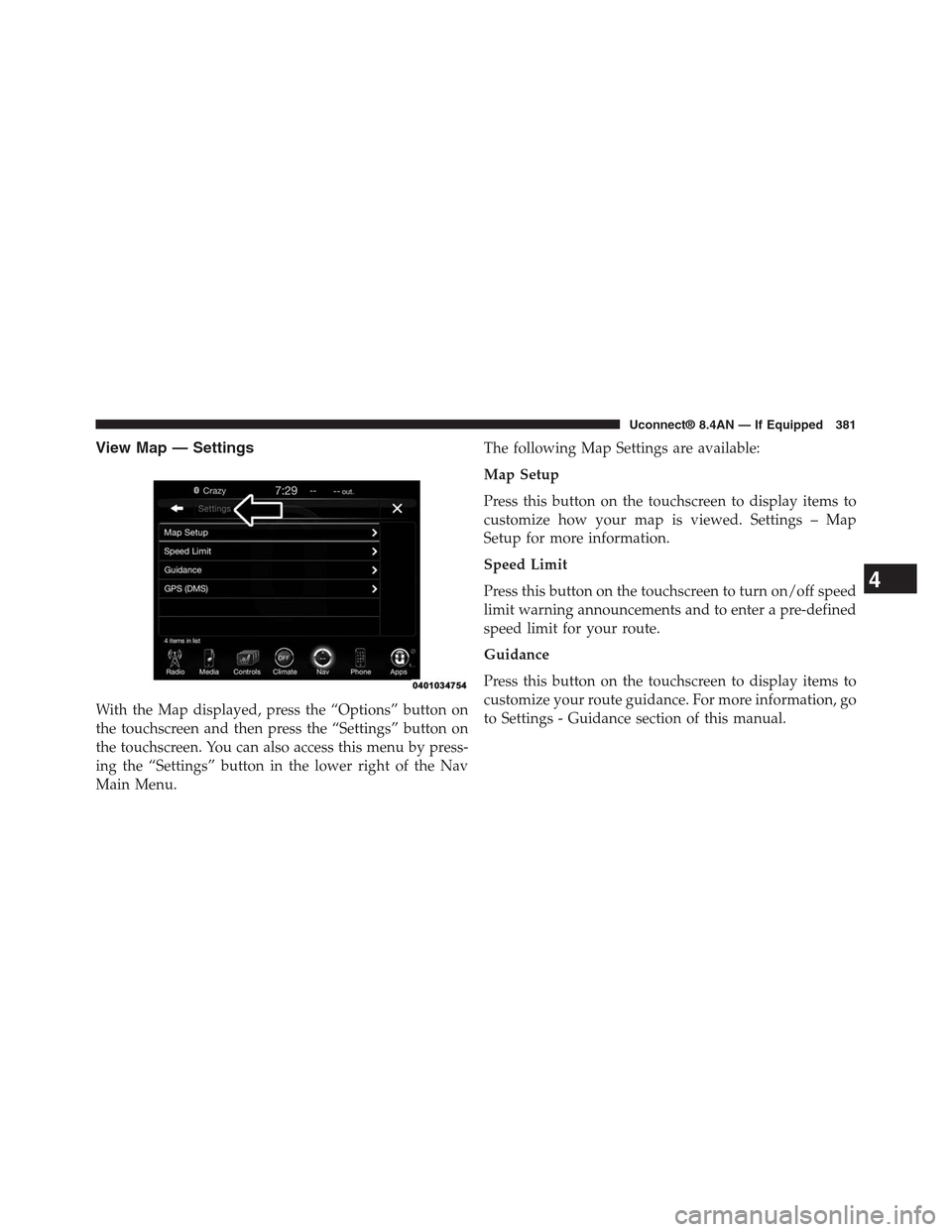
With the Map displayed, press the “Options” button on
the touchscreen and then press the “Settings” button on
the touchscreen. You can also access this menu by press-
ing the “Settings” button in the lower right of the Nav
Main Menu.
The following Map Settings are available:
Map Setup
Press this button on the touchscreen to display items to
customize how your map is viewed. Settings – Map
Setup for more information.
Speed Limit
Press this button on the touchscreen to turn on/off speed
limit warning announcements and to enter a pre-defined
speed limit for your route.
Guidance
Press this button on the touchscreen to display items to
customize your route guidance. For more information, go
to Settings - Guidance section of this manual.
4
Uconnect® 8.4AN — If Equipped 381
Page 404 of 429
WARNING!
If anyone in the vehicle could be in danger (e.g.,
fire or smoke is visible, dangerous road conditions
or location), do not wait for voice contact from a
9-1-1 operator. All occupants should exit the ve-
hicle immediately and move to a safe location.
WARNING!
Do not add any aftermarket electrical equipment to
the vehicle’s electrical system. This may prevent your
vehicle from sending a signal to initiate an emer-
gency call. To avoid interference that can cause the
9-1-1 Call system to fail, never add aftermarket
equipment (e.g., two way mobile radio, CB radio,
data recorder, etc.) to your vehicle’s electrical system
or modify the antennas on your vehicle.
9-1-1 Call System Limitations
Vehicles sold in Canada and Mexico DO NOT have 9-1-1
Call system capabilities.
9-1-1 or other emergency line operators in Canada and
Mexico may not answer or respond to 9-1-1 system calls.
If the 9-1-1 Call system detects a malfunction, any of the
following may occur at the time the malfunction is
detected, and at the beginning of each ignition cycle:
•The Rearview Mirror light will continuously be illu-
minated red.
•The Phone Screen will display the following message
“Vehicle phone requires service. Please contact your
dealer.”
•An In-Vehicle Audio message will state “Vehicle phone
requires service. Please contact your dealer.”
4
Uconnect® 8.4AN — If Equipped 403
Page 405 of 429
WARNING!
•Ignoring the Rearview Mirror light could mean you
may not have 9-1-1 Call capability if needed. If the
Rearview Mirror light is illuminated, have an au-
thorized dealer service the 9-1-1 Call system imme-
diately.
•The Occupant Restraint Controller (ORC) turns on
the Air Bag Warning Light on the instrument panel
if a malfunction is detected in any part of the air
bag system. If the Air Bag Warning Light is illumi-
nated, the air bag system may not be working
properly and the 9-1-1 system may not be able to
send a signal to a 9-1-1 operator. If the Air Bag
Warning Light is illuminated, have an authorized
dealer service your vehicle immediately.
Even if the 9-1-1 Call system is fully functional, factors
beyond Chrysler Group LLC’s control may prevent or
stop 9-1-1 Call system operation. These include, but are
not limited to, the following factors:
•The ignition key has been removed from the ignition
and the delayed accessories mode is active.
•The ignition key is in OFF position.
•The vehicle’s electrical systems are not intact.
•The 9-1-1 Call system software and/or hardware are
damaged during a crash.
•The vehicle battery loses power or becomes discon-
nected during a vehicle crash.
•Wireless and/or Global Positioning Satellite signals
are unavailable or obstructed.
•Equipment malfunction at the 9-1-1 operator facility.
404 Uconnect® 8.4AN — If Equipped
Page 406 of 429
•Operator error by the 9-1-1 operator.
•Wireless network congestion.
•Weather.
•Buildings, structures, geographic terrain, or tunnels.
WARNING!
Never place anything on or near the vehicle’s
wireless and GPS antennas. You could prevent
wireless and GPS signal reception, which can
prevent your vehicle from placing an emergency
call. Wireless and GPS signal reception is required
for the 9-1-1 Call system to function properly.
WARNING!
Failure to perform scheduled maintenance and
regularly inspect your vehicle may result in ve-
hicle damage and/or serious injury.
General Information
This device complies with Part 15 of the FCC Rules.
Operation is subject to the following two conditions: (1)
This device may not cause harmful interference, and (2)
this device must accept any interference received, includ-
ing interference that may cause undesired operation.
REMOTE SERVICE FEATURES
If your vehicle is equipped with Remote Service Features,
for more information, refer tomoparownerconnect.com
or call 855-792-4241 for U.S. residents and 855-209-8317
for Canadian residents.
4
Uconnect® 8.4AN — If Equipped 405
Page 425 of 429
SAFETY GUIDELINES
WARNING!
ALWAYS drive safely with your hands on the
steering wheel. You have full responsibility and
assume all risks related to the use of the
Uconnect® features and applications in this ve-
hicle. Only use Uconnect® when it is safe to do so.
Failure to do so may result in an accident involv-
ing serious injury or death.
Ensure that all persons read this manual carefully before
using the system. It contains instructions on how to use
the system in a safe and effective manner.
Please read and follow these safety precautions. Failure
to do so may result in injury or property damage.
•Glance at the screen only when safe to do so. If
prolonged viewing of the screen is necessary, park in a
safe location and set the parking brake.
•Stop use immediately if a problem occurs. Failure to
do so may cause injury or damage to the product.
Return it to your authorized dealer for repair.
•Make certain that the volume level of the system is set
to a level that still allows you to hear outside traffic
and emergency vehicles.
Safe Usage of the Uconnect® Access System
•Read all instructions in this manual carefully before
using your system to ensure proper usage!
•Your system is a sophisticated electronic device. Do
not let young children use your system.
424 SAFETY GUIDELINES