Page 292 of 429
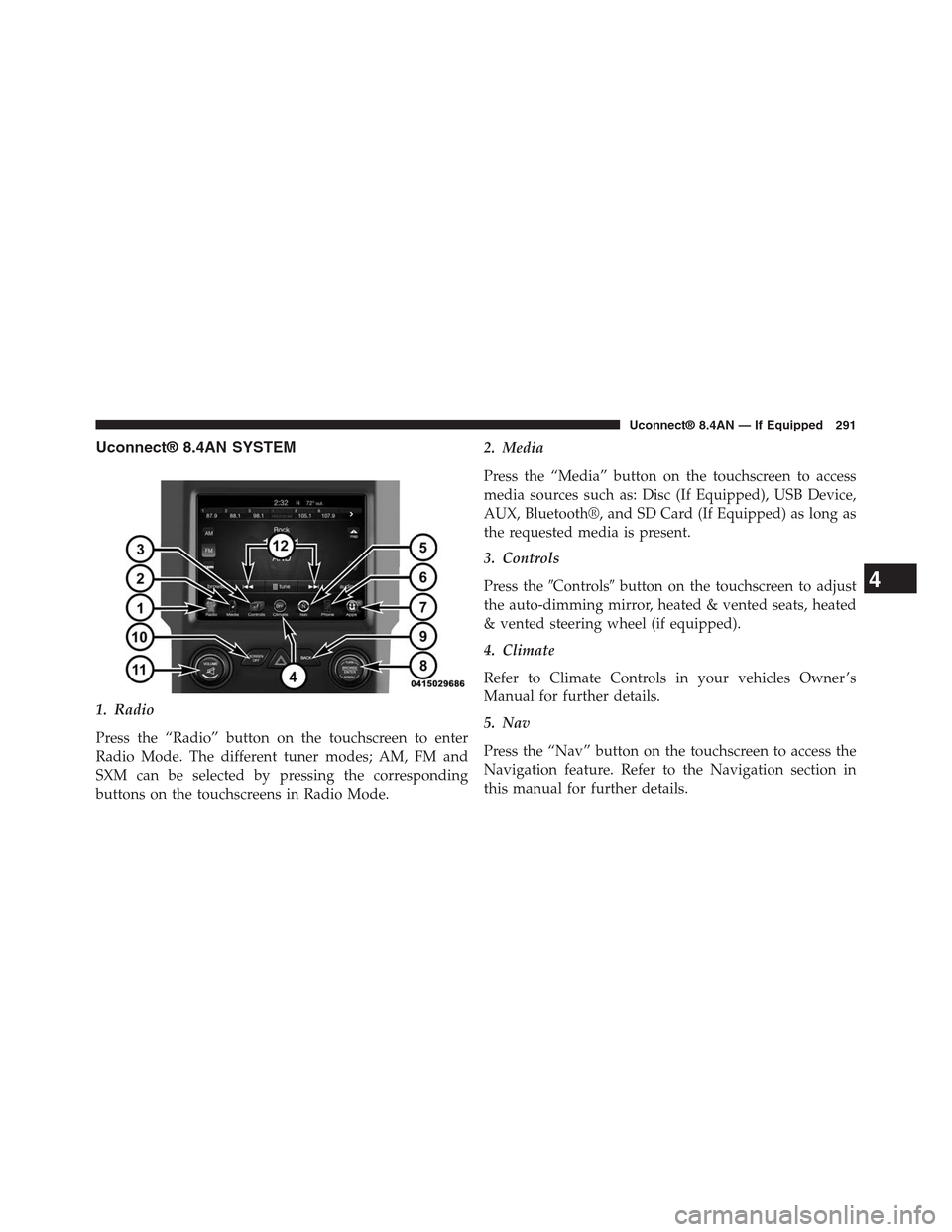
Uconnect® 8.4AN SYSTEM
1. Radio
Press the “Radio” button on the touchscreen to enter
Radio Mode. The different tuner modes; AM, FM and
SXM can be selected by pressing the corresponding
buttons on the touchscreens in Radio Mode.
2. Media
Press the “Media” button on the touchscreen to access
media sources such as: Disc (If Equipped), USB Device,
AUX, Bluetooth®, and SD Card (If Equipped) as long as
the requested media is present.
3. Controls
Press the#Controls#button on the touchscreen to adjust
the auto-dimming mirror, heated & vented seats, heated
& vented steering wheel (if equipped).
4. Climate
Refer to Climate Controls in your vehicles Owner ’s
Manual for further details.
5. Nav
Press the “Nav” button on the touchscreen to access the
Navigation feature. Refer to the Navigation section in
this manual for further details.
4
Uconnect® 8.4AN — If Equipped 291
Page 310 of 429
Shuffle
Press the “Shuffle” button on the touchscreen to play the
selections on the USB/iPod® device in random order to
provide an interesting change of pace. Press the “Shuffle”
button on the touchscreen a second time to turn this
feature off.
Info
Press the “Info” button on the touchscreen to display the
current track information. Press the “Info” button on the
touchscreen a second time to cancel this feature.
Tracks
Press the “trks” button on the touchscreen to display a
pop up with the Song List. The currently playing song is
indicated by an arrow and lines above and below the
song title. When in the trks List screen you can rotate the
TUNE/SCROLL knob to highlight a track (indicated by
the line above and below the track name) and then push
the ENTER/BROWSE knob to start playing that track.
Pressing the “trks” button on the touchscreen while the
pop up is displayed will close the pop up.
Audio
Refer to Radio Mode for adjusting the audio settings.
AUX Mode
Overview
AUX (Auxiliary Mode) is entered by inserting an AUX
device using a cable with a 3.5 mm audio jack into the
AUX port or by pressing the AUX button on the left side
of the display.
Inserting Auxiliary Device
Gently insert the Auxiliary device cable into the AUX
Port. If you insert an Auxiliary device with the ignition
4
Uconnect® 8.4AN — If Equipped 309
Page 311 of 429

ON and the radio ON, the unit will switch to AUX mode
and begin to play when you insert the device cable.
Controlling The Auxiliary Device
The control of the auxiliary device (e.g., selecting play-
lists, play, fast forward, etc.) cannot be provided by the
radio; use the device controls instead. Adjust the volume
with the VOLUME/MUTE rotary knob, or with the
volume of the attached device.
NOTE:The vehicle radio unit is acting as the amplifier
for audio output from the Auxiliary device. Therefore if
the volume control on the Auxiliary device is set too low,
there will be insufficient audio signal for the radio unit to
play the music on the device.
Media Mode
Press the “Media” button on the touchscreen to select the
desired audio source: AUX
Audio
Refer to Radio Mode for adjusting the audio settings.
SD Card Mode — If Equipped
Overview
SD Card Mode is entered by either inserting a SD Card
into the SD Card slot or press the “SD Card” button on
the left side of the display.
Seek Up/Seek Down
Press and release the Seek Upbutton on the touch-
screen for the next selection on the SD Card. Press and
release the Seek Downbutton on the touchscreen to
return to the beginning of the current selection, or to
return to the beginning of the previous selection if the
SD Card is within the first three seconds of the current
selection.
310 Uconnect® 8.4AN — If Equipped
Page 413 of 429
Media
Uconnect® offers connections via USB, SD, Bluetooth®
and auxiliary ports. Voice operation is only available for
connected USB and iPod® devices. (Remote CD player
optional and not available on all vehicles.)
Press the VR button. After the beep, say one of the
following commands and follow the prompts to
switch your media source or choose an artist.
•Change source to Bluetooth®
•Change sourceto iPod®
•Change sourceto USB
•Play artistBeethoven;Play albumGreatest Hits;Play
songMoonlight Sonata;Play genreClassical
TIP:Press the Browse button on the touchscreen to see all
of the music on your iPod® or USB device. Your Voice
Command must matchexactlyhow the artist, album,
song and genre information is displayed.
412 Uconnect® 8.4A/8.4AN VOICE RECOGNITION QUICK TIPS