Page 137 of 726
!DRIVER MEMORY SEAT — IF EQUIPPED . . . .224
▫Programming The Memory Feature.........225
▫Linking And Unlinking The Remote Keyless Entry
Transmitter To Memory.................226
▫Memory Position Recall.................227
▫Easy Entry/Exit Seat (Available With Memory
Seat Only)...........................227
!TO OPEN AND CLOSE THE HOOD.........229
!LIGHTS.............................230
▫Headlight Switch......................230
▫Automatic Headlights — If Equipped.......231
▫Headlights On With Wipers — If Equipped . . .232
▫Headlight Delay — If Equipped...........232
▫Lights-On Reminder...................233
▫Daytime Running Lights — If Equipped.....233
▫Front Fog Lights — If Equipped...........233
▫Dimmer Controls.....................234
▫Multifunction Lever...................236
▫Turn Signals.........................236
▫Lane Change Assist...................237
▫High/Low Beam Switch................237
▫Flash-To-Pass........................237
▫Automatic High Beam — If Equipped......237
▫Battery Protection.....................239
!WINDSHIELD WIPER AND WASHERS......240
▫Intermittent Wiper System...............241
▫Windshield Wiper Operation.............241
3
UNDERSTANDING THE FEATURES OF YOUR VEHICLE 135
Page 149 of 726
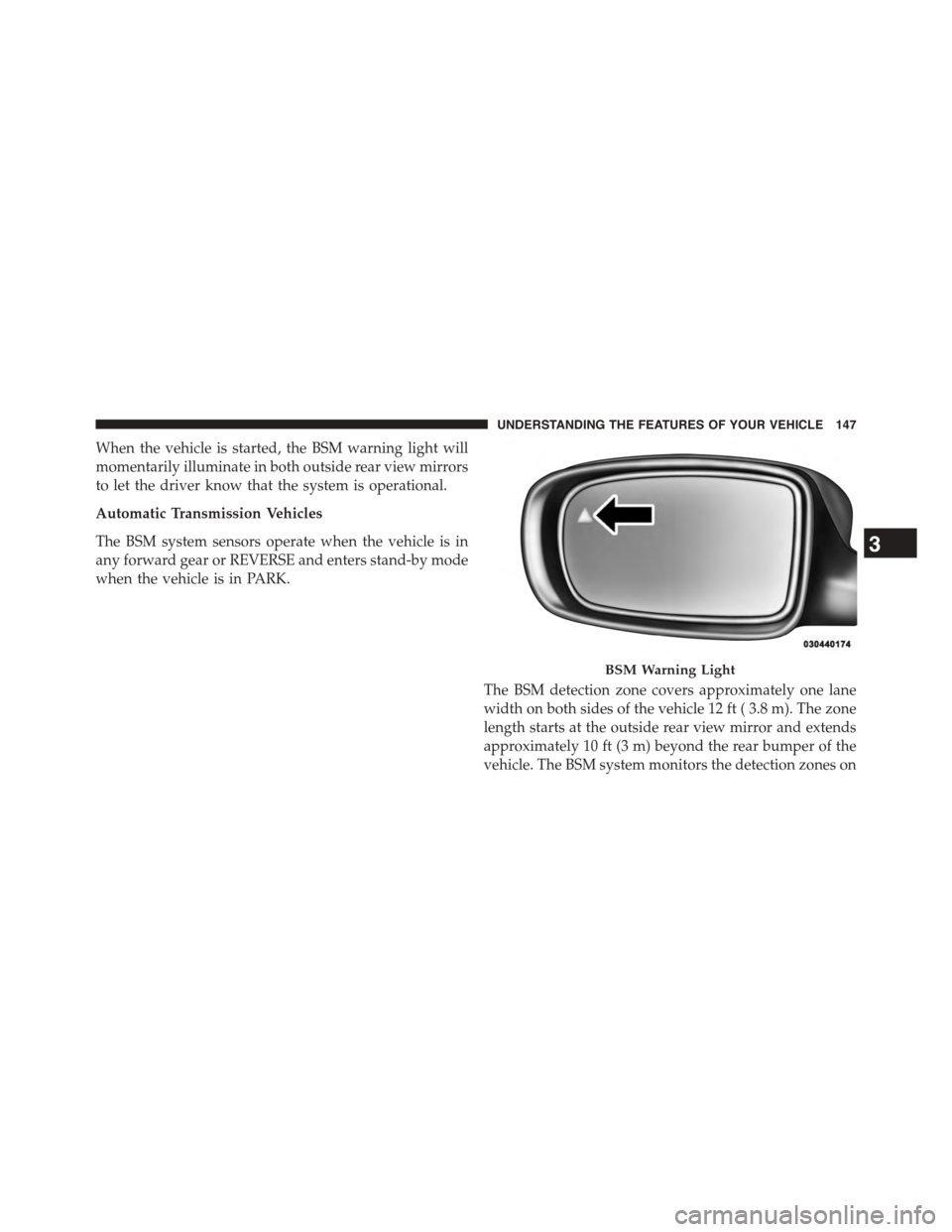
When the vehicle is started, the BSM warning light will
momentarily illuminate in both outside rear view mirrors
to let the driver know that the system is operational.
Automatic Transmission Vehicles
The BSM system sensors operate when the vehicle is in
any forward gear or REVERSE and enters stand-by mode
when the vehicle is in PARK.
The BSM detection zone covers approximately one lane
width on both sides of the vehicle 12 ft ( 3.8 m). The zone
length starts at the outside rear view mirror and extends
approximately 10 ft (3 m) beyond the rear bumper of the
vehicle. The BSM system monitors the detection zones on
BSM Warning Light
3
UNDERSTANDING THE FEATURES OF YOUR VEHICLE 147
Page 157 of 726
When the system is in RCP, the system shall respond with
both visual and audible alerts when a detected object is
present. Whenever an audible alert is requested, the radio
volume is reduced. Turn/hazard signal status is ignored;
the RCP state always requests the chime.
NOTE:The BSM system will store the current operating
mode when the vehicle is shut off. Each time the vehicle
is started the previously stored mode will be recalled and
used.
General Information
This vehicle has systems that operate on radio frequency
that comply with Part 15 of the Federal Communications
Commission (FCC) rules and with Industry Canada
Standards RSS- GEN/210/220/310.
Operation is subject to the following two conditions:
1. The device may not cause harmful interference.
2. The device must accept any interference received,
including interference that may cause undesired op-
eration of the device.
Changes or modifications to any of these systems by
other than an authorized service facility could void
authorization to use this equipment.
Uconnect® PHONE — IF EQUIPPED
Uconnect® Phone is a voice-activated, hands-free, in-
vehicle communications system. Uconnect® Phone al-
lows you to dial a phone number with your mobile
phone using simple voice commands (e.g., “Call”$
“Mike”$“Work” or “Dial”$“248-555-1212”). Your
mobile phone’s audio is transmitted through your vehi-
cle’s audio system; the system will automatically mute
your radio when using the Uconnect® Phone.
3
UNDERSTANDING THE FEATURES OF YOUR VEHICLE 155
Page 158 of 726
NOTE:The Uconnect® Phone requires a mobile phone
equipped with the Bluetooth® “Hands-Free Profile,”
Version 0.96 or higher. See the Uconnect® website for
supported phones.
For Uconnect® customer support:
•U.S. residents - visitUconnectPhone.com or call
1-877-855-8400.
•Canadian Residents - visitUconnectPhone.com or
call, 1-800-465-2001 (English) or 1-800-387-9983
(French).
Uconnect® Phone allows you to transfer calls between
the system and your mobile phone as you enter or exit
your vehicle and enables you to mute the system’s
microphone for private conversation.
The Uconnect® Phone is driven through your
Bluetooth® “Hands-Free Profile” mobile phone.
Uconnect® features Bluetooth® technology - the global
standard that enables different electronic devices to con-
nect to each other without wires or a docking station.
Uconnect® Phone operates no matter where you stow
your mobile phone (be it your purse, pocket, or brief-
case), as long as your phone is turned on and has been
paired to the vehicle’s Uconnect® Phone. The Uconnect®
Phone allows up to seven mobile phones to be linked to
the system. Only one linked (or paired) mobile phone can
be used with the system at a time. The system is available
in English, Spanish, or French languages.
WARNING!
Any voice commanded system should be used only
in safe driving conditions following all applicable
laws, including laws regarding phone use. Your at-
tention should be focused on safely operating the
vehicle. Failure to do so may result in a collision
causing serious injury or death.
156 UNDERSTANDING THE FEATURES OF YOUR VEHICLE
Page 163 of 726
Phonebook Download — Automatic Phonebook
Transfer From Mobile Phone
If equipped and specifically supported by your phone,
Uconnect® Phone automatically downloads names (text
names) and number entries from your mobile phone’s
phonebook. Specific Bluetooth® Phones with Phone
Book Access Profile may support this feature. See
Uconnect® website for supported phones.
•To call a name from the Uconnect® Phonebook or
downloaded Phonebook, follow the procedure in “Call
by Saying a Name” section.
•Automatic download and update, if supported, begins
as soon as the Bluetooth® wireless phone connection is
made to the Uconnect® Phone, for example, after you
start the vehicle.
•A maximum of 2,000 entries per phone will be down-
loaded and updated every time a phone is connected
to the Uconnect® Phone.
•Depending on the maximum number of entries down-
loaded, there may be a short delay before the latest
downloaded names can be used. Until then, if avail-
able, the previously downloaded phonebook is avail-
able for use.
•Only the phonebook of the currently connected mobile
phone is accessible.
•Either the mobile phone’s phonebook or the mobile
phone’s SIM card phonebook is downloaded.
•This downloaded phonebook cannot be edited or
deleted on the Uconnect® Phone. These can only be
edited on the mobile phone. The changes are trans-
ferred and updated to Uconnect® Phone on the next
phone connection.
3
UNDERSTANDING THE FEATURES OF YOUR VEHICLE 161
Page 170 of 726
1. After the ignition is switched to OFF, a call can
continue on the Uconnect® Phone either until the call
ends, or until the vehicle battery condition dictates
cessation of the call on the Uconnect® Phone and
transfer of the call to the mobile phone.
2. After the ignition is cycled to OFF, a call can continue
on the Uconnect® Phone for a certain duration, after
which the call is automatically transferred from the
Uconnect® Phone to the mobile phone.
3. An active call is automatically transferred to the
mobile phone after the ignition is cycled to OFF.
Uconnect® Phone Features
Language Selection
To change the language that the Uconnect® Phone is
using:
1. Push the Phonebutton to begin.
2. After the “Ready” prompt and the following beep, say
the name of the language you wish to switch to
English, Espanol, or Francais.
3. Continue to follow the system prompts to complete
the language selection.
After selecting one of the languages, all prompts and
voice commands will be in that language.
NOTE:After every Uconnect® Phone language change
operation, only the language-specific 32-name phone-
book is usable. The paired phone name is not language-
specific and is usable across all languages.
Emergency Assistance
If you are in an emergency and the mobile phone is
reachable:
•Pick up the phone and manually dial the emergency
number for your area.
168 UNDERSTANDING THE FEATURES OF YOUR VEHICLE
Page 175 of 726
Mute/Un-Mute (Mute ON/OFF)
When you mute the Uconnect® Phone, you will still be
able to hear the conversation coming from the other
party, but the other party will not be able to hear you. To
mute the Uconnect® Phone:
•Push the Voice Commandbutton.
•Following the beep, say “Mute.”
To un-mute the Uconnect® Phone:
•Push the Voice Commandbutton.
•Following the beep, say “Mute off.”
Advanced Phone Connectivity
Transfer Call To And From Mobile Phone
The Uconnect® Phone allows ongoing calls to be trans-
ferred from your mobile phone to the Uconnect® Phone
without terminating the call. To transfer an ongoing call
from your Uconnect® Phone paired mobile phone to the
Uconnect® Phone or vice versa, push the Voice Com-
mandbutton and say “Transfer Call.”
Connect Or Disconnect Link Between The
Uconnect® Phone And Mobile Phone
Your mobile phone can be paired with many different
electronic devices, but can only be actively “connected”
with one electronic device at a time.
If you would like to connect or disconnect the Bluetooth®
connection between your mobile phone and the
Uconnect® Phone System, follow the instructions de-
scribed in your mobile phone User ’s Manual.
List Paired Mobile Phone Names
•Push the Phonebutton to begin.
•After the “Ready” prompt and the following beep, say
“Setup Phone Pairing.”
3
UNDERSTANDING THE FEATURES OF YOUR VEHICLE 173
Page 187 of 726
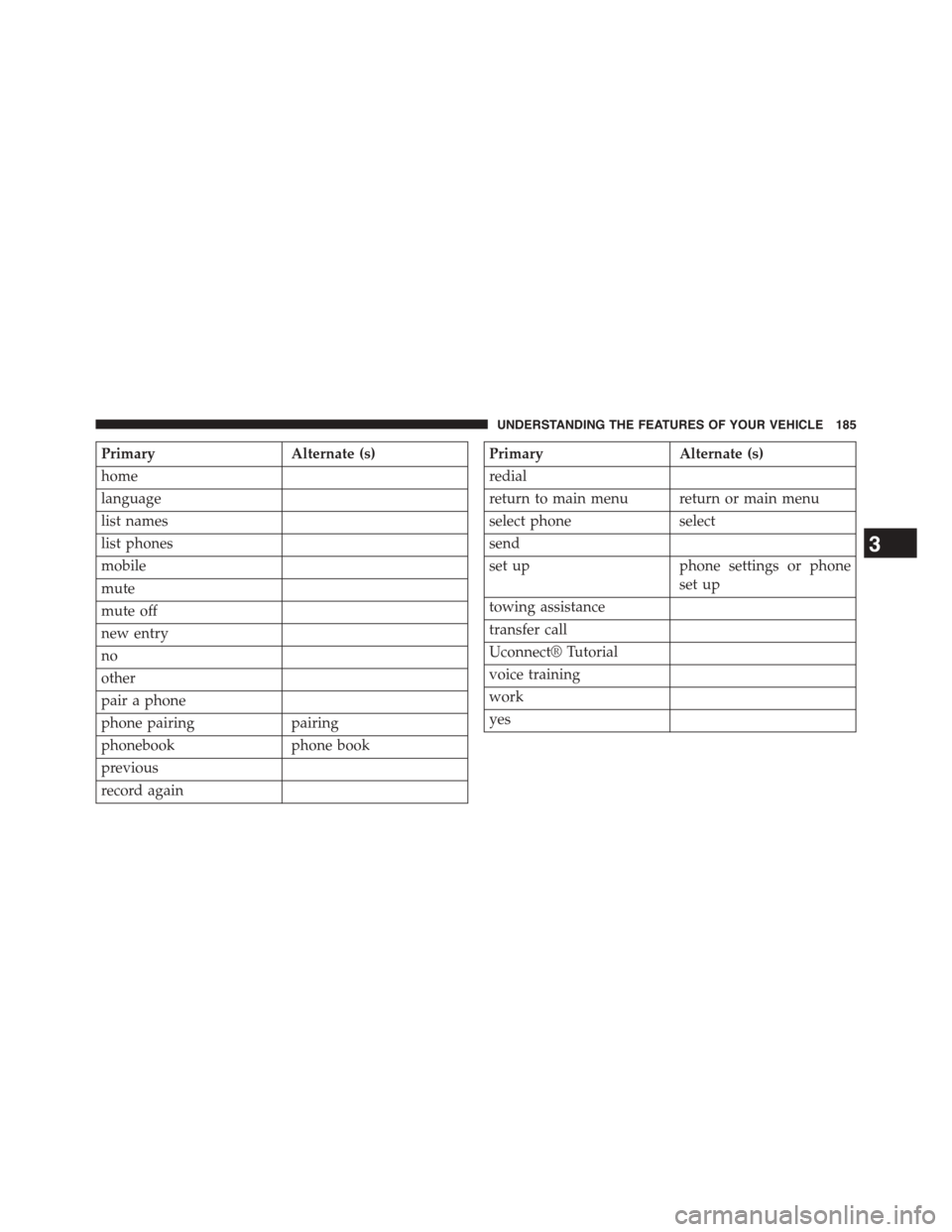
PrimaryAlternate (s)
home
language
list names
list phones
mobile
mute
mute off
new entry
no
other
pair a phone
phone pairingpairing
phonebookphone book
previous
record again
PrimaryAlternate (s)
redial
return to main menu return or main menu
select phoneselect
send
set upphone settings or phone
set up
towing assistance
transfer call
Uconnect® Tutorial
voice training
work
yes
3
UNDERSTANDING THE FEATURES OF YOUR VEHICLE 185