2015 CHEVROLET CORVETTE automatic
[x] Cancel search: automaticPage 53 of 393
Black plate (24,1)Chevrolet Corvette Owner Manual (GMNA-Localizing-U.S./Canada/Mexico-
7576293) - 2015 - crc - 10/31/14
2-24 Keys, Doors, and Windows
Roof
Roof Panel
If equipped with a removable roof
panel, use the following procedures
to remove or install it.
{Caution
If a roof panel is dropped or
rested on its edges, the roof
panel, paint, and/or
weatherstripping may be
damaged. Always place the roof
panel in the stowage receivers
after removing it from the vehicle.
Removing the Roof Panel
{Warning
Do not remove a roof panel while
the vehicle is moving. The panel
could fall into the vehicle and(Continued)
Warning (Continued)
strike an occupant and cause you
to lose control. It could also fly off
and strike another vehicle.
Remove the roof panel only when
the vehicle is parked.
It may be necessary to have help
removing the roof panel.
To remove:
1. Shift an automatic transmission into P (Park) or a manual
transmission into 1 (First) or
R (Reverse).
2. Turn the ignition off and set the parking brake.
3. Lower both sun visors.
4. Open the rear hatch and remove any items that may interfere with
proper storage of the roof panel. 5. Lower the windows.
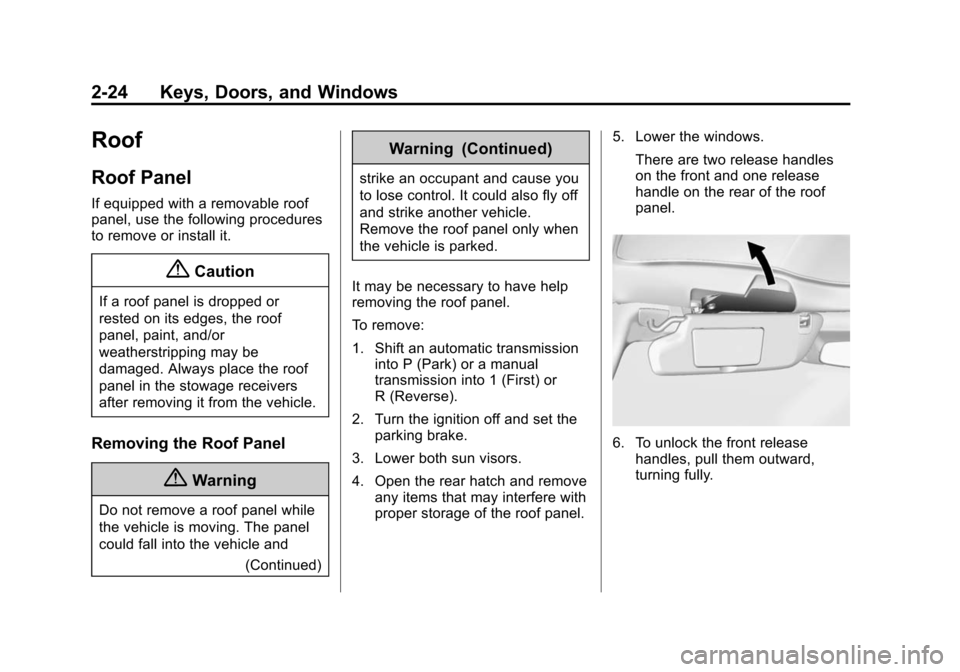
There are two release handles
on the front and one release
handle on the rear of the roof
panel.
6. To unlock the front releasehandles, pull them outward,
turning fully.
Page 55 of 393
Black plate (26,1)Chevrolet Corvette Owner Manual (GMNA-Localizing-U.S./Canada/Mexico-
7576293) - 2015 - crc - 10/31/14
2-26 Keys, Doors, and Windows
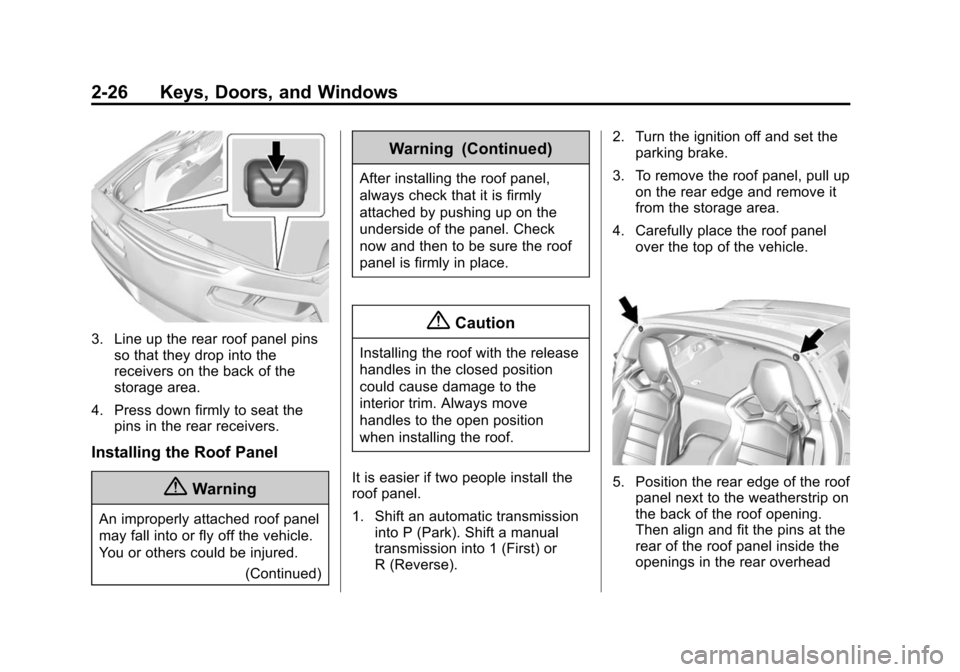
3. Line up the rear roof panel pinsso that they drop into the
receivers on the back of the
storage area.
4. Press down firmly to seat the pins in the rear receivers.
Installing the Roof Panel
{Warning
An improperly attached roof panel
may fall into or fly off the vehicle.
You or others could be injured.
(Continued)
Warning (Continued)
After installing the roof panel,
always check that it is firmly
attached by pushing up on the
underside of the panel. Check
now and then to be sure the roof
panel is firmly in place.
{Caution
Installing the roof with the release
handles in the closed position
could cause damage to the
interior trim. Always move
handles to the open position
when installing the roof.
It is easier if two people install the
roof panel.
1. Shift an automatic transmission into P (Park). Shift a manual
transmission into 1 (First) or
R (Reverse). 2. Turn the ignition off and set the
parking brake.
3. To remove the roof panel, pull up on the rear edge and remove it
from the storage area.
4. Carefully place the roof panel over the top of the vehicle.
5. Position the rear edge of the roofpanel next to the weatherstrip on
the back of the roof opening.
Then align and fit the pins at the
rear of the roof panel inside the
openings in the rear overhead
Page 58 of 393
Black plate (29,1)Chevrolet Corvette Owner Manual (GMNA-Localizing-U.S./Canada/Mexico-
7576293) - 2015 - crc - 10/31/14
Keys, Doors, and Windows 2-29
4. When possible, operate theconvertible top when the vehicle
is stopped. The top can be
operated while driving below
50 km/h (31 mph) and will stop if
that speed is exceeded. The top
operation will take approximately
25 seconds. Make sure the top
operation can be completed
before that speed is reached.
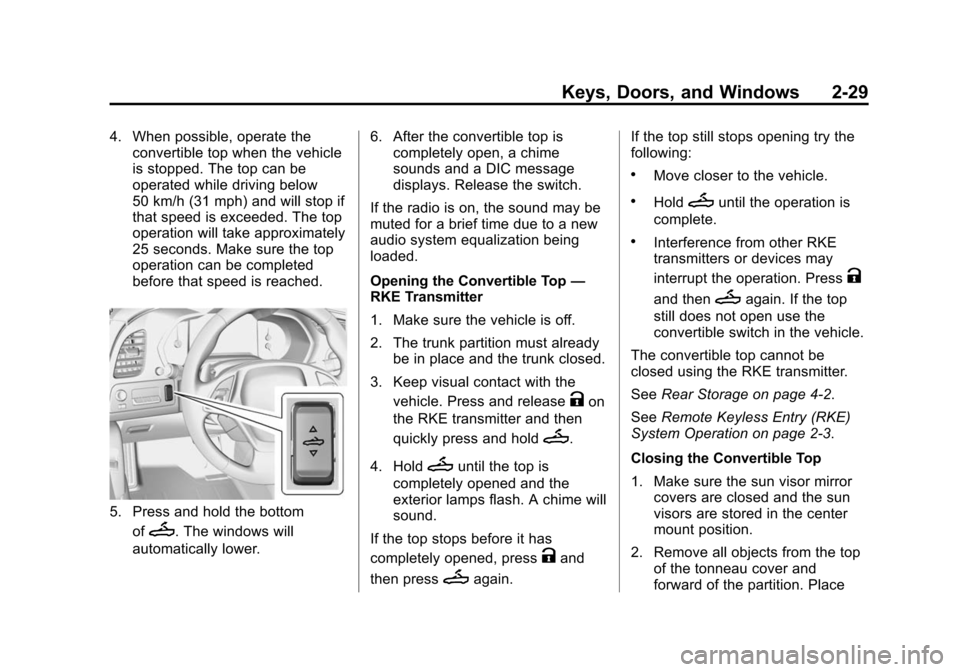
5. Press and hold the bottom
of
M. The windows will
automatically lower. 6. After the convertible top is
completely open, a chime
sounds and a DIC message
displays. Release the switch.
If the radio is on, the sound may be
muted for a brief time due to a new
audio system equalization being
loaded.
Opening the Convertible Top —
RKE Transmitter
1. Make sure the vehicle is off.
2. The trunk partition must already
be in place and the trunk closed.
3. Keep visual contact with the vehicle. Press and release
Kon
the RKE transmitter and then
quickly press and hold
M.
4. Hold
Muntil the top is
completely opened and the
exterior lamps flash. A chime will
sound.
If the top stops before it has
completely opened, press
Kand
then press
Magain. If the top still stops opening try the
following:
.Move closer to the vehicle.
.HoldMuntil the operation is
complete.
.Interference from other RKE
transmitters or devices may
interrupt the operation. Press
K
and thenMagain. If the top
still does not open use the
convertible switch in the vehicle.
The convertible top cannot be
closed using the RKE transmitter.
See Rear Storage on page 4-2.
See Remote Keyless Entry (RKE)
System Operation on page 2-3.
Closing the Convertible Top
1. Make sure the sun visor mirror covers are closed and the sun
visors are stored in the center
mount position.
2. Remove all objects from the top of the tonneau cover and
forward of the partition. Place
Page 59 of 393
Black plate (30,1)Chevrolet Corvette Owner Manual (GMNA-Localizing-U.S./Canada/Mexico-
7576293) - 2015 - crc - 10/31/14
2-30 Keys, Doors, and Windows
the partition in the rear storage
area in the upright position.
Fasten both sides of the partition
to the posts just below the
tonneau cover. SeeRear
Storage on page 4-2.
3. Close the trunk.
4. Start the vehicle or place it in ACC/ACCESSORY.
5. When possible, operate the convertible top when the vehicle
is stopped. The top can be
operated while driving below
50 km/h (31 mph) and will stop if
that speed is exceeded. The top
operation will take approximately
25 seconds. Make sure the top
operation can be completed
before that speed is reached.
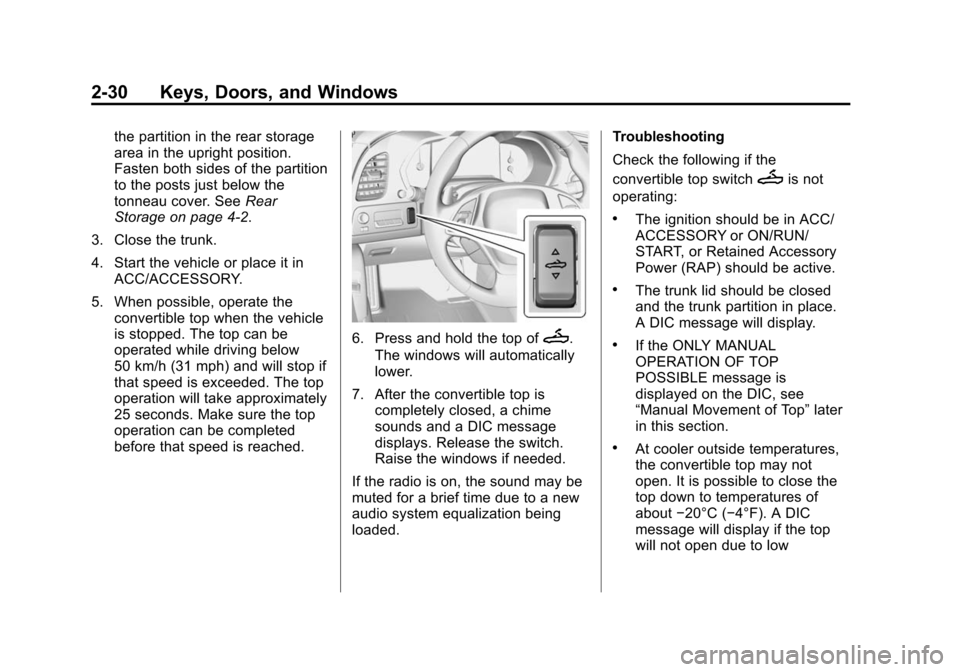
6. Press and hold the top ofM.
The windows will automatically
lower.
7. After the convertible top is completely closed, a chime
sounds and a DIC message
displays. Release the switch.
Raise the windows if needed.
If the radio is on, the sound may be
muted for a brief time due to a new
audio system equalization being
loaded. Troubleshooting
Check the following if the
convertible top switch
Mis not
operating:
.The ignition should be in ACC/
ACCESSORY or ON/RUN/
START, or Retained Accessory
Power (RAP) should be active.
.The trunk lid should be closed
and the trunk partition in place.
A DIC message will display.
.If the ONLY MANUAL
OPERATION OF TOP
POSSIBLE message is
displayed on the DIC, see
“Manual Movement of Top” later
in this section.
.At cooler outside temperatures,
the convertible top may not
open. It is possible to close the
top down to temperatures of
about −20°C (−4°F). A DIC
message will display if the top
will not open due to low
Page 61 of 393

Black plate (32,1)Chevrolet Corvette Owner Manual (GMNA-Localizing-U.S./Canada/Mexico-
7576293) - 2015 - crc - 10/31/14
2-32 Keys, Doors, and Windows
If the top cannot be secured, keep
clear of the top components. In
some conditions the top may move
quickly.
Do not drive with the convertible top
in an unsecured position. The top
components may move
unexpectedly. In some cases the
top may not be able to be power
operated. If this occurs, follow the
DIC messages displayed.
If the tonneau cover is not secured
and latched, and the vehicle is
moving above 10 km/h (6 mph), the
tonneau cover may automatically
move to a stable position.
SeeConvertible Top Messages on
page 5-35.Manual Movement of Top
If the DIC displays the ONLY
MANUAL OPERATION OF TOP
POSSIBLE message:
1. Press
Mto either open or
close the top. Press the switch
in the opposite direction if one
does not work.
2. If the top moves, continue pressing the switch in that
direction for at least
five seconds. The top should
then work normally.
If the top does not respond in either
direction, use the following
procedure to manually adjust the
convertible top and tonneau cover if
they are retracted but not latched.
This requires more than one person.
1. On each side of the tonneau cover, lift and pivot rearward into
the fully open position.
Page 67 of 393
Black plate (4,1)Chevrolet Corvette Owner Manual (GMNA-Localizing-U.S./Canada/Mexico-
7576293) - 2015 - crc - 10/31/14
3-4 Seats and Restraints
Memory Seats
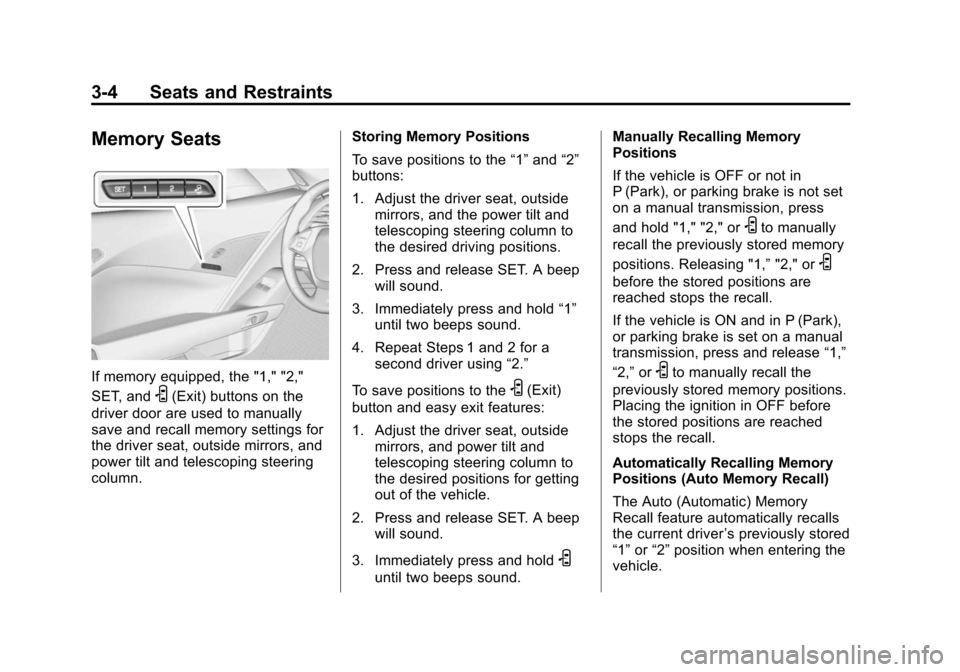
If memory equipped, the "1," "2,"
SET, and
S(Exit) buttons on the
driver door are used to manually
save and recall memory settings for
the driver seat, outside mirrors, and
power tilt and telescoping steering
column. Storing Memory Positions
To save positions to the
“1”and “2”
buttons:
1. Adjust the driver seat, outside mirrors, and the power tilt and
telescoping steering column to
the desired driving positions.
2. Press and release SET. A beep will sound.
3. Immediately press and hold “1”
until two beeps sound.
4. Repeat Steps 1 and 2 for a second driver using “2.”
To save positions to theS(Exit)
button and easy exit features:
1. Adjust the driver seat, outside mirrors, and power tilt and
telescoping steering column to
the desired positions for getting
out of the vehicle.
2. Press and release SET. A beep will sound.
3. Immediately press and hold
S
until two beeps sound. Manually Recalling Memory
Positions
If the vehicle is OFF or not in
P (Park), or parking brake is not set
on a manual transmission, press
and hold "1," "2," or
Sto manually
recall the previously stored memory
positions. Releasing "1,” "2," or
S
before the stored positions are
reached stops the recall.
If the vehicle is ON and in P (Park),
or parking brake is set on a manual
transmission, press and release “1,”
“2,” or
Sto manually recall the
previously stored memory positions.
Placing the ignition in OFF before
the stored positions are reached
stops the recall.
Automatically Recalling Memory
Positions (Auto Memory Recall)
The Auto (Automatic) Memory
Recall feature automatically recalls
the current driver ’s previously stored
“1” or“2” position when entering the
vehicle.
Page 68 of 393

Black plate (5,1)Chevrolet Corvette Owner Manual (GMNA-Localizing-U.S./Canada/Mexico-
7576293) - 2015 - crc - 10/31/14
Seats and Restraints 3-5
Depending upon the Auto Memory
Recall feature enabled in the vehicle
personalization menu, memory“1”
or “2” positions are recalled as
follows:
To activate the recall when the
ignition is off, and “On - Driver Door
Open” is selected in the vehicle
personalization menu:
.PressKon the RKE transmitter
and open the door.
.Press the lock/unlock button on
the outside driver door handle
and open the driver door. The
RKE transmitter must be present
for the recall to activate.
.If the driver door is already
open, press
Kon the RKE
transmitter to activate the recall. To activate the recall at ignition ON,
the transmission must be in P (Park)
or the parking brake set for a
manual transmission, and
“On - At
Ignition On” selected in the vehicle
personalization menu:
.Place the ignition in ON/RUN/
START.
See Vehicle Personalization on
page 5-45.
To stop recall movement, press one
of the memory, power mirror,
or power seat controls, or press the
power tilt and telescoping steering
column control. If On - At Ignition
On is selected in the vehicle
personalization menu, placing the
ignition in OFF stops the recall.
RKE transmitters are not labeled
with a number. If your memory seat
position is stored to "1" or "2" but
this position is not automatically
recalling, then change the stored
position or switch RKE transmitters
with the other driver. Easy Exit Recall
If programmed on in the vehicle
personalization menu, the easy exit
feature automatically moves the
driver seat, power tilt and
telescoping steering column, and
outside mirrors on some vehicles to
the memory positions previously
saved to the
S(Exit) button. See
“Storing Memory Positions” listed
previously. See also Vehicle
Personalization on page 5-45.
Easy exit recall automatically
activates when one of the following
occurs:
.The vehicle is turned off and the
driver door is opened within a
short time.
.The vehicle is turned off with the
driver door open.
To stop recall movement, press one
of the memory, driver seat, outside
mirror, or power tilt and telescope
steering column controls.
Page 69 of 393
Black plate (6,1)Chevrolet Corvette Owner Manual (GMNA-Localizing-U.S./Canada/Mexico-
7576293) - 2015 - crc - 10/31/14
3-6 Seats and Restraints
Seat Travel Limit
If the seat is folded forward or
moved rearward into contact with
the carpet, the seat must be
returned to an upright position or
moved forward off the carpet to
regain operation.
Obstructions
If something has blocked the driver
seat and/or power tilt and
telescoping steering column while
recalling a memory position, the
recall may stop. Remove the
obstruction. Then do one of the
following:
.If manually recalling the position,
press and hold the appropriate
manual control for the memory
item that is not recalling for
two seconds. Try recalling again
by pressing the appropriate
memory button.
.If automatically recalling the
position, press and hold the
appropriate manual control for
the memory item that is not
recalling for two seconds. Try
recalling again by opening the
driver door and pressing
Kon
the RKE transmitter.
.If recalling the exit position,
press and hold the appropriate
manual control for the exit
feature not recalling for
two seconds. Then try recalling
the exit position again.
If the memory position is still not
recalling, see your dealer for
service.
Seatback Latches
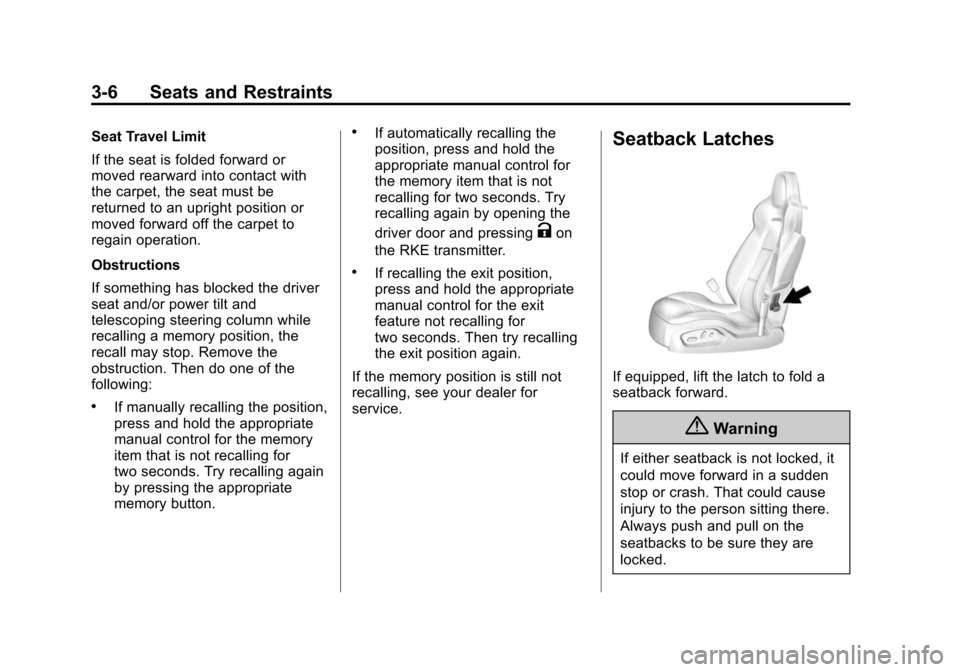
If equipped, lift the latch to fold a
seatback forward.
{Warning
If either seatback is not locked, it
could move forward in a sudden
stop or crash. That could cause
injury to the person sitting there.
Always push and pull on the
seatbacks to be sure they are
locked.