2015 CHEVROLET CORVETTE automatic
[x] Cancel search: automaticPage 42 of 393
Black plate (13,1)Chevrolet Corvette Owner Manual (GMNA-Localizing-U.S./Canada/Mexico-
7576293) - 2015 - crc - 10/31/14
Keys, Doors, and Windows 2-13
Power Door Locks
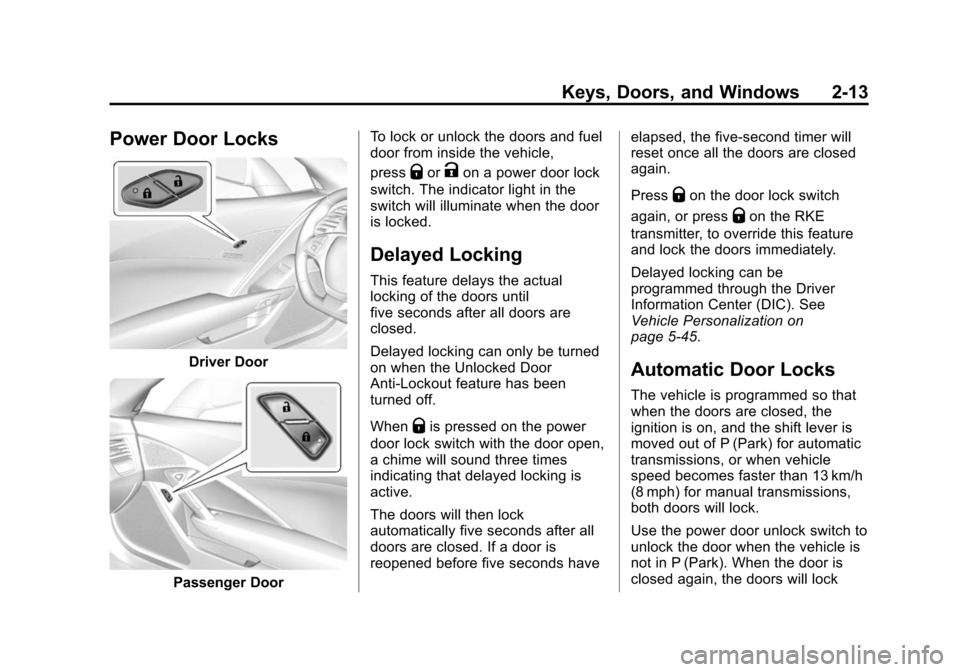
Driver Door
Passenger DoorTo lock or unlock the doors and fuel
door from inside the vehicle,
press
QorKon a power door lock
switch. The indicator light in the
switch will illuminate when the door
is locked.
Delayed Locking
This feature delays the actual
locking of the doors until
five seconds after all doors are
closed.
Delayed locking can only be turned
on when the Unlocked Door
Anti-Lockout feature has been
turned off.
When
Qis pressed on the power
door lock switch with the door open,
a chime will sound three times
indicating that delayed locking is
active.
The doors will then lock
automatically five seconds after all
doors are closed. If a door is
reopened before five seconds have elapsed, the five-second timer will
reset once all the doors are closed
again.
Press
Qon the door lock switch
again, or press
Qon the RKE
transmitter, to override this feature
and lock the doors immediately.
Delayed locking can be
programmed through the Driver
Information Center (DIC). See
Vehicle Personalization on
page 5-45.
Automatic Door Locks
The vehicle is programmed so that
when the doors are closed, the
ignition is on, and the shift lever is
moved out of P (Park) for automatic
transmissions, or when vehicle
speed becomes faster than 13 km/h
(8 mph) for manual transmissions,
both doors will lock.
Use the power door unlock switch to
unlock the door when the vehicle is
not in P (Park). When the door is
closed again, the doors will lock
Page 43 of 393
Black plate (14,1)Chevrolet Corvette Owner Manual (GMNA-Localizing-U.S./Canada/Mexico-
7576293) - 2015 - crc - 10/31/14
2-14 Keys, Doors, and Windows
either when your foot is removed
from the brake or the vehicle speed
becomes faster than
13 km/h (8 mph).
Automatic Door Unlock
The vehicle is programmed so that
when the shift lever is moved into
P (Park) for automatic transmission
vehicles or when the ignition is
turned off or is in Retained
Accessory Power (RAP) for manual
transmission vehicles, both doors
will unlock.
With the vehicle stopped and the
engine running, door unlocking can
be programmed through the Driver
Information Center (DIC). This
allows the driver to choose various
unlock settings. For programming
information, seeVehicle
Personalization on page 5-45.
Lockout Protection
If the vehicle is in ACC/
ACCESSORY or ON/RUN/START,
and the power door lock switch is
pressed with the driver door open,
the doors will lock and only the
driver door will unlock.
If the vehicle is off and Unlocked
Door Anti-Lockout is turned on, the
driver door is open, and door
locking is requested using a door
lock switch or the RKE transmitter,
both doors will lock and only the
driver door will unlock. The
Unlocked Door Anti-Lockout feature
can be turned on or off using the
vehicle personalization menus.
See Vehicle Personalization on
page 5-45.
Lockout protection can be manually
overridden with the driver door open
by pressing and holding
Qon the
power door lock switch.
Doors
Hatch (Trunk)
{Warning
Exhaust gases can enter the
vehicle if it is driven with the
liftgate, hatch/trunk open, or with
any objects that pass through the
seal between the body and the
hatch/trunk or liftgate. Engine
exhaust contains carbon
monoxide (CO) which cannot be
seen or smelled. It can cause
unconsciousness and even death.
If the vehicle must be driven with
the liftgate or hatch/trunk open:
.Close all of the windows.
.Fully open the air outlets on
or under the instrument
panel.
(Continued)
Page 44 of 393

Black plate (15,1)Chevrolet Corvette Owner Manual (GMNA-Localizing-U.S./Canada/Mexico-
7576293) - 2015 - crc - 10/31/14
Keys, Doors, and Windows 2-15
Warning (Continued)
.Adjust the climate control
system to a setting that
brings in only outside air and
set the fan speed to the
highest setting. See“Climate
Control Systems” in the
Index.
.If the vehicle is equipped with
a power liftgate, disable the
power liftgate function.
For more information about
carbon monoxide, see Engine
Exhaust on page 9-27.
Hatch/Trunk Release
For automatic transmissions, the
vehicle must be in P (Park).
For manual transmissions, the
vehicle must be off or stationary
with the parking brake set. See
Electric Parking Brake on
page 9-36. To release the hatch/trunk:
.Press}.
.Press and holdion the
Remote Keyless Entry (RKE)
transmitter. See Remote Keyless
Entry (RKE) System on
page 2-2.
Press the hatch/trunk release touch
pad with the RKE transmitter within
range or use the key in the key
cylinder. See Keys on page 2-1.
Hatch/Trunk Closing
{Caution
Do not store heavy or sharp
objects in the rear storage
compartments located in the
hatch/trunk area. The objects
could damage the underside of
the hatch/trunk.
Page 47 of 393

Black plate (18,1)Chevrolet Corvette Owner Manual (GMNA-Localizing-U.S./Canada/Mexico-
7576293) - 2015 - crc - 10/31/14
2-18 Keys, Doors, and Windows
How to Detect a Tamper
Condition
IfKis pressed on the transmitter
and the horn chirps and the lights
flash three times, a previous alarm
occurred while the system was
armed.
If the alarm has been activated, a
message will appear on the DIC.
See Security Messages on
page 5-42.
Inclination Sensor and
Intrusion Sensor
In addition to the standard
theft-deterrent system features, this
system may also have an inclination
sensor and intrusion sensor.
The inclination sensor can set off
the alarm if it senses movement of
the vehicle, such as a change in
vehicle orientation.
The intrusion sensor monitors the
vehicle interior, and can activate the
alarm if it senses unauthorized entry
into the vehicle’s interior. Do not allow passengers or pets to remain
in the vehicle when the intrusion
sensor is activated.
Before arming the theft-deterrent
system and activating the intrusion
sensor:
.Make sure both doors and
windows are completely closed.
.Secure any loose items such as
sunshades.
.Make sure there are no
obstructions blocking the
sensors.
Intrusion and Inclination
Sensors Disable Switch
It is recommended that the intrusion
and inclination sensors be
deactivated if pets are left in the
vehicle or the vehicle is being
transported.
With the vehicle turned off, press
d
to the right of the hatch/trunk
release button. The indicator light
will come on momentarily, indicating
that these sensors have been
disabled until the next time the
alarm system is armed.
Immobilizer
See
Radio Frequency Statement on
page 13-12.
Immobilizer Operation
The vehicle has a passive
theft-deterrent system.
The security light comes on in the
instrument cluster if there is a
problem with arming or disarming
the theft-deterrent system. This light
also comes on briefly when the
engine is started.
The system is automatically armed
when the ignition is turned off.
Page 49 of 393
Black plate (20,1)Chevrolet Corvette Owner Manual (GMNA-Localizing-U.S./Canada/Mexico-
7576293) - 2015 - crc - 10/31/14
2-20 Keys, Doors, and Windows
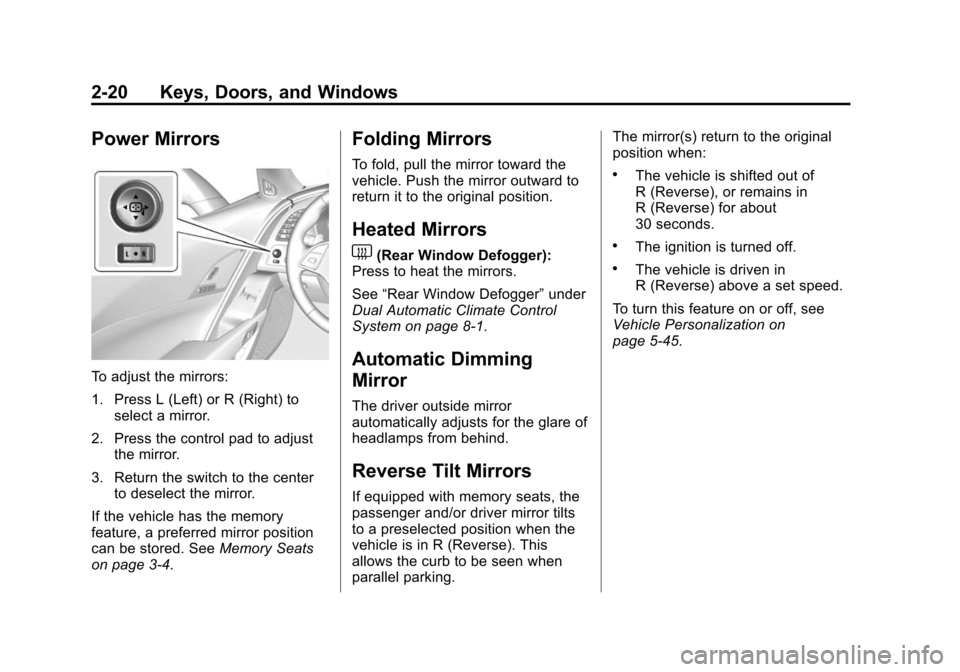
Power Mirrors
To adjust the mirrors:
1. Press L (Left) or R (Right) toselect a mirror.
2. Press the control pad to adjust the mirror.
3. Return the switch to the center to deselect the mirror.
If the vehicle has the memory
feature, a preferred mirror position
can be stored. See Memory Seats
on page 3-4.
Folding Mirrors
To fold, pull the mirror toward the
vehicle. Push the mirror outward to
return it to the original position.
Heated Mirrors
1
(Rear Window Defogger):
Press to heat the mirrors.
See “Rear Window Defogger” under
Dual Automatic Climate Control
System on page 8-1.
Automatic Dimming
Mirror
The driver outside mirror
automatically adjusts for the glare of
headlamps from behind.
Reverse Tilt Mirrors
If equipped with memory seats, the
passenger and/or driver mirror tilts
to a preselected position when the
vehicle is in R (Reverse). This
allows the curb to be seen when
parallel parking. The mirror(s) return to the original
position when:
.The vehicle is shifted out of
R (Reverse), or remains in
R (Reverse) for about
30 seconds.
.The ignition is turned off.
.The vehicle is driven in
R (Reverse) above a set speed.
To turn this feature on or off, see
Vehicle Personalization on
page 5-45.
Page 50 of 393

Black plate (21,1)Chevrolet Corvette Owner Manual (GMNA-Localizing-U.S./Canada/Mexico-
7576293) - 2015 - crc - 10/31/14
Keys, Doors, and Windows 2-21
Interior Mirrors
Interior Rearview Mirrors
Adjust the rearview mirror for a clear
view of the area behind your
vehicle.
If equipped with OnStar, there are
three buttons at the bottom of the
mirror. See your dealer for more
information on the system and how
to subscribe to OnStar. SeeOnStar
Overview on page 14-1.
To avoid accidental OnStar calls,
clean the mirror with the ignition off.
Do not spray glass cleaner directly
on the mirror. Use a soft towel
dampened with water.
Manual Rearview Mirror
Push the tab forward for daytime
use and pull it rearward for
nighttime use to avoid glare of the
headlamps from behind.
Automatic Dimming
Rearview Mirror
If equipped, automatic dimming
reduces the glare of headlamps
from behind. The dimming feature
comes on when the vehicle is
started.
Windows
{Warning
Never leave a child, a helpless
adult, or a pet alone in a vehicle,
especially with the windows
closed in warm or hot weather.
They can be overcome by the
extreme heat and suffer
permanent injuries or even death
from heat stroke.
Page 51 of 393
Black plate (22,1)Chevrolet Corvette Owner Manual (GMNA-Localizing-U.S./Canada/Mexico-
7576293) - 2015 - crc - 10/31/14
2-22 Keys, Doors, and Windows
Power Windows
{Warning
Leaving children in a vehicle with
the Remote Keyless Entry (RKE)
transmitter is dangerous for many
reasons; children or others could
be badly injured or even killed.
They could operate the power
windows or other controls or even
make the vehicle move. The
windows will function with the
RKE transmitter in the vehicle
and they could be seriously
injured or killed if caught in the
path of a closing window. Do not
leave the RKE transmitter in a
vehicle with children.
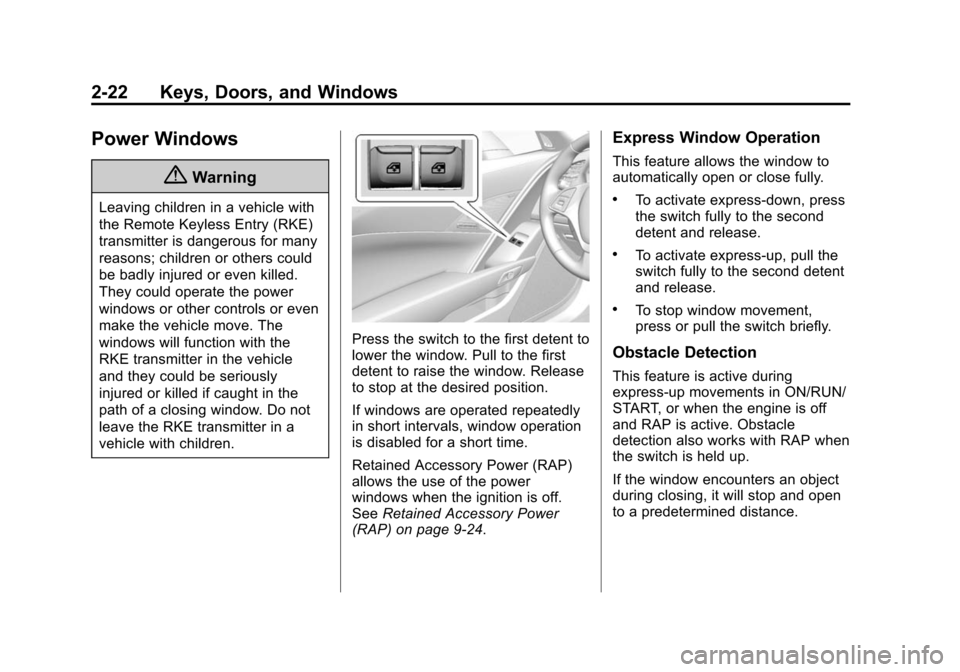
Press the switch to the first detent to
lower the window. Pull to the first
detent to raise the window. Release
to stop at the desired position.
If windows are operated repeatedly
in short intervals, window operation
is disabled for a short time.
Retained Accessory Power (RAP)
allows the use of the power
windows when the ignition is off.
SeeRetained Accessory Power
(RAP) on page 9-24.
Express Window Operation
This feature allows the window to
automatically open or close fully.
.To activate express-down, press
the switch fully to the second
detent and release.
.To activate express-up, pull the
switch fully to the second detent
and release.
.To stop window movement,
press or pull the switch briefly.
Obstacle Detection
This feature is active during
express-up movements in ON/RUN/
START, or when the engine is off
and RAP is active. Obstacle
detection also works with RAP when
the switch is held up.
If the window encounters an object
during closing, it will stop and open
to a predetermined distance.
Page 52 of 393

Black plate (23,1)Chevrolet Corvette Owner Manual (GMNA-Localizing-U.S./Canada/Mexico-
7576293) - 2015 - crc - 10/31/14
Keys, Doors, and Windows 2-23
Conditions such as severe cold or
ice may cause the window to
auto-reverse. The window will return
to normal operation once the
condition or object is removed.
If conditions prevent a window from
closing and the window continues to
auto-reverse, it is possible to close
the window while in ON/RUN by
holding the window switch in the
first or second detent until the
window is closed.
Window Operation with
Convertible Top
Windows automatically lower fully
when the convertible top is lowered
or raised. SeeConvertible Top on
page 2-28. To raise the windows,
pull the switch to the second detent
and release.
Window Indexing
Indexing automatically lowers the
window a small amount when the
door is opened. When the door is
closed, the window will raise to its
full up position. If either window does not index properly, it could be
due to loss of power. Before
returning to the dealer for service,
perform the window indexing reset
procedure.
Window Indexing and
Express-Up Reset
Window indexing may be required if
the vehicle battery has been
recharged or disconnected, or is not
working. Express-up and the
convertible top will not function until
the windows are reset. After battery
power is restored, a message
displays in the Driver Information
Center. See
Driver Information
Center (DIC) on page 5-26.
Once power is restored:
1. Close the doors.
2. Start the vehicle.
3. Hold the window switch up to the
fully closed position.
Sun Visors
Pull the sun visor down to block
glare. Detach the sun visor from the
center mount to pivot to the side
window or, if equipped, extend
along the rod.