2015 CHEVROLET CORVETTE power windows
[x] Cancel search: power windowsPage 8 of 393

Black plate (1,1)Chevrolet Corvette Owner Manual (GMNA-Localizing-U.S./Canada/Mexico-
7576293) - 2015 - crc - 10/31/14
In Brief 1-1
In Brief
Instrument Panel
Instrument Panel . . . . . . . . . . . . . . 1-2
Initial Drive Information
Initial Drive Information . . . . . . . . 1-4
Remote Keyless Entry (RKE)System . . . . . . . . . . . . . . . . . . . . . . 1-4
Remote Vehicle Start . . . . . . . . . 1-5
Door Locks . . . . . . . . . . . . . . . . . . . 1-5
Trunk Release . . . . . . . . . . . . . . . . 1-7
Windows . . . . . . . . . . . . . . . . . . . . . . 1-8
Seat Adjustment . . . . . . . . . . . . . . 1-8
Memory Features . . . . . . . . . . . . . 1-9
Heated and Ventilated Seats . . . . . . . . . . . . . . . . . . . . . . . 1-10
Safety Belts . . . . . . . . . . . . . . . . . . 1-10
Passenger Sensing System . . . . . . . . . . . . . . . . . . . . . 1-11
Mirror Adjustment . . . . . . . . . . . . 1-11
Steering Wheel Adjustment . . . . . . . . . . . . . . . . . 1-12
Interior Lighting . . . . . . . . . . . . . . 1-13
Exterior Lighting . . . . . . . . . . . . . 1-13
Windshield Wiper/Washer . . . . 1-14
Climate Controls . . . . . . . . . . . . . 1-15
Transmission . . . . . . . . . . . . . . . . 1-16
Vehicle Features
Infotainment System . . . . . . . . . 1-17
Steering Wheel Controls . . . . . 1-17
Cruise Control . . . . . . . . . . . . . . . 1-17
Driver Information Center (DIC) . . . . . . . . . . . . . . . 1-17
Rear Vision Camera (RVC) . . . . . . . . . . . . . 1-18
Power Outlets . . . . . . . . . . . . . . . 1-18
Universal Remote System . . . 1-18
Roof Panel . . . . . . . . . . . . . . . . . . 1-19
Convertible . . . . . . . . . . . . . . . . . . 1-19
Performance and Maintenance
Traction Control/Electronic Stability Control . . . . . . . . . . . . 1-19
Tire Pressure Monitor . . . . . . . . 1-20
Performance Vehicle Features . . . . . . . . . . . . . . . . . . . 1-20
Engine Oil Life System . . . . . . 1-21
Car Wash Guidelines . . . . . . . . 1-21
Driving for Better Fuel Economy . . . . . . . . . . . . . . . . . . . 1-22
Roadside Assistance Program . . . . . . . . . . . . . . . . . . . . 1-22
OnStar
®. . . . . . . . . . . . . . . . . . . . . 1-22
Page 15 of 393
Black plate (8,1)Chevrolet Corvette Owner Manual (GMNA-Localizing-U.S./Canada/Mexico-
7576293) - 2015 - crc - 10/31/14
1-8 In Brief
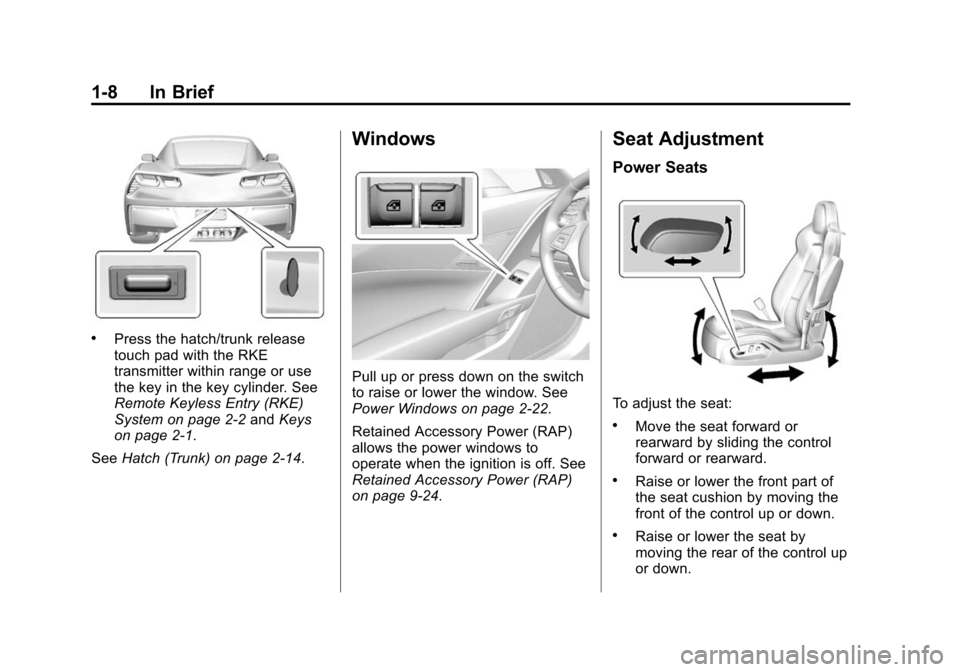
.Press the hatch/trunk release
touch pad with the RKE
transmitter within range or use
the key in the key cylinder. See
Remote Keyless Entry (RKE)
System on page 2-2andKeys
on page 2-1.
See Hatch (Trunk) on page 2-14.
Windows
Pull up or press down on the switch
to raise or lower the window. See
Power Windows on page 2-22.
Retained Accessory Power (RAP)
allows the power windows to
operate when the ignition is off. See
Retained Accessory Power (RAP)
on page 9-24.
Seat Adjustment
Power Seats
To adjust the seat:
.Move the seat forward or
rearward by sliding the control
forward or rearward.
.Raise or lower the front part of
the seat cushion by moving the
front of the control up or down.
.Raise or lower the seat by
moving the rear of the control up
or down.
Page 30 of 393
Black plate (1,1)Chevrolet Corvette Owner Manual (GMNA-Localizing-U.S./Canada/Mexico-
7576293) - 2015 - crc - 10/31/14
Keys, Doors, and Windows 2-1
Keys, Doors, and
Windows
Keys and Locks
Keys . . . . . . . . . . . . . . . . . . . . . . . . . . 2-1
Remote Keyless Entry (RKE)System . . . . . . . . . . . . . . . . . . . . . . 2-2
Remote Keyless Entry (RKE) System Operation . . . . . . . . . . . 2-3
Remote Vehicle Start . . . . . . . . . 2-9
Door Locks . . . . . . . . . . . . . . . . . . 2-11
Power Door Locks . . . . . . . . . . . 2-13
Delayed Locking . . . . . . . . . . . . . 2-13
Automatic Door Locks . . . . . . . 2-13
Lockout Protection . . . . . . . . . . . 2-14
Doors
Hatch (Trunk) . . . . . . . . . . . . . . . . 2-14
Vehicle Security
Vehicle Security . . . . . . . . . . . . . . 2-16
Vehicle Alarm System . . . . . . . 2-16
Immobilizer . . . . . . . . . . . . . . . . . . 2-18
Immobilizer Operation . . . . . . . 2-18
Exterior Mirrors
Convex Mirrors . . . . . . . . . . . . . . 2-19
Power Mirrors . . . . . . . . . . . . . . . . 2-20
Folding Mirrors . . . . . . . . . . . . . . . 2-20
Heated Mirrors . . . . . . . . . . . . . . . 2-20
Automatic Dimming Mirror . . . 2-20
Reverse Tilt Mirrors . . . . . . . . . . 2-20
Interior Mirrors
Interior Rearview Mirrors . . . . . 2-21
Manual Rearview Mirror . . . . . . 2-21
Automatic Dimming Rearview Mirror . . . . . . . . . . . . . . . . . . . . . . . 2-21
Windows
Windows . . . . . . . . . . . . . . . . . . . . . 2-21
Power Windows . . . . . . . . . . . . . 2-22
Sun Visors . . . . . . . . . . . . . . . . . . . 2-23
Roof
Roof Panel . . . . . . . . . . . . . . . . . . 2-24
Convertible Top . . . . . . . . . . . . . . 2-28
Keys and Locks
Keys
{Warning
Leaving children in a vehicle with
a Remote Keyless Entry (RKE)
transmitter is dangerous and
children or others could be
seriously injured or killed. They
could operate the power windows
or other controls or make the
vehicle move. The windows will
function with the RKE transmitter
in the vehicle, and children or
others could be caught in the path
of a closing window. Do not leave
children in a vehicle with an RKE
transmitter.
Page 31 of 393
Black plate (2,1)Chevrolet Corvette Owner Manual (GMNA-Localizing-U.S./Canada/Mexico-
7576293) - 2015 - crc - 10/31/14
2-2 Keys, Doors, and Windows
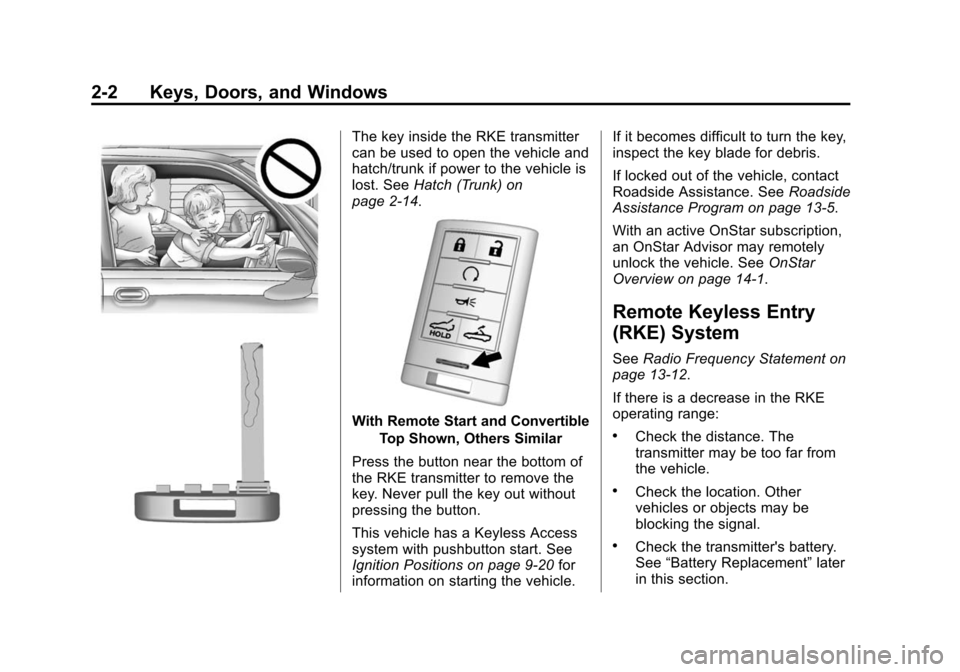
The key inside the RKE transmitter
can be used to open the vehicle and
hatch/trunk if power to the vehicle is
lost. SeeHatch (Trunk) on
page 2-14.
With Remote Start and Convertible
Top Shown, Others Similar
Press the button near the bottom of
the RKE transmitter to remove the
key. Never pull the key out without
pressing the button.
This vehicle has a Keyless Access
system with pushbutton start. See
Ignition Positions on page 9-20 for
information on starting the vehicle. If it becomes difficult to turn the key,
inspect the key blade for debris.
If locked out of the vehicle, contact
Roadside Assistance. See
Roadside
Assistance Program on page 13-5.
With an active OnStar subscription,
an OnStar Advisor may remotely
unlock the vehicle. See OnStar
Overview on page 14-1.
Remote Keyless Entry
(RKE) System
See Radio Frequency Statement on
page 13-12.
If there is a decrease in the RKE
operating range:
.Check the distance. The
transmitter may be too far from
the vehicle.
.Check the location. Other
vehicles or objects may be
blocking the signal.
.Check the transmitter's battery.
See “Battery Replacement” later
in this section.
Page 40 of 393

Black plate (11,1)Chevrolet Corvette Owner Manual (GMNA-Localizing-U.S./Canada/Mexico-
7576293) - 2015 - crc - 10/31/14
Keys, Doors, and Windows 2-11
.The oil pressure is low.
.Two remote vehicle starts have
already been used.
.The vehicle is not in P (Park).
Door Locks
{Warning
Unlocked doors can be
dangerous.
.Passengers—especially
children —can easily open
the doors and fall out of a
moving vehicle. When a door
is locked it will not open. You
increase the chance of being
thrown out of the vehicle in a
crash if the doors are not
locked. So, wear safety belts
properly and lock the doors
whenever you drive.
.Young children who get into
unlocked vehicles may be
unable to get out. A child can
(Continued)
Warning (Continued)
be overcome by extreme heat
and can suffer permanent
injuries or even death from
heat stroke. Always lock your
vehicle whenever you
leave it.
.Outsiders can easily enter
through an unlocked door
when you slow down or stop
your vehicle. Locking your
doors can help prevent this
from happening.
To lock or unlock from the outside,
press
QorKon the Remote
Keyless Entry (RKE) transmitter.
1. Door Handle Sensor
2. Power Door Lock Switch
3. Door Latch Button
For Keyless Access, hold the RKE
transmitter within 1 m (3 ft) of the
door handle. Grip and press the
door handle sensor (1) to open. See
Remote Keyless Entry (RKE)
System Operation on page 2-3.
When the passenger door is opened
first, the driver door will also unlock.
To program this feature, see Vehicle
Personalization on page 5-45.
Page 41 of 393
Black plate (12,1)Chevrolet Corvette Owner Manual (GMNA-Localizing-U.S./Canada/Mexico-
7576293) - 2015 - crc - 10/31/14
2-12 Keys, Doors, and Windows
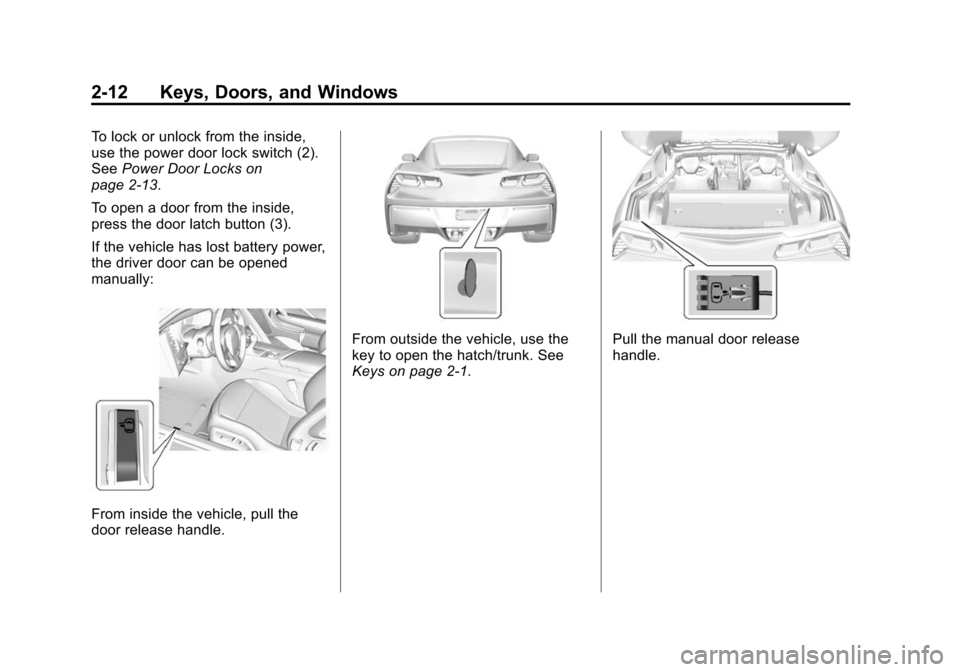
To lock or unlock from the inside,
use the power door lock switch (2).
SeePower Door Locks on
page 2-13.
To open a door from the inside,
press the door latch button (3).
If the vehicle has lost battery power,
the driver door can be opened
manually:
From inside the vehicle, pull the
door release handle.
From outside the vehicle, use the
key to open the hatch/trunk. See
Keys on page 2-1.Pull the manual door release
handle.
Page 42 of 393
Black plate (13,1)Chevrolet Corvette Owner Manual (GMNA-Localizing-U.S./Canada/Mexico-
7576293) - 2015 - crc - 10/31/14
Keys, Doors, and Windows 2-13
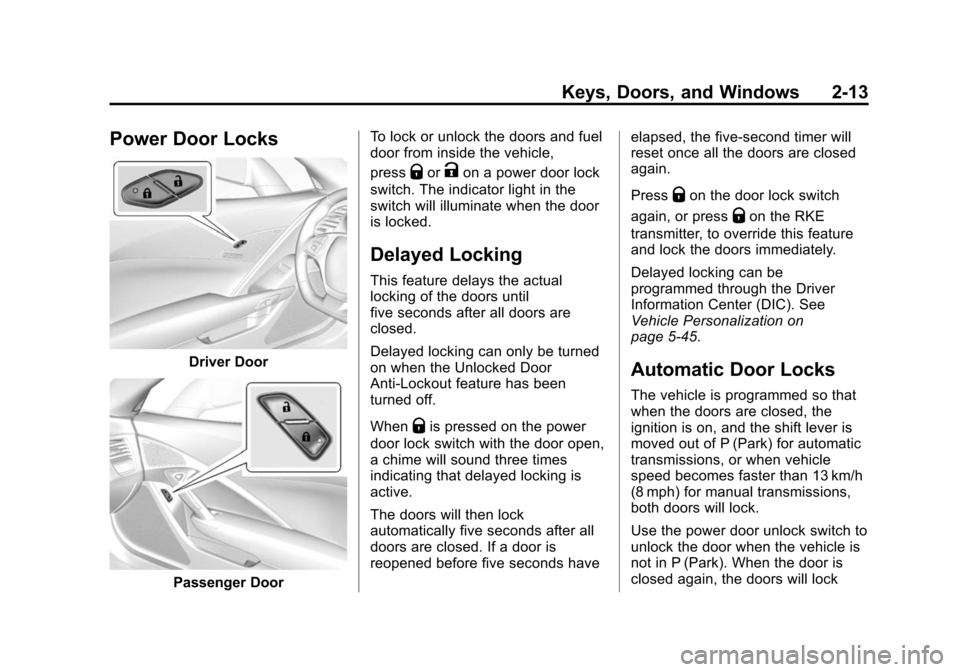
Power Door Locks
Driver Door
Passenger DoorTo lock or unlock the doors and fuel
door from inside the vehicle,
press
QorKon a power door lock
switch. The indicator light in the
switch will illuminate when the door
is locked.
Delayed Locking
This feature delays the actual
locking of the doors until
five seconds after all doors are
closed.
Delayed locking can only be turned
on when the Unlocked Door
Anti-Lockout feature has been
turned off.
When
Qis pressed on the power
door lock switch with the door open,
a chime will sound three times
indicating that delayed locking is
active.
The doors will then lock
automatically five seconds after all
doors are closed. If a door is
reopened before five seconds have elapsed, the five-second timer will
reset once all the doors are closed
again.
Press
Qon the door lock switch
again, or press
Qon the RKE
transmitter, to override this feature
and lock the doors immediately.
Delayed locking can be
programmed through the Driver
Information Center (DIC). See
Vehicle Personalization on
page 5-45.
Automatic Door Locks
The vehicle is programmed so that
when the doors are closed, the
ignition is on, and the shift lever is
moved out of P (Park) for automatic
transmissions, or when vehicle
speed becomes faster than 13 km/h
(8 mph) for manual transmissions,
both doors will lock.
Use the power door unlock switch to
unlock the door when the vehicle is
not in P (Park). When the door is
closed again, the doors will lock
Page 43 of 393
Black plate (14,1)Chevrolet Corvette Owner Manual (GMNA-Localizing-U.S./Canada/Mexico-
7576293) - 2015 - crc - 10/31/14
2-14 Keys, Doors, and Windows
either when your foot is removed
from the brake or the vehicle speed
becomes faster than
13 km/h (8 mph).
Automatic Door Unlock
The vehicle is programmed so that
when the shift lever is moved into
P (Park) for automatic transmission
vehicles or when the ignition is
turned off or is in Retained
Accessory Power (RAP) for manual
transmission vehicles, both doors
will unlock.
With the vehicle stopped and the
engine running, door unlocking can
be programmed through the Driver
Information Center (DIC). This
allows the driver to choose various
unlock settings. For programming
information, seeVehicle
Personalization on page 5-45.
Lockout Protection
If the vehicle is in ACC/
ACCESSORY or ON/RUN/START,
and the power door lock switch is
pressed with the driver door open,
the doors will lock and only the
driver door will unlock.
If the vehicle is off and Unlocked
Door Anti-Lockout is turned on, the
driver door is open, and door
locking is requested using a door
lock switch or the RKE transmitter,
both doors will lock and only the
driver door will unlock. The
Unlocked Door Anti-Lockout feature
can be turned on or off using the
vehicle personalization menus.
See Vehicle Personalization on
page 5-45.
Lockout protection can be manually
overridden with the driver door open
by pressing and holding
Qon the
power door lock switch.
Doors
Hatch (Trunk)
{Warning
Exhaust gases can enter the
vehicle if it is driven with the
liftgate, hatch/trunk open, or with
any objects that pass through the
seal between the body and the
hatch/trunk or liftgate. Engine
exhaust contains carbon
monoxide (CO) which cannot be
seen or smelled. It can cause
unconsciousness and even death.
If the vehicle must be driven with
the liftgate or hatch/trunk open:
.Close all of the windows.
.Fully open the air outlets on
or under the instrument
panel.
(Continued)