2015 AUDI TT ROADSTER wipers
[x] Cancel search: wipersPage 50 of 244

48 Clear vision
Clear vision Lights
Switching the headlights on and off
Fig . 52 Instr ument pane l: lig ht sw itc h
Fig. 53 Instrum ent pane l: ligh t swi tch with daytime
runnin g lights (DRL)
The light switch must not be overturned past
the stops in
either direct ion.
Switching on automatic headlight
control*
.,. Turn the light switch to AUTO* ¢ fig. 52.
Switching on the side marker lights
... Turn the light switch to :;oo: .
Switching on the headlights and high
beam
... Turn the light switch to iD.
... Push the high beam lever forward towards
the instrument panel¢
page SO.
Switching off the lights
... Turn the light switch to 0.
The head lights only work when the ignition is
switched on. While start ing the engine or
when switching off the ignition, the head- lights
will go off and only the side ma rker
lights will be on.
Daytime running lights (DRL) (USA
models)
T he daytime running lights can be turned on
or off using this function. If the function is ac
tive, the daytime running lights are turned on
automatically when the ignit ion is switched
on.
The daytime running lights are activated
only
when the light switch is at the AUTO* or DRL *
position.
Daytime running lights (Canada models
only)
The daytime running lights are activated only
when the light switch ¢ fig. 52 is either at the
0 or the :;oo: position.
T he daytime r unning lights funct ion cannot be
turned off.
Automatic headlight control*
In the switch position AUTO the automatic
headlight control
is turned on. The low
beams are turned on automatically through a
light sensor as soon as ambient brightness
(e .g. when driving into a tunnel) falls below a
value preset at the factory. When ambient
brightness increases aga in, the low beams are
turned off again automatically ¢.&. .
In the
AUTO position the low beams are
switched off automatically when the ignition
is turned off .
Light Sensor Malfunction*
In the event of a light sensor malfunction, the
driver is notified in the instrument cluster dis
play:
tal Automatic headlights/automatic wipers
defective
For safety reasons the low beams are turned
on permanently with the switch in
AUTO* .
However, you can continue to turn the lights
on and off using the light switch . Have the
Ill>-
Page 56 of 244

54 Clear vision
@ Tips
-Switching off the dimming function of
the inside rear view mirror also deact i
vates the automatic dimming f unction of
the exterior m irrors.
- The automatic dimming mirrors do not
dim when the interior lighting is turned
on or the reverse gear is selected .
-Automat ic dimming for the m irror only
operates properly if the light striking the inside mirror is not hindered in any way.
Sun visors
Using the sun visors makes driving safer.
Fig. 61 Sun viso r
The vanity mirrors in the sun v isors are equip
ped with lids. Push lid in direction of arrow to
open.
Wiper and washer system
Windshield wiper
The windshield wiper lever controls both the
windshield wipers and the washer system .
Fig. 62 Wiper lever: wind shi eld w iper lever pos it ions
T he windshield wiper lever i=:> fig. 62 has the
following positions:
Intermittent wiping ~l (activating rain
sensor)*
.. Move the lever up to position (D.
.. Move the interval set switch @, to change
the intervals.
Low wiper speed
.. Move the lever up to position @.
High wiper speed
.. Move the lever up to posit ion @.
One-touch wiping
.. Move the lever to position @, when you
want to wipe the windshield
briefly.
Automatic wiper/washer
.. Pull the lever to position ® (to ward the
steering whee l) and hold .
.. Release the lever . The washer stops and the
w ipers keep going for about four seconds.
Turning off the wipers
.. Move the lever back to position @ .
The windshield w ipers and washer only work
when the ignition is turned on. If you switch
off the igni tion with the windshie ld wipe r lev
er still in the interval wipe position and then
come back a while later and drive off, the ra in
sensor will reactivate itself after the vehicle
speed has exceeded 4 mph (6 km/h).
Th e rai n sensor* is only activated with the
wiper lever set to position
(D. When it starts
to rain, the rain senso r will a utomat ically acti
vate the intermittent wiping mode .
To reduce the sensitivity of the sensor, move
swi tch @ down. To increase the sensitivity,
move the switc h up. The higher you adjust the
sensitivity, the faster the sensor will react
when it senses moisture on the windshield.
The pauses between wiper turns depend not
only on the sensitivity setting, but on the ve-
hicle speed as well. ..,.
Page 57 of 244

During brief stops, e.g. at a red light, wiper
motion will automatically be reduced to the
next lower speed. Wipers already turning at
low speed change to intermittent wiping.
When the ignition is turned on, the washer
jets are heated.
A WARNING
- Wiper blades are crucial for safe driving!
Only when they are in good condition are
they able to clear the windows properly
to provide uncompromising visibility .
Worn or damaged wiper blades are a safety hazard ¢
page 5 7, Replacing
windshield wiper blades!
- The light/rain sensor* is only designed to
assist and support the driver.
It remains
entirely the driver's responsibility to
monitor outside weather conditions and
to manually activate the wipers as soon as rain or drizzle reduces visibility
through the windshield.
- The windshield must not be treated with
water-repellent materials. They can in
crease glare under poor visibility condi
tions such as wetness, darkness, or when
the sun is low on the horizon. In addi
tion, they can cause the windshield wip
ers to chatter .
(I) Note
In freezing or near freezing conditions:
- Always check that the wiper blades are
not frozen to the glass before you turn
the wipers on . Loosen a wiper blade
which is frozen in place before operating
the wipers to prevent damage to the
wiper blade or the wiper motor.
- Do not use the wipers to clear a frosted window . Using the wipers as a conven
ient ice scraper will destroy the wiper
blades.
- Before you take your vehicle to an auto
matic car wash, make sure you have the
windshield wiper system switched off (lever in position 0), otherwise the wind
shield wiper system could get damaged
Clear vision 5 5
in the car wash if it should suddenly
come on.
(0 Tips
- The windshield wipers are switched off
when the ignition is turned off. Activate
the windshield wipers after the ignition
is switched back on by moving the wind
shield wiper lever to any position.
- Worn or dirty windshield wiper blades
cause smearing, which can affect the op
eration of the light/rain sensor* . Check
the condition of your windshield wiper
blades regularly.
- The rain sensor is part of the interval
wiping system . Turning off the ignition
will also deactivate the rain sensor. To re activate the sensor, switch off the inter
val wiping function, then switch it back
on again.
-Applies to vehicles with light/rain sen
sor : When the wipers are switched on
manually and in rain conditions, the au
tomatic headlights* turn on¢
page 48,
Switching the headlights on and off
or
off during the day when the wipers are
no longer operating. The automatic
headlights* function is available in this
case only when the light switch is in the
"AUTO" position¢
page 48, fig. 52.
-Make sure the washer fluid reservoir in
the engine compartment is topped off
before going on a long trip. Look up
¢
page 179 for checking and filling the
washer container .
- The wipers only operate with the hood
completely closed .
Headlight washer system
Applies to vehicles: with headlight washer system
The headlight washer system cleans the
headlights.
"'Operate the windshield wiper/washer sys
tem
o page 54, fig. 62 ® with the head
lights turned on by holding the lever for lon-
ger than one second . ..,.
Page 58 of 244
56 Clear vis ion
The washer jets extend forward out o f the
front bumper driven by water pressure to
spray the front headlights with water.
You shou ld inspect the headlights regularly
(for example when refueling) and clean
off
any solid dirt or insects from the lenses .
To ensure the system wo rks properly in wi nter,
keep the washer jets free of snow and remove
any ice using a de-icing spray.
Service position
It is only possible to change wiper blades if
you move the wiper arms to the service posi
tion .
In o rder to use the windsh ield wipers, t he
front lid mus t be comp lete ly closed.
Moving w iper blades to the service
position
• When there is a risk of frost, make s ure that
the wiper b lades a re not frozen to the wind
shield .
.. Switch the ignition on.
.. Move the wiper lever to position
0
c> page 54, fig. 62.
.. Press the I Reset I button until the Displa y
typ e
menu appears in the Driver Informa
t ion System display .
.. Us ing the rocker switch and the
! Reset ! but
ton, select the
S et > W iper s > Front > Serv
ice positi on on
function. The winds hield
wiper arms move to the service position.
Moving wiper blades to park position
.. Make certain that the wiper arms are lying
against the windshie ld .
.. Switch the ign ition on and move t he wiper
l ever from posi tion
O to 4 c> page 54,
fig . 62 .
The wiper arms will move back to
the park position.
«I) Note
Never drive yo ur vehicle when the w ind
shie ld w iper arms are in the service pos i
tion and pulled away from the windshie ld .
When you dr ive faste r than 4 mp h (6 km/ h), the wiper a
rms automatically return to
the park position and cou ld cause paint
damage to the front lid!
(D Tips
- Yo u can also turn on the se rvice posit ion,
for example, if yo u want to protect the
w indshield from icing by using a cover .
- The service posit ion moves to
off a uto
matically when you operate the w ind
shield wiper lever, or speed exceeds
4 mph (6 km/h).
Cleaning windshield wiper blades
Clean the windshie ld w iper blades when they
begin to leave streaks. Use a soft cloth and
glass cleaner to clean the windshield wiper
blades.
.. Place the windshie ld w iper arms in the serv
ice pos it ion . Refer to
c::> page 56 .
"' Lift the wiper arm away from the front win
dow.
_&. WARNING
Di rty windsh ield wiper b lades can impair
your view. This can lead to accidents .
-
Page 59 of 244
Replacing windshield wiper blades
Wiper blades in good condition help keep the
windshield clear .
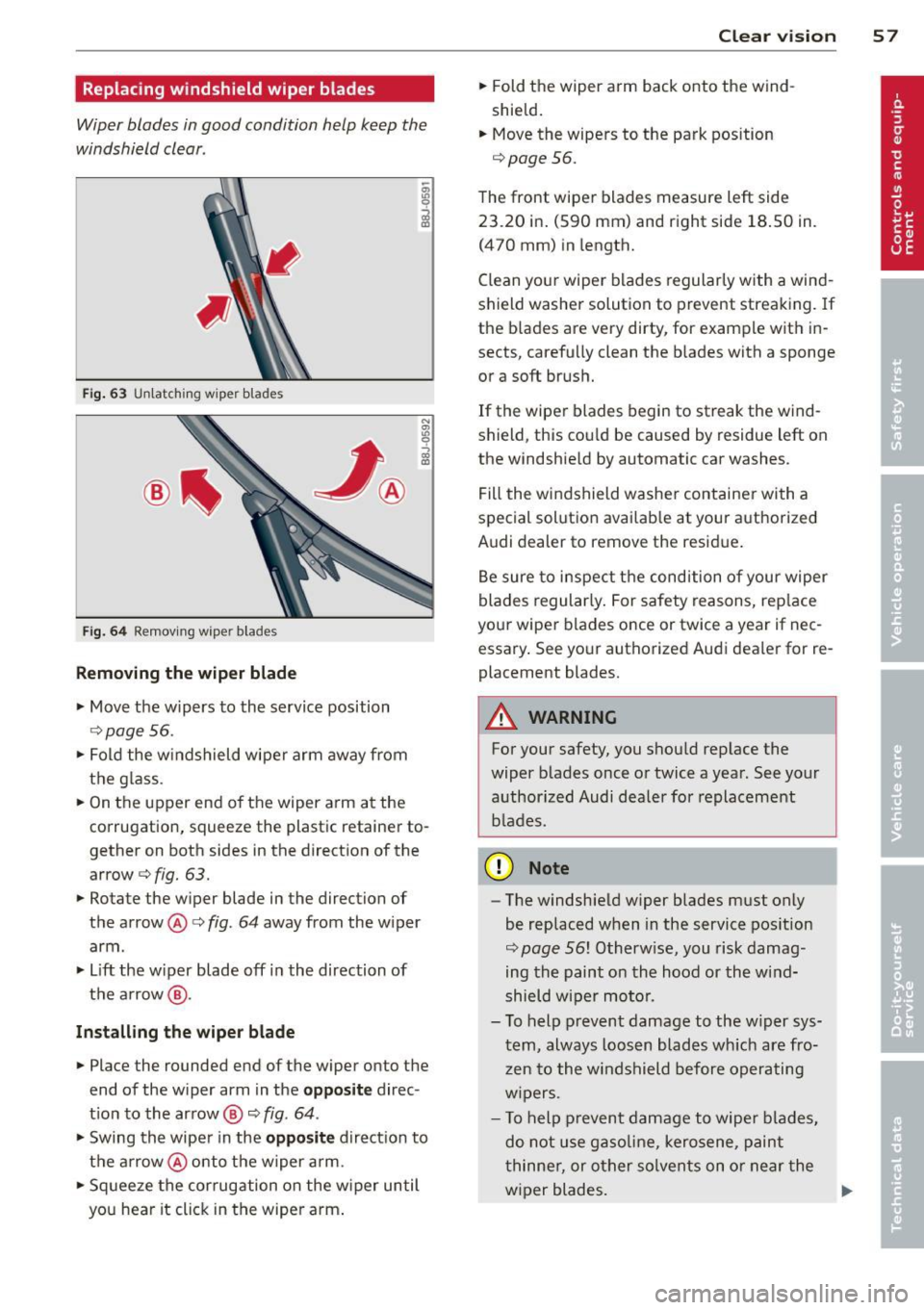
Fig. 63 U nl atc hing wiper bla des
Fi g. 6 4 Remov ing wipe r bla des
Removing the wip er blade
• Move the wipers to the service position
c::> page 56.
• Fold the w indshield wiper arm away from
the g lass.
• On the upper end of the wiper a rm at the
corrugation, squeeze the plastic retainer to
gether on both sides in the direction of the
arrow c::>
fig. 63.
• Rotate the w iper blade in the direction of
the arrow @c::>
fig. 64 away from the w iper
arm .
• Lift the w iper blade off in the direction of
the a rrow @.
Inst alling the wiper blade
• Place the rounded end of the wiper onto the
end of the wiper arm in the
opposit e direc
t ion to the arrow @ c::>
fig. 64 .
• Swing the wiper in the opposite direction to
the a rrow @onto the wiper arm.
• Sq ueeze the corrugation on the w iper until
you hear it click in the wipe r arm .
Clear vi sion 5 7
• Fold the wiper arm back onto the wind
shield.
• Move the wipers to the park position
c::>
page 56.
The front wipe r blades measure left side
23 .20 in . (590 mm) and right side 18 .50 in.
(470 mm) in length.
C lean you r wiper blades regularly with a wind
shield washer solution to prevent streaking. If
the b lades are very dirty, for examp le with in
sects, carefully clean the b lades with a sponge
or a soft brush.
If the wiper blades begin to streak the wind
shield, this cou ld be caused by residue left on
the windshie ld by automatic car washes.
Fill the wi ndshield washe r container with a
spec ial solutio n availab le at your aut horized
Audi dealer to remove the resid ue .
Be sure to inspect t he condition of your wiper
blades regularly. For safety reasons, rep lace
your wiper blades once or twice a year if nec
essary . See yo ur authorized Aud i dealer for re
placement blades.
A WARNING
For your safety, you shou ld rep lace the
wiper b lades once or twice a yea r. See your
a uthorized Audi dealer for replacement
b lades.
(D Note
- The w indshie ld w iper blades must only
be replaced w hen in the service pos ition
c::>
page 56! Otherw ise, you risk damag
ing the paint on the hood or the wind
shield wiper mo to r.
- T o help p revent damage to the w iper sys
tem, always loos en blades wh ich are fro
z en to the windshield before operating
w ipers.
- T o help p revent damage to wiper blades,
do not use gaso line, kero sene, paint
t hinne r, or other solvents on o r near the
w iper blades.
Page 60 of 244
58 Clear vision
-To help prevent damage to the wiper
arms or oth er components, do not at
tempt to move the wipers by hand.
@ Tips
- Commercial hot waxes applied by auto
matic car washes aff ect the cleanability
of the glass surface .
- The front wiper blades are different
lengths; the blade on the driver's side is
longer .
Digital compass
Activating or deactivating the compass
Applies to vehicles: with digital compass
Fig. 65 Inside re ar view mirro r: di gital compass ac ti
va ted
• To activate or deactivate , hold the@
¢ fig. 65 button down until the red display
appears or disappears.
The digital compass only works with the igni
tion turned on . The directions are displayed as
initials:
N (North), NE (Northeast) , E (East),
SE (Southeast) , S (South), SW (Southwest),
W (West), NW (Northwest).
The compass has to be recalibrated if the dis
play is wrong or inaccurate
¢ page 58.
(j) Tips
-To avoid inaccurate directions, do not al
low any remote controls, electrical sys
tems, or metal parts close to the mirror.
- The correct magnetic deflection zone
must be set in order to display the direc
tions correctly.
Setting the magnetic deflection zone
Applies to vehicles: with digital compass
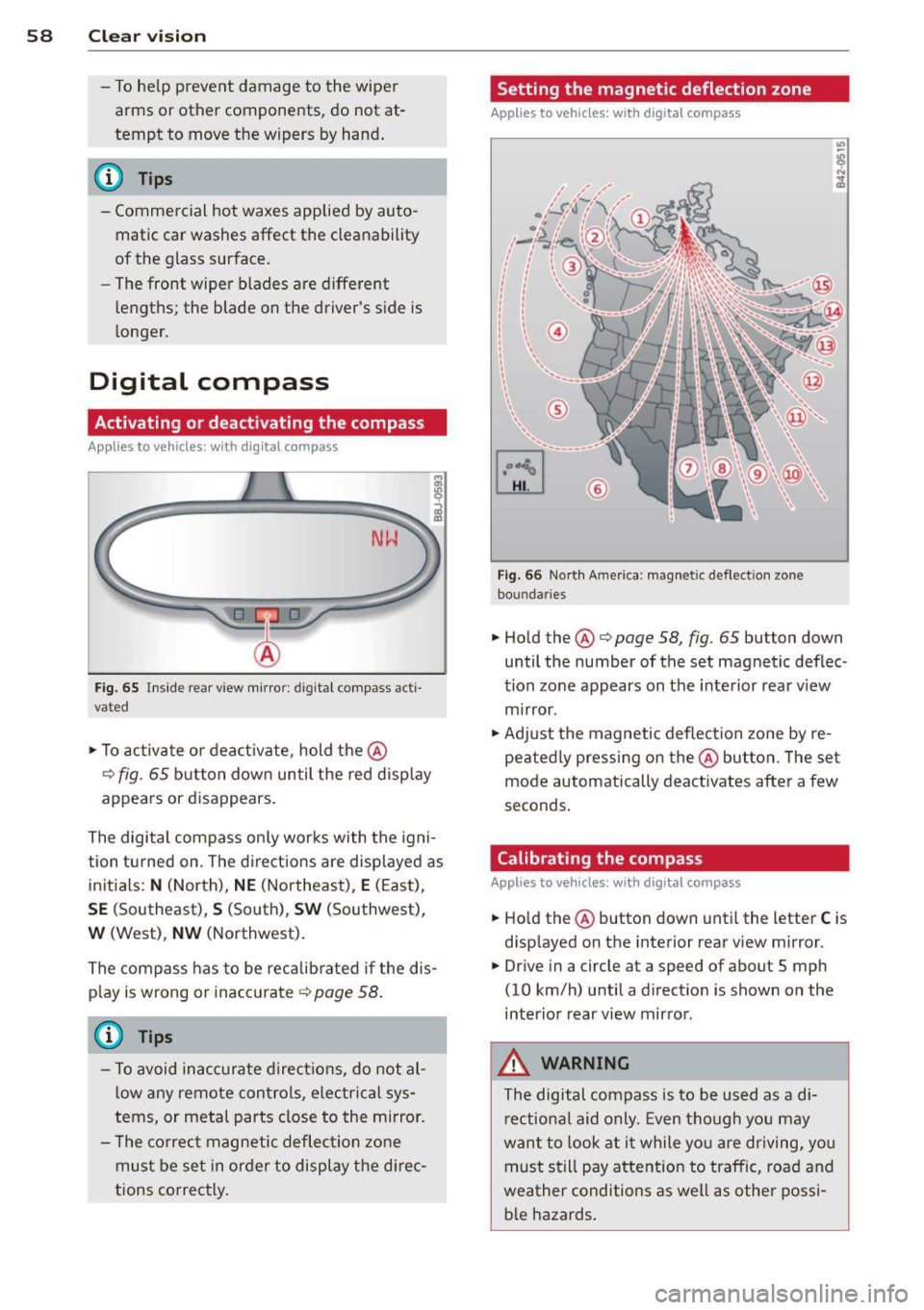
Fig. 66 North A meri ca : magn etic defle ction zo ne
bo undaries
• Hold the@¢ page 58, fig. 65 button down
until the number of the set magnetic deflec
tion zone appears on the interior rear view
mirror .
• Adjust the magnetic deflection zone by re
peatedly pressing on the@button. The set
mode automatically deactivates after a few
seconds.
Calibrating the compass
Applies to vehicles: with digital compass
• Hold the @button down until the letter C is
displayed on the interior rear view mirror .
• Drive in a circle at a speed of about S mph
(10 km/h) until a direction is shown on the
interior rear view mirror.
_&. WARNING
The digital compass is to be used as a di
rectional aid only. Even though you may
want to look at it while you are driving, you
must still pay attention to traffic, road and
weather conditions as well as other possi
ble hazards.
-
Page 156 of 244

154 Vehicle care and cleaning
Vehicle care and
cleaning
General information
Regular, proper care helps to maintain your
vehicle 's value. It can also be a requirement
when subm itting warranty claims for corro
sion damage and paint defects on the body .
The required cleaning and care products can be obtained from your authorized Audi dealer
or a qualified workshop. Read and follow the instructions for use on the packaging .
A WARNING
-Us ing cleaning and care products incor
rectly can be dangerous to your hea lth .
- Always store cleaning and care products
out of reach of children to reduce the ris k
of poisoning.
@ For the sake of the environment
-Preferably use environmentally-friendly
products when buying cleaning agents .
- Do not d ispose of leftover cleaning and
ca re products with household trash .
Car washes
-
The longer that deposits such as insects, bird
droppings , tree sap or road salt rema in on the
vehicle, the more the surface can be dam
aged. High temperatures such as those
caused by s unligh t increase the corrosive ef
fect.
Before washing, wet heavy deposits with plen
ty of water.
Also, wash the underside of your vehicle once
road salt stops be ing used for the season .
Pressure wa shers
When washing your vehicles with a pressure
washer, always follow the operating instruc
tions provided w ith the pressure washer. Th is
is especially important in regard to the pres
sure and spray ing distance . Do not aim the
spray directly at seals on side w indows, doors, the
hood, the rear lid or the convertible top or
at tires, rubber hoses, insulating material
orsensors* . Keep a distance of at least 16 in
ches (40 cm) .
Do not remove snow and ice with a pressure
washer.
Never use rotary nozzles or high pressure noz
zles.
The water temperature must not be above
140
°F (60 °() .
Automatic car washes
Spray off the vehicle before washing.
Make sure that the windows are closed and
the windshie ld wipers are off. Follow instruc
tions from the car wash operator, especially if
there are accessories attached to your vehicle .
If possible, use car washes that do not have
brushes .
Washing by hand
Clean the vehicle starting from the top and
working down using a soft sponge or cleaning
brush . Use solvent-free cleaning products.
Washing vehicles with matte finish paint
by hand
To avoid damaging the paint when washing,
first remove dust and large particles from
your vehicle. Insects, grease spots and finger
prints are best removed with a special cleaner
for matte finish paint .
Apply the product using a microfiber cloth. To
avoid damaging the paint surface, do not use
too much pressure.
Rinse the vehicle thoroughly with water. Then
clean using a neutra l shampoo and a soft mi
crofiber cloth.
Rinse the vehicl e thoroughly again and let it
air dry. Remove any water residue using a sham my.
Stubbo rn deposits such as bird droppings o r
tree sap are best removed with p lenty of wa-
ter and a microfiber cloth. .,.
Page 166 of 244

164 Checking and filling
Checking and filling
Engine hood
Releasing the engine hood
The engine hood is released from inside the
vehicle .
Fig. 126 Driver' s side footwe ll: e ngin e hood release
lever
.. Open the driver's door .
.. Pull the release lever on the left under the
instrument panel
c> fig . 126 in the direction
of the arrow .
The hood pops up slight ly under spring pres
sure.
Opening the engine hood
Fig . 127 Re lease lever under the engine hood
Before opening the engine hood, make sure
that the windshie ld wipers are flat against the
windshie ld. Otherwise, they cou ld damage the
pain t on the hood.
.. Lift the hood slight ly
c> .&, .
.. Pull up on the release under the hood
c> fig . 12 7. This releases the catch .
.. Open the hood all the way.
A WARNING
-Hot engine coolant can burn you.
- To reduce the risk of being burned, never
open the hood if you see or hear steam
or coo lant escaping from the eng ine
compartment . Wait unt il no steam or
coolant can be seen or heard before care
fu lly opening the hood.
Closing the engine hood
.. Pull the hood down until the pressure from
the struts is reduced .
.. Let the hood
drop down and latch in p lace.
Do not try to push it shut; it may fail to en
gage
c> .&, .
A WARNING
--
A hood that is not completely latched
could fly up and b lock your view while dr iv
i ng.
- When you close the engine hood, check it
to make sure the safety catch has proper
ly engaged . The hood should be flush
with the surrounding vehicle body parts.
- If you notice while dr iv ing that the hood
is not secured properly, stop at once and
close it .
Working in the engine compartment
Be especially careful whenever you work in
the engine compartment!
Whene ve r y ou must pe rform any wo rk in th e
eng ine compartment, for e xample chec king
and filling the diff ere nt fluids, ther e is a risk
of injury , burn s and accident s. To prevent
p ers onal injury alwa ys obs erv e the follo win g
WARNING S. Th e engin e c ompartm ent of an y
v e hicl e is a hazardou s area!
c> .&.
A WARNING
To help avoid injury, before you check any
thing under the hood:
- Sw itch off the engine .
- Remove the ignition key.