2015 AUDI TT ROADSTER warning
[x] Cancel search: warningPage 30 of 244

28 Driver information system
-The fuel economy messages are not dis
played in every instance, but rather in in
terva ls over a period of ti me.
Service interval display
The service interval display reminds you when
your nex t service is due.
Fig. 19 Sect ion of instrument cluster: Serv ice in terva l
d isp lay
The schedule for the next oil change or inspec
tion is calculated automatically and displayed
accordingly. The display works in two stages :
Service reminder
30 days before the next service is due, a serv
ice reminder appears in the display when you
turn on the ignition.
After about
5 seconds the display switches
back to normal. The distance and time re
maining are updated each time the ignition is
turned on until the date due for service is
reached.
Service due
When the due date for service is reached , the
message
Service due! appears in the instru
ment cluster immediately after you turn on
the ignition. Additionally, a warning tone
sounds . After about
5 seconds the display
switches back to normal.
Calling up the service schedules
If or when an oil change or inspection is due,
can be shown in the instrument cluster by se
lecting the serv ice interval display. Select
Check > Service > Oil change or Service by us
ing the
! R ES ET I button and the rocker switch
c> page 25 , fig . 12.
Resetting the service interval display
Your authorized Audi dealer will reset the cor
responding service schedule after performing
the appropriate service on your veh icle. You
also have the possibility to reset the oil
change schedule after having performed an
o il change according to Audi specifications.
- Switch the ignition on.
- Pull the knob
c> fig. 19. The message. Serv-
ice due!
appears.
- Pull the knob until the display
Oil change in
-----mi (km)---day s appears . If the I RESET I
button is not pulled within 5 seconds, the
disp lay reset mode closes.
(D Note
If you disconnect the battery terminals, no
ca lculations can be made for the service
interval display during this time and no
service reminder will appear. Remember
that observing the proper service intervals
i s vitally important to extending the life of
your vehicle, particularly the engine, and
maintain ing its value . Even if the mileage
driven is low, the maximum period of one
year from one service to the next must not
be exceeded.
'
(D Tips
-Do not reset the display between oil
changes, otherwise the display w ill be in
correct.
- Th e information in the Service Reminder
remains stored even when the vehicle
battery is disconnected.
Lap timer
I ntrod ucti on
App lies to vehicles: wit h lap timer
You can record and evaluate lap times with
the lap timer in the display c>page
29,
fig. 21. The time is measured in minutes, sec
onds and
1/10 seconds. The hours are also
shown when the lap t ime exceeds
60 min utes .
T he maximum individual measurement is 99
hours. ..,.
Page 31 of 244
A WARNING
Please devote your fu ll attent ion to driv
ing. As th e driver, you have complete re
sponsibility for safety in traffic. Only use
the funct ions in such a way that you always
ma in ta in complete control over your veh i
cle i n all t raff ic sit uat ions .
{D) Tips
When the lap t imer stopwatch is running,
you can call up the t rip computer info rma
tion wi th the
I RESET I b utton .
Calling up the lap timer and timing
Appl ies to vehicles: with lap timer
------- @
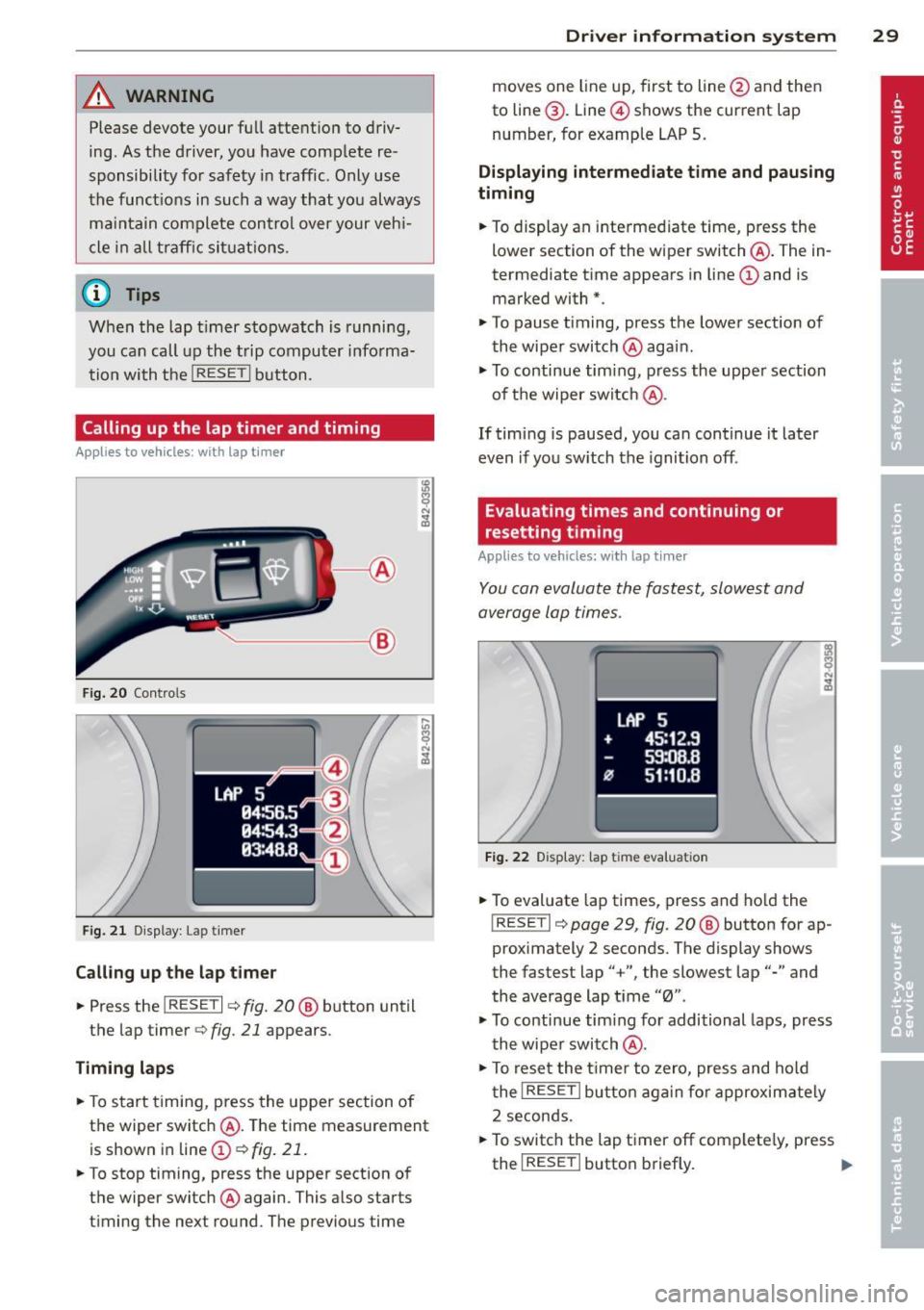
Fig. 20 Contro ls
F ig. 2 1 Display : Lap t imer
Call ing up the l ap t imer
.. Press the I RESET I c:> fig. 20@ button until
the lap timer
c:> fig. 21 appears .
Timing lap s
.. To start timing , press the upper section of
the wiper switch @. T he time measurement
is shown in line@
c:> fig. 21 .
.. To stop timing, press the upper section of
the wiper switch @again. This also starts
timing the next round . The previous time
Dr iver in formation system 29
moves one line up, first to line @and then
to line @. Line @ shows the current lap
number, for example LAP 5 .
Displaying intermediate time and paus ing
timing
.. To display an inte rmediate time, press the
lower section of the wiper switch @. The in
termediate t ime appears in line@and is
marked with* .
.. To pause t iming, press the lower section of
the wiper switch @again .
.. To continue tim ing , press the upper section
of t he wiper switch @.
If tim ing is paused, you ca n continue it later
even if you sw itch the ignition off.
Evaluating times and continuing or
resetting timing
Applies to vehicles: with lap tim er
You can evaluate the fastest, slowest and
average lap times .
LAP 5
+ 45:12 .9
59:08 .B
flJ 51:10 .B
F ig . 2 2 D isplay : lap tim e evalua tion
.. To evaluate lap times, press and ho ld the
! RESETI c:> page 29 , fig. 20 @ button for ap
proximately 2 seconds . The display shows
the fastest lap" +", the slowest lap"-" and
the average lap t i me "0" .
.,. To continue tim ing fo r additional laps, press
t h e wiper switch @.
.. To rese t the t ime r to zero, pres s and hold
t he
I RESE T I button aga in fo r approxima tely
2 seconds .
.. To switch the lap timer off complete ly, press
the
I RESE T I button briefly. II-
Page 32 of 244
30 Driver information system
@ Tips
-Saved lap times cannot be individually
deleted from the total results.
- The saved lap timer values will not be
lost after turning the ignition off .
On-Board Diagnostic
system (OBD)
Malfunction Indicator Lamp (MIL)
The Malfunction Indicator Lamp (MIL) Ill in
the instrument cluster is part of the On-Board
Diagnostic (OBD II) system.
The warning/indicator light illuminates when
the ignition is switched on and goes o ut after
the engine starts and the idle has stabilized.
This indicates that the MIL is working proper
ly.
If the light does not go out after the engine
is started, or illuminates whi le you are driv
ing, a ma lfunction may exist in the engine sys
tem. If the light illuminates, the catalytic con
verter could be damaged.
Continue driving
with reduced power (avoid
ing sustained high speeds and/or rapid accel
erations) and have the condition corrected.
Contact your authorized Audi dealer .
If the light illuminates, the electronic speed limiter may also be malfunctioning. For more
information ¢
page 30, Electronic speed
limiter.
An improperly closed fuel filler cap may also
cause the MIL light to illuminate
¢page 162.
On-Board Diagnostics
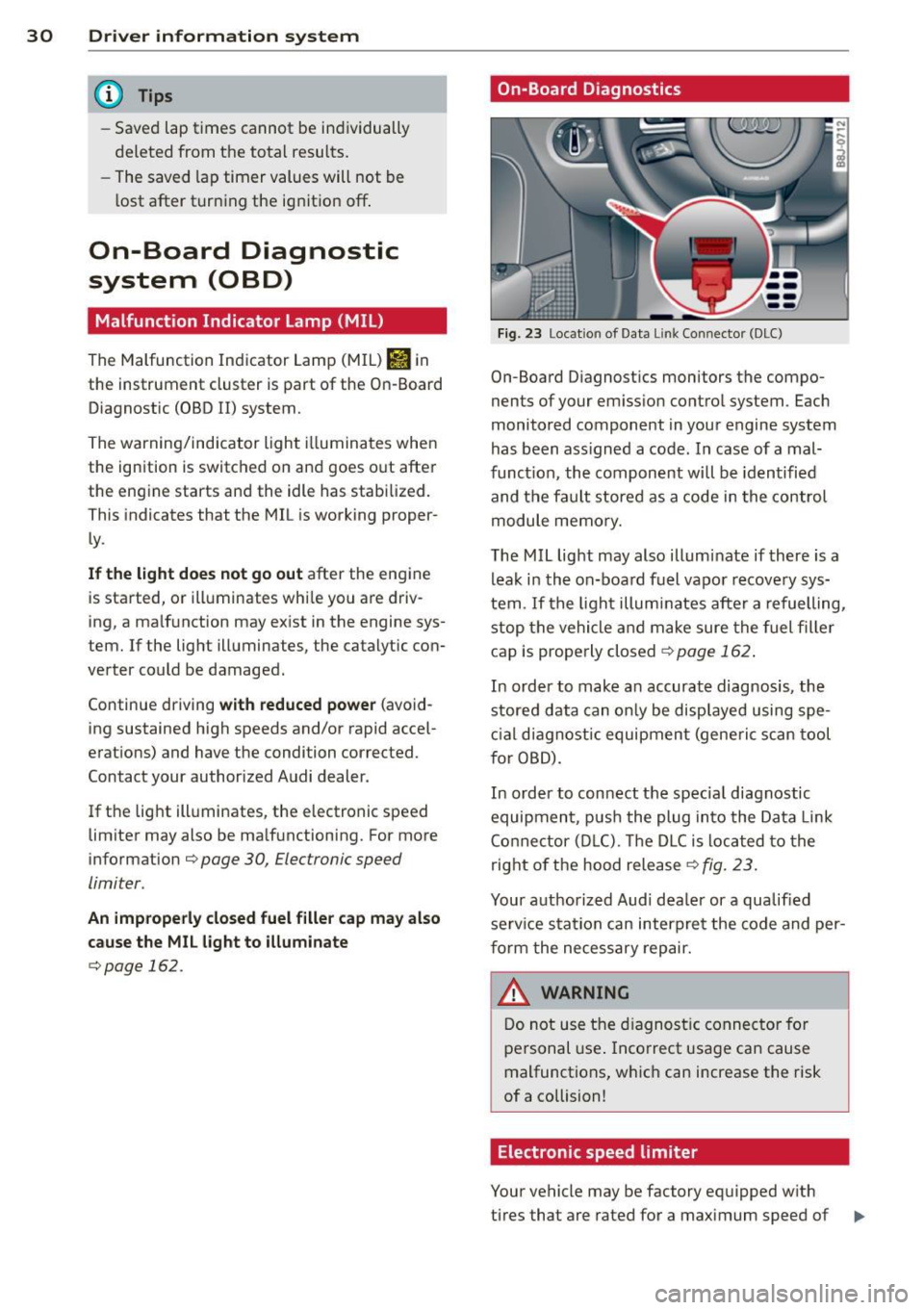
Fig. 23 Location of Data Lin k Co nn ector (DLC)
On-Board D iagnostics monitors the compo
nents of your emission control system . Each
monitored component in your engine system
has been ass igned a code. In case of a mal
funct ion, the component will be identified
and the fault stored as a code in the control
module memory.
The MIL light may also illuminate if there is a
leak in the on-board fuel vapor recovery sys
tem .
If the light illuminates after a refuelling,
stop the vehicle and make sure the fuel filler
cap is properly closed¢
page 162 .
In order to make a n accurate diagnosis, the
stored data can only be displayed using spe
cial diagn ostic equipment (generi c scan tool
f or OBD).
In order to connect the spec ial diagnostic
equipment , push the plug into the Data Link
Connector (DLC). Th e DLC is located to the
right of the hood release
¢fig. 23.
Your authorized Audi dealer or a qualified
service s ta tion can interpret the code and per
form the necessary repair.
~ARNING
Do not use the diagnostic connector for
personal use . Incorrect usage can cause
malfunctions, which can increase the risk
of a collision!
Electronic speed limiter
Your vehicle may be factory equipped w ith
-
tires that are rated for a maximum speed of .,..
Page 33 of 244
130 mph (210 km/h). This is less than the
maximum speed of your vehicle. To reduce the
risk of sudden tire failure and loss of control if
the vehicle is operated at excessive speeds,
your vehicle also has an electronic speed limit
er . The electronic speed limiter prevents your
veh icle from going faster than the tire speed
rating . For more informat ion
.:;, page 191 .
If the engine control unit receives faulty vehi
cle roadspeed signa ls, the Malfunction Indica
tor L ight (MIL)
Ill will illuminate . If this oc
curs, contact the nearest authorized Audi
dealer for assistance.
S models
Your vehicle's top speed is elec tronically limit
ed to 155 mph (250 km/h) .
If the engine control unit rece ives fau lty vehi
cle roadspeed signals, the Malfunction Indica
tor Lamp (MIU
¢..ijj will illuminate. If th is oc
curs, contact the nearest authorized Audi
dealer for assistance .
&, WARNING
Always observe the posted speed limits
and adjust your speed to suit prevailing
road, traffic and weather conditions. Never
drive your vehicle faster than the maxi
mum speed rating of the tires installed.
Driver information system 31
Page 34 of 244

32 Opening and clo sing
Opening and closing
Keys
Key set
Fig . 2 4 Key set
Fig . 25 Remote master key : Indicator light
@ Ma ster key w ith remote control
You can centrally lock and unlock your vehicle
and start the engine with the master key with
remote control. To fold the key out and back
in place, press the re lease button
c:> fig. 24
(arrow).
@ Valet ke y
The valet key on ly fits the lock in the driver's
door and the ignition lock. If you have to leave
the key with somebody e lse, you are well-ad
vised to turn over the valet key only.
Be aware that the rear lid and glove compart
ment can be opened from inside the vehicle
using the release buttons .
© Emergency k ey
The eme rgency key is only for temporary use if
the vehicle key should be lost or misplaced
c:> & .
Ke y replac ement
If you lose a key, contact you r a uthorized Audi
dealer immed iate ly to have the
Lost key disa
bled. Be sure to bring all your keys with you .
Registered ke ys
You can check to find out how many keys have
been reg istered to your vehicle. Therefore,
when buy ing a used veh icle, make sure to get
all of the keys that belong to it.
Call ing up the reg istered keys
c:> page 24.
St ate of mas ter key b atter y
When a button is pressed, the check light
flashes
c:> fig . 25 (arrow) . If the check light
does not come on or flash, the battery is dead
and has to be replaced .
Battery replacement
c:> page 33.
_& WARNING ........... -
- Do not leave your vehicle unattended
wit h the key in the ignition lock. Entry by
unauthorized persons could endange r
you o r result in theft or damage the vehi
cle. A lways loc k all doors a nd take the
key.
- D o not leave ch ildren unattended in the
veh icle, especially wi th access to vehicle
keys . Unguarded access to the keys pro
vides children the opportunity to start
the engine and/or activate vehicle sys
tems such as the power windows etc. Un supervised operation of any vehicle sys
tem by children can result in ser ious in
jury.
{!) Tips
- If you open the driver's door with the key
left in the ignit ion lock, a chime will
sound . Th is is your rem inder to remove
the key and lock the door.
- For security reasons, rep lacement keys
are only ava ilable from Audi dealers .
Page 35 of 244
Master key with remote control
The remote control allows you to lock or un
lock the vehicle electronically .
The transmitter and battery are located in the
head of the remote control. The receiver is lo
cated inside the vehicle. The maximum effec
tive range depends on several things . Remem
ber, if the battery is wea k, the effective range
decreases.
If you need to replace the remote control, or if
you need to have it repaired, you must see
your author ized Audi dealer. Only then can
you use the key again.
(D Tips
- If the ignition is sw itched on, the remote
control system is deactivated .
- The remote control system can be affect ed by other systems operating in the
same frequency range close to the vehi
cle, such as mobi le telephones, televi
sion broadcasting stations, etc.
- Fo r De clarat ion of Compliance to United
Sta tes FCC and Indus try Canada regula
tions ¢
page 228.
Master key battery replacement
Each master key contains a battery housed
under the cover .
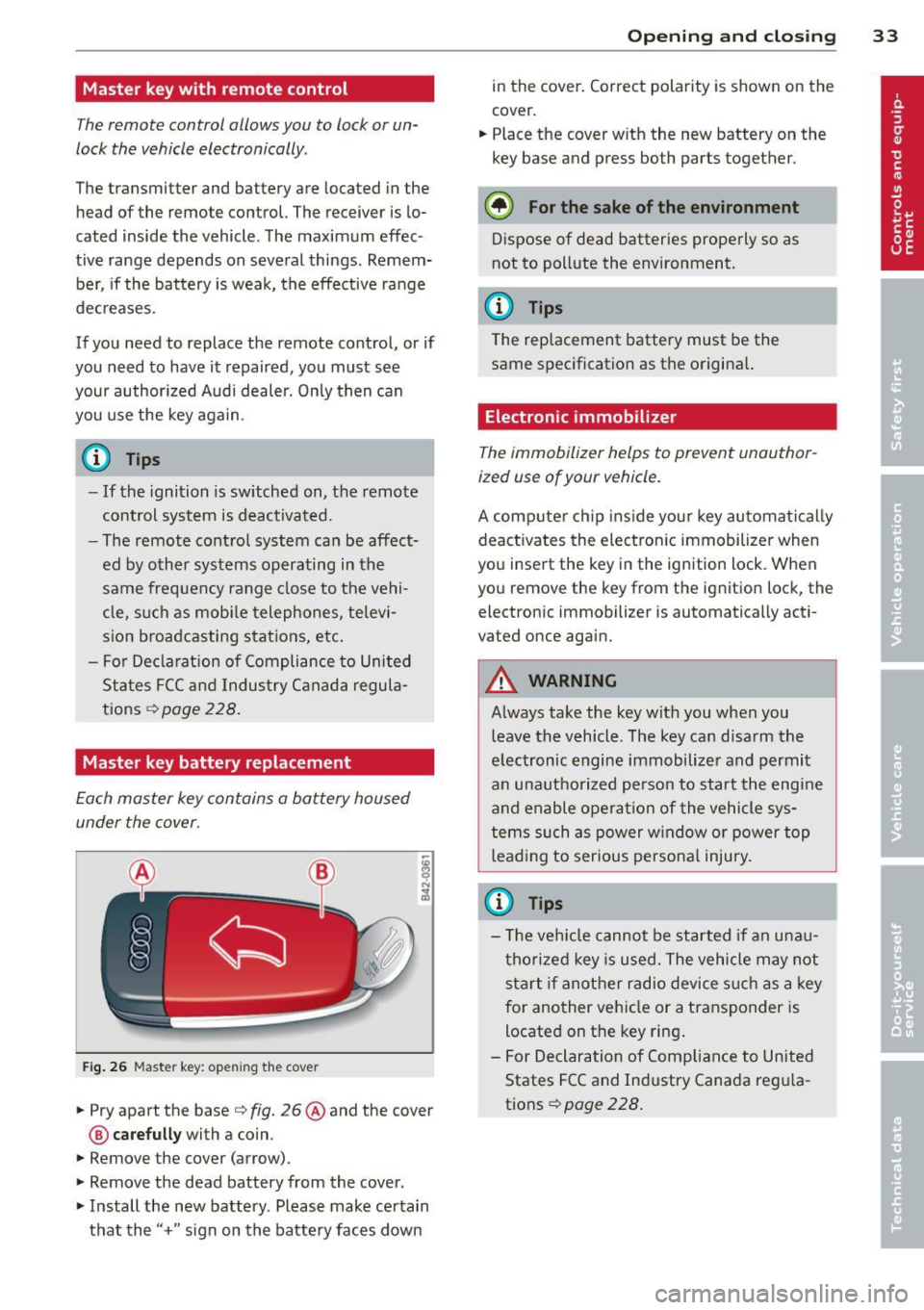
Fig . 26 Maste r key: open ing the cover
.. Pry apart the base¢ fig. 26@and the cover
@ care full y with a coin .
.,. Remove the cover (arrow) .
.,. Remove the dead battery from the cover .
.. Install the new battery . Please make certain
that the" +" sign on the batte ry faces down
Op enin g an d clos ing 33
in the cover . Correct polarity is shown on the
cover .
.. Place the cover with the new battery on the
key base and press both parts together .
@ For the sake of the env ironment
Dispose of dead batteries properly so as
not to pollute the environment.
(D Tips
The replacement battery must be the
same specification as the origina l.
Electronic immobilizer
The immobilizer helps to prevent unauthor
ized use of your vehicle.
A computer chip ins ide your key automatica lly
deactivates the electron ic immobilizer when
you insert the key in the ign ition lock. When
you remove the key from the ignition lock, the
electronic immobilizer is automatically acti
vated once again.
A WARNING
---
Always take the key with you when you leave the vehicle. The key can disarm the
electronic engine immobilizer and permit
an unauthorized person to start the engine
and enable operation of the vehicle sys
tems such as power w indow or power top
leading to serious persona l injury.
(D Tips
- T he ve hicle cannot be started if an unau
thorized key is used. The vehicle may not
start if another radio device s uch as a key
for another vehicle or a transponder is
located on the key ring .
- For Declaration of Compliance to United
States FCC and Industry Canada reg ula
tions¢
page 228 .
Page 36 of 244
34 Opening and closing
Power locking system
General description
The power locking system locks or unlocks all
doors simultaneously.
The power lock ing system in your ve hicle in
corporates the fo llow ing funct ions:
- Central locking function
- Remote con tro l feature q page 33 .
- Anti -Theft Alarm Sys tem q page 38.
A ll the doors and the rear lid are locked by the
centra l locking system when you lock the vehi
cle.
The unlocking a nd lock ing mode * can be
changed in t he d river i nfo rmation system
qpage24.
Unlocking the vehicle
You can un lock the vehicle from outs ide e ither
by using the remote control
or by insert ing
a nd turning the key in t he driver's door lock.
When you
unlock your veh icle:
- The anti-theft alarm system is deactivated br iefly.
- The veh icle inter ior lights ill uminate for ap
proximate ly 30 seconds.
- All turn signa l lights will f lash twice w hen
the car is unlocked.
- After unlock ing the vehicle, yo u have 30 sec
onds to open a door or the rear lid. After 30
seconds, the vehicle automatically locks and
the ant i-theft a larm system activates again.
The rear lid can be locked or un locked either
by using the remote control
or by insert ing
a nd turning the key in the driver's door lock.
Unlock ing the ve hicle w ith the remote co ntrol
c::::5 will only unlock the rear lid, to open it, the
lid handle needs to be p ressed .
Locking the vehicle
You can lock the vehicle from o utside e ither by
using the remote control
or by insert ing and
turning the key in the drivers's door lock.
When you
lo ck the vehicle:
- All doors and the rear lid are locked. -
All turn signal lights wi ll flash once when
the car is loc ked .
- The ant i-theft a larm system is ac tiva ted.
The ho rn of the anti -theft alarm system wi ll
sound and t he anti-theft a la rm system read
iness light, located in the center of the in
strument panel be low the w indshield on the
r ight side of the air vent, will start to blink.
- The vehicle interior lights turn off.
Automat ic lock ing*
T he au tom atic locking fea ture locks a ll the ve
hicle doors an d the rear lid when you drive
faster than 9 m ph (15 km/h).
You can unlock t he vehi cle from the i nside by:
- remov ing the key from the igni tion swi tc h
(the vehi cle w ill automatically u nlock itself)
or
- pressi ng the un loc k pa rt of the power lock
sw itch
ll:D or
pull ing the door ha ndle (to open the doo r).
If you wish, yo u can have an a utho rized Aud i
dealer convert your power doo r lock system to
automat ic locking.
Unintentionally locking yourself out
T he veh icle does not lock with t he centra l
l ocking switch
¢ page 3 6 if the driver's door
is open .
D o no t lock your ve hicle w ith the
remote mas
ter key
un til a ll doo rs and t he rea r lid are
cl osed. In this way yo u avoid locking yourse lf
o ut accidentally .
_& WARNING
- When you loc k yo ur vehicle from o utside,
nobody- espec ia lly children -shou ld re
main inside the vehicle. Remember,
when yo u lock the vehicle from the out
side th e wi ndows cannot be o pened from
the inside.
- Wh en you leav e th e ve hicle, always re
move the ign ition key and take it w ith
you. This will preven t passe ngers (chil
d ren, f or example) from acci denta lly be
i n g loc ke d in the vehicle s hould they
Page 37 of 244
accidentally press the power locking
switch.
- Do not leave children inside the vehicle
unsupervised. In an emergency it would
be impossible to open the doors from
the outside without the key.
@ Tips
- In the event of a crash with airbag de
ployment a ll locked doors will be auto
matically unlocked to g ive access to the
vehicle occupants from the outside.
- If the power locking system should mal
function, you can lock each door individ
ually using the vehicle key .
- If the power locking system should fail,
you can still open the fue l tank flap in an
emergency
c>page 163.
- You are well advised not to keep valua
bles inside an unattended vehicle, visible
or not . Even a properly locked vehicle
cannot provide the security of a safe!
Unlocking and locking the vehicle w ith
the remote control
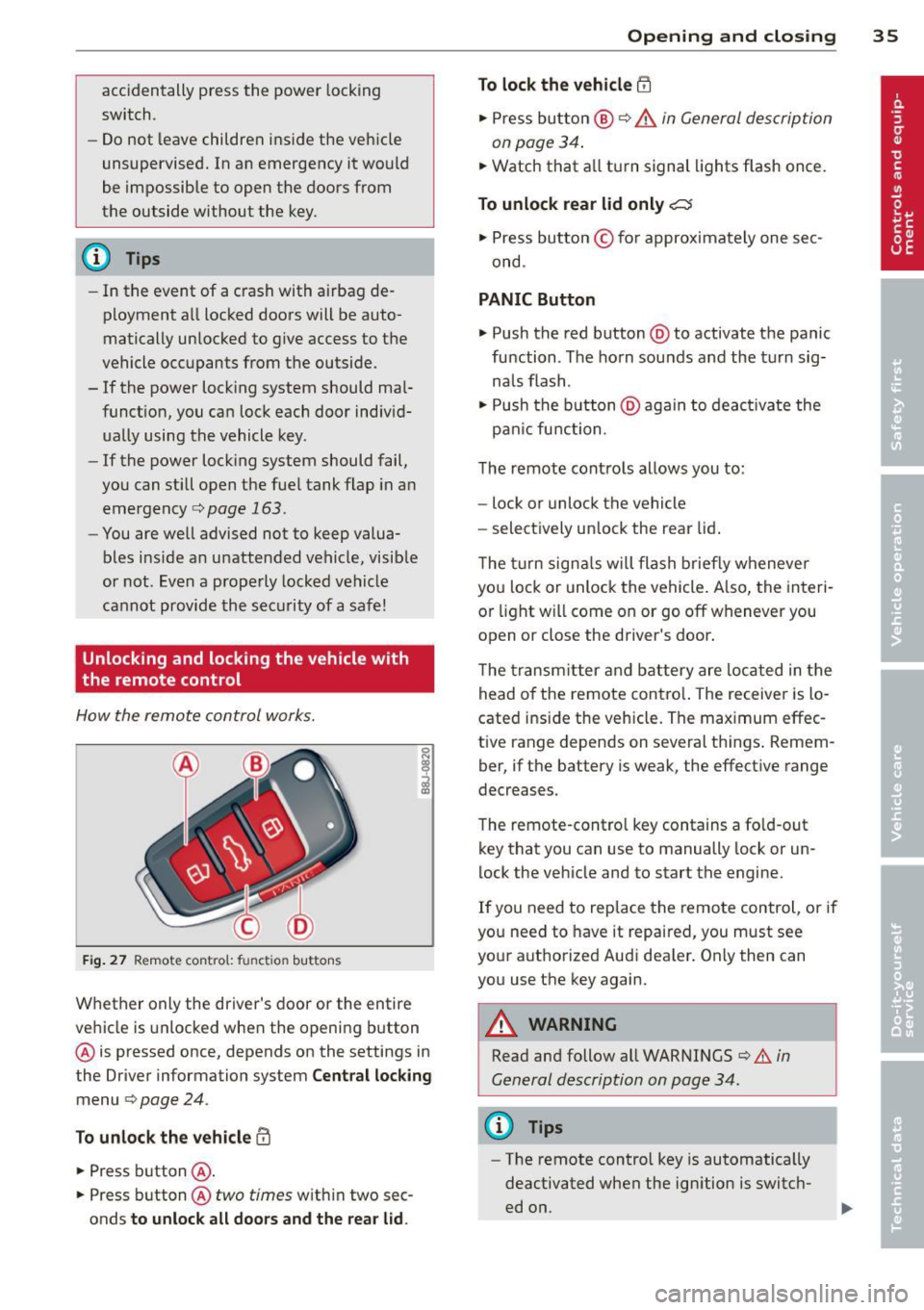
How the remote control works.
Fig . 27 Remote contro l: fu nctio n buttons
0
I
Whether only the driver's door or the entire
vehicle is unlocked when the opening b utton
@ is pressed once, depends on the settings in
the Driver information system
Central locking
menu c> page 24.
To unlock the vehicle !Ii
.,. Press button @.
.,. Press button @
two times with in two sec
onds
to unlock all doors and the rear lid.
Opening and closing 35
To lock the vehicle efl
.,. Press button @ c> &. in General description
on page 34 .
.,. Watch that a ll turn signal lights flash once.
To unlock rear lid only~
.,. Press button © for approximately one sec
ond .
PANIC Button
.,. Push the red button @to activate the panic
function . The horn sounds and the turn sig
na ls flash .
.,. Push the button @aga in to deact ivate the
pan ic function .
The remote controls allows you to:
- lock or unlock the vehicle
- select ively unlock the rear lid.
The turn signals will flash briefly whenever
you lock or unlock the vehicle. Also, the interi
or light will come on or go off whenever you
open or close the driver's door .
The transm itter and battery are located in the
head o f the remote contro l. The receiver is lo
cated ins ide the vehicle. The max imum effec
tive range depends on several th ings . Remem
ber, if the battery is weak, the effective range
decreases.
The remote-control key contains a fo ld-out
key that you can use to manually lock or un
lock the vehicle and to start the engine.
If you need to replace the remote control, or if
you need to have it repaired, you must see
your authorized Aud i dealer. Only then can
you use the key again.
A WARNING
Read and follow all WARNINGS c> .&. in
General description on page 34.
(0 Tips
- The remote contro l key is automatically
deactivated when the ignition is switch
ed on.
-