2015 AUDI TT ROADSTER check oil
[x] Cancel search: check oilPage 27 of 244

Set Clock ¢ page 2 5
Computer¢ page 25
Acoustic par k assist* ¢ page 79
Speed warning ¢ page 77
Language ¢
page 2 5
Units (distance, fue l consump-
tion, temperature) ¢
page 25
Tire press ure moni toring
c> page 198
Lap timer* c>page 28
Lighting* ¢ page 48
Wiper (service pos it io n)
¢page 56
Window c> page 40
Doors (unlo ck ing and locking
mode, for example Auto- lock)
¢ page 34, c> page 34
Check
Service c> page 28
Chassis numbe r c> page 2 22
Engine oil temperature*
¢
page 26, c> page 26
Registe red keys ¢ page 32
Menu off
All of the messages shown in
vehicles withou t menu display ap-
pe ar o n the display screen.
Navigating the menu
Use the rocker switch on the windshield wiper
lever and the
I Reset ! button to operate the
menu and carry out inquiries and selections.
~-- @
Fig. 1 2 Wiper leve r: Controls for the men u disp lay
To open the menu
.. Press the I Reset ! button @ until the menu
display
i=> page 24 , fig . 11 appears
Dr iver in formation system 25
Selections and settings
.. Press the rocker switch @to reac h a men u
disp lay. The swi tch is operated the same as
the display (up/down).
Entering and confirming
.,. Press the I Reset I butto n @ .
Returning to the Start menu
.. Press the I Reset I button longer tha n 2 sec
onds to return from any menu level to the
Sta rt menu .
U sing the rocker switc h, you can select the
menus in the display or change settings. A
cursor appea rs on the left in front of these
lected values .
By pressing the
I Reset! button, you activate
the selection you made or confirm the values
you set.
Selected fu nctions are identified wit h
a check mark or ar e car ried out directly .
Selecting settings
Fig. 13 D isplay: Menu Sett ings, co mpute r selected
(page
l)
Se lect you r settings a s foll ows:
.,. Press the
I Reset I butto n. The Sta rt menu ap
pears ¢
page 24 , fig . 11 .
.. Press the rocker switch unt il Set is dis
played .
.. Press the
I Reset I butto n. All the menu s a p
pe a r .
.. Press the rocker switch until the desire d line
is highlig hted (curso r)
¢ fig . 13 .
.. Press the I Reset I button.
.. If necessary, scro ll by selecting and activat
ing the symbol for "Next page" o r "Previous
page" .
~
Page 30 of 244

28 Driver information system
-The fuel economy messages are not dis
played in every instance, but rather in in
terva ls over a period of ti me.
Service interval display
The service interval display reminds you when
your nex t service is due.
Fig. 19 Sect ion of instrument cluster: Serv ice in terva l
d isp lay
The schedule for the next oil change or inspec
tion is calculated automatically and displayed
accordingly. The display works in two stages :
Service reminder
30 days before the next service is due, a serv
ice reminder appears in the display when you
turn on the ignition.
After about
5 seconds the display switches
back to normal. The distance and time re
maining are updated each time the ignition is
turned on until the date due for service is
reached.
Service due
When the due date for service is reached , the
message
Service due! appears in the instru
ment cluster immediately after you turn on
the ignition. Additionally, a warning tone
sounds . After about
5 seconds the display
switches back to normal.
Calling up the service schedules
If or when an oil change or inspection is due,
can be shown in the instrument cluster by se
lecting the serv ice interval display. Select
Check > Service > Oil change or Service by us
ing the
! R ES ET I button and the rocker switch
c> page 25 , fig . 12.
Resetting the service interval display
Your authorized Audi dealer will reset the cor
responding service schedule after performing
the appropriate service on your veh icle. You
also have the possibility to reset the oil
change schedule after having performed an
o il change according to Audi specifications.
- Switch the ignition on.
- Pull the knob
c> fig. 19. The message. Serv-
ice due!
appears.
- Pull the knob until the display
Oil change in
-----mi (km)---day s appears . If the I RESET I
button is not pulled within 5 seconds, the
disp lay reset mode closes.
(D Note
If you disconnect the battery terminals, no
ca lculations can be made for the service
interval display during this time and no
service reminder will appear. Remember
that observing the proper service intervals
i s vitally important to extending the life of
your vehicle, particularly the engine, and
maintain ing its value . Even if the mileage
driven is low, the maximum period of one
year from one service to the next must not
be exceeded.
'
(D Tips
-Do not reset the display between oil
changes, otherwise the display w ill be in
correct.
- Th e information in the Service Reminder
remains stored even when the vehicle
battery is disconnected.
Lap timer
I ntrod ucti on
App lies to vehicles: wit h lap timer
You can record and evaluate lap times with
the lap timer in the display c>page
29,
fig. 21. The time is measured in minutes, sec
onds and
1/10 seconds. The hours are also
shown when the lap t ime exceeds
60 min utes .
T he maximum individual measurement is 99
hours. ..,.
Page 146 of 244

144 Intelligent technology
-Never push the ve hicle or app ly force to
the rea r spo ile r - i t co uld be damaged .
- To prevent damage to the rear spoiler do
not lean o r place a nyth ing o n it.
- Only ope rate the rear spoi ler manually
when the rear lid is closed and t he rear
spo ile r moving parts are not blocked.
Otherwise, damage could occur.
C lean the spoi le r compartment every 2 to
3 months . The spoiler compartment must
always be free of ice, snow, leaves or other
debris.
Braking
General information
What affects braking efficiency?
Operating conditions and d riving habit s
The brakes on today's automob iles are st ill
subject to wea r, depend ing largely on operat
i ng cond itions and dr iv ing habits
c:> & . On
ve hicles that a re e ithe r dr iven mostly in stop
and-go city traffic o r a re driven ha rd , the
b rake pads should be checked by yo ur auth or
iz ed A udi dealer more often th an specifie d in
the
Warranty & Maintenance booklet . Fail ure
to have your b ra ke pads inspected can res ult
in red uced b rake performance.
O n steep slopes, yo u sh ou ld use t he b ra ki ng
effect of the engine . This way, yo u preven t un
necessa ry wear on the brake system . If you
must use yo ur brakes, do not ho ld the bra kes
down continuously . P u mp the brakes at inter
va ls.
N oises may occur w hen braking depending on
the speed, bra king force and outside condi
tions s uch as temperature and h umidity.
Moisture or road salt
Unde r cert a in co ndi tions, for examp le, w hen
d riving through wate r or ve ry heavy rain , or
even after washing yo ur vehicle , the braking effect can be
reduced due to mois ture (or in
freez ing cond itions ice) on the brake pads. A
f ew cautio us brake applications s hou ld dry off
the brake pads or remove any ice coatings.
T he effec tiveness of the brakes can be red uce d
whe n the vehicle is d riven on a sa lt -covered
road and the b rakes are not used . Likewise,
yo u clean off acc umulated salt coat ing from
brake d iscs and pads with a few cautio us ap
plicat ions o f th e b rake
c:> & .
Corrosion
The re may be a tendency for dirt to build up
on the brake pads and corros ion to form on
t h e d iscs if the car is not driven regu larly or
o n ly for short trips w ith litt le use of the
brakes .
If the brakes are not used frequently, or if cor
ros ion has formed on the discs, it is adv isable
to clean off t he pads a nd d iscs by braking
firmly a few times from a moderately h igh
s p eed
c:> & .
Faults in the brake system
If you shou ld notice a sudden increase i n
brake pedal trave l, then one of the two brake
c ircuits may have fa iled
c:> & .
Low brake fluid level
Malfunctions ca n occ ur in the bra ke system if
t h e b rake fluid level is too low. The brake flu id
level is monitored electronica lly.
Brake booster
T he br ake boos ter inc reases the pressure tha t
yo u genera te with the b ra ke peda l. It works
o nl y when t he engine is runnin g
.c:> .&
Brake lining wear status
Br ake lining wear may be che cked by visual in
spe ct io n of th e condition o f the br ake pa ds
t h ro ugh the open ing s in the wheel. If neces
sa ry, the w heel may be removed fo r thi s i n
spect ion
c:> page 208, What should I be
aware of when changing a tire?.
Page 147 of 244

A WARNING
-You should perform brak ing maneuvers
for the purpose of cleaning the brake
system only if road cond it ions permit .
Other road users must not be put at r isk -
yo u may cause an acc ident!
- Before descending a steep grade, reduce
speed and shift transm iss ion into a lowe r
gear or lowe r driving range. Do not ride
the brakes or hold the pedal down too
long or too often . This cou ld cause the
brakes to get hot and diminish braking
efficiency.
- Do not "ride the b rakes" by resting your
foot on the pedal when yo u do not intend
to brake . Th is may cause the brakes to
overheat, premature wear and increased
stopp ing distance.
- Under certain climat ic and operating
condit ions such as passing throug h wa
ter, driving in heavy rai n or after wash ing
the vehicle, the effect iveness of the
brakes can be reduced. In winter, ice can
accumulate on the brake pads, lini ngs,
discs and d rums. Carefully apply brakes
f or a test . B rakes wi ll dry and ice coat
ings wi ll be cleaned
off after a few ca re
ful brake applications.
- Driv ing for an ex tended pe riod of time on
salt -covered roa ds without using your
brakes can also affect braking efficiency.
Clean
off accumulated salt coating from
brake discs and pads with a few cautious
brake applicat ions.
- If you damage the front spoiler, or if you install a different spoiler, be sure the air
flow to the front brakes is not obstruct
ed . Otherwise the brake system could
overheat reducing the eff ectiveness of
the ent ire brake system.
- Failure of one bra ke c ircuit will impair
the brak ing capability resulting in an in
cr eased stopp ing distan ce. Avoid dr iv ing
the ve hicle and have it towed to the near
est Aud i dea le r or q ualified workshop .
- Never le t the vehicle ro ll to a stop w ith
the engine shu t off.
Int ellig ent technolog y 145
-If the brake booster is not working, the
brake peda l must be pressed considera
bly harder to make up for the lack of
booster assistance.
Electro-mechanical
power assist
The ele ctro-mechanical power assist helps
the driver when steering .
The degree of power assist is electronically
matched to veh icle speed.
The powe r steering system assists the driver
so that he can steer the vehicle with reduced
physical effort.
Power steer ing will not work if the engine is
off . As a result, the steering wheel will be hard
to turn .
A WARNING
If the system develops a problem, you
must seek qualified professiona l assis
tance.
(D Note
-
If there is an electronic malfunction, ser
votronic
will still function like a conven
tiona l powe r steering system, providing a
constant steering support force tha t is no
l onger proportionate to the vehicle speed.
This is most noticeable when t urning the
steering wheel at low speeds (for example
when parking), - more effort w ill be re
quired than usual.
- Be aware of the different than usual
steering response and adjust your steer
ing force accordingly.
- Have the problem checked and set right
by an authori zed Aud i dea ler as soon as
possible.
- If a steering malfunction occurs, th is is
signa led w ith the
ls4 or .• indicator
lights and a warn ing tone, see. •
•
Page 152 of 244

150 Driving and en vironm ent
Avoid damaging the
vehicle
When you are driving on poor roads, or over
curbs, steep ramps, etc ., make certain that
low-lying parts such as spoilers and exhaust
system parts do not bottom out and get dam
aged.
This is especially true for vehicles with low
slung chassis (sports chassis) and fully loaded
vehicles .
Driving through water
on roads
Note the following to avoid vehicle damage
when driving through water, for example on
flooded roads:
- T he water must not be any highe r tha n the
bottom of the vehi cle body.
- Do no t drive faster than wa lking speed.
_& WARNING
After d riving through water, m ud, slush,
etc., the brakes may be slow to take effect
because o f wet brake ro tors and pads . Dry
the brakes fi rst by braking carefully to re
store the full braking effect.
(]) Note
Vehicle components such as the engine,
transmiss ion, suspension or electrical sys
tem can be severely damaged by driving
through water.
- Check the depth o f the water before driv
ing through it.
- Do not stop the veh icle, dr ive in reverse
or switch the engine
off when driving
through water.
- Keep in mind that oncoming vehicles may c reate waves that raise the water
l evel and make it too deep for your vehi
cle to drive through safely.
- Avoid driving thro ugh salt water because
it can ca use corrosion.
-
Catalytic converter
It is very important that your emission con
trol system (catalytic converter) is function
ing properly to ensure that your vehicle is run
ning in an environmentally sound manner.
.. Always use lead-free gasoline¢ page 160,
Fuel supply .
.. Never run the tank down all the way to emp
ty.
.. Never put too much moto r o il in yo ur eng ine
¢ page 169, Adding engine oil ~-
.. Never try to push- or tow-st art you r vehicle.
The catalytic co nverter is an efficient "clean
u p" dev ice built into the exhaust system of
t h e vehi cle. The cata lytic conve rter bu rns
many of the pollutan ts in the exha ust gas be
f ore they are re leased into the atmosphere.
T he exclusive use of unleaded fuel is critically
impor tant for the life of the catalyt ic convert
er and prope r funct ion ing of the engi ne.
A WARNING
- Do not park or operate the vehicle in
areas where the hot exha ust system may
come in contact with dry g rass, brush,
fue l spill or other material wh ich can
cause a fire.
- Do not app ly additiona l undercoating or
r u stproofing on or near the exhaust
manifold, exhaust pipes, catalytic con
verter or heat sh ields. Dur ing driv ing, the
substance used fo r undercoating could
overheat and cause a fire.
(D Note
- Be aware that just one tank filling with
leaded fuel will already ser iously de-
grade the performance of the catalytic
converte r.
- Do not exceed the correct engi ne oil level
¢page 169.
-Do not drive until the fuel tank becomes
completely empty . The engine co uld mis-
fire. Unburned fuel could also get into ..,.
Page 154 of 244

152 Driving and en vironm ent
Avoid full throttle
Driving at moderate speeds saves fuel and
improves your mileage .
"'Try and keep well below your car 's maximum
speed.
Accelerating gently reduces fuel consump
tion, engine wear, and does not disturb the
environment. F ue l consumption, exhaust emissions and en
gine no ise increase disproportionately at high
speeds. If you drive at approximately three
quarters of top speed, fuel consumption will be reduced by one half. Never dr ive faster
than the posted speed limit and weather con
d itions permit .
Reducing unnecessary idling
Even when your car is just idling it burns up
fuel.
"'Shut the engine off when you are not driv ing
the vehicle .
"'Do not warm up the veh icle by letting the
engine run at idle .
It makes sense to shut
off the e ngine in traff ic
jams, when waiting for trains to pass at ra il
road crossings , or at traff ic lights that have
l ong wa its on red. Turning the engine
off fo r
just
30-40 seconds saves more fue l than is
burned s tarting the eng ine again .
It takes a long time for the engine to warm up
fully when it is running at idle . Howeve r, wear
and nox ious em issions are especially high
when the engine is warming up. So you should
drive away as soon as you start the engine and
avoid running at high RPMs while the engine
is sti ll warming up.
([) Note
Do not leave engine idling unattended af
ter starting . If warning lights should come
on to indicate improper operation, they
wou ld go unheeded. Extended idling also
produces heat, which cou ld result in over- heating or other damage to the vehicle or
other property .
Regular maintenance
A badly tuned engine unnecessarily wastes a
lot of fuel.
"' Have your ve hicle serviced at reg ular in ter -
vals.
By having your veh icle regu la rly serviced by an
Audi dealer he lps to ensure that it runs p rop
erly and economically. The condition of your
vehicle not only affects its sa fety and ability to
hold its val ue, it also affects
fuel con sum p
tion .
Check your oil e ach time you fill your t ank .
The amount of o il used is related to engine
load and speed .
It is normal for the oil consumption of a new
engine to reach its lowest value after a certa in
mileage has been driven.
You must drive your veh icle about 3,000 m iles
(5,000 kilometres) before you can properly
assess oil consumpt ion.
This also app lies to fue l cons umption and en
gine output.
(D Note
- Have your vehicle maintained proper ly
and in accordance with the service rec
ommendations in your Warranty
& Main
tenance booklet. Lack of proper ma inte
nance as well as improper use of the ve
hicle will impair the function of the
em iss ion contro l system and cou ld lead
to damage.
- Do not alter or remove any component of
the Emission Control Sys tem unless ap
proved by the manufacturer.
- Do not alte r or remove any device, such
a s hea t sh ie lds, switches, ig nition w ires,
valves, which are designed to protec t
your vehicle's Emission Control System
and other impo rtant vehicle compo
nents .
Page 167 of 244

-Apply the parking brake.
- Move selector lever to "P" (Park).
- Always let the engine cool down. Hot
components will burn skin on contact.
- To reduce the risk of being burned, never
open the hood if you see or hear steam
or coolant escaping from the engine
compartment. Wa it until no steam or
coolant can be seen or heard before care
fully opening the hood.
- Keep children away from the engine com
partment .
- Never spill fluids on hot engine compo
nents. They can cause a fire.
- Never touch the radiator fan. The auxili
ary electric fan is temperature controlled
and can switch on suddenly.
- Never open the coolant reservoir cap
when the engine is still warm. The cool
ant system is pressurized and hot cool
ant could spray out .
- Protect your face, hands and arm from
steam or hot engine coolant by placing a
thick rag over the cap when you open the
coolant reservoir .
- Do not remove the engine cover under
any circumstances . This increases the
risk of burns.
- If work on the fuel system or the electri
cal system is necessary:
- Always disconnect the battery .
- Never smoke or work near heaters or
open flames. Fluids in the engine com
partment could start a fire.
- Keep an approved fire extinguisher im
mediately available.
- To avoid electrical shock and personal in
jury while the engine is running or being
started, never touch:
- Ignition cables
- Other components of the high voltage
electronic ignition system.
- If you must perform a check or repair
with the engine running:
Checking and filling 165
- First, fully apply the parking brake,
move selector lever to "P" (Park) .
- Always use extreme caution to prevent
clothing, jewelry, or long hair from get
ting caught in the radiator fan, V-belts
or other moving parts, or from contact
ing hot parts . Tie back hair before
starting, and wear no clothing that will hang or droop into the engine.
- Minimize exposure to emission and
chemical hazards~&. .
A WARNING
California Proposition 65 Warning:
- Engine exhaust, some of its constituents,
and certain vehicle components contain
or emit chemicals known to the State of
California to cause cancer and birth de
fects and reproductive harm. In addition,
certain fluids contained in vehicles and
certain products of component wear con
tain or emit chemicals known to the State of California to cause cancer and
birth defects or other reproductive harm.
- Battery posts, terminals and related ac
cessories contain lead and lead com
pounds, chemicals known to the State of
California to cause cancer and reproduc
tive harms. Wash hands after handling.
Q) Note
When adding fluids, always make sure that
they are poured into the proper container
or filler opening, otherwise serious dam
age to vehicle systems will occur .
@ For the sake of the environment
To detect leaks in time, inspect the vehicle
floor pan from underneath regularly . If
you see spots from oil or other vehicle flu ids, have your vehicle inspected by an au
thorized Audi dealer. •
•
Page 168 of 244
166 Checking and filling
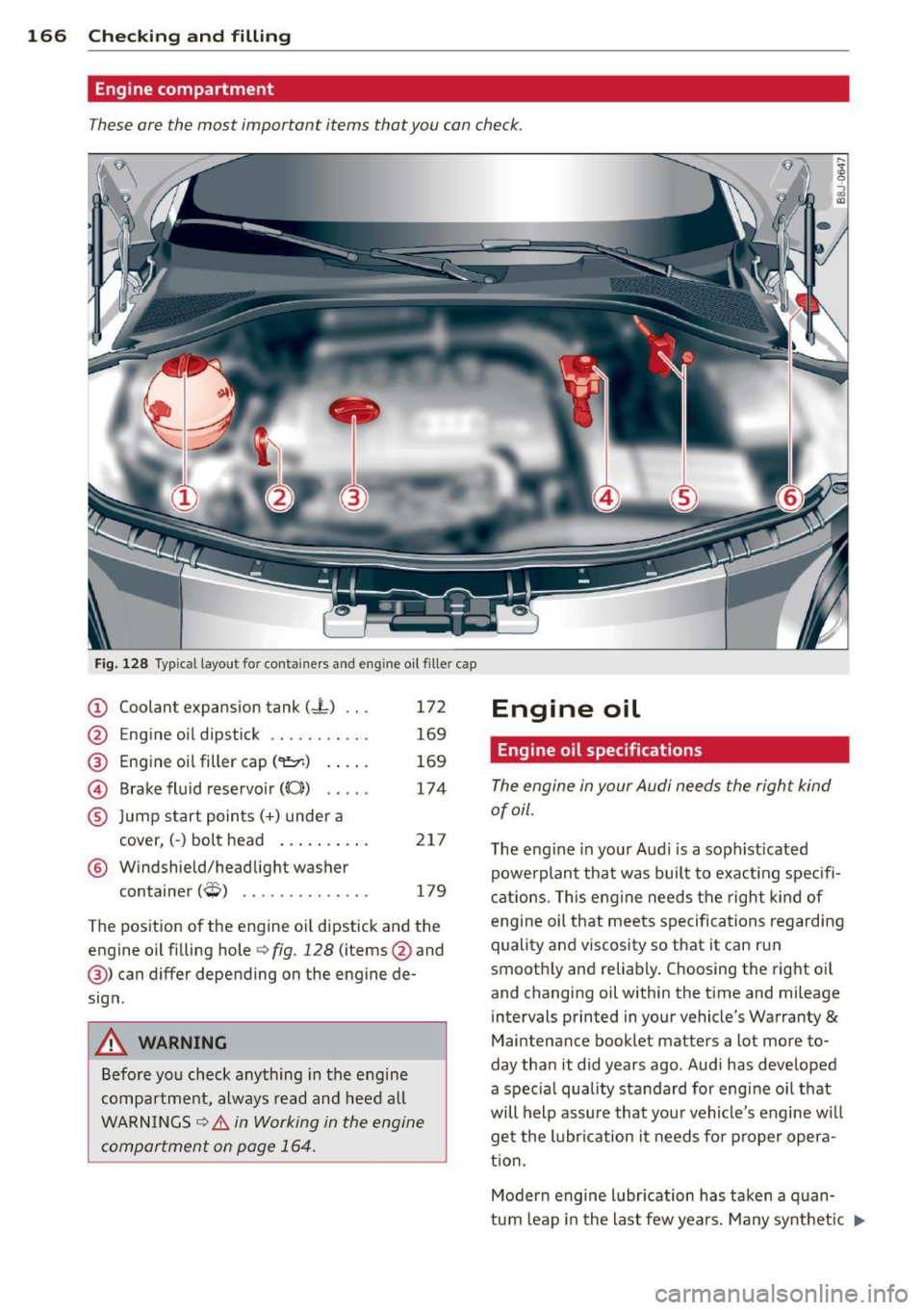
Engine compartment
These are the most important items that you can check .
•
Fig. 128 Typ ica l layout for containers and eng ine oil filler cap
CD Coolant expansion tank (-L) .. .
'2' E . 'l d. . k \61 ngIne 0 1 1pst1c .......... .
@ Engine oil filler cap ('1:::r.) .. .. .
@ Brake fluid reservoir((();) .. .. .
® Jump start points(+) under a
cover, (-) bolt head .... ... .. .
® Windshield/headlight washer
t . (
;;p, ) con ainer ,-!,, •••.•••.•.•••.
172
169
169
174
217
179
The pos ition of the engine o il dipstick and the
engine o il fi lling hole
r::> fig. 128 (items @and
@) can differ depending on the engine de
sign .
A WARNING
Before you check anything in the engine
compartment, always read and heed all
WARN INGS
c::> .& in Working in the engine
compartment on page 164.
Engine oil
Engine oil specifications
The engine in your Audi needs the right kind
of oil.
T he eng ine in your Aud i is a soph ist icated
powerplant that was built to exact ing spec ifi
cat ions . T his engine needs the right kind of
engine oil that meets specifications regarding
quality and viscosity so that it can run
smooth ly and reliably . Choosing the right o il
and changing oil within the time and mileage
i ntervals printed in your vehicle's Warranty
&
Maintenance booklet matters a lot more to
day tha n it did years ago. Audi has developed
a spec ia l quality standard for engine oil that
will help assure that you r vehicle's engine w ill
get the lubr ication it needs fo r proper opera
t ion.
Modern engine lubr ication has taken a quan
tum leap in the last few years. Many synthet ic
1J.