2015 AUDI S3 SEDAN warning
[x] Cancel search: warningPage 90 of 282
Automatic transmission
Launch Control-Program
Applie s to v ehi cles: w ith launch control
The Launch Control Program enables maximum
acceleration .
Requirement: The engine must be at operating
temperature and t he steering wheel must not be
turned.
.,. With the engine running, press the
!~OFFI but
ton briefly one time
l) .
.,. Pull the selector lever back out of the O/S posi
tion briefly to select the S position, or press it
toward the right into the tiptronic position or
select the
Dynamic driving mode in drive se
lect*
~page 112.
.,. Press the brake pedal firmly with your left foot
and hold it all the way down for at least 1 sec
ond.
.,. At the same time, press the gas pedal all the
way down with your right foot until the engine
reaches and stays at a high RPM level.
.,. Remove your left foot from the brake.
_.&. WARNING
- Always adapt your driving to the traffic flow.
- Only use Launch Control when road and traf-
fic conditions allow it and other drivers will
not be endangered or impacted by your driv
ing and the vehicle's acceleration.
- Please note that the drive wheels can spin
and the vehicle can break away when sport
mode is switched on, especially when the
road is slippery.
- Once the vehicle has started moving, press
the
l .1'3 OFF ! button briefly to turn the sport
mode off.
(D Tips
- The transmission temperature may increase
significantly after using the launch control program. If that happens, the program may
1l In vehicles w ith a d rive r infor matio n syste m, a n ESC light
in t he instrument clus ter s tays o n co ntinuo usly and t he
message
Stabilization control (ESC): sport. Warning! Re·
stricted stability
appears temporarily.
88
not be available for a few minutes. It will be
available again after a cool-down period.
- When accelerating using the launch control
program, all vehicle parts are subject to
heavy loads. This can lead to increased wear.
Emergency mode
App lies to vehicles : wi th S t ro ni c t ra nsmi ssio n
In the event of a system malfunction, there is an
emergency program .
If all of the selector lever positions are highlight
ed with a light background in the instrument
cluster display, there is a system malfunction and
the S tronic transmission is running in the emer
gency program. The vehicle can still be driven in
emergency mode, but only with reduced speed
and not in all gears. In some cases, the vehicle
cannot drive in reverse .
(D Note
If the transmission runs in emergency mode,
drive to an authorized Audi dealer or author
ized Audi Service Facility immediately to have
the malfunction corrected.
Transmission malfunction
• Transmission malfunction! Please stop the
vehicle and select P
There is a malfunction in the transmission. Park
the vehicle securely and do not continue driving.
See an authorized Audi dealer or authorized Audi
Service Facility for assistance.
• Transmission overheating! Please stop the
vehicle!
The transmission is too hot and can become dam
aged. Stop and let the transmission cool with the
engine running (at idle) in the P selector lever po
sition. Then the indicator light and the message
turn off, drive to an authorized Audi dealer or au
thorized Audi Service Facility immediately to have.,.
Page 92 of 282

Automatic transmi ssion
A WARNING
Only move the se lector lever out of the P posi
tion when the parking brake is set . If that
does not work, secure the vehicle w ith the
brake pedal. Otherw ise, the vehicle could
start to move uni ntentionally when the sele c
t o r l ever is moved out of the P pos ition.
90
Page 93 of 282

M N
0 > co ,...., \!) ..,.,
..,.,
..,., ,....,
Trailer mode Driving with a trailer
General information
Your Audi was designed primarily for passenger
transportation .
If you plan to tow a tra iler, p lease remember that
the additiona l load will affect d urability, econo
my and performance .
T railer towing not on ly places more stress on the
vehicle, it a lso calls for more concentrat ion from
the dr iver .
F or this reason, a lways fo llow the operating and
d riving instructions provided and use common
sense.
Technical requirements
Traile r hitch
Use a weight-carrying hitch conforming to the
gross trailer we ight. The hitch must be suitable
for your vehicle and trai ler and must be mounted
securely on the veh icle 's chassis at a technically
sound
location . Use on ly a tra iler hitc h with a re
movable ba ll mou nt. Always chec k w ith the t ra il
e r hitch m anu fac tur er to make sure that you a re
using the co rrec t hitch.
Do not use a bumper hitch .
The hitch must be installed in such a way that it
does not i nterfere wit h the impact -absorbi ng
bumper system. No mod ificat ions should b e
mad e to the vehicle exhaust and brake systems .
Fr om time to t ime, c hec k t hat a ll h itch mou nti ng
bo lts remain sec urely fastened .
When you are no t tow ing a trailer,
remove the
trai ler hitch ball mount . Th is prevents the hitc h
fr om caus ing damage should you r vehicle be
s truck from behind~,&. .
Trailer brakes
If yo ur tra iler is equipped w it h a braking system,
check to be s ure that it conforms to all regu la
tions.
Trailer mode
T he trailer hyd raulic brake system must not be di
rect ly connected to the ve hicle's hydraulic b rake
system .
Safety chains
Always use s afe ty chains be tween your ve hicle
and the tra ile r.
Trailer lights
Tra ile r li ghts must meet all regulations. Be sure
to check w it h your Aud i dea le r fo r corr ect w irin g,
swi tches and relays.
Mirrors
If you a re unable to see the traffic behind you us
i ng the regular o uts ide mirrors, then you
must in
sta ll extended mirrors .
It is importa nt that you
always have clea r vision to the rea r.
_&. WARNING
Afte r removing the trailer hit ch, d o no t store
i t in yo ur vehicle. In ca se of sudden br akin g,
the hitch could fly fo rward and inju re you or
your passengers.
Operating instructions
Maximum traile r weight
A trai le r fo r you r vehicle is limited to a typi cal
class 1 or class 2 trai le r.
Trailer load distribution
B e sure the load in the t raile r is held secure ly in
pla ce to p revent it from shift ing forward, back
ward or sideways .
Never allow a pas senger to ride in a trailer~.&.
in Driving instructions on page 92.
Engine cooling system
Towing a trailer makes the engine work harder . It
is important tha t the cooling system 's pe rform
ance is up to the additional load. Make s ure that
the coo ling system has enoug h flu id.
Tire pressure
When towing a trailer, inflate the tires of your ve-
hicle to the cold tire pressure listed under "Full
lilJJ..
91
Page 94 of 282

Trailer mode
load" on the label located on the driver's side B
pillar (visible when the door is open). Inflate
trailer tires to trailer and tire manufacturers'
specifications.
Lights
Check to make sure both vehicle and trailer lights
are working properly.
Safety chains
Be sure tra iler safety cha ins are properly connect
ed from the trailer to the hitch on the vehicle.
L eave enough slack in the chains to permit turn
ing corners. When you install safety chains, make
sure they will not drag on the road when you are
driving .
The chains should cross under the trai ler tongue
to prevent it from dropping in case of separation
from the hitch .
Driving instructions
Driving with a trailer always requires extra care
and consideration .
To obta in the best poss ible handling of vehicle
and trailer, please note the following:
.,. Do not tow a loaded tra iler when your car itself
is not loaded.
.. Be especia lly careful when passing other
vehicles.
.. Observe speed limits .
.. Do not drive at the maximum permissible
speed.
.. Always apply brakes early.
.. Monitor the temperature gauge.
Weight distribution
Towing a loaded trai ler with an empty car results
in a high ly unstable distribution of weight. If this
cannot be avoided, drive at very low speeds only
to avoid the risk of losing steering control.
A "balanced" rig is easie r to operate and control.
This means that the tow vehicle should be loaded
to the extent possible and permissible, while
keeping the trailer as light as poss ible under the
circumstances. Whenever possible, transfer
some cargo to the luggage compartment of the
92
tow vehicle while observing tongue load require
ments and vehicle loading considerations.
Speed
The higher the speed, the more diff icult it be
comes for the driver to control the rig. Do not
drive at the maximum permissible speed. Reduce
your speed even more if load, weather or wind
conditions are unfavorab le -particularly when
going downh ill.
Reduce veh icle speed
immediately if the trailer
shows the slightest sign of swaying .
Do not try
to stop the swaying by accelerating.
Observe speed limits. In some areas, speeds for
vehicles towing tra ile rs are lower than fo r regular
vehicles .
Always apply brakes early. When driving down
hill, shift int o a lo wer gear to use the eng ine
braking effect to slow the vehicle . Use of the
brakes alone can cause them to overheat and fail.
Coolant temperature
The coolant temperature gauge¢ page 12 must
be obse rved carefully. The coolant temperature
can increase if you dr ive on long inclines in a low
gear at high engine speeds . Reduce your speed
immediately if the LEDs in the top part of the dis
play turn on .
For more information abo ut ind icator lights, re
fer to. ¢
page 19 .
A WARNING
-
Anyone not properly restrained in a moving
vehicle is at a much greater risk in an acci
dent. Never let anyone ride in your car who is
not proper ly wearing the restraints provided
by Aud i.
Trailer mode notes
Important to know
Your vehicle handles differently when towing a
trai ler because of the additiona l weight and dif
ferent weight distribution . Safety, performance
and economy will greatly depend on how careful-
ly you load your trailer and operate your r ig. ..,.
Page 96 of 282

Assist
Assist Electronic speed limiter*
Applies to veh icles: with electronic speed limiter
Your vehicle may be factory equipped with ti res
that are rated for a maximum speed of 130 mph
(210 km/h) . T his is less than the maximum speed
of your vehicle . To reduce the risk of sudden tire
failure and loss of control if the vehicle is operat
ed at excessive speeds, your vehicle also has an
electronic speed limiter. The electronic speed
limiter prevents your vehicle from going faster
than the tir e speed rat ing . For more information
~page 221.
If the engine control unit receives faulty vehicle
road speed signals, the Malfunction Indicator
Lamp (MIL)
¢4 will illuminate . If this occurs,
contact the nearest a utho rized Audi dealer for as
sistance .
A WARNING
Always observe the posted speed limits and
adjust your speed to suit prevailing road, traf
fic and weather conditions . Never drive your
vehicle faster than the maximum speed rating of the tires installed.
Speed warning system
Introduction
The speed warning system helps you to stay un
der a specified maximum speed.
-
The speed warning system warns you if you are
exceeding the maximum speed that you have set .
You will hear a warning tone when your speed ex
ceeds the stored value by approximately 3 mph
(3 km/h) . Th e. (USA models)/. (Canada
models) indicator light and the message
Speed
limit exceeded!
appear in the instrument cluster
disp lay at the same time . The ./. indicator
light turns off when the speed decreases below
the stored maximum speed.
Setting a thresho ld is recommended if you would
like to be reminded when you re ach a certain
maximum speed. Situations where you may want
to do so include driving in a country with a gener-
94
al speed limit or if there is a specified maximum
speed for winter tires.
(D Tips
Regardless of the speed warning system, you
should always monitor your speed using the
speedometer and make sure you are following
the legal speed limit .
Setting the threshold
You can set, change and delete the threshold in
the MMI.
.. Select: the I MENU I button >Car> Systems*
contro l button > Driver assistance > Speed
warning.
You can set any threshold between 20 mph
(30 km/h) and 150 mph (240 km/h) . Settings
can each be adjusted in increments of 6 mph
(10 km/h).
Cruise control system
· Description
Applies to vehicles: with cruise control system
The cruise control system makes it poss ible to
drive at a constant speed starting at 15 mph
(20 km/h).
The speed is kept constant by modify ing engine
power or through an act ive brake intervention.
A WARNING
- Always pay attention to the traffic around
you when the cruise control is in operation.
You are a lways responsible for your speed
and the distance between your vehicle and
other vehicles.
- For reasons of safety, cruise contro l should
not be used in the city, in stop-and-go traf
fic, on winding roads and when road condi tions are poor (such as ice, fog, gravel,
heavy rain and hydroplaning) -you could
have an accident .
- Switch the cruise control off temporarily
when driv ing in turning lanes, highway exits
or in construction zones .
-
Page 97 of 282
....,
N
0 > co
rl I.O
"'
"'
"'
rl
-Please note that unconsciously "resting"
your foot on the accelerator pedal prevents the cruise control from braking. This is due
to the control system be ing overr idden by
the driver 's acceleration .
-If there is a b rake system malfunction such
as overheating when the speed warning sys
tem is switched on, the braking function in
the system will be deactivated. The remain
ing speed warni ng system fu nctions will re
ma in active, as long as the~ (USA mod
els) /. (Canada models) indicator light is
on .
{i) Tips
-The cruise cont ro l system is idea l for
stretches with speed limits. The driver i s re
spons ible for adhering to the cor rect speed.
- The cruise cont ro l rema ins active when
s hift ing ge ars.
- The brake lights turn on when the bra kes
are activated.
Switching on
Applies to vehicles: with c ruise contro l system
0
f
®t
0
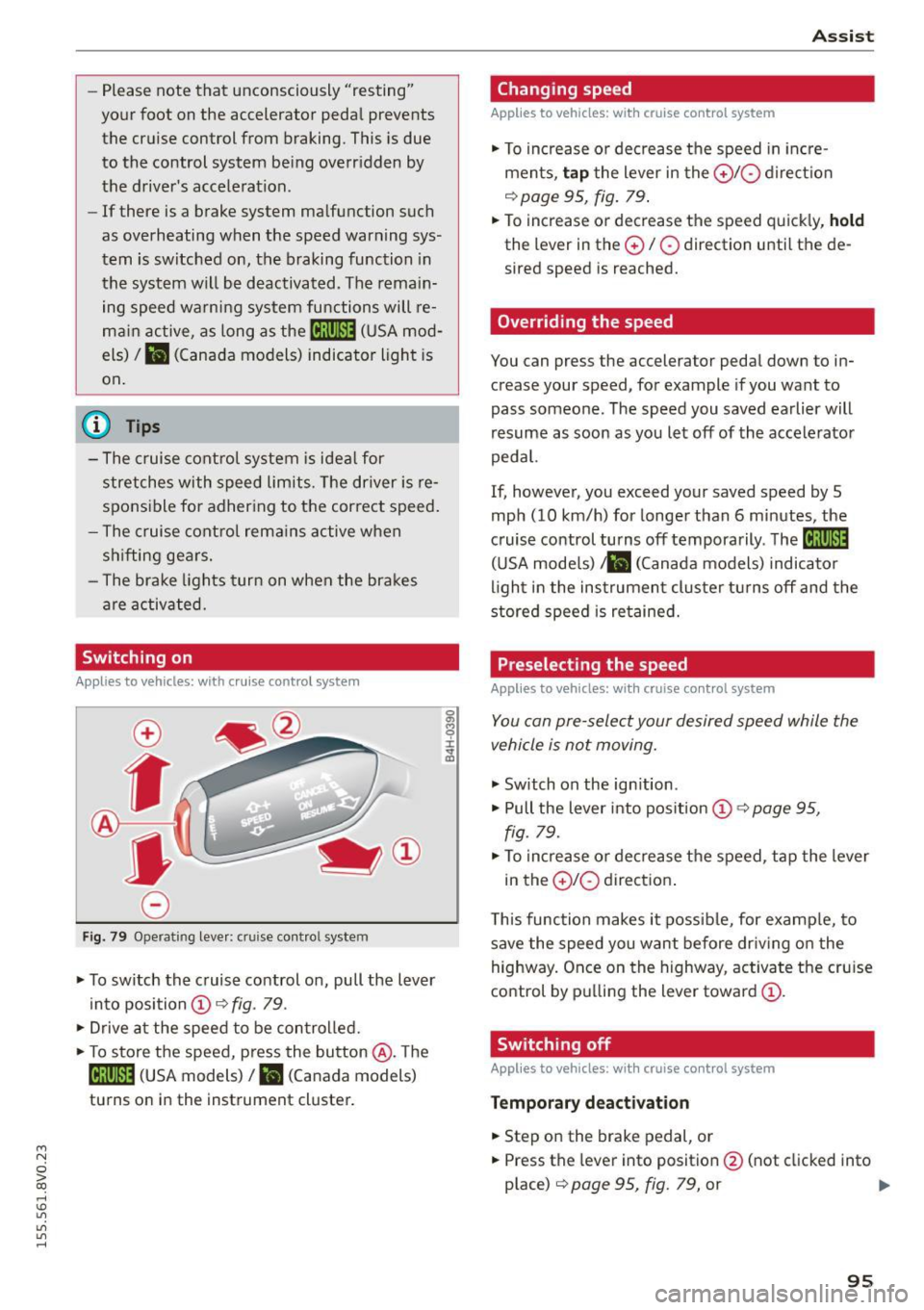
Fi g. 7 9 Operating leve r: cruise co ntro l system
.. To switch th e cruise control on, pull the lever
in to posi tion @~
fig. 79 .
., Drive a t the speed to be con trolled.
.. To store the speed, press the button @. T he
[ij;\1)~14 (USA models)/ Ii.I (Canada models)
tu rns o n in the instrument cluster.
A ssi st
Changing speed
Applies to vehicles: with cruise control system
., To increase o r dec rease the speed in in cre
ments,
tap t he lever in the 0 10 d ire ct io n
q page 95, fig . 79 .
.. To increase or decrease the speed quick ly, hold
the lever in the 0 / 0 direction u ntil the de
sired speed is reached.
Overriding the speed
You can press the accelerator pedal down to in
crease your speed, for example if you want to
pass someone. The speed you saved earlier will
resume as soon as you let off of the accele rato r
pedal.
If, howeve r, you exceed your saved speed by 5
mph (10 km/h) for longe r than 6 minutes, the
c ruise control turns off temporarily . The
M;\1)~14
(U SA mode ls) ;lB (Canada models) indicator
li ght in the instrumen t cluster t urns off and the
stored speed is re tained.
Preselecting the speed
Applies to vehicles: with cruise control system
You can pre-select your desired speed while the
vehicle is not moving.
., Switch on the ign ition .
.. Pull the lever into pos ition
(D 9 page 95,
fig. 79 .
., To increase or de crease t he speed, tap the lever
in the
0 10 direction .
T his function makes it poss ible, for examp le, to
save the speed you want before dr iv ing o n the
highway. Once on the h ighway, activa te the cru ise
control by p ulling the lever toward
(D .
Switching off
Appl ies to vehicles: with cruise cont rol system
Temporary deactivat ion
.. Step on the brake pedal, or
.. Press the lever into position @(not clicked into
place)
q page 95, fig. 79, or ..,
95
Page 98 of 282
Ass is t
Sw it c h ing off c omplet ely
.,. Press the lever into pos ition @ (clicked into
place) , or
.,. switch the ignition
off .
The speed you saved w ill be retained if the cr uise
control has been sw itched
off temporar ily . To re
sume the stored speed, release the brake peda l
and pu ll the lever into position
(D .
The stored speed is erased when the cru ise con
trol is switched
off comp lete ly or the ignition is
switched
off .
A WARNING
You should only resume the saved speed if it
is not too high for existing traffic conditions.
Otherw ise you risk an accident.
@ Tips
- If the brakes become too heated while driv
ing, the cruise contro l switches
off. If this
happens while driving downhill, you can re
lieve the brakes by sh ifting into a lower
gear.
- When the cruise control is act ivated, ESC
sport mode cannot be switched on.
Audi adaptive cruise control
Description
Applies to veh icles: w ith Audi adaptive cruise control
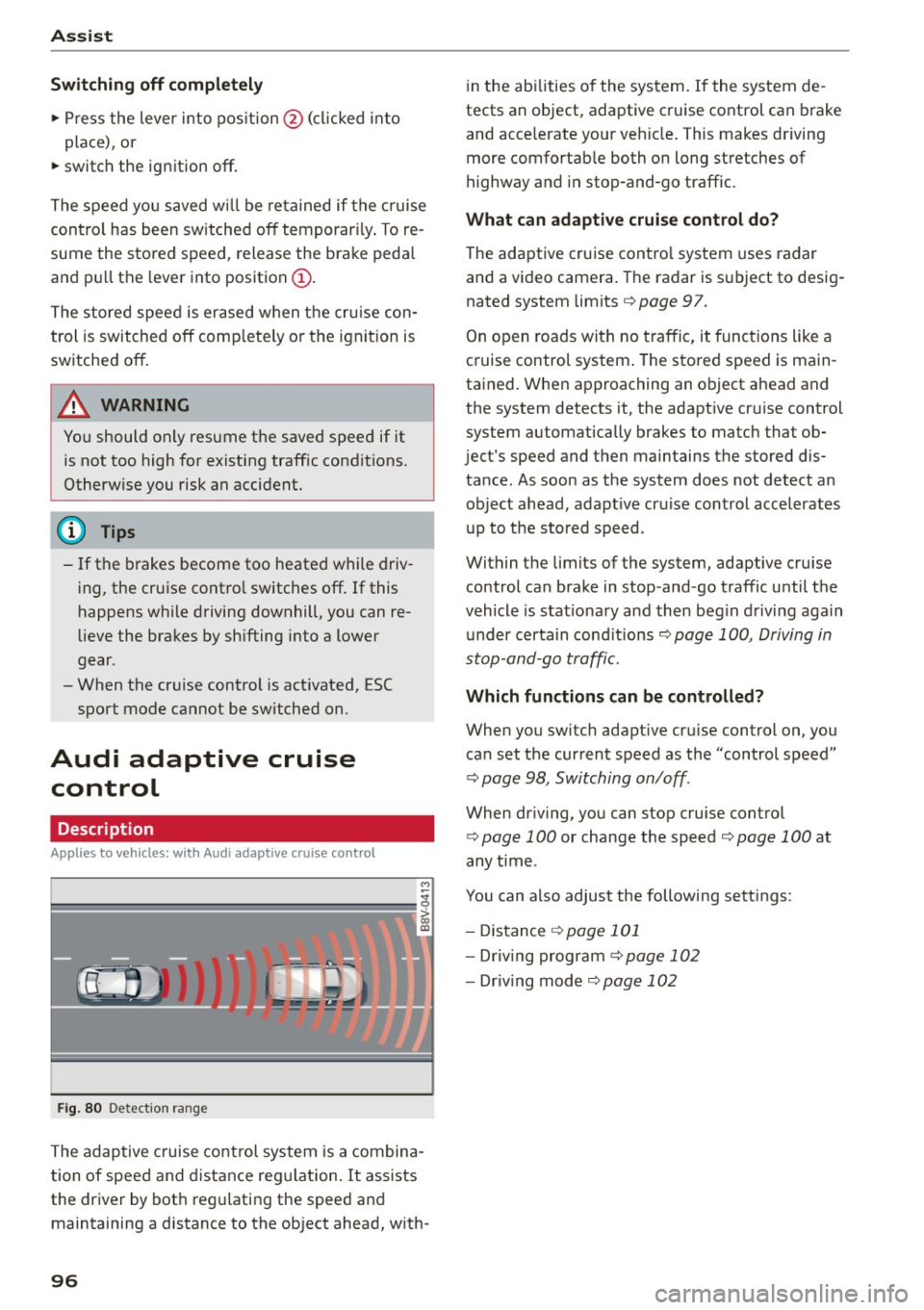
F ig. 80 Det ect ion rang e
The adaptive cruise control system is a combina
tion of speed and distance reg ulation . It assists
the driver by bot h reg ulating the speed and
maintaining a distance to the object ahead, w ith -
96
in the abilities o f the system. If the system de
tects an object, adaptive cruise control can brake
and acce lerate your veh icle . This makes driving
more comfortab le both on long stretches of
highway and in stop-and-go traffic.
What can adaptive crui se con trol do?
The adaptive cruise contro l system uses radar
and a video camera. The radar is subject to desig
nated system limits
q page 97.
On open roads with no traffic, it funct ions like a
cruise control system . The stored speed is main
tained. When approaching an object ahead and
the system detects it, the adapt ive cruise control
system automatically brakes to match that ob
ject's speed and then maintains the stored dis
tance. As soon as the system does not detect an object ahead, adapt ive cr uise control accelerates
up to the sto red speed .
Within the limits of the system, adaptive cruise
control can brake in stop -and -go traffic until the
vehicle is stat iona ry and then beg in driving again
under certain cond itions
q page 100, Driving in
stop-and-go traff ic.
Which functions can be controlled?
When you swi tch adapt ive cru ise control on, you
can set the current speed as the "control speed"
q page 98, Switching on/off .
When driving, yo u can stop cruise contro l
q page 100 or change the speed q page 100 at
any time .
You can also adjust the following sett ings:
- Distance
q page 101
- Dr iv ing program C) page 102
-Dr iv ing mode C)page 102
Page 99 of 282

....,
N
ci > co
rl I.O
"'
"'
"'
rl
General information
Applies to vehicles: with Audi adaptive cruise control and Audi
pre sense front
Fig. 81 Front of vehicle: sensor
The general information applies to adaptive
cruise control* and pre sense front*
r::!>page 103.
The radar sensor area r::!> fig. Bl must not be cov
ered with stickers, deposits or any other obstruc
tions as it may impair the function of the adap
tive cruise control and the pre sense front. For in
formation on cleaning, refer tor::!>
page 235. The
same applies for any modifications made in the
front area .
The function of the adaptive cruise control sys tem and pre sense front is limited in some condi
tions :
- Objects can only be detected when they are
within the sensor ranger::!>
page 96, fig. 80.
-The system has a limited ability to detect ob
jects that are a short distance ahead, off to the side of your vehicle or moving into your lane.
- Objects that are difficult to detect such as mo
torcycles, vehicles with high ground clearance
or an overhanging load are detected late or not
detected at all.
- When driving through curves
r=> page 98.
-With stationary objects r::!> page 98.
A WARNING
Always pay attention to traffic when adaptive
cruise control is switched on and the pre
sense front is active
r::!> page 103. As the d riv
er, you are still responsible for starting and
for maintaining speed and distance to other objects. The pre sense front is used to assist
you. The driver must always take action to
Assist
avoid a collision. The driver is always responsi
ble for braking at the correct time.
- Using adaptive cruise control incorrectly can
cause collisions, other accidents and serious
injuries.
- For safety reasons, do not use adaptive
cruise control when driving on roads with
many curves, when the road surface is in
poor condition and/or in bad weather (such
as ice, fog, gravel, heavy rain and hydroplan
ing). Using the system under these condi
tions could result in a collision.
- Switch adaptive cruise control off tempora
rily when driving in turning lanes, on ex
pressway exits or in construction zones. This
prevents the vehicle from accelerating to
the set speed when in these situations.
- The adaptive cruise control system will not
brake by itself if you put your foot on the ac
celerator pedal. Doing so can override the
speed and distance regulation.
- When approaching stationary objects such
as stopped traffic, adaptive cruise control
will not respond and pre sense front will
have limited function.
- The adaptive cruise control system and pre
sense front do not react to people, animals,
objects crossing the road or oncoming ob
jects.
- The function of the radar sensors can be af
fected by reflective objects such as guard
rails, the entrance to a tunnel, heavy rain or
ice.
- Always maintain enough distance from
vehicles ahead so that you can still brake
your vehicle safely. The adaptive cruise con trol cannot safely slow your vehicle or brake it to a stop if you are driving too close be
hind a vehicle. Please note that the auto
matic braking function cannot brake sud
denly or apply the brakes fully under these
conditions.
- To reduce the risk of unintended actions,
switch the ACC off when you are not actively
using it.
~
97