2015 AUDI S3 SEDAN service
[x] Cancel search: servicePage 81 of 282

M N
0 > co ,...., \!) 1.1'1
1.1'1
1.1'1
,....,
brake provides various convenience and safety
functions.
When starting from rest
- The integral hill start assist helps you when
driving by automatically releasing the parking
brake ¢
page 80 , Starting from a stop.
- When starting on inclines, the hill start assist
prevents the vehicle from unintentionally roll
ing back. The braking force of the parking brake
is not r eleased until sufficient driving forc e has
b ee n built up at the wh eels.
Emergency brake function
An emergency braking functions ensures that the
vehicle can be slowed down even if the
normal
brakes fail¢ page 80, Emergency braking func
tion.
A WARNING
- Do not press the accelerator pedal inadver
tently if the vehicle is stationary but the en gine is running and a gear is selected . Other
wise the vehicle will start to move immedi
ately and could result in a crash.
-If the power supply fails, the released park
ing brake can no longer engage. In this case,
park the vehicle on level ground and secure
it by placing the selector lever in the P posi
tion. See an authorized Audi dealer or au
thorized Audi Service Facility for assistance.
(D Note
If the . or 1111 (USA models)/ . (Canada
models) indicator light in the instrument clus
ter blinks , there is a malfunction in the brake
system. Refer to the detailed description of
the indicator lights¢
page 17.
-If the - (USA models)/ . (Cana-
da models) or
Ill indicator light turns on,
there is a malfunction in the parking brake
¢ page 18.
(D Tips
-If the parking brake is set while the ignition
is switched
off, thP l<@) indicator light in the
button and in the instrument cluster dis
play - (USA models) /. (Canada mod-
Driving
els) will turn off after a certain amount of
time.
- If driver's door is opened while the ignition
is switched on, the parking brake sets auto
matically. This prevents unintended rolling
of the vehicle.
- Occasional noises when the parking brake is
applied and released are normal and are not
a cause for concern.
- When the vehicle is parked, the parking
brake goes through a self-test cycle at regu
lar intervals. Any noises associated with this
are normal.
- If there is a power failure, the parking brake will not set if it is released, and it will not
release if it is set¢&. See an authorized
Audi dealer or authorized Audi Service Fa
cility for assistance .
Parking
.. Press the brake pedal to stop the vehicle.
.. Pull the switch@¢
page 78, fig . 71 to set the
parking brake.
.. Place the selector lever in the P position.
.. Turn th e engine off¢,& .
.. Turn the steering wheel when pa rking on in
clines so that the wheels will roll into the curb
if the vehicle starts moving .
A WARNING
--Always take the vehicle key with you when
leaving the vehicle, even for a short period
of time. This applies particularly when chil
dren remain in the vehicle. Otherwise the
children could start the engine , release the
parking brake or operate electrical equip
ment (e.g. power windows). There is the risk
of an accident.
- When the vehicle is locked, no one -particu
larly not children should remain in the vehi
cle. Locked doors make it more difficult for
emergency workers to get into the vehicle,
which puts lives at risk.
79
Page 83 of 282

M N
0 > co ,...., \!) 1.1'1
1.1'1
1.1'1
,....,
-If you do not begin moving immediately af
ter releasing the brake pedal, the vehicle
could begin to roll backward under certain
circumstances . Press the brake pedal or set
the parking brake immediately .
- If the engine "stalls", press the brake pedal
or set the parking brake immediately.
- Starting on inclines in stop-and-go traffic:
To help prevent the vehicle from rolling back
when starting, press and hold the brake pedal for several seconds when the vehicle
is stationary .
(D Tips
You can find out if your vehicle is equipped
with Hill Hold by checking at an authorized
Audi dealer or authorized Audi Service Facili
ty.
Driving
81
Page 86 of 282

Automatic transmission
than approximately 2 seconds when the brake
pedal is not pressed.
Interlock button
The interlock butto n in the selector lever handle
p revents you from moving the selector lever in
advertently while in some selector lever posi
t ions . The positions that require the interlock
button to be pressed are marked in co lor in the il
lustration
c::> fig. 73.
Ignition key safety interlock*
You can only remove the key from the ignition af
ter sw itching the ign ition off if the selector lever
is in the P position. The selector lever will be
locked in the P posit ion as long as the key is not
in the ignition .
A WARNING
Read and following all WARNINGS. c::> & in Se
lector lever positions on page 82.
@ Tips
- If the selector lever does not engage, there
is a malfunction. The engine is disabled to
prevent the vehicle from driving off uninten
tionally. Press the brake pedal br iefly to al
low the selector lever lock to engage again.
- If the vehicle does not move forward or in
reverse even though a drive position is se
lected, proceed as follows:
- >If the vehicle does not move in the desired
direct ion, the system may not have engaged
the drive pos ition correctly. Press the brake
pedal and select the drive position again.
- >If the veh icle still does not move in the de
sired direct ion, there is a system malfunc
tion. See an authorized Audi dealer or au
thorized Audi Service Facility for ass istance
to have the system checked.
84
Driving tips
Applies to vehicles: with S tronic transmissio n
The transmission shifts up and down automati
cally when in the driving gears .
Fig. 74 Sec tion of t he ce nter conso le: se le ct or lever with
interloc k button
The engine will only be able start when the selec
tor lever is in the P or N positions . At low temper
atures (be low 14 °F (-10 °C)), the engine can only
be started when the selector lever is in the P po
sition.
Starting from a stop
"' Press and hold the brake pedal.
"' Press and hold the interlock button in the selec
tor lever hand le, select the desired selector lev
er position such as D
c::> page 82 and release the
lock button.
"' Wait a moment until the transmission shifts .
You will notice a slight movement when the
gear engages .
"' Release the brake peda l and press the accelera
tor pedal
c::> ,&. .
Stopping temporarily
"'Keep the veh icle stationary using the braking
pedal, for example at traff ic lights .
"' Do not press the accelerator peda l when doing
this.
"' To prevent the vehicle from rolling when you
start driving, set the parking brake when stop
ping on steep incl ines
c::> ,&. .
"'The parking brake will release automat ically
and the vehicle will start moving once you press
the acce lerator pedal. Requirement: The door
must be closed.
Page 90 of 282
Automatic transmission
Launch Control-Program
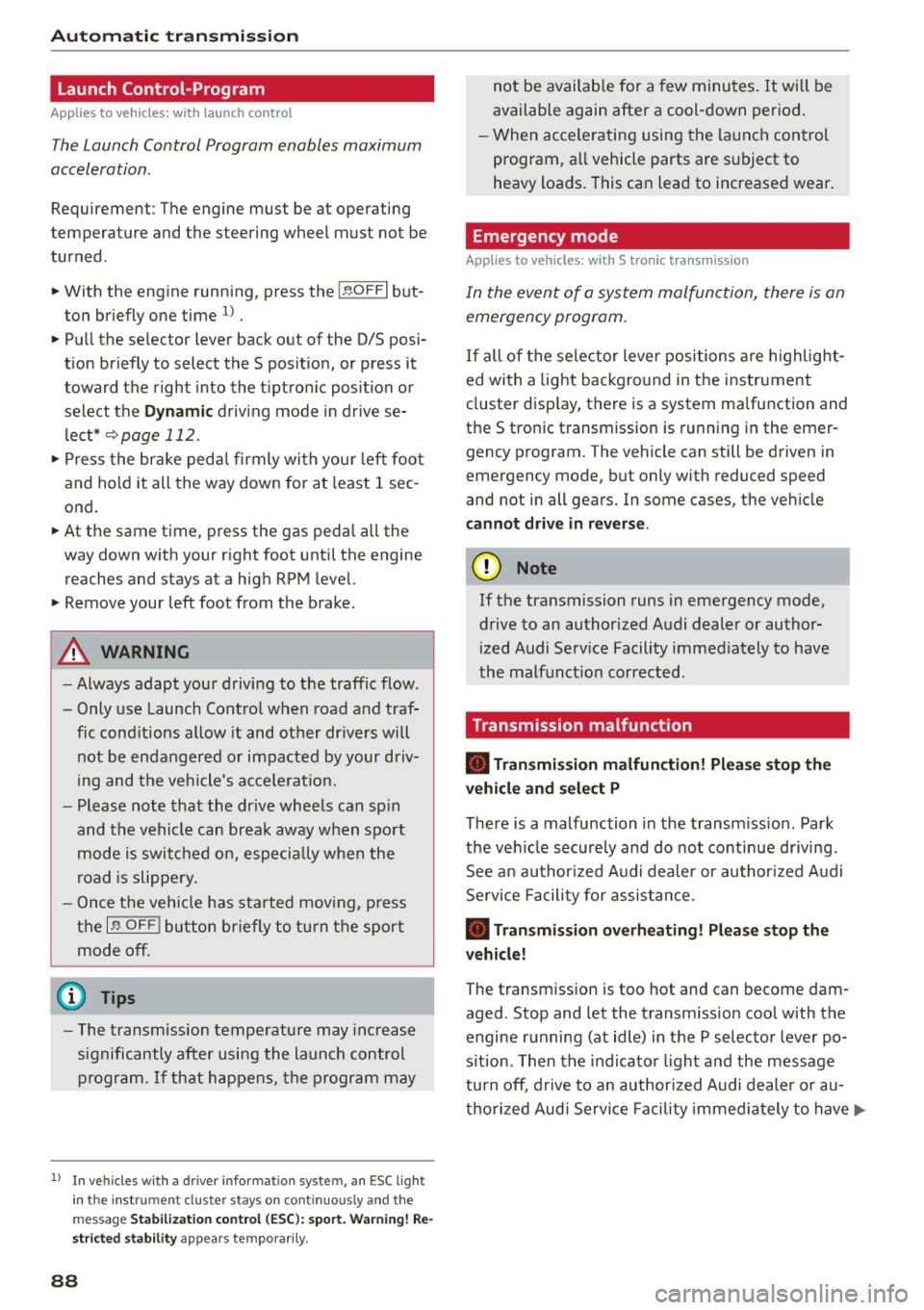
Applie s to v ehi cles: w ith launch control
The Launch Control Program enables maximum
acceleration .
Requirement: The engine must be at operating
temperature and t he steering wheel must not be
turned.
.,. With the engine running, press the
!~OFFI but
ton briefly one time
l) .
.,. Pull the selector lever back out of the O/S posi
tion briefly to select the S position, or press it
toward the right into the tiptronic position or
select the
Dynamic driving mode in drive se
lect*
~page 112.
.,. Press the brake pedal firmly with your left foot
and hold it all the way down for at least 1 sec
ond.
.,. At the same time, press the gas pedal all the
way down with your right foot until the engine
reaches and stays at a high RPM level.
.,. Remove your left foot from the brake.
_.&. WARNING
- Always adapt your driving to the traffic flow.
- Only use Launch Control when road and traf-
fic conditions allow it and other drivers will
not be endangered or impacted by your driv
ing and the vehicle's acceleration.
- Please note that the drive wheels can spin
and the vehicle can break away when sport
mode is switched on, especially when the
road is slippery.
- Once the vehicle has started moving, press
the
l .1'3 OFF ! button briefly to turn the sport
mode off.
(D Tips
- The transmission temperature may increase
significantly after using the launch control program. If that happens, the program may
1l In vehicles w ith a d rive r infor matio n syste m, a n ESC light
in t he instrument clus ter s tays o n co ntinuo usly and t he
message
Stabilization control (ESC): sport. Warning! Re·
stricted stability
appears temporarily.
88
not be available for a few minutes. It will be
available again after a cool-down period.
- When accelerating using the launch control
program, all vehicle parts are subject to
heavy loads. This can lead to increased wear.
Emergency mode
App lies to vehicles : wi th S t ro ni c t ra nsmi ssio n
In the event of a system malfunction, there is an
emergency program .
If all of the selector lever positions are highlight
ed with a light background in the instrument
cluster display, there is a system malfunction and
the S tronic transmission is running in the emer
gency program. The vehicle can still be driven in
emergency mode, but only with reduced speed
and not in all gears. In some cases, the vehicle
cannot drive in reverse .
(D Note
If the transmission runs in emergency mode,
drive to an authorized Audi dealer or author
ized Audi Service Facility immediately to have
the malfunction corrected.
Transmission malfunction
• Transmission malfunction! Please stop the
vehicle and select P
There is a malfunction in the transmission. Park
the vehicle securely and do not continue driving.
See an authorized Audi dealer or authorized Audi
Service Facility for assistance.
• Transmission overheating! Please stop the
vehicle!
The transmission is too hot and can become dam
aged. Stop and let the transmission cool with the
engine running (at idle) in the P selector lever po
sition. Then the indicator light and the message
turn off, drive to an authorized Audi dealer or au
thorized Audi Service Facility immediately to have.,.
Page 91 of 282
....,
N
0 > co
rl I.O
the malfunction corrected. If the indicator light
and the driver message do not turn off, do not
continue dr iv ing. See an authorized Audi dealer
or authorized Audi Service Facility for assistance .
rm Transmission malfunction: you can continue
driving
Drive to an authorized Aud i dealer or authorized
Aud i Service Facility immediately to have the
malfunction corrected.
rm Transmission malfunction: no reverse gear
(you can continue driving)
Drive to an authorized Aud i dealer or authorized
Audi Service Fac ility immediately to have the
malfunction corrected.
rm Transmission malfunction: You can continue
driving in D until engine off
Drive the vehicle away from moving traffic and
park. See an authorized Audi dealer or authorized
Audi Service Fac ility for assistance.
rm Transmission overheating! Please adapt
driving style
Continue driving moderate ly. When the indicator
light turns off, you can continue driving normally.
rm Transmission: Please press brake pedal and
select gear again
If the transmission malfunctions because the
temperature is too high, a message appears
when the transmission is coo led.
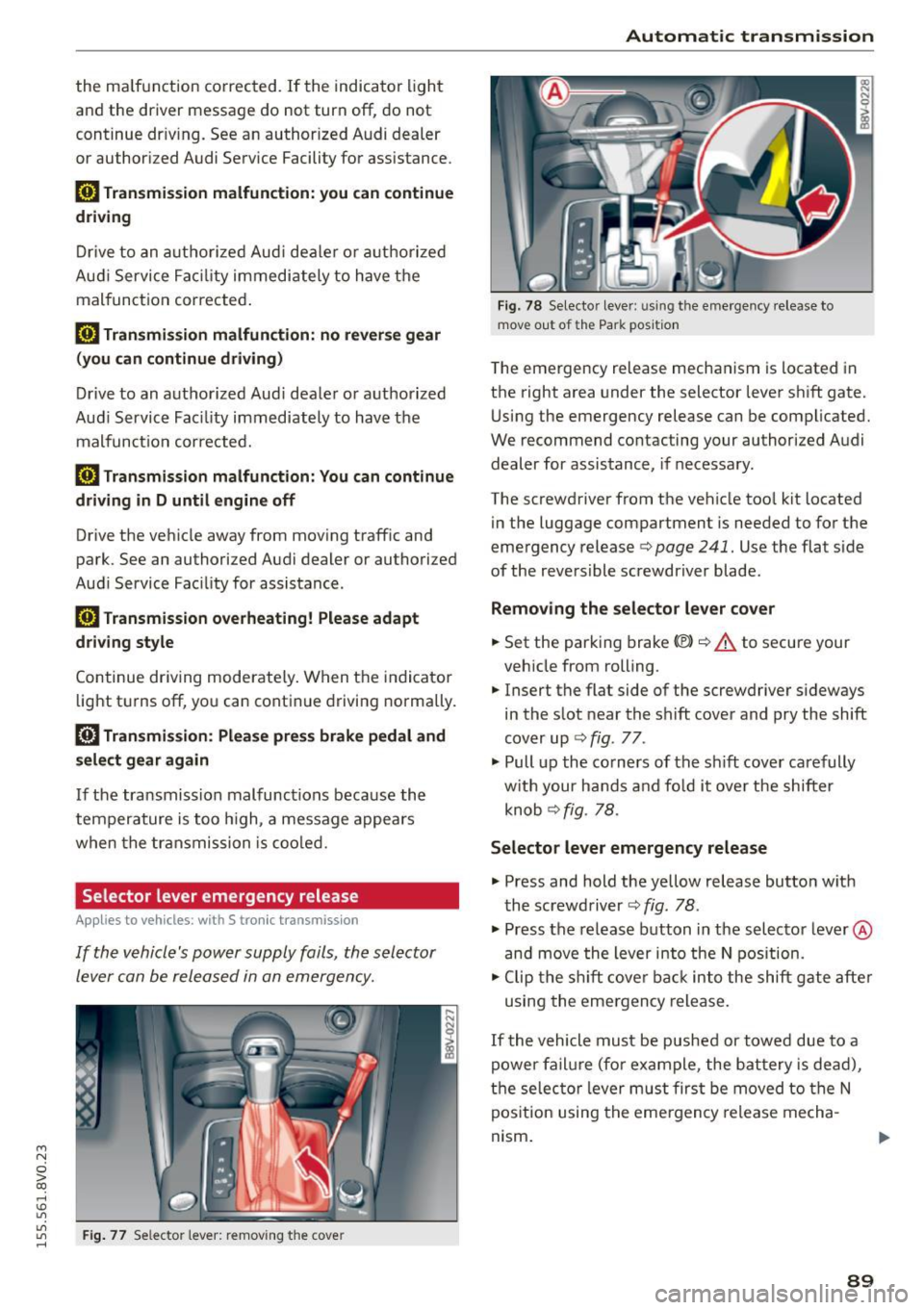
Selector lever emergency re lease
Appl ies to vehicles: with S tronic transm ission
If the vehicle's power supply foils, the selector
lever can be released in an emergency.
"'
"'
"' Fig. 77 Selector lever: removing the cove r rl
Automatic transmission
Fig. 78 Selector lever: u sing the emergency release to
move out of the Park position
The emergency release mechanism is located in
the right area under the selector lever shift gate.
Using the emergency release can be complicated.
We recommend contacting your authorized Audi dealer for assistance, if necessary.
The screwdriver from the vehicle too l kit located
in the luggage compartment is needed to for the
emergency release
c> page 241. Use the flat side
of the reversible screwdriver blade .
Removing the selector lever cover
.. Set the parking brake «Ell c> A to secure your
vehicle from rolling.
.. Insert the flat side of the screwdriver s ideways
in the slot near the shift cover and pry the shift
cover up ¢
fig. 77 .
.. Pull up the co rners of the sh ift cover carefully
with your hands and fo ld it over the shifter
knob ¢
fig. 78.
Selector lever emergency release
.. Press and hold the yellow release button with
the screwdriver ¢
fig. 78.
.. Press the release button in the selector lever ®
and
move the lever into the N position.
.. Clip the shift cover back into the shift gate after
using the emergency release.
If the vehicle must be pushed or towed due to a
power failure (for example, the battery is dead),
the selector lever must first be
moved to the N
position using the emergency release mecha
nism .
89
Page 100 of 282
Assist
(D Note
The sensor can be displaced by impacts or
damage to the bumper, wheel housing and
underbody. The adaptive cruise control and
pre sense front may become impaired as a re
sult. Have an authorized Audi dealer or au
thorized Audi Service Facility check their func
tion.
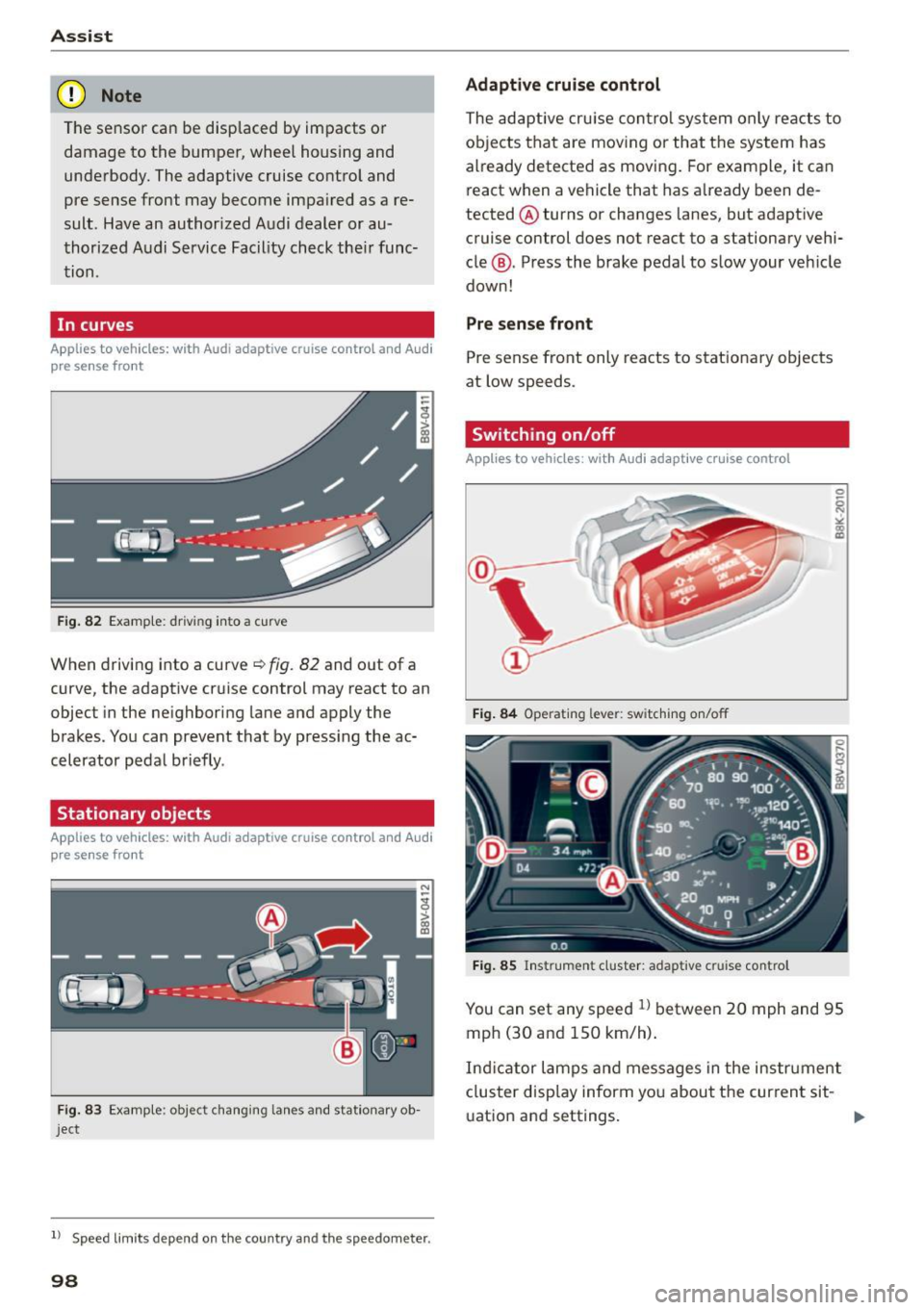
In curves
Applies to vehicles: with Audi adaptive cruise control and Aud i
pre sense front
Fig. 82 Example: driving into a curve
When driving into a curve~ fig. 82 and out of a
curve, the adaptive cruise control may react to an
object in the neighboring lane and apply the
brakes. You can prevent that by pressing the ac
celerator pedal briefly .
Stationary objects
Applies to vehicles: with Audi adaptive cruise control and Audi
pre sense front
Fig. 83 Example: object changing lanes and stationar y ob
ject
l l Speed limits depe nd on t he country and the speedo meter .
98
Adaptive cruise control
The adaptive cruise control system only reacts to
objects that are moving or that the system has
already detected as moving. For example, it can
react when a vehicle that has already been de
tected @turns or changes lanes, but adapt ive
cruise control does not react to a stationary vehi
cle @. Press the brake pedal to slow your vehicle
down!
Pre sense front
Pre sense front only reacts to stationary objects
at low speeds.
Switching on/off
Applies to vehicles : with A udi adaptive cruise contro l
Fig. 84 Operating lever: switching on/off
Fig. 85 Instrument cluster: adaptive cruise control
You can set any speed ll between 20 mph and 95
mph (30 and 150 km/h).
Ind icator lamps and messages in the instrument
cluster disp lay inform you about the current sit-
ua tion and settings. ..,
Page 104 of 282
Ass is t
- Always fo llow applicable traffic laws, use
common sense and select a distance to
vehicles ahead that takes the current traffic, road and weathe r cond itions into account.
(D Tips
Distance 3
is set a utomat ica lly each time you
sw itch the ignition on. It you wou ld like to
have this distance as a basic sett ing, you can
have the
adaptive cruise control menu ex
tended
I e nabled from an authorized Aud i
dea le r or a uthorized Audi Service Facility .
Setting the driving program
Applies to vehicles: with Audi adaptive cruise co ntrol
A adaptive cru ise con trol dr iving pr ogram is ad
justable on veh icles w it h out A udi drive selec t*.
• In the MMI, se lect: the
! MENU ! button> Car >
Sy stem s*
cont ro l bu tton > Driver a ssistance >
Adaptive crui se control > Driving program >
Comfort /Standard/Dynamic .
Selecting the driving mode
Applies to veh icles: w ith Audi adaptive cruise co ntrol
The adap tive c ruise control driv ing program is ad
justable for vehicles with Audi
drive select usi ng
the dr iv ing mode.
• Select the des ired driv ing mode
Comfo rt , Auto ,
Dynamic or Individual *
with the knob
¢page 112 .
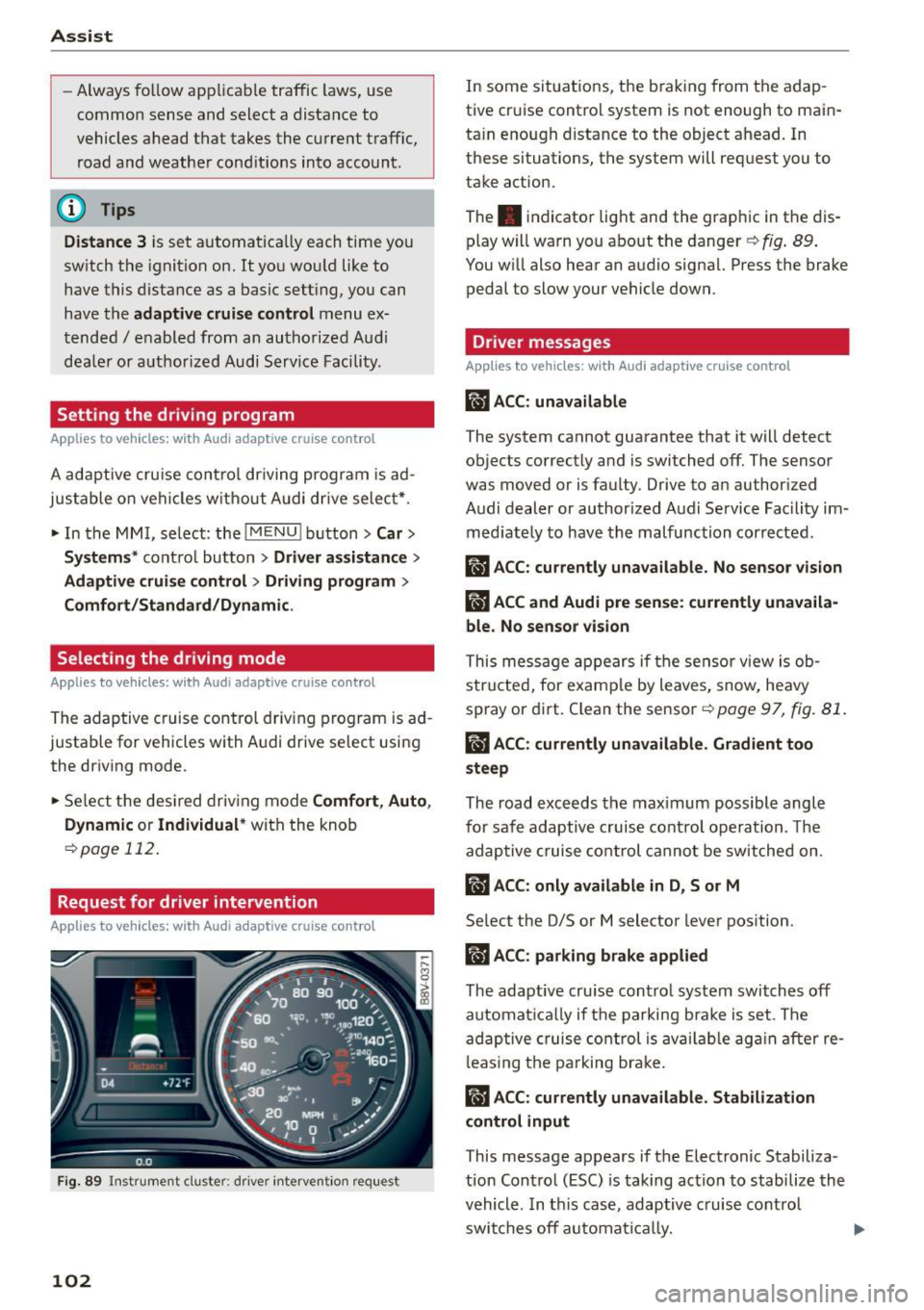
Request for driver intervention
App lies to veh icles: w ith Audi adaptive cruise co ntrol
F ig. 89 Instr ument cluste r: d river intervent ion req uest
102
In some situations, the brak ing from the adap
tive cruise control system is not enough to main
ta in enough d istance to the object ahead. In
these situations, the system will request you to
take action.
The . indicator light and the graph ic in the dis
play w ill warn you abo ut the danger ¢
fig. 89 .
You w ill also hear an audio signa l. Press the brake
pedal to slow your vehicle down.
Driver messages
App lies to vehicles: wit h Aud i adapt ive c ru ise contro l
ill ACC: unavailable
The system cannot guarantee that it will detect
objects correctly and is switched off. The sensor
was
moved or is faulty. Drive to an author ized
Audi dealer or authorized Audi Service Fac ility im
med iate ly to have the malfunction corrected.
ill ACC : currently unava ilable . No sensor vision
IIJ ACC and Audi pre sen se : currently unava ila
ble. No sensor vis ion
This mess age appears if the sensor v iew is ob
str ucted, for e xam ple by leaves, snow, heavy
spray or di rt. C lean the sensor-=>
page 97, fig. 81 .
ill ACC: currently unavailable . Gradient too
steep
The road exceeds the max imum possible angle
for safe adaptive c ruise contro l operation . Th e
adap tive cruise co ntrol cannot be switched on .
ill ACC: only available in D, Sor M
Select the D/S or M selector lever pos ition.
II) ACC: parking brake applied
The adaptive cru ise cont ro l system swi tch es off
automat ically if t he parking b ra ke is set . The
ad aptive cruise co ntrol is av ail ab le ag ain after re
l eas ing t he pa rking br ake.
II ACC : currently unavailable. Stabilization
control input
This message appears if the Electronic Stabiliza
tion Control (ESC) is taking act io n to stabilize the
vehicle . In t his case, adaptive c ruise cont rol
swi tches off automat ically.
Page 107 of 282
M N
0 > co ,...., \!) ..,.,
..,.,
..,., ,....,
-Please note that the sensor does not always
detect all objects. This increases the risk of a
collision.
- Pre sense front does not react to people or
animals or objects that are crossing the ve
hicle's path or are difficult to detect
¢ page 97.
-Reflective objects such as guard rails or the
entrance to a tunnel, heavy rain and ice can
affect the funct ion of the radar sensor and
the system's ability to detect a collision risk .
- Lack of attention can lead to collisions, oth
er accidents and serious injuries. pre sense
front is an assistance system and cannot
prevent a collision by itself. The driver must
always intervene . The driver is always re
sponsible for braking at the right time.
- Always pay attention to traffic, even when
pre sense front is switched on . Always be
ready to intervene and take over complete
control of the vehicle whenever it is neces
sary. Always follow traffic laws regarding
maintaining a safe distance between your
vehicle and vehicles ahead.
- pre sense front works within certain limits
and cannot react to situations that are out
side of the system limits, such as when ap
proaching a stationary vehicle or a station
ary obstacle (the end of a traffic jam or ave
hicle that has broken down).
- Always keep in m ind that the radar sensor
for pre sense front only works w ith in de
fined detection zones, which means other
vehicles may not always be detected correct
ly.
- The function and range of the radar sensor
can be impaired by rain, snow and heavy
mist. Vehicles ahead may not be detected
right away, or not detected at a ll.
- Reflective surfaces such as guard rails or en
trances to tunnels may impair the function
of the radar sensor.
(D Note
The sensor can be disp laced by impacts or
damage to the bumper, whee l hous ing and
underbody. The pre sense front sensor can be
damaged by this . Have an authorized Audi
Assist
dealer or authorized Audi Service Facility
check their function.
(D Tips
- You can cancel the braking with increasing
force that is initiated by the system by brak
ing yourself, by acce lerating noticeably or by
swerving .
- For information on driver messages about
pre sense, refer to ¢
page 106.
- Keep in mind that pre sense front can brake
unexpectedly. Always secure any cargo or
objects that you are transporting to reduce
the risk of damage or injury .
- Certain pre sense front functions switch
off
when ESC is switched off (sport mode) or
when driving in reverse.
- The pre sense front functions are not availa
ble if there is a malfunction in the adaptive
cruise control* system
¢page 102 or
¢ page 106.
-Keep in mind that pre sense front can brake
abruptly. Always secure cargo or objects
that you transport to reduce the risk of
damage or injury .
Settings in the Infotainment system
Applies to vehicles : wi th Audi pre sense front or A ud i ada ptive
cruise co ntrol
.,. In the MMI, select: the I MENU I button >C ar>
Systems*
car > Driver assistance > Audi pre
sense .
Switching the system on and off
Audi pre sense (Sys tem): if the system is switch
ed
off, it switches on again automatically once
the ignition is switched on again.
System -Switch Audi pre sense On-Off . With
this, you can switch the prewarning and the brak ing intervention from Audi pre sense on or
off.
Early warning -The distance and approach warn
ings can be switched
On /Off.
(D Tips
-If you restrict or switch off the ESC, the pre
sense also switches itse lf off ¢
page 124 .
105