2015 AUDI S3 SEDAN wheel
[x] Cancel search: wheelPage 81 of 282

M N
0 > co ,...., \!) 1.1'1
1.1'1
1.1'1
,....,
brake provides various convenience and safety
functions.
When starting from rest
- The integral hill start assist helps you when
driving by automatically releasing the parking
brake ¢
page 80 , Starting from a stop.
- When starting on inclines, the hill start assist
prevents the vehicle from unintentionally roll
ing back. The braking force of the parking brake
is not r eleased until sufficient driving forc e has
b ee n built up at the wh eels.
Emergency brake function
An emergency braking functions ensures that the
vehicle can be slowed down even if the
normal
brakes fail¢ page 80, Emergency braking func
tion.
A WARNING
- Do not press the accelerator pedal inadver
tently if the vehicle is stationary but the en gine is running and a gear is selected . Other
wise the vehicle will start to move immedi
ately and could result in a crash.
-If the power supply fails, the released park
ing brake can no longer engage. In this case,
park the vehicle on level ground and secure
it by placing the selector lever in the P posi
tion. See an authorized Audi dealer or au
thorized Audi Service Facility for assistance.
(D Note
If the . or 1111 (USA models)/ . (Canada
models) indicator light in the instrument clus
ter blinks , there is a malfunction in the brake
system. Refer to the detailed description of
the indicator lights¢
page 17.
-If the - (USA models)/ . (Cana-
da models) or
Ill indicator light turns on,
there is a malfunction in the parking brake
¢ page 18.
(D Tips
-If the parking brake is set while the ignition
is switched
off, thP l<@) indicator light in the
button and in the instrument cluster dis
play - (USA models) /. (Canada mod-
Driving
els) will turn off after a certain amount of
time.
- If driver's door is opened while the ignition
is switched on, the parking brake sets auto
matically. This prevents unintended rolling
of the vehicle.
- Occasional noises when the parking brake is
applied and released are normal and are not
a cause for concern.
- When the vehicle is parked, the parking
brake goes through a self-test cycle at regu
lar intervals. Any noises associated with this
are normal.
- If there is a power failure, the parking brake will not set if it is released, and it will not
release if it is set¢&. See an authorized
Audi dealer or authorized Audi Service Fa
cility for assistance .
Parking
.. Press the brake pedal to stop the vehicle.
.. Pull the switch@¢
page 78, fig . 71 to set the
parking brake.
.. Place the selector lever in the P position.
.. Turn th e engine off¢,& .
.. Turn the steering wheel when pa rking on in
clines so that the wheels will roll into the curb
if the vehicle starts moving .
A WARNING
--Always take the vehicle key with you when
leaving the vehicle, even for a short period
of time. This applies particularly when chil
dren remain in the vehicle. Otherwise the
children could start the engine , release the
parking brake or operate electrical equip
ment (e.g. power windows). There is the risk
of an accident.
- When the vehicle is locked, no one -particu
larly not children should remain in the vehi
cle. Locked doors make it more difficult for
emergency workers to get into the vehicle,
which puts lives at risk.
79
Page 84 of 282
Automatic transmi ssion
Automatic transmission
S tronic
Introduction
Applies to veh icles: w ith S tro nic transmiss ion
Your vehicle is equ ipped w ith an electronically
contro lled DSG transmission ca lled S tronic. Two
independent clutches transfer the power be
tween the eng ine and t ransmission. It a llows the
vehicle to accelerate without a noticeable inter
ruption in tract ion .
The transmission upshifts or downsh ifts auto
matica lly. The driv ing style contin uously influen
ces the se lection of the driving program .
When a
mod era te driving style is used, the
transmiss ion se lects the mos t econom ica l driving
mode. The transmission upsh ifts at a lower RPM
and downshifts at a higher RPM to improve fuel
efficiency .
The transmission swit ches to a sporty mode after
a kick-down or when the driver uses a
s po rty driv
ing sty le
characterized by quick accelerator pedal
movements, heavy acceleration, frequent
changes in speed and t raveling at the maximum
speed.
If desired, the drive r can a lso se lect the gears
manually ( tiptronic mode) ¢ page 87, Shift ing
manually (tiptronic mode) .
Selector lever positions
Applies to vehicles: w ith S tro nic transmiss ion
F ig. 72 In strum ent clus te r: S electo r lev er pos it io ns
-~ 0 > a, ID
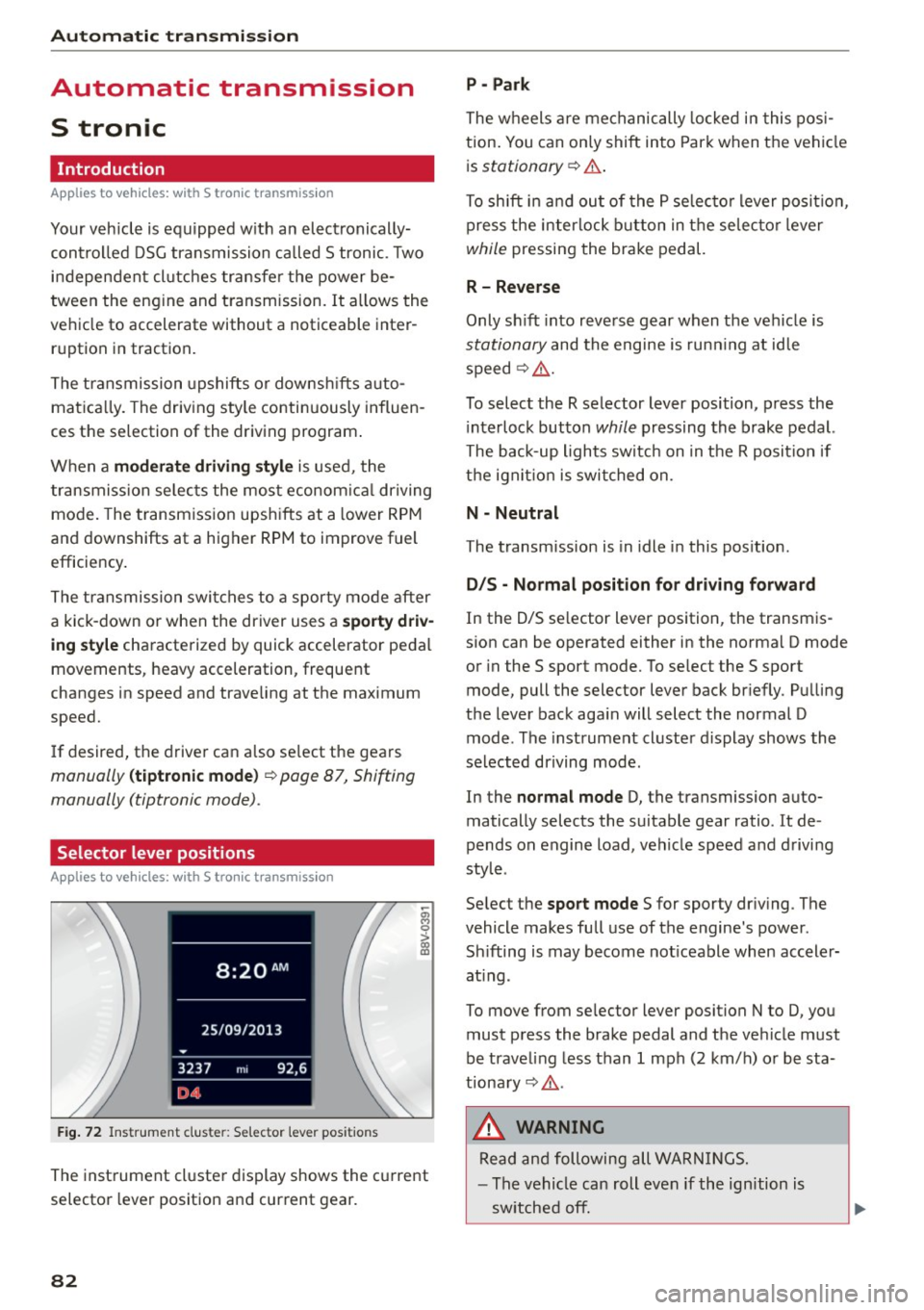
The inst rument cl uste r display shows the c urrent
selector lever position and current gear.
82
P - Park
The wheels a re mechanically locked i n this pos i
tion . You can on ly shift into Par k when the vehi cle
i s
stationary ¢.&. .
To shift i n and ou t of the P se lec to r lever posit io n,
press the interlock button in the selec tor lever
while pressing the brake pedal.
R - Reverse
Only sh ift into reve rse gear when the vehicle is
stationary and the engine is run ning at id le
speed¢ .&..
To select the R selector lever position, p ress the
i nterlock button
while pressing the brake pedal.
The back-up lights switc h on in the R posit ion if
the ign it io n is switched on.
N - Neutral
The transm ission is in idle in this pos ition .
D/S - Normal po sit ion fo r dri ving f orward
In the D/S se lector lever position , the transm is
s ion can be operated either in the norma l D mode
or in the S sport mode. To se lect the S sport
mode, pull the selector lever back br iefly . Pu lling
the lever back aga in will select the normal D
mode . The instrument cluster display shows the
selected driving mode .
In the
normal mode D, the transmission auto
matically selects the suitable gear ratio. It de
pends on engine load, vehicle speed and d rivi ng
style .
Se lect the
sport mode S for sporty dr iv ing . The
vehicle makes fu ll use of the engine 's power.
Sh ifting is may become not iceable when accele r
at ing .
To move from se lec tor lever position N to D, you
must p ress the brake pedal and the ve hicle must
be traveling less than 1 mph (2 km/h) o r be sta
tiona ry¢ .&..
&, WARNING
Read and following all WA RN IN GS.
- The vehicle can roll even if the ignition is
sw itched off.
Page 87 of 282
M N
0 > co ,...., \!) ..,.,
..,.,
..,., ,....,
Stopp ing /p ark in g
If the se lector lever is not in the P position when
you open the driver's door, the vehicle cou ld roll.
In vehicles with a convenience key*, the message:
Shift t o P, o ther wis e vehi cle c an roll away .
D oo rs do not lo ck if l ever i s not i n P
appears . You
will also hear a warning tone.
~ Press and ho ld the brake pedal c:> A
~ Set the parking brake.
~ Se lect the P selector lever pos ition.
Stopping on an incline
~ Always press the b rake pedal to hold the vehi
cle in place and prevent it from "rolling back"
c:> A -Do not try to prevent the vehicle from
"rolling back" when a gear is engaged by in
creasing the engine speed
c:> @ .
Starting on an incline in vehicl es without H ill
H old *
~ Set the parking brake.
~ With the driving gear se lected, press the accel
erator pedal carefully. The parking brake releas
es automatically . Requ irement: The door must
be closed .
Starting o n an incline in veh icles with Hill
Hol d*
~ With the driving gear selected, remove your
foot from the brake pedal and press the accel
erator pedal
c:> page 80, Hill hold.
Under certain circumstances, (such as driving in
the mountains or towing a tra iler), it may be use
ful to sw itch temporarily to the manual sh ift pro
gram in order to adjust the gears to the driving
conditions by hand~
page 87.
When parking on a level surface, simply place the
selector lever in the P position. On inclines, acti
vate the parking brake first and then move the
selecto r lever to the P position~
page 78. This
prevents the locking me chanism from being load
ed too heavi ly and wi ll make it easier to move the
selector lever out of the P posit ion .
Aut omatic transm issio n
A WARNING
-The vehicle can roll even when the engine is
sw itched off.
- Unintended vehicle movement can lead to
serious injuries.
- Never leave your vehicle with the engine running while in gear. If you must leave your
veh icle when the engine is running, set the
parking brake and move the selector lever to
the P position.
- Power is still transferred to the wheels when
the eng ine is running at idle. To prevent the
veh icle from "creeping", you must keep your
foot on the brake when the engine is run
n ing and the selec to r l ever is in the D, Sor R
position or "tiptronic" mode is selected .
- Do not inadvertently press the accelera tor
pedal when the vehicle is stationa ry. Other
wise the vehicle will start to move immedi
ately, even if the parking brake is set. This
could res ult in a crash.
- Do not press the accelerator pedal when
changing the se lector lever position while
the vehicle is stationary and the eng ine is
running.
- Never engage the R or P selector level pos i
tions while dr iv ing.
It could cause a crash.
- Before driving down a steep s lope, reduce
your speed and shift into a lower gear with
"t iptronic".
- Do not ride the brakes or press the brake
pedal too often or too long when driving
down a hill. Constant braking causes the
brakes to overheat and substantially re
duces braking performance, increases brak
ing d istance or causes comp lete failure of
the brake system.
- If you must stop on an incline, always hold
the vehicle in place with the foot brake or pa rking brake to prevent it from ro lling
back.
- Never hold the vehicle on an incline with a slipping clut ch. The cl utch opens au tomati
cally when it becomes too hot from the
overload . The
mJ indicator light turns on
and a message appears
c:> page 88 when
the clutch is overloaded .
85
Page 89 of 282
....,
N
0 > co
rl I.O
"'
"'
"'
rl
Shifting manually (tiptronic mode)
Applies to vehicles: with 5 tronic transmiss ion/ shi ft padd les
The tiptronic allow the driver to shift the gears
manually.
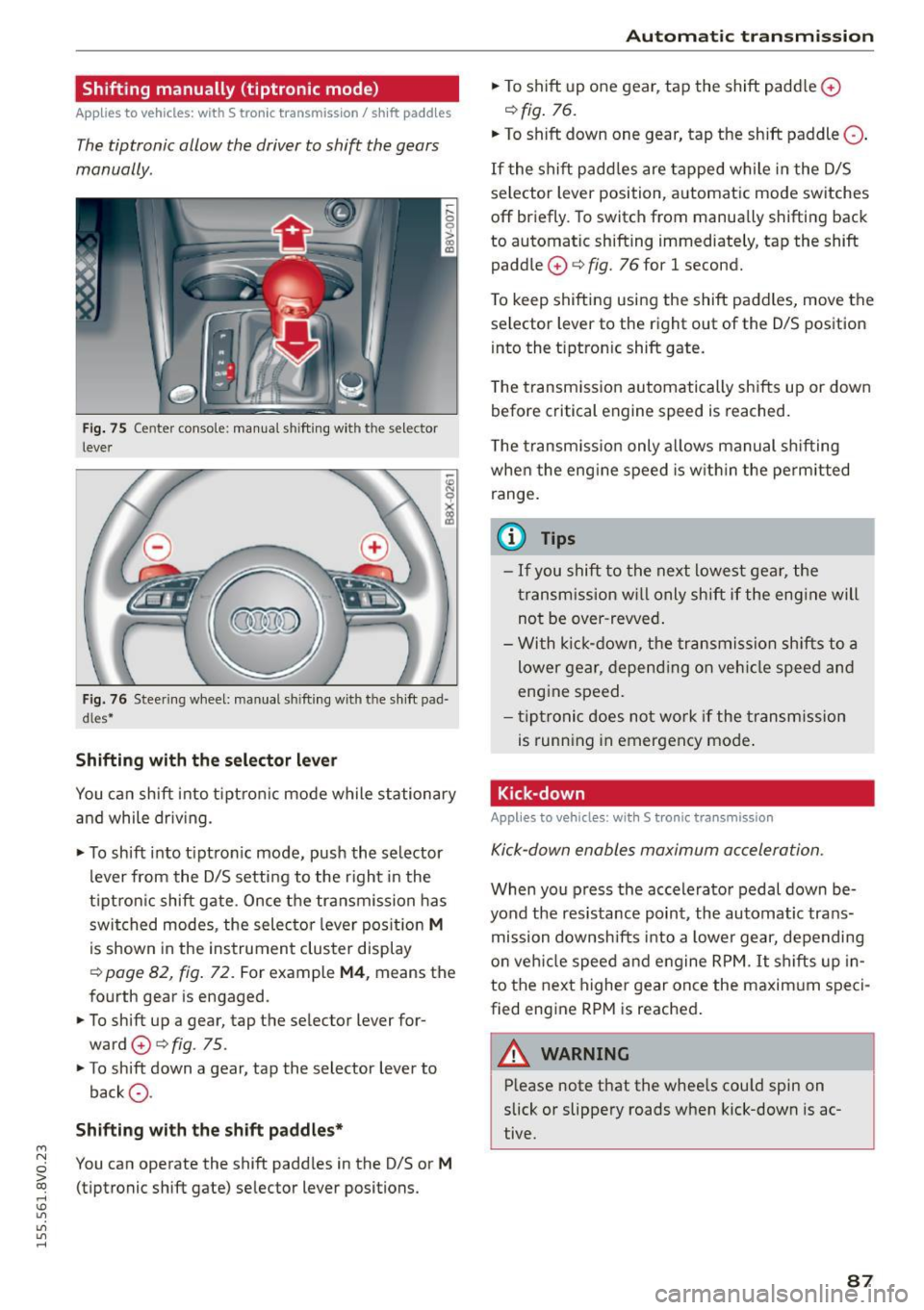
Fig. 75 Center c_onso le: manual shi fting wi th the selec tor
lever
Fig. 76 Steering wheel: manual shi fting with t he shift pad
d les*
Shifting with the selector lever
You can shift into tiptronic mode while stationary
and while driv ing.
• To shift into tip tron ic mode, push the selector
lever from the D/S setting to the right in the
tiptron ic shift gate. Once the transmission has
switched modes, the selecto r lever position
M
is shown in the instrument cluster display
r:::> page 82, fig. 72 . For example M4, means the
fourth gear is engaged.
• To shift up a gear, tap the selector lever for
ward
0 r:::> fig . 75.
• To shift down a gear, tap the selector lever to
back
0 -
Shifting with the shift paddles*
You can operate the shift paddles in the D/S or M
(tiptronic shift gate) selector lever positions.
Automatic transmission
• To shift up one gear, tap the shift padd le 0
r:::> fig. 76.
• To shift down one gear, tap the shift paddle 0 -
If the shift paddles are tapped while in the D/S
selector lever position, automatic mode switches
off briefly. To switch from manually shifting back
to automatic shifting immediately, tap the shift paddle
0 ¢ fig. 76 for 1 second.
To keep shifting using the shift paddles, move the
selector lever to the right out of the D/S position
into the t iptron ic shift gate.
T he transmission automatically shifts up or down
before critical engine speed is reached.
The transmission only allows manual shifting
whe n the engine speed is within the permitted
range.
(0 Tips
- If you shift to the next lowest gear, the
transmission will only shift if the engine will
not be over-revved.
- With kick-down, the transmission shifts to a
lower gear, depending on vehicle speed and
engine speed.
- tiptronic does not work if the transmission
is running in emergency mode .
Kick-down
Applies to vehicles: wit h S tronic transm issio n
Kick-down enables maximum acceleration.
When you press the accelerator pedal down be
yond the resistance point , the automatic trans
mission downsh ifts into a lower gear, depending
on veh icle speed and engine RPM.
It shifts up in
to the next higher gear once the maxim um speci
fied eng ine RPM is reached.
A WARNING ~
Please note that the whee ls cou ld spin on
slick or slippery roads when kick-down is ac
tive .
-
87
Page 90 of 282
Automatic transmission
Launch Control-Program
Applie s to v ehi cles: w ith launch control
The Launch Control Program enables maximum
acceleration .
Requirement: The engine must be at operating
temperature and t he steering wheel must not be
turned.
.,. With the engine running, press the
!~OFFI but
ton briefly one time
l) .
.,. Pull the selector lever back out of the O/S posi
tion briefly to select the S position, or press it
toward the right into the tiptronic position or
select the
Dynamic driving mode in drive se
lect*
~page 112.
.,. Press the brake pedal firmly with your left foot
and hold it all the way down for at least 1 sec
ond.
.,. At the same time, press the gas pedal all the
way down with your right foot until the engine
reaches and stays at a high RPM level.
.,. Remove your left foot from the brake.
_.&. WARNING
- Always adapt your driving to the traffic flow.
- Only use Launch Control when road and traf-
fic conditions allow it and other drivers will
not be endangered or impacted by your driv
ing and the vehicle's acceleration.
- Please note that the drive wheels can spin
and the vehicle can break away when sport
mode is switched on, especially when the
road is slippery.
- Once the vehicle has started moving, press
the
l .1'3 OFF ! button briefly to turn the sport
mode off.
(D Tips
- The transmission temperature may increase
significantly after using the launch control program. If that happens, the program may
1l In vehicles w ith a d rive r infor matio n syste m, a n ESC light
in t he instrument clus ter s tays o n co ntinuo usly and t he
message
Stabilization control (ESC): sport. Warning! Re·
stricted stability
appears temporarily.
88
not be available for a few minutes. It will be
available again after a cool-down period.
- When accelerating using the launch control
program, all vehicle parts are subject to
heavy loads. This can lead to increased wear.
Emergency mode
App lies to vehicles : wi th S t ro ni c t ra nsmi ssio n
In the event of a system malfunction, there is an
emergency program .
If all of the selector lever positions are highlight
ed with a light background in the instrument
cluster display, there is a system malfunction and
the S tronic transmission is running in the emer
gency program. The vehicle can still be driven in
emergency mode, but only with reduced speed
and not in all gears. In some cases, the vehicle
cannot drive in reverse .
(D Note
If the transmission runs in emergency mode,
drive to an authorized Audi dealer or author
ized Audi Service Facility immediately to have
the malfunction corrected.
Transmission malfunction
• Transmission malfunction! Please stop the
vehicle and select P
There is a malfunction in the transmission. Park
the vehicle securely and do not continue driving.
See an authorized Audi dealer or authorized Audi
Service Facility for assistance.
• Transmission overheating! Please stop the
vehicle!
The transmission is too hot and can become dam
aged. Stop and let the transmission cool with the
engine running (at idle) in the P selector lever po
sition. Then the indicator light and the message
turn off, drive to an authorized Audi dealer or au
thorized Audi Service Facility immediately to have.,.
Page 95 of 282
M N
0 > co ,...., \!) 1.1'1
1.1'1
1.1'1
,....,
Before you actually tow your trailer, practice
turning, stopping and backing up in an area away
from traffic. Keep practicing until you have be
come completely fami liar with the way your ve hi
cle-trailer combination behaves and responds.
Backing up is d iff icu lt and requires practice . Back
i ng up w ith a trailer generally req uires steering
action oppos ite to that when backing up yo ur ve
hi cle without a trailer.
M aintain a g reater distance betwee n your vehicle
and the one in front of yo u. You w ill need more
room to stop. To compensate for the tra iler, you
will need a larger than norma l turning radius.
When passing, remember that yo u cannot acce l
erate as fast as yo u normally would because of
the added load. Make sure you have enough room
to pass. After passing, allow plenty of room for
your trailer before changing lanes again.
Avoid jerky sta rts, sharp turns or rapid lane
changes.
@ Tips
- Do not tow a tra ile r during the break-in peri
od of yo ur vehicle.
- If yo u tow a t railer, you r A udi may require
more frequent ma intenance due to the ex
tra load
~ page 262.
Parking on a slope
Do not park on a slope with a trailer . If it cannot
be avoided, do so only after doing the following:
When parking:
.. Apply the foo t brake .
.. Have someone pla ce chocks under bo th t he ve
hicle and the trailer wheels .
.. With c hocks i n place, s lowly re lease the brakes
u nti l the whee l chocks absorb the load .
.. Turn the wheels towards the c urb .
.. Apply the parking brake .
.. Se lect the P selector lever pos ition.
When restarting after parking :
.. Apply the foot brake .
.. Start the eng ine.
.. Se lect the D/S selector lever posit ion.
Trailer mode
.. Release the pa rking brake and s lowly pull out
an d away from the wheel chocks .
.. Stop and have someone retr ieve the wheel
chocks.
(D Tips
If you move the selector leve r of the automat
i c transm iss ion to P before app ly ing the park
i ng brake and before blocking the wheels, you
may have to use mo re force later to move the
l ever out of the P posit ion.
93
Page 100 of 282
Assist
(D Note
The sensor can be displaced by impacts or
damage to the bumper, wheel housing and
underbody. The adaptive cruise control and
pre sense front may become impaired as a re
sult. Have an authorized Audi dealer or au
thorized Audi Service Facility check their func
tion.
In curves
Applies to vehicles: with Audi adaptive cruise control and Aud i
pre sense front
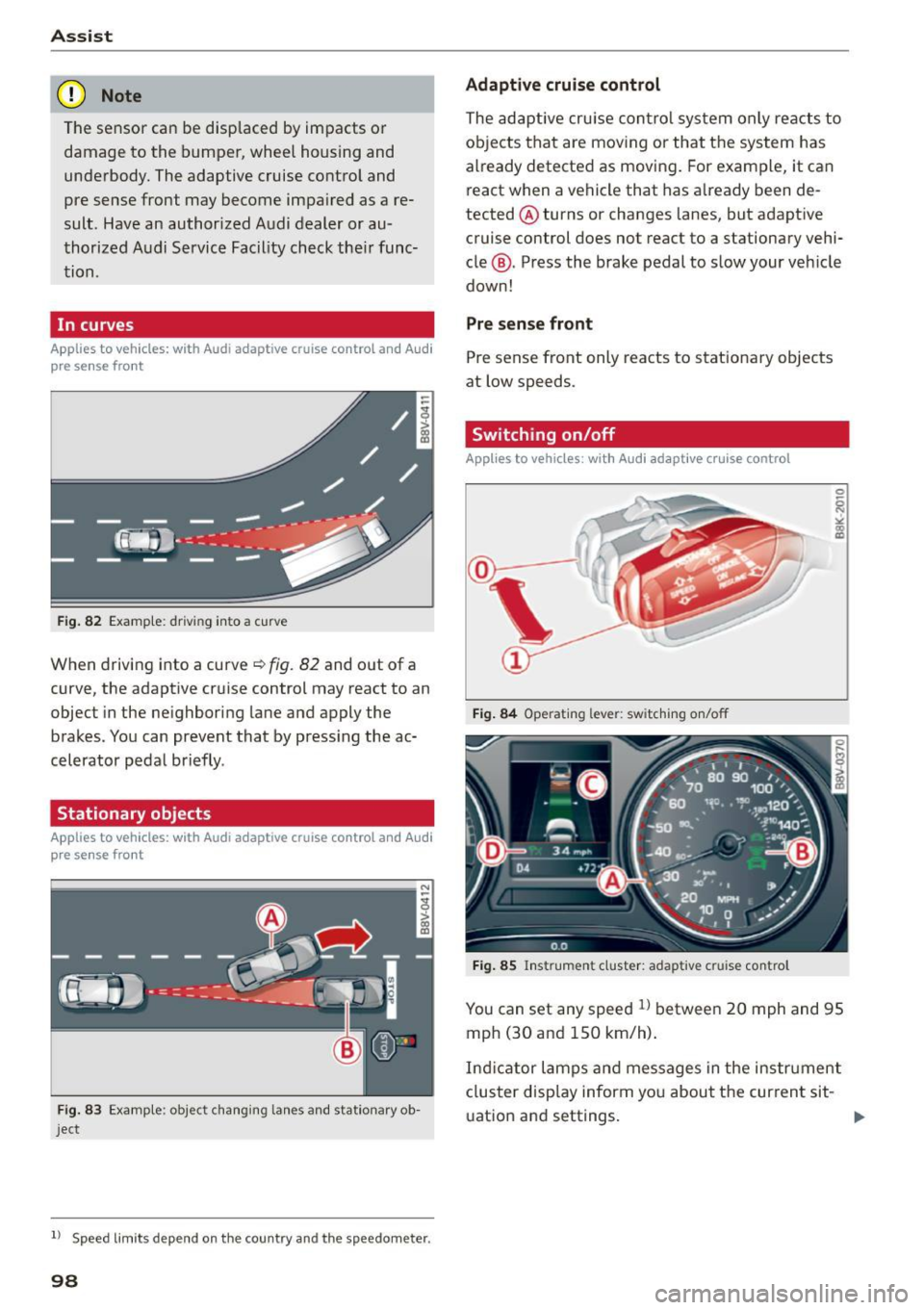
Fig. 82 Example: driving into a curve
When driving into a curve~ fig. 82 and out of a
curve, the adaptive cruise control may react to an
object in the neighboring lane and apply the
brakes. You can prevent that by pressing the ac
celerator pedal briefly .
Stationary objects
Applies to vehicles: with Audi adaptive cruise control and Audi
pre sense front
Fig. 83 Example: object changing lanes and stationar y ob
ject
l l Speed limits depe nd on t he country and the speedo meter .
98
Adaptive cruise control
The adaptive cruise control system only reacts to
objects that are moving or that the system has
already detected as moving. For example, it can
react when a vehicle that has already been de
tected @turns or changes lanes, but adapt ive
cruise control does not react to a stationary vehi
cle @. Press the brake pedal to slow your vehicle
down!
Pre sense front
Pre sense front only reacts to stationary objects
at low speeds.
Switching on/off
Applies to vehicles : with A udi adaptive cruise contro l
Fig. 84 Operating lever: switching on/off
Fig. 85 Instrument cluster: adaptive cruise control
You can set any speed ll between 20 mph and 95
mph (30 and 150 km/h).
Ind icator lamps and messages in the instrument
cluster disp lay inform you about the current sit-
ua tion and settings. ..,
Page 101 of 282

M N
0 > co ,...., \!) 1.1'1
1.1'1
1.1'1
,....,
Switching adaptive cruise control on
"'Pull the lever toward yo u into posit ion (!)
¢fig. 84. ACC: sta ndb y appears in the instru
ment cluster disp lay .
Saving the speed and activating regulation
"'T o save the current speed, press the !SETI
¢ fig. 84 button . T he stored speed is s hown in
the tachomete r LED line @and appears briefly
in the information line @¢
fig. 85.
"' To activate the reg ulation while stationary, you
must press the brake pedal.
Sw itching adaptiv e cruise c ontrol off
"' Push the lever away from you into position @
u nt il it clicks into place. The message
ACC : off
appears .
The stored speed in the L ED line is erased.
@ Indicato r light s
II-adaptive cruise contro l is switched o n. Ob
jects ahead are not detected. The stored speed is
maintained.
• -An object ahead was detected . The adaptive
cruise control system regu lates the speed and
d istance to the object ahead and brakes/acceler
ates automatica lly.
f:i -adaptive cru ise contro l is switched o n. An
object ahead was detected. Yo ur vehicle remains
stopped and w ill not start dr iving automatica lly.
• -The automatic brak ing is no t eno ugh to
maintain a sufficient distance to an object ahead .
You must intervene ¢
page 102, Request for
driver intervention.
© Instrument clu ster display
If adaptive cruise control is not shown in the in
strument cluster display, yo u can call i t up using
the mu ltifunc tion steering wheel buttons
¢page 28.
Based on the g raphics in the display, you can de
termine if the system is ma inta ining a distance to
a vehicle ahead and what that dis tance to this ve
h icle is:
No vehi cle -No object ahead was detected .
Ass is t
White vehicle -An object ahead was de tected .
Re d vehi cle -Request fo r the d river to take action
¢page 102.
Both arrows on the scale© indicate the d istance
to the object ahead. No arrow appears when the
vehicle is on an open road and the re is no object
ahead. If a n object is detected ahead, the a rrow
moves on the sca le.
T he green zone on the sca le indicates the store
distance. For i nformat ion on changing the dis
t a nce, refer to ¢
page 101. If the distance se
l ected is ex ceeded or not reached, the arrow
moves into the red zone on the scale .
_& WARNING
-Using adaptive cruise contro l incorrectly can
cause collisions, other accidents and serious in ju ries.
- If you press the
ISETI button when driving at
speeds be low 20 mph (30 km/h), the vehi
cle acce lerates automatically up to 20 mph
(30 km/h), which is the mi nimum speed
that can be set.
{!) Tips
- If you switch the ignit ion or the adaptive
cruise contro l system off, the set speed is
erased for safety reason.
- The Electronic Stabilization Control (ESC) and Anti-Slip Regulat ion (ASR) both sw itch
on when the adaptive cruise contro l is
switched on . ESC and ASR ca nnot be switch
e d off when adaptive c ruise cont ro l is
sw itched on.
- With the adaptive c ruise control activated
the ESC sport mode cannot be activated .
99