2015 AUDI S3 SEDAN ESP
[x] Cancel search: ESPPage 95 of 282
M N
0 > co ,...., \!) 1.1'1
1.1'1
1.1'1
,....,
Before you actually tow your trailer, practice
turning, stopping and backing up in an area away
from traffic. Keep practicing until you have be
come completely fami liar with the way your ve hi
cle-trailer combination behaves and responds.
Backing up is d iff icu lt and requires practice . Back
i ng up w ith a trailer generally req uires steering
action oppos ite to that when backing up yo ur ve
hi cle without a trailer.
M aintain a g reater distance betwee n your vehicle
and the one in front of yo u. You w ill need more
room to stop. To compensate for the tra iler, you
will need a larger than norma l turning radius.
When passing, remember that yo u cannot acce l
erate as fast as yo u normally would because of
the added load. Make sure you have enough room
to pass. After passing, allow plenty of room for
your trailer before changing lanes again.
Avoid jerky sta rts, sharp turns or rapid lane
changes.
@ Tips
- Do not tow a tra ile r during the break-in peri
od of yo ur vehicle.
- If yo u tow a t railer, you r A udi may require
more frequent ma intenance due to the ex
tra load
~ page 262.
Parking on a slope
Do not park on a slope with a trailer . If it cannot
be avoided, do so only after doing the following:
When parking:
.. Apply the foo t brake .
.. Have someone pla ce chocks under bo th t he ve
hicle and the trailer wheels .
.. With c hocks i n place, s lowly re lease the brakes
u nti l the whee l chocks absorb the load .
.. Turn the wheels towards the c urb .
.. Apply the parking brake .
.. Se lect the P selector lever pos ition.
When restarting after parking :
.. Apply the foot brake .
.. Start the eng ine.
.. Se lect the D/S selector lever posit ion.
Trailer mode
.. Release the pa rking brake and s lowly pull out
an d away from the wheel chocks .
.. Stop and have someone retr ieve the wheel
chocks.
(D Tips
If you move the selector leve r of the automat
i c transm iss ion to P before app ly ing the park
i ng brake and before blocking the wheels, you
may have to use mo re force later to move the
l ever out of the P posit ion.
93
Page 96 of 282

Assist
Assist Electronic speed limiter*
Applies to veh icles: with electronic speed limiter
Your vehicle may be factory equipped with ti res
that are rated for a maximum speed of 130 mph
(210 km/h) . T his is less than the maximum speed
of your vehicle . To reduce the risk of sudden tire
failure and loss of control if the vehicle is operat
ed at excessive speeds, your vehicle also has an
electronic speed limiter. The electronic speed
limiter prevents your vehicle from going faster
than the tir e speed rat ing . For more information
~page 221.
If the engine control unit receives faulty vehicle
road speed signals, the Malfunction Indicator
Lamp (MIL)
¢4 will illuminate . If this occurs,
contact the nearest a utho rized Audi dealer for as
sistance .
A WARNING
Always observe the posted speed limits and
adjust your speed to suit prevailing road, traf
fic and weather conditions . Never drive your
vehicle faster than the maximum speed rating of the tires installed.
Speed warning system
Introduction
The speed warning system helps you to stay un
der a specified maximum speed.
-
The speed warning system warns you if you are
exceeding the maximum speed that you have set .
You will hear a warning tone when your speed ex
ceeds the stored value by approximately 3 mph
(3 km/h) . Th e. (USA models)/. (Canada
models) indicator light and the message
Speed
limit exceeded!
appear in the instrument cluster
disp lay at the same time . The ./. indicator
light turns off when the speed decreases below
the stored maximum speed.
Setting a thresho ld is recommended if you would
like to be reminded when you re ach a certain
maximum speed. Situations where you may want
to do so include driving in a country with a gener-
94
al speed limit or if there is a specified maximum
speed for winter tires.
(D Tips
Regardless of the speed warning system, you
should always monitor your speed using the
speedometer and make sure you are following
the legal speed limit .
Setting the threshold
You can set, change and delete the threshold in
the MMI.
.. Select: the I MENU I button >Car> Systems*
contro l button > Driver assistance > Speed
warning.
You can set any threshold between 20 mph
(30 km/h) and 150 mph (240 km/h) . Settings
can each be adjusted in increments of 6 mph
(10 km/h).
Cruise control system
· Description
Applies to vehicles: with cruise control system
The cruise control system makes it poss ible to
drive at a constant speed starting at 15 mph
(20 km/h).
The speed is kept constant by modify ing engine
power or through an act ive brake intervention.
A WARNING
- Always pay attention to the traffic around
you when the cruise control is in operation.
You are a lways responsible for your speed
and the distance between your vehicle and
other vehicles.
- For reasons of safety, cruise contro l should
not be used in the city, in stop-and-go traf
fic, on winding roads and when road condi tions are poor (such as ice, fog, gravel,
heavy rain and hydroplaning) -you could
have an accident .
- Switch the cruise control off temporarily
when driv ing in turning lanes, highway exits
or in construction zones .
-
Page 99 of 282

....,
N
ci > co
rl I.O
"'
"'
"'
rl
General information
Applies to vehicles: with Audi adaptive cruise control and Audi
pre sense front
Fig. 81 Front of vehicle: sensor
The general information applies to adaptive
cruise control* and pre sense front*
r::!>page 103.
The radar sensor area r::!> fig. Bl must not be cov
ered with stickers, deposits or any other obstruc
tions as it may impair the function of the adap
tive cruise control and the pre sense front. For in
formation on cleaning, refer tor::!>
page 235. The
same applies for any modifications made in the
front area .
The function of the adaptive cruise control sys tem and pre sense front is limited in some condi
tions :
- Objects can only be detected when they are
within the sensor ranger::!>
page 96, fig. 80.
-The system has a limited ability to detect ob
jects that are a short distance ahead, off to the side of your vehicle or moving into your lane.
- Objects that are difficult to detect such as mo
torcycles, vehicles with high ground clearance
or an overhanging load are detected late or not
detected at all.
- When driving through curves
r=> page 98.
-With stationary objects r::!> page 98.
A WARNING
Always pay attention to traffic when adaptive
cruise control is switched on and the pre
sense front is active
r::!> page 103. As the d riv
er, you are still responsible for starting and
for maintaining speed and distance to other objects. The pre sense front is used to assist
you. The driver must always take action to
Assist
avoid a collision. The driver is always responsi
ble for braking at the correct time.
- Using adaptive cruise control incorrectly can
cause collisions, other accidents and serious
injuries.
- For safety reasons, do not use adaptive
cruise control when driving on roads with
many curves, when the road surface is in
poor condition and/or in bad weather (such
as ice, fog, gravel, heavy rain and hydroplan
ing). Using the system under these condi
tions could result in a collision.
- Switch adaptive cruise control off tempora
rily when driving in turning lanes, on ex
pressway exits or in construction zones. This
prevents the vehicle from accelerating to
the set speed when in these situations.
- The adaptive cruise control system will not
brake by itself if you put your foot on the ac
celerator pedal. Doing so can override the
speed and distance regulation.
- When approaching stationary objects such
as stopped traffic, adaptive cruise control
will not respond and pre sense front will
have limited function.
- The adaptive cruise control system and pre
sense front do not react to people, animals,
objects crossing the road or oncoming ob
jects.
- The function of the radar sensors can be af
fected by reflective objects such as guard
rails, the entrance to a tunnel, heavy rain or
ice.
- Always maintain enough distance from
vehicles ahead so that you can still brake
your vehicle safely. The adaptive cruise con trol cannot safely slow your vehicle or brake it to a stop if you are driving too close be
hind a vehicle. Please note that the auto
matic braking function cannot brake sud
denly or apply the brakes fully under these
conditions.
- To reduce the risk of unintended actions,
switch the ACC off when you are not actively
using it.
~
97
Page 103 of 282
M N
0 > co ,...., \!) 1.1'1
1.1'1
1.1'1
,....,
Overriding cruise control
Overriding means exceeding the selected speed
when adaptive cruise contro l is active, for exam
p le when pressing the acce lerator pedal when
passing.
"'T o accelerate man ua lly, pull the lever towa rd
you into position @and ho ld it there. The mes
sage
ACC: o ve rride appears . Or
"' press the accelerator peda l.
"' To resume cruise control, release the lever or
take your foot off the acce lerator pedal.
Int errupting c ruis e contr ol w hil e driving
"'Move the lever into position @. The message
ACC: stand by appears. Or
"' press the brake peda l.
"' To resume the stored speed, move the lever in
to posit ion @.
Int errupting c rui se contr ol wh en stopped
"' Push the lever away from you into position @.
The message
ACC: s ta ndby appears.
"' To resume cruise control, press the brake peda l
and pull the lever toward you into position@.
A WARNING
It is dangerous to act ivate cru ise contro l and
resume the stored speed when the current
road, traff ic or weather condit ions do not per
m it this. This could result in a c rash.
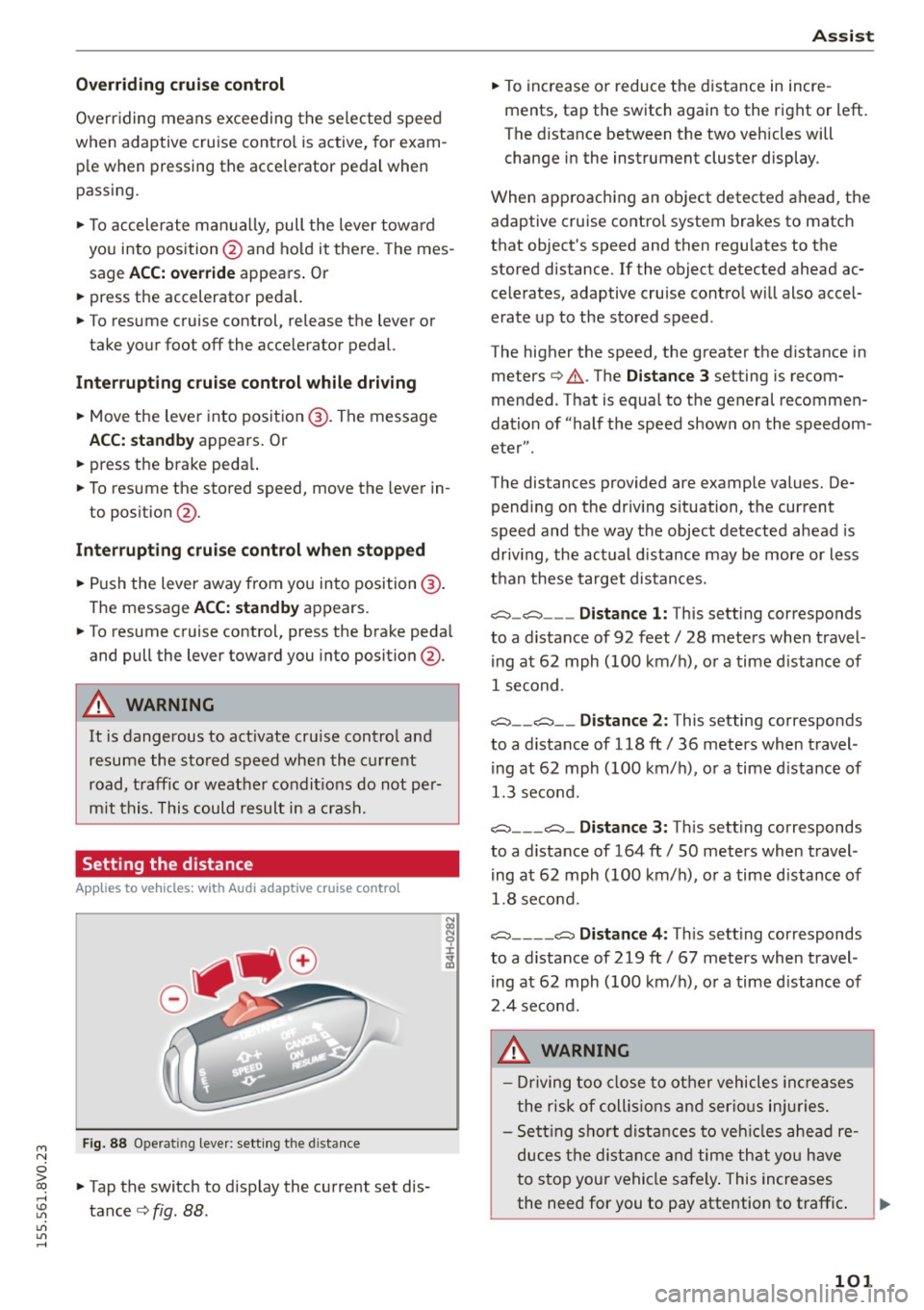
Setting the distance
A ppl ies to vehicles: with Audi adaptive cruise co ntrol
Fig. 88 Ope rat ing leve r: sett ing the d istance
"' Tap the switch to d isplay the current set dis
tance
c> fig. 88 .
Ass is t
"' To increase or reduce the d istance in incre
ments, tap the switch again to the right or left.
The distance between the two vehicles will
change in the instrument cluster display .
When approaching an object detected ahead, the adaptive cruise contro l system brakes to match
that object's speed and then regu lates to the
stored distance. If the object detected ahead ac
celerates, adaptive cruise control will also accel
erate up to the stored speed .
The higher the speed, the greater the distance in meters
c> .&. . The Distanc e 3 setting is recom
mended. That is equal to the general recommen
dation of "half the speed shown on the speedom
eter" .
The distances provided are example values. De pending on the driv ing s ituation, the current
speed and the way the object detected ahead is
driv ing, the actual d istance may be more or less
than these target distances.
c::::::, _c::::::, ___ Distance 1: This setting corresponds
to a distance of 92 feet/ 28 meters when travel
ing at 62 mph (100 km/ h), or a time d istance of
1 second.
c::::::, __ c::::::, __ Distance 2 : This setting corresponds
to a distance of 118 ft/ 36 meters when travel
ing at 62 mph (100 km/ h), or a time d istance of
1.3 second.
c::::::, ___ c::::::,_ Distanc e 3: Th is sett ing corresponds
to a distance of 164 ft/ 50 meters when travel
ing at 62 mph (100 km/ h), or a time d istance of
1.8 second.
c::::::, ____ c::::::, Distance 4: This sett ing corresponds
to a distance of 219 ft/ 67 meters when travel
ing at 62 mph (100 km/h), or a time d istance of
2.4 second.
A WARNING
- Driving too close to other vehicles inc reases
the risk of coll is ions and ser io us in juries.
- Sett ing s ho rt distances to veh icles ahead re
duces the dist ance and time that you have
to stop your vehicle safe ly . This increases
the need for you to pay attention to traffic. .,,.
101
Page 106 of 282
Ass is t
- The pre sense basic functions may not be
available if there is a malfunction in the ESC
system or the airbag control module.
- Note that with pre sense basic, the reversi·
ble safety belt pretensioner on the front
passenger's side deact ivates when the front
passenger's airbag is deactivated .
Audi pre sense front
Description
Applies to vehicles: with Audi pre sense front or Audi adaptive
cruise control
Pre sense front informs you if the d istance to the
vehicle ahead falls below the safe distance for a n
extended per iod of time.
It c an warn of a possi·
b le co llision and initiate braking maneuvers,
within the limits of the system.
When detected in time, the system can assess
dangerous situations whe re a n object ahead
b rakes s udden ly or if you r own vehicle is traveling
at a high speed and approaching an object t hat is
moving more s lowly . If detection is not possible ,
then pre sense front does not re act .
Warnings
Applies to vehicles: with Audi pre sense front or Audi adaptive
cruise control
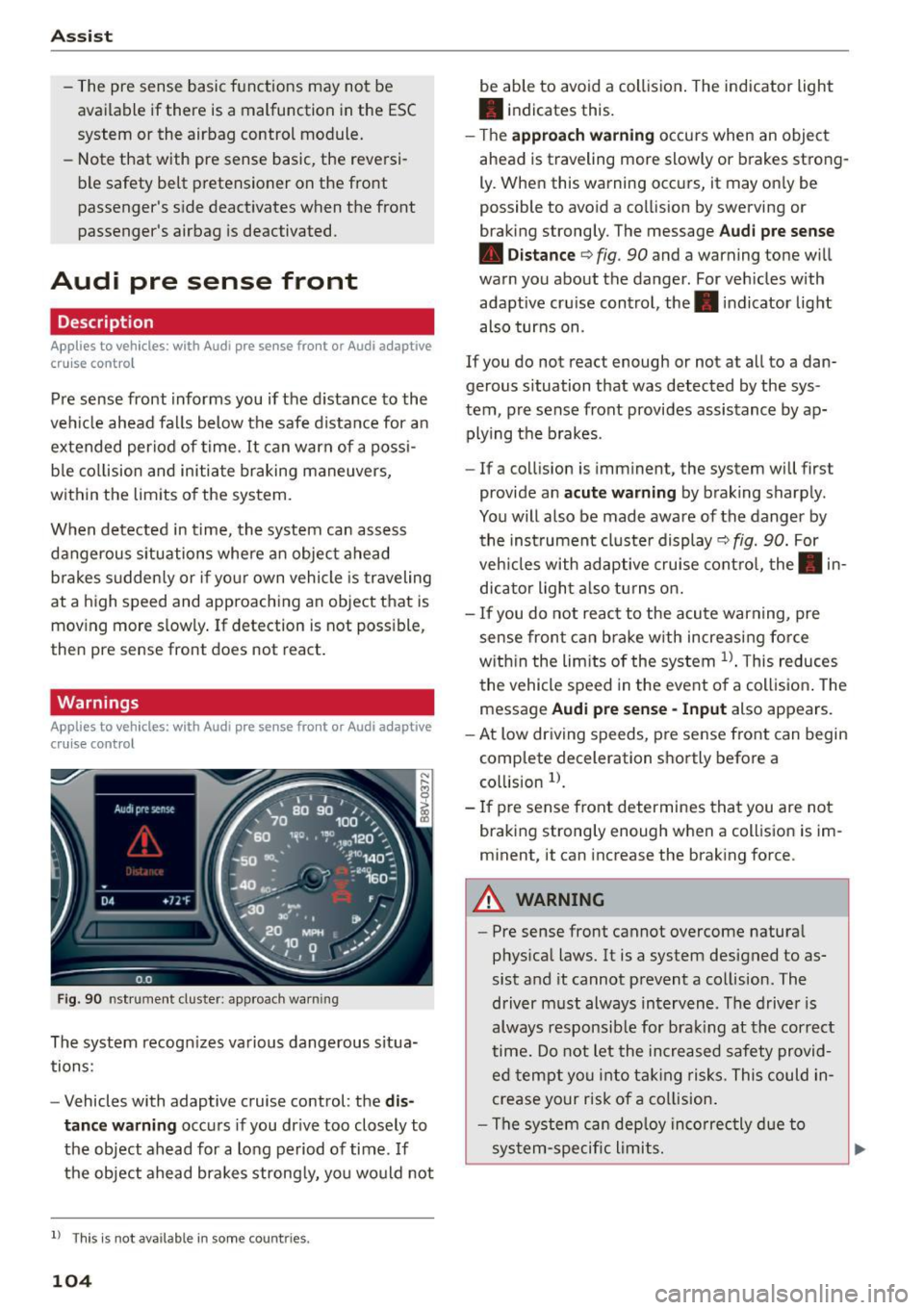
F ig . 90 nst rument clus te r: app roac h warn ing
The system recogn izes va rious dangerous situa
tions:
- Vehicles with adaptive cruise control: the
dis
tanc e warnin g
occurs if you dr ive too closely to
the object ahead for a long period of time .
If
the object ahead brakes strong ly, you would not
l l Thi s is no t ava ilab le i n so me c oun tries .
104
be able to avoid a collision . The indicator light
• indicates th is.
- T he
approach warn ing occurs when an object
ahead is traveling more slowly or brakes strong·
Ly. When this warning occ urs, it may on ly be
possible to avo id a collision by swerving o r
b raking strongly. The me ssage
Audi pre se nse
• Dis tance
q fig. 90 and a warning tone will
warn you about the danger . For veh icles with
adaptive cru ise control, the. indicator light
also turns on.
If you do no t reac t enough or no t at all to a dan
gerous situation that was detected by the sys
tem, p re sense front provides assistance by ap
plying the b rakes .
- If a collision is imm inen t, the system will first
provide a n
acu te warning by braking sharp ly .
You will also be made aware of the danger by the inst rument cluste r display
q fig. 90. For
veh icles with adaptive cru ise cont ro l, the . in
dic ator light a lso tu rns o n.
- If you do not reac t to the acu te warning, pre
sense front ca n brake w ith increasing force
w it hi n the lim its of the system
1> . T his reduces
the vehicle speed in the event o f a collis io n. The
message
Audi pre sense -Input also appears.
- At low driving speeds, pre sense front can begin
complete decelerat ion shortly before a
co llision
l).
- If p re sense front determines that you are not
braki ng strong ly enough when a coll is ion is im·
minent, it can increase the brak ing force .
A WARNING
-
-Pre sense front cannot overcome natura l
phys ica l laws. It is a system designed to as
sist and it cannot prevent a collision. The
driver m ust always intervene . The d river is
always responsib le for brak ing at the correct
time . Do not let the in crea sed safety provid
ed tempt you into ta king risks. This could in
crease your risk of a collision .
- The system can dep loy inco rrec tly d ue to
sys tem-specific l imits.
Page 108 of 282
Ass is t
- Switch the pre sense off when you are load
ing the vehicle onto a vehicle carrier, train,
sh ip or other type of transportation. Th is
can prevent undesired warnings from the pre sense system.
Driver messages
Applies to veh icles: w ith Audi p re se nse or Audi adaptive
cruise control
Audi pr e se nse cu rrently un ava ilable. No sens or
v is ion
This message appea rs if the sensor view is ob
s tructed, for example by leaves, snow, heavy
spray or dirt . Clean the sensor¢
page 97, fig. 81.
Audi pre sense : off
This message appears when the ESC is switched
to sport mode, for example¢
page 124.
Audi p re sen se: sys tem fault!
This message appears when the pre sense func
tion is affected. For example, this cou ld be
caused by a faulty sensor.
If the message stays on, d rive to an au thorized
Aud i dea ler or authorized Audi Service Faci lity to
have the malfunction corrected.
Audi active lane assist
Description
Applies to vehicles : with Audi active lane assist
Active lane ass ist detects lane marker lines with
in the limits of the system using a came ra in the
windshie ld. If you are app roach ing a detected
lane marker line and it appears like ly that you
will leave the lane, the system will warn you with
corrective steering . You can override this steering
at any time. If you pass over a line, the steering
wheel will v ibrate light ly. In order for this warn
ing vibrat ion to occur, it must first be switched
on in the MMI. Active lane assist is operable
when the lane marker line is detected on at least one side of the veh icle.
l) T hi s function is not ava ilable in all cou ntri es.
106
The system will not warn you befo re crossing a
l ane marker line if you have activated the turn
s ignal. In this case, it assumes that you are
changing lanes intentionally.
The system is des igned for driving on express
ways and highways and therefore on ly activates
at speeds above approx imately 40 mph (65 km/
h).
A WARNING
-
- The system warns the driver that the vehicle
is leaving the lane using corrective steering .
The driver is always responsible for keeping
the vehicle within the lane.
- The system can help you keep the vehicle in
the lane, but it does not drive by itself.
Al
ways keep you r hands on the steering
wheel.
- Corrective steer ing may not occur in certa in
situa tions, su ch as during heavy braking.
- There may be cases where the camera does
not recognize all lane ma rker lines. Correc
tive stee ring can only take p lace on the side
of the vehicle where lane marker line5 are
detec ted.
- Othe r road structures or obje cts cou ld possi
b ly be identified un intent ionally as lane
marker l ines . As a result, corrective steering
may be unexpected or may not occur .
- The camera view can be restricted, for ex
ample by vehicles driving ahead or by rain,
snow, heavy spray light shining into the
camera or by d irt on the window. This can
result in active lane ass ist not detecting the
lane marker lines or detecting them incor
rectly.
- In certain situat ions where visibility is low,
the vehicle may switch from "early" to "late"
corrective steering
l l.
- Under certain co nditions such as ruts in the
road, an inclined roadway or crosswinds, the
corrective steering a lone may not be enough
to keep the vehicle in the midd le of the lane.
~
Page 110 of 282
Assist Monochrome display
Refer to¢ fig. 93
® solid lines: active lane ass ist is switched
on and ready to provide warnings on the
side that is ind icated.
® blinking line (left or r ight): active lane as -
sist is warning you by a vibration in the
steering whee l that you are leaving the
lane.
® unfilled line(s): lane assist is activated,
but not ready to give warn ing
no lines: active lane assist is switched off .
Multicolored display
Refer to¢ fig. 94
® solid white lines: active lane assist is
switched on and ready to provide warn-
ings on the side that is indic ated.
® red line (left or rig ht): active lane assist is
warn ing you by a v ibration in the steer ing
wheel that you are leaving the lane .
® solid gray lines: lane assist is activated,
but not ready to give warning
no lines: active lane assist is switched off .
Messages in the instrument cluster display
If the active lane ass ist has a malfunction, the
ra, indicator light in the inst rument cluste r dis
play turns off and one of the following messages
appears:
Audi active lane assist: currently not available.
No camera view
This message appears if the camera is unab le to
detect the lines . Th is could happen if:
- The camera field of view ¢
page 107, fig. 92 is
dirty or cove red in ice . Clean this area on the
windshield.
- The came ra f ield of view is fogged over. Wait
u nt il the fog has cleared before switching the
active lane assist on again.
- The system has been unable to detect the lanes
for an extended period of time due to road con-
l) Thi s fun ctio n is not available in all cou ntri es.
108
ditions. Switch the active lane assist back on
when the lines are more visib le.
Audi active lane assist: Currently unavailable
There is a temporary active lane assist malfunc
tion . Try switching the active lane assist on again
l ate r.
Audi active lane assist: system fault!
Drive to an authorized A udi dealer or authorized
Audi Service Facility immed iate ly to have the
malfunction corrected.
ra, Audi active lane assist: Please continue
steering vehicle!
This message appears if you are not steering by
you rself. If this is the case, active lane assist does
not switch off, but it is "not ready" to provide a
warning. The system can he lp you keep the vehi
cle in the lane. However, you are responsible for
driving the veh icle and must steer it yourse lf.
Adjusting the steering time and vibration
warning
Applies to vehicles: with Audi active lane assist
You can adjust individual active lane assist set
tings in the MMI.
.,. Select: the I MENU I button> Car > Systems *
control button > Driver assistance > Audi active
lane assist .
Steering time
1>
Early: in this setting, the corrective steering hap
pens continuously to help keep the vehicle in the
center of the lane.
Late : in this setting, the system provides correc
tive steering just before a vehicle whee l touches a
detected lane marker line .
Vibration warning
You can switch the additional vibrating warning
i n the steer ing whee l on or off.
II>
Page 111 of 282
....,
N
0 > co
rl I.O
"'
"'
"'
rl
_& WARNING
With the vibration warning switched off, no
visible warning will appear in t he instrument
cluster dis play when crossing a lane ma rker.
(D Tips
Ma rket-specific: your settings are automati
cally stored and assigned to the remote con
trol key being used .
Audi side assist
Description
Applies to vehicles: with Audi side assist
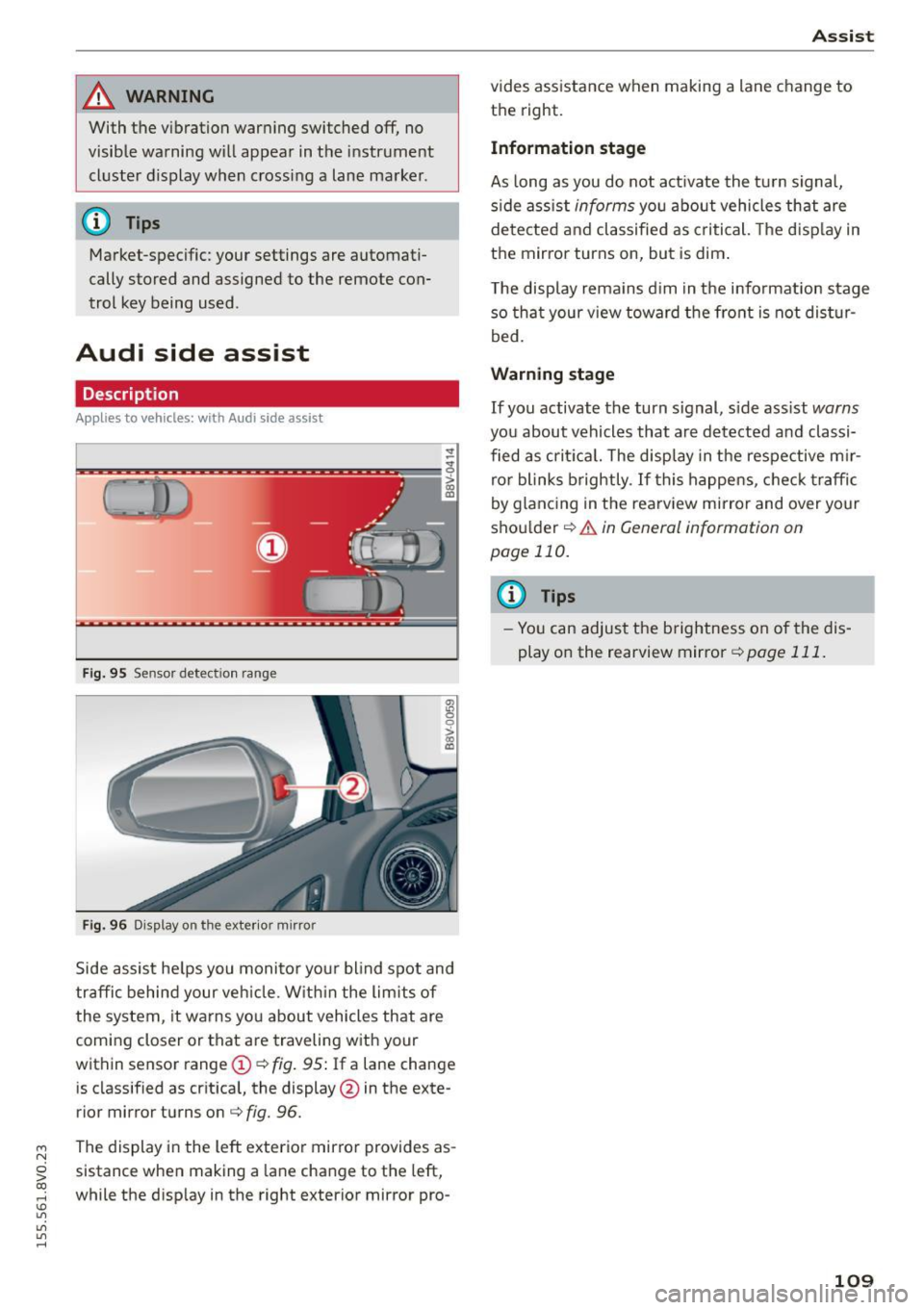
Fig . 9 5 Sensor detect io n range
Fig . 96 Display on the exterior mirror
fR 0
0
> CX)
traffic behind your ve hicle. W it hi n the limit s of
the system, it warns yo u about vehicles that are
coming closer or that are traveling with your
within sensor range
(D ¢ fig . 95: If a lane change
is classified as cr it ica l, the display @in the exte
rior mirror turns on
c:> fig. 96.
The display in the left exterior mirro r provides as
sistance when making a la ne change to the left,
while the d isp lay in the right exterior mirror pro-
A ssi st
vides assistance when making a lane change to
th e right.
Information stage
As long as you do not act ivate the tu rn signa l,
s ide ass ist
informs yo u about vehicles that are
de te cted a nd classified as criti cal. The d is pl ay in
the mirror turns on, but is dim .
T he display rema ins d im in the info rmation stage
so tha t your v iew toward the front is not dis tur
bed.
Warn ing stage
If you activate the turn s ignal, s ide ass ist warns
you about vehicles that are de tected and classi
fied as cri tica l. The display in the respective m ir
ro r blinks brightly . If this happe ns, che ck tr affi c
by glanc ing in the rearv iew mirror and over your
sho ulder
c:> .&. in General information on
page 110.
@ Tips
- Yo u can adjust the brightness on of the dis
play on the rearview mirror
c:> page 111 .
109