2015 AUDI Q3 parking brake
[x] Cancel search: parking brakePage 4 of 258

2 Table of contents Vehicle literature .. .. .. .. .. ... .
5
About this Owner's Manual . . . 6
Controls and equipment .. ... .
Ins truments and controls .. . .
General illus tration .... ... .. .. ... .
Instruments and warning /
indicator lights ........ .. .. .. . .
Ins truments . .. .. ..... ... .. .. ... .
War ning/ indi cator lights ... .. ... .. .
Driver information d isplay .. . .
Overview ... ... .. ..... ... .. .. ... .
Operation . .... .. ..... ... .. .. ... .
Trip computer . ........... .... ... .
Time and date display ..... .. .. .. . .
Odometer .. ........ ..... .. ..... .
Open doo r/hood/ rear lid warning .. . .
E fficiency p rogram ......... ... .. . .
S ervice in terval d isp lay .... .. .. ... .
On -Board D ia gnostic system ( OBD) . . . 8
8
8
1 0
1 0
11
2 0
20
2 1
22
23
23
23
24
2 5
26
Ele ctr onic spee d lim iter . . . . . . . . . . . . 2 7
Opening and closing .. .. .. .. . .
Powe r locking sy stem ..... .. .. .. . .
Rear lid ..... .. .. ..... ... .. .. ... .
C hil d safety locks . ..... ... .. .. ... .
Power win dows .. ..... ... .. .. ... .
Panorama s unroof ........ .. .. ... .
Clear vision .. .. ..... ... .. .. ... .
Lights . .. .. .. . .......... .. .. ... .
Inter ior lights ............. ... ... .
V 1s 1on . ...... ........... .... ... .
W iper and washer system . ... .. .. . .
Di gita l compass ........... ... .. . .
Seats and storage ...... ..... . .
Ge neral recomme ndat ions ..... .. . .
F ront sea ts .... .... ...... .. .. .. . .
H ead re straints .......... .. .. .. . .
Ashtr ay .. .. ............. ....... .
C igare tte lig hte r . ...... ... .. .. ... .
1 2- vo lt sockets . .. ..... ... .. .. ... .
Sto rage ..... .. .. ..... ... .. .. ... . 28
2
8
3 4
3 6
37
38
4 0
40
43
44
46
4 8
so
so
51
5 2
53
53
5 4
54
Descr ipt ion and mo unt ing locations . . 57 L
oad ing the roof rack . .. ..... .... . .
Luggage compartment . ..... ... .. .
Warm and cold .. ... ..... ... .. .
Climate control . .... .. ..... .... . .
On the road ... .. ... ..... ... .. .
Stee ring . ..... .. .. .... .... ... .. .
Ig nit ion lock ..... ... .. ..... .... . .
Convenience key .. ... .......... .. .
D river messages .. ............... .
E lectromechanical parking brake . .. .
Speed warning system . .......... . .
Cru ise cont ro l .. .. ............... .
Audi side assist .............. .
Lane change ass istant . .......... . .
Audi dr ive select ... ... ..... .. .
Driving set tings .. ..... ......... . .
Automatic transmission ... .. .
tiptron ic .. .. .. .. .. ... .. ... ..... .
Parking systems
58
59
63
63
66
66
66
68
70
70
73
73
75
75
79
79
81
81
87
Genera l information . . . . . . . . . . . . . . 87
Rea r parking syste m . . . . . . . . . . . . . . 88
P a rking system plus . . . . . . . . . . . . . . . 88
Rea r view came ra . . . . . . . . . . . . . . . . . 89
Adjus ting the display and the w arning
tones ... .. .... .. .. ... ..... ... .. . 93
E rror messages . . . . . . . . . . . . . . . . . . 93
T ra ile r hitch . . . . . . . . . . . . . . . . . . . . . 93
Safety fir st . . . . . . . . . . . . . . . . . . . . 94
Driving Safely . . . . . . . . . . . . . . . . . 94
Genera l notes . . . . . . . . . . . . . . . . . . . . 94
Proper occ upant seating positions . . . 95
Pedal area . . . . . . . . . . . . . . . . . . . . . . . 99
Stow ing luggage . . . . . . . . . . . . . . . . . 100
Reporting Sa fety Defects . . . . . . . . . . . 101
Safety belts . . . . . . . . . . . . . . . . . . . 104
General notes . . . . . . . . . . . . . . . . . . . . 104
Why safety belts? . . . . . . . . . . . . . . . . 105
Safe ty be lts . . . . . . . . . . . . . . . . . . . . . 107
Sa fe ty be lt pretensioners . . . . . . . . . . 110
Page 11 of 258

(!) Door handle
@ Power locking sw it ch . .. .. .. .
@ LED fo r centra l loc king/a nti-
theft a larm system . .... .. .. .
@ Side assist button .. .... .. .. .
® Side assist warn ing lamp .. .. .
@ Light switch . ... .... ... .. .. .
(J) A ir outlets with thumbwheel
@ Turn signa l and high beam . .. .
® M ultifunction steering wheel
with:
- Horn
- Driver's airbag
- Driver information system but-
tons . .. ... ....... ... .. .. .
- Audio/video, telephone, navi gation and vo ice recognition
buttons
- Programmable steering wheel
button . .. ........... .. .. .
- Shift padd les ........ .. .. .
@ Instrument cluste r ...... ... .
@ Switches for windshie ld wiper/
washer . ..... ...... ... .. .. .
@ I STAR T ENGINE STOP ! button
@ Parking brake ......... .... .
~ Starting the eng ine if there is a
malfunction, or ignit ion lock . . 32
28
75
75
40
41
1 16
20
22
84
10
46
68
70
69
@ Steer ing whee l adjustment . . . 66
@ Lever for cruise control system 73
@ Data L ink Connector for On
Board Diagnostics (OBD II) . . . . 26
@ Ins trument i llum ination . . . . . . 44
@ Eng ine hood release . . . . . . . . . 179
@ Rear lid sw itch . . . . . . . . . . . . . . 34
@ Power exterior mir ro r adjust-
ment . . . . . . . . . . . . . . . . . . . . . 44
@ Power wi ndow switches . . . . . . 37
@ Child safety lock bu ttons . . . . . 3 7
@ Button/Indicator light for:
~ - E mergency flas he rs . . . . . . . . 43
~ -PASSENGER AIRBAG OFF 0
~ @ Info tainmen t disp lay (not folda -,....,
~ ble)
5 @ Glove compartment . . . . . . . . . S5
Instrument s and control s 9
@ Front Passenger's airbag .. ...
@ MMI controls
@) Buttons/Indicator lights fo r:
- Drive se lect ..... .. .. ..... .
- Parking system p lus (with
rearview camera) ... .... .. .
- Elect ron ic Stabilization Con-
trol (ESC) ..... . .. .. ..... .
- P arking system ........... .
- Hi ll descent ass ist ........ .
@ Climate controls .. ... ...... .
@ Selector lever ........ ..... .
@ Cen ter console w ith:
- (upholder . .. ............ .
- Cigarette lighter . ... .... .. .
- 12 -volt -socket
(D Tips 116
79
88
155
87
155 64
81
S5
53
54
Some of the equipment or features show n
i n the general i llus tration may be standa rd
equipment on yo ur vehicle or may be op
tiona l equipment depend ing on your mod
e l. Always ask your authorized Audi dea ler
if you have a quest ion about your vehicle.
Page 14 of 258

12 Instruments and warning/indicator lights
compartment, stop the engine and let it
cool down. Always exercise extreme cau
tion when work ing under the hood
c::> page 179.
Overview
Some ind icator lights turn on briefly to check
the function of that system when you switch
the ign ition on. These systems are ma rked
with a ../ in the following tables. If one of
these indicator lights does not turn on, there
is a malfunction in that system.
Red indicator lights
USA models:
Brake system ../
c::>page 13
Canada models:
Brake system ../
c::>page 13
USA models:
Electromechanical parking brake
c::>page 14
Canada models:
Electromechanical parking brake
c::>page 14
Safety belts
c::>page 16
Engine cooling system
c::>page 14
Engine oil pressure
c::>page 15
Battery
c::>page 15
Electromechanical Steering../
¢ page 158
Steering column lock
¢page 16
Yellow indicator lights
Electronic Stabilization Control
(ESC) ../
¢page 16
TPMS
Electronic Stabilization Control
(ESC) ../
¢page 16
USA models:
Anti-lock braking system (ABS) de
fective../
¢page 16
Canada models:
Anti-lock braking system (ABS) de
fective../
c::> page 16
Safety systems ../
c::> page 16
Worn brake pads
c::> page 17
Electromechanical park ing brake
¢ page 14
Tire pressure monitoring
system../
¢page 213
Tire pressure monitoring system
¢page 213
Elect ronic power control../
c::> page 17
• M
alfunct ion ind icator Lamp (MIL)../ ¢page 17
Engine speed limitat ion
c::> page 17
- Engine oil level
- c::>pagel7
• ·
-. Engine oil level _
1 c::> page 17
• Engine oil sensor c::> page 18
Battery
c::> page 15
-
Tank system
... c::> page 18
• Windshield
washer fluid level c::> page 18
- Ignition lock
IYiiil c::> page 18
Page 15 of 258
M N
M N
0 ::i co ,...., \!) 1.1'1 ,...., 1.1'1 ,....,
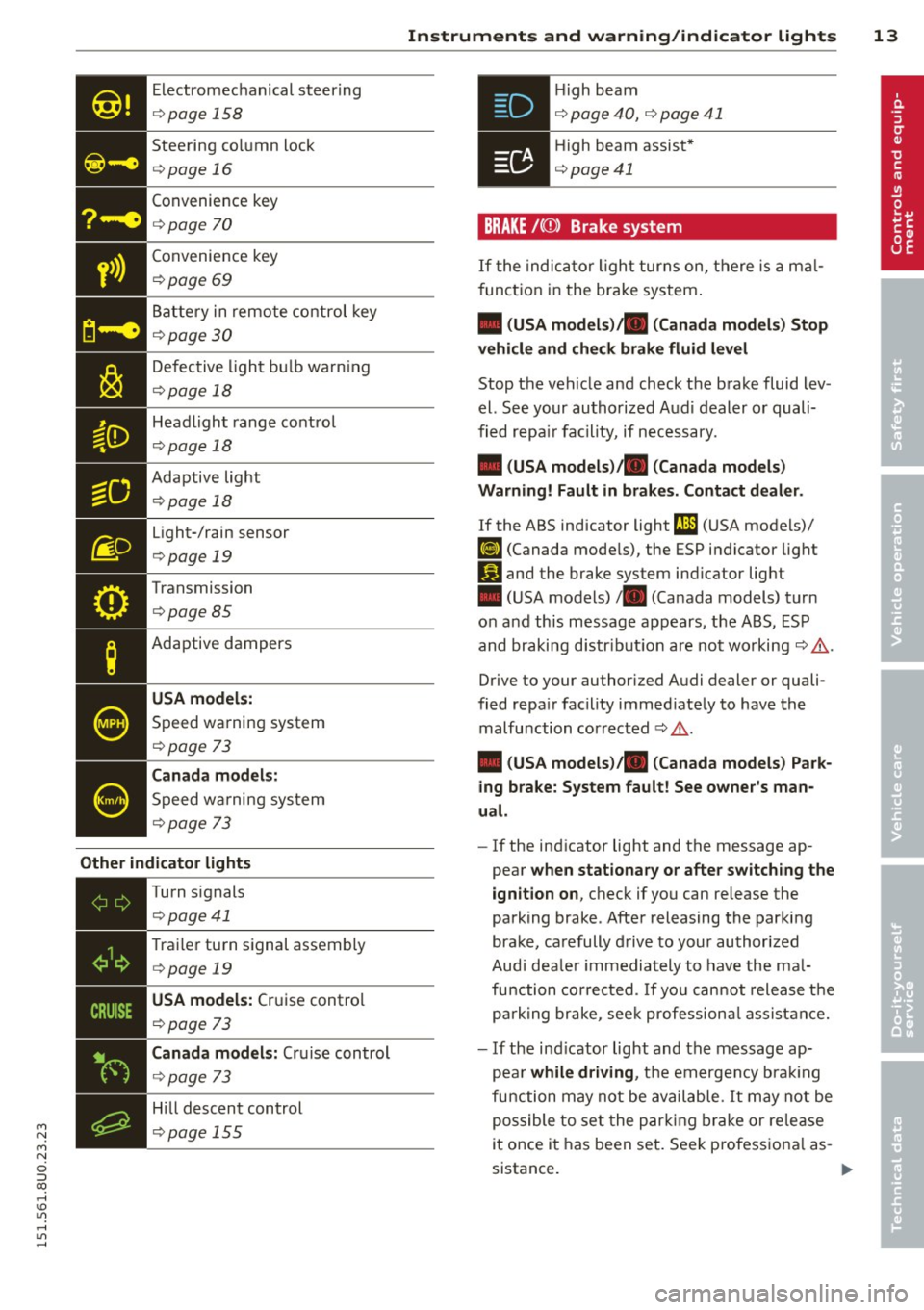
Electromechanical steering
¢page 158
Steering column lock
¢page 16
Convenience key
¢page 70
• Convenience
key ¢page 69
Battery in remote control key
¢ page 30
Defective light bulb warn ing
¢ page 18
Headlight range control
¢page 18
- Adaptive light
- ¢page18
Light-/rain sensor
¢ page 19
Transmission
¢page 85
Adaptive dampers
USA models:
Speed warning system
¢page 73
Canada models:
Speed wa rning system
¢page 73
Other indicator lights
•iii
Turn
signals
¢ page41
• T
rai ler turn signal assembly ¢ page 19
• USA models:
Cruise control
¢
page 73
Canada models: Cruise control
¢page 73
Hill descent control
¢page 155
Instruments and warning/indicator lights 13
.Hi gh beam
• ¢ page 40, ¢ page 41
• High beam assist*
¢page41
BRAKE /((D ) Brake system
If the indicator light turns on, there is a mal
function in the brake system.
• (USA models)/ . (Canada models) Stop
vehicle and check brake fluid level
Stop the veh icle and check the brake fluid lev
el. See your authorized Aud i dealer or quali
fied repa ir facility, if necessary.
• (USA models)/ . (Canada models)
Warning! Fault in brakes. Contact dealer .
If the ABS indicator light t1l1 (USA models)/
fiJ (Canada models), the ESP indicator light
Iii and the brake system ind icator light
• (USA models)/ . (Canada models) turn
on and this message appears, t he ABS, ESP
and braking distr ibution are not working¢&.
Drive to your authorized Audi dealer or quali
fied repa ir facility immed iately to have the
malfunction corrected ¢ & .
• (USA models)/ . (Canada models) Park
ing brake: System fault! See owner's man
ual.
- If the indicator light and the message ap
pear
when stationary or after switching the
ignition on,
check if you can release the
park ing brake . After releasing the parking
brake, carefully drive to your author ized
Audi dea le r im mediately to have the mal
function corrected. If you can not release the
park ing brake , seek professional assistance.
- If the ind icator light and the message ap
pea r
while driving , the emergency brak ing
function may not be available. It may not be
possible to set the parking brake or release
it once it has been set. Seek pro fessiona l as-
sistance. .,.
Page 16 of 258
![AUDI Q3 2015 Owners Manual 14 Instrum ent s and w arn ing /indic ato r light s
(USA models): If the warning light . and the
warning light
ll] appear together, immedi
ately contact your authorized Audi deale](/manual-img/6/57629/w960_57629-15.png "AUDI Q3 2015 Owners Manual 14 Instrum ent s and w arn ing /indic ato r light s
(USA models): If the warning light . and the
warning light
ll] appear together, immedi
ately contact your authorized Audi deale")
14 Instrum ent s and w arn ing /indic ato r light s
(USA models): If the warning light . and the
warning light
ll] appear together, immedi
ately contact your authorized Audi dealer or
qua lified workshop to have all brake pads in
spected
¢ page 17.
When the light comes on, an audib le warning
signal is also given .
.&_ WARNING
- Always observe the warnings in
¢ page 179, before opening the hood
and checking the brake fluid.
- Driv ing with low brake fluid is a safety
hazard. Stop the car and get professional
assistance.
- If the . (USA models) . (Canada
models) brake system indicator light
turns on together with the ABS and ESC
indicator lights, the ABS/ESC regu lating
function may have failed. Functions that
stabilize the vehicle are no longer availa
ble. Th is could cause the vehicle to
swerve and increase the risk of sliding .
Drive carefully to the nearest a uthorized
Audi dealer or other qualified workshop
and have the malfunction corrected.
- If the brake warning/indicator light does
not go out after a few seconds and the
park ing brake is released, or lights up
wh ile you are driving, the fluid level in
the brake fluid reservoir is too low .
If you
believe that it is safe to do so, proceed
immediately at low speed to the nearest
authori zed Audi dealer o r qualified wo rk
shop and have the bra ke system inspect
ed.
- Always keep in m ind that after several
brake applicat ions, yo u will need greater
pressure on the brake peda l to stop your
vehicle. Do not re ly on strained brakes to
respond with maxim um stopping power
in critical situations. You must allow for
increased brak ing distances. The extra
distance used up by fad ing brakes could
lead to an acc ident.
PARK !<®> Electromechanical parking brake
The warning/indicator light monitors the
electromechanical parking brake .
If the indicator light. (USA models) •
(Canada models) turns on, the parking brake
was set.
• (USA model s)/. (Canada models ) Press
brake pedal to release parking b ra ke.
To re lease the park ing brake, press the brake
peda l and press the button(®) at the same
t ime or start driving with starting assist
¢ page 71, Starting from rest.
Ill Pa rking br ake : S ys tem f ault! See owne r's
manual.
If the I.II ind ic a tor light tu rns o n and this
message appears, there is a parking b rake
malfunction. Drive to your authorized A udi
dealer or qualified workshop immediately to
have the malfunct ion corrected.
@ Tips
More informat ion on the parking brake
¢page 70 .
-L Engine cooling system
A malfunction in the engine cooling system
must be repaired as soon as possible.
• Turn off engine and ch eck coolant level
T he coolant level is too low .
Do not continue dr iving and turn
off the en
gine. Check the coo lant level
¢ page 186.
-If the coo lant level is too low, add coo lant
¢ page 186. Only continue driving if the in
dicator light turns off.
- If the coo lant level is correct, then the ma l
function may be ca used by fa ilure of the
coolant fan. Do not continue driving. See
your authorized Audi dealer or qualified re pa ir fac ility .
• Coolant temperature! Let engine run
w ith vehicle stationar y.
Page 72 of 258

70 On the road
@ Tips
You ca n call up the dr iver message aga in
by pressi ng the
!ST ART ENGINE STOPI but
ton.
Driver messages
Turn off ignition. Battery discha rging
T his message appears and a war ning tone
sounds if yo u open the dr iver's door when the
ignit io n is switched on.
Press brakepedal to start engine .
This message appears if you do not press t he
b rake pedal to start the engine in a vehicle
with a n automatic t ransmission .
Please engage N or P .
This message appears if you try to start or
switch off the eng ine when the selector lever
is not i n Nor P. The eng ine can then not be
started or sw itched off.
fll Is key in the vehicle?
If t h e in dicator lamp lights up and the mes
sage appears, the convenience key* was re
moved from the vehicle while the e ngine was
runni ng .
If the convenience key is not in the
ve hicle you will not be able to switch on the
ignit io n or restart the engine after it has been
switched off . You w ill also not be ab le to l ock
the veh icle from the outside .
Shift to P, vehicle can roll away . Doors can
only be locked in P.
F or safety reasons , this messa ge will ap pear
together with a wa rning tone if t he se lector
l eve r is not in position P when you switch off
the ign ition. Put the selector lever in posi
tion P; otherw ise the vehicle can roll away and
cannot be locked .
II No key identified. See owner's manual.
If the indi cator lamp lights up and the mes
sage ap pears, a malfunct ion has occ urred
c:::> poge 69.
Electromechanical
parking brake
Operation
The ele ctrome chani cal parking brake replace s
t he hand broke.
Fi g. 77 Center co nsole: pa rk in g b rake
.,. Pull the(®) switch@ c:::> fig. 77 to app ly the
parking brake. The indicator lights . in the
sw itch and . (USA models)/ . (Canada
models) in the instrument cluster illumi
nate.
.,. To releas e th e pa rking bra ke, pr ess the bra ke
or ac celera to r peda l with t he igni tion
sw itche d on and simu ltaneously p ress the
sw itch (®) . Th e in d ic ator lig hts . in the
sw itch and . (USA models)/ . (Canada
mo dels) in the instr ument cluster go out.
Your ve hicle is equipped wi th a n ele ctro me
ch anical parking brake. The parkin g bra ke is
designe d to prevent the ve hicle from rolling
u nintentionally and replaces the hand b rake.
In ad diti on to the normal fu nctions o f a tra d i
tio na l han d brake, the e lectromechanical
parking brake provi des vario us convenience
and safety f unct ions .
When starting from rest
- The integral s tart ing as sist help s you when
d riving by au toma tically re leasi ng the pa rk
ing brake
c:::> poge 71, S tarting from res t.
- W he n star ting o n incl ines, t he s tar tin g as
sis t p reven ts the vehicle from uni nte ntion al
ly ro lling back . The braking force of the
parking brake is not re leased unt il suffic ient
driving force has been bui lt up at the
wheels .
Page 73 of 258

M N
M N
0 ::i co ,...., \!) ..,.,
,...., ..,., ,....,
Emergency brake function
An emergency brake ensures that the vehicle
can be slowed down even if the
normal brakes
fail c::>
page 72, Emergency broking.
& WARNING
If a drive range is engaged with the vehicle
stat ionary and the engine running, you
must in no instance accelerate care lessly.
Otherw ise the vehicle will start to move
immediately -risk of an accident.
(D Tips
- If the parking brake is applied with the
i gnition switched off, the indicator lights
• in the switch and. (USA models) /
• (Canada models) in the instrument
cluster w ill go out after a certa in period
of time.
- Occasional noises when the park ing
brake is applied and re leased a re norma l
and are not a ca use for concern.
- When the vehicle is parked, the parking
brake goes through a se lf-test cycle at
regular intervals. Any assoc iated noises
are norma l.
Parking
~ Press the brake peda l to stop the vehicle.
~ Pull the switch@c::> page 70, fig . 77 to set
the parking brake.
~ Move the selector lever to P.
~ Turn the engine off c::> _&.
~ When on incl ines or declines, turn the steer
ing wheel so that the vehicle w ill roll i nto
the curb if it begi ns to move.
& WARNING
- When you leave your veh icle - even if on
ly b riefly- a lways remove the ign ition
key . This applies particularly when chil
dren remain in t he vehicle . Otherwise the
children co uld start the engine, release
the parking brake or operate electrical
equipment (e.g. power windows). There is the r isk of an accident .
On th e ro ad 71
-When the veh icle is locked, no one - par
ticularly not children should rema in in
the vehicle. Locked doors make it more
difficult for emergency wo rkers to get in
to the vehicle - putting lives at risk .
Starting from rest
The starting assist function ensures that the
parking broke is released automatically upon starting.
Stopping and applying park ing brak e
~ Pull the sw itch C®l to apply the pa rking
brake.
Starting and automatically releasing the parking brake
~ When you start to drive as usual, the park
ing brake is a utomatically released and your
veh icle begins to move.
When stopping at a traffic signal or stopping in city traff ic on vehicles with an automatic
transmission, the parking brake can be ap
plied. The vehicle does not have to be held
with the footbrake. The parking brake elimi
nates the tende ncy to creep w ith a dr ive range
engaged. As soon as you d rive off as usual,
t he pa rking bra ke is re leased automatically
and the veh icle s tarts to move.
St arting on slopes
When starting on inclines, the starting assist
prevents the vehicle from un intent io nally roll
ing back. The braking force of the parking
brake is no t re leased unt il su ff ic ient d riving
force has been built up a t the wheels.
(D Tips
Fo r safety reasons, the parking bra ke is re
l eased automatically o nly when the d riv
e r's safety belt is eng aged in the buckle.
Page 74 of 258

72 On the road
Starting off with a trailer
To prevent rolling back unintentionally on an
incline, do the follow ing:
.. Keep the switch@¢ page 70, fig. 77 pulled
and depress the accele rator. The park ing
brake stays applied and prevents the vehicle
from roll ing bac kward.
"' You can release the switch @ once you are
sure that you a re develop ing enough dr iv ing
f orce at the wheels by dep ress ing the accel
erator.
Depending on the weight of the r ig (veh icle
and tra iler) and the seve rity of the in cli ne, you
may roll backwards as you start . You can pre
vent rolling backwards by holding the parking
brake switch @ pulled out and accelerating -
just as you would when starting on a hill with a conventional hand brake.
Hill hold
Hill hold makes it easier to start on hills.
Requirement : The driver door must be closed
and the engine must be r unning .
The system is act ivated when the brake pedal
i s pressed wh ile the veh icle is sta tionary .
To prevent the vehicle from rolling back when
start ing , the brake power is held for a br ief
moment after re leas ing the b rake peda l. Dur
i ng th is t ime, yo u can easily begin to move
your ve hicle.
A WARNING
- The inte lligent technology of Hill Hold
cannot overcome the lim itations im
posed by natural phys ica l laws. The in
creased comfort offered by Hill Hold
should not cause you to take safety risks.
- Hi ll Hold cannot hold the veh icle in all
hill start situations (for examp le, if the
ground is slippery or icy).
- If you do not begin moving immediately
after releasing the brake pedal, the veh i
cle could begin to roll backward under
certai n circumstances . Press the b rake
-
pedal or set the parking brake immedi
ately .
- If the engine "stalls", press the brake
pedal or set the parking brake immedi
ately .
- Starting on inclines in stop-and-go traf
f ic: To help prevent the vehicle from roll
ing back when start ing, press and ho ld
the brake pedal for several seconds when
the vehicle is stationary.
Emergency braking
In the event tha t the conventional brake sys
tem fails or locks .
.. In an emergency, pu ll the switch @
¢
page 70, fig. 77 and continue to pull it to
slow your vehicle down with the parking
brake .
.. As soon as you release the switch @ or ac-
celerate, the b rak ing process stops.
If you pull the switch @ and hold it above a
speed of about S mph (8 km/h), the emergen
cy brak ing funct io n is initiated . T he veh icle is
braked at all fou r whee ls by activating the hy
draulic b rake system. The brake pe rfo rmance
is sim ila r to m akin g an emergency stop ¢_&. .
In order not to act ivate the eme rgency brak
ing by mistake, an audib le warning tone (buz
zer) sounds whe n the switch @ is pulled. As
soon as t he sw itch @ is re leased, or the acce l
erator pedal is depressed, eme rgency braking
stops.
A WARNING
=
Emergency braking should only be used in
an emergency, when the norma l foot bra ke
has fa iled or the brake pedal is obstructed.
Using the park ing brake to perform emer
gency braking will s low your veh icle down
as if you had made a full brake application .
The laws of phys ics cannot be suspended
even with ESC and i ts associa ted compo
nents (ABS, ASR, EDS). In corners and
when road or weathe r cond itions are bad
,
a full brake application can ca use the