2015 AUDI A7 wheel
[x] Cancel search: wheelPage 55 of 316

M N <( (.J
'SI: ,...., \!) 1.1'1 ,...., 1.1'1 ,....,
Seats and storage
General recommen
dations
Why is your seat adjustment so important?
The safety belts and the airbag system can
only provide maximum protection if the front
seats are correctly adjusted.
There are various ways of adjusting the front
seats to provide safe and comfortable support
for the driver and the front passenger. Adjust
your seat properly so that :
- you can easily and quick ly reach all the
switches and controls in the instrument
panel
- your body is properly supported thus reduc ing physical stress and fatigue
- the safety belts and airbag system can offe r
maximum protection ¢
page 147.
In the following sections, you will see exactly
how you can best adjust your seats .
There are special regulations and instructions
for installing a child seat on the front pas
senger's seat. Always fo llow the information
regarding chi ld safety provided in
¢ page 173, Child Safety .
A WARNING
Incorrect seating position of the driver and
all other passengers can result in serious
personal injury.
- Always keep your feet on the f loor when
the vehicle is in motion -never put your
feet on top of the instrument panel, out
of the window or on top of the seat cush
ion. Th is applies especially to the passen
gers . If your seating position is incorrect,
you increase the r isk of injury in the case
of sudden braking or an acc ident. If the
airbag inflates and the seating position
is incorrect, this could result in persona l
injury or even death.
- It is important for both the driver and
front passenger to keep a distance of a t
Seat s an d sto rage 53
least 10 inches (25 cm) between them
selves and the steering wheel and/or in
strument panel. If you're s itting any
closer than th is, the airbag system can
not protect you properly. In addition, the
front seats and head restraints must be
adjusted to your body height so that they
can give you maximum protect ion.
- Always try to keep as much distance as
possible between yourself and the s teer
ing wheel o r instrument pane l.
- Do not adjust the driver's or front pas
senger's seat whi le the vehicle is moving.
Your sea t may move unexpected ly, caus
ing sudden loss of vehicle cont rol and
personal injury . If you adjust yo ur seat
while the veh icle is moving, yo u are out
of posit ion.
Driver's seat
The correct seat position is important for safe
and relaxed driving.
We recommend that you adjus t the dr iver's
seat in the fo llowing manner:
.,. Adjust the seat in fore and aft direction so
that you can easily push the peda ls to the
floor wh ile keeping your knees s lightly bent
i:::> A in Why is your seat adjustment so im
portant? on page 53.
.,. Adjust the backrest so that when you sit
w ith your back against the backrest, you can
still grasp the top of the steering wheel.
.,. For adjustable head restra ints: adjust the
head restra int so the upper edge is as even
as poss ible with the top of your head . If that
is not poss ible, try to adjust the head re
straint so that it is as close to this position
as possible ¢
page 56. Move the head re
straint so that it is as close to the back of
the head as possib le .
A WARNING
-Never place any objects in the dr iver's foot-
well. An object could get into the pedal
area and interfere with pedal funct ion . In
~
Page 60 of 316

58 Seats and storage
The follow ing settings are stored:
Remote Memory button
control
master key
Driver Driver Front passen-ger
Seat X X X
Steering X X
wheel*
Both exterior
X X
rearview mir -
rors*
Remote control key
Ap plies to vehicles: with memory function
To assign the driver's seat settings to the re
mote control key when locking the vehicle, the
function must be switched on.
> Select: I CARI funct ion button> (Car)* sys
tems
control button > Vehicle settings >
Seats > Driver seat > Remote control key >
On.
I@ Tips
If you do not want another driver's set
tings to be assigned to the remote control
key, switch off the memory function using
the MMI or the
I OFF I button c:::> page 58.
Memory buttons
Applies to vehicles: with memo ry function
Fig. 54 Driver's doo r: memory function buttons
The memory buttons are located in the driv
er's/front passenger's* door .
Switching the memory function on/off
> Press the IOF FI button to switch the memory
fu nction on/off. The LED in the button illu
m inat es when the memory function is
switched off . Seating profiles are neither
stored nor recalled.
Storing a seating profile
> Press the ISET I button . When the word SET
lights up, the memory is ready to store set
tings.
> Press a memory button briefly. A tone con
firms that the settings were stored .
Accessing a seating profile
> If the driver's door is open and the ignition
is swi tched off, press the memory button.
> If the driver's door is closed or the ignition is
switched on, press and ho ld the memory
button until the seat adjustment is com
plete.
A WARNING
- For safety reasons, the seat setting
should only be recalled when the vehicle
is stationary- otherw ise you risk having
an accident .
- If necessary, you stop the process by
press ing the
I OF FI button or any of the
memory buttons.
· Adjusting the front passenger seat in
the MMI
Applies to vehicles: wit h memo ry fu nct io n
The driver can adjust the position of the front
passenger seat.
Adjusting the front passenger seat from
the driver's side
> Select: I CAR I function button > (Car)* sys
tem s
control button > Vehicle settings >
Seats > Front passenger seat > Adjust seat
position. .,..
Page 73 of 316

M N <( (.J
'SI: ,...., \!) 1.1'1 ,...., 1.1'1 ,....,
l
ed or cleared of condensation as quickly as
possib le. The maximum amount of air flows
mainly from the vents be low the windshield.
Recirculation mode switches off. The tempera
ture should be set to approximately 72 °F (22
°() .
The IAUTOI button switches the defroster off.
IQil REAR I Switching rear window heater
on/off
The rear window heater only operates when
the engine is running.
It switches off auto
matica lly after a few minutes, depending on
the outside temperature.
To prevent the rear window heater from
switch ing off automatica lly, press and hold
the
!llill REARI button for more than 2 seconds.
This remains stored until the ignition is
sw itched off.
QJ Adjusting seat heating
Pressing the button switches the seat heating
on at the highest setting ( leve l 3) . The LEDs
indicate the temperature level. To reduce the
temperature, press the button again. To
switch the seat heating off, press the button repeatedly until the LE D turns off .
After 10 minutes, the seat heating automati
cally switches from leve l 3 to level 2.
The seat heating for both outer rear seats * is
adj usted using the buttons in the center con
sole.
Warm and cold 71
Air vents
You can open or close the center and outer
vents in the cockpit and the vents in the rear
center console using the ridged thumbwheels.
The levers adjust the direction of the airflow
from the vents.
T he air temperature in the rear can be adjust
ed so that it is warmer or co lder by turning
the knob to the red or blue area.
A WARNING
- Do not use the recirc ulation for extended
periods of time. The windows could fog
up since no fresh a ir can enter the vehi
cle. If the windows fog up, press the air
recirc ulat ion button again immed iately
to switch off the air recirculation func
tion or select defrost.
- Individuals with reduced sensitivity to
pa in or temperature could develop burns
when using the seat heating function . To
red uce the risk of injury, these individu
a ls shou ld not use seat heating.
(D Note
To avoid damage to the heating elements
in the seats, do not kneel on the seats or
place heavy loads on a small area of the
seat.
Page 75 of 316

M N <( (.J
'SI: ,...., \!) 1.1'1 ,...., 1.1'1 ,....,
IAUTO I Switching automatic mode on
Automatic mode maintains a constant tem
perature inside the vehicle. Air temperature,
airflow and air distribution are controlled au
tomatically.
Adjusting the temperature
Temperatu res between 60 °F (+16 °C) and
84 °F ( +28 °C) can be set. O uts ide of this
range,
lo or hi wi ll appear in the climate con
trol system disp lay. At both of these settings,
the climate control system runs continuously
at maximum cooling or heating power. There
is no temperature regu lation.
~ Adjusting the airflow
You can adjust the airf low manually to suit
your needs . To have the airf low regulated au
tomatically, press the
I AUTO j button.
li!J Adjusting the air distribution
You can manually se lect the vents where the
air will flow. To have the air distribution regu
lated automatically, press the
IAUTOI button .
~I~ * Adjusting seat heating/
ventilation*
Pressing the button switches the seat heat
ing/ventilation on at the highest setting ( level
3). The LEDs indicate the heating/ventilation
level. To reduce the heating/venti lation, press
the button again. To switch the seat heating/
ventilation off, press the button repeatedly
until the LED turns off.
After 10 minutes, the seat heating automati
cally switches from level 3 to level 2.
l
ed or cleared of condensation as quickly as
possible. The maximum amount of air flows
mainly from the vents below the windshield.
Recircula tion mode switches off. The tempera
ture should be set to approximately 72 °F (22
°() .
The IAUTO I button switches the defroster off.
Warm and cold 73
liiii REAR! Switching rear window heater
on/off
The rear window heater only operates when
the engine is running. It switches off auto matically after 10 to 20 minutes, depending
o n the outside temperature.
To prevent the rear window heater from
switching off automatically, press and ho ld
the
l liiil REARI button for more than 2 seconds.
This remains stored until the ign ition is
switched off .
I SYNC I Synchronization*
When synchronization is switched on, the
same settings are applied to both the driver
and front passenger, except for the seat heat
ing/ventilation*. The rear zone is also
synchronized. Synchronization switches off
when the settings for the front passenger s ide
o r rear are adjusted.
You can also switch synchronization on by pressing and holding a dial. For example, if
you press and hold the dial on the front pas
senger side, the settings for that s ide are
transferred to the driver side. The same ap
plies to the rear.
Air vents
You can open or close the center and outer
vents in the cockpit and the vents in the rear
cente r console and door pillars using the
ridged thumbwheels. The levers adjust the di
rection of the airflow from the vents.
&_ WARNING
-=
-Do not use the recirc ulation for extended
periods of time . The windows could fog
up since no fresh air can enter the vehi
cle. If the windows fog up, press the air recirculation butto n aga in immediately
to switch off the air recirculation func
tion or se lect defrost.
- Individuals w ith reduced sensitivity to
pa in or temperature could deve lop burns
when using the seat heating function . To
red uce the risk of injur y, these individu-
als should not use seat heating . ..,.
Page 76 of 316

7 4 Warm and cold
(D Note
To avoid damage to the heating e lements
in the seats, do not kneel on the seats or
place heavy loads on a small area of the
seat .
Setup
Applies to vehicles: with four-zone a utomat ic clima te con·
tro l
The climate control system setup is accessed
through the MMI .
.,. Se lect : I CAR I func tion button> (Car )* sys·
terns con trol but ton > A /C.
Rear cabin settings*
When th is fu nction is selected, all sett ings for
the rear can be adjusted through the climate
control sys tem in the cockpit. The cl imate
con trol sy stem se ttings cannot be adjusted in
the rea r seat a t the same time. This func tion
switches o ff after a certain period of time or
when one of the dia ls in the cockp it is press
ed .
Auto recirculation*
The sensit ivity level of the au tomatic rec ircu
lation mode can be set at v ario us leve ls from
off to sensit ive. The recirculation mode is con
trolled a utomat ica lly. You must p ress the
I@ FRONT I button if fog forms on the win
dows.
Footwell temperature
You can ad just the footwe ll temperat ure so
that it is cooler or wa rmer.
Supplementary heater*
The supplementa ry heater warms the interio r
of vehicle s with diesel engines* mo re q uic k ly.
The su pplement ary he ate r is cont rolle d au to
mat ica lly in t he
Auto setting.
Steering wheel heating
App lies to vehicles: wi th hea ted s tee rin g wheel
The steering wheel rim can be heated .
Fig. 78 S tee ring co lu mn : steeri ng w hee l h ea tin g but ·
ton
.,. Press the~ button to swi tch steering whee l
heati ng on/off . The message
Steering wheel
heating on !/Steering wheel heating off !
appears in the instrument cluster d isplay.
T he temperat ure is maintained at a constant
level when steering wheel heating is switched
on.
T he steering whee l hea ting se tt ings are stor
ed automat ica lly and assigned to the remote
control key that is in use .
Page 77 of 316

M N <( I.J "". rl I.O
"' rl
"' rl
On the road
Steering
Manually adjustable steering wheel
Applies to vehicles: with manu ally adjustable steering
w hee l
The height and reach of the steering wheel
can be adjusted.
Fig. 79 Lever on the steering column
" Pull the lever¢ fig. 79 -arrow -¢_&..
"Move the steering wheel to the desired posi
tion.
" Push the lever against the steering column
u ntil it locks.
There must be at least 10 inches (25 cm) be
tween your chest and the center of the steer ing wheel.
If you cannot sit more than 10 in
ches (25 cm) from the steer ing wheel, see if
adaptive equipment is available to help you
reach the pedals and increase the distance
from the steering whee l.
F or detailed information on how to adjust the
driver's seat, see
Q page 54.
_& WARNING
Improper use of steering wheel adjust
ment and improper seating position can
cause serious personal injury.
- Adjust the steering whee l column on ly
when the vehicle is not moving to pre
vent loss of veh icle control.
-
- Adjust the driver's seat or steering wheel
so that there is a minimum of 10 inches
(25 cm) between your chest and the
steering wheel¢
page 129, fig . 148. If
you cannot maintain this minimum dis-
On the road 75
tance, the airbag system cannot protect
you properly.
- If physical limitations prevent you from
sitting 10 inches (25 cm) or more from
the steering wheel, check with your au
thorized Audi dealer to see if adaptive
equipment is available.
- If the steering wheel is aligned with your
face, the supplementa l driver's a irbag
cannot provide as much protection in an
accident . Always make sure that the
steering wheel is aligned with your
chest.
- Always hold the steering wheel w ith your
hands at the 9 o'clock and 3 o'clock posi
tions to reduce the risk of personal injury
if the driver's airbag deploys.
-Never hold the steering wheel at the 12
o'clock position or wi th your hands inside
the stee ring wheel rim or on the steering
wheel hub. Holding the steering wheel
the wrong way can cause serious injuries
to the hands, arms and head if the driv
er's airbag deploys.
Electrically adjustable steering wheel
App lies to vehicles: wi th electrica lly ad justable stee ring
w heel
The steering wheel position can be electrically
adjusted for height and reach.
Fig. 80 Switch for steering w heel adjustme nt
"To adjust the height, press the switch up/
down. The steer ing column w ill cont inue
moving as long as you are pressing the
switch .
" To
move the steering wheel forward or back,
press the switch forward/back. The steering
I),-
Page 78 of 316

76 On the road
column will continue moving as long as you
are pressing the switch.
There must be at least 10 inc hes (25 cm) be
tween you r chest and the center of the steer
ing whee l.
If you cannot sit more than 10 in
ches (25 cm) from the steering whee l, see if
adapt ive equipment is available to help you
reach the pedals and increase the distance
from the steer ing wheel.
F or detai led information on how to adjust the
driver's seat, see
<::> page 54 .
In vehicles with the memory f unction* , the
steering column settings are stored together
with the seat position.
A WARNING
Improper use of steering wheel adjust
ment and improper seating position can
cause se rious personal injury.
- Adjust the steer ing whee l column on ly
when the vehicle is not moving to pre
vent loss of veh icle cont rol.
-
- Adjust the driver's seat or steering wheel
so that the re is a min imum of 10 inches
(25 cm) between your chest and the
steering wheel ¢
page 129, fig. 148. If
you can not maintain this min imum dis
tan ce, the airbag system cannot protect
yo u properly.
- If p hys ica l limi tations prevent y ou from
sitting 10 in ches (25 cm) o r more from
the steering wheel, check with yo ur au
tho rized Aud i dealer to see if adaptive
equipment is availab le .
- If the steerin g wheel is aligned wi th you r
face, the supp lemental drive r's airbag
cannot prov ide as much protect ion in an
acc ident. A lways make sure that the
steering wheel is aligned with your
chest.
- Always hold the steering wheel with your
hands at the 9 o'clock and 3 o'clock posi
t ions to reduce the risk of pe rsonal injury
if the d river 's airbag deploys.
- Never hold the steer ing whee l at the 12
o'clock posit ion or w it h your hands i nside the steering wheel rim or on the steering
wheel hub. Hold
ing the steer ing wheel
the wrong way can cause serious injuries
to the hands, arms and head if the driv
er 's airbag deploys.
Easy entry feature
Applies to vehicles: with electrically adjustable steering
wheel
The easy entry feature makes it easier to en
ter and exit the vehicle by automatically ad
justing the steering wheel.
.. Select in the MM I: ICAR I fu nction button>
(Car )* sys tem s control b utton > V ehicle set
ting s
> Seat s > Driver 's seat > Easy entry >
On .
When the easy ent ry feature is turned on, the
steering wheel moves up to the park position
when you switch
off the ignition. After you en
ter the veh icle, the steering wheel moves to
the stored position as soon as you sw itch on
the ignit ion.
Starting and stopping
the engine
Starting the engine
This button switches on the ignition and
starts the engine.
Fig . 81 Ce nter console: S TART ENGINE S TOP b utto n
Switching the ign ition on /off
• To switch the ign ition on/off, press the
I STAR T ENGINE ST OPI button . Do not p ress
the brake pedal while doing this . Diesel
veh icles are preheated while the ignit ion is
sw itched on . ..,.
Page 81 of 316
M N <( I.J "". rl I.O
"' rl
"' rl
.. Press the !S TAR T ENGINE STOP I button. The
engine will start.
.. Drive to your author ized Audi dealer imme
diately to have the malfunction corrected .
@ Tips
You can view the message again by press ing the
! START ENGINE STOPI button.
Electromechanical
parking brake
Operation
The electromechanical parking brake replaces
the hand brake.
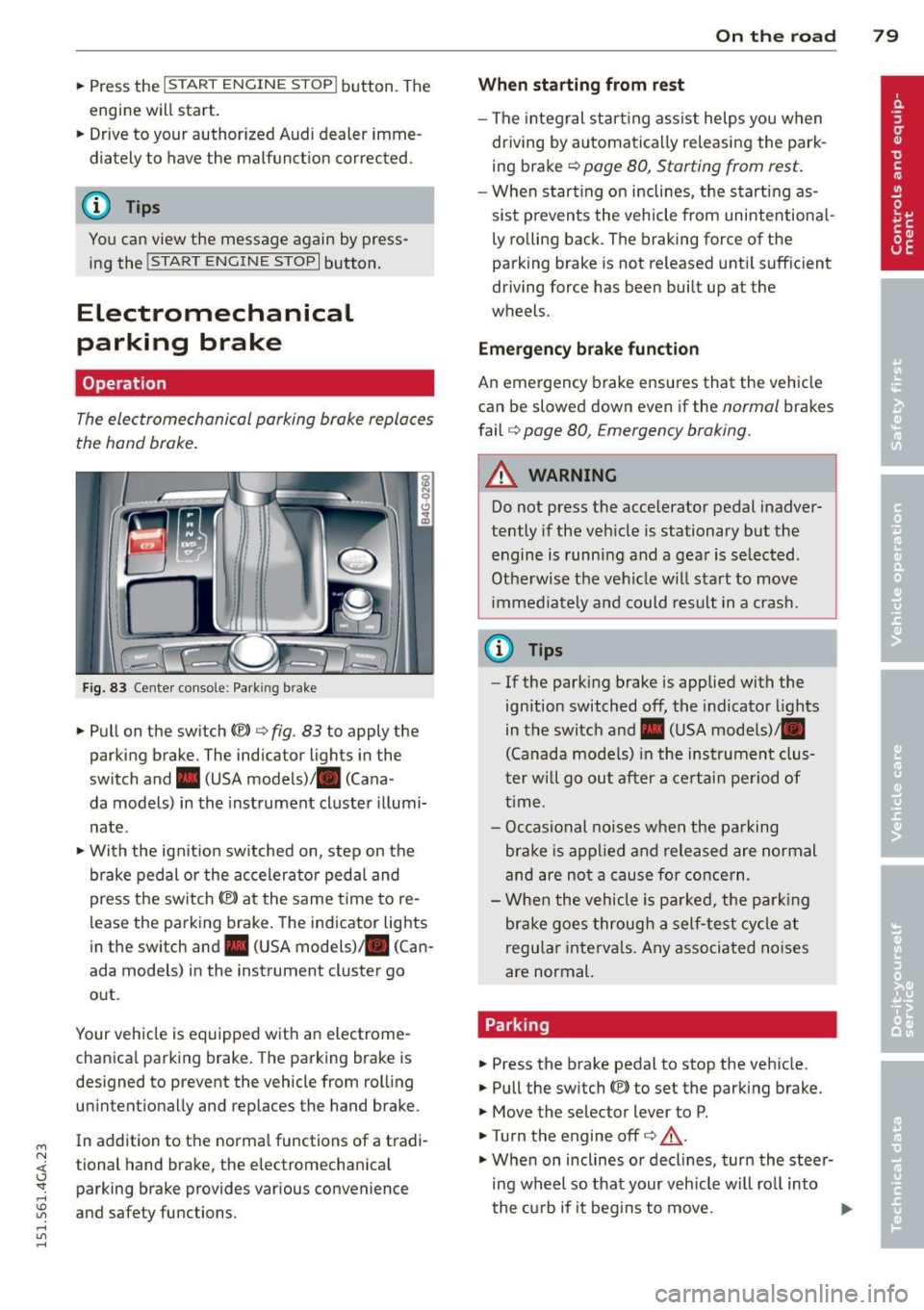
Fig. 83 Center console: Park ing brake
.. Pull on the switch<®> c> fig. 83 to apply the
parking brake. The indicator lights in the
switch and. (USA models)/ . (Cana -
da models) in the instrument cluster illumi
nate .
.. With the ignit ion sw itched on, step on the
brake pedal or the accelerator pedal and
press the sw itch<®> at the same time to re
lease the parking brake. The indicator lights
in the switch and. (USA models) . (Can
ada models) in the instrument cluster go
out .
Your vehicle is equipped with an electrome
chanica l parking brake. The parking brake is
designed to prevent the vehicle from rolling unintentionally and replaces the hand brake .
In addition to the norma l functions of a tradi
tional hand brake, the electromechanical parking brake provides various convenience
and safety functions.
On the road 79
When starting from rest
- The integral start ing assist helps you when
driving by automatically re leasing the park
ing brake c>
page 80, Starting from rest.
-When start ing on inclines, the starting as
sist p revents the vehicle from unintentiona l
ly rolling back. The braking force of the
parking brake is not re leased until sufficient
driving force has been built up at the
wheels.
Emergency brake function
An emergency brake ensures that the vehicle
can be slowed down even if the
normal brakes
fail
c:;, page 80, Emergency braking.
A WARNING
Do not press the accelerator pedal inadver
tently if the veh icle is stationary but the
engine is running and a gear is selected .
Otherwise th e vehicle w ill start to move
immediately and could result in a crash.
@ Tips
- If the parking brake is applied with the
ignition switched
off, the indicator lights
in the switch and. (USA models)/ •
(Canada models) in the instrument clus
t er w ill go out after a certain period of
time.
- Occasional noises when the parking
brake is applied and released are normal
and are not a cause for concern.
- When the vehicle is pa rked, the parking
brake goes through a self-test cycle at
regu lar intervals. Any associated noises
are normal.
Parking
.. Press the brake pedal to stop the vehicle.
.. Pull the switch(®) to set the parking brake.
.. Move the selector lever to P .
.. Tu rn the engine offc>
.&.
.,. When on inclines or decl ines, turn the steer
ing wheel so that your veh icle wi ll roll into
the curb if it begins to move. ""