2015 AUDI A7 mission
[x] Cancel search: missionPage 4 of 316

2 Table of content s
Vehicle lite ratu re .. .. .. .. .. ... .
5
About thi s Owner' s Manual . . . 6
C ontr ols and equi pm ent .. ... .
Ins truments and controls .. . .
General illustration ...... ... .. ... .
Instruments and warning /
indicator lights ........ .. .. .. . .
Instruments ............ ... .. ... .
Warning/indicator lights .. ... ... .. .
Driver information display .... .. ... .
On-Board Diagnostic system (OBD) . . .
Opening and closing .. .. .... . .
Keys .. ...... ........... .. .. ... .
Power locking system ..... .. .. .. . .
Rear lid .. .. ........ ........ .... .
Child safety lock for the rear doors .. .
Power windows ............... .. .
Valet park ing . ........... .. .. ... .
Sliding/tilting sun roof ... .. .. .. .. . .
Garage door opener (HomeL in k) . ... .
Clear vision .. ........ .. .. .. .. . .
Lights . .. .. ............. .. .. .. . .
I nterior lights .... ....... ... .. ... .
V1s1on ..... ... . ........ .... .... .
Wiper and washer system . ... .. .. . .
Mirrors ................. .. .. ... .
Seat s and storage ... .. .. .... . .
General recommendations . .. .. .. . .
Front seats .................. ... .
H ead restraints .......... .... ... .
Seat memory .. .... ........ .. .. . .
Ashtray .. .. ................ ... . .
C igarette lighter ................. .
12-vo lt sockets ........... .. .. ... .
Sto rage .. ............... .. .. .. . .
Roof rack . .... . ...... ... ... .... .
Luggage compartment . ... .. .. ... .
Pass-through with ski sack ... .... . .
Warm and cold ..... ... .. .. ... .
Climate controls .. ..... ... .. .. ... . 8
8
8
11
1 1
1 2
24
29
31
31
33
37
40
40
4 1
41
42
44
44
4 7
48
48
so
53
53
54
56 57
59
59
60
60
62
64
67
69
69
Three-zone climate control . . . . . . . . . 70 Four
-zone automatic climate control .
Steering wheel heating . ..... ... .. . 72
74
On the road
. . . . . . . . . . . . . . . . . . . 75
Steering . . . . . . . . . . . . . . . . . . . . . . . . 75
Starting and stopping the engine . . . . 76
E lectromechanical parking brake . . . . 79
Start-Stop-System . . . . . . . . . . . . . . . . 81
Speed warning system . . . . . . . . . . . . . 83
Cruise control . . . . . . . . . . . . . . . . . . . . 84
Audi adaptive cruise control
and braking guard . . . . . . . . . . . .
86
Introduction . . . . . . . . . . . . . . . . . . . . . 86
Genera l information . . . . . . . . . . . . . . 86
Audi adaptive cruise cont rol . . . . . . . . 88
Audi braking gua rd . . . . . . . . . . . . . . . 92
Messages . . . . . . . . . . . . . . . . . . . . . . . 93
Audi active lane assist . . . . . . . . 95
Active lane assist . . . . . . . . . . . . . . . . . 95
Audi side assist . . . . . . . . . . . . . . . 98
Lane Change Assistant. . . . . . . . . . . . . 98
Audi drive select . . . . . . . . . . . . . . 102
Driv ing settings . . . . . . . . . . . . . . . . . . 102
Raising/lowering the vehicle . . . . . . . . 104
Driver messages . . . . . . . . . . . . . . . . . . 104
Night vision assistant . . . . . . . . . 105
Night vision assistant with detected
pedestr ian marking . . . . . . . . . . . . . . . 105
Automatic Transmission . . . . . . 109
S tronic, tiptronic . . . . . . . . . . . . . . . . . 109
Parking systems . . . . . . . . . . . . . . 116
General information . . . . . . . . . . . . . . 116
Parking system plus . . . . . . . . . . . . . . . 117
Rear view camera . . . . . . . . . . . . . . . . . 118
Peripheral cameras . . . . . . . . . . . . . . . 121
Adjusting the d isplay a nd the warning
tones. . . . . . . . . . . . . . . . . . . . . . . . . . . 126
Error messages . . . . . . . . . . . . . . . . . . 12 7
T ra ile r hitch . . . . . . . . . . . . . . . . . . . . . 127
Page 11 of 316

M N <( (.J
'SI: ,...., \!) 1.1'1 ,...., 1.1'1 ,....,
CD
@
®
©
®
®
(j)
Door handle
Audi side assist display
Power locking sw itches
Memory function buttons .. .. .
Aud i side assist button ...... .
A ir vents with thumbwheel
Control lever for:
- T urn signal and high beam
- Audi act ive lane assist . .. .. .
@ Mu ltifunction steering wheel
with:
- Horn
- Driver's airbag
- Driver information system but-
tons ... ..... ....... ... .. .
- Audio/video , telephone, navi
gation and voice recognition
buttons
- Steering wheel heating . ... .
- Shift padd les (automatic
transmission) ..... ... ... . .
® Instrument cluster ......... .
@ Head-up Display ........... .
@ Windshield washer system
lever .. .. ........ ..... .... .
@ Buttons for :
- MMI display
- Reset bu tton for tr ip odome-
te r .. .. ... .. ..... ... .. .. .
@ Starting the engine if there is a
malfunction ............... .
~ Knee airbag ........... .. .. .
@ Steer ing whee l adjustment, de
pending on equipment:
- mechan ical .......... .. .. .
- electrical .... ....... ... .. .
@ Leve r for:
- Cru ise control system ... .. .
- Adaptive cruise contro l .. .. .
@ Button for sw itch ing the Head
up Disp lay on/off, adjusting the
h eight .. ............. .. .. .
@ Instrument illumination ... .. .
@ Eng ine hood release ........ . 98
36
57
98
46 95
151 24
74
113 11
28
48
2 7
78
164
75
75
84
86
28
47
225
In strument s and control s 9
@ Data Link Connector for On
Board Diagnostics (OBD II)
@ Light switch ... .. . .. ... .... .
@ Buttons for :
- All-weather lights
- Night v ision assistant .... .. .
- Rear fog lights .. .. .. ..... .
@ Power exterior m irror adjust-
ment ...... .. .. ..... ..... . 29
44
44
105 44
so
@ Rea r lid switch . . . . . . . . . . . . . . 37
@ Power w indows . . . . . . . . . . . . . 40
@ MMI display
@ Emergency flashe rs . . . . . . . . . . 45
@ Glove compartment . . . . . . . . . 61
@) Front passenger's airbag . . . . . 151
@ Valet parking feature . . . . . . . . 41
@ Drives (MMI)
@ Buttons/Indicator lights fo r
- Start-Stop-System . . . . . . . . . 81
- Parking system . . . . . . . . . . . . 116
- PASSENG ER AIR BAG OF F . . . . 160
- Rear spoiler . . . . . . . . . . . . . . . 197
- Electron ic Stabilization Con-
t rol . . . . . . . . . . . . . . . . . . . . . 19 7
@ Climate controls, depending on
vehicle equipment:
- Three-zone cl imate control . . 70
- F our-zone automatic climate
cont rol . . . . . . . . . . . . . . . . . . 72
@ Storage compartment or ash-
t ray wit h cigarette lighter . . . . . 59, 59
@ I S T ART ENGINE STOPI button 76
@ MM I controls
@ 12-volt socket, (upho lder 60, 60
@ E lectromechanical parking
brake . . . . . . . . . . . . . . . . . . . . . 79
@ Selector lever (a utomatic trans-
mission) 109
(D Tips
-Some of the equipment or fea tures
show n in the genera l ill ustration may be
standard equipment on your vehicle or
may be opt ional equ ipment depending
on your model. Always ask your
Page 16 of 316

14 Instrum ent s and w arn ing /indic ato r light s
Electromechanical parking
brake
c::>page 16
Tire pressure monitor ing sys
tem../
c::> page270
Tire pressure monitoring sys
tem
c::> page270
Electronic power control../ (al
te rna tive to
II)
c::> page20
Glow plug system
(alternative to
Gi)
c::> page 21
Malfunction indicator Lamp
(MIL)../
Diesel particulate fi lter* clog
ged
c::> page 21
Engine speed limitation
c::>page 21
Engine oil level
c::> page 18
Engine o il sensor
c::> page 22
Battery
c::>page 17
Tank system
c::>page22
Windshie ld washer fluid level
c::>page22
Windshie ld w ipers
c::> page22
AdBlue ./'
Rear fog light(s)
c::> page 22
Headlight range control
c::>page22
adaptive light*
c::>page 22
Light-/rain sensor fau lty
c::>page 23
Audi act ive lane assist*
c::>page 96
T ransmission (tiptronic)
c::>page 114
Transmission
- S tron ic
c::>page 114
Electronic steering column lock
c::>page 18
Engine start system
c::>page 18
Central indicator light
c::>page 19
Electromechanical steering, dy
namic steering*../
c::>page 200
Air suspens ion*
c::>page 18
Sport differentia l*
c::> page 23
Rear spoiler
c::>page 197
Refill Ad Blue*
c::>page 221
AdBlue malfunction*
c::>page 221
Remote cont ro l key
c::>page 76
Other indicato r lights
,---=--~-----
Remote cont ro l key
c::> page 78
Battery in remote control key
c::> page32
Defect ive light bulb warning
c::>page 22
Tu rn signa ls
c::> page23
USA mod els : Cruise control*
c::>page 84
Can ada models : Cruise control*
c::> page 84
Adaptive cruise control*
c::> page 88
Page 25 of 316

M N <( (.J
'SI: ,...., \!) 1.1'1 ,...., 1.1'1 ,....,
Instruments and warning/indicator lights 23
Go to an authorized dea lership to have the
headlights or the contro l unit for the Adaptive
Light repaired.
fi.D Light/rain sensor
El Automatic headl ights/automatic wipers:
system fault
If the indicator light t urns on and this mes
sage appears, the light/rain sensor is not
functioning correctly .
F or safety reasons the low beams are turned
on permanent ly with the switch in
AUTO.
However, you can continue to turn the lights
on and off using the light switch. You can still
control all funct ions that are independent of
the rain sensor through the windsh ield wiper
lever .
Contact your author iz ed Audi dealer as soon
as possible to have the problem corrected.
I-: Sport differential
App lies to vehicles: with sport different ia l
IIJ Sport differential: system fault
There is a malfunct ion with the sport differen
tial.
Drive to your authorized Audi dea ler immedi
ately to have the malfunction corrected.
IIJ Sport differential : overheating
The transmission temperature has increased
sig nificantly due to the sporty dr iv ing manner .
Dri ve i n a less sporty manner until the tem
perature returns to the normal range and the
indicator light switches of .
A WARNING
Contact your authorized Audi dealer or a
qualif ied workshop if the sport differential
is faulty or ma lfunctioning. The repa ir
must be performed by trained personnel
using the correct oil in order to ensure
safety .
-
¢ Q Turn signals
The indicator light blinks when you use either
turn signal .
Whenever you use the left . or the right 1B
turn s ignal, the indicator light blinks. When
you use the emergency flashers, both indica
tor lights flash .
If one of the turn signa l light bulbs burn out,
the turn signal will blink twice as fast as nor
mal. Carefully dr ive to your authorized Audi
dealer immed iately to have the malfunction
corrected. The ind icator light does not indi
cate a malfunction if a turn signal on the trail
er or on the vehicle fails in trailer towing
mode.
(D Tips
For more information on the turn signals,
refer to
q page 46.
CRUISE/' (-) Cruise control
The warning/indicator light Ill (USA models)/
l'I (Canada mode ls) illuminates when the
cruise control is activated
q page 84.
Page 31 of 316

M N <( I.J "". rl I.O
"' rl
"' rl
Instrument s and warning /indicator lights 29
Adjusting the height
The height of the display can be a djus ted to
t he individual driver .
.. Make sure you a re seated cor rect ly
¢page 129.
.. Turn the knob~ to adjust the displ ay .
Settings in the MMI
.. Se lect: I CARI funct ion button > ( Car )* s ys
tems
control button > D river Assist > Head
up Display > Head-up Display content
or
Di splay brightne ss .
Display content
In the MMI, you ca n specify which information
should be displayed :
- Cruise contro l system*
- Navigatio n information*
- A udi adaptive cruise control *
- Audi a ct ive lane assist*
- Night vis ion assistant*
The speed display and some of the red indica tor lights cannot be hidden in the MMI.
Display brightness
You can ad just the display brightness in t he
MMI. The display brightness decreases auto
mat ica lly as the amount of light decreases.
The basic leve l of brightness is adjusted with
the ins trumen t illum ina tion ¢ page 47 .
(D Note
To prevent sc ratches on t he g lass covering
the Head-up Disp lay, do not place any ob
jects in the proj ection opening.
(D Tips
- Sung lasses w ith polar izat ion fi lters an d
unfavorable lighting condit ions can af
fect the display.
- A specia l w indshield is needed for the
Head-up Display funct io n.
- Fo r information on cleaning, refer to
¢ table on page 214.
On-Board Diagnostic
system (OBD)
Malfunction Indicator Lamp (MIL )
The Ma lfunction Indicator Lamp ( MIL ) ¢'4 in
the instr ument cluster is part of the On-Board
Diagnostic (OBD II) system .
T he wa rni ng/indicator light ill uminates when
the ignit io n is switched on and goes out after
the engine sta rts and the id le has stab ilized.
This indicates that the MIL is working proper
ly .
If the light does not go out afte r th e en gine
is started, or illuminates while you are dr iv
ing, a mal function may exist in the engine sys
tem.
If the lig ht illum inates, the catalyt ic con
verter could be damaged .
Contin ue driving
with reduced power (avoid
ing s ustained high speeds and/or rapid accel
erations) and have the cond ition corrected.
Contact your aut horized Audi dea ler.
If the light illuminates, the e lectronic speed
limiter may also be malfunct ioning . For more
information
c> page 30, Electronic speed
limiter.
An improperly closed fuel filler cap may also
cause the MIL light to illuminate
c> page 219.
On-Board Diagnostics
Fig. 1 6 Location o f Data Li nk Co nnector (D LC)
On-Board Diagnostics monitors the com po
nents of your emission cont ro l system. Each
monitored component in your engine system
Iii>-
Page 83 of 316
soon as the switch(®) is released, or the accel
erator pedal is depressed, emergency braking
stops.
.&_ WARNING
Emergency braking should only be used in
an emergency, when the normal foot brake
has failed or the brake pedal is obstructed .
Using the parking brake to perform emer
gency braking will slow your vehicle down
as if you had made a full brake applicat ion.
The laws of physics cannot be suspended
even with ESC and its associated compo
nents (ABS, ASR, EDL). In corners and
when road or weather conditions are bad
'
a full brake application can cause the vehi-
cle to skid or the rear end to break away -
r isking an accident.
Start-Stop-System
Description
Appl ies to vehicles : wit h Start-Stop-System
The Start-Stop-System can help increase fuel
economy and reduce CO
2 emissions.
I n the Start-Stop-mode, the engine shuts off
automatically when the vehicle is stopped,
such as at a traffic light. The ignit io n remains
sw itched on dur ing th is stop phase. The en
gine will be automatically restarted when
needed.
The last Start-Stop-System setting (on/off us
ing the button
l
l --1 but
ton turns on when the Start-Stop-System is
switched off manually.
Basic requirements for the Start-Stop
mode
- The driver's door is closed .
- The driver' seat belt is latched.
- The hood is closed.
- T he veh icle must have been driven faster
~ than 2.5 mph (4 km/h) since the last stop.
<(
~ -A tra iler is not hitched to the veh icle.
rl I.O
"' rl
"' rl
On the road 81
.&_ WARNING
-Never let the vehicle roll with the engine
sw itched off . You could lose control over
the vehicle. This can lead to a collision
and serious injuries.
- The brake booster and the steering sup
port do not work while the eng ine is
sw itched off. More force is required to
stop and to steer the vehicle.
- To reduce the risk of injuries, make sure
that the Start-Stop-System is turned off
when working in the eng ine compart
ment
¢ page 83.
(D Note
Always switch off the Start-Stop-System
when driving through water¢
page 83.
Starting/stopping the engine
Applies to vehicles: w ith Start -Stop-System
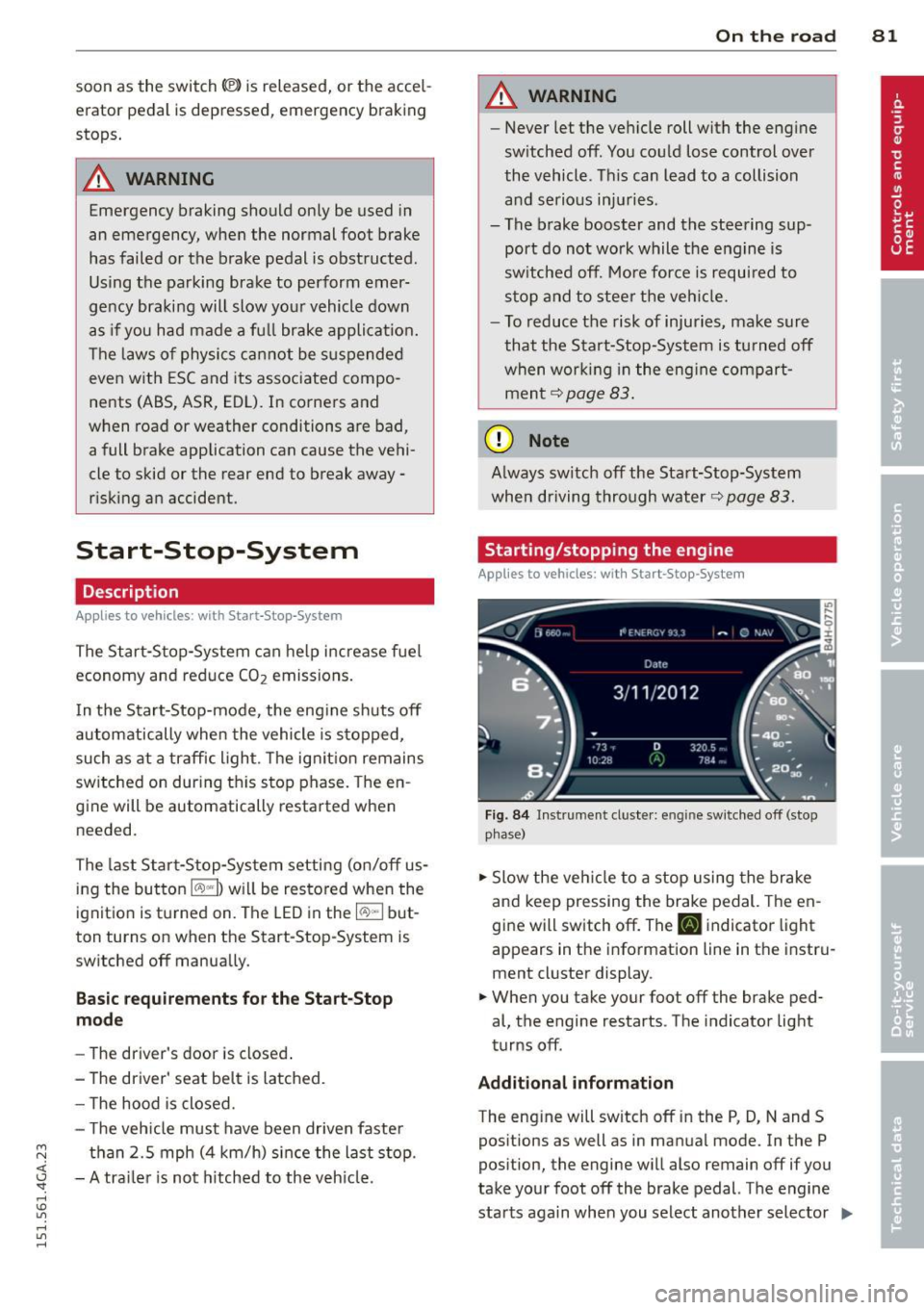
Fig. 84 Instrument cluste r: engine sw itched off (stop
p hase)
.,. Slow the vehicle to a stop using the brake
and keep pressing the brake pedal. The en
gine will switch off. The
tlJ indicator light
appears in the information line in the instru
ment cluster display.
.. When you take your foot off the brake ped
al, the engine restarts. The indicator light
turns off.
Additional information
The eng ine will switch off in the P, D, N and S
positions as well as in manual mode. In the P
position, the engine will also remain off if you
take your foot off the brake pedal. The engine
starts aga in when you select another selector ..,_
Page 104 of 316

102 Audi drive select
Audi drive select
Driving settings
Introduction
Aud i d rive select mak es it possible to expe ri
ence diffe ren t types of vehi cle se ttin gs i n o ne
ve hicl e. The dr ive r can se lect th ree
Comfort ,
Auto and Dynamic modes in the M MI to
switch between a sporty and a comforta ble
driving mo de.
You c an a lso a djust the setti ng according to
your p re ferences in the
Individual mode . F o r
examp le, you ca n combine settings such as a
sporty en gine t uning with comfortab le steer
ing.
A WARNING
Improper use of the A udi drive select can
cause collisions, ot her acc idents and se ri
ous personal injury.
Description
The follow ing systems a re affected by dr ive
se lect:
Engine and transmission
Depending on the mode, the engine and the
tra nsmission respond quicker or in a more bal
a nced manner to acce lerator pedal move
men ts. I n the sporty dynamic mode, the
tra nsmission sh ifts at highe r RPMs.
Air suspension*
The adaptive air suspension/adaptive air sus
pe nsion sport*
(A ir suspension in the MMI) is
an e lec tronically con tro lled air suspens ion and
d ampi ng sys tem. Th ey are adjusted depe nd
ing on the se lected driving mode, the dr ive r's
steer ing, br aki ng and acceler ation inpu t and
the road s urface, ve hicle speed an d load . A
sporty se tting is generally use d in vehicl es
with a daptive ai r suspension s port* .
The vehicle clea rance v aries depe nd ing on the
se lec ted mode and the speed . T
he hig hway setting is act ivated automat ically
whe n you drive above 7 5 mph (120 km/ h) for
m ore than
30 seconds in the Auto or Dynamic
mode. The g ro und clearance is increased a uto
matically if the speed drops below
44 mph
(70 km/h) for more than 120 seconds .
Steering
The steering adapts in terms of steering effort
and steering ratios. Indirect steering that
moves easily, like the steer ing in comfort
m ode, is best suited to lo ng drives o n a hig h
way. In contrast, dynamic mode provides spo rty, direct steer ing .
The following applies to veh icles with dynamic
steering* : the steer ing rat io changes based on
vehicle speed in orde r to ma inta in optimum
stee ring effort for the dr ive r at all times . This
sets the stee ring to be less sens itive at h igher
speeds in order to provide improved vehicle
co ntrol. At reduced spee ds, howeve r, s teer ing
is mo re d ire ct in order to keep the stee ring ef
fort as minima l as poss ible when the drive r is
mane uve rin g the vehicle. At low and average
speeds, dynamic steering addit iona lly pro
vides more responsive steeri ng performance.
Sport differential*
As a component o f the all whee l dr ive system
(quatt ro)
¢ page 200, the Sport differential *
dist ributes t he d riving power to the rear ax le
depend ing on the sit uat ion . The distrib ution
of power var ies depending on the selected
mode, from balanced (comfo rt) to agile (dy
nam ic) . The goal is a h igh level of ag ility and
abili ty to acce lera te on curves . Th e veh icle is
very respons ive to stee ring.
Curve light*
The curve light adapts to driving on curves.
The pivoting act io n and the lighting are also
adapt ed to the mode.
Adaptive cruise control*
The behav ior when accelerating can be adjust
ed from comfortab le to sporty, depending on
the drive select mode . Adaptive cru ise contro l
also responds to the driv ing behavior o f the
IJI,,
Page 106 of 316
104 Audi drive select
Adjusting the Individual mode
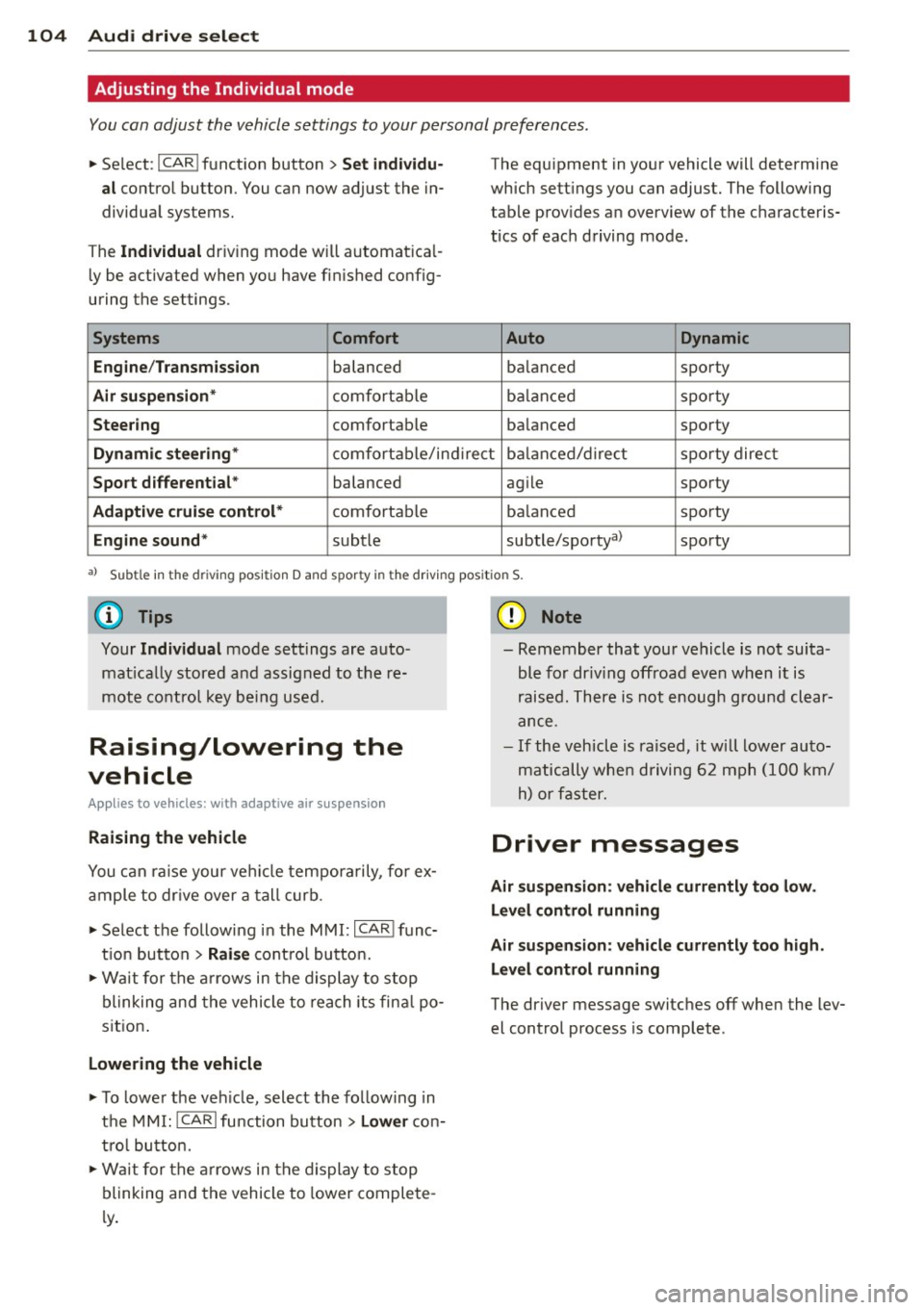
You can adjust the vehicle settings to your personal preferences .
• Se lect : I CAR ! function button > Set individu
al
control button. You can now adjust the in
dividual systems.
The
Individual dr iving mode will automatica l
ly be activated when you have finished config
uring the settings .
Systems Comfort
Engine /Transmission
balanced
Air suspension* comfortable
Steering comfortable The equipment
in your vehicle will determine
which settings you can adjust. The following
table provides an overview of the characteris
tics of each driving mode.
Auto Dynamic
balanced sporty
balanced sporty
balanced sporty
Dynamic steering* comfortable/indirect balanced/direct sporty direct
Sport differential * balanced agile sporty
Adaptive cruise control* comfortable balanced sporty
Engine sound* subtle
subtle/sportya> sporty
al Sub
tle in th e d riv in g po sit ion D an d sp or ty in t he driving pos itio n S.
Your Individual mode settings are auto
matically stored and assigned to the re
mote control key being used.
Raising/lowering the
vehicle
Appl ies to vehicles : wit h adapt ive a ir suspe nsion
Raising the vehicle
You can ra is e your veh icle temporarily, for ex
ample to drive over a tall curb.
• Select the following in the MMI:
ICARI func
t ion button
> Raise control button.
• Wait for the arrows in the display to stop
blinking and the vehicle to reach its fina l po
sit ion .
Lowering the vehicle
• To lower the vehicle, select the following in
the MMI:
!CARI function button > Lower con
tro l button.
• Wait for the arrows in the display to stop
blinking and the vehicle to lower complete
l y .
(D Note
- Remember that your vehicle is not suita
ble for dr iv ing offroad even when it is
raised. There is not enough ground clear
ance.
- If the vehicle is raised, it wi ll lower auto
matically when driving 62 mph (100 km/
h) or faster.
Driver messages
Air suspension: vehicle currently too low .
Level control running
Air suspension: vehicle currently too high.
Level control running
The driver message switches off when the lev
el control process is complete .