2015 AUDI A3 battery
[x] Cancel search: batteryPage 37 of 288

(D Tips
If you vehicle is left standing for a long pe
riod of t ime, note the following:
- The proximity sensor sw itches off afte r a
few days to save energy. You then have
to pull once on the door hand le to unlock
the vehicle and a second time to open it.
- To prevent the battery from draining and
to retain the start ing ability of your vehi
cle as long as poss ible, the energy man
agement system gradually tuns off un necessary convenience functions You
may not be able to unlock your vehicle
using the convenience key.
- For Declaration of Compliance to United
States FCC and Industry Canada regula
tions, see
r:o page 2 71.
Unlocking /locking with the key
In the event that the power locking system
fails, the driver's door can locked and un
locked using the door lock .
Fig . 21 Driver's door: door lock
• To un lock the driver's door, t urn the key to
the open position @.
• To lock the driver's door, move the selector
lever to the P position (automatic transmis
s ion) and turn the key once to the close posi
t ion @.
The settings in the MMI specify if the entire
vehicle or one of the doors is unlocked
i:::o page36 .
Openin g an d clos ing 35
@ Tips
Additional remote control key or conven
i ence key functions~
page 39, Conven-
ience opening/closing.
Central locking switch
Fig . 22 Driver's door: centra l locking switch
• To lock the vehicle, press the [§] button
q ,&..
• To unlock the vehicle, press the Im button
r=ofig.22.
When locking the vehicle with the centra l
locking switch, the following applies:
- Opening the doo r and the luggage compart
ment lid from the
outside is not possib le
(for security such as when stopped at a
light).
- The LED in the central locking switch turns
on when all doors are closed and locked.
- Yo u can open the doo rs individually from the
inside by pulling the doo r handle.
- In the event of a crash w ith airbag deploy
ment, the doo rs unlock automat ica lly to al
low access to the vehicle.
A WARNING
- The power lock ing switch works with the
ignit ion off and a utomatica lly locks the
entire veh icle when the [§] button is
pressed.
- The central locking switch is inoperative
when the vehicle is locked from the out side.
- Locked doors make it more difficult for
emergency workers to get into the veh i-
cle, which puts lives at risk. Do not leave ..,
Page 42 of 288

40 Opening and clo sing
- For security reasons, the windows can
only be opened with the remote control
key at a maximum distance of 2 meters
from the vehicle .
- Pay attention when using the lock cylin
der to close the windows and the panora
ma sunroof* so that no one is pinched.
Clos ing stops when the key is moved into
the starting pos ition.
Correcting power window malfunctions
After disconnecting the vehicle battery, the
one-touch up and down feature must be acti
vated again .
.. Pull the power window sw itch until the w in
dow is comp lete ly raised.
.,. Release the switch and pull it again for at
least one seco nd.
Panorama sunroof
Description
Applies to vehicles: with pa norama sunroo f
Fig. 28 Section of the head liner: panorama s unroo f
butto n
The button has two stages. In the second
stage, the roof automatically runs to the end
position (open/closed) when the button is op
e rated b riefly. The movement can be stopped
by pressing the button .
@ Tilting and sliding
.. To tilt the sunroof complete ly, press the
switch brief ly to the second leve l.
.. To close the roof complete ly, pull the button
down briefly to the second lev el or slide the button forward br
iefly to the second level
¢ .&_ .
.. To select an intermediate pos it ion, press/
pull the sw itch in the first leve l until the de
sired position is reached.
® Op ening and closing
.. To open the sunroof completely, slide the
button bac k to just before the second level.
.. To close the roof completely, p ush the but
ton forward briefly to the second level or
pull the button down briefly to the second
level ¢.&_ .
.,. To se lect an in termediate pos it ion, press/
pull the sw itch forwa rd/back in the fi rst lev
el unt il the desired po sit ion is reached .
A wind deflector integrated in the panorama
s u nroof adapts automatically to the sunroof
pos ition. This reduces wind noise to a mini
mum i n all panorama sunroof pos itions.
You can still operate the pa no rama s unroof
for about 10 minutes aft er th e ignition is
switched off . T he swi tch is deactivated once
t h e dr iver's o r fron t passenger's door is
opened.
Sun shade
T he sun shade can be opened and closed man
u ally, depending on the position of the panor
ama sunroof. The sun s hade can be opened
part ia lly.
_& WARNING
=
B e carefu l when closing t he pano rama sun -
r oof -otherw ise serio us in ju ry co uld resu lt!
A lways take the ign ition key wit h you when
l eaving the vehicle.
(D Note
A lways close t he panor ama s unroo f whe n
l eav ing your ve hicle . Sudde n rain can cause
d amage to the interio r equipment of your
vehicle, particularly the e lectronic equip-
ment .
ll>
Page 59 of 288
unattended in the vehicle with the vehicle
key.
(D Note
To avoid damaging the socket, only use
plugs that fit properly.
- Never connect equipment that generates
electrical current, such as a solar panel
or battery charger, to the 12-volt socket.
This could damage the vehicle's e lectri
cal system .
- The 12-volt socket should only be used
for a short period of time as a power
source for electrical equipment . Please
use the electrical sockets in the vehicle
when connecting equipment for longer periods .
- To avoid damaging the socket, only use
plugs that fit properly .
{D) Tips
The vehicle battery drains when accesso
ries are turned on but the engine is off .
Storage
Beverage holders
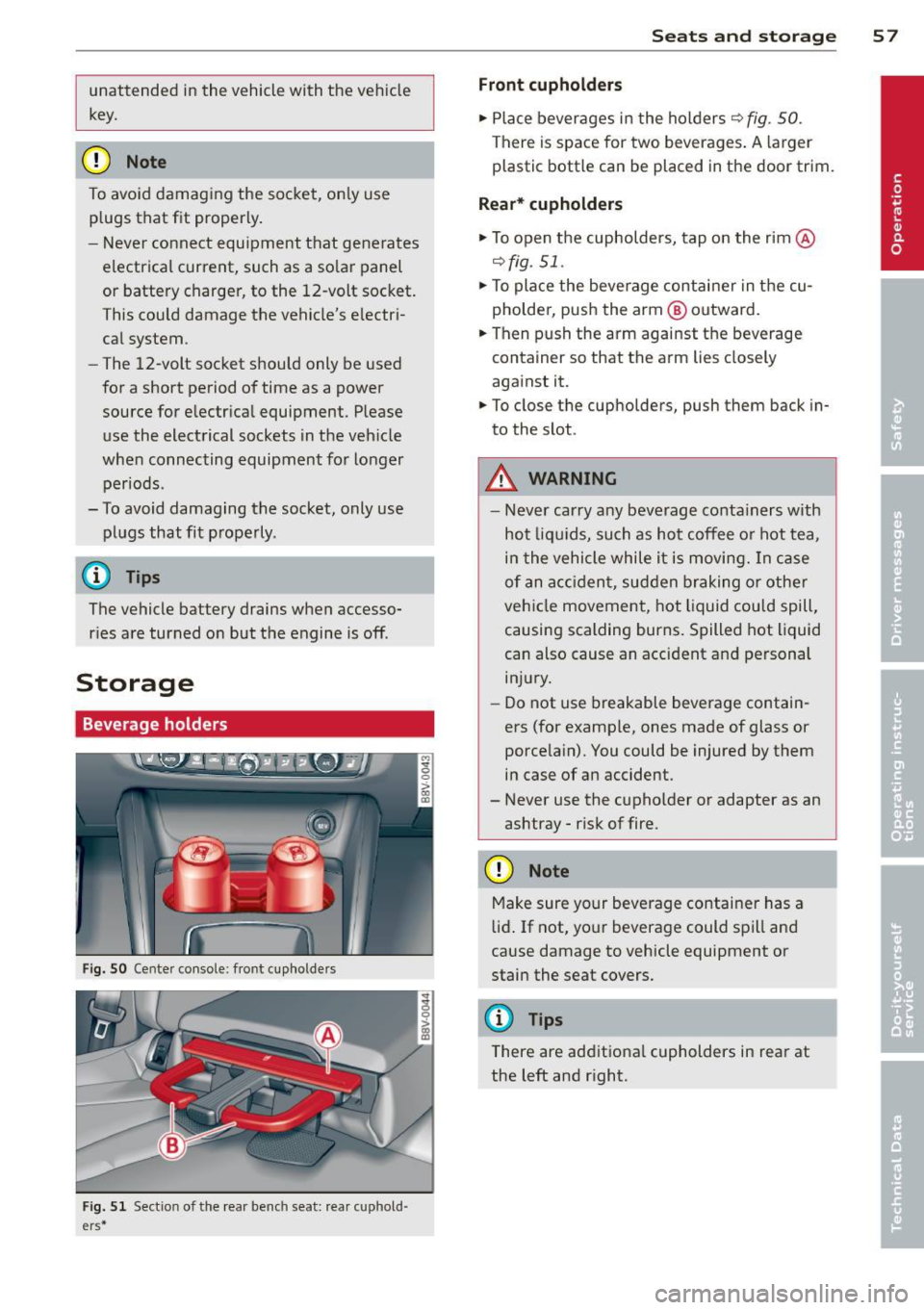
Fig. 50 Center console: front cupho lde rs
Fig. 51 Sect ion of the rear benc h seat: rea r cuphold ·
e rs *
Seats and storage 57
Front cupholders
.,. Place beverages in the holders ¢ fig . SO.
There is space for two beverages. A larger
plastic bottle can be placed in the door trim.
Rear* cupholders
.,. To open the cupholders, tap on the rim @
¢fig. 51.
.,. To place the beverage container in the cu
pholder, push the arm @ outward.
.,. Then push the arm against the beverage
container so that the arm lies closely
against it.
.,. To close the cupholders, push them back in
to the slot .
A WARNING
-
- Never carry any beverage conta iners with
hot liqu ids, such as hot coffee or hot tea,
in the vehicle while it is moving. In case
of an acc ident, sudden braking or other
vehicle movement, hot liquid could spill,
causing scalding burns. Spilled hot liquid
can also cause an accident and personal injury.
- Do not use breakable beverage contain
ers (for example, ones made of glass or
porcelain). You could be injured by them
in case of an accident .
- Never use the cupholder or adapter as an
ashtray -risk of fire.
(D Note
Make sure your beverage container has a
lid. If not, your beverage could spill and
cause damage to vehicle equipment or
stain the seat covers.
(D Tips
There are additiona l cupholders in rear at
the left and right.
Page 70 of 288

68 Warm and cold
through a t unnel or when sitting in traffic
c:;> &. .
The 1- 1 button, IAUTO I or the~ button
sw itches recircu lation mode off.
The system switches to recircu lat ion mode
when dr iving in reverse when the engine is
cold .
.8, WARNING
You should not use the rec irculat ion mode
for an extended period since no fresh air is drawn in. With the air -conditioning sw itch
ed off, the windows can fog up, which in
creases the risk of an accident.
Adjusting the air vents
Fi g. 62 Cockp it: adjust ing the air vents
Fig. 6 3 (Ca nada ve hicles on ly) A ir ve nts: ad justing the
a irflow sett ing A) D iffused B) Direct
The follow ing settings are possibler=> fig. 62:
- @ Air flow amount
- @ Air flow d irect io n
- @
(Canada vehicles only) Air flow settings
(diffused or direct)
To adjust the
air flow amount , turn the ridged
outer adjusting r ing (D r=>
fig. 62. To stop the air flow, turn the adjusting ring a
ll the way to
the right.
T o adj ust the
air flow direction , turn the air
ven t grill insert @.
(Canada vehicles only) To adjust the air flow
se tting s,
pull o r press the m iddle adjustment
ring @
c::> fig. 62:
-Diffu sed air flow (indirect @): Press the
m iddle adjustment ring in lightly
c::> fig . 63.
- Dir ect
air flow (straight @): Pull the center
adjustment ring out lightly
c::> fig . 63 .
Rear window defogger
When a funct ion is switched on, the L ED in
the~ button for ma nual climate co ntrol
c::> page 65, fig. 60 and au toma tic climate con
tro l
c::>page 66, fig. 61 tu rns on . If the rear
window defogger is act ivated when the igni
tion is switched on, the battery management
determines based on the battery charge if it is
poss ible to turn on. Otherw ise, the rear win
dow defogger funct ions with the eng ine run
ning and switches off automatically after ap
proximate ly 10 -20 minutes, depending on
the outside temperatu re.
To p revent the rear window defogger from
switching off automatically, press and hold
the~ (word REAR*) button for more than two
seconds. This remains s to red up to approxi
mately 15 minutes after turning off the igni
tio n.
Seat heating
Applies to veh icles : w it h sea t heat ing
The seat heating has three leve ls. T he select
ed heating level is indicated by the LEDs in the
button (manua l climate control)
c::> page 65,
fig. 60,
(automatic climate control)
c::> page 66, fig . 61 .
.,. To switch the seat heating on, press the [li
button once .
.,. To switch to a lower level , press the
[li but
ton again .
.,. To switch the seat heating off, press the
lll
button repeatedly unt il the LED turns off . ..,.
Page 73 of 288

~ To engage the steering wheel lock, turn the
whee l until it locks when the ignition key is
removed .
~ To release the steering wheel lock, insert
the key in the ignition lock and turn the key
in the -direction of the arrow- while turning
the steering wheel.
Switching the ignition on and off
~ To switch the ignition on, turn the ignition
key to position
(D .
~ To switch the ignition off, turn the ignition
key to position @.
Starting the engine
Your vehicle is equipped with launch contro l.
As soon as you have turned the ign ition key to
position @, the engine will start automatical
ly.
~ Press the brake peda l and move the se lector
l ever to the P or N pos ition.
~ Turn the key briefly to position @. The igni
t ion key automatically returns to position
@. Do not press the accelerator pedal when
doing this.
Major electrical equ ipment switches off tem
porarily when starting the engine.
If the engine does not start immediately, stop
the starting procedure by turning the ignit ion
key to position @and repeat after 30 sec
onds .
Automatic start malfunction
If the Ila indicator light turns on (gasoline en
gine) and the message
Engine start system
malfunction. Please contact Service
appears,
there is an automatic start malfunction.
To start the engine, hold the ignition key in position @until the engine runs.
D rive to an autho rized Audi dea ler or qualified
repair facility immediately to have the ma l
function corrected.
A WARNING
- Never allow the engine to run in confined
spaces -there is a r isk of asphyxiation.
Driving 71
- Never remove the ignition key from the
ignit ion lock while the vehicle is mov ing.
Otherwise the steering lock will engage
and you will not be able to steer the vehi
cle.
- The brake booster and power steering
only work when the eng ine is running. If
the engine is off, you have to use more
force when stee ring or braking. Because
you cannot steer and bra ke as you usual
ly would, this could lead to crashes and
serious inju ries .
- Always take the vehicle key with you
when leaving the vehicle, even for a
short period of time . This applies partic
ular ly when c hildren remain in the vehi
cle. Otherwise the children could start
the engine or operate electrical equip
ment such as power windows.
(D Note
- Avoid high engine speed, full th rottle,
and heavy engine load as long as the en
gine has not reached operating tempera
ture yet. You could damage the engine.
- The engine cannot be started by pushing or towing the vehicle.
@ For the sake of the environment
Do not let the engine run while parked to
warm up. Begin driving immediately. This
reduces unnecessary emissions.
(D Tips
-If it is difficult to turn the key to position
(D, turn the steering wheel back and
forth slightly to release the steer ing
wheel lock.
-After starting a cold engine, there may be a brief period of increased no ise be
cause the oil pressure must first build up
in the hydraulic valve adjusters. This is
normal and not a cause for concern.
- If the battery is disconnected and recon
nected, you have to hold t he ignition key
in posit ion
(D for five seconds fo r the en-
gine to start.
Ill>
•
Page 77 of 288

engine is switched off - there is a risk of
damaging the engine. For this reason, let
the engine run for at idle for approximate
ly two minutes before shutting it off .
(D Tips
-After the engine has been switched off,
the radiator fan can continue to run for up to 10 minutes - even with the ignition
switched off.
It can also switch on again
after some time if the coolant tempera
ture rises as a result of heat bui ldup or if
the engine compartment is heated by
sunlight and the engine is hot.
Starting the engine if there is a
malfunction
Appl ies to vehicles: with convenience key
It may not be possible to start the engine un
der certain circumstances , for example if the
battery in the vehicle key is drained, if inter
ference is affected the key or if there is a sys
tem malfunction.
Fig. 67 Steering col umn/rem ote control key : start ing
th e engin e if th ere is a malfun ctio n
As long as the message y>l) Key not recog
nized. See owners manual
appears, you can
emergency start your vehicle.
.. Press the brake pedal
9 &. in Starting the
engine with the
S TART ENGINE STOP but
ton on page 73.
.. Press the l ~s~ T~A~R= T~E~N-G~I~N~E~S~T~O~P~ I button.
.. Hold the master key as shown in the illustra
tion in the location indicated
y>>) 9 fig. 67 .
The eng ine will start .
.. If the engine does not automatically start,
press the
I STAR T ENGIN E STOP ! button
again.
Driving 75
Drive to an authorized Audi dealer or qualified
repair facility immediately to have the mal
function corrected .
(D Tips
You can display the message that appears
during an emergency by pressing the
I START ENGINE STOP!* button.
Driver messages
Turn off ignition before leaving car. Battery
is discharging
This message appears and a warning tone
sounds if you open the driver's door when the
ignition is switched on. Turn off the ignition
so that the battery will not discharge.
Pressing start/stop button again will switch
off engine!
This message appears when you press the
!STAR T ENG INE ST OP!* button while driving
¢ page 74, Emergency off function.
Engine start system malfunction. Please
contact Service
The eng ine automatic start system has a mal
funct ion. Drive to an authorized Audi dealer or
qualified repair facility immediately to have
the malfunction corrected. To start the en
gine, press and hold the
I STAR T ENG INE ST OP I button.
DI Key not recognized. See owner 's manual
This message appears if there is no conven
ience key inside the vehicle or if the system
does not recognize the key . The convenience
key may not be recogn ized, for example, if it is
cove red by an object that
disrupts the s ignal
(such as a briefcase), o r if the key battery is
weak . Electronic devices such as cell phones
can a lso interfere with the signal.
To start or stop the engine, see "Correct ing a
malfunction "¢
page 75.
Ill Key not in vehicle?
The Ill indicator light turns on and this mes
sage appears if the convenience key was
Page 103 of 288

Driver messages
Applies to vehicles: with Audi side assist
If the side assist switches off automatica lly, a
message appea rs in the instrument cluster
disp lay .
@j Audi active lane assist: currently not
available. No camera view
The radar sensors' vision is affected. Do not
cover the area in fron t of the sensors with bike
wheels, stickers, dirt or other objects. Clean
the area in front of the sensors, if necessary
r::!) page 99, fig. 88.
@j Audi side assist : currently unavailable
Side assist cannot be switched on temporari ly
because there is a malfunction (for example,
the battery charge leve l may be too low) .
@j Audi side assist: System fault!
The system cannot guarantee that it wi ll de
tec t ve hicl es correctly and it is switched off.
The sensors have been displaced or are faulty.
H ave the system checked by an authorized
Audi dealer or authorized Aud i Service Facility
soon.
Audi side assist 101
•
Page 115 of 288

Selector lever emergency release
"'Press and hold the yellow release button
with the screwdriver ¢
fig. 97.
"' Press the release button in the selector lever
@ and move the lever into the N position.
"' Clip the shift cover back into the shift gate
after using the emergency release.
If the ve hicle must be pushed or towed due to
a power failure (for example, the battery is
dead), the selector lever must f irst be moved
to the N position using the emergency release
mechanism.
A WARNING
Only move the selector lever out of the P
position when the parking brake is set. If
that does not work, secure the vehicle with
the brake pedal. Otherwise, the vehicle
could start to move unintentiona lly when
the selector lever is moved out of the P po
sition .
Automatic transmission 113
•