2015 AUDI A3 CABRIOLET service
[x] Cancel search: servicePage 99 of 302

M N
" > co ,...., \!) ..,.,
,...., ..,., ,....,
it is necessary. Always follow traffic laws
regarding mainta ining a safe distance
between your vehicle and veh icles ahead.
- pre sense front works within certain lim
its and cannot react to situations that
are outside of the system lim its, such as
when approaching a stationary vehicle or
a stationary obstacle (the end of a traffic
jam or a vehicle that has broken down) .
-Always keep in m ind that the radar sen
sor for pre sense front only works within defined detection zones, which means
other vehicles may not alw ays be detect
ed correct ly.
- T he function and range of the radar sen
sor c an be impaired by rain, snow and
heavy mist. Vehicles ahead may not be
detected right away, o r not detected at
all .
- Reflective surfaces such as guard rails or
entrances to t unnels may impair the
function of the radar sensor .
(D Note
The sensor can be disp laced by impacts or
damage to the bumper, whee l housing and
underbody . The pre sense front sensor can
be damaged by this . Have an authorized
Aud i dea ler or a uthori zed Audi Service Fa
cility check their function.
(D} Tips
- You can cance l the braking with increas
ing fo rce that is initiated by the system
by braking yo urself, by accelerating no
ticeab ly or by swerving.
- For information on dr iver messages
about pre sense, refer to<=> page 97.
- Keep in mind that pre sense front can brake unexpectedly . Always secure any
cargo or objects that you are transport
i ng to reduce the risk of damage o r in
Jury .
- Certain pre sense front funct ions switch
off when ESC is sw itched off (sport
mode) or when driving in reverse .
Audi pre sense 97
- T he p re sense front functions are not
available if there is a ma lfunction in the
adaptive cru ise cont ro l* system
¢ page
93 or ¢page 97.
- Keep i n mind t hat pre sense front can
brake abruptly. Always secure cargo or
objects that you transport to reduce the
r isk of damage or injury.
Settings in the Infotainment system
App lies to vehicles: with Aud i pre sense front or Aud i
adapt ive cruise control
.. Select in the MMI: I MENU I button > Ca r >
S y stems *
control button > Dri ver assistance
> Audi pre sense .
Switching the syst em on and off
Audi pre sense (System ): If the system is
switched off, it switches on again automati
ca lly once the ign ition is switched on aga in.
S ys tem -Switch Audi pre sense on-off. W ith
this, yo u can switch the p rewarning and the
braking intervention from Audi pre sense on
or off .
Prewarning -The distance and approach
warnings can b e switched
on/ off .
(D Tips
-If you res trict or sw itch off the ESC, the
pre sense also sw itches itself off
¢ page
189.
- Switch the pre sense off when you a re
loading the vehicle onto a ve hicle carrier,
train, ship o r other type of transporta
tion. This can prevent undesired warn
ings from the pre sense system.
Driver messages
Applies to vehicles: with Aud i pre sense or Aud i adapt ive
cruise control
Audi pre sen se curr entl y un av a ilabl e. No se n
so r vis ion
T h is message appears if the senso r view is ob
structed, for exam ple by leaves, snow, heavy
spray or d irt. Clean the sensor¢ page
87,
rg .84 . ~
•
Page 107 of 302

M N
" > co ,...., \!) ..,.,
,...., ..,., ,....,
-In some situations, the system may not
function or its function may be limited.
For example:
- If vehicles are approaching or being
left behind very quickly. The display
may not turn on in time.
- In poor weather conditions such as
heavy rain, snow or heavy mist.
- On very wide lanes, in tight curves, or if
there is a rise in the road surface.
Vehicles in the adjacent lane may not
be detected because they are outside
of the sensor range.
- Audi side assist cannot detect all vehicles
under all conditions, which can increase
the risk of accidents.
- Please note that side assist only displays approaching vehicles or vehicles in your
blind spot if your vehicle is traveling at
least 19 mph (30 km/h).
- In certain situations, the system may not
work or its function may be limited. For
example:
- The display may not turn on at the
right time if vehicles are approaching
or passing very quickly.
- In poor weather conditions, such as
heavy rain, snow or fog.
- In very wide lanes, in tight curves or
when there are slopes in the roadway,
vehicles in the neighboring lanes may not be detected because they are out
side of the sensor range.
(D Note
The sensors can be displaced by impacts or damage to the bumper, wheel housing and
underbody. This can affect the system. Have an authorized Audi dealer or author
ized Audi Service Facility check their func
tion.
@ Tips
- If the window glass in the driver's door
or front passenger's door has been tint
ed, the display in the exterior mirror may
be misinterpreted .
Audi side assist 105
-For an explanation on conformity with
the FCC regulations in the United States
and the Industry Canada regulations, re
fer to
c> page 285.
Switching on and off
Applies to vehicles : wit h Audi s ide ass ist
The system and be switched on and off in the
MMI.
.,. Select: the
I MENU I button >Car> Systems*
control button > Driver assistance > Audi
side assist.
With Off , the system is switched
off.
An activated system will sig nal every time the
ignition is sw itched on by turning the displays
in the exterior mirrors on briefly.
' Adjusting the display brightness
App lies to vehicles : wit h Audi side ass ist
The display brightness can be adjusted in the
MMI.
.,. Select: the I MENU I button >Car> Systems*
control button > Driver assistance > Audi
side assist .
The display brightness adjusts automatically
to the brightness of the surroundings, both in
the information and in the warning stage. In
very dark or very bright surroundings, the dis
play is already set to the minimum or maxi
mum level by the automatic adjustment . In
such cases, you may notice no change when
adjusting the brightness, or the change may
only be noticeable once the surroundings
change.
Adjust the brightness to a level where the dis
play in the information stage will not disrupt
your view forward.
If you change the bright
ness, the display in the exterior mirror will
briefly show the brightness leve l in the infor
mation stage. The brightness of the warning
stage is linked to the brightness in the infor
mation stage and is adjusted along with the
information stage adjustment .
IIJJ,,
•
Page 114 of 302

112 Autom atic tr an smi ssion
position longer than approximately 2 seconds
when th e brake pedal is not pressed.
Inter lock butt on
The interlock button in the selector lever han
d le prevents you from moving the selector
lever inadvertently while in some se lecto r lev
er positions. The positions that require the in
terlock button to be pressed are marked in
color in the illustration
c::> fig. 106 .
Ignition k ey s afe ty inte rloc k*
You can only remove the key from the ignition
after switching the ignition off if the se lector
lever is in the P position. The selector lever
will be locked in the P position as long as the
key is not in the ign ition.
_&. WARNING
Read and following all WARNINGS. c::> .& in
Selector lever positions on page 110.
(D Tips
- If the se lector lever does not engage,
there is a malfunction. The engine is dis
abled to prevent the vehicle from driving
off unintentionally. Press the brake pedal briefly to allow the selector lever lock to
engage aga in .
- If the vehicle does not move forward or
in reverse even though a drive position is
se lected, proceed as follows:
- >If the veh icle does not move in the de
s ired direction, the system may not have
engaged the dr ive position co rrectly.
Press the brake pedal and select the
drive position again.
- >If the veh icle st ill does not move in the
desired direction, there is a system mal
f u nct ion . See an a uthorized Aud i dea ler
or authorized Audi Service Facility for as
sistance to have the system checked.
Driving tips
Applies to vehicles: with S tronic transmission
The transmission shifts up and down auto
matically when in the driving gears .
Fig . 107 Sect io n of the cente r co nsole: se lector leve r
w ith interlock b utto n
The eng ine will only be able start when these
lector lever is in the P or N positions. At low
temperatures (below 14 °F ( -10 °C)), the en
gine can only be started when the selector
lever is in the P pos it ion.
St arting from a stop
.,. Press and hold the brake pedal.
.,. Press and hold the interlock button in the
selector lever handle, select the desired se
lector lever pos ition such as D
c::> page 11 0
and release the lock button.
.,. Wa it a moment until the transmission
shifts . You will notice a slight movement
when the gear engages .
.. Release the b rake peda l and press the acce l
erator pedal
c::> _A .
Stopping t emporarily
.,. Keep the veh icle stat iona ry using the brak
ing pedal, fo r example at traffic lig hts.
.,. Do not press the accelerator peda l when do
ing this.
.,. To prevent the vehicle from ro lling when you
start driv ing, set the parking brake when
stopping on steep inclines
c::> _A .
.,. The parking brake will release automat ically
and the vehicle will start mov ing once you
press the acce lerator pedal. Requ irement:
The driver's safety belt must fastened and
the dr iver's door must be closed . .,._
Page 118 of 302

116 Automatic tran smi ssio n
Launch Control-Program
Ap plies to vehicles: with launch co ntrol
The Launch Control Program enables maxi
mum acceleration .
Requirement: The engine must be at operat
ing temperature and the steering wheel must
not be turned .
• With the engine running, press the
l~ OFFI
button briefly one time ll .
• Pull the selector lever back out of the D/S
position briefly to select the S position, or
press it toward the rig ht into the tipt ronic
pos it ion or select the
dynami c driving mode
in drive select*
~ page 107.
• Press the brake peda l firmly with your left
f oot and hold it all the way down for at least
1 second .
.. At the same time, press the gas peda l all the
way down with your right foot unti l the en
gine reaches and stays at a high RPM level.
• Remove your left foot from the brake.
A WARNING
- Always adapt your driving to the traffic
flow.
- Only use Launch Contro l when road and
t raff ic conditions a llow it and othe r driv
ers w ill not be endangered or impacted
by you r driv ing and the veh icle's acceler
ation.
- Please note that the drive whee ls can
spin and the vehicle can brea k away
when sport mode is sw itched on, espe
cially when the road is slippery.
- Once the vehicle has s tarted moving,
press the
I ~ OFF ! button br iefly to turn
the sport mode off.
@ Tips
- The transm ission tempera ture may in
crease significantly after using the
l ) In vehicles with a drive r inform ation system, an ESC
l ig ht in t he in strume nt cl us te r stays on cont inuously
and the m essage
Stabili zatio n co ntrol (ESC): spo rt.
W arn ing! Restricted st ability
appears te mpo rarily.
Launch Control Program . If that hap
pens, the program may not be availab le
for a few minutes . It will be ava ilable
again after a cool-down period.
- When accelerating using the Launch
Contro l Program, all vehicle parts are
subject to heavy loads. Th is can lead to
increased wear.
Emergency mode
Applies to vehicles: wit h S tronic transm issio n
In the event of a system malfunction, there is
an emergency program.
If all of the selector lever positions are high
li ghted with a light background in the instru
ment cluster d isp lay, there is a system mal
funct ion and the S tronic transmission is run
ning in the emergency program . The vehicle
can still be driven in emergency mode, but on
ly w it h reduced speed and not in all gears. In
some cases, the ve hicl e
cann ot driv e in re
v e rs e .
d) Note
If the transmission runs in emergency
mode, drive to your author ized Audi dealer
or q ualified repa ir fa cility immed iate ly to
have the ma lf u nct ion corrected.
Transmission malfunction
• Tran smi ssion m alfu ncti on! Please st op
the vehicle and select P
T he re is a malfunction in the transmiss ion .
Park the ve hicle securely and do not continue
driv ing. See an authorized A udi dealer or au
thorized Audi Service Facility for assistance.
• Tran smi ssion o verheating! Plea se stop
the vehicle!
The transm iss ion is too hot and can become
damaged . Stop and let the t ransmission cool .,.
Page 119 of 302
....,
N
r--. > co
rl I.O
"' rl
"' rl
with the engine running (at id le) in the P se
l ecto r lever positio n. The n the indicator light
and the message turn off , d rive to an author
i z ed A udi dealer or qualified repair facility im
mediately to have the malfunct ion corrected.
If the i ndicator light and the drive r message
do not tur n off, do not cont inue dr iv ing. See
an author ized Audi dealer or authori zed A udi
S ervi ce Fa cility for assis tan ce.
DD Transmiss ion malfunction: you can con
tinue driving
Drive to an authori zed Aud i dea ler or a uthor
ized Audi Service Facility immed iate ly to have
the ma lfunction corrected .
DD Transmission malfunction: no reverse
gear (you can continue driving )
Drive to an aut ho rized Aud i dea le r o r a uthor
ized A udi Service Facility immed iate ly to have
the ma lfunction cor rected .
DD Transmi ssion malfunction: You can con
tinue dri ving in D until engine off
D rive t he ve hicle away from mov ing t raff ic and
par k. See an au thori zed A ud i d ealer or au tho r
iz ed A udi Service Faci lity for assis tance .
DD Transmi ssion overheating! Please adapt
driving style
Continue dr iving moderate ly . W hen t he indi
cator light tur ns off, you can continue dr iving
normally .
DD Transmiss ion : Please press brake pedal
and select gear again
I f the tra nsmission mal functions beca use the
temperature is too high , a message appears
when the transmission is cooled.
Autom atic transm ission 11 7
Selector lever emergency release
Applies to vehicles: with S tronic transmission
If the vehicle's power supply fails , the selec
tor lever can be released in an emergency .
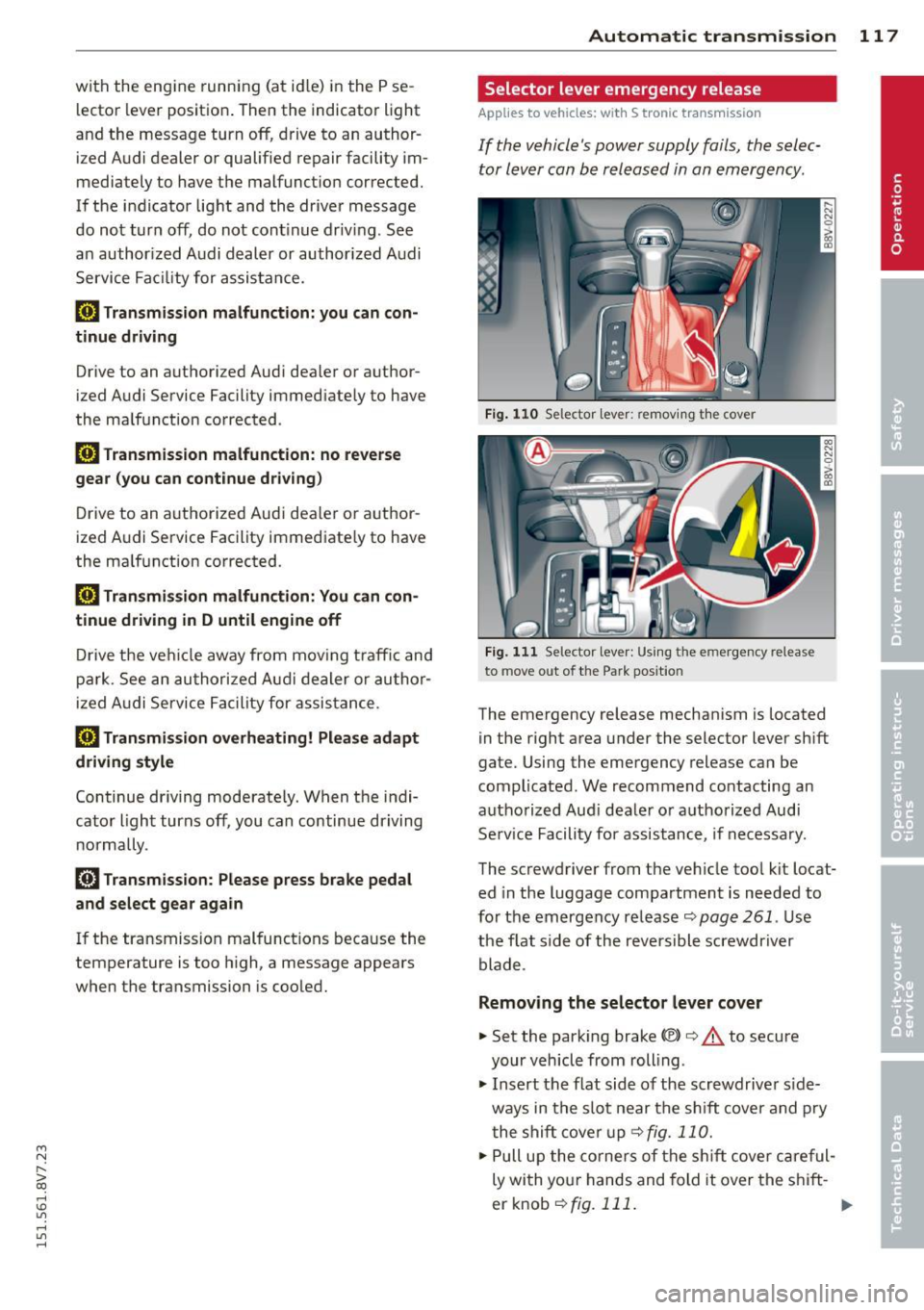
Fig. 110 Se lector leve r: remov ing t he cover
Fig . 1 11 Se lector lev er: Us ing t he e mergency re lea se
to move out of the Park pos it io n
The emergency release mechanism is located
in the right area under the selector lever sh ift
gate. Using the emergency release ca n be
complicated. We recommend contacting an
autho rized Aud i dea le r or a uthorized Audi
Se rv ice Facili ty for assistance, if necessa ry.
The screwdriver from the ve hicle too l kit locat
ed in the luggage compa rtment is needed to
fo r the em ergency re lease <=:>
page 261 . Use
the flat side of the reversible screwdriver
blade .
Removing the selector lever cover
... Set the park ing brake «e)) <=:> &. to secure
your veh icle from rolling .
... Insert t he flat side of the scr ewdrive r side
ways in the s lot near the s hift cover a nd p ry
t he shift cove r up
<=>fig. 11 0 .
... Pull u p the co rners of the s hift cove r ca reful
ly wi th yo ur hands and fold it over the s hift-
er knob
r::!) fig. 111 . ..,.
Page 121 of 302
M N ,....
> co ,...., \!) 1.1"1 ,...., 1.1"1 ,....,
Parking systems
General information
Appl ies to vehicles: with rea r parking sys te m s/park ing
system pl us/rearv iew camera
Depending on your vehicle's equipment, vari
ous parking aids w ill help you when parking
and maneuvering.
The
r ea r p arking sys te m is an audible parking
aid that warns you of obstacles
behind the ve
hicle
~ page 120 .
T he
p ar kin g syste m plus assists you when
parking by audibly and visually indicat ing ob
jects detected
in front of and behind the vehi
cle
~ page 120.
T he
re ar view came ra shows the area behind
the veh icle in the MMI display . This display as
sists you when you are cross or para llel park
ing. The park ing system plus functions are al
so available
r::!;> page 121.
A WARNING ,-
- Always look for traff ic and check the area
around your vehicle by looking at it di
rectly as well. The parking system cannot
replace the driver 's attent ion. The driver
is always respons ible when entering or
leaving a parking space and during simi
lar maneuvers .
- Please note that some surfaces, such as
clothing, are not detected by the system .
- Sensors and cameras have blind spots in
wh ich people and objects cannot be de
tected . Be especially cautious of small
children and animals.
- Always pay attention to the area around
the vehicle -using the rearview mirror,
too .
- The sensors can be displaced by impacts
or damage to the radiator grille, bumper ,
wheel housing and the unde rbody . The
par king system may become impai red as
a result. Have an authorized Aud i dealer
or authorized Audi Service Facility check
their function .
Parking system s 119
-Make sure the sensors are not obstructed
by st ickers, deposits or other materials.
If they are, the sensor function could be impaired. For additional information on
cleaning, refer to~
page 204 .
(D Note
-Some objects are not detected or dis
played by the system under certain cir
cumstances:
- Objects such as ba rrier chains, trailer
draw bars, vertical po les or fences
- Objects above the senso rs such as wall
extensions
- Objects w ith specific surfaces or st ruc
tures such as chain link fences or pow der snow
- If you continue d riving closer to a low-ly
ing object, it may disappear from the
sensor range . Note that you wi ll no lon
ger be warned about this obstacle.
- T he sensors can be displaced by impacts
or damage to the radiato r grille, bumper,
wheel housing and the underbody. The park ing system may become impaired as
a result. Have an authori zed Audi dealer
or authorized Audi Service Facility check
their function .
{!) Tips
- The system may provide a warning even
though there are no obstacles in the cov
erage area in some situations, such as:
- certain road su rfaces or for long grass.
- externa l ult rason ic sources e.g. from
clean ing vehicles.
- heavy ra in , snow, or thick vehicle ex
haust.
- We recommend that you practice park
ing in a traff ic-free location or par king
lot to become familiar w ith the system.
When doing this , the re should be good
light and weather cond itions.
- Yo u can change the vo lume and pitch of
the signals as we ll as the disp lay
r::!;> page 125.
Page 138 of 302

136 Driving safety
The ro llover protection system functions
when th e power top is both open and closed .
.&_ WARNING
Do not use the area behind the rear seat
head restraints
q fig. 126 as a storage
area. This is the area where the rollbars de
ploy . If the rollover protection system is
triggered, objects plac e there can be p ro
pell ed through the vehicle and make it
more diff icul t for the rollbars to dep loy.
T his i ncreases the risk for serious o r life
threatening injuries.
When is rollover protection deployed?
Rollover protection deploys in a collision or
rollover.
Depending on the collision, se nsors through
out the ve hicle and the control module tr igger
the rollove r system to deploy.
For safety reasons, rollover protect ion also de
p loys duri ng front, side and rear collisions
above a certa in leve l of seve rity .
Retracting rollover protection
Fig. 128 Deployed ro llba r wit h release loop .
Fig. 129 Dep loye d rollbar w it h powe r top frame fac ing
up wa rd .
If the rollover p rotection has tr iggered but
t h e vehicle was not invo lved in an accident,
you can retract the rollover protection your se lf in an emergency. Dr ive to an author iz ed
Audi dealer or authorized Audi Service Facility immediately to have the malfunct ion correct
ed .
With the power top open
.. Pull the loop upward in the direct ion of the
arrow and hold it in place Q
fig. 128.
.. Slide the rollbar down .
.,. Release the loop just before the ro llbar
reaches its end position (1-2 in ./ 3-5 cm) .
.,. Press the ro llbar down un til it stops .
.,. Ma ke s ure the rollbar is se cure before re-
leasing it.
.,. Close the cover@Q
fig. 129.
.. Repeat the p roced ure on the other ro llbar .
With the power top closed
.,. Switch the ignit ion on .
.,. Press the conve rtible swit ch to adjust the
convert ible frame until it is ve rtical
q fig .129.
.. Pull the loop upward in the direct ion of the
arrow and hold it in place ¢
fig. 128.
.. Slide the rollbar down .
.. Release the loop just before the rollbar
reaches its end position (1-2 in ./ 3-5 cm) .
.,. Press the rollbar down un til it stops .
.,. Ma ke s ure the rollbar is sec ure befor e re-
leasing it .
.,. Close the cover @¢
fig. 129 .
.. Repeat the p roced ure on the othe r rollb ar .
.. Yo u can now close the powe r top again .
_& WARNING
-
-Make sure you r head or othe r parts of
your body are not located in the area
above the ro llbar when press ing the roll
bar down. If the rollbar is not secured
correctly, it cou ld deploy again as soon as
you releas e it an d cause injur ies.
- Have the rollover protection system
checked by and a uthorized Audi dea ler or ..,.
Page 139 of 302

M N
" > co ,...., \!) 1.1"1 ,...., 1.1"1 ,....,
authorized Audi Service Facility if it mal
functions. Otherw ise the system may not
deploy correct ly in a collision.
- Modifying the ro llover protection system
or individual components is not permit
ted.
- Work on the rollover protect ion system
should only be performed by an author
ized Audi dealer or authorized Audi Serv
ice Facility. Otherwise the system may
not function correctly in a collision or it
cou ld dep loy unexpectedly.
- Have the system inspected at service in
tervals. This ensures the system will a l
ways be ready for use . Have an autho r
ized Audi de aler or authorized Audi Serv
ice Facility check the ro llover p rotection
system every two years at the latest .
Driving s afe ty 137
•
•
•