Page 290 of 545
Continued
289
uuBluetooth ® HandsFreeLink ®u HFL Menus
Features
■To replace an already-paired phone
with a new phone
1. Press the SETTINGS button.
2. Rotate to select Phone Settings, then
press .
u Repeat the procedure to select
Bluetooth Device List .
3. Rotate to select a paired phone you
want to replace, then press .
4. Rotate to select Replace This Device ,
then press .
5. HFL enters the pairing process and searches
a new phone.
u Follow the prompts to pair a new phone.
6. A notification appears on the screen if
pairing is successful.
1To replace an already-paired phone with a new phone
The replaced phone will keep the same speed dial
entries, and security PI N information from the
previously paired phone.
Page 291 of 545
290
uuBluetooth ® HandsFreeLink ®u HFL Menus
Features
■To delete a paired phone
1. Press the SETTINGS button.
2. Rotate to select Phone Settings, then
press .
u Repeat the procedure to select
Bluetooth Device List .
3. Rotate to select a phone you want to
delete, then press .
4. Rotate to select Delete This Device ,
then press .
5. A confirmation message appears on the
screen. Rotate to select Yes, then press
.
6. A notification appears on the screen if
pairing is successful.
Page 292 of 545

Continued
291
uuBluetooth ® HandsFreeLink ®u HFL Menus
Features
■To turn on or off the text/e-mail
function
1. Press the SETTINGS button.
2. Rotate to select Phone Settings, then
press .
u Repeat the procedure to select Enable
Text/Email .
u A pop-up menu appears on the screen.
3. Rotate to select On or Off , then press
.■To turn on or off the text/e-mail notice
1. Press the SETTINGS button.
2. Rotate to select Phone Settings, then
press .
u Repeat the procedure to select New
Text/Email Alert .
u A pop-up menu appears on the screen.
3. Rotate to select On or Off , then press
.
■
To Set Up a Text/e-mail Message Option
1 To Set Up a Text/e-mail Message Option
To use the text/e-mail message function, you need a
Bluetooth -compatible cell phone. For a list of
compatible phones, pairing procedures, and special
feature capabilities:•U.S.: Visit www.acura.com/handsfreelink , or call 1-
888-528-7876.•Canada: Visit www.handsfreelink.ca , or call 1-888-
528-7876.
1 To turn on or off the text/e-mail notice
On : A pop-up notification comes on every time you
receive a new text message.
Off : The message you receive is stored in the system
without notification.
Page 293 of 545
uuBluetooth ® HandsFreeLink ®u HFL Menus
292Features
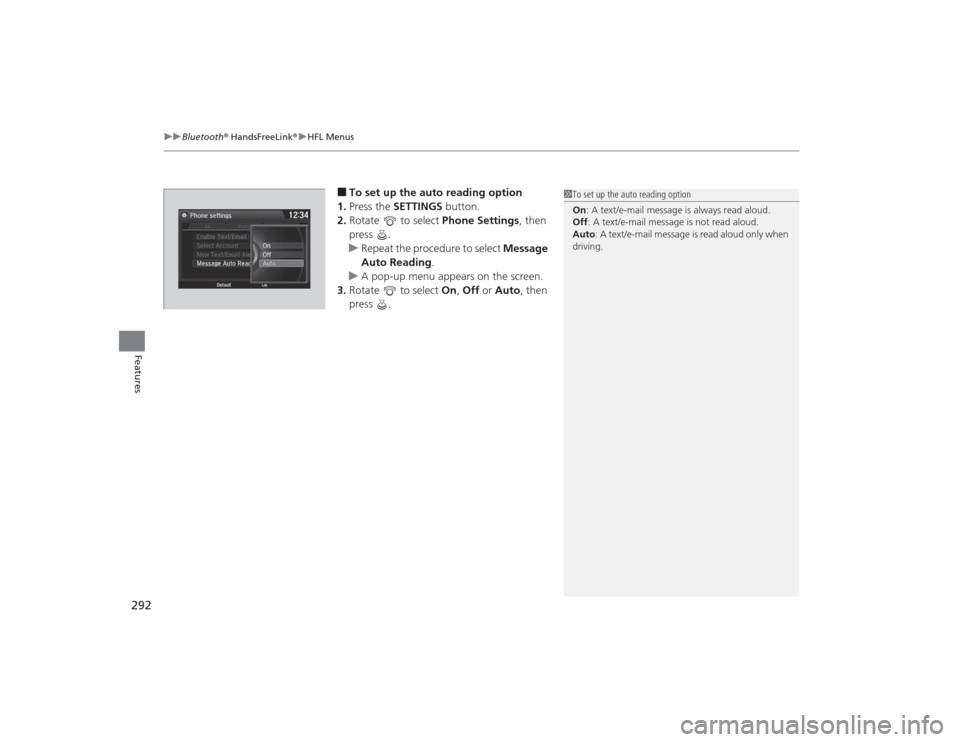
■To set up the auto reading option
1. Press the SETTINGS button.
2. Rotate to select Phone Settings, then
press .
u Repeat the procedure to select Message
Auto Reading .
u A pop-up menu appears on the screen.
3. Rotate to select On, Off or Auto , then
press .
1 To set up the auto reading option
On : A text/e-mail message is always read aloud.
Off : A text/e-mail message is not read aloud.
Auto : A text/e-mail message is read aloud only when
driving.
Page 294 of 545
Continued
293
uuBluetooth ® HandsFreeLink ®u HFL Menus
Features
You can protect each of the six cell phones with a security PIN.
1.Press the SETTINGS button.
2. Rotate to select Phone Settings, then
press .
u Repeat the procedure to select
Bluetooth Device List .
3. Rotate to select a phone you want to
add a security PIN to, then press .
4. Rotate to select Edit PIN, then press .
5. Enter a new four-digit number.
u Rotate to select, then press .
Move to delete. Rotate to select
OK to enter the security PIN.
u You can also enter a number using the
icons.
6. Re-enter the four-digit number.
u The screen returns to the screen in step
4.■
To Create a Security PIN
1To Create a Security PIN
If the phone is already security PIN protected, you
need to enter the current security PIN before clearing
the PIN or creating a new one.
Audio/information screenOn Demand Multi-Use Display
TM
Audio/information screenOn Demand Multi-Use Display
TM
Page 295 of 545
294
uuBluetooth ® HandsFreeLink ®u HFL Menus
Features
If you get into the vehicle while you are on the phone, the call can be automatically
transferred to HFL.
1.Press the SETTINGS button.
2. Rotate to select Phone Settings, then
press .
u Repeat the procedure to select Auto
Transfer .
3. Rotate to select On, then press .
You can set HFL to automatically answer an incoming call in four seconds. 1.Press the SETTINGS button.
2. Rotate to select Phone Settings, then
press .
u Repeat the procedure to select Auto
Answer.
3. Rotate to select On, then press .■
Automatic Transferring
■
Auto Answer
Page 296 of 545
Continued
295
uuBluetooth ® HandsFreeLink ®u HFL Menus
Features
You can change the ring tone setting.
1.Press the SETTINGS button.
2. Rotate to select Phone Settings, then
press .
u Repeat the procedure to select Ring
Tone .
3. Rotate to select Fixed, Mobile Phone
or Off , then press .
You can display a caller’s picture on an incoming call screen. 1.Press the SETTINGS button.
2. Rotate to select Phone Settings, then
press .
u Repeat the procedure to select Use
Contact Photo .
3. Rotate to select On or Off , then press
.■
Ring Tone
1 Ring Tone
Fixed: The fixed ring tone sounds from the speaker.
Mobile Phone : The ring tone stored in the
connected cell phone sounds from the speaker.
Off : No ring tones sound from the speaker.
■
Use Contact PhotoPhone settings
All PhoneAuto Transfer
Auto Answer
Ring Tone
Automatic Phone Sy
Use Contact Photo On
Off
Default
Page 297 of 545
uuBluetooth ® HandsFreeLink ®u HFL Menus
296Features
■When Automatic Phone Sync is set to
On:
When your phone is paired, the contents of its
phonebook and call history are automatically
imported to HFL.■Changing the Automatic Phone Sync
setting
1. Press the SETTINGS button.
2. Rotate to select Phone Settings, then
press .
u Repeat the procedure to select
Automatic Phone Sync .
3. Rotate to select On or Off , then press
.
■
Automatic Import of Cellular Phonebook and Call History
1 Automatic Import of Cellular Phonebook and Call History
When you select a person from the list in the cellular
phonebook, you can see up to three category icons.
The icons indicate what types of numbers are stored
for that name.
On some phones, it may not be possible to import the
category icons to HFL.
The phonebook is updated after every connection.
Call history is updated after every connection or call.
Preference
Home
Mobile
Work
Pager Fax
Car
Other Voice