Page 282 of 545
281
uuBluetooth ® HandsFreeLink ®u HFL Menus
Continued
Features
HFL MenusThe power mode must be in ACCESSORY or ON to use HFL.■Phone Settings screen
1.Press the SETTINGS button.
2. Rotate to select Phone Settings, then
press .
1 HFL Menus
To use HFL, you must first pair your Bluetooth-
compatible cell phone to the system while the vehicle
is parked.
Some functions are limit ed while driving. A message
appears on the screen when the vehicle is moving
and the operation is canceled.
Phone
Connect PhoneBluetooth
Device List
(Existing
entry list)
Replace This Device
Add Bluetooth Device
Disconnect a paired phone from the system.Connect a phone to the system.
*1: Appears only when a phone is connected to HFL.
Disconnect
(Existing entry list)
Pair a phone to the system.
Edit PIN
Create a security PIN for a paired phone. Replace a previously paired phone with a
new phone.
Delete This Device
Delete a previously paired phone.
Add Bluetooth Device
Pair a phone to the system.
Page 283 of 545

282
uuBluetooth ® HandsFreeLink ®u HFL Menus
Features
Manual Input
Edit Speed
Dial
New Entry
Import from Call History
Import from Phonebook
Delete All
Delete all the previously stored speed dial numbers.
Select a phone number from the call
history to store as a speed dial number.
Select a phone number from the
phonebook to store as a speed dial number. Enter a phone number to store as a speed
dial number.
Edit
Delete
(Existing
entry list)
Edit a previously stored speed dial number.●Change a number.●Create or delete a voice tag.Delete a previously stored speed dial
number.
Set calls to automatically transfer from your phone to HFL when you enter the
vehicle.
Auto TransferAuto AnswerRing Tone
Set whether to automatically answer an incoming call after about four
seconds.
Select the ring tone.
Use Contact Photo
Set phonebook data to be automatically imported when a phone is paired to
HFL.
Display a caller’s picture on an incoming call screen.
Automatic Phone Sync
Cancel/Reset all customized items in the Phone Settings group as default.
Default
Page 284 of 545
283
uuBluetooth ® HandsFreeLink ®u HFL Menus
Continued
Features
Select a mail or text message account.
Text/Email
*1
*1: Appears only when a phone is connected to HFL.
Select Account
Enable Text/Email
Turn the text/e-mail message function on and off.
New Text/Email Alert
Select whether a pop-up alert comes on the screen when HFL receives a new
text/e-mail message.
Message Auto Reading
Selects whether the system automatically reads out messages, and, if selected,
whether only when driving.
Page 285 of 545
284
uuBluetooth ® HandsFreeLink ®u HFL Menus
Features
■Phone screen
1.Press the PHONE button.
2. Press the MENU button to display the
menu items.
Select a phone number from the call history to store as a
speed dial number.
Speed Dial
*1
Manual Input
New Entry
Import from Call HistoryImport from Phonebook
Select a phone number from the phonebook to store as a
speed dial number.Enter a phone number to store as a speed dial number.
More Speed Dials
Display another paired phone’s speed dial list.
*1: Appears only when a phone is connected to HFL.
(Existing entry list)
Dial the selected number in the speed dial list.
Phonebook
*1
Dial
*1
Display the paired phone’s phonebook. Enter a phone number to dial.
Page 286 of 545
285
uuBluetooth ® HandsFreeLink ®u HFL Menus
Continued
Features
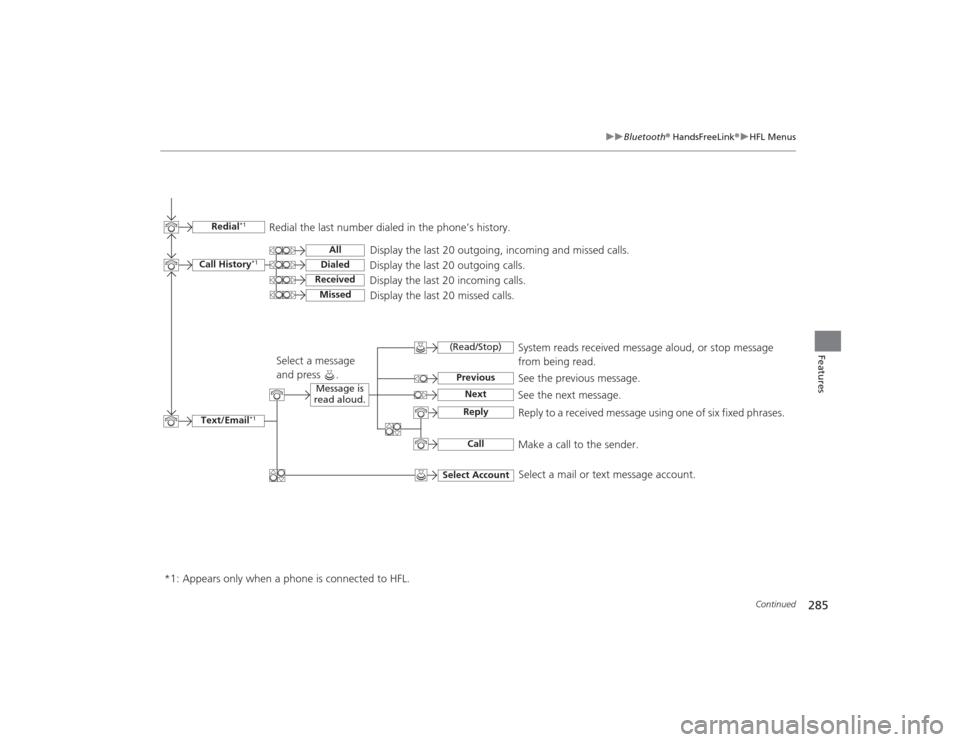
Text/Email
*1
Message is
read aloud.
See the previous message.
(Read/Stop)PreviousNext
See the next message. System reads received message aloud, or stop message
from being read.
ReplyCall
Reply to a received message us
ing one of six fixed phrases.
Make a call to the sender.
Select Account
Select a message
and press .
Select a mail or text message account.
Redial
*1
Redial the last number dialed in the phone’s history.
Display the last 20 outgoing, incoming and missed calls.
Call History
*1
AllDialedReceived
Display the last 20 outgoing calls.
Display the last 20 incoming calls.
Missed
Display the last 20 missed calls.
*1: Appears only when a phone is connected to HFL.
Page 287 of 545

uuBluetooth ® HandsFreeLink ®u HFL Menus
286Features
■To pair a cell phone (when there is no
phone paired to the system)
1. Press the PHONE button.
2. Rotate to select Yes, then press .
3. Make sure your phone is search or
discoverable mode, then press .
u HFL automatically searches for a
Bluetooth device.
4. When your phone appears on the list, select
it by pressing .
u If your phone does not appear, you can
select Refresh to search again.
u If your phone still does not appear, move
to select Device Not Found? and
search for Bluetooth devices using your
phone. From your phone, select
HandsFreeLink .
5. HFL gives you a pairing code on the audio/
information screen.
u Confirm if the pairing code on the screen
and your phone match.
This may vary by phone.
6. A notification appears on the screen if
pairing is successful.
■
Phone Setup
1Phone Setup
Your Bluetooth -compatible phone must be paired to
HFL before you can make and receive hands-free
calls.
Phone Pairing Tips:•You cannot pair your phone while the vehicle is
moving.•Up to six phones can be paired.•Your phone’s battery may drain faster when it is
connected to HFL.•If your phone is not ready for pairing or not found
by the system within three minutes, the system will
time out and returns to idle.
Once you have paired a phone, you can see it
displayed on the screen with one or two icons on the
right side.
These icons indicate the following: : The phone can be used with HFL.
: The phone is compatible with Bluetooth ® Audio.
When pairing is completed, an Automatic Phone
Sync prompt appears. Select On if you want your call
history and phonebook automatically imported to
HFL.
2 Changing the Automatic Phone Sync
setting P. 296
Page 288 of 545
287
uuBluetooth ® HandsFreeLink ®u HFL Menus
Continued
Features
■To pair a cell phone (when a phone has
already been paired to the system)
1. Press the SETTINGS button.
2. Rotate to select Phone Settings, then
press .
u Repeat the procedure to select Connect
Phone , then Add Bluetooth device .
3. Make sure your phone is in search or
discoverable mode, then press .
u HFL automatically searches for a
Bluetooth device.
4. When your phone appears on the list, select
it by pressing .
u If your phone does not appear, you can
select Refresh to search again.
u If your phone still does not appear, move
to select Device Not Found? and
search for Bluetooth devices using your
phone. From your phone, select
HandsFreeLink .
5. HFL gives you a pairing code on the audio/
information screen.
u Confirm if the pairing code on the screen
and your phone match.
This may vary by phone.
6. A notification appears on the screen if
pairing is successful.
Page 289 of 545
uuBluetooth ® HandsFreeLink ®u HFL Menus
288Features
■To change the pairing code setting
1. Press the SETTINGS button.
2. Rotate to select System Settings, then
press .
u Repeat the procedure to select Edit
pairing code .
3. Rotate to select Fixed or Random ,
then press .
1 To change the pairing code setting
The pairing code may be six or four digits depending
on your phone.
The default pairing code is 0000 until you change the
setting.
To create your own, select Fixed, and delete the
current code, then enter a new one.
For a randomly generated pairing code each time you
pair a phone, select Random.