Page 280 of 505
279
uuBluetooth ® HandsFreeLink ®u HFL Menus
Continued
Features
■To delete a paired phone
1. Press the SETTINGS button.
2. Rotate to select Phone Settings, then
press .
u Repeat the procedure to select
Bluetooth Device List .
3. Rotate to select a phone you want to
delete, then press .
4. Rotate to select Delete This Device ,
then press .
5. A confirmation message appears on the
screen. Rotate to select Yes, then press
.
6. A notification appears on the screen if
pairing is successful.
Page 283 of 505
282
uuBluetooth ® HandsFreeLink ®u HFL Menus
Features
Edit the user name of a paired phone as
follows:
1. Press the SETTINGS button.
2. Rotate to select Phone Settings, then
press .
u Repeat the procedure to select
Bluetooth Device List .
3. Rotate to select a phone you want to
edit, then press .
4. Rotate to select Edit Device Name,
then press .
5. Enter a new name of the phone.
u Rotate to select, then press .
Move to delete. Rotate or move
to select OK then press to enter the
name.
u You can also enter a name using the
icons.
■
Editing User NameAudio/information screenOn Demand Multi-Use Display
TM
Audio/information screenOn Demand Multi-Use Display
TM
Page 286 of 505
Continued
285
uuBluetooth ® HandsFreeLink ®u HFL Menus
Features
■When Automatic Phone Sync is set to
On:
When your phone is paired, the contents of its
phonebook and call history are automatically
imported to HFL.■Changing the Automatic Phone Sync
setting
1. Press the SETTINGS button.
2. Rotate to select Phone Settings, then
press .
u Repeat the procedure to select
Automatic Phone Sync .
3. Rotate to select On or Off , then press
.
■
Automatic Import of Cellular Phonebook and Call History
1 Automatic Import of Cellular Phonebook and Call History
When you select a person from the list in the cellular
phonebook, you can see up to three category icons.
The icons indicate what types of numbers are stored
for that name.
On some phones, it may not be possible to import the
category icons to HFL.
The phonebook is updated after every connection.
Call history is updated after every connection or call.
Pref
Home
Mobile
Work
Pager Fax
Car
Other
Message
Voice
Page 294 of 505
Continued
293
uuBluetooth ® HandsFreeLink ®u HFL Menus
Features
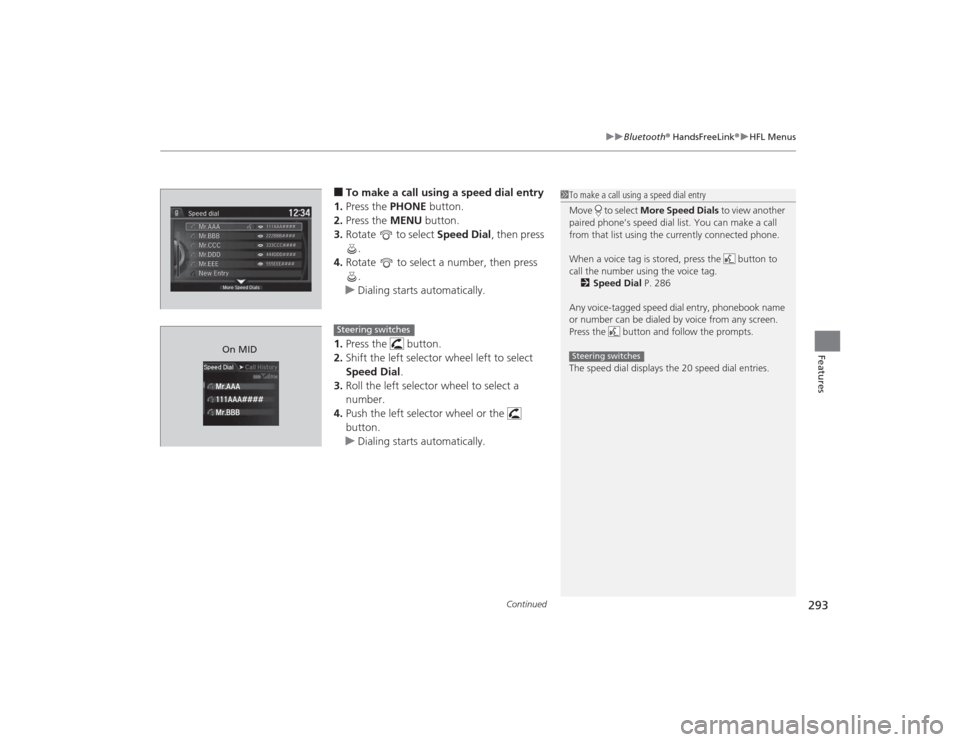
■To make a call using a speed dial entry
1. Press the PHONE button.
2. Press the MENU button.
3. Rotate to select Speed Dial, then press
.
4. Rotate to select a number, then press
.
u Dialing starts automatically.
1. Press the button.
2. Shift the left selector wheel left to select
Speed Dial .
3. Roll the left selector wheel to select a
number.
4. Push the left selector wheel or the
button.
u Dialing starts automatically.
1To make a call using a speed dial entry
Move to select More Speed Dials to view another
paired phone’s speed dial list. You can make a call
from that list using the currently connected phone.
When a voice tag is stored, press the button to
call the number using the voice tag. 2 Speed Dial P. 286
Any voice-tagged speed dial entry, phonebook name
or number can be dialed by voice from any screen.
Press the button and follow the prompts.
The speed dial displays the 20 speed dial entries.Steering switches
111AAA#### Mr.AAA
Mr.BBBOn MID
Steering switches
Page 297 of 505

uuBluetooth ® HandsFreeLink ®u HFL Menus
296Features
HFL can display newly received text messages and e-mails as well as 20 of the most
recently received messages on a linked cell phone. Each received message can be
read aloud and replied to using a fixed common phrase.
1.A pop-up appears and notifies you of a new
text message or e-mails.
2. Rotate to select Read to listen to the
message, then press .
u The text message or e-mail is displayed.
The system automatically starts reading
out the message.
3. To discontinue the message read-out, press
.■
Receiving a Text Message/e-mail
1Receiving a Text Message/e-mail
The system does not display any received messages
while you are driving. You can only hear them read
aloud.
With some phones, you may be able to display up to
20 most recent text messages and e-mail.
State or local laws may limit your use of the HFL text
message/e-mail feature. Only use the text message/
e-mail feature when conditions allow you to do so
safely.
When you receive a text message or e-mail for the
first time since the phone is paired to HFL, you are
asked to turn the New Text/Email Alert setting to
On .
2 To turn on or off the text/e-mail notice
P. 280
Page 298 of 505
Continued
297
uuBluetooth ® HandsFreeLink ®u HFL Menus
Features
If a paired phone has text message or mail accounts, you can select one of them to
be active and receive notifications.
1.Press the SETTINGS button.
2. Rotate to select Phone Settings, then
press .
u Repeat the procedure to select Select
Account .
3. Rotate to select Text Messages or an
e-mail account you want, then press .■
Selecting a Mail Account
1 Selecting a Mail Account
You can also select a mail account from the folder list
screen or the message list screen.
Move to select Select Account, then press .
You can only receive notifications from one text
message or mail account at a time.
Page 307 of 505

306Driving
Before DrivingDriving PreparationCheck the following items before you start driving.
•Make sure there are no obstructions on the windows, door mirrors, exterior
lights, or other parts of the vehicle.
u Remove any frost, snow, or ice.
u Remove any snow on the roof, as this can slip down and obstruct your field of
vision while driving. If frozen solid, remove ice once it has softened.
u When removing ice from around the wheels, be sure not to damage the wheel
or wheel components.
• Make sure the hood is securely closed.
u If the hood opens while driving, your front view will be blocked.
• Make sure the tires are in good condition.
u Check air pressure, check for damage and excessive wear.
2 Checking and Maintaining Tires P. 421
•Make sure there are no people or objects behind or around the vehicle.
u There are blind spots from the inside.■
Exterior Checks
1Exterior ChecksNOTICEWhen doors are frozen shut, use warm water around
the door edges to melt any ice. Do not try to force
them open, as this can damage the rubber trim
around the doors. When done, wipe dry to avoid
further freezing.
Do not pour warm water into the key cylinder.
You will be unable to insert the key if the water
freezes in the hole.
Heat from the engine and exhaust can ignite
flammable materials left under the hood, causing a
fire. If you’ve parked your vehicle for an extended
period, inspect and remove any debris that may have
collected, such as dried grass and leaves that have
fallen or have been carried in for use as a nest by a
small animal.
Also check under the hood for leftover flammable
materials after you or someone else has performed
maintenance on your vehicle.
Page 325 of 505

324Driving
When DrivingStarting the Engine
1.Make sure the parking brake is applied.
2. Check that the shift lever is in
(P
, then
depress the brake pedal.
u Although it is possible to start the vehicle
in
(N
, it is safer to start it in
(P
.
3. Press the ENGINE START/STOP button
without depressing the accelerator pedal.
The engine will crank until it starts.
1 Starting the Engine
Keep your foot firmly on the brake pedal when
starting the engine.
The engine is harder to start in cold weather and in
thinner air found at altitudes above 8,000 feet (2,400
meters).When starting the engine in cold weather, turn off all
electrical accessories such as the lights, climate control
system, and rear defogger in order to reduce battery drain.If you live in a region where winter is extremely cold,
an engine block heater will improve starting and
warming of the engine. If temperatures consistently
below -22°F (-30°C) are expected, the coolant
mixture should be changed to a higher concentration
to prevent freezing. Consult a dealer for details.
If the exhaust system sounds abnormal or you can
smell exhaust gas inside the vehicle, have your vehicle
checked by a dealer. There may be a problem with
the engine or exhaust system.
Bring the keyless access remote close to the ENGINE
START/STOP button if the battery in the keyless
access remote is weak. 2 If the Keyless Access Remote Battery is
Weak P. 463
The engine may not start if the keyless access remote
is subjected to strong radio waves.
Do not hold the ENGINE START/STOP button to
start the engine.
If the engine does not start, wait at least 10 seconds
before trying again.
Brake Pedal


