2015 Acura MDX air
[x] Cancel search: airPage 328 of 505
Continued
327
uuWhen Driving uStarting the Engine
Driving
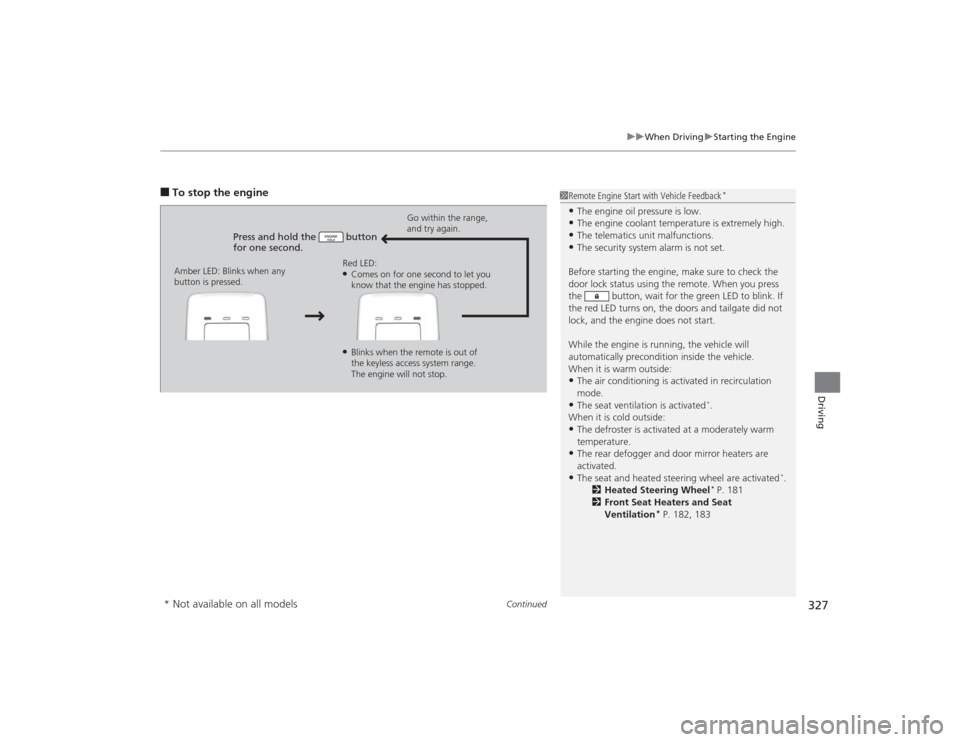
■To stop the engine
Press and hold the button
for one second.
Go within the range,
and try again.
Amber LED: Blinks when any
button is pressed. Red LED:
●Comes on for one second to let you
know that the engine has stopped.●Blinks when the remote is out of
the keyless access system range.
The engine will not stop.
1
Remote Engine Start with Vehicle Feedback
*
•The engine oil pressure is low.•The engine coolant temperature is extremely high.•The telematics unit malfunctions.•The security system alarm is not set.
Before starting the engine, make sure to check the
door lock status using the remote. When you press
the button, wait for the green LED to blink. If
the red LED turns on, the doors and tailgate did not
lock, and the engine does not start.
While the engine is running, the vehicle will
automatically precondition inside the vehicle.
When it is warm outside:•The air conditioning is activated in recirculation
mode.•The seat ventilation is activated
*.
When it is cold outside:
•The defroster is activated at a moderately warm
temperature.•The rear defogger and door mirror heaters are
activated.•The seat and heated steering wheel are activated
*.
2 Heated Steering Wheel
* P. 181
2 Front Seat Heaters and Seat
Ventilation
* P. 182, 183
* Not available on all models
Page 352 of 505

Continued
351
uuWhen Driving uForward Collision Warning (FCW)
*
Driving
1Forward Collision Warning (FCW)
*
Never apply a film or attach any objects to the
windshield that could obstruct the FCW camera’s
field of vision.
Scratches, nicks, and other damage to the windshield
within the FCW camera’s field of vision can cause the
system to operate abnormally. If this occurs, we
recommend that you replace the windshield with a
genuine Acura replacement windshield. Making even
minor repairs withi n the camera’s field of vision or
installing an aftermarket replacement windshield
may also cause the system to operate abnormally.
After replacing the windshield, have a dealer
recalibrate the camera. Proper calibration of the FCW
camera is necessary for the system to operate
properly.
Beep The camera is located
behind the rearview mirror.
The beeper sounds and the BRAKE message
appears in the MID until a possible collision is
avoided.
* Not available on all models
Page 356 of 505

Continued
355
uuWhen Driving uLane Departure Warning (LDW)
*
Driving
The camera is located behind the rearview
mirror.
Press the LDW button to turn the system on
and off. u The indicator in the button comes on
when the system is on.
■
LDW Camera
1LDW Camera
Never apply a film or attach any objects to the
windshield that could obstruct the LDW camera’s
field of vision.
Scratches, nicks, and other damage to the windshield
within the LDW camera’s field of vision can cause the
system to operate abnormally. If this occurs, we
recommend that you replace the windshield with a
genuine Acura replacement windshield. Making even
minor repairs withi n the camera’s field of vision or
installing an aftermarket replacement windshield
may also cause the system to operate abnormally.
After replacing the windshield, have a dealer
recalibrate the camera. Proper calibration of the LDW
camera is necessary for the system to operate properly.
Do not place an object on the top of the instrument
panel. It may reflect onto the windshield and prevent
the system from detecting lane lines properly.
To help reduce the likelihood that high interior
temperatures will cause the camera system to shut off,
when parking, find a shady area or face the front of the
vehicle away from the sun. Also, do not use a reflective
sun shade that can concentrate heat on the camera.
If the Can Not Operate: Camera Too Hot message
appears:•Use the climate control system to cool down the
interior and, if necessary, the defroster mode when
windows are fogged.•Start driving the vehicle to lower the windshield
temperature, which cools down the area around
the LDW camera.
LDW Camera■
LDW On and Off
LDW Button
Indicator
Page 357 of 505

356
uuWhen Driving uLane Departure Warning (LDW)
*
Driving
LDW may not activate or may not recognize lanes, and may activate even when
keeping in the middle of a lane, under the following conditions.■
LDW Limitations
Condition
●When you drive in bad weather (rain, fog, etc.).●A heavy load in the rear or modifications to the suspension tilts your vehicle.●An abnormal tire condition is detected (wrong tire size, flat tire, etc.).●When the windshield is blocked by dirt, mud, leaves, wet snow, etc.●When the temperature inside the system is high.●A sudden change between light and dark such as an entrance or exit of a tunnel.●You drive into the sunlight (e.g. at dawn or dusk).●When the windshield is dirty or cloudy.●When you drive in the shadows of trees, buildings, etc.●When your vehicle is towing a trailer.●When you drive on a wet road surface following another vehicle.u
The camera may perceive the tire tracks in the water as lane lines.
●When there is snow or wheel tracks on the side of the road.●When the road has many repaired area or an erased lane line.●When the vehicle is running over painted signs or crosswalk markings.●When you drive in a lane with worn-out lane markings.
Page 358 of 505

357
uuWhen Driving uLane Keeping Assist System (LKAS)
*
Continued
Driving
Lane Keeping Assist System (LKAS)
*
Provides steering input to help keep the vehicle in the middle of a detected lane and
provides audible and visual alerts if the vehicle is detected drifting out of its lane.
1Lane Keeping Assist System (LKAS)
*
Important Safety Reminders
The LKAS is for your convenience only. It is not a
substitute for your vehicle control. The system does
not work if you take your hands off the steering
wheel or fail to steer the vehicle.
2 Multi-Information Display (MID) Warning
and Information Messages P. 96
Do not place an object on the top of the instrument
panel. It may reflect onto the windshield and prevent
the system from detecting lane lines properly.
The LKAS is convenient when it is used on freeways.
The LKAS may not work properly under the following
conditions:•Your tires are over or under inflated.•Your tires or wheels are of varied size or
construction.•Your vehicle’s suspension has been altered,
changing the height of the vehicle.•Your vehicle has heavy load in the trunk or on the
rear seats.•A compact spare tire
* is mounted.
•Driving on snowy or wet roads.•Roadway lane markers are difficult to see due to
weather (rain, snow, fog, etc.) or road conditions.•Driving on a road with temporary lane markings.•Multiple or varied lane markings are visible on the
pavement due to road repairs or old lane markings.•Roadway objects or structures are misinterpreted
as lane markers.•On non-freeway roadways and on freeways with
many curves.
■Steering input assist
The system applies torque to the
steering to keep the vehicle between
the left and right lane lines. The
applied torque becomes stronger as the
vehicle gets closer to either of the lane
lines.
■Audible and visual alerts
Beeps and a warning display alert
you that the vehicle is drifting out of
a detected lane.
When you operate the turn signals to change lanes, the system is suspended, and
resumes after the signals are off.
If you make a lane change without operating the turn signals, the LKAS alerts
activate, and torque is applied to the steering.
■LKAS camera
Monitors the lane
lines
* Not available on all models
Page 359 of 505

uuWhen Driving uLane Keeping Assist System (LKAS)
*
358Driving
The system can be used when the following conditions are met.
• The lane you are driving in has detectable lane markers on both sides, and your
vehicle is in the center of the lane.
• The vehicle speed is between 45 and 90 mph (72 and 145 km/h).
• You are driving on a straight or slightly curved road.
• The turn signals are off.
• The brake pedal is not depressed.
• The wipers are not in continuous operation.■How to activate the system
1.Press the MAIN button.
u The LKAS is on in the MID.
The system is ready to use.
2. Press the LKAS button.
u Lane outlines appear on the multi-
information display.
The system is activated.■
When the System can be Used
1Lane Keeping Assist System (LKAS)
*
•Shadows of adjacent objects are parallel to lane
markings.•The windshield is dirty.•Where the roadway has crossing or other lines
(e.g., such as at an intersection).
1LKAS camera
Never apply a film or attach any objects to the
windshield that could obstruct the LKAS camera’s
field of vision.
Scratches, nicks, and other damage to the windshield
within the LKAS camera’s field of vision can cause the
system to operate abnormally. If this occurs, we
recommend that you replace the windshield with a
genuine Acura replacement windshield. Making even
minor repairs withi n the camera’s field of vision or
installing an aftermarket replacement windshield
may also cause the system to operate abnormally.
After replacing the windshield, have a dealer
recalibrate the camera. Proper calibration of the LKAS
camera is necessary for the system to operate properly.
If the Can Not Operate: Camera Too Hot message
appears:•Use the climate control system to cool down the
interior and, if necessary, the defroster mode when
windows are fogged.•Start driving the vehicle to lower the windshield
temperature, which cools down the area around
the LKAS camera.
1 When the System can be Used
If the vehicle drifts toward either left or right lane line
due to the system applying torque, turn off the LKAS
and have your vehicle checked by a dealer.
MAIN Button
LKAS Button
* Not available on all models
Page 362 of 505

361
uuWhen Driving uLane Keeping Assist System (LKAS)
*
Driving
The system may not detect lane markings and the position of your vehicle properly
under the following conditions.■
LKAS Limitations
Condition
●The vehicle interior is reflected onto the front windshield.●Headlight lenses are dirty or the headlights are not properly adjusted.●The windshield is fogged.●Driving on snowy or wet roads.●The ambient brightness suddenly changes (e.g., at the entrance or exit of a tunnel).●You drive into the low sun (e.g., at dawn or dusk).●A strong light is reflected onto the roadway.●Roadway lane markers are difficult to see due to weather (rain, snow, fog, etc.) or road conditions.●Driving on a road with temporary lane markings.●Multiple or varied lane markings are visible on the roadway due to road repairs or old lane markings.●Roadway objects or structures are misinterpreted as lane markers.●There is little contrast between lane lines and the roadway surface.●The vehicle in front of you is driving near the lane lines.●Driving over bumps.●Where marked lanes merge or split.●Where the lane is extremely narrow, wide or changing.●Where the road is hilly or the vehicle is approaching the crest of a hill.
Page 367 of 505

uuWhen Driving uBlind Spot Information (BSI) System
*
366Driving
■When the system detects a vehicle
1Blind Spot Information (BSI) System
*
You can change the setting for BSI.
2 Customizable Features P. 107
Turn the system off when towing a trailer.
The system may not work properly for the following
reasons:•The added mass tilts the vehicle and changes the
radar coverage.•The trailer itself can be detected by the radar
sensors, causing the BSI alert indicators to come on.
BSI may be adversely affected when:•Objects (guard rails, poles, trees, etc,.) are
detected.•An object that does not reflect radio waves well,
such as a motorcycle, is in the alert zone.•Driving on a curved road.•A vehicle is moving from a far lane to the adjacent
lane.•The system picks up external electrical interference.•The rear bumper or the sensors have been improperly
repaired or the rear bumper has been deformed.•The orientation of the sensors has been changed.•In bad weather (Heavy rain, snow, and fog).
For proper BSI use:•Always keep the rear bumper corner area clean.•Do not cover the rear bumper corner area with
labels or stickers of any kind. •Take your vehicle to a dealer if you need the rear
bumper corner area or the radar sensors to be repaired,
or the rear bumper corner area is strongly impacted.
■Comes on when●A vehicle enters the alert zone from behind
to overtake you with a speed difference of
no more than 31 mph (50 km/h) from your
vehicle.●You pass a vehicle with a speed difference
of no more than 12 mph (20 km/h).
BSI Alert Indicator: Located near the outside
rearview mirror on both sides.■Blinks and the beeper sounds when
You move the turn signal lever in the direction
of the detected vehicle. The beeper sounds
three times. Comes On
Blinks
* Not available on all models