2014 VOLVO V60 light
[x] Cancel search: lightPage 248 of 442

||
07 Driver support
07
246* Option/accessory, for more information, see Introduction.
Cars with reversing sensors*
Four coloured areas (one per sensor) show dis- tance.
If the car is also equipped with parking assis- tance sensors (parking assistance sensors (p.240)) the distance indication will be more pre-cise and the coloured areas show which ofthe 4 sensors is/are registering an obstacle.
Colour / paintDistance (metres)
Light yellow0.7–1.5
Yellow0,5–0,7
Orange0,3–0,5
Red0–0.3
Related information
• Park assist camera - settings (p. 246)
• Park assist camera - limitations (p. 247) •
Park Assist* (p. 240)
Park assist camera - settings
The parking camera is an assist system and is activated when reverse gear is engaged.
SettingsTo change the settings for the parking cam-era:
1. Press
OK/MENU when a camera view is
shown.
2. Turn to reach the desired option with OK/
MENU .
3. Press OK/MENU and back out with EXIT.
or
1. Press CAM.
2. Press OK/MENU .
3. Turn to reach the desired option with OK/
MENU .
4. Press OK/MENU and back out with EXIT.
MiscellaneousThe default setting is that the camera is acti- vated when reverse gear is engaged. •One press on
CAM activates the camera
even if reverse gear is not engaged.
• Change between normal and zoomed image by turning
TUNE or by pressing
CAM .
TowbarThe camera can be used with advantage for coupling a trailer. A park assist line for the
ProCarManuals.co’
Page 256 of 442

07 Driver support
07
254* Option/accessory, for more information, see Introduction.
BLIS* (Blind Spot Information System) - operation
BLIS (Blind Spot Information System) is a function designed for providing support forthe driver when driving in dense traffic onroads with several lanes in the same direction.
Activate/deactivate BLISBLIS is activated when the engine is started.This is confirmed by the indicator lamps inthe door panels flashing once.
Button for activating/deactivating.
The BLIS function can be deactivated/acti-
vated by pressing the BLIS button on the
centre console. Some combinations of the selected equip- ment leave no vacant space for a button inthe centre console - in which case the func-tion is handled by the car's menu system (p.103) MY CAR . When BLIS is deactivated/activated the lampin the button extinguishes/illuminates and thecombined instrument panel confirms thechange with a text message. The door panelindicator lamps flash once upon activation. To extinguish the message:
• Press the left stalk switch
OK button.
or
• Wait approx. 5 seconds - the message extinguishes.
When BLIS operates
Principle for BLIS: 1. Zone in blind spot. 2. Zone for rapidly approaching vehicle.
The BLIS function is active at speeds above approx. 10 km/h. The system is designed to react when: •
the driver's vehicle is overtaken by other vehicles
• the driver's vehicle is rapidly caught upby another vehicle.
When BLIS detects a vehicle in zone 1 or a quickly approaching vehicle in zone 2, thedoor panel BLIS lamp illuminates with a con-stant glow. If the driver activates the directionindicator on the same side as the warning inthis situation then the BLIS lamp will changefrom a constant glow to flashing with a moreintense light.
WARNING
BLIS does not work in sharp bends. BLIS does not work when the car is being reversed.
Limitations
• Dirt, ice and snow covering sensors can reduce functionality and make it impossi-ble to provide warnings. BLIS cannotdetect hazards if it is covered.
• Do not affix any objects, tape or labels inthe area of the sensors.
• BLIS is deactivated when a trailer is con-nected to the car's electrical system.
ProCarManuals.co’
Page 259 of 442
07 Driver support
07
* Option/accessory, for more information, see Introduction.257
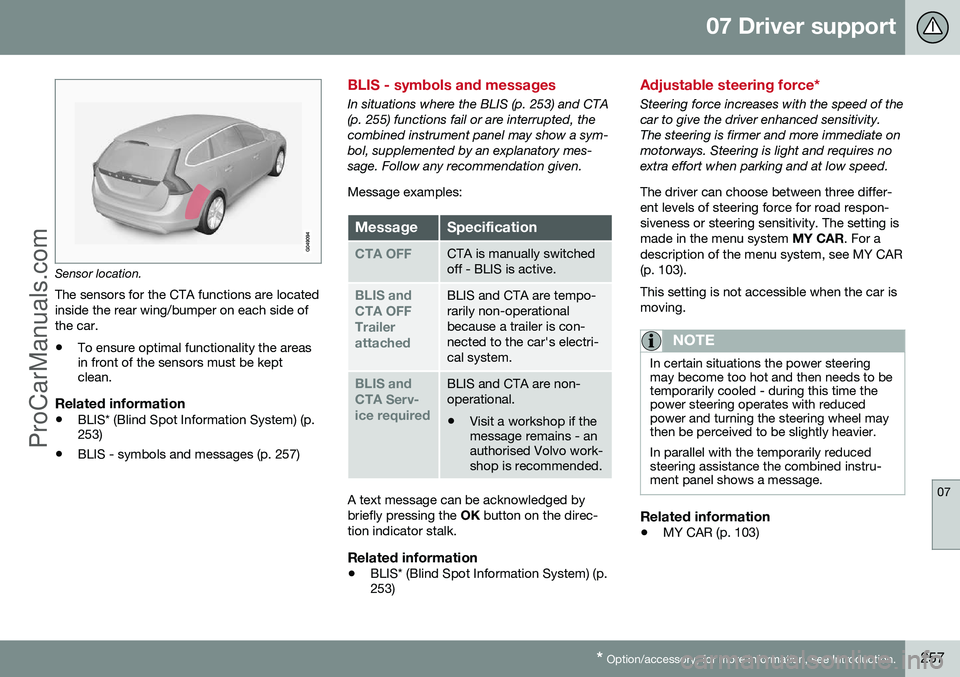
Sensor location.
The sensors for the CTA functions are located inside the rear wing/bumper on each side ofthe car.
• To ensure optimal functionality the areas in front of the sensors must be keptclean.
Related information
•BLIS* (Blind Spot Information System) (p.253)
• BLIS - symbols and messages (p. 257)
BLIS - symbols and messages
In situations where the BLIS (p. 253) and CTA (p. 255) functions fail or are interrupted, thecombined instrument panel may show a sym-bol, supplemented by an explanatory mes-sage. Follow any recommendation given. Message examples:
MessageSpecification
CTA OFFCTA is manually switched off - BLIS is active.
BLIS and CTA OFFTrailerattachedBLIS and CTA are tempo- rarily non-operationalbecause a trailer is con-nected to the car's electri-cal system.
BLIS and CTA Serv-ice requiredBLIS and CTA are non- operational.
• Visit a workshop if the message remains - anauthorised Volvo work-shop is recommended.
A text message can be acknowledged by briefly pressing the
OK button on the direc-
tion indicator stalk.
Related information
• BLIS* (Blind Spot Information System) (p. 253)
Adjustable steering force*
Steering force increases with the speed of the car to give the driver enhanced sensitivity.The steering is firmer and more immediate onmotorways. Steering is light and requires noextra effort when parking and at low speed. The driver can choose between three differ- ent levels of steering force for road respon-siveness or steering sensitivity. The setting ismade in the menu system
MY CAR. For a
description of the menu system, see MY CAR(p. 103). This setting is not accessible when the car is moving.
NOTE
In certain situations the power steering may become too hot and then needs to betemporarily cooled - during this time thepower steering operates with reducedpower and turning the steering wheel maythen be perceived to be slightly heavier. In parallel with the temporarily reduced steering assistance the combined instru-ment panel shows a message.
Related information
• MY CAR (p. 103)
ProCarManuals.co’
Page 262 of 442

08 Starting and driving
08
260* Option/accessory, for more information, see Introduction.
Alcolock* - storage
Store the Alcolock in its holder. Release the handheld unit by depressing it slightly in itsholder and releasing it - it then springs outand can be removed from the holder.
Handheld unit storage and charging station.
• Replace the handheld unit in the holder by pushing it in until it engages.
• Store the handheld unit in the holder -this provides it with the best protectionand keeps its batteries fully charged.
Related information
• Alcolock* - functions and operation (p.259)
• Alcolock* - before starting the engine (p.260)
• Alcolock* (p. 259)
• Alcolock* - to bear in mind (p. 261) •
Alcolock* - symbols and text messages(p. 263)
Alcolock* - before starting the engine
The Alcolock is activated automatically and is then ready for use when the car is opened.
1. When the indicator lamp (6) is green the
Alcolock is ready for use.
2. Withdraw the Alcolock from its holder. If the Alcolock is outside the car when it is unlocked then it must first be activatedwith the switch (2).
3. Fold up the nozzle (1), take a deep breath and blow with an even pressure until a"click" is heard after approx. 5 seconds.The result will be one of the alternatives inthe following table Result after breath
test .
4. If no message is shown then the trans- mission to the car may have failed - inwhich case, press the button (3) to trans-mit the result to the car manually.
5. Fold down the nozzle and refit the Alco- lock in its holder.
6. Start the engine following an approved breath test within 5 minutes - otherwise itmust be repeated.
ProCarManuals.co’
Page 268 of 442
08 Starting and driving
08
266* Option/accessory, for more information, see Introduction.
Remote start (ERS)*
Remote start (ERS – Engine Remote Start) means that the car's engine can be startedremotely using the remote control key or thePCC key. This is so that the passenger com-partment can be warmed up/cooled downbefore departure. The climate control system and audio system start with the same settings that were in usewhen the car was parked. An ERS-started engine is activated for a maximum of 15 minutes, then it is switchedoff. After two ERS-activations the enginemust be started in the normal way beforeERS can be re-used. The optional ERS function is available on most cars with automatic gearbox.
NOTE
The service life of the remote control key's battery is affected by the ERS function. Inthe event of frequent use of ERS the bat-tery should therefore be changed once peryear, see Remote control key/PCC -replacing the battery (p. 158).
NOTE
Follow local/national rules/regulations on idling.
WARNING
To remote-start the engine, the following criteria must be met:
• The car must be supervised.
• There must be no people or animals inside the car.
• The car must not be parked in aclosed, unventilated area - the exhaustgases may seriously injure humansand animals.
Related information
•
Remote start (ERS) - operation (p. 266)
• Remote start (ERS) - symbols and mes- sages (p. 268)
Remote start (ERS) - operation
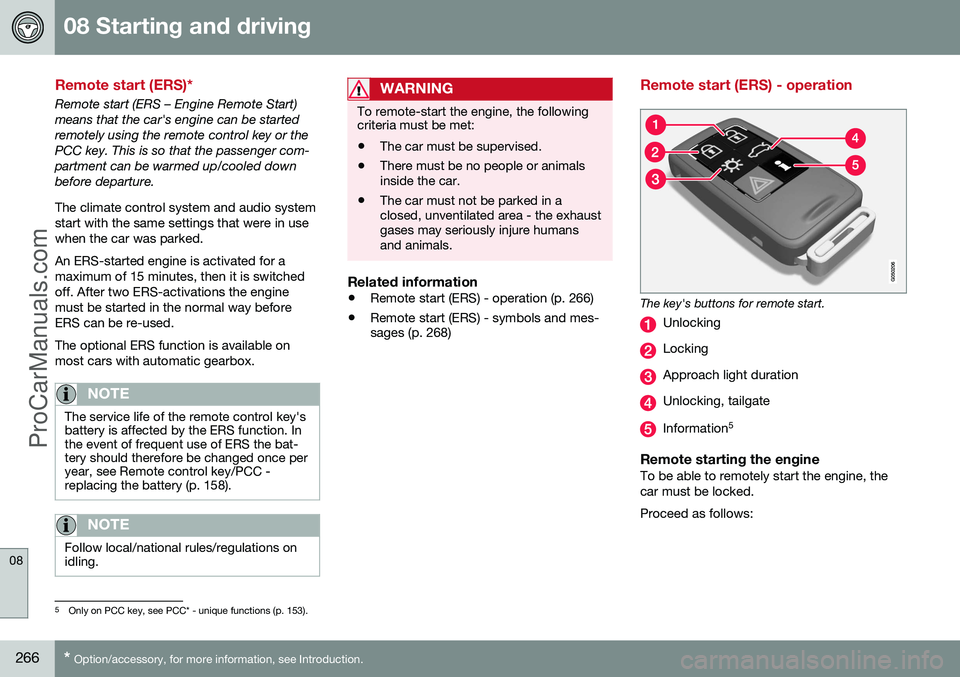
The key's buttons for remote start.
Unlocking
Locking
Approach light duration
Unlocking, tailgate
Information 5
Remote starting the engineTo be able to remotely start the engine, the car must be locked. Proceed as follows:
5
Only on PCC key, see PCC* - unique functions (p. 153).
ProCarManuals.co’
Page 269 of 442

08 Starting and driving
08
* Option/accessory, for more information, see Introduction.267
1. Briefly press on the key's button (2).
2. Follow this immediately afterwards with a
long press - at least 2 seconds - on button (3).
If the conditions for ERS are fulfilled then the following takes place:
1. The direction indicators flash quickly sev- eral times.
2. The engine starts.
3. The direction indicators illuminate with a constant glow for 3 seconds to verify that the engine has started.
NOTE
After remote starting, the car continues to be locked but with deactivated movementdetector*.
With PCC 6
keyThe light indication for Approach lighting 7
flashes several times when
the button is pressed and then goes to constant glow if all criteria for
ERS have been fulfilled. However, this doesnot mean that ERS has started the engine. To check whether ERS has started the engine, the user can press the button (5) - ifthe engine has started, there is a light indica-tion by the buttons (2) and (3).
Active functionsThe following functions are activated with a remote started engine: • Ventilation system
• Audio/video system
• Approach light duration.
Deactivated functionsThe following functions are deactivated with a remote started engine: • Headlamps
• Position lamps
• Number plate lighting
• Windscreen wiper.
ERS is interruptedThe following steps switch off an ERS-started engine: • The remote control key's button (1), (2) or (4) is depressed
• The car is unlocked
• A door is opened
• Accelerator pedal or brake pedal isdepressed
• The gear selector is moved out of
P posi-
tion
• There is approx.10 litres left in the fueltank •
Active ERS time exceeds 15 minutes.
When an ERS-started engine is switched off, the direction indicators illuminate with a con-stant glow for 3 seconds.
Related information
• Remote start (ERS)* (p. 266)
• Remote start (ERS) - symbols and mes- sages (p. 268)
6
For more information on the PCC key, see PCC* - unique functions (p. 153).7
For more information on Approach lighting, see Remote control key - functions (p. 151) and Approach light duration (p. 89).
ProCarManuals.co’
Page 271 of 442

08 Starting and driving
08
}}
* Option/accessory, for more information, see Introduction.269
Starting the engine – Flexifuel
Flexifuel engines can be driven on 95 octane unleaded petrol and bioethanol E85. Theengine is started in the same way as in a pet-rol-driven car.
Engine block heater*
Electrical input to the engine block heater.
Cars intended for E85 have an electric engine block heater. Starting and driving with a pre-heated engine means significantly reducedemissions and reduced fuel consumption. Forthis reason you should aim to use the engineblock heater throughout the winter months. • In outside temperatures between +5 °C and -10 °C, the electric engineblock heater should be activated for atleast 1 hour.
• In outside temperatures between-10 °C and -20 °C, the electric engine block heater should be activated for atleast 2 hours.
• In outside temperatures lower than-20 °C, the electric engine block heatershould be activated for at least 3 hours.
WARNING
The engine block heater is powered by high voltage. Fault tracing and repair of anelectric engine block heater and its electri-cal connections must only be carried outby a workshop - an authorised Volvo work-shop is recommended.
NOTE
Points to remember for carrying reserve fuel:
• In the event of stalling due to an empty fuel tank, bioethanol E85 from areserve fuel can may make the enginedifficult to start in extreme cold. This isavoided by filling the reserve fuel canwith 95 octane petrol.
For more information on Flexifuel's bioethanol E85 fuel, see Fuel - bioethanol E85 (p. 304).
In the event of starting difficultiesIf the engine does not start at the first startattempt: •
Make further attempts to start with the START/STOP ENGINE
button.
• Check that the engine block heater hasbeen activated and, where appropriate,activate it for the time specified above.
IMPORTANT
If the engine does not start despite repea- ted start attempts, you are recommendedto contact an authorised Volvo workshop.
Fuel adaptationFlexifuel engines can be driven on both 95 octane unleaded petrol and bioethanol E85.Both fuels are filled in the common fuel tankso that any variations of mixing ratiosbetween these two fuels is possible. If the fuel tank is filled with petrol after the car has been driven on bioethanol E85 (or viceversa) then the engine may run slightlyunevenly for a time. For this reason it isimportant to allow the engine to accustomitself (adapt) to the new fuel mixture. Adaptation takes place automatically when the car is driven for a short period at an evenspeed.
ProCarManuals.co’
Page 272 of 442

||
08 Starting and driving
08
270
IMPORTANT
After the fuel mixture in the tank has been changed an adaptation should be made bydriving at an even speed for about 15minutes.
If the battery has been discharged or discon- nected then a slightly longer period of drivingis required for the adaptation as the memoryfor the electronics has been cleared.
Related information
•Jump starting with battery (p. 270)
• Starting the engine (p. 264)
Jump starting with battery
If the starter battery (p. 361) is discharged then the car can be started with current fromanother battery.
When jump starting the car, the following steps are recommended to avoid short cir-cuits or other damage:
1. Insert the remote control key in key posi-
tion 0 (p. 70).
2. Check that the donor battery has a volt- age of 12 V.
3. If the donor battery is installed in another car - switch off the donor car's engine and make sure that the two cars do nottouch each other. 4. Connect one of the red jump lead's
clamps to the donor battery's positiveterminal (1).
IMPORTANT
Connect the start cable carefully to avoid short circuits with other components in theengine compartment.
5. Open the clips on the front cover of thebattery in your car and remove the cover, see Starter battery - replacement (p.363).
6. Connect the red jump lead's other clamp onto the car's positive terminal (2).
7. Connect one of the black jump lead's clamps to the donor battery's negativeterminal (3).
8. Connect the other clamp to a grounding point, e.g. right-hand engine mounting atthe top, the outer screw head (4).
9. Check that the jump lead clamps are affixed securely so that there are nosparks during the starting procedure.
10. Start the engine of the "donor car" and allow it to run a few minutes at a speedslightly higher than idleapprox. 1500 rpm.
ProCarManuals.co’