2014 VOLVO V60 steering
[x] Cancel search: steeringPage 238 of 442

||
07 Driver support
07
236* Option/accessory, for more information, see Introduction.
Dynamic cornering
LKA does not intervene in sharp inside bends. In certain cases, the Lane Keeping Aid allows the car to cross side lines without engagingactive steering or warning with pulsatingvibration in the steering wheel. Using an adja-cent lane for dynamic cornering when there isa clear line of vision is an example of onesuch case.
Related information
• Lane Keeping Aid (LKA)* (p. 234)
• Lane Keeping Aid (LKA) - limitations (p. 237)
• Lane Keeping Aid (LKA) - operation (p.236)
• Lane Keeping Aid (LKA) - symbols andmessages (p. 238)
Lane Keeping Aid (LKA) - operation
Lane Keeping Aid is supplemented with self- explanatory graphics in different situations.Here are some examples:
NOTE
LKA is temporarily deactivated for as long as the direction indicator is switched on.
LKA "sees" and follows the side lines (marked in red in the figure).
If the Lane Keeping Aid is active and detects/"sees" the side lines, the LKA symbolindicates this with WHITE lines.
• GREY side line - the Lane Keeping Aid does not see a line on that side of the car.
LKA intervenes on the right-hand side (marked in red in the figure).
The Lane Keeping Aid intervenes and steers away from the side line - this is indicatedwith:
• RED line for the side in question.
Related information
• Lane Keeping Aid (LKA)* (p. 234)
• Lane Keeping Aid (LKA) - limitations (p. 237)
• Lane Keeping Aid (LKA) - function (p. 235)
• Lane Keeping Aid (LKA) - symbols andmessages (p. 238)
ProCarManuals.co’
Page 239 of 442

07 Driver support
07
* Option/accessory, for more information, see Introduction.237
Lane Keeping Aid (LKA) - limitations
The Lane Keeping Aid camera sensor is restricted in a similar way to the human eye.
• For more information, read about camera sensor limitations (p. 220) and seeColli-sion warning system* - operation (p. 217).
NOTE
In certain demanding situations LKA may find it difficult to assist the driver correctly- in which case it is recommended thatLKA is switched off. Examples of such a situation could be:
• roadworks
• winter road conditions
• poor road surface
• very sporty driving style
• poor weather with reduced visibility.
Hands on the steering wheelIn order for Lane Keeping Aid to operate, the driver must have his/her hands on the steer-ing wheel. LKA continually monitors this. Ifhands are not detected on the steering wheelthen a text message is shown, prompting thedriver to actively steer the car. If the driver does not follow the request to begin steering, Lane Keeping Aid goes intostandby mode and will remain in this modeuntil the driver begins to steer the car again.
Related information
•
Lane Keeping Aid (LKA)* (p. 234)
• Lane Keeping Aid (LKA) - function (p. 235)
• Lane Keeping Aid (LKA) - operation (p. 236)
• Lane Keeping Aid (LKA) - symbols andmessages (p. 238)
ProCarManuals.co’
Page 246 of 442

07 Driver support
07
244* Option/accessory, for more information, see Introduction.
Park assist camera
The parking camera is an assist system and is activated when reverse gear is engaged (canbe changed in the settings menu (p. 246)). The camera image is shown on the centre console's screen.
NOTE
When a towbar is configured with the car's electrical system, the protrusion of thetowbar is included when the functionmeasures the parking space.
WARNING
• The parking camera serves as an aid. It does not relieve the driver of respon-sibility when reversing.
• The camera has blind spots, whereobstacles cannot be detected.
• Be aware of people and animals in thevicinity of the car.
Function and operation
CAM
button location.
The camera shows what is behind the car and if something appears from the sides. The camera shows a wide area behind the car and part of the bumper and any towbar. Objects on the screen may appear to tilt slightly - this is normal.
NOTE
Objects on the display screen may be closer to the car than they appear to be onthe screen.
If another view is active the parking camera system takes over automatically and thecamera image is displayed on the screen. When reverse gear is engaged two unbroken lines are shown graphically which illustrate where the car's rear wheels will roll with thecurrent steering wheel angle, this facilitatestight parking, reversing into tight spaces andfor hitching a trailer. The car’s approximateexternal dimensions are illustrated by meansof two dashed lines. These park assist linescan be switched off in the settings menu. If the car is also equipped with parking assis- tance sensors* then their information is dis-played graphically as coloured fields in orderto illustrate the distance to detected obsta-cles, see the heading "Cars with reversingsensors" later in the text. The camera is active approx. 5 seconds after reverse gear has been disengaged or until thecar's speed exceeds 10 km/h forward or35 km/h backward.
Camera location next to the opening handle.
ProCarManuals.com
Page 247 of 442

07 Driver support
07
}}
245
Light conditionsThe camera image is adjusted automatically according to prevailing light conditions.Because of this, the image may vary slightlyin brightness and quality. Poor light condi-tions can result in a slightly reduced imagequality.
NOTE
Keep the camera lens clear of dirt, snow and ice to ensure optimum function. Thisis particularly important in poor light.
Park assist lines
Examples of how the park assist lines can be dis- played for the driver.The lines on the screen are projected as if they were at ground level behind the car andare directly related to steering wheel move- ment, which shows the driver the path the carwill then take - also when the car is turning.
NOTE
•
When reversing with a trailer which is not connected electrically to the car,the lines on the display show the routethe
car will take - not the trailer.
• The screen shows no lines when atrailer is connected electrically to thecar's electrical system.
• The parking camera is deactivatedautomatically when towing a trailer if aVolvo genuine trailer cable is used.
IMPORTANT
Bear in mind that the screen only shows the area behind the car - pay attention tothe sides and front of the car whenmanoeuvring during reversing.
Boundary lines
The system's different lines 23
.
Boundary line, free reversing zone
"Wheel tracks"
The dashed line (1) frames in a zone up to about 1.5 m back from the bumper. It is alsothe limit of the car's most protruding parts,such as door mirrors and corners - also whenthe car is turning. The wide "wheel tracks" (2) between the side lines indicate where the wheels will roll andcan extend about 3.2 m back from thebumper if no obstacle is in the way.
23 The figure is schematic and does not show the model in question in an accurate way.
ProCarManuals.co’
Page 249 of 442
07 Driver support
07
* Option/accessory, for more information, see Introduction.247
towbar's intended "trajectory" toward the trailer can be shown on the screen - just asfor the "wheel tracks".
• If precise manoeuvring is required then the towbar can be zoomed in by pressingCAM
- pressing the button again returns
to normal view.
The towbar's park assist line is activated in
the menu system after pressing OK/MENU
where you can select to display either the "wheel tracks" or the towbar's trajectory -both options cannot be shown simultane-ously.
Related information
• Park assist camera (p. 244)
• Park assist camera - limitations (p. 247)
• Park Assist* (p. 240)
• MY CAR (p. 103)
Park assist camera - limitations
The parking camera is an assist system and is activated when reverse gear is engaged.
NOTE
A bike carrier or other accessory mounted on the rear of the car could obscure thecamera's view.
To bear in mindPay attention to the possibility that, even if it only looks like a relatively small part of theimage is obscured, it could be a relativelylarge sector that is hidden from view. Obsta-cles could thereby go undetected until theyare very close to the car.
• Keep the camera lens free from dirt, ice and snow.
• Clean the camera lens regularly with luke-warm water and car shampoo - take carenot to scratch the lens.
Related information
•Park assist camera (p. 244)
• Park assist camera - settings (p. 246)
• Park Assist* (p. 240)
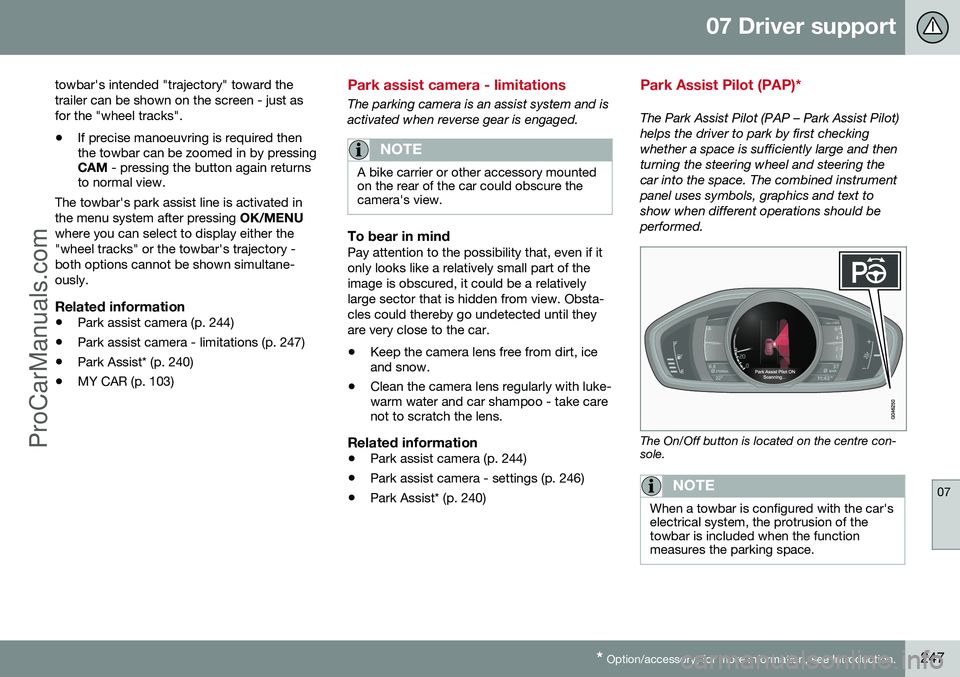
Park Assist Pilot (PAP)*
The Park Assist Pilot (PAP – Park Assist Pilot) helps the driver to park by first checkingwhether a space is sufficiently large and thenturning the steering wheel and steering thecar into the space. The combined instrumentpanel uses symbols, graphics and text toshow when different operations should beperformed.
The On/Off button is located on the centre con- sole.
NOTE
When a towbar is configured with the car's electrical system, the protrusion of thetowbar is included when the functionmeasures the parking space.
ProCarManuals.co’
Page 250 of 442

||
07 Driver support
07
248* Option/accessory, for more information, see Introduction.
WARNING
PAP does not work in all situations but is designed merely as a supplementary aid. The driver always has the final responsibil- ity for driving the vehicle in a safe mannerand for paying attention to the surround-ings and other road users approaching orpassing during parking.
Related information
• Park Assist Pilot (PAP)* - symbols and messages (p. 252)
• Park Assist Pilot (PAP)* - operation (p.249)
• Park Assist Pilot (PAP)* - function (p.248)
• Park Assist Pilot (PAP)* - limitations (p.251)
• Park Assist* (p. 240)
• Park assist camera (p. 244)
Park Assist Pilot (PAP)* - function
The Park Assist Pilot (PAP – Park Assist Pilot) helps the driver to park by first checkingwhether a space is sufficiently large and thenturning the steering wheel and steering thecar into the space. The combined instrumentpanel uses symbols, graphics and text toshow when different operations should beperformed.
NOTE
The PAP function measures the space and turns the steering wheel - the driver's taskis to follow the combined instrument pan-el's instructions and select the gear(reverse/forward), control the speed, brakeand stop.
PAP can be activated if the following criteria are met once the engine has been started:
• The functions DSTC or ABS must not intervene while the PAP function is ena-bled - these can be activated due to asteep or slippery surface, for example;see the sections on Foot brake and Sta-bility and traction control system for moreinformation.
• A trailer must not be connected to thecar.
• The speed must be below 50 km/h.
Principle for PAP.
The PAP function parks the car using the fol- lowing steps:
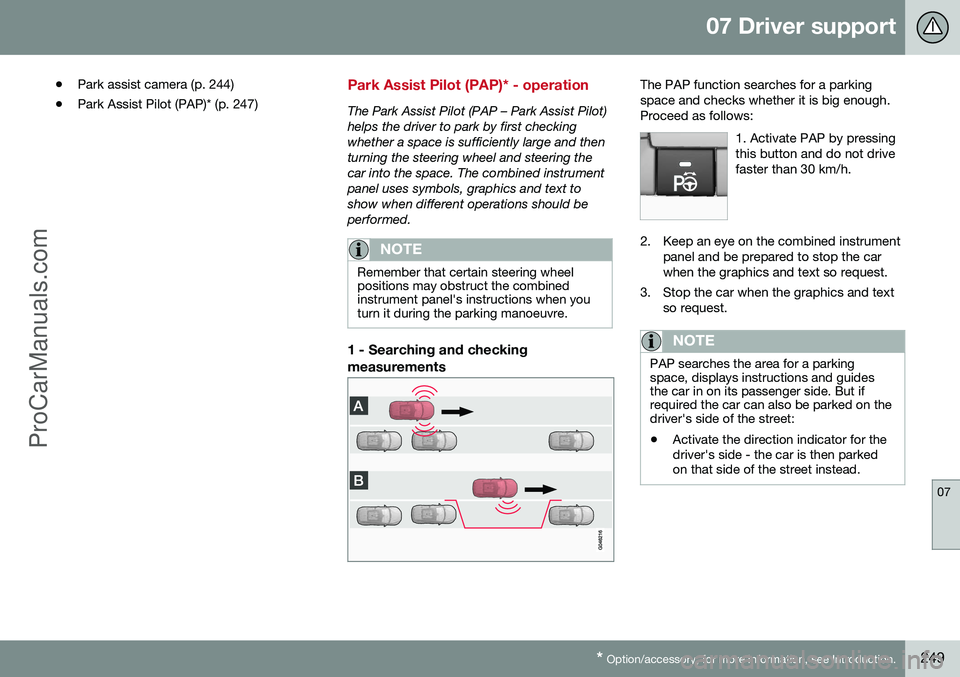
1. The function searches for a parking space and measures it (A & B) - during measure- ment the speed must notexceed 30 km/h.
2. The car is steered into the space while reversing (C & D).
3. The car is straightened up in the space by driving back and forth (E & F ).
Related information
• Park Assist Pilot (PAP)* - symbols andmessages (p. 252)
• Park Assist Pilot (PAP)* - operation (p.249)
• Park Assist Pilot (PAP)* - limitations (p.251)
• Park Assist* (p. 240)
ProCarManuals.co’
Page 251 of 442
07 Driver support
07
* Option/accessory, for more information, see Introduction.249
•
Park assist camera (p. 244)
• Park Assist Pilot (PAP)* (p. 247)
Park Assist Pilot (PAP)* - operation
The Park Assist Pilot (PAP – Park Assist Pilot) helps the driver to park by first checkingwhether a space is sufficiently large and thenturning the steering wheel and steering thecar into the space. The combined instrumentpanel uses symbols, graphics and text toshow when different operations should beperformed.
NOTE
Remember that certain steering wheel positions may obstruct the combinedinstrument panel's instructions when youturn it during the parking manoeuvre.
1 - Searching and checking measurements
The PAP function searches for a parking space and checks whether it is big enough.Proceed as follows:
1. Activate PAP by pressingthis button and do not drivefaster than 30 km/h.
2. Keep an eye on the combined instrumentpanel and be prepared to stop the car when the graphics and text so request.
3. Stop the car when the graphics and text so request.
NOTE
PAP searches the area for a parking space, displays instructions and guidesthe car in on its passenger side. But ifrequired the car can also be parked on thedriver's side of the street:
• Activate the direction indicator for the driver's side - the car is then parkedon that side of the street instead.
ProCarManuals.co’
Page 252 of 442

||
07 Driver support
07
250* Option/accessory, for more information, see Introduction.
2 - Reversing in
During the Reversing step, PAP will steer the car into the parking space. Proceed as fol-lows:
1. Check that the area behind the car is
clear, then engage reverse gear.
2. Reverse slowly and carefully without touching the steering wheel - and no faster than approx. 7 km/h.
3. Keep an eye on the combined instrument panel and be prepared to stop the carwhen the graphics and text so request.
NOTE
•Keep your hands away from the steer- ing wheel when the PAP function isactivated.
• Make sure that the steering wheel isnot hindered in any way and can rotatefreely.
• For optimum results - Wait until thesteering wheel has been turned beforestarting to drive backwards/forwards.
3 - Straightening up
When the car has reversed into the parking space, it must be straightened up and stop-ped. 1. Engage 1st gear or
D position, wait until
the steering wheel has been turned, then drive slowly forwards.
2. Stop the car when the graphics and text message so request.
3. Engage reverse gear and drive back- wards slowly until the graphics and textmessage tell you to stop.
The function is disengaged automatically when parking is complete, and the graphicsand text message show that parking is com-plete. It may be necessary for the driver tocorrect the positioning afterwards. Only thedriver can determine whether the car is prop-erly parked.
IMPORTANT
The warning distance is shorter when the sensors are used by Active Park Assistcompared with when Park Assist uses thesensors.
Related information
• Park Assist Pilot (PAP)* - symbols and messages (p. 252)
• Park Assist Pilot (PAP)* - function (p. 248)
• Park Assist Pilot (PAP)* - limitations (p.251)
• Park Assist* (p. 240)
• Park assist camera (p. 244)
• Park Assist Pilot (PAP)* (p. 247)
ProCarManuals.co’