2014 VOLVO V60 ECO mode
[x] Cancel search: ECO modePage 234 of 442

07 Driver support
07
232
Lane Departure Warning (LDW) - symbols and messages
In situations where there is no LDW function a symbol may be shown in the combinedinstrument panel in combination with anexplanatory message - follow the recommen-dation given if appropriate.
Message examples:
Symbol
AMessageSpecification
Lane departure warning ON/Lane departure warning OFFThe function is switched on/off. Shown at switch-on/off.The text disappears after 5 seconds.
Lane Depart. Warning Unavail-
able at this speedThe function is set in standby mode due to speed being lower than 65 km/h.
Lane Depart. Warning Unavail-
ableThe lane does not have clear side markings or the camera sensor is temporarily disengaged. Read about camera sensor limitations (p. 220).
Lane Depart. Warning Availa-
bleThe function scans the lane's side markings.
Windscreen Sensors blockedThe camera sensor is temporarily disengaged. Shown in the event of snow, ice or dirt on the windscreen for example.
• Clean the windscreen surface in front of the camera sensor.
Read about camera sensor limitations (p. 220).
Driver Alert Sys Service requiredThe system is disengaged.
• Visit a workshop if the message remains - an authorised Volvo workshop is recommended.
A
Symbols are schematic - may vary by market and car model.
ProCarManuals.co’
Page 239 of 442

07 Driver support
07
* Option/accessory, for more information, see Introduction.237
Lane Keeping Aid (LKA) - limitations
The Lane Keeping Aid camera sensor is restricted in a similar way to the human eye.
• For more information, read about camera sensor limitations (p. 220) and seeColli-sion warning system* - operation (p. 217).
NOTE
In certain demanding situations LKA may find it difficult to assist the driver correctly- in which case it is recommended thatLKA is switched off. Examples of such a situation could be:
• roadworks
• winter road conditions
• poor road surface
• very sporty driving style
• poor weather with reduced visibility.
Hands on the steering wheelIn order for Lane Keeping Aid to operate, the driver must have his/her hands on the steer-ing wheel. LKA continually monitors this. Ifhands are not detected on the steering wheelthen a text message is shown, prompting thedriver to actively steer the car. If the driver does not follow the request to begin steering, Lane Keeping Aid goes intostandby mode and will remain in this modeuntil the driver begins to steer the car again.
Related information
•
Lane Keeping Aid (LKA)* (p. 234)
• Lane Keeping Aid (LKA) - function (p. 235)
• Lane Keeping Aid (LKA) - operation (p. 236)
• Lane Keeping Aid (LKA) - symbols andmessages (p. 238)
ProCarManuals.co’
Page 240 of 442

07 Driver support
07
238* Option/accessory, for more information, see Introduction.
Lane Keeping Aid (LKA) - symbols and messagesIn situations where there is no LKA function or it is interrupted, a symbol may be shown inthe combined instrument panel in combina- tion with an explanatory message - follow therecommendation given if appropriate. Message examples:
Symbol
AMessageSpecification
Lane Keeping Aid Unavail-
able at this speedThe Lane Keeping Aid is set in standby mode due to speed being lower than 65 km/h.
Lane Keeping Aid Unavail-
able for current markingsThe lane does not have clear side lines or the camera sensor is temporarily disengaged. Read about the limitations of the camera sensor, see Collision warning system* - camera sensor limitations (p.220) and Collision warning system* - operation (p. 217).
Lane Keeping Aid Availa-
bleThe function scans the lane's side lines.
Windscreen sensors blocked See manualThe camera sensor is temporarily disengaged. Shown in the event of snow, ice or dirt on the windscreen for example.
• Clean the windscreen surface in front of the camera sensor.
Read about the limitations of the camera sensor, see Collision warning system* - camera sensor limitations (p. 220) and Collision warning system* - operation (p. 217).
Lane Keeping Aid Service requiredThe system is disengaged.
• Visit a workshop if the message remains - an authorised Volvo workshop is recommended.
Lane Keeping Aid Inter- ruptedLKA has been set to standby mode. The lines of the LKA symbol indicate when the function is active again.
A
The table's symbols are schematic. The symbols shown in the combined instrument panel may have a slightly different appearance.
ProCarManuals.co’
Page 254 of 442

||
07 Driver support
07
252* Option/accessory, for more information, see Introduction.
IMPORTANT
The PAP system's parameters may need to be updated when changing to anotherapproved wheel rim size involving changedtyre circumference. Consult a workshop -an authorised Volvo workshop is recom-mended.
Maintenance
The PAP sensors are located in the bumpers 25
-
6 front and 4 rear.
For the PAP function to work correctly, its sensors must be cleaned regularly with waterand car shampoo - these are the same sen-sors that are used by parking assistance, seePark assist syst* - cleaning the sensors (p.243).
Related information
• Park Assist Pilot (PAP)* - symbols and messages (p. 252)
• Park Assist Pilot (PAP)* - operation (p.249)
• Park Assist Pilot (PAP)* - function (p. 248)
• Park Assist* (p. 240)
• Park assist camera (p. 244)
• Park Assist Pilot (PAP)* (p. 247)
Park Assist Pilot (PAP)* - symbols and messages
The Park Assist Pilot (PAP – Park Assist Pilot) helps the driver to park by first checkingwhether a space is sufficiently large and thenturning the steering wheel and steering thecar into the space. The combined instrumentpanel uses symbols, graphics and text toshow when different operations should beperformed. The combined instrument panel can show dif- ferent combinations of symbols and text withvarying content - sometimes with a self-explanatory piece of advice on appropriateaction. If a message shows that PAP is disengaged, contact with an authorised Volvo workshop isrecommended.
Related information
•
Park Assist Pilot (PAP)* - operation (p. 249)
• Park Assist Pilot (PAP)* - function (p. 248)
• Park Assist Pilot (PAP)* - limitations (p.251)
• Park Assist* (p. 240)
• Park assist camera (p. 244)
• Park Assist Pilot (PAP)* (p. 247)
25
The figure is schematic and therefore does not show the car model in question.
ProCarManuals.co’
Page 263 of 442

08 Starting and driving
08
* Option/accessory, for more information, see Introduction.261
Result after breath test
Indicator lamp (5) +Display textSpecification
Green lamp +Alcoguard Approved testStart the engine - no alcohol content meas-ured.
Yellow lamp +Alcoguard Approved testEngine starting possi- ble - measured alcoholcontent is above0.1 promille but belowthe limit value in force A
.
Red lamp + Dis-
approved test Wait 1 minuteEngine starting not possible - measuredalcohol content isabove the limit value in force A
.
A Limit values vary from country to country. Find out what applies in your country. See also Alcolock* (p. 259)
NOTE
After a completed period of driving, the engine can be restarted within 30 minuteswithout a new breath test.
Related information
• Alcolock* - functions and operation (p. 259)
• Alcolock* - storage (p. 260) •
Alcolock* (p. 259)
• Alcolock* - symbols and text messages(p. 263)
Alcolock* - to bear in mind
In order to obtain correct function and as accurate a measurement result as possible:
• Avoid eating or drinking approx. 5 minutes before the breath test.
• Avoid excess windscreen washing - thealcohol in the washer fluid may result inan incorrect measurement result.
In order to ensure that a new breath test is carried out in the event of a change of driver -depress the switch (2) and the send button (3)simultaneously for approx. 3 seconds. Atwhich point the car returns to start inhibitionmode and a new approved breath test isrequired before starting the engine.
ProCarManuals.co’
Page 275 of 442

08 Starting and driving
08
}}
* Option/accessory, for more information, see Introduction.273
Automatic gearbox -- Geartronic*
The Geartronic gearbox has two different gear modes - Automatic and Manual.
D : Automatic gear positions. +/–: Manual gear
positions. S8
: Sport mode*.
Combined instrument panel (p. 59) shows the position of the gear selector using the follow- ing indications:
P, R, N, D, S*, 1, 2, 3 etc.
Gear positionsAutomatic gear positions are indicated on the right of thecombined instrument panel.(Only one marker is illumi-nated at a time - the oneshowing the current gearselector position.)
Symbol " S" for Sport mode is ORANGE when
the mode is active.
Parking position - PSelect position P when starting the engine or
when the car is parked.
• In order to be able to move the gear selector from
P-position, the brake pedal
must first be depressed firmly.
The gearbox is mechanically blocked when the P position is engaged. Also apply the
parking brake (p. 293), as a precaution.
NOTE
The gear selector must be in P position to
allow the car to be locked and alarmed.
IMPORTANT
The car must be stationary when posi- tion P is selected.
WARNING
Always apply the parking brake when parking on a slope - the automatic trans-mission's P position is not sufficient to
hold the car in all situation.
Reverse position - RThe car must be stationary when R position is
selected.
Neutral position - NNo gear is engaged and the engine can be started. Apply the parking brake if the car isstationary with the gear selector in N position.
Drive position - DD is the normal driving position. Shifting up
and down takes place automatically based onthe level of acceleration and speed. The carmust be stationary when the gear selector ismoved to D position from R position.
Geartronic – Manual gear positions (+S-)
The driver can also change gear manually using the Geartronic automatic gearbox. Thecar engine-brakes when the accelerator pedalis released.
The manual gear position is reachedby moving the lever to the side fromposition D to the end position at
" +S- ". The combined instrument
panel's symbol " +S-" changes colour from
WHITE to ORANGE and the digits
1, 2, 3 etc.
are displayed in a box, corresponding to the gear that has just been selected.
• Move the lever forwards towards "
+"
(plus) to change up a gear and release the lever, which returns to its rest positionbetween + and –.
or
8 The "Sport mode" function is not available in a V60 Plug-in Hybrid - only "+" and "-".
ProCarManuals.co’
Page 276 of 442

||
08 Starting and driving
08
274* Option/accessory, for more information, see Introduction.
• Pull the lever back towards "
–" (minus) to
change down a gear and release it.
The manual gearshift mode " +S–" can be
selected at any time while driving. Geartronic automatically shifts down if the driver allows the speed to decrease lowerthan a level suitable for the selected gear, inorder to avoid jerking and stalling. To return to automatic driving mode:
• Move the lever to the side to the end position at
D.
NOTE
If the gearbox has a Sport programme then the gearbox will only become manualafter the gear selector has been movedforwards or backwards in its " +S–" posi-
tion. The combined instrument panel then changes indication from
S to show which
of the gears 1, 2, 3 etc. is engaged.
Paddles*As a supplement to manual gear changing with the gear selector there are also controlslocated on the steering wheel, so-called"paddles". To be able to change gear with the steering wheel paddles they must first be activated.This is by means of pulling one of the paddlestoward the steering wheel - the combined instrument panel then changes indicationfrom "
D" to a figure, which indicates the cur-
rent gear. To then change gear one step: • Pull one of the paddles backwards - towards the steering wheel - and release.
Both steering wheel "paddles".
"
-": Selects the next lower gear.
" + ": Selects the next higher gear.
A gear change occurs at each pull of the pad- dle provided that the engine speed does notleave the permitted range. After each gear change the combined instru- ment panel changes figure to show the cur-rent gear.
NOTE
Automatic deactivation If the steering wheel paddles are not used then they are deactivated after a short time- this is indicated when the combinedinstrument panel switches indication, fromthe figure for the current gear back to " D".
The exception is during engine braking -then the paddles are activated as long asengine braking is in progress. Manual deactivation The steering wheel paddle shifters can also be deactivated manually: • Pull both paddles toward the steering wheel and hold until the combinedinstrument panel changes characterfrom the figure for the current gear to"
D ".
The paddles can also be used with the gear selector in Sport mode* - then the paddlesare constantly activated without being deacti-vated.
ProCarManuals.co’
Page 278 of 442
08 Starting and driving
08
276* Option/accessory, for more information, see Introduction.
Automatic gearbox -- Powershift*
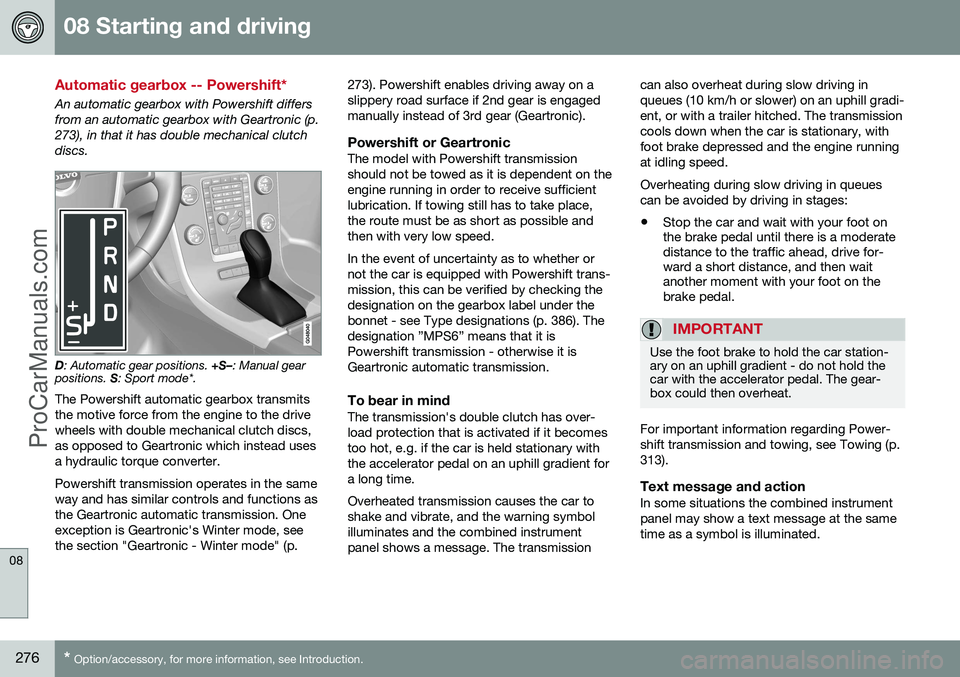
An automatic gearbox with Powershift differs from an automatic gearbox with Geartronic (p.273), in that it has double mechanical clutchdiscs.
D : Automatic gear positions. +S–: Manual gear
positions. S: Sport mode*.
The Powershift automatic gearbox transmits the motive force from the engine to the drivewheels with double mechanical clutch discs,as opposed to Geartronic which instead usesa hydraulic torque converter. Powershift transmission operates in the same way and has similar controls and functions asthe Geartronic automatic transmission. Oneexception is Geartronic's Winter mode, seethe section "Geartronic - Winter mode" (p. 273). Powershift enables driving away on aslippery road surface if 2nd gear is engagedmanually instead of 3rd gear (Geartronic).
Powershift or GeartronicThe model with Powershift transmissionshould not be towed as it is dependent on theengine running in order to receive sufficientlubrication. If towing still has to take place,the route must be as short as possible andthen with very low speed. In the event of uncertainty as to whether or not the car is equipped with Powershift trans-mission, this can be verified by checking thedesignation on the gearbox label under thebonnet - see Type designations (p. 386). Thedesignation ”MPS6” means that it isPowershift transmission - otherwise it isGeartronic automatic transmission.
To bear in mindThe transmission's double clutch has over-load protection that is activated if it becomestoo hot, e.g. if the car is held stationary withthe accelerator pedal on an uphill gradient fora long time. Overheated transmission causes the car to shake and vibrate, and the warning symbolilluminates and the combined instrumentpanel shows a message. The transmissioncan also overheat during slow driving inqueues (10 km/h or slower) on an uphill gradi-ent, or with a trailer hitched. The transmissioncools down when the car is stationary, withfoot brake depressed and the engine runningat idling speed. Overheating during slow driving in queues can be avoided by driving in stages:
• Stop the car and wait with your foot on the brake pedal until there is a moderatedistance to the traffic ahead, drive for-ward a short distance, and then waitanother moment with your foot on thebrake pedal.
IMPORTANT
Use the foot brake to hold the car station- ary on an uphill gradient - do not hold thecar with the accelerator pedal. The gear-box could then overheat.
For important information regarding Power- shift transmission and towing, see Towing (p.313).
Text message and actionIn some situations the combined instrumentpanel may show a text message at the sametime as a symbol is illuminated.
ProCarManuals.co’