2014 VOLVO V60 roof
[x] Cancel search: roofPage 148 of 442

||
05 Loading and storage
05
146* Option/accessory, for more information, see Introduction.
Removing the net cassettes1. Roll the safety nets into the cassettes in
accordance with the procedure in the section entitled "Using the safety net",but in reverse.
2. Fold the whole backrest forward.
3. Slide the cassettes out until they loosen from the anchor rails.
Store the cassettes in their compartment under the cargo area floor hatch.
WARNING
Loads in the luggage compartment must be anchored well, and also using a cor-rectly fitted safety net.
Related information
• Loading (p. 142)
• Safety grille (p. 146)
Safety net* combined with cargo cover
A safety net prevents loads from being thrown
forward in the passenger compartment in the event of sudden braking.
Puller-straps for raising the net.
The safety net can also be raised from the rear seat when the cargo cover is extended. Follow the procedure described in the section "Using the safety net" (p. 145). The straps forfolding up are located by the arrows.
Related information
• Safety net* (p. 145)
• Loading (p. 142)
• Load retaining eyelets (p. 143)
Safety grille
A safety grille prevents loads or pets from being thrown forward in the passenger com-partment in the event of sudden braking.
Folding upTake hold of the bottom of the safety grille and pull back/up.
IMPORTANT
The protective grille cannot be folded up or down when a cargo cover is fitted.
Fitting/removalThe safety grille is normally permanently installed in the car because it can easily befolded up in the roof and so be out of the wayif a longer cargo area is required. However, if
ProCarManuals.co’
Page 151 of 442

06 Locks and alarm
06
* Option/accessory, for more information, see Introduction.149
Remote control key with key blade
The remote control key is used to start the car and for locking and unlocking. It contains adetachable key blade (p. 155) made of metal.The visible section is available in two versionsso that it is possible to distinguish betweenthe remote control keys. The car is supplied with 2 remote control keys or PCCs* (Personal Car Communicator). Additional remote control keys can be ordered - up to 6 can be programmed andused for the same car.
WARNING
If there are children in the car: Remember to switch off the supply to the power windows and sunroof by removingthe remote control key if the driver leavesthe car.
Remote control key with PCC (p. 153) has increased functionality compared with theremote control key, see PCC* - unique func-tions (p. 153).
Related information
• Remote control key - functions (p. 151)
Remote control key - losing
If you lose a remote control key then a new one can be ordered at a workshop - anauthorised Volvo workshop is recommended. The remaining remote control keys must be taken to the Volvo workshop. The code of themissing remote control key must be erasedfrom the system as a theft prevention meas-ure. The current number of keys registered tothe car can be checked in the menu systemMY CAR
. For a description of the menu sys-
tem, see MY CAR (p. 103).
Related information
• Remote control key - functions (p. 151)
Key memory*
The key memory in the remote control key (p. 149) means that certain settings in the car canbe individually adapted for different people. The key memory function is available in com- bination with power seat and power rearviewand door mirrors. Settings for door mirrors,driver's seat and steering force can be savedin the key memory.
Key memory – door mirrors and driver's
seat
The settings are automatically connected toeach respective remote control key, see Keymemory* in remote control key (p. 74) andAdjustable steering force* (p. 257). Afterlocking with the remote control key the set-ting of the combined instrument panel'stheme is also saved in the key, see MY CAR(p. 103). The function can be activated/deactivated in the menu system MY CAR. For a description
of the menu system, see MY CAR (p. 103). For cars with the Keyless drive function, see Keyless drive* (p. 159).
ProCarManuals.co’
Page 154 of 442
||
06 Locks and alarm
06
152* Option/accessory, for more information, see Introduction.
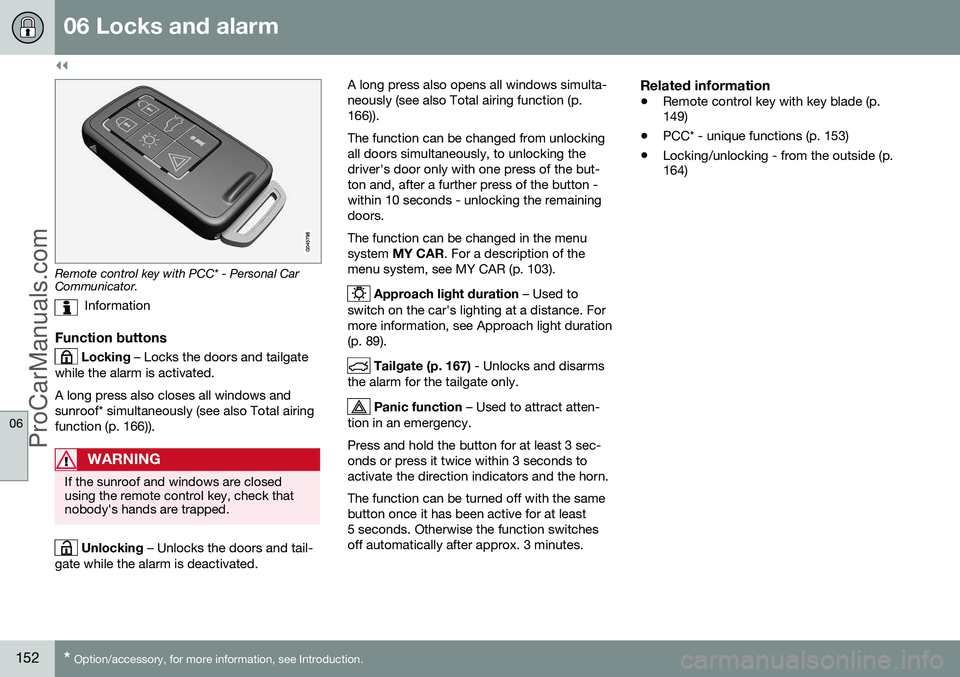
Remote control key with PCC* - Personal Car Communicator.
Information
Function buttons
Locking – Locks the doors and tailgate
while the alarm is activated. A long press also closes all windows and sunroof* simultaneously (see also Total airingfunction (p. 166)).
WARNING
If the sunroof and windows are closed using the remote control key, check thatnobody's hands are trapped.
Unlocking – Unlocks the doors and tail-
gate while the alarm is deactivated. A long press also opens all windows simulta- neously (see also Total airing function (p.166)). The function can be changed from unlocking all doors simultaneously, to unlocking thedriver's door only with one press of the but-ton and, after a further press of the button -within 10 seconds - unlocking the remainingdoors. The function can be changed in the menu system
MY CAR . For a description of the
menu system, see MY CAR (p. 103).
Approach light duration – Used to
switch on the car's lighting at a distance. For more information, see Approach light duration(p. 89).
Tailgate (p. 167) - Unlocks and disarms
the alarm for the tailgate only.
Panic function – Used to attract atten-
tion in an emergency. Press and hold the button for at least 3 sec- onds or press it twice within 3 seconds toactivate the direction indicators and the horn. The function can be turned off with the same button once it has been active for at least5 seconds. Otherwise the function switchesoff automatically after approx. 3 minutes.
Related information
• Remote control key with key blade (p. 149)
• PCC* - unique functions (p. 153)
• Locking/unlocking - from the outside (p.164)
ProCarManuals.co’
Page 168 of 442
||
06 Locks and alarm
06
166* Option/accessory, for more information, see Introduction.
• Pull the door handle and open the door - the door is unlocked and opened in oneoperation.
Lamp in lock buttonCentral locking is available in two variants - the lamp in the central locking button for thedriver's door has different meanings depend-ent on the variant. With central locking button only in the driver's door, other doors have no button:
• Illuminated lamp means that all doors are locked.
With central locking button on both front doors and electric lock button in each reardoor:
• Illuminated lamp means that only that particular door is locked. When all but-tons are illuminated all doors are locked.
Locking
•
Press the central locking button - all
closed doors are locked.
A long press also closes all side windows and sunroof simultaneously (see also Total airingfunction (p. 166)).
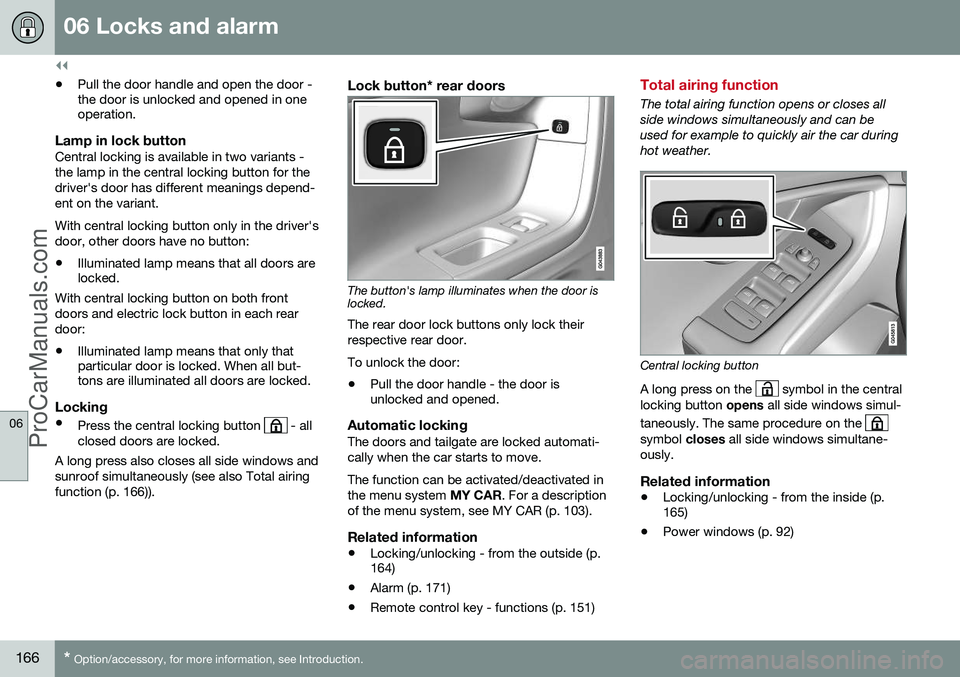
Lock button* rear doors
The button's lamp illuminates when the door is locked.
The rear door lock buttons only lock their respective rear door. To unlock the door:
• Pull the door handle - the door is unlocked and opened.
Automatic lockingThe doors and tailgate are locked automati- cally when the car starts to move. The function can be activated/deactivated in the menu system
MY CAR. For a description
of the menu system, see MY CAR (p. 103).
Related information
• Locking/unlocking - from the outside (p. 164)
• Alarm (p. 171)
• Remote control key - functions (p. 151)
Total airing function
The total airing function opens or closes all side windows simultaneously and can beused for example to quickly air the car duringhot weather.
Central locking button
A long press on the
symbol in the central
locking button opens all side windows simul-
taneously. The same procedure on the
symbol closes all side windows simultane-
ously.
Related information
• Locking/unlocking - from the inside (p. 165)
• Power windows (p. 92)
ProCarManuals.co’
Page 173 of 442

06 Locks and alarm
06
* Option/accessory, for more information, see Introduction.171
Alarm
The alarm is a device that warns in the event of e.g. a break-in in the car. Activated alarm is triggered if:
• a door, the bonnet or the tailgate is opened
• a movement is detected in the passengercompartment (if fitted with a movementdetector*)
• the car is raised or towed away (if fittedwith a tilt detector*)
• the battery's cable is disconnected
• the siren is disconnected.
If there is a fault in the alarm system then the information display in the combined instru-ment panel shows a message. In which case,contact a workshop - an authorised Volvoworkshop is recommended.NOTE
The movement sensors trigger an alarm in the event of movement in the passengercompartment - air currents are also regis-tered. For this reason the alarm is trig-gered if the car is left with a window or thesunroof open or if the passenger compart-ment heater is used. To avoid this: Close the window/sunroof when leaving the car. If the car's inte-grated passenger compartment heater (ora portable electric heater) shall be used -direct the airflow from the air vents so thatthey are not pointing upwards in the pas-senger compartment. Alternatively,reduced alarm level can be used, seeReduced alarm level (p. 173).
NOTE
Do not attempt to repair or alter compo- nents in the alarm system yourself. Anysuch attempts may affect the terms of theinsurance.
Arming the alarm–Press the remote control key lock button.
Deactivate the alarm–Press the remote control key unlock but- ton.
Deactivating a triggered alarm–Press the remote control key unlock but- ton or insert the remote control key in theignition switch.
Related information
• Alarm indicator (p. 172)
• Alarm - automatic re-arming (p. 172)
• Alarm - remote control key not working (p. 172)
ProCarManuals.co’
Page 308 of 442

||
08 Starting and driving
08
306* Option/accessory, for more information, see Introduction.
• For lowest fuel consumption, activate ECO (p. 288)* 16
.
• Use the ECO Guide which indicates how fuel-efficiently the car is being driven, seeEco guide & Power guide* (p. 63).
• Drive in the highest gear possible, adap-ted to the current traffic situation androad - lower engine speeds result in lowerfuel consumption. Use the gear indicator(p. 272).
• Avoid sudden unnecessary accelerationand heavy braking.
• High speed results in increased fuel con-sumption - the wind resistance increaseswith speed.
• Do not run the engine to operating tem-perature at idling speed, but rather drivewith a light load as soon as possible - acold engine consumes more fuel than awarm one.
• Drive with the correct air pressure in thetyres and check this regularly - selectECO tyre pressure for best results, seeTyres - approved tyre pressures (p. 407).
• Choice of tyres can affect fuel consump-tion - seek advice on suitable tyres from adealer.
• Remove unnecessary items from the car -the greater the load the higher the con-sumption. •
Use engine braking to slow down, when itcan take place without risk to other roadusers.
• A roof load and ski box increase air resis-tance, leading to higher consumption -remove the load carriers when not in use.
• Avoid driving with open windows.
For information about Volvo Car Corpora- tion's environmental philosophy, see VolvoCars' environmental philosophy (p. 19). For more information about fuel consumption, see Fuel consumption and CO2 emissions (p.403).
WARNING
Never switch off the engine while moving, such as downhill, this deactivates impor-tant systems such as the power steeringand brake servo.
Related information
• Fuel - handling (p. 301)
• Fuel consumption and CO2 emissions (p. 403)
• Fuel tank - volume (p. 402)
Driving with a trailer
When driving with a trailer there are a number of important points to think about regardinge.g. the towing bracket, the trailer and howthe load is positioned in the trailer. Payload depends on the car's kerb weight. The total of the weight of the passengers andall accessories, e.g. towbar, reduces the car'spayload by a corresponding weight. For moredetailed information on weights, see Weights(p. 390). If the towing bracket is mounted by Volvo, then the car is delivered with the necessaryequipment for driving with a trailer. • The car's towing bracket must be of an approved type.
• If the towbar is retrofitted, check withyour Volvo dealer that the car is fullyequipped for driving with a trailer.
• Distribute the load on the trailer so thatthe weight on the towing bracket com-plies with the specified maximum towballload.
• Increase the tyre pressure to the recom-mended pressure for a full load. For tyrepressure label location, see Tyres - airpressure (p. 328).
• The engine is loaded more heavily thanusual when driving with a trailer.
16
Only applies to cars with automatic gearbox.
ProCarManuals.co’
Page 375 of 442

10 Maintenance and service
10
* Option/accessory, for more information, see Introduction.373
FunctionA
––
Infotainment control module; Screen A5
Audio control unit (amplifier)*, Digital radio*; TV*10
Audio or Control Module Sen- sus
A15
Telematics*; Bluetooth*5
––
Sunroof*; Interior lighting roof; Climate sensor*; Dampermotors, air intake5
12 V socket, tunnel console15
Seat heating, rear right*15
Seat heating, rear left*15
Electric additional heater*5
Seat heating (passenger side)15
Seat heating (driver's side)15
FunctionA
Parking assistance*; Parking camera*; Towbar control mod-ule* BLIS*5
AWD control module*15
Active chassis - Four-C*10
A
Certain model variants.
Related information
• Fuses - in engine compartment (p. 368)
• Fuses - in the control module under the glovebox (p. 374)
• Fuses - in cargo area (p. 376)
• Fuses - in the engine compartment's coldzone (p. 377)
ProCarManuals.co’
Page 377 of 442

10 Maintenance and service
10
* Option/accessory, for more information, see Introduction.375
FunctionA
Movement detector alarm*; Cli- mate panel5
Steering lock15
Siren*; Data link connector OBDII5
––
Airbags10
Collision warning*5
Accelerator pedal sensor; Dim- ming interior rearview mirror*;Seat heating, rear* Electric additional heater*7,5
Infotainment control module (Performance); Audio (Perform-ance)15
Brake lights5
Sunroof*20
Immobiliser5
Related information
• Fuses - in engine compartment (p. 368)
• Fuses - under glovebox (p. 372)
• Fuses - in cargo area (p. 376) •
Fuses - in the engine compartment's cold zone (p. 377)
ProCarManuals.co’