2014 VOLVO V60 buttons
[x] Cancel search: buttonsPage 186 of 442

||
07 Driver support
07
184* Option/accessory, for more information, see Introduction.
–Depress the accelerator pedal fully.
> The combined instrument panel shows
the stored maximum speed with a col- oured mark (5) and the driver can tem-porarily exceed the set maximumspeed - the mark (5) changes colourduring this time from GREEN toWHITE. The speed limiter is automatically reac- tivated after the release of the acceler-ator pedal and the car's speed isslowed down to below the selected/stored maximum speed - the display'smark (5) changes colour from WHITEto GREEN and the car's maximumspeed is again limited.
Related information
• Speed limiter* (p. 182)
• Speed limiter* - getting started (p. 182)
• Speed limiter* - changing speed (p. 183)
• Speed limiter* - deactivation (p. 184)
• Speed limiter* - alarm for speed excee- ded (p. 184)
Speed limiter* - alarm for speed exceeded
A (Speed Limiter) can be regarded as a reverse cruise control - the driver regulatesthe speed using the accelerator pedal but isprevented from accidentally exceeding apre-selected/set speed by the speed limiter. On a steep downhill gradient the speed limit- er's engine braking effect may be inadequateand the selected maximum speed is excee-ded. The driver is alerted about this with anacoustic signal. The signal is active until the driver has slowed to below the selected maximum speed.
NOTE
The alarm is only activated after 5 seconds if the speed has been exceeded by at least3 km/h provided that none of the buttons
or has been depressed during the
last half minute.
Related information
• Speed limiter* (p. 182)
• Speed limiter* - changing speed (p. 183)
• Speed limiter* - getting started (p. 182)
• Speed limiter* - temporary deactivation and standby mode (p. 183)
• Speed limiter* - deactivation (p. 184)
Speed limiter* - deactivation
A (Speed Limiter) can be regarded as a reverse cruise control - the driver regulatesthe speed using the accelerator pedal but isprevented from accidentally exceeding a pre-selected/set speed by the speed limiter. To deactivate the speed limiter:
–Press the steering wheel button .
> The combined instrument panel's sym- bol for the speed limiter (6) and the mark for the set speed (5) are extin-guished. The selected and storedspeed are thus deleted from the mem-ory and cannot be resumed with the
button.
The driver can then use the accelerator pedal to choose a speed without limi-tation.
Related information
• Speed limiter* (p. 182)
• Speed limiter* - getting started (p. 182)
• Speed limiter* - temporary deactivation and standby mode (p. 183)
• Speed limiter* - alarm for speed excee-ded (p. 184)
ProCarManuals.co’
Page 187 of 442

07 Driver support
07
* Option/accessory, for more information, see Introduction.185
Cruise control*
The cruise control (CC – Cruise Control) helps the driver maintain an even speed, resulting ina more relaxed driving on motorways andlong, straight roads in regular traffic flows.
Overview
The steering wheel buttons and combined instru- ment panel in cars without speed limiter 4
.
The steering wheel buttons and combined instru- ment panel in cars with speed limiter 4
.
Cruise control - On/Off.
Standby mode ceases and the stored speed is resumed.
Standby mode
Activate and adjust the speed.
Selected speed (GREY = Standby mode).
Cruise control active - WHITE symbol (GREY = Standby mode).
WARNING
The driver must always be observant with regard to the traffic conditions and inter-vene when the cruise control is not main-taining a suitable speed and/or suitabledistance. The driver always bears ultimate responsi- bility for ensuring that the vehicle is drivensafely.
Related information
• Cruise control* - managing speed (p. 186)
• Cruise control* temporary deactivationand standby mode (p. 186)
• Cruise control* - resume set speed (p.187)
• Cruise control* - deactivate (p. 187)
4
A Volvo dealer has updated information about what applies in each respective market.
ProCarManuals.co’
Page 188 of 442

07 Driver support
07
186* Option/accessory, for more information, see Introduction.
Cruise control* - managing speed
The cruise control (CC – Cruise Control) helps the driver to maintain an even speed. It ispossible to activate, set or change the speed.
Activating and setting the speedTo enable cruise control:
• Press the steering wheel button
> The cruise control symbol in the com-
bined instrument panel changes from WHITE to GREY and shows that thecruise control is in standby mode.
To activate cruise control:
• At the required speed - press the steering wheel button
or .
> The current speed is stored in the mem- ory and the combined instrument panel's marking (5) is illuminated/turns WHITE atthe selected speed.
NOTE
Cruise Control cannot be enabled at speeds below 30 km/h.
Changing the speedTo change the stored speed: • Adjust with short presses on
or -
every press gives +/- 5 km/h. The last presses made are stored in the memory.
To adjust +/- 1 km/h: •
Hold down the button and release it atthe required speed.
A temporary increase in speed with the accel- erator pedal, e.g. during overtaking, does notaffect the cruise control setting - the carreturns to the set speed when the acceleratorpedal is released.
NOTE
If any of the Cruise Control buttons are held depressed for several minutes then itis blocked and deactivated. To be able toreactivate Cruise Control, the car must bestopped and the engine restarted.
Related information
• Cruise control* (p. 185)
• Cruise control* temporary deactivation and standby mode (p. 186)
• Cruise control* - resume set speed (p.187)
• Cruise control* - deactivate (p. 187)
Cruise control* temporary deactivation and standby mode
The cruise control (CC – Cruise Control) helps the driver to maintain an even speed. Thefunction can be temporarily deactivated andset in standby mode.
Temporary deactivation - standby modeTo temporarily disengage cruise control andset it in standby mode:
• Press the steering wheel button
.
> The combined instrument panel's mark- ing (5) and the symbol (6) change colour from WHITE to GREY.
Automatic standby modeCruise control is temporarily disengaged andset in standby mode if:
• wheels lose traction
• the foot brake is used
• speed falls below approx. 30 km/h
ProCarManuals.co’
Page 194 of 442

||
07 Driver support
07
192* Option/accessory, for more information, see Introduction.
At the same time a speed range is marked:
• the higher speed with the GREEN mark- ing (6) is the pre-programmed speed
• the lower speed is the speed of the car infront.
Changing the speedTo change the stored speed: •
Adjust with short presses on
or -
every press gives +/- 5 km/h. The last presses made are stored in the memory.
If speed is increased using the accelera- tor pedal prior to pressing the
/ but-
ton, then it is the car's current speed when the button is pressed that is storedin the cruise control.
To adjust +/- 1 km/h: • Hold down the button and release it at the required speed.
NOTE
If any of the Cruise Control buttons are held depressed for several minutes then itis blocked and deactivated. To be able toreactivate Cruise Control, the car must bestopped and the engine restarted. In certain situations, cruise control cannot be activated. In this case, the combined instrument panel (p. 200) shows
Cruise
control Unavailable.
Related information
• Adaptive cruise control - ACC* (p. 188)
• Adaptive cruise control* - overview (p. 190)
• Adaptive cruise control* - function (p.189)
Adaptive cruise control* - set time interval
The adaptive cruise control (ACC – Adaptive Cruise Control) helps the driver to maintain aneven speed and a safe distance from the vehi-cle ahead.
Different time intervals to thevehicle in front can beselected and shown in thecombined instrument panelas 1-5 horizontal lines - themore lines the longer thetime interval. One line corre-
sponds to approximately 1 second to thevehicle in front, 5 linesapproximately 3 seconds.
To set/change the time distance:
• Turn the thumbwheel on the steering wheel keypad (p. 190) (or use the
/buttons for cars without Speed limiter).
At low speed, when the distances are short, the adaptive cruise control increases the timeinterval slightly. The adaptive cruise control allows the time interval to vary noticeably in certain situationsin order to allow the car to follow the vehiclein front smoothly and comfortably. Note that a short time interval only allows the driver a short time to react and take action ifany unforeseen traffic problem should arise.
ProCarManuals.co’
Page 268 of 442
08 Starting and driving
08
266* Option/accessory, for more information, see Introduction.
Remote start (ERS)*
Remote start (ERS – Engine Remote Start) means that the car's engine can be startedremotely using the remote control key or thePCC key. This is so that the passenger com-partment can be warmed up/cooled downbefore departure. The climate control system and audio system start with the same settings that were in usewhen the car was parked. An ERS-started engine is activated for a maximum of 15 minutes, then it is switchedoff. After two ERS-activations the enginemust be started in the normal way beforeERS can be re-used. The optional ERS function is available on most cars with automatic gearbox.
NOTE
The service life of the remote control key's battery is affected by the ERS function. Inthe event of frequent use of ERS the bat-tery should therefore be changed once peryear, see Remote control key/PCC -replacing the battery (p. 158).
NOTE
Follow local/national rules/regulations on idling.
WARNING
To remote-start the engine, the following criteria must be met:
• The car must be supervised.
• There must be no people or animals inside the car.
• The car must not be parked in aclosed, unventilated area - the exhaustgases may seriously injure humansand animals.
Related information
•
Remote start (ERS) - operation (p. 266)
• Remote start (ERS) - symbols and mes- sages (p. 268)
Remote start (ERS) - operation
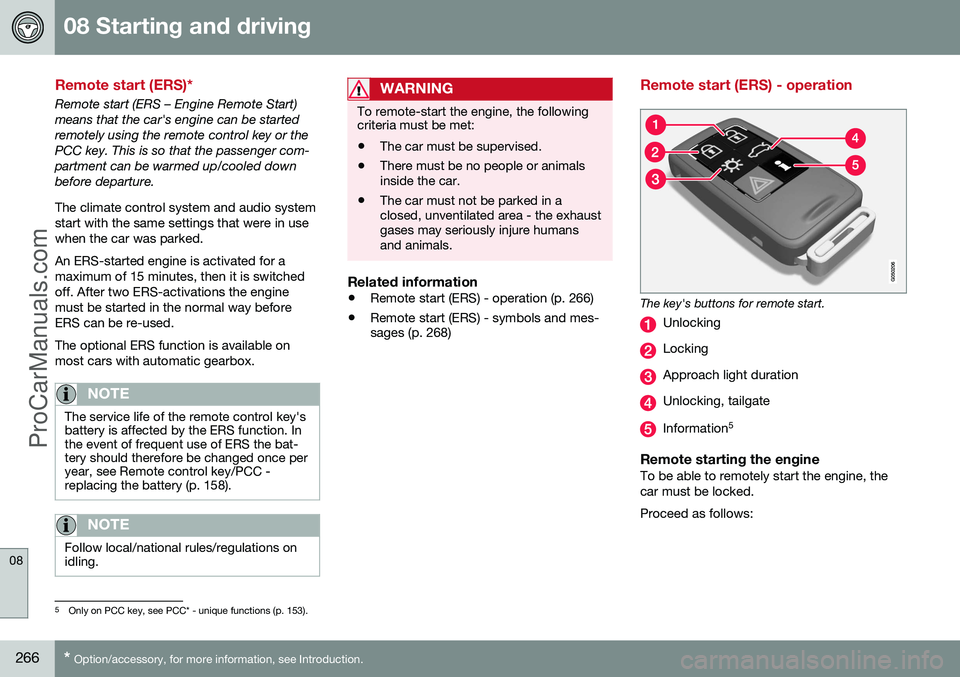
The key's buttons for remote start.
Unlocking
Locking
Approach light duration
Unlocking, tailgate
Information 5
Remote starting the engineTo be able to remotely start the engine, the car must be locked. Proceed as follows:
5
Only on PCC key, see PCC* - unique functions (p. 153).
ProCarManuals.co’
Page 269 of 442

08 Starting and driving
08
* Option/accessory, for more information, see Introduction.267
1. Briefly press on the key's button (2).
2. Follow this immediately afterwards with a
long press - at least 2 seconds - on button (3).
If the conditions for ERS are fulfilled then the following takes place:
1. The direction indicators flash quickly sev- eral times.
2. The engine starts.
3. The direction indicators illuminate with a constant glow for 3 seconds to verify that the engine has started.
NOTE
After remote starting, the car continues to be locked but with deactivated movementdetector*.
With PCC 6
keyThe light indication for Approach lighting 7
flashes several times when
the button is pressed and then goes to constant glow if all criteria for
ERS have been fulfilled. However, this doesnot mean that ERS has started the engine. To check whether ERS has started the engine, the user can press the button (5) - ifthe engine has started, there is a light indica-tion by the buttons (2) and (3).
Active functionsThe following functions are activated with a remote started engine: • Ventilation system
• Audio/video system
• Approach light duration.
Deactivated functionsThe following functions are deactivated with a remote started engine: • Headlamps
• Position lamps
• Number plate lighting
• Windscreen wiper.
ERS is interruptedThe following steps switch off an ERS-started engine: • The remote control key's button (1), (2) or (4) is depressed
• The car is unlocked
• A door is opened
• Accelerator pedal or brake pedal isdepressed
• The gear selector is moved out of
P posi-
tion
• There is approx.10 litres left in the fueltank •
Active ERS time exceeds 15 minutes.
When an ERS-started engine is switched off, the direction indicators illuminate with a con-stant glow for 3 seconds.
Related information
• Remote start (ERS)* (p. 266)
• Remote start (ERS) - symbols and mes- sages (p. 268)
6
For more information on the PCC key, see PCC* - unique functions (p. 153).7
For more information on Approach lighting, see Remote control key - functions (p. 151) and Approach light duration (p. 89).
ProCarManuals.co’