2014 VOLVO V60 buttons
[x] Cancel search: buttonsPage 129 of 442
04 Climate control
04
}}
127
Air distribution - table
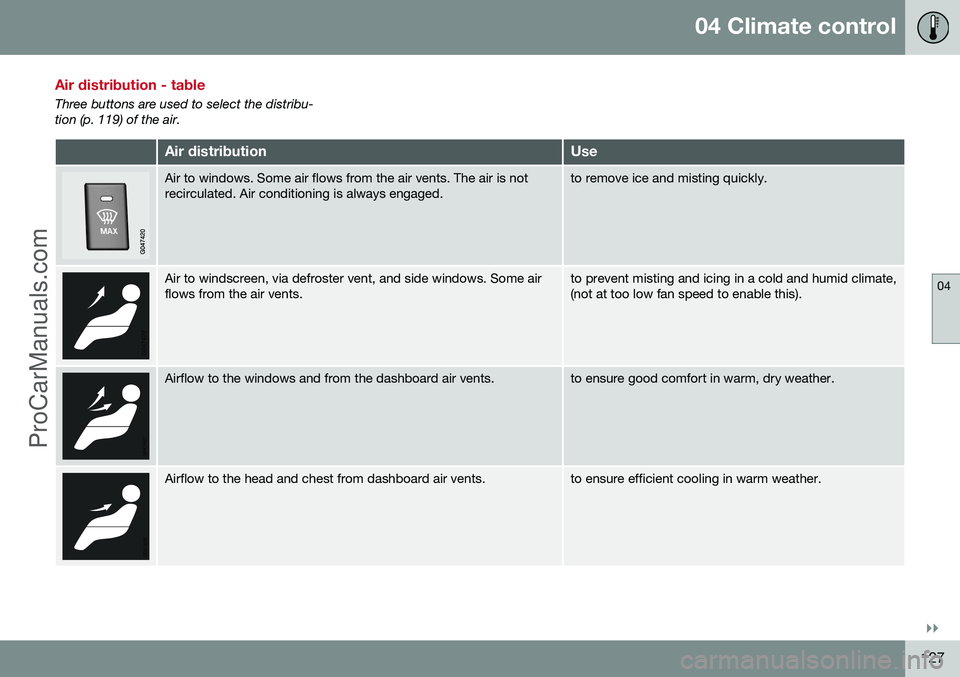
Three buttons are used to select the distribu- tion (p. 119) of the air.
Air distributionUse
Air to windows. Some air flows from the air vents. The air is not recirculated. Air conditioning is always engaged.to remove ice and misting quickly.
Air to windscreen, via defroster vent, and side windows. Some air flows from the air vents.to prevent misting and icing in a cold and humid climate, (not at too low fan speed to enable this).
Airflow to the windows and from the dashboard air vents.to ensure good comfort in warm, dry weather.
Airflow to the head and chest from dashboard air vents.to ensure efficient cooling in warm weather.
ProCarManuals.co’
Page 154 of 442
||
06 Locks and alarm
06
152* Option/accessory, for more information, see Introduction.
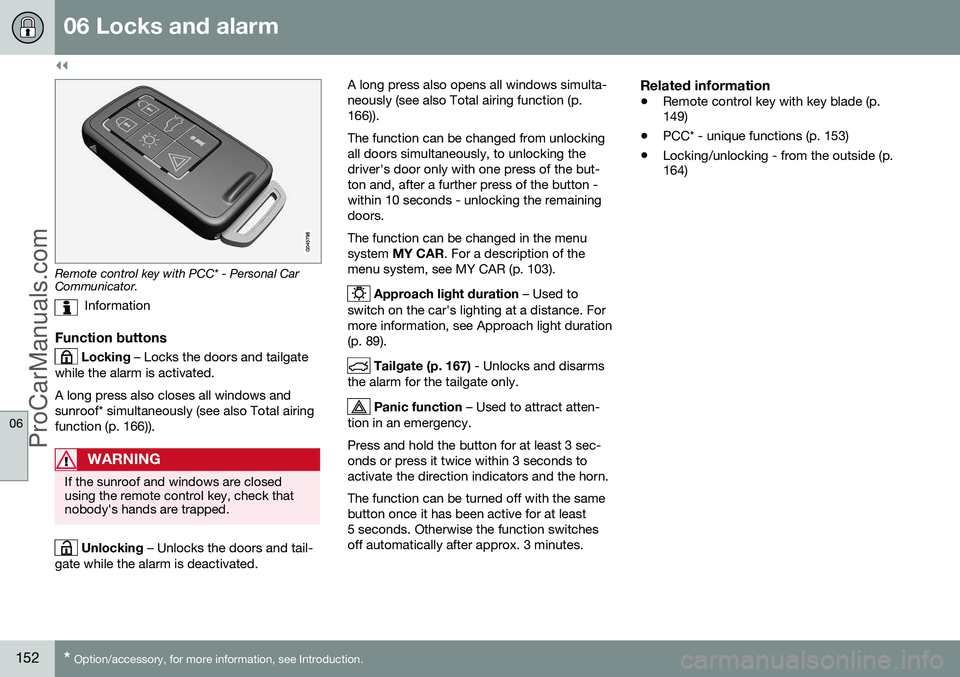
Remote control key with PCC* - Personal Car Communicator.
Information
Function buttons
Locking – Locks the doors and tailgate
while the alarm is activated. A long press also closes all windows and sunroof* simultaneously (see also Total airingfunction (p. 166)).
WARNING
If the sunroof and windows are closed using the remote control key, check thatnobody's hands are trapped.
Unlocking – Unlocks the doors and tail-
gate while the alarm is deactivated. A long press also opens all windows simulta- neously (see also Total airing function (p.166)). The function can be changed from unlocking all doors simultaneously, to unlocking thedriver's door only with one press of the but-ton and, after a further press of the button -within 10 seconds - unlocking the remainingdoors. The function can be changed in the menu system
MY CAR . For a description of the
menu system, see MY CAR (p. 103).
Approach light duration – Used to
switch on the car's lighting at a distance. For more information, see Approach light duration(p. 89).
Tailgate (p. 167) - Unlocks and disarms
the alarm for the tailgate only.
Panic function – Used to attract atten-
tion in an emergency. Press and hold the button for at least 3 sec- onds or press it twice within 3 seconds toactivate the direction indicators and the horn. The function can be turned off with the same button once it has been active for at least5 seconds. Otherwise the function switchesoff automatically after approx. 3 minutes.
Related information
• Remote control key with key blade (p. 149)
• PCC* - unique functions (p. 153)
• Locking/unlocking - from the outside (p.164)
ProCarManuals.co’
Page 155 of 442

06 Locks and alarm
06
* Option/accessory, for more information, see Introduction.153
Remote control key - range
Remote control key (p. 149) functions have a range of about 20 metres from the car. If the car does not verify a button being pressed - move closer and try again.
NOTE
The remote control key functions may be disrupted by surrounding radio waves,buildings, topographical conditions, etc.The car can always be locked/unlockedwith the key blade, Detachable key blade -unlocking doors (p. 156).
If the remote control key is removed from the car when the engine is running or key position(p. 70) I or II is active, and if all doors are
closed, then a warning message is shown inthe information display in the combinedinstrument panel and an audio reminder sig-nal sounds at the same time. The message is extinguished and the audible reminder signal stops when the remote con-trol key is brought back to the car aftereither/or:
• The remote control key has been inserted into the ignition switch.
• Speed exceeds 30 km/h.
• the
OK button has been pressed.
Related information
• Remote control key - functions (p. 151)
PCC* - unique functions
Remote control key with PCC has extended functionality compared with remote controlkey without PCC (p. 149) in the form of aninformation button and indicator lamps.
Remote control key with PCC* - Personal Car Communicator.
Information button
Indicator lamps
Using the information button enables access to certain information from the car via theindicator lamps.
Using the information button–Press the information button .
> All indicator lamps flash for approxi- mately 7 seconds and the light travels around on the PCC. This indicates thatinformation from the car has beenread. If any of the other buttons are pressed during this time then the reading isinterrupted.
NOTE
If none of the indicator lamps illumi-
nates with repeated use of the information button and in different locations (as well asafter 7 seconds and after the light hastravelled around on the PCC), contact aworkshop - an authorised Volvo workshopis recommended.
Indicator lamps display information in accord- ance with the following illustration:
ProCarManuals.co’
Page 160 of 442

06 Locks and alarm
06
158* Option/accessory, for more information, see Introduction.
Remote control key/PCC - replacing the battery
The batteries for the remote control key/PCC can be replaced. The batteries for the remote control key/PCC should be replaced if: • the information symbol in the combined instrument panel illuminates and the dis- play shows
Low battery in remote
control. Please change batteries.
and/or
• the locks repeatedly do not react to sig- nals from the remote control key within20 metres from the car.
Opening
Slide the spring-loaded catch to the
side.
At the same time pull the key blade
straight out backwards.
Insert a 3 mm slot screwdriver in the
hole behind the spring-loaded catch and gently prize the remote control key up.
NOTE
Turn the remote control key over with the buttons facing up, this is to avoid the bat-teries falling out when it is opened.
IMPORTANT
Avoid touching new batteries and their contact surfaces with your fingers as thismay impair their function.
Battery replacementClosely study how the battery/batteries are secured on the inside of the cover,with regard to their ( +) and ( –) sides.
Remove control key (1 battery)1. Carefully prize out the battery.
2. Install a new one with the ( +) side down.
PCC* (2 batteries)1. Carefully prize out the batteries.
2. First install one new one with the ( +) side
up.
3. Position the white plastic tab in between and finally install a second new battery with the ( +) side down.
Battery typeUse batteries with the designation CR2430, 3V - one in the remote control key and two inthe PCC.
ProCarManuals.co’
Page 163 of 442

06 Locks and alarm
06
* Option/accessory, for more information, see Introduction.161
Keyless drive* - locking
Cars with the Keyless-drive system have a touch-sensitive area on the outer handle ofthe doors and a rubberised button next to thetailgate's rubberised pressure plate for lock-ing/unlocking.
The touch-sensitive area on the outer door han- dles and the rubberised button next to the tail-gate's rubberised pressure plate.
Lock the doors and the tailgate with one long press on any of the door handles' touch-sen-sitive areas or press the smaller of the tail-gate's two rubberised buttons - the lock indi-cator (p. 150) in the windscreen confirms thatlocking has been completed by starting toflash. All doors and the tailgate must be closed before the car can be locked - otherwise thecar is not locked.
NOTE
In cars with automatic gearbox selectors, the gear selector must be set to the P
position; otherwise the car can be neitherlocked nor alarmed.
Related information
• Keyless drive* (p. 159)
• Alarm indicator (p. 172)
Keyless drive* - unlocking
Unlocking takes place when a hand grasps a door handle or the tailgate's rubberised pres-sure plate is actuated - open the door or tail-gate as normal.
NOTE
The door handles normally register a hand that takes hold of the handle, but withthick gloves on or after a very quick handmovement a second attempt may berequired, or with the glove taken off.
Related information
•
Keyless drive* (p. 159)
• Keyless drive* - locking (p. 161)
ProCarManuals.co’
Page 168 of 442
||
06 Locks and alarm
06
166* Option/accessory, for more information, see Introduction.
• Pull the door handle and open the door - the door is unlocked and opened in oneoperation.
Lamp in lock buttonCentral locking is available in two variants - the lamp in the central locking button for thedriver's door has different meanings depend-ent on the variant. With central locking button only in the driver's door, other doors have no button:
• Illuminated lamp means that all doors are locked.
With central locking button on both front doors and electric lock button in each reardoor:
• Illuminated lamp means that only that particular door is locked. When all but-tons are illuminated all doors are locked.
Locking
•
Press the central locking button - all
closed doors are locked.
A long press also closes all side windows and sunroof simultaneously (see also Total airingfunction (p. 166)).
Lock button* rear doors
The button's lamp illuminates when the door is locked.
The rear door lock buttons only lock their respective rear door. To unlock the door:
• Pull the door handle - the door is unlocked and opened.
Automatic lockingThe doors and tailgate are locked automati- cally when the car starts to move. The function can be activated/deactivated in the menu system
MY CAR. For a description
of the menu system, see MY CAR (p. 103).
Related information
• Locking/unlocking - from the outside (p. 164)
• Alarm (p. 171)
• Remote control key - functions (p. 151)
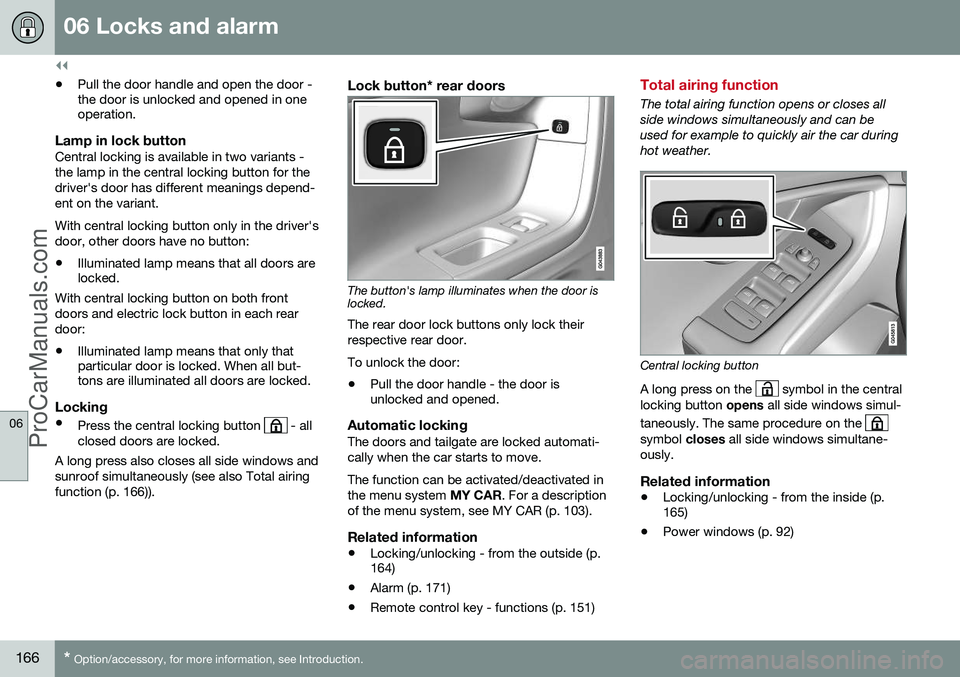
Total airing function
The total airing function opens or closes all side windows simultaneously and can beused for example to quickly air the car duringhot weather.
Central locking button
A long press on the
symbol in the central
locking button opens all side windows simul-
taneously. The same procedure on the
symbol closes all side windows simultane-
ously.
Related information
• Locking/unlocking - from the inside (p. 165)
• Power windows (p. 92)
ProCarManuals.co’
Page 177 of 442

07 Driver support
07
* Option/accessory, for more information, see Introduction.175
Active chassis - Four C*
Active chassis "Four-C" (Continously Controlled Chassis Concept), regulates thecharacteristics of the shock absorbers so thatthe car's driving characteristics can beadjusted. There are three settings: Comfort,
Sport and Advanced .
ComfortThis setting means that the car is perceivedas being more comfortable on rough anduneven road surfaces. Shock absorption issoft and the movement of the body is smoothand gentle.
SportThis setting means that the car is perceivedas being more sporty and is recommendedfor more active driving. Steering response isfaster than in the Comfort mode. Shockabsorption is harder and the body follows theroad in order to reduce rolling during corner-ing.
AdvancedThis setting is only recommended on veryeven and smooth road surfaces. The shock absorbers are optimised for maxi- mum roadholding and rolling in bends is fur-ther minimised.
Operation
Control buttons.
The required chassis setting is selected using the centre console buttons. The setting usedwhen the engine was switched off is re-acti-vated when the engine is next started. Theexception is Advanced - it is restarted asSport.
Stability and traction control system (DSTC)
The stability and traction control system, DSTC (Dynamic Stability & Traction Control),helps the driver to avoid skidding andimproves the car's traction. The activation of the system during braking may be noticed as a throbbing sound. Thecar may accelerate slower than expectedwhen the accelerator pedal is depressed. The system consists of the following func- tions: • Active Yaw Control
• Spin Control
• Traction control system
• Engine drag control - EDC
• Corner Traction Control - CTC
• Trailer Stability Assist* - TSA
Active Yaw ControlThe function checks the driving and brake force of the wheels individually in order tostabilise the car.
Spin ControlThe function prevents the driving wheels fromspinning against the road surface duringacceleration.
ProCarManuals.co’
Page 184 of 442

07 Driver support
07
182* Option/accessory, for more information, see Introduction.
Speed limiter*
A (Speed Limiter) can be regarded as a reverse cruise control - the driver regulatesthe speed using the accelerator pedal but isprevented from accidentally exceeding a pre-selected/set speed by the speed limiter.
Overview
Steering wheel keypad and combined instrument panel.
Speed limiter - On/Off.
Standby mode ceases and the stored speed is resumed.
Standby mode.
Activate and adjust the max. speed.
Selected speed.
Speed limiter active.
Related information
• Speed limiter* - getting started (p. 182)
• Speed limiter* - temporary deactivation and standby mode (p. 183)
• Speed limiter* - alarm for speed excee-ded (p. 184)
• Speed limiter* - deactivation (p. 184)
Speed limiter* - getting started
A (Speed Limiter) can be regarded as a reverse cruise control - the driver regulatesthe speed using the accelerator pedal but isprevented from accidentally exceeding a pre-selected/set speed by the speed limiter.
Switch on and activateWhen the speed limiter is active, its symbol(6) is shown in combination with a mark (5) bythe set maximum speed in the combinedinstrument panel. Selection and storage of the highest possible speed in the memory can be made both dur-ing a journey and while stationary.
While driving1.
Press the steering wheel button to
switch on the speed limiter.
> The symbol (6) for speed limiter illumi- nates in the combined instrument panel.
2. When the car is moving at the desired highest possible speed: Press one of the steering wheel buttons
or until the
combined instrument panel shows a mark (5) by the desired maximum speed.
> The speed limiter is then active and the selected max. speed is stored in the memory.
ProCarManuals.co’