Page 241 of 563
238
3-1. Using the air conditioning system and defogger
Automatic air conditioning system
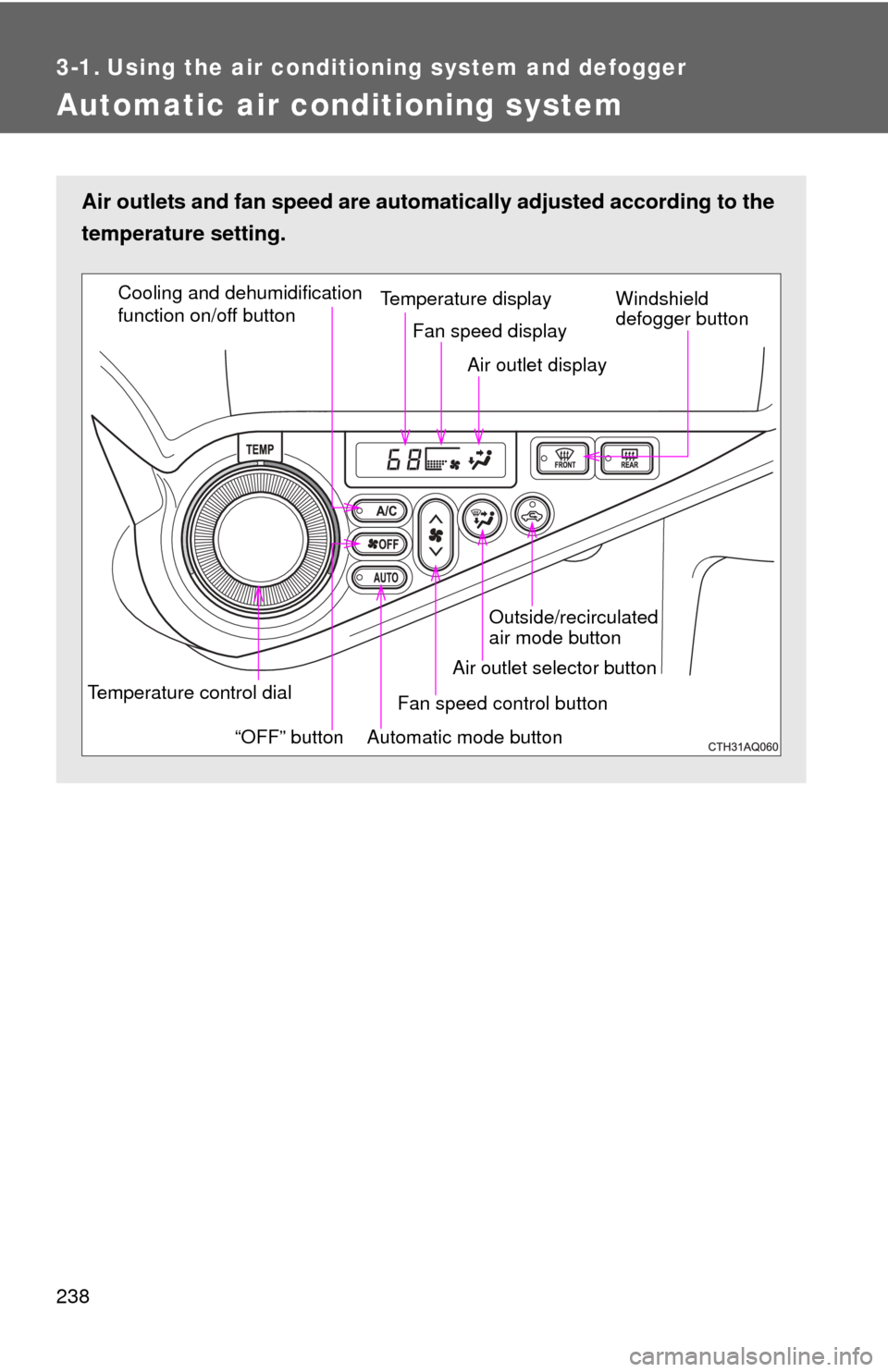
Air outlets and fan speed are automatically adjusted according to the
temperature setting.
Temperature control dial
“OFF” buttonTemperature display
Fan speed display
Air outlet display
Cooling and dehumidification
function on/off button
Windshield
defogger button
Automatic mode button Fan speed control button
Air outlet selector button Outside/recirculated
air mode button
Page 251 of 563
248
3-2. Using the audio system
Audio system types
Without Display Audio system
CD player and AM/FM radio
TitlePage
Using the radioP. 254
Using the CD playerP. 256
Playing back MP3 and WMA discsP. 261
Operating an iPodP. 268
Operating a USB memoryP. 276
Optimal use of the audio systemP. 284
Using the AUX portP. 287
Page 252 of 563
249
3-2. Using the audio system
3
Interior features
■
About Bluetooth®
The Bluetooth wordmark and logo are owned by Bluetooth SIG. and
permission has been granted to use the trademark of the licensee
Panasonic Corporation. Other trademarks and trade names are owned by
various different owners.
With Display Audio system
Owners of models equipped with a Display Audio system should
refer to the “Display Audio System Owner's Manual”.
Page 253 of 563

250 3-2. Using the audio system
CAUTION
■U.S.A. (without Display Audio system)
Part 15 of the FCC Rules
FCC ID: ACJ932PTA184
FCC WARNING
Changes or modifications not expressly approved by the party responsible
for compliance could void the user’s authority to operate the equipment.
This transmitter must not be co-located or operated in conjunction with any
other antenna or transmitter.
This equipment complies with FCC radiation exposure limits set forth for an
uncontrolled environment and meets the FCC radio frequency (RF) Expo-
sure Guidelines in Supplement C to OET65. This equipment has very low
levels of RF energy that it deemed to comply without maximum permissive
exposure evaluation (MPE). But it is desirable that it should be installed and
operated keeping the radiator at least 20cm or more away from person’s
body (excluding extremities: hands, wrists, feet and ankles).
■ Canada (without Display Audio system)
This device complies with Industry Canada licence-exempt RSS stan-
dard(s). Operation is subject to the following two conditions: (1) this device
may not cause interference, and (2) this device must accept any interfer-
ence, including interference that may cause undesired operation of the
device.
Le présent appareil est conforme aux CNR d'Industrie Canada applicables
aux appareils radio exempts de licence.
L'exploitation est autorisée aux deux conditions suivantes : (1) l'appareil ne
doit pas produire de brouillage, et (2) l'utilisateur de l'appareil doit accepter
tout brouillage radioélectrique subi, même si le brouillage est susceptible
d'en compromettre le fonctionnement.
Page 255 of 563

252 3-2. Using the audio system
CAUTION
■For vehicles sold in the U.S.A. (with Display Audio system)
FCC ID: BABFT0032A
This device complies with part 15 of the FCC Rules. Operation is subject to
the following two conditions: (1) This device may not cause harmful interfer-
ence, and (2) this device must accept any interference received, including
interference that may cause undesired operation.
FCC WARNING
Changes or modifications not expressly approved by the party responsible
for compliance could void the user’s authority to operate the equipment.
CAUTION: Radio Frequency Radiation Exposure
This equipment complies with FCC radiation exposure limits set forth for
uncontrolled equipment and meets the FCC radio frequency (RF) Exposure
Guidelines in Supplement C to OET65. This equipment has very low levels
of RF energy that it deemed to comply without maximum permissive expo-
sure evaluation (MPE). But it is desirable that it should be installed and oper-
ated with at least 20cm and more between the radiator and person's body
(excluding extremities: hands, wrists, feet and ankles).
Co-location: This transmitter must not be co-located or operated in conjunc-
tion with any other antenna or transmitter.
Page 256 of 563

253
3-2. Using the audio system
3
Interior features
CAUTION
■
For vehicles sold in Canada (with Display Audio system)
IC: 2024B-FT0032A
CAUTION: Radio Frequency Radiation Exposure
This equipment complies with IC radiation exposure limits set forth for
uncontrolled equipment and meets RSS-102 of the IC radio frequency (RF)
Exposure rules. This equipment has very low levels of RF energy that it
deemed to comply without maximum permissive exposure evaluation
(MPE). But it is desirable that it should be installed and operated with at least
20cm and more between the radiator and person’s body (excluding extremi-
ties: hands, wrists, feet and ankles).
This Category II radiocommunication device complies with Industry Canada
Standard RSS-310.
Ce dispositif de radiocommunication de catégorie II respecte la norme CNR-
310 d’Industrie Canada.
This device complies with Industry Canada licence-exempt RSS stan-
dard(s). Operation is subject to the following two conditions: (1) this device
may not cause interference, and (2) this device must accept any interfer-
ence, including interference that may cause undesired operation of the
device.
Le présent appareil est conforme aux CNR d’Industrie Canada applicables
aux appareils radio exempts de licence. L’exploitation est autorisée aux
deux conditions suivantes : (1) l’appareil ne doit pas produire de brouillage,
et (2) l’utilisateur de l’appareil doit accepter tout brouillage radioélectrique
subi, même si le brouillage est susceptible d’en compromettre le fonctionne-
ment.
NOTICE
■To prevent 12-volt battery discharge
Do not leave the audio system on longer than necessary when the hybrid
system is off.
■ To avoid damaging the audio system
Take care not to spill drinks or other fluids over the audio system.
Page 259 of 563
256
3-2. Using the audio system
Using the CD player
Loading CDsInsert a CD.
Ejecting CDsPress and remove the CD.
Selecting a track
Turn or press “
” to move up or “ ” to move down using
until the desired track number is displayed.
Random playback
Repeat play
PlaybackCD eject
Search playback
Displays text message
Vo lu m e
Power
Selecting a track Selecting a
track or displays
track list
Fast-forwarding
or reversing
Page 260 of 563
257
3-2. Using the audio system
3
Interior features
Selecting a track from a track list
Press .
The track list will be displayed.
Turn and press to select a track.
To return to the previous display, press (BACK).
Scanning tracksPress .
The first 10 seconds of each track will be played.
Press again when the desired track is reached.
Fast-forwarding and reversing tracks
To fast-forward or reverse, press and hold ( ) or
().
Random playbackPress (RDM).
To cancel, press (RDM) again.
Repeat playPress (RPT).
To cancel, press (RPT) again.
STEP1
STEP2
STEP1
STEP2