Page 267 of 563
264 3-2. Using the audio system
■Display
P. 258
■ Error messages
“ERROR”: This indicates a problem either in the CD or inside the
player.
“CD CHECK”: The CD may be dirty, damaged or inserted up-side down.
“NO SUPPORT”: This indicates that MP3/WMA files are not included in the CD.
■ Discs that can be used
Discs with the marks shown below can be used.
Playback may not be possible depending on recording format or disc fea-
tures, or due to scratches, dirt or deterioration.
■ CD player protection feature
To protect the internal components, playback is automatically stopped when
a problem is detected while the CD player is being used.
Page 270 of 563

267
3-2. Using the audio system
3
Interior features
●
MP3 and WMA playback
When a disc containing MP3 or WMA files is inserted, all files on the disc
are first checked. Once the file check is finished, the first MP3 or WMA\
file
is played. To make the file check finish more quickly, we recommend you
do not write in any files other than MP3 or WMA files or create any unnec-
essary folders.
If the discs contain a mixture of music data and MP3 or WMA format data,
only music data can be played.
● Extensions
If the file extensions .mp3 and .wma are used for files other than MP3 and
WMA files, they will be mistakenly recognized and played as MP3 and
WMA files. This may result in large amounts of interference and damage
to the speakers.
● Playback
• To play MP3 files with steady sound quality, we recommend a fixed bit
rate of 128 kbps and a sampling frequency of 44.1 kHz.
• CD-R or CD-RW playback may not be possible in some instances, depending on the characteristics of the disc.
• There is a wide variety of freeware and other encoding software for MP3 and WMA files on the market, and depending on the status of the
encoding and the file format, poor sound quality or noise at the start of
playback may result. In some cases, playback may not be possible at
all.
• When files other than MP3 or WMA files are recorded on a disc, it may take more time to recognize the disc and in some cases, playback may
not be possible at all.
• Microsoft, Windows, and Windows Media are the registered trade- marks of Microsoft Corporation in the U.S. and other countries.
NOTICE
■ CDs and adapters that cannot be used ( P. 259)
■ CD player precautions ( P. 260)
■ If a CD is left inside the CD pl ayer or in the ejected position for
extended periods ( P. 260)
■ Lens cleaners ( P. 260)
Page 285 of 563

282 3-2. Using the audio system
●MP3 and WMA playback
• When a device containing MP3 or WMA files is connected, all files in
the USB memory are checked. Once the file check is finished, the first
MP3 or WMA file is played. To make the file check finish more quickly,
we recommend that you do not include any files other than MP3 or
WMA files or create any unnecessary folders.
• When the USB memory is connected and the audio source is changed to USB memory mode, the USB memory will start playing the first file in
the first folder. If the same device is removed and reinserted (and the
contents have not been changed), the USB memory will resume play
from the same point in which it was last used.
● Extensions
If the file extensions .mp3 and .wma are used for files other than MP3 and
WMA files, they will be skipped (not played).
● Playback
• To play MP3 files with steady sound quality, we recommend a fixed bit
rate of at least 128 kbps and a sampling frequency of 44.1 kHz.
• There is a wide variety of freeware and other encoding software for MP3 and WMA files on the market, and depending on the status of the
encoding and the file format, poor sound quality or noise at the start of
playback may result. In some cases, playback may not be possible at
all.
• Microsoft, Windows, and Windows Media are registered trademarks of Microsoft Corporation in the U.S.A. and other countries.
CAUTION
■ Caution while driving
Do not connect USB memory or operate the controls.
Page 341 of 563
338 3-6. Other interior features
CAUTION
■Burns
●Use caution when seating the following persons in a seat with the seat
heater on to avoid the possibility of burns:
• Babies, small children, the elderly, the sick and the physically chal-
lenged
• Persons with sensitive skin
• Persons who are fatigued
• Persons who have taken alcohol or drugs that induce sleep (sleeping drugs, cold remedies, etc.)
● Do not cover the seat with anything when using the seat heater.
Using the seat heater with a blanket or cushion increases the temperature
of the seat and may lead to overheating.
● Do not use the seat heater more than necessary. Doing so may cause
minor burns or overheating.
NOTICE
■To prevent seat heater damage
Do not put heavy objects that have an uneven surface on the seat and do
not stick sharp objects (needles, nails, etc.) into the seat.
■ To prevent 12-volt battery discharge
Turn the seat heaters off when the hybrid system is off, and check that the
indicator is off.
Page 345 of 563
342 3-6. Other interior features
CAUTION
Observe the following precautions.
Failure to do so may cause the driver's floor mat to slip, possibly interfering
with the pedals while driving. An unexpectedly high speed may result or it may
become difficult to stop the vehicle, leading to a serious accident.
■When installing the driver's floor mat
●Do not use floor mats designed for other models or different model year
vehicles, even if they are Toyota Genuine floor mats.
● Only use floor mats designed for the driver's seat.
● Always install the floor mat securely using the retaining hooks (clips) pro-
vided.
● Do not use two or more floor mats on top of each other.
● Do not place the floor mat bottom-side up or upside-down.
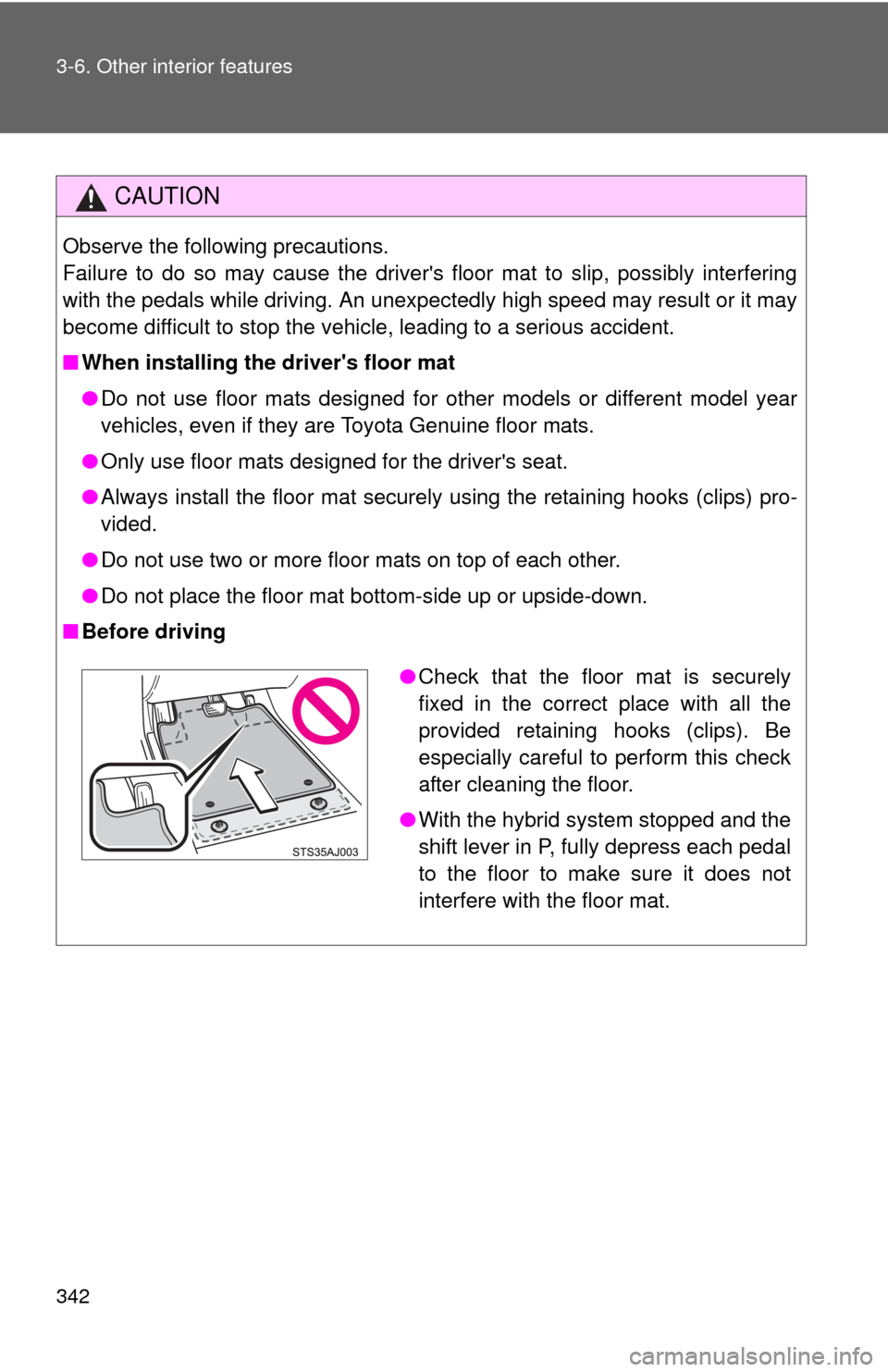
■ Before driving
●Check that the floor mat is securely
fixed in the correct place with all the
provided retaining hooks (clips). Be
especially careful to perform this check
after cleaning the floor.
● With the hybrid system stopped and the
shift lever in P, fully depress each pedal
to the floor to make sure it does not
interfere with the floor mat.
Page 348 of 563
Maintenance and care4
345
4-1. Maintenance and careCleaning and protecting the vehicle exterior ......... 346
Cleaning and protecting the vehicle interior .......... 349
4-2. Maintenance Maintenance requirements .................. 352
General maintenance....... 355
Emission inspection and maintenance (I/M)
programs........................ 359
4-3. Do-it-yourself maintenance
Do-it-yourself service precautions .................... 360
Hood ................................ 364
Positioning a floor jack ..... 366
Engine compartment ........ 368
12-volt battery .................. 379
Tires ................................. 384
Tire inflation pressure ...... 392
Wheels ............................. 396
Air conditioning filter......... 399
Wireless remote control/ electronic key battery ..... 401
Checking and replacing fuses .............................. 404
Light bulbs........................ 415
Page 349 of 563
346
4-1. Maintenance and care
Cleaning and protecting the vehicle exterior
■Automatic car washes
●Fold the mirrors and remove the antenna before washing the vehicle.
Start washing from the front of the vehicle. Make sure to re-install the
antenna and extend the mirrors before driving.
● Brushes used in automatic car washes may scratch the vehicle surface
and harm your vehicle’s paint.
● In certain automatic car washes, the rear spoiler may interfere with
machine operation. This may prevent the vehicle from being cleaned
properly or result in damage to the rear spoiler.
■ High pressure car washes
●Do not allow the nozzles of the car wash to come within close proximity
of the windows.
● Before using the car wash, check that the fuel filler door on your vehicle
is closed properly.
Perform the following to protect the vehicle and maintain it in prime
condition:
● Working from top to bottom, liber ally apply water to the vehicle
body, wheel wells and underside of the vehicle to remove any
dirt and dust.
● Wash the vehicle body using a sponge or soft cloth, such as a
chamois.
● For hard-to-remove marks, use car wash soap and rinse thor-
oughly with water.
● Wipe away any water.
● Wax the vehicle when the waterproof coating deteriorates.
If water does not bead on a clean surface, apply wax when the vehi-
cle body is cool.
Page 352 of 563
349
4-1. Maintenance and care
4
Maintenance and care
Cleaning and protecting the vehicle interior
■Shampooing the carpets
There are several commercial foaming-type cleaners available. Use a
sponge or brush to apply the foam. Rub in overlapping circles. Do not use
water. Wipe dirty surfaces and let them dry. Excellent results are obtained by
keeping the carpet as dry as possible.
■ Seat belts
Clean with mild soap and lukewarm water using a cloth or sponge. Also
check the belts periodically for excessive wear, fraying or cuts.
The following procedures will help prot ect your vehicle's interior and
keep it in top condition:
■ Protecting the vehicle interior
Remove dirt and dust using a vacuum cleaner. Wipe dirty sur-
faces with a cloth dampened with lukewarm water.
■ Cleaning the synthetic leather areas
●Remove loose dirt using a vacuum cleaner.
● Apply a mild soap solution to the synthetic leather using a
sponge or soft cloth.
● Allow the solution to soak in for a few minutes. Remove the
dirt and wipe off the solution with a clean, damp cloth.