2014 TOYOTA 4RUNNER engine
[x] Cancel search: enginePage 147 of 530

1453-4. Adjusting the steering wheel and mirrors
3
Operation of each component
4RUNNER (U)_(OM35A83U)
Auto anti-glare inside rear view mirror
Responding to the level of brightness of the headlights of vehicles
behind, the reflected light is automatically reduced.
Changing automatic anti-glare
function mode
ON/OFF
When the automatic anti-glare
function is in on mode, the indica-
tor illuminates.
Vehicles without a smart key sys-
tem:
The function will set to on mode
each time the engine switch is
turned to the “ON” position.
Pressing the button turns the func-
tion to off mode. (The indicator also
turns off.)
Vehicles with a smart key system:
The function will set to on mode
each time the engine switch is
turned to IGNITION ON mode.
Pressing the button turns the func-
tion to off mode. (The indicator also
turns off.)
■ To prevent sensor error (a uto anti-glare type)
Indicator
To ensure that the sensors operate prop-
erly, do not touch or cover them.
CAUTION
Do not adjust the position of the mirror while driving.
Doing so may lead to mishandling of the vehicle and cause an accident,
resulting in death or serious injury.
Page 149 of 530

1473-4. Adjusting the steering wheel and mirrors
3
Operation of each component
4RUNNER (U)_(OM35A83U)
■Mirror angle can be adjusted when
Vehicles without a smart key system
The engine switch is in the “ACC” or “ON” position.
Vehicles with a smart key system
The engine switch is in ACCESSORY or IGNITION ON mode.
■ When the mirrors are fogged up
The outside rear view mirrors can be cleared using the mirror defoggers. Turn
on the rear window defogger to turn on the outside rear view mirror defog-
gers. ( P. 282, 288)
CAUTION
■Important points while driving
Observe the following precautions while driving.
Failure to do so may result in loss of control of the vehicle and cause an
accident, resulting in death or serious injury.
● Do not adjust the mirrors while driving.
● Do not drive with the mirrors folded.
● Both the driver and passenger side mirrors must be extended and properly
adjusted before driving.
■ When a mirror is moving
To avoid personal injury and mirror malfunction, be careful not to get your
hand caught by the moving mirror.
■ When the mirror de foggers are operating
Do not touch the rear view mirror surfaces, as they can become very hot
and burn you.
Page 151 of 530

1493-5. Opening, closing the windows and moon roof
3
Operation of each component
4RUNNER (U)_(OM35A83U)
■The power windows can be operated when
Vehicles without a smart key system
The engine switch is in the “ACC” or “ON” position.
Vehicles with a smart key system
The engine switch is in IGNITION ON mode.
■ Operating the power windows after turning the engine off
Vehicles without a smart key system
The power windows can be operated for approximately 45 seconds even
after the engine switch is turned to the “ACC” or “LOCK” position. They can-
not, however, be operated once either front door is opened.
Vehicles with a smart key system
The power windows can be operated for approximately 45 seconds even
after the engine switch is turned to ACCESSORY mode or turned off. They
cannot, however, be operated once either front door is opened.
■ Jam protection function
If an object becomes caught between the window and the window frame, win-
dow travel is stopped and the window is opened slightly.
■ When the power window does not close normally
If the jam protection function is operating abnormally and a window cannot be
closed, perform the following operations using the power window switch on
the relevant door.
● Vehicles without a smart key system: After stopping the vehicle, the window
can be closed by holding the power window switch in the one-touch closing
position while the engine switch is turned to the “ON” position.
● Vehicles with a smart key system: After stopping the vehicle, the window
can be closed by holding the power window switch in the one-touch closing
position while the engine switch is turned to IGNITION ON mode.
● If the window still cannot be closed even by carrying out the operation as
explained above, initialize the function by performing the following proce-
dure.
Hold the power window switch in the one-touch closing position. Continue
holding the switch for a further 6 seconds after the window has closed.
Hold the power window switch in the one-touch opening position. Con-
tinue holding the switch for a further 2 seconds after the window has
opened completely.
Hold the power window switch in the one-touch closing position once
again. Continue holding the switch for a further 2 seconds after the win-
dow has closed.
If you release the switch while the window is moving, start again from the
beginning.
If the window continues to close but then re-open slightly even after perform-
ing the above procedure correctly, have the vehicle inspected by your Toyota
dealer.
1
2
3
Page 154 of 530
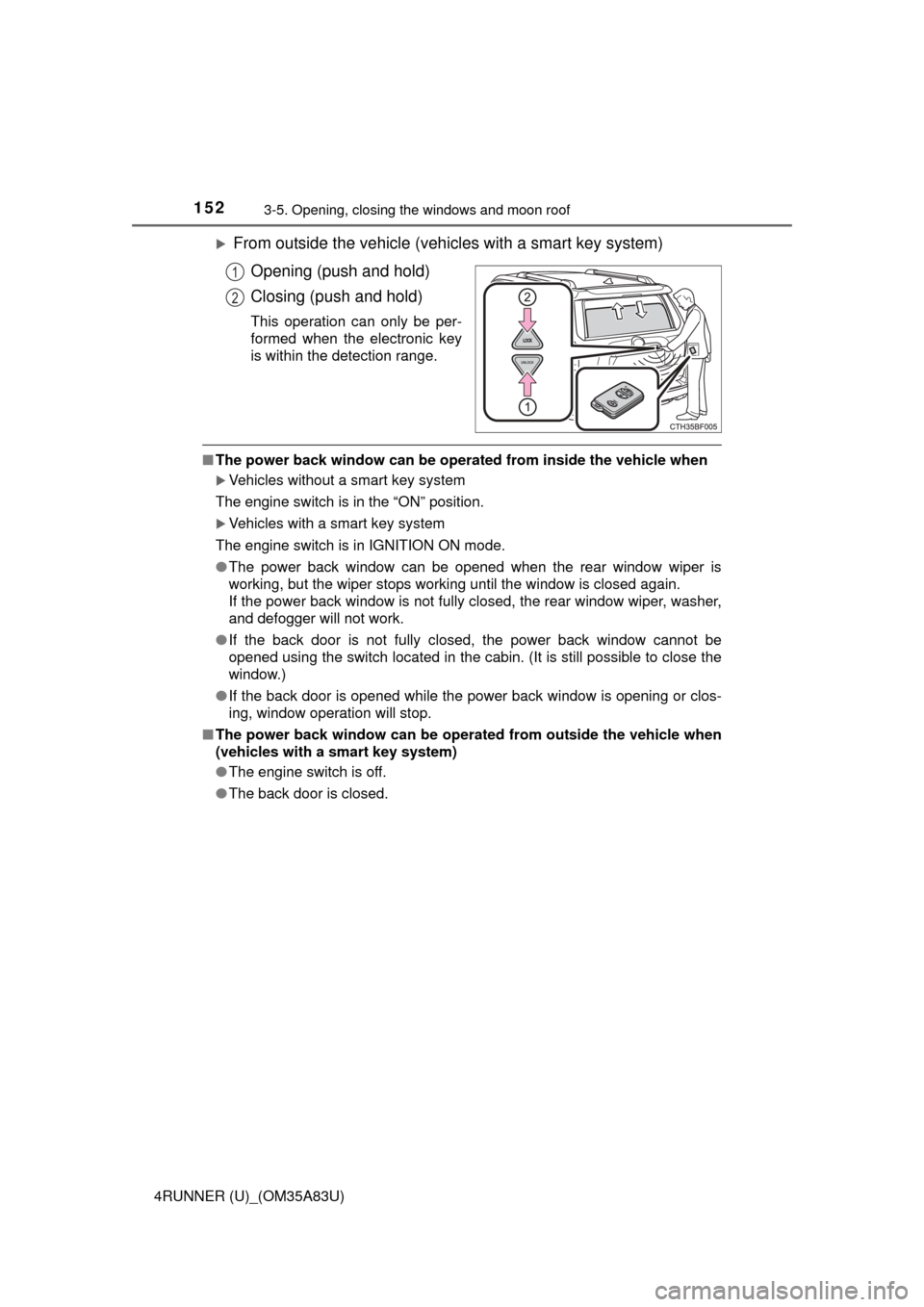
1523-5. Opening, closing the windows and moon roof
4RUNNER (U)_(OM35A83U)
From outside the vehicle (vehicles with a smart key system)Opening (push and hold)
Closing (push and hold)
This operation can only be per-
formed when the electronic key
is within the detection range.
■The power back window can be operat ed from inside the vehicle when
Vehicles without a smart key system
The engine switch is in the “ON” position.
Vehicles with a smart key system
The engine switch is in IGNITION ON mode.
● The power back window can be opened when the rear window wiper is
working, but the wiper stops working until the window is closed again.
If the power back window is not fully closed, the rear window wiper, washer,
and defogger will not work.
● If the back door is not fully closed, the power back window cannot be
opened using the switch located in the cabin. (It is still possible to close the
window.)
● If the back door is opened while the power back window is opening or clos-
ing, window operation will stop.
■ The power back window can be operat ed from outside the vehicle when
(vehicles with a smart key system)
● The engine switch is off.
● The back door is closed.
1
2
Page 155 of 530

1533-5. Opening, closing the windows and moon roof
3
Operation of each component
4RUNNER (U)_(OM35A83U)■
Operating the power back window from inside the vehicle after turning
the engine off
Vehicles without a smart key system
The power back window can be operated for approximately 45 seconds even
after the engine switch is turned to the “ACC” or “LOCK” position. It cannot,
however, be operated once either front door is opened.
Vehicles with a smart key system
The power back window can be operated for approximately 45 seconds even
after the engine switch is turned to ACCESSORY mode or turned off. It can-
not, however, be operated once either front door is opened.
■ Jam protection function
If an object becomes caught between the window and the window frame, win-
dow travel is stopped and the window is opened slightly.
■ When the power back window does not close normally
If the jam protection function is operating abnormally and a window cannot be
closed, perform the following operations using the power back window
switch.
●Vehicles without a smart key system: After stopping the vehicle, the window
can be closed by holding the power back window switch in the one-touch
closing position while the engine switch is turned to the “ON” position.
● Vehicles with a smart key system: After stopping the vehicle, the window
can be closed by holding the power back window switch in the one-touch
closing position while the engine switch is turned to IGNITION ON mode.
● If the window still cannot be closed even by carrying out the operation
explained above, initialize the function by performing the following proce-
dure.
Hold the power back window switch in the one-touch closing position.
Continue holding the switch for a further 6 seconds after the window has
closed.
Hold the power back window switch in the one-touch opening position.
Continue holding the switch for a further 2 seconds after the window has
opened completely.
Hold the power back window switch in the one-touch closing position
once again. Continue holding the switch for a further 2 seconds after the
window has closed.
If you release the switch while the window is moving, start again from the
beginning.
If the window continues to close but then re-open slightly even after perform-
ing the above procedure correctly, have the vehicle inspected by your Toyota
dealer.
■ Customization
Settings (e.g. linked operation) can be changed.
(Customizable features P. 485)
1
2
3
Page 158 of 530

1563-5. Opening, closing the windows and moon roof
4RUNNER (U)_(OM35A83U)
■The moon roof can be operated when
Vehicles without a smart key system
The engine switch is in the “ON” position.
Vehicles with a smart key system
The engine switch is in IGNITION ON mode.
■ Operating the moon roof af ter turning the engine off
Vehicles without a smart key system
The moon roof can be operated for approximately 45 seconds even after the
engine switch is turned to the “ACC” or “LOCK” position. They cannot, how-
ever, be operated once either front door is opened.
Vehicles with a smart key system
The moon roof can be operated for approximately 45 seconds after the
engine switch is turned to ACCESSORY mode or turned off. It cannot, how-
ever, be operated once either front door is opened.
■ Jam protection function
If an object is detected between the moon roof and the frame while the moon
roof is closing or tilting down, travel is stopped and the moon roof opens
slightly.
■ To reduce moon roof wind noise
When the moon roof is opened automatically, it will stop slightly before the
fully open position. Driving with the moon roof in this position can help reduce
wind noise.
■ Sunshade
The sunshade can be opened and closed manually. However, the sunshade
will open automatically when the moon roof is opened.
Page 159 of 530

1573-5. Opening, closing the windows and moon roof
3
Operation of each component
4RUNNER (U)_(OM35A83U)■
When the moon roof do es not close normally
Perform the following procedure:
● If the moon roof closes but then re-opens slightly
Stop the vehicle.
Press and hold the “SLIDE (open/close)” switch in the close position.
*1
The moon roof will close, reopen and pause for approximately 10 sec-
onds.
*2 Then it will close again, tilt up and pause for approximately 1 sec-
ond. Finally, it will tilt down, open and close.
Check to make sure that the moon roof is completely closed and then
release the switch.
● If the moon roof tilts down but then tilts back up
Stop the vehicle.
Press and hold the “UP” switch
*1 until the moon roof moves into the tilt
up position and stops.
Release the “UP” switch once and then press and hold the “UP” switch
again.
*1
The moon roof will pause for approximately 10 seconds in the tilt up posi-
tion.
*2 Then it will adjust slightly and pause for approximately 1 second.
Finally, it will tilt down, open and close.
Check to make sure that the moon roof is completely closed and then
release the switch.
*1: If the switch is released at the incorrect time, the procedure will have to
be performed again from the beginning.
*2: If the switch is released after the above mentioned 10 second pause,automatic operation will be disabled. In that case, press and hold the
“UP” or “DOWN” switch, and the moon roof will tilt up and pause for
approximately 1 second. Then it will tilt down, open and close. Check to
make sure that the moon roof is completely closed and then release the
switch.
If the moon roof does not fully close even after performing the above proce-
dure correctly, have the vehicle inspected by your Toyota dealer.
■ Moon roof open reminder function
An alarm will sound when the driver’s door is opened with the moon roof not
fully closed and the engine switch off.
■ Customization that can be co nfigured at Toyota dealer
Settings (e.g. key linked operation) can be changed.
(Customizable features P. 485)
1
2
3
1
2
3
4
Page 161 of 530

159
Driving4
4RUNNER (U)_(OM35A83U)4-1. Before driving
Driving the vehicle ............. 160
Cargo and luggage ........... 170
Vehicle load limits ............. 175
Trailer towing..................... 176
Dinghy towing ................... 191
4-2. Driving procedures Engine (ignition) switch (vehicles without a
smart key system) ........... 192
Engine (ignition) switch (vehicles with a
smart key system) ........... 195
Automatic transmission ..... 200
Turn signal lever................ 203
Parking brake .................... 204
4-3. Operating the lights and wipers
Headlight switch ................ 205
Fog light switch ................. 211
Windshield wipers and washer ............................ 213
Rear window wiper and washer ............................ 216 4-4. Refueling
Opening the fuel tank cap .................................. 219
4-5. Using the driving support systems
Cruise control .................... 222
Intuitive parking assist....... 226
Four-wheel drive system (part-time 4WD
models) ........................... 232
Four-wheel drive system (full-time 4WD
models) ........................... 236
Active traction control system ............................ 240
AUTO LSD system............ 242
Rear differential lock system ............................ 244
Downhill assist control system ............................ 247
Crawl Control .................... 250
Multi-terrain Select ............ 253
Driving assist systems ...... 260
4-6. Driving tips Winter driving tips ............. 269
Off-road precautions ......... 273