Page 82 of 530
822. Instrument cluster
4RUNNER (U)_(OM35A83U)
The brightness of the instrument panel lights can be adjusted.
Brighter
Darker
■ The meters and display illuminate when
Vehicles without a smart entry & start system
The engine switch is in the “ON” position.
Vehicles with a smart entry & start system
The engine switch is in IGNITION ON mode.
■ The brightness of the in strument panel lights
When the headlight switch is turned to on, the brightness will be reduced
slightly unless the control dial is turned fully upward.
Instrument panel light control
1
2
NOTICE
■ To prevent damage to the engine and its components
● Do not let the indicator needle of the tachometer enter the red zone, which
indicates the maximum engine speed.
● The engine may be overheating if the engine coolant temperature gauge is
in the red zone (H). In this case, immediately stop the vehicle in a safe
place, and check the engine after it has cooled completely. (P. 455)
Page 84 of 530
842. Instrument cluster
4RUNNER (U)_(OM35A83U)■
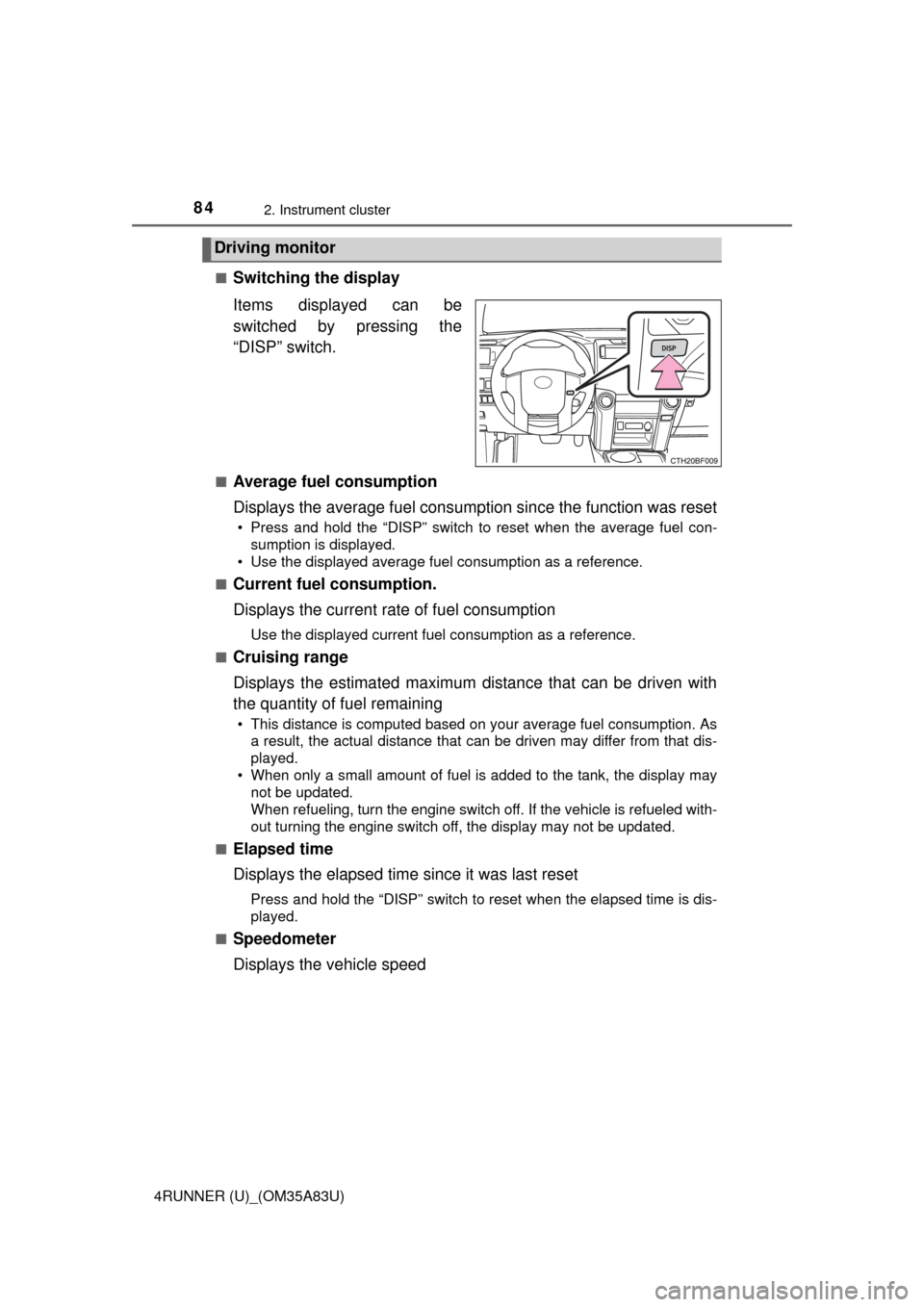
Switching the display
Items displayed can be
switched by pressing the
“DISP” switch.
■Average fuel consumption
Displays the average fuel consumption since the function was reset
• Press and hold the “DISP” switch to reset when the average fuel con-
sumption is displayed.
• Use the displayed average fuel consumption as a reference.
■
Current fuel consumption.
Displays the current rate of fuel consumption
Use the displayed current fuel consumption as a reference.
■
Cruising range
Displays the estimated maximum distance that can be driven with
the quantity of fuel remaining
• This distance is computed based on your average fuel consumption. As a result, the actual distance that can be driven may differ from that dis-
played.
• When only a small amount of fuel is added to the tank, the display may not be updated.
When refueling, turn the engine switch off. If the vehicle is refueled with-
out turning the engine switch off, the display may not be updated.
■
Elapsed time
Displays the elapsed time since it was last reset
Press and hold the “DISP” switch to reset when the elapsed time is dis-
played.
■
Speedometer
Displays the vehicle speed
Driving monitor
Page 88 of 530
882. Instrument cluster
4RUNNER (U)_(OM35A83U)■
Liquid crystal display
Small spots or light spots may appear on the display. This phenomenon is
characteristic of liquid crystal displays, and there is no problem continuing to
use the display.
■ Setting display automatic suspension
In the following situations, the setting display will be suspended.
●When a message appears.
● When the vehicle begins to move.
CAUTION
■The display at low temperatures
Allow the interior of the vehicle to warm up before using the display. At
extremely low temperatures, the display monitor may respond slowly, and
display changes may be delayed.
■ Cautions during setting up the display
As the engine needs to be running during setting up the display, ensure that
the vehicle is parked in a place with adequate ventilation. In a closed area
such as a garage, exhaust gases including harmful carbon monoxide (CO)
may collect and enter the vehicle. This may lead to death or a serious
health hazard.
Page 97 of 530
973-1. Key information
3
Operation of each component
4RUNNER (U)_(OM35A83U)■
If you lose your keys
New genuine keys can be made by your Toyota dealer using the other key
(vehicles without a smart key system) or mechanical key (vehicles with a
smart key system) and the key number stamped on your key number plate.
Keep the plate in a safe place such as your wallet, not in the vehicle.
■ When riding in an aircraft
When bringing a key with wireless remote control function onto an aircraft,
make sure you do not press any buttons on the key while inside the aircraft
cabin. If you are carrying the key in your bag etc., ensure that the buttons are
not likely to be pressed accidentally. Pressing a button may cause the key to
emit radio waves that could interfere with the operation of the aircraft.
■ Conditions affecting operation
Vehicles without a smart key system
The wireless remote control function may not operate normally in the follow-
ing situations:
● Near a TV tower, radio station, electric power plant, airport or other facility
that generates strong radio waves
● When carrying a portable radio, cellular phone or other wireless communi-
cation devices
● When multiple wireless keys are in the vicinity
● When the wireless key is in contact with, or is covered by, a metallic object
● When a wireless key (that emits radio waves) is being used nearby
● When the wireless key has been left near an electrical appliance such as a
personal computer
Vehicles with a smart key system
P. 1 1 0
■ Key battery depletion
Vehicles with a smart key system
● The standard battery life is 1 to 2 years.
● If the battery becomes low, an alarm will sound in the cabin when the engine
stops. ( P. 431)
● As the electronic key always receives radio waves, the battery will become
depleted even if the electronic key is not used. The following symptoms indi-
cate that the electronic key battery may be depleted. Replace the battery
when necessary. ( P. 385)
• The smart key system or the wireless remote control does not operate.
• The detection area becomes smaller.
• The LED indicator on the key surface does not turn on.
Page 98 of 530

983-1. Key information
4RUNNER (U)_(OM35A83U)●
To avoid serious deterioration, do not leave the electronic key within 3 ft. (1
m) of the following electrical appl iances that produce a magnetic field:
•TVs
• Personal computers
• Cellular phones, cordless phones and battery chargers
• Recharging cellular phones or cordless phones
• Table lamps
• Induction cookers
Vehicles without a smart key system
If the wireless remote control function does not operate, the battery may be
depleted. Replace the battery when necessary. ( P. 385)
■ Precautions when disconnecting the battery (vehicles with a smart key
system)
● In some cases, it may not be possible to unlock the doors using the smart
key system immediately after the battery has been disconnected. Use the
wireless remote control or the mechanical key to lock or unlock the doors.
● The engine may not start on the first attempt after reconnecting the battery
but will start normally after the second attempt. This is not a malfunction.
● The engine switch mode is memorized by the vehicle. When the battery is
reconnected, the system will return to the mode it was in before the battery
was disconnected. Before disconnecting the battery, turn the engine switch
off.
If you are unsure what mode the engine switch was in when the battery was
disconnected, be especially careful when reconnecting the battery.
■ Replacing the battery
P. 385
■ Confirmation of the registered key number
The number of keys already registered to the vehicle can be confirmed. Ask
your Toyota dealer for details.
■ If a wrong key is used (vehicles with a smart key system)
The key cylinder rotates freely to isolate inside mechanism.
■ Certification for wireless remote control
For vehicles sold in the U.S.A.
FCC ID: HYQ14ACX
FCC ID: HYQ13CZD
FCC ID: HYQ14ADF
FCC ID: HYQ13CZE
FCC ID: HYQ12BBY
FCC ID: HYQ13BDC
Page 103 of 530
1033-1. Key information
3
Operation of each component
4RUNNER (U)_(OM35A83U)
Move the inside lock button to the lock position.
Close the door.
Vehicles without a smart key system
The door cannot be locked if either of the front doors is open and
the key is in the engine switch.
Vehicles with a smart key system
The door cannot be locked if the engine switch is in ACCESSORY
or IGNITION ON mode, or the electr onic key is left inside the vehi-
cle. However, the key may not be detected correctly and the door
may be locked.
The door cannot be opened from
inside the vehicle when the lock is
set. Unlock
Lock
These locks can be set to prevent
children from opening the rear
doors. Push down on each rear
door switch to lock both rear doors.
Locking the doors from the outside without a key
Rear door child-protector lock
1
2
1
2
Page 104 of 530

1043-1. Key information
4RUNNER (U)_(OM35A83U)
The following functions can be set or canceled:
For instructions on customizing, refer to P. 485.
■
Setting and canceling the functions
To switch between setting and canceling, follow the procedure
below: Vehicles without a smart key system: close all the doors and turn
the engine switch to the “ON” position. (Perform step 2 within 20
seconds.)
Vehicles with a smart key system : close all the doors and turn the
engine switch to IGNITION ON mode. (Perform step 2 within 20
seconds.)
Automatic door lockin g and unlocking systems
FunctionOperation
Speed linked door locking function
All doors are automatically locked
when vehicle speed is approxi-
mately 12 mph (20 km/h) or higher.
Shift position linked door locking
functionAll doors are automatically locked
when shifting the shift lever to posi-
tion other than P.
Shift position linked door unlocking
functionAll doors are automatically unlocked
when shifting the shift lever to P.
Driver's door linked door unlocking
function
(
vehicles without a smart key sys-
tem
)
All doors are automatically unlocked
when driver's door is opened within
10 seconds after turning the engine
switch to “ACC” or “LOCK”.
Driver's door linked door unlocking
function
(vehicles with a smart key system)All doors are automatically unlocked
when driver's door is opened within
10 seconds after turning the engine
switch off.
1
Page 107 of 530
107
3
Operation of each component
4RUNNER (U)_(OM35A83U)
3-2. Opening, closing and locking the doors
●Locks and unlocks the doors ( P. 100)
● Starts the engine ( P. 195)
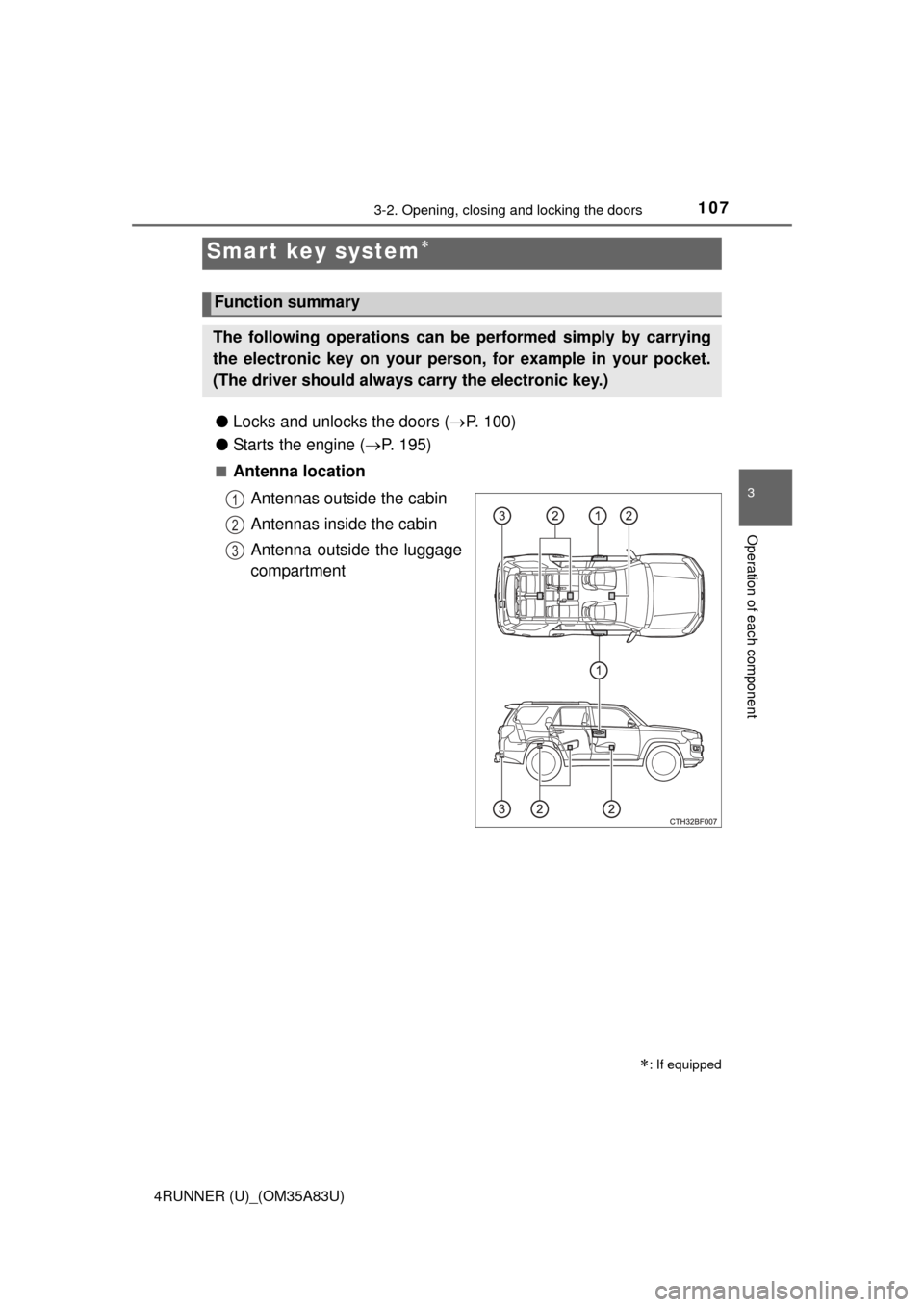
■Antenna location
Antennas outside the cabin
Antennas inside the cabin
Antenna outside the luggage
compartment
Smart key system
: If equipped
Function summary
The following operations can be performed simply by carrying
the electronic key on your person, for example in your pocket.
(The driver should always carry the electronic key.)
1
2
3