Page 246 of 530
2444-5. Using the driving support systems
4RUNNER (U)_(OM35A83U)
The rear differential lock system is effective in case one of the rear
wheels is spinning.
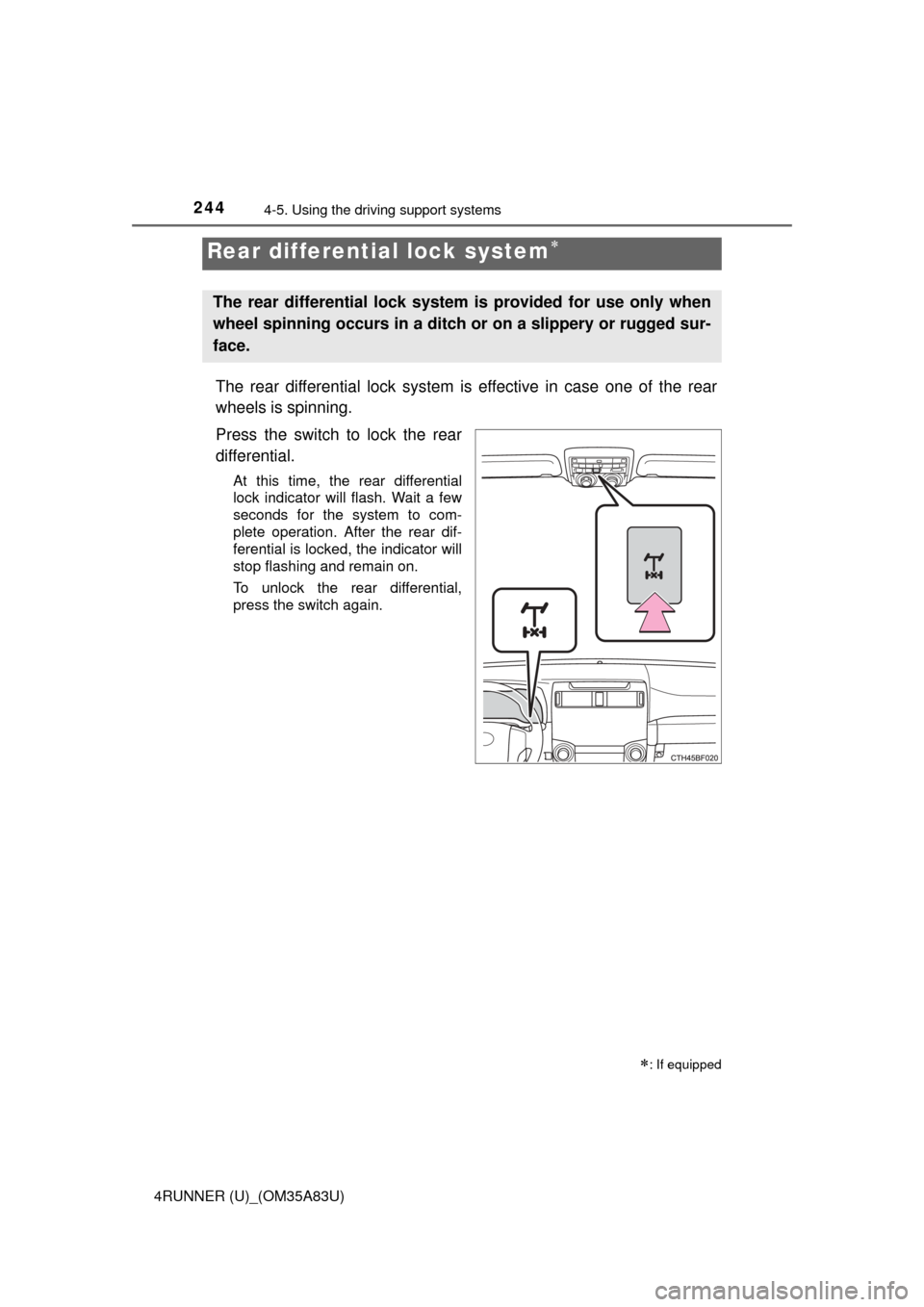
Press the switch to lock the rear
differential.
At this time, the rear differential
lock indicator will flash. Wait a few
seconds for the system to com-
plete operation. After the rear dif-
ferential is locked, the indicator will
stop flashing and remain on.
To unlock the rear differential,
press the switch again.
Rear differential lock system
: If equipped
The rear differential lock system is provided for use only when
wheel spinning occurs in a ditch or on a slippery or rugged sur-
face.
Page 247 of 530
2454-5. Using the driving support systems
4
Driving
4RUNNER (U)_(OM35A83U)
Before using the rear differential lock system:
Stop the vehicle, shift the shift lever to N and shift the front-wheel
drive control lever into L4 to see if this is sufficient. If this has no
effect, additionally use the rear differential lock system.
Be sure the wheels have stopped spinning.
Press the rear differential lock switch.
Gently depress the accelerator pedal.
After the rear differential is locked, the indicator will come on.
Unlock the rear differential as soon as the vehicle moves.
To unlock the rear differential, press the switch again.
■ Locking the rear differential
The following systems do not operate when the rear differential is locked. It is
normal operation for the ABS warning light and VSC OFF indicator to be on at
this time.
•ABS
• Multi Terrain ABS
• Brake assist system
•VSC
• Hill-start assist control
■ The rear differential lock is disengaged when
The front-wheel drive control lever or switch is shifted to H2 or H4.
Never forget to turn off the switch after using this feature.
■ After unlocking the rear differential
Check that the indicator goes off.
■ If the rear differential lock indicator flashes rapidly
There may be a malfunction in the rear differential lock system. Have the
vehicle inspected by your Toyota dealer immediately.
Using the rear differential lock system
1
2
3
4
Page 248 of 530
2464-5. Using the driving support systems
4RUNNER (U)_(OM35A83U)
CAUTION
■To avoid an accident
● Do not use the rear differential lock system except when wheel spinning
occurs in a ditch or on a slippery or rugged surface. Large steering effort
and careful cornering control will be required.
● Do not lock the rear differential until the wheels have stopped spinning.
Otherwise, the vehicle may move in an unexpected direction when the dif-
ferential lock is engaged, resulting in an accident. This may also lead to
possible damage to rear differential lock component parts.
● Do not drive over 5 mph (8 km/h) when the rear differential is locked.
● Do not keep driving with the rear differential lock switch on.
Page 249 of 530
2474-5. Using the driving support systems
4
Driving
4RUNNER (U)_(OM35A83U)■
Activating the system
The system will activate when
●
The vehicle is traveling under 15 mph (25 km/h) with the acceler-
ator and brake pedals released.
● Part-time 4WD models: The front-wheel drive control lever or
switch is in L4.
Full-time 4WD models: The four-wheel drive control switch is in
L4L.
● The rear differential is unlocked (if equipped).
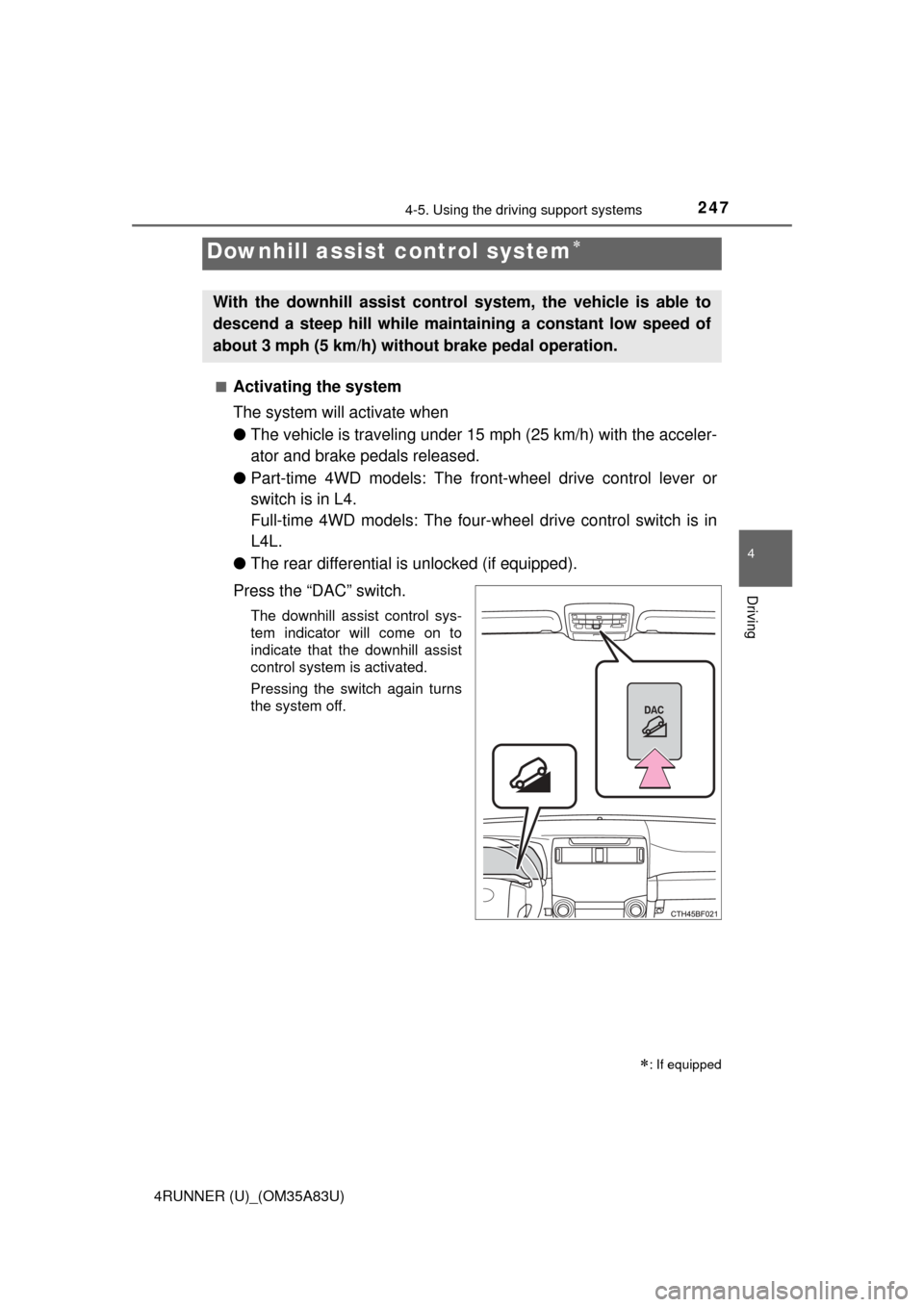
Press the “DAC” switch.
The downhill assist control sys-
tem indicator will come on to
indicate that the downhill assist
control system is activated.
Pressing the switch again turns
the system off.
Downhill assist control system
: If equipped
With the downhill assist control system, the vehicle is able to
descend a steep hill while maintaining a constant low speed of
about 3 mph (5 km/h) without brake pedal operation.
Page 250 of 530
2484-5. Using the driving support systems
4RUNNER (U)_(OM35A83U)
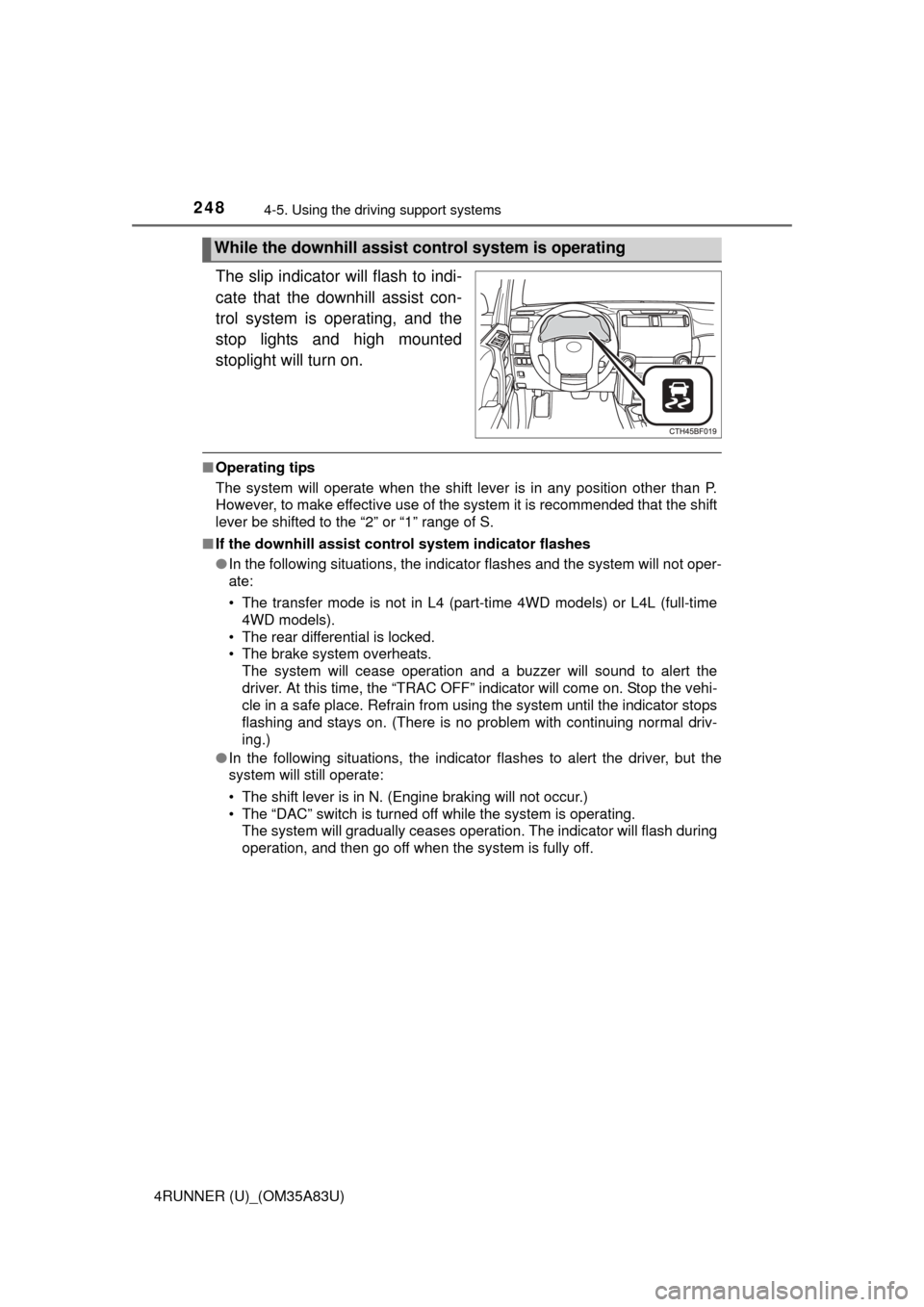
The slip indicator will flash to indi-
cate that the downhill assist con-
trol system is operating, and the
stop lights and high mounted
stoplight will turn on.
■Operating tips
The system will operate when the shift lever is in any position other than P.
However, to make effective use of the system it is recommended that the shift
lever be shifted to the “2” or “1” range of S.
■ If the downhill assist control system indicator flashes
●In the following situations, the indicator flashes and the system will not oper-
ate:
• The transfer mode is not in L4 (part-time 4WD models) or L4L (full-time
4WD models).
• The rear differential is locked.
• The brake system overheats. The system will cease operation and a buzzer will sound to alert the
driver. At this time, the “TRAC OFF” indicator will come on. Stop the vehi-
cle in a safe place. Refrain from using the system until the indicator stops
flashing and stays on. (There is no problem with continuing normal driv-
ing.)
● In the following situations, the indicator flashes to alert the driver, but the
system will still operate:
• The shift lever is in N. (Engine braking will not occur.)
• The “DAC” switch is turned off while the system is operating.
The system will gradually ceases operation. The indicator will flash during
operation, and then go off when the system is fully off.
While the downhill assist control system is operating
Page 251 of 530
2494-5. Using the driving support systems
4
Driving
4RUNNER (U)_(OM35A83U)■
System malfunction
In case of a system malfunction, the following may occur:
●The downhill assist control system indicator flashes in a situation other than
those listed above.
● The downhill assist control system indicator does not come on when the
engine switch is turned to the “ON” position (vehicles without a smart key
system) or the engine switch is turned to IGNITION ON mode (vehicles with
a smart key system).
Have your vehicle inspected by your Toyota dealer.
CAUTION
■ Conditions which may affect the downhill assist control system opera-
tion
● Do not rely too heavily on the downhill assist control system. On extremely
steep inclines, icy surfaces or muddy roads, the vehicle may slip and the
system may not be able to maintain the constant low vehicle speed of
about 3 mph (5 km/h), leading to an accident causing death or serious
injury.
● Do not shift the shift lever to R while driving forward, or to D while driving
backward. Doing so may cause the wheels to lock up, leading to an acci-
dent causing death or serious injury. In addition, excessive stress will be
applied to the automatic transmission, possibly resulting in damage.
Page 252 of 530
2504-5. Using the driving support systems
4RUNNER (U)_(OM35A83U)■
Crawl Control switch
Crawl Control
: If equipped
Allows travel on extremely rough o
ff-road surfaces at a fixed low
speed without pressing the acceler ator or brake pedal. Mini-
mizes loss of traction or vehicle slip when driving on slippery
road surfaces, allowing for stable driving.
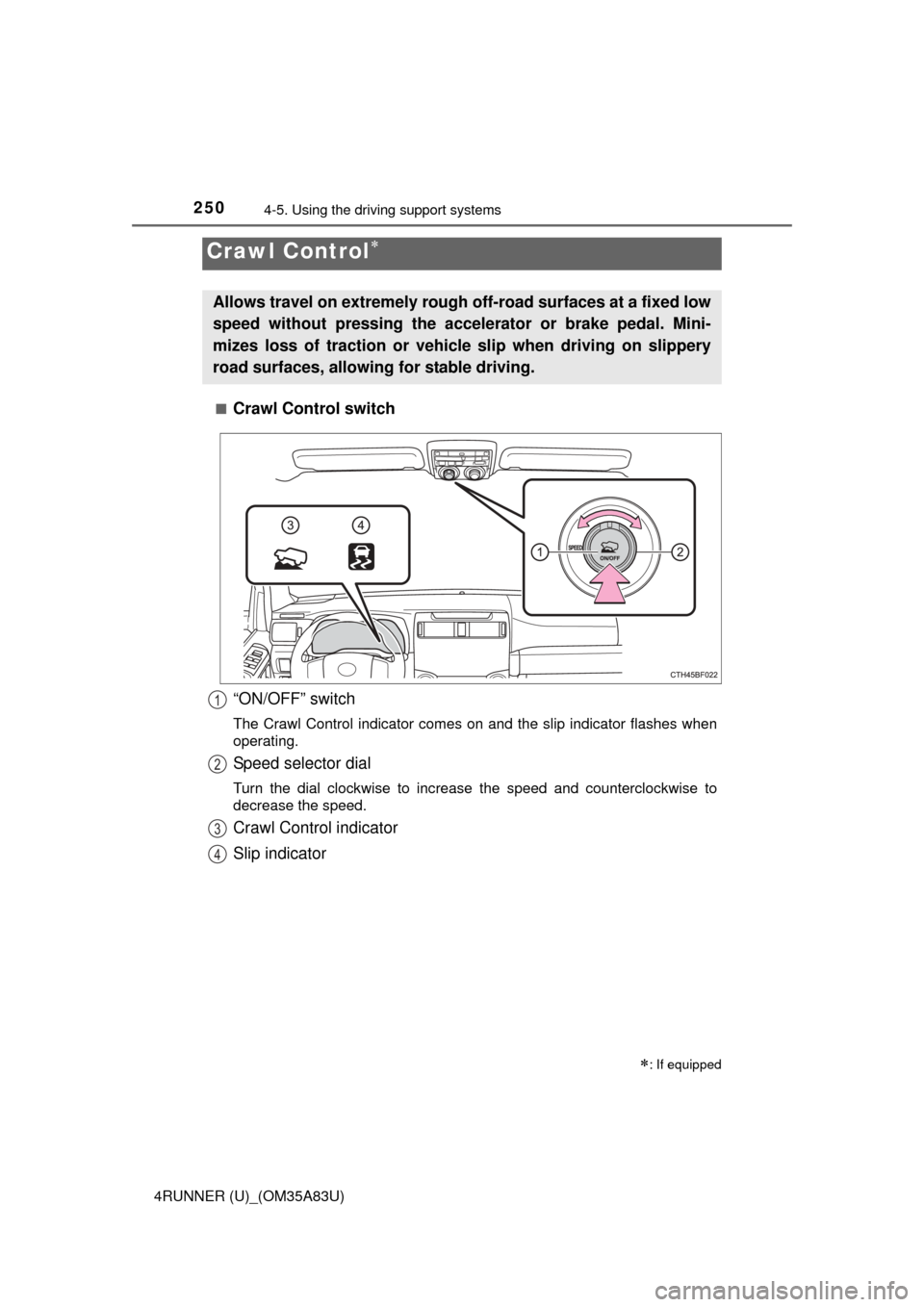
“ON/OFF” switch
The Crawl Control indicator comes on and the slip indicator flashes when\
operating.
Speed selector dial
Turn the dial clockwise to increase the speed and counterclockwise to
decrease the speed.
Crawl Control indicator
Slip indicator
1
2
3
4
Page 259 of 530
2574-5. Using the driving support systems
4
Driving
4RUNNER (U)_(OM35A83U)
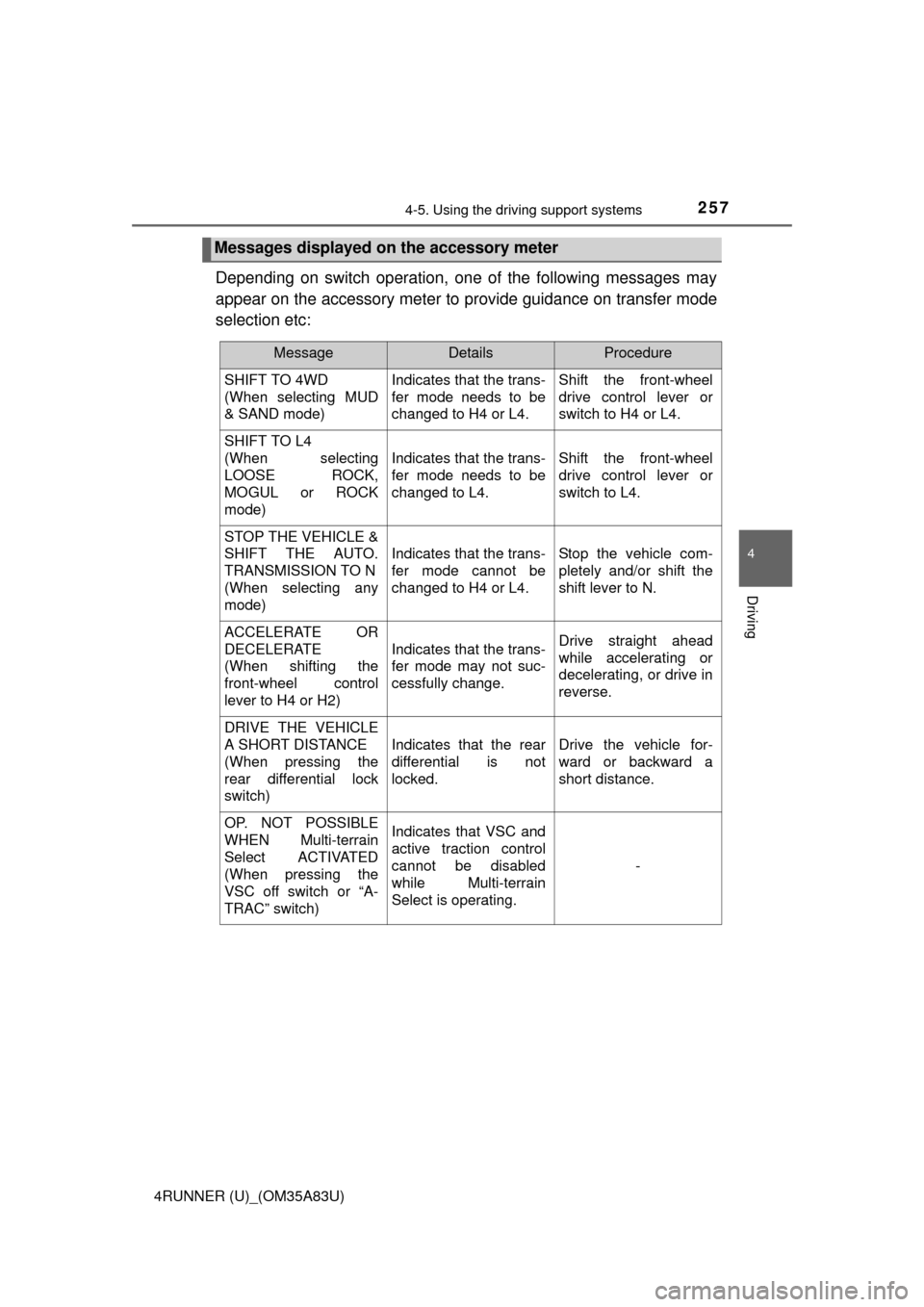
Depending on switch operation, one of the following messages may
appear on the accessory meter to provide guidance on transfer mode
selection etc:
Messages displayed on the accessory meter
MessageDetailsProcedure
SHIFT TO 4WD
(When selecting MUD
& SAND mode) Indicates that the trans-
fer mode needs to be
changed to H4 or L4.Shift the front-wheel
drive control lever or
switch to H4 or L4.
SHIFT TO L4
(When selecting
LOOSE ROCK,
MOGUL or ROCK
mode)
Indicates that the trans-
fer mode needs to be
changed to L4.Shift the front-wheel
drive control lever or
switch to L4.
STOP THE VEHICLE &
SHIFT THE AUTO.
TRANSMISSION TO N
(When selecting any
mode)
Indicates that the trans-
fer mode cannot be
changed to H4 or L4.Stop the vehicle com-
pletely and/or shift the
shift lever to N.
ACCELERATE OR
DECELERATE
(When shifting the
front-wheel control
lever to H4 or H2)
Indicates that the trans-
fer mode may not suc-
cessfully change.Drive straight ahead
while accelerating or
decelerating, or drive in
reverse.
DRIVE THE VEHICLE
A SHORT DISTANCE
(When pressing the
rear differential lock
switch)
Indicates that the rear
differential is not
locked.Drive the vehicle for-
ward or backward a
short distance.
OP. NOT POSSIBLE
WHEN Multi-terrain
Select ACTIVATED
(When pressing the
VSC off switch or “A-
TRAC” switch)Indicates that VSC and
active traction control
cannot be disabled
while Multi-terrain
Select is operating.
-