Page 288 of 530
2865-1. Using the air conditioning system and defogger
4RUNNER (U)_(OM35A83U)■
Adjusting the temperature setting
To adjust the temperature se
tting, turn clockwise to
increases the temperature and turn counterclockwise to
decreases the temperature.
■Fan speed setting
To adjust the fan speed, press “ ” on to increase the fan
speed and “ ” to decrease the fan speed.
Press to turn the fan off.
Automatic air conditioning system
: If equipped
Air outlets and fan speed are automatically adjusted according
to the temperature setting.
Air conditioning controls
Page 294 of 530
2925-1. Using the air conditioning system and defogger
4RUNNER (U)_(OM35A83U)
CAUTION
■To prevent the windshield from fogging up
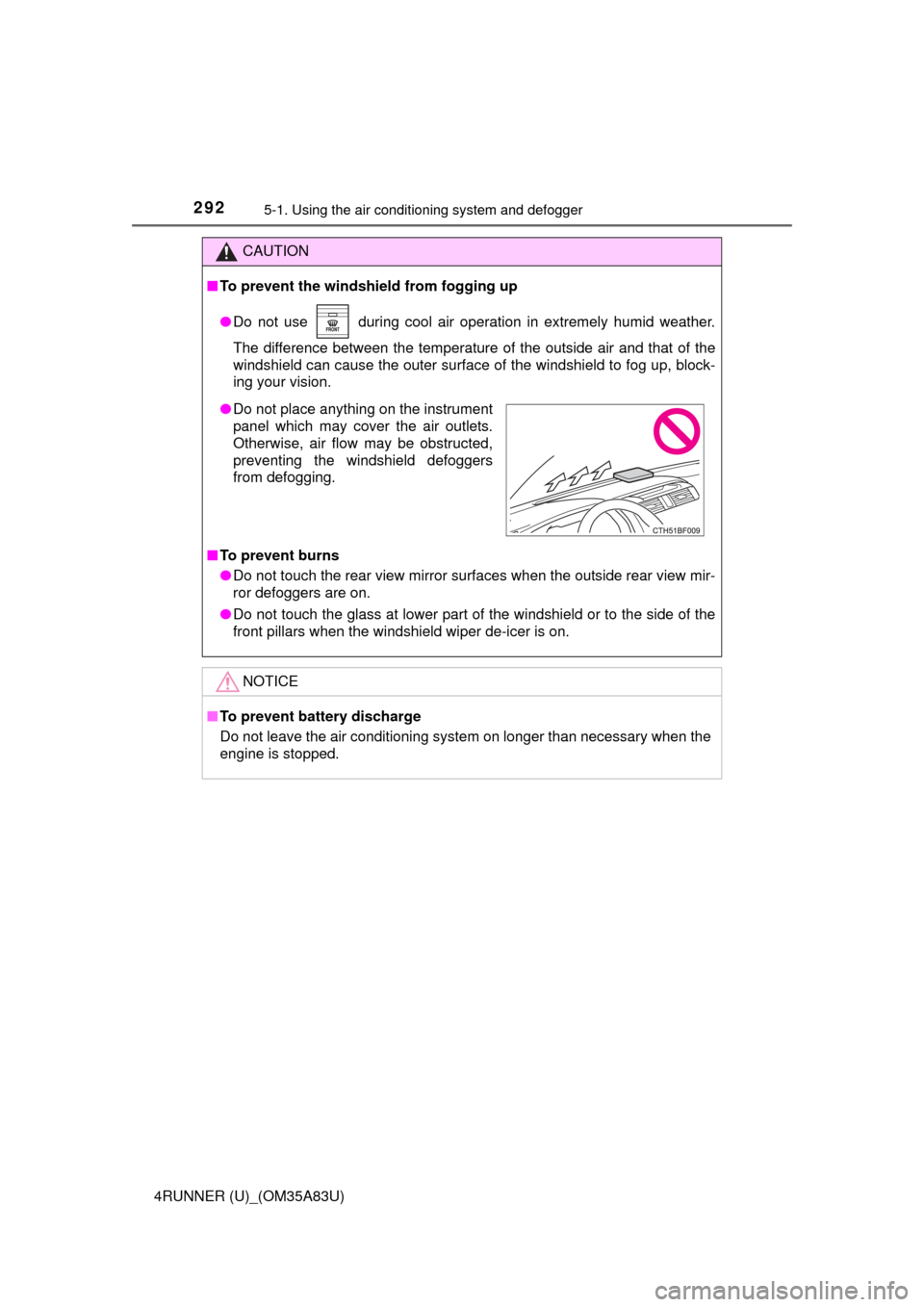
● Do not use during cool air operation in extremely humid weather.
The difference between the temperature of the outside air and that of the
windshield can cause the outer surface of the windshield to fog up, block-
ing your vision.
■ To prevent burns
● Do not touch the rear view mirror surfaces when the outside rear view mir-
ror defoggers are on.
● Do not touch the glass at lower part of the windshield or to the side of the
front pillars when the windshield wiper de-icer is on.
NOTICE
■To prevent battery discharge
Do not leave the air conditioning system on longer than necessary when the
engine is stopped.
● Do not place anything on the instrument
panel which may cover the air outlets.
Otherwise, air flow may be obstructed,
preventing the windshield defoggers
from defogging.
Page 296 of 530
2945-1. Using the air conditioning system and defogger
4RUNNER (U)_(OM35A83U)
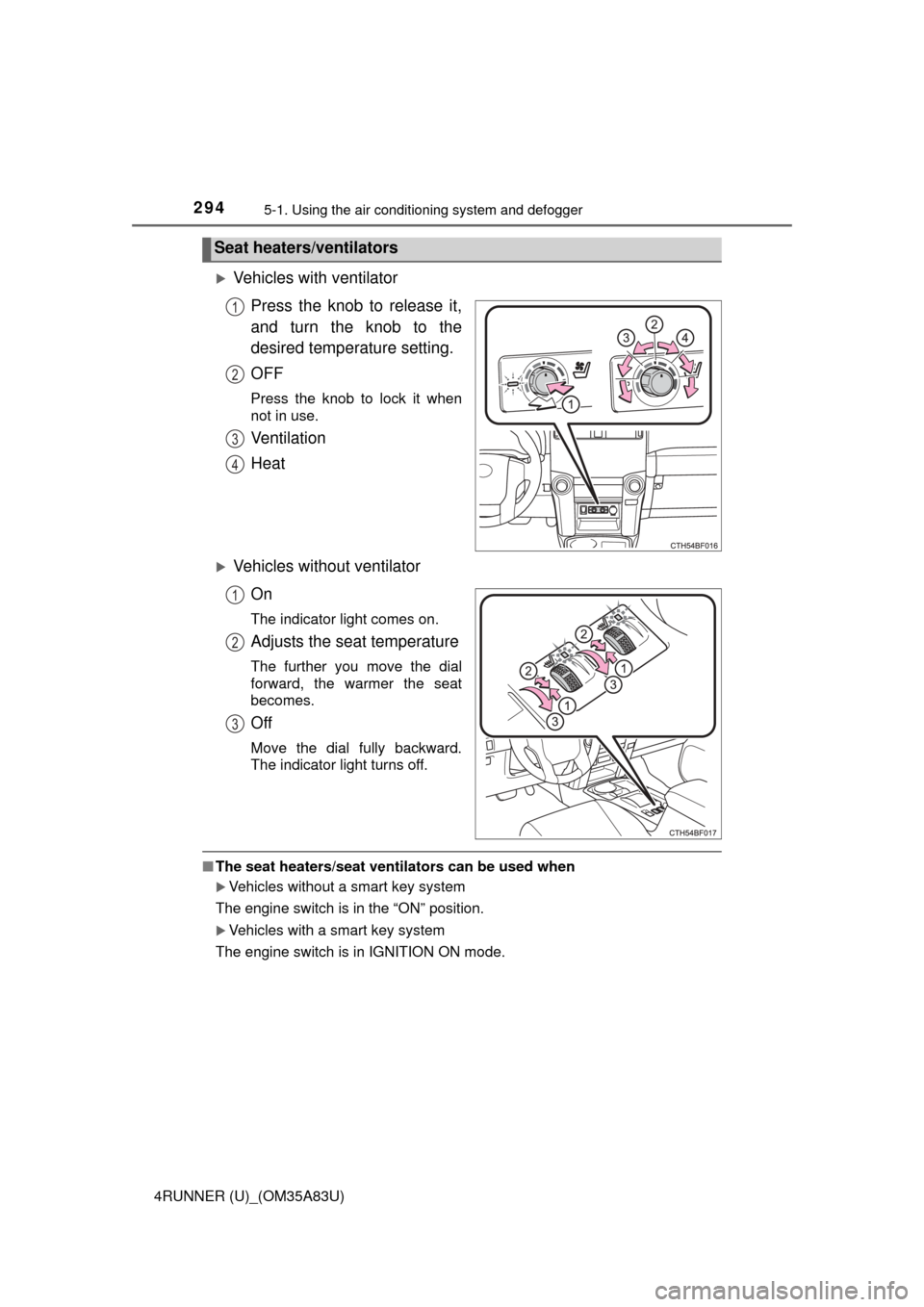
Vehicles with ventilator
Press the knob to release it,
and turn the knob to the
desired temperature setting.
OFF
Press the knob to lock it when
not in use.
Ventilation
Heat
Vehicles without ventilatorOn
The indicator light comes on.
Adjusts the seat temperature
The further you move the dial
forward, the warmer the seat
becomes.
Off
Move the dial fully backward.
The indicator light turns off.
■The seat heaters/seat ventilators can be used when
Vehicles without a smart key system
The engine switch is in the “ON” position.
Vehicles with a smart key system
The engine switch is in IGNITION ON mode.
Seat heaters/ventilators
1
2
3
4
1
2
3
Page 299 of 530
2975-2. Using the interior lights
5
Interior features
4RUNNER (U)_(OM35A83U)
■Illuminated entry system
Vehicles without a smart key system
The lights automatically turn on/off according to the engine switch position,
whether the doors are locked/unlocked, and whether the doors are open/
closed.
Vehicles with a smart key system
The lights automatically turn on/off according to engine switch mode, the
presence of the electronic key, whether the doors are locked/unlocked, and
whether the doors are opened/closed.
■ To prevent battery discharge
If the following lights remain on, the lights will go off automatically after 20
minutes:
●Engine switch light
● Front interior light
● Rear interior light
● Personal lights
● Footwell lights
● Inside door handle lights
● Door courtesy lights
■ Customization
Setting (e.g. the time elapsed before lights turn off) can be changed.
(Customizable features: P. 485)
NOTICE
■To prevent battery discharge
Do not leave the lights on longer than necessary when the engine is not
running.
Page 301 of 530
2995-3. Using the storage features
5
Interior features
4RUNNER (U)_(OM35A83U)
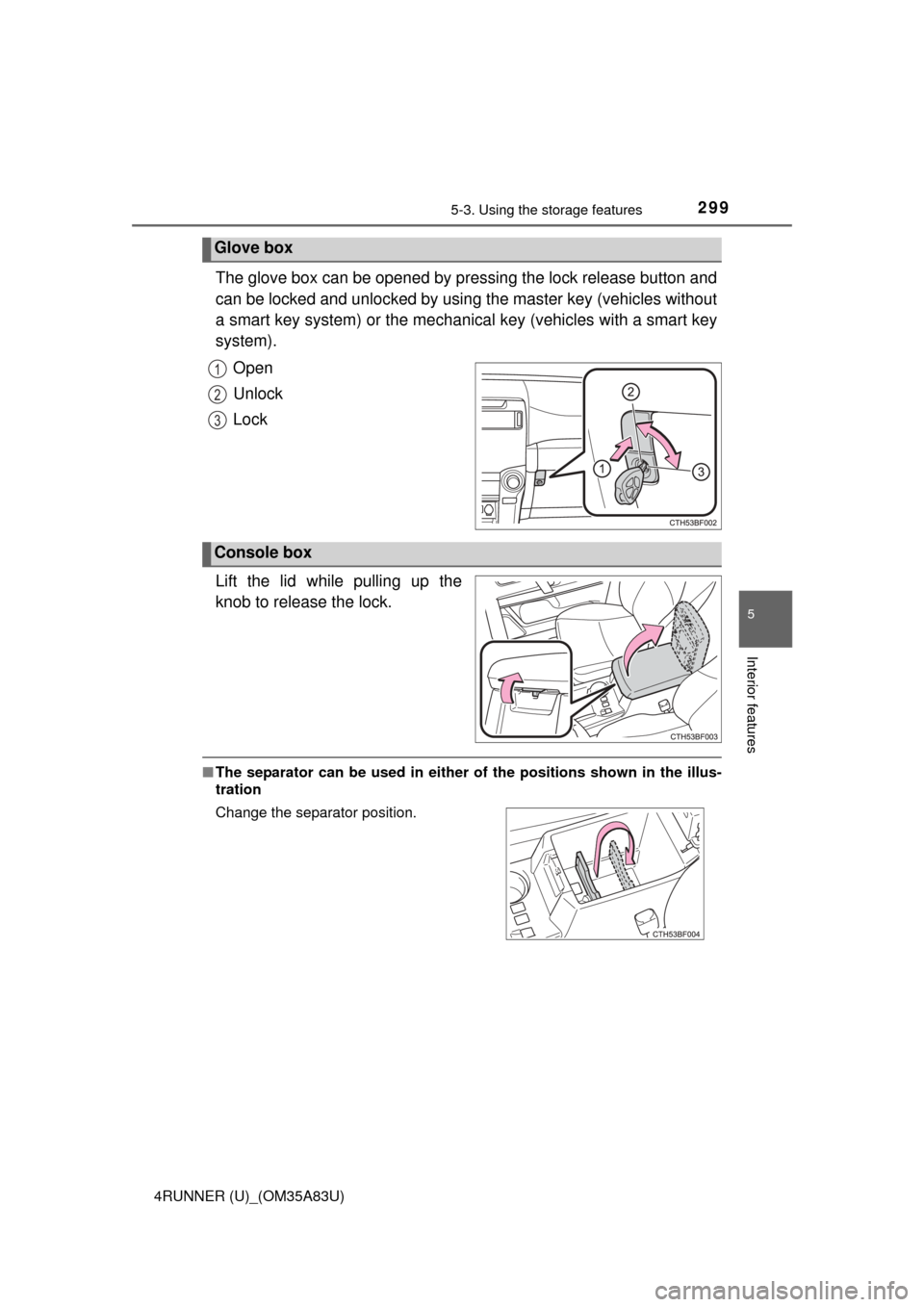
The glove box can be opened by pressing the lock release button and
can be locked and unlocked by using the master key (vehicles without
a smart key system) or the mechanical key (vehicles with a smart key
system).
Open
Unlock
Lock
Lift the lid while pulling up the
knob to release the lock.
■ The separator can be used in either of the positions shown in the illus-
tration
Glove box
1
2
3
Console box
Change the separator position.
Page 305 of 530
3035-3. Using the storage features
5
Interior features
4RUNNER (U)_(OM35A83U)
Lift the lid while pulling up the knob to release the lock.Coin holder
Tissue pocket
Pen holder
Coin holder/tissue pocket/pen holder
1
2
3
Page 310 of 530
3085-3. Using the storage features
4RUNNER (U)_(OM35A83U)■
Slide deck (if equipped)
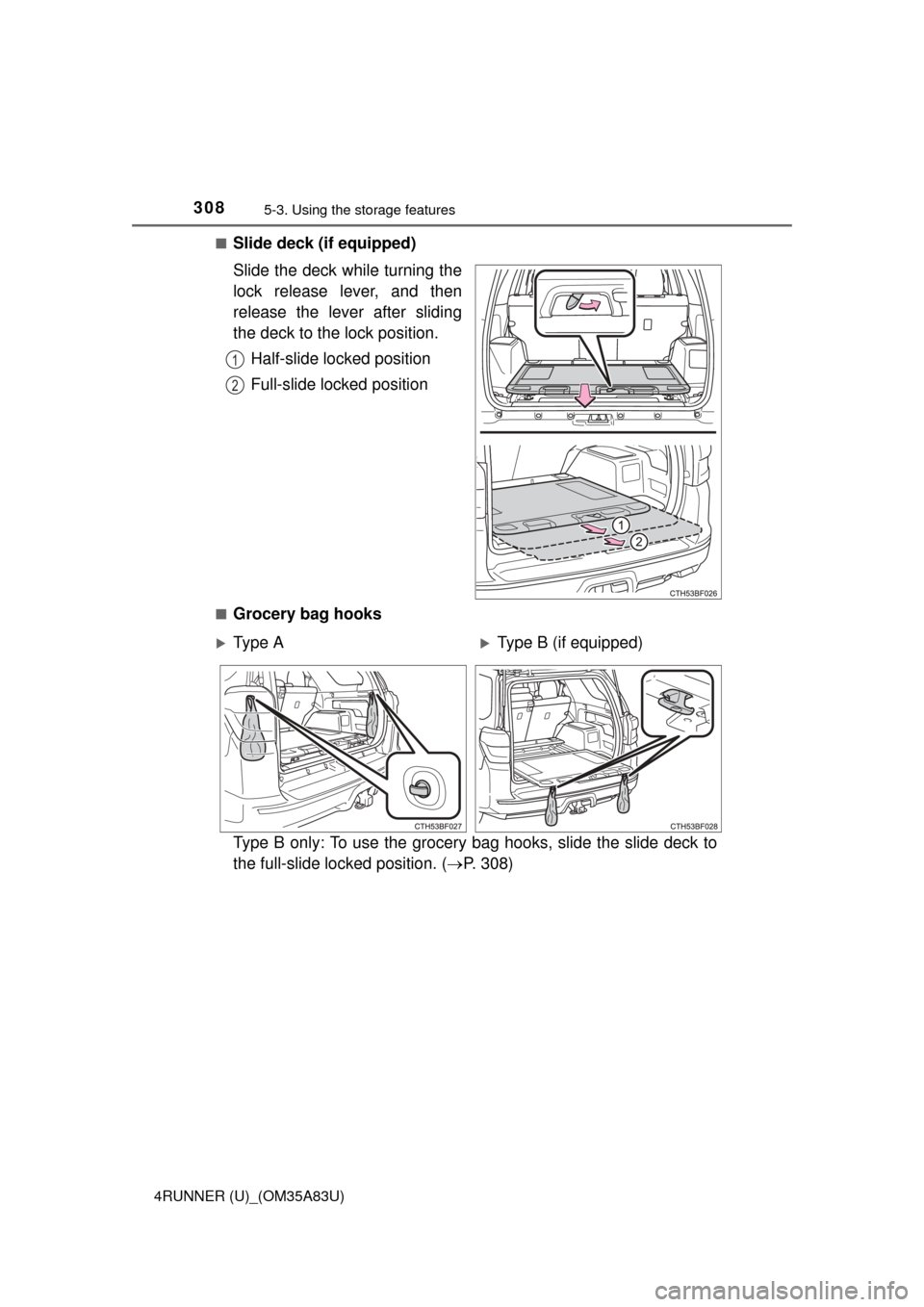
Slide the deck while turning the
lock release lever, and then
release the lever after sliding
the deck to the lock position.
Half-slide locked position
Full-slide locked position
■Grocery bag hooks
Type B only: To use the grocery bag hooks, slide the slide deck to
the full-slide lock ed position. (P. 308)
1
2
Ty p e AType B (if equipped)
Page 311 of 530
3095-3. Using the storage features
5
Interior features
4RUNNER (U)_(OM35A83U)
CAUTION
■When the cargo hooks are not in use
To avoid injury, always return the cargo hooks to their stowed positions.
■ Slide deck operating pr ecaution (if equipped)
● Be careful not to get hands or feet pinched by the slide deck.
● Be careful not to allow the slide deck to hit any persons or luggage while
sliding the deck.
● Do not operate the slide deck while someone is on it.
Doing so may cause an accident.
● If operating the slide deck when the vehicle is stopped on an incline, the
slide deck may move faster. Be careful not to allow the slide deck to hit
you or pinch your fingers etc.
● After sliding the deck, make sure it is securely locked in position.
● Do not close the back door while any person is sitting on the slide deck or
any person is between the slide deck and back door.
● Do not stow any objects into the space between the slide deck rails.
NOTICE
■To prevent damage to the cargo net hooks
Avoid hanging things other than a cargo net on them.
■ Slide deck weight capacity (if equipped)
Do not load anything heavier than 440 lb. (200 kg) on the sliding deck.
■ Grocery bag hook weight capacity
Do not hang any object heavier than 8.8 lb. (4 kg) on the grocery bag hooks.
■ When using the slide deck (if equipped)
● Do not close the back door while the slide deck is sliding out. Doing so
may cause the back door or slide deck to break.
● If operating the slide deck when the vehicle is stopped on an incline, the
slide deck may move faster. Be careful as luggage may become damaged
or fly out and damage the cabin.