2014 SUBARU TRIBECA start stop button
[x] Cancel search: start stop buttonPage 122 of 426
&If you have accidentally trig-
gered the alarm system
!To stop the alarm
Do any of the following operations.
.Press any button on the remote trans-mitter.
.Turn the ignition switch to the“ON”position.
&Arming the system
!To arm the system using remotetransmitter
1. Close all windows and the moonroof.
2. Remove the key from the ignitionswitch.
3. Open the doors and get out of thevehicle.
4. Make sure that the engine hood islocked.
5. Close all doors and the rear gate.
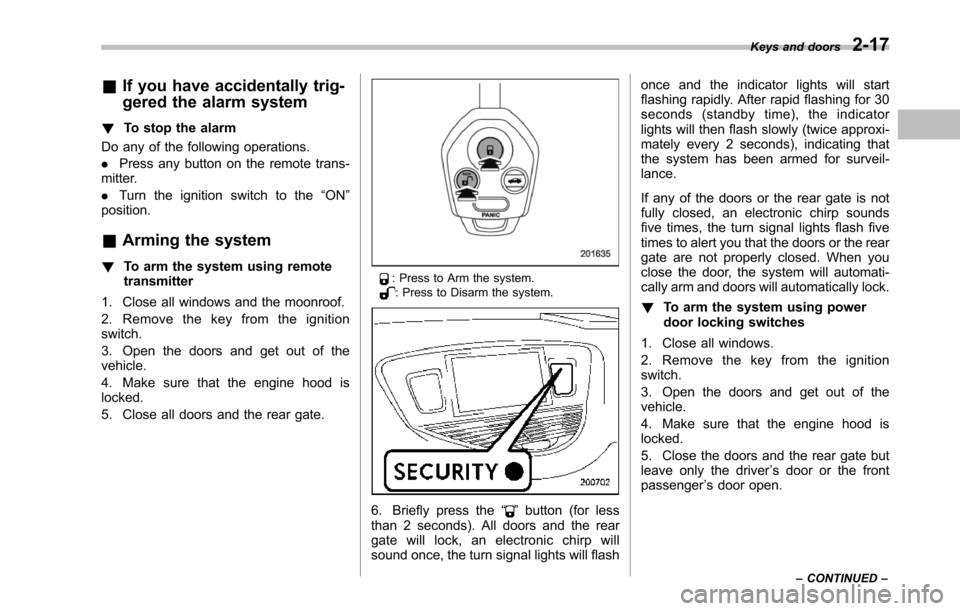
: Press to Arm the system.: Press to Disarm the system.
6. Briefly press the“”button (for lessthan 2 seconds). All doors and the reargate will lock, an electronic chirp willsound once, the turn signal lights will flash
once and the indicator lights will startflashing rapidly. After rapid flashing for 30seconds (standby time), the indicatorlights will then flash slowly (twice approxi-mately every 2 seconds), indicating thatthe system has been armed for surveil-lance.
If any of the doors or the rear gate is notfully closed, an electronic chirp soundsfive times, the turn signal lights flash fivetimes to alert you that the doors or the reargate are not properly closed. When youclose the door, the system will automati-cally arm and doors will automatically lock.
!To arm the system using powerdoor locking switches
1. Close all windows.
2. Remove the key from the ignitionswitch.
3. Open the doors and get out of thevehicle.
4. Make sure that the engine hood islocked.
5. Close the doors and the rear gate butleave only the driver’s door or the frontpassenger’s door open.
Keys and doors2-17
–CONTINUED–
Page 202 of 426
.If you insert a disc that cannot beplayed by the player,“CHECK DISC”will appear on the display and theplayer will revert to the previouslyselected mode..The player is designed to be able toplay music CD-Rs and music CD-RWs,but it may not be able to play certainones..CDs (i.e., 8 cm/3 inch CDs) are notsupported, and if inserted, they will beimmediately ejected.
!When CD is in the player
When the“CD”button (1) is pressed, theplayer will start playback.
NOTE
After the last song finishes, the playerwillautomatically return to track 1 (thefirst song on the disc).
!To stop playback of a CD
When the“PUSH POWER”button ispressed during playback of a CD, the CDstops playing temporarily. To let the CDresume playing, press the button again.
!To select a song from its beginning
!Forward direction
Briefly press the“”side of the“TUNETRACK”button (2) to skip to the beginning
of the next track. Each time this side of thebutton is pressed, the indicated tracknumber will increase.
NOTE
In an MP3 folder, skipping past the lasttrack will take you back to the first trackin the folder.
!Backward direction
Briefly press the“”side of the“TUNETRACK”button (2) to skip to the beginningof the current track. Each time this side ofthe button is pressed, the indicated tracknumber will decrease.
NOTE
In an MP3 folder, skipping past the lasttrack will take you back to the first trackin the folder.
!Fast-forwarding and rewinding
!Fast-forwarding
Press and hold the“”side of the“TUNETRACK”button (2) to fast-forward thetrack.
Release the button to stop fast-forwarding.
NOTE
If you fast-forward past the last trackon the disc, the player will select thefirst track on the disc and start playing
it.
!Rewinding
Press and hold the“”side of the“TUNETRACK”button (2) to rewind the track.
Release the button to stop rewinding.
NOTE
If you rewind to the beginning of thefirst track on the disc, the rewindingwill stop and the player will startplaying the first track on the disc.
!Folder selection (MP3 disc)
Press the“”side of the“SEEK FLDR”button (4) brieflyto select the next folder.Pressing the“”side of the same buttonthe first time makes the player go back tothe beginning of the currently selectedtrack; pressing it a second time makes itgo back to the previously selected track.
NOTE
Only MP3 folders are recognized whenan attempt to select the next or pre-vious folder is made. If no appropriatefolder exists on the disc, pressing the“”or“”side of the“SEEK FLDR”button has no effect.
Audio5-11
–CONTINUED–
Page 213 of 426
5-22Audio
!How to insert a CD(s)
!Inserting a CD
1. Briefly press the“LOAD”button (10). Ifthe magazine in the player has an idleposition where you can insert a disc, thedisc number indicator associated with theidle position will blink.
If no indicator blinks, it means that there isno idle position in the magazine.
2. After the disc number indicator hasstarted to flash, insert the disc when“LOAD”flashes on the display. The discwill then be automatically drawn in, andthe player will begin to play back the firsttrack of the disc.
.To insert more discs in succession,repeatSteps 1 and 2. The magazine willbe loaded with discs in the ascendingorder of position number.
If you do not insert any disc in 15 secondsafter you have pressed the“LOAD”button,the player willbegin to play back the firsttrack of the last disc you have inserted.
.The disc indicator steadily lights up if adisc is already inserted in the correspond-ing position of the magazine.
.While the player is in the loading mode,if you press“FM AM”button, the player willenter the standby mode. Press the“CD”button (1) to start playback.
!Inserting a disc in a desiredposition
1. Briefly press the“LOAD”button (10). Ifthe magazine in the player has an idleposition where you can insert a disc, thedisc number indicator associated with theidle position will blink.
The positions in the magazine the indica-tor of which steadily lights up are alreadyloaded with discs.
2. Press the disc select button (9) at theposition where you want to insert a disc.
3. Insert the disc when“LOAD”flasheson the display. The disc will then beautomatically drawn in, and the player willbegin to play the first track on the disc.
.If you wish to insert another disc,repeat the procedure beginning with step1.
If you do not insert any disc in 15 secondsafter you have pressed the“LOAD”button,the player will begin to play back the firsttrack of the last disc you have inserted.
.While the player is in the loading mode,if you press“FM AM”button, the player willenter standby mode. Press the“CD”button (1) to start playback.
!Loading all the magazine (fulldisc loading mode)
1. If you press and hold the“LOAD”button (10), the player will produce a beepsound and will enter the full disc loadingmode.
2. A“disc number”indicator will blink,and“ALL LOAD”will be on display for aperiod of 15 seconds. If a disc is success-fully loaded during this period, the discnumber indicator will stop blinking and willsteadily light.
3. When the loading of a disc is com-plete, the next disc number indicator willblink. Then repeat Step 2.
4. When the magazine is filled with discsby repeating Steps 2 and 3, the player willstart playback of the discs, beginning withthe one inserted first.
If you fail to insert any disc during each 15seconds interval, the full disc loadingmode will be canceled, and the player willstart playback of the disc inserted first.
!How to play back a CD or make apause
!When there is no CD inserted:
Properly insert a CD. Refer to“How toinsert a CD(s)”F5-22.
When a CD is loaded, the player will startplayback of the CD, beginning with the
Page 214 of 426
first track.
!When there are CDs loaded:
Press the preferred disc select button (9),the disc number indicator of which isconstantly illuminated. The player will thenstart playback of the selected CD, begin-ning with the first track.
If a disc that the player cannot read hasbeen loaded,“CHECK DISC”will appearon the display and the player will not playanything.
!To select a song from its beginning
!Forward direction
Brieflypress the“”side of the“TUNETRACK”button (2) to skip to the beginningof the next track. Each time the button ispressed, the indicated track number willincrease.
NOTE
In an MP3 folder, skipping past the lasttrack will take you back to the first trackin the folder.
!Backward direction
Briefly press the“”side of the“TUNETRACK”button (2) to skip to the beginningof the current track. Each time the buttonis pressed, the indicated track number willdecrease.
NOTE
In an MP3 folder, skipping past the firsttrack will take you to the last track inthe folder.
!Fast-forwarding and rewinding
!Fast-forwarding
Press and hold the“”side of the“TUNETRACK”button (2) to fast-forward thetrack.
Release the button to stop fast-forwarding.
NOTE
If you fast-forward to the end of the lasttrack, fast-forwarding will stop and theplayer will start playback beginningwith the first track.
!Rewinding
Press and hold the“”side of the“TUNETRACK”button (2) to rewind the track.
Release the button to stop rewinding.
NOTE
If you rewind to the beginning of thefirst track, the rewinding will stop andthe player will start playback.
!Repeating
!To repeat the currently playingtrack
To repeat a track, briefly press the“RPT”button (6) while the track is playing. Thedisplay will show“RPT”, and the track willbe repeated.
To cancel the track repeat-play mode,briefly press the“RPT”button twice. The“RPT”indication will turn off, and thenormal playback mode will be resumed.
NOTE
.Each time you briefly press thebutton, the mode will change to thenext one in the following sequence.
If you accidentally press the button andcancel the track repeat-play mode,press it again to reselect the repeat-play mode..The repeat-play mode will be can-celledif you perform any of the follow-ing steps.–Press the“RDM”button.–Press the“SCAN”button.–Press the“”button.–Press the disc select button.–Select the radio mode.
Audio5-23
–CONTINUED–
Page 256 of 426
&Starting your vehicle
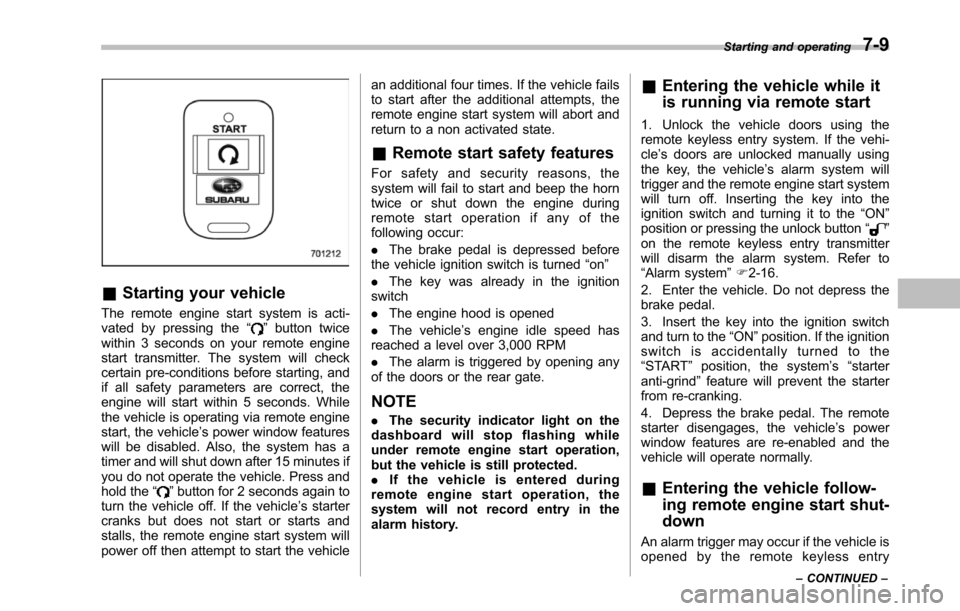
The remote engine start system is acti-vated by pressing the“”button twicewithin 3 seconds on your remote enginestart transmitter. The system will checkcertain pre-conditions before starting, andif all safety parameters are correct, theengine will start within 5 seconds. Whilethe vehicle is operating via remote enginestart, the vehicle’s power window featureswill be disabled. Also, the system has atimer and will shut down after 15 minutes ifyou do not operate the vehicle. Press andhold the“”button for 2 seconds again toturn the vehicle off. If the vehicle’s startercranks but does not start or starts andstalls, the remote engine start system willpower off then attempt to start the vehicle
an additional four times. If the vehicle failsto start after the additional attempts, theremote engine start system will abort andreturn to a non activated state.
&Remote start safety features
For safety and security reasons, thesystem will fail to start and beep the horntwice or shut down the engine duringremote start operation if any of thefollowing occur:
.The brake pedal is depressed beforethe vehicle ignition switch is turned“on”
.The key was already in the ignitionswitch
.The engine hood is opened
.The vehicle’s engine idle speed hasreached a level over 3,000 RPM
.The alarm is triggered by opening anyof the doors or the rear gate.
NOTE
.The security indicator light on thedashboard will stop flashing whileunder remote engine start operation,but the vehicle is still protected..If the vehicle is entered duringremote engine start operation, thesystem will not record entry in thealarm history.
&Entering the vehicle while it
is running via remote start
1. Unlock the vehicle doors using theremote keyless entry system. If the vehi-cle’s doors are unlocked manually usingthe key, the vehicle’s alarm system willtrigger and the remote engine start systemwill turn off. Inserting the key into theignition switch and turning it to the“ON”position or pressing the unlock button“”on the remote keyless entry transmitterwill disarm the alarm system. Refer to“Alarmsystem”F2-16.
2. Enter the vehicle. Do not depress thebrake pedal.
3. Insert the key into the ignition switchand turn to the“ON”position. If the ignitionswitch is accidentally turned to the“START”position, the system’s“starteranti-grind”feature will prevent the starterfrom re-cranking.
4. Depress the brake pedal. The remotestarter disengages, the vehicle’s powerwindow features are re-enabled and thevehicle will operate normally.
&Entering the vehicle follow-
ing remote engine start shut-
down
An alarm trigger may occur if the vehicle isopened by the remote keyless entry
Starting and operating7-9
–CONTINUED–
Page 260 of 426
“R”position or vice versa untilthe vehicle has completelystopped. Such shifting maycause damage to the transmis-sion.
.When parking the vehicle, firstsecurely apply the parking brakeand then place the select lever inthe“P”position. Avoid parkingfor a long time with the selectlever in any other position asdoing so could result in a deadbattery.
NOTE
.When the engine coolant tempera-ture is still low, the automatic transmis-sion will upshift to higher enginespeeds than when the coolant tempera-ture is sufficiently high in order toshorten the warm-up time and improvedriveability. The gearshift timing willautomatically shift to the normal timingafter the engine has warmed up..Immediately after ATF (automatictransmission fluid) is replaced, youmay feel that the automatic transmis-sion operation is somewhat unusual.This results from invalidation of datawhich the on-board computer hascollected and stored in memory to
allow the transmission to shift at themost appropriate times for the currentcondition of your vehicle. Optimizedshifting will be restored as the vehiclecontinues to be driven for a while.
&Select lever
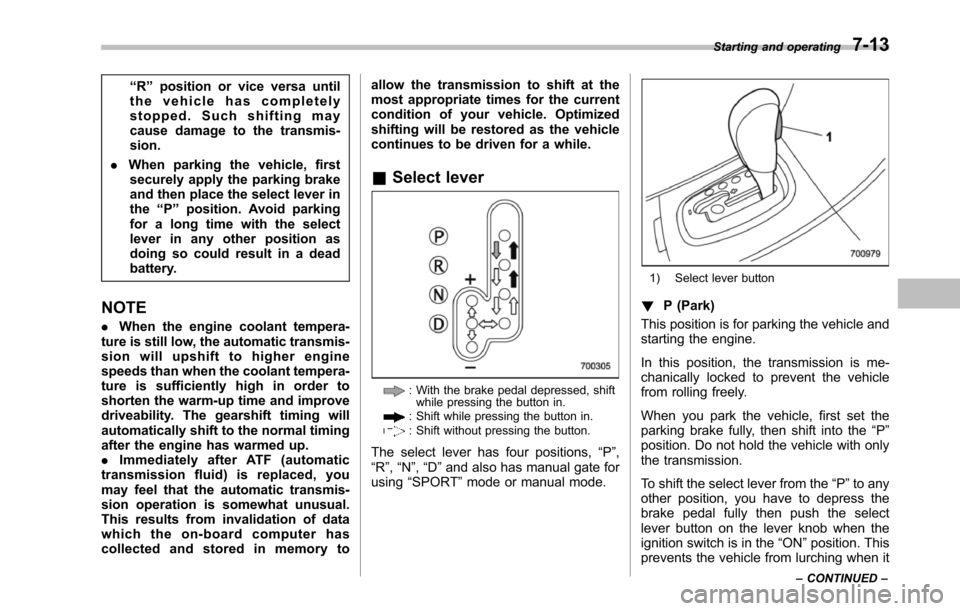
: With the brake pedal depressed, shiftwhile pressingthe button in.: Shift while pressing the button in.: Shift without pressing the button.
The select lever has four positions,“P”,“R”,“N”,“D”and also has manual gate forusing“SPORT”mode or manual mode.
1) Select lever button
!P (Park)
This position is for parking the vehicle andstarting the engine.
In this position, the transmission is me-chanically locked to prevent the vehiclefrom rolling freely.
When you park the vehicle, first set theparking brake fully, then shift into the“P”position. Do not hold the vehicle with onlythe transmission.
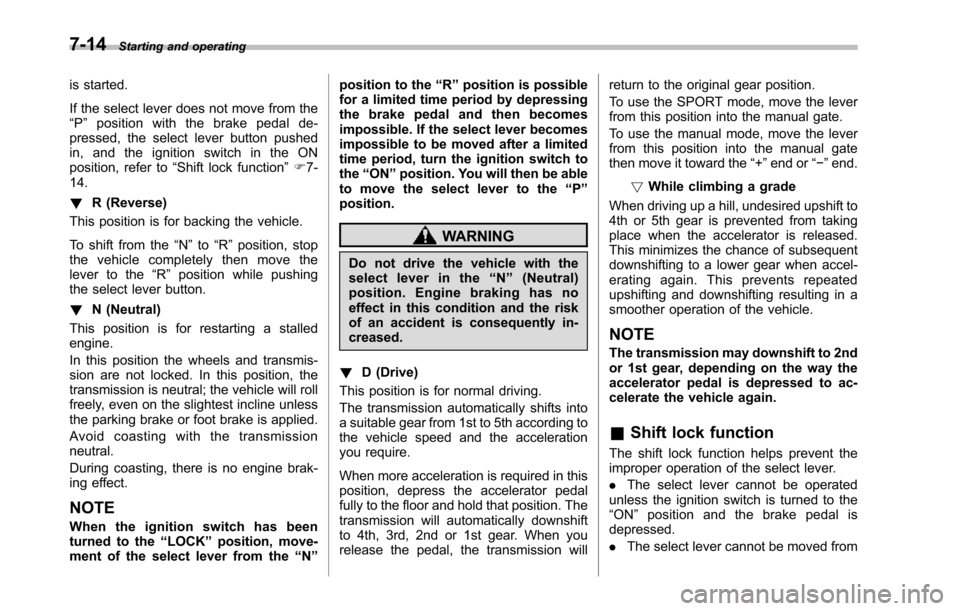
To shift the select lever from the“P”to anyother position, you have to depress thebrake pedal fully then push the selectlever button on the lever knob when theignition switch is in the“ON”position. Thisprevents the vehicle from lurching when it
Starting and operating7-13
–CONTINUED–
Page 261 of 426
7-14Starting and operating
is started.
If the select lever does not move from the“P”position with the brake pedal de-pressed, the select lever button pushedin, and the ignition switch in the ONposition, refer to“Shift lock function”F7-14.
!R (Reverse)
This position is for backing the vehicle.
To shift from the“N”to“R”position, stopthe vehicle completely then move thelever to the“R”position while pushingthe select leverbutton.
!N (Neutral)
This position is for restarting a stalledengine.
In this position the wheels and transmis-sion are not locked. In this position, thetransmission is neutral; the vehicle will rollfreely, even on the slightest incline unlessthe parking brake or foot brake is applied.
Avoid coasting with the transmissionneutral.
During coasting, there is no engine brak-ing effect.
NOTE
When the ignition switch has beenturned to the“LOCK”position, move-ment of the select lever from the“N”
position to the“R”position is possiblefor a limited time period by depressingthe brake pedal and then becomesimpossible. If the select lever becomesimpossible to be moved after a limitedtime period, turn the ignition switch tothe“ON”position. You will then be ableto move the select lever to the“P”position.
WARNING
Do not drive the vehicle with theselect lever in the“N”(Neutral)position. Engine braking has noeffect in this condition and the riskof an accident is consequently in-creased.
!D (Drive)
This position is for normal driving.
The transmission automatically shifts intoa suitable gear from 1st to 5th according tothe vehicle speed and the accelerationyou require.
When more acceleration is required in thisposition, depress the accelerator pedalfully to the floor and hold that position. Thetransmission will automatically downshiftto 4th, 3rd, 2nd or 1st gear. When yourelease the pedal, the transmission will
return to the original gear position.
To use the SPORT mode, move the leverfrom this position into the manual gate.
To use the manual mode, move the leverfrom this position into the manual gatethen move it toward the“+”end or“!”end.
!While climbing a grade
When drivingup a hill, undesired upshift to4th or 5th gear is prevented from takingplace when the accelerator is released.This minimizes the chance of subsequentdownshifting to a lower gear when accel-erating again. This prevents repeatedupshifting and downshifting resulting in asmoother operation of the vehicle.
NOTE
The transmission may downshift to 2ndor 1st gear, depending on the way theaccelerator pedal is depressed to ac-celerate the vehicle again.
&Shift lock function
The shift lock function helps prevent theimproper operationof the select lever.
.The select lever cannot be operatedunless the ignition switch is turned to the“ON”position and the brake pedal isdepressed.
.The select lever cannot be moved from
Page 262 of 426
the“P”position to any other positionbefore the brake pedal is depressed.Depress the brake pedal first, and thenoperate the select lever.
.Only the“P”position allows you to turnthe key from the“Acc”position to the“LOCK”position and remove the key fromthe ignition key cylinder.
.If the ignition switch is turned to the“LOCK”position while the select lever is inthe“N”position,the select lever may notbe moved to the“P”positionafter a periodof time. Therefore, move the select leverto the“P”position with the brake pedaldepressed soon after the ignition switch isturned to the“LOCK”position.
!Shift lock release
If the select lever cannot be operated, turnthe ignition switch back to the“ON”position then move the select lever to the“P”position with the select lever buttonpressed and brake pedal depressed.
If the select lever does not move afterperforming the above procedure, performthe following steps.
.When the select lever cannot beshifted from“P”to“N”:
Refer to“Shift lock release using the shiftlock release button”F7-15.
.When the select lever cannot beshifted from“N”to“R”or“P”:
Within 60 seconds after placing the igni-tion switch in the“Acc”position, move theselect lever to the“R”or“P”position withthe select lever button pressed and brakepedal depressed.
If you must perform the above procedure,the shift lock system (or the vehicle controlsystem) may be malfunctioning. Contact aSUBARU dealer for an inspection as soonas possible.
If the select lever does not move afterperforming the above procedure, refer to“Shift lock release using the shift lockrelease button”F7-15.
!Shift lock release using the shiftlock release button
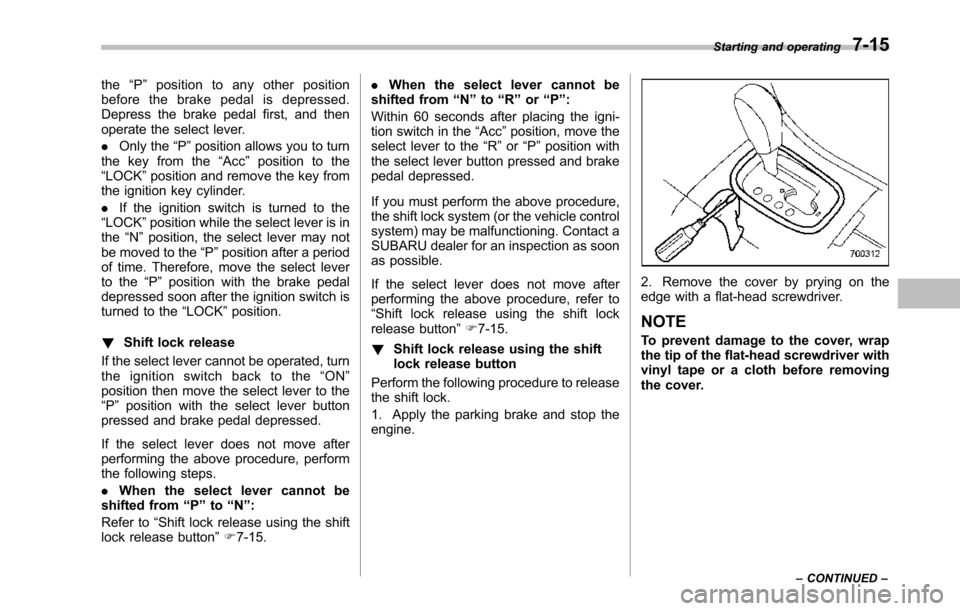
Perform the following procedure to releasethe shift lock.
1. Apply the parking brake and stop theengine.
2. Remove the cover by prying on theedge with a flat-head screwdriver.
NOTE
To prevent damage to the cover, wrapthetip of the flat-head screwdriver withvinyl tape or a cloth before removingthe cover.
Starting and operating7-15
–CONTINUED–