2014 SUBARU TRIBECA manual radio set
[x] Cancel search: manual radio setPage 198 of 426
NOTE
While you are holding down either sideof the“TUNE TRACK”button, thetuning frequency will not stop chan-ging even if the frequency of a recei-vable station is reached.
!Seek tuning
If you press the“”or“”side of the“SEEK FLDR”button (7), the radio willautomatically search for a receivablestation and stop at the first one it finds.This function may not be available, how-ever, when radio signals are weak. In suchasituation,performmanualtuningtoselect the desired station.
!Automatic tuning (SCAN)
Press the“SCAN”button (8) to change theradio to the SCAN mode. In this mode, theradio scans through the radio band until astation is found. The radio will stop at thestation for 5 seconds while displaying thefrequency, after which scanning will con-tinue until the entire band has beenscanned from the low end to the highend. Press the“SCAN”button again tocancel the SCAN mode and to stop on anydisplayed frequency.
Press the“”or“”side of the“SEEKFLDR”button (7) again to cancel the scanmode and to stop on any displayed
frequency.
When the“SCAN”button is pressed forautomatic tuning, stations are scanned inthe direction of low frequencies to highfrequencies only.
Automatic tuning may not function prop-erly if the station reception is weakened bydistancefrom the station or proximity totall buildings and hills.
!Selecting preset stations
Presetting a station with a preset button(10) allows you to select that station in asingle operation. Up to six, AM, FM1 andFM2 stations each may be preset.
!How to preset stations
1. Press the“FM AM”button (2) to selectFM1, FM2, or AM reception.
2. Press the“SCAN”button (8) or tunethe radio manually until the desired stationfrequencyis displayed.
3. Press and hold one of the presetbuttons (10) to store the frequency. If thebutton is pressed briefly, the precedingselection will remain in memory.
NOTE
.If the connection between the radioand battery is broken for any reasonsuch as vehicle maintenance or radioremoval, all stations stored in the
preset buttons are cleared. If thisoccurs, it is necessary to reset thepreset buttons..If a cell phone is placed near theradio, it may cause the radio to emitnoise when it receives calls. This noisedoes not indicate a radio malfunction.
!Satellite radio mode (if equipped)
To receive satellite radio, it is necessary toinstall the SUBARU genuine satellitereceiver (optional part) and to enter intoa contract with a satellite radio networkservice such as“Sirius XMTMsatelliteradio”(for U.S.A. only)or“Sirius satelliteradio”(for Canada only). For details,please contact your SUBARU dealer.
!Sirius satellite radio (for Canadaonly)
Sirius satellite radio is a recent innovationthat allows the listener to experiencedigital sound quality and to have a greatervariety of channels.
Use of satellite radio (Sirius) requires atuner, antenna and a service contract. Fordetails, please contact your SUBARUdealer or visit Sirius Satellite Radio atwww.sirius.ca or call 1-888-539-7474 formore information. Sirius, the Sirius doglogo, channel names and logos are trade-marks of SIRIUS Satellite Radio Inc.
Audio5-7
–CONTINUED–
Page 200 of 426
buttons (10) to store the channel. If thebutton is pressed briefly, the precedingselection will remain in memory.
NOTE
If the connection between the radio andbattery is broken for any reason suchas vehicle maintenance or radio re-moval, all channels stored in the presetbuttons are cleared. If this occurs, it isnecessary to reset the preset buttons.
!Display selection
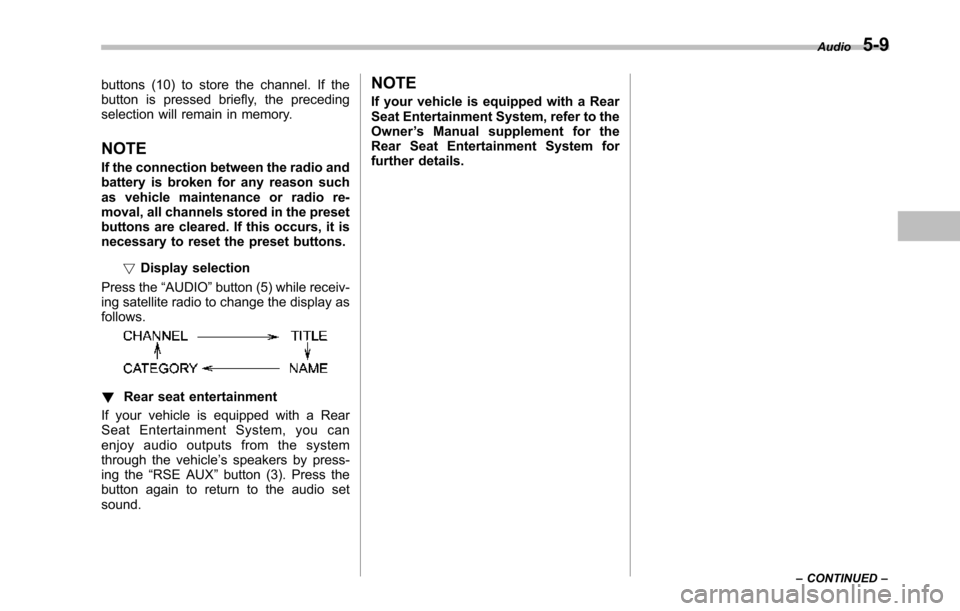
Press the“AUDIO”button (5) while receiv-ing satellite radio to change the display asfollows.
!Rear seat entertainment
If your vehicle is equipped with a RearSeat Entertainment System, you canenjoy audio outputs from the systemthrough the vehicle’s speakers by press-ing the“RSE AUX”button (3). Press thebutton again to return to the audio setsound.
NOTE
If your vehicle is equipped with a RearSeat Entertainment System, refer to theOwner’s Manual supplement for theRear Seat Entertainment System forfurther details.
Audio5-9
–CONTINUED–
Page 209 of 426
5-18Audio
NOTE
While you are holding down either sideof the TUNE/TRACK button, the tuningfrequency will not stop changing evenif the frequency of a receivable stationis reached.
!Seek tuning (SEEK)
If you press the“”or“”side of the“SEEK FLDR”button (7), the radio willautomatically search for a receivablestation and stop at the first one it finds.This function may not be available, how-ever, when radio signals are weak. In suchasituation,performmanualtuningtoselect the desired station.
!Scan tuning (SCAN)
Press the“SCAN”button (8) to change theradio to the SCAN mode. In this mode, theradio scans through the radio band until astationis found. The radio will stop at thestation for 5 seconds while displaying thefrequency, after which scanning will con-tinue until the entire band has beenscannedfrom the low end to the highend. Press the“SCAN”buttonagain tocancel the SCAN mode and to stop on anydisplayed frequency.
Press the“”or“”side of the“SEEKFLDR”button (7) again to cancel the scanmode and to stop on any displayed
frequency.
When the“SCAN”button is pressed forautomatic tuning, stations are scanned inthe direction of low frequencies to highfrequencies only.
Automatic tuning may not function prop-erly if the station reception is weakened bydistance from the station or proximity totall buildings and hills.
!Selecting preset stations
Presetting a station with a preset buttonallows you to select that station in a singleoperation. Up to six AM, FM1 and FM2stations each may be preset.
!How to preset stations
1. Press the“FM AM”button (2) to selectFM1, FM2 or AM reception.
2. Press the“SCAN”button (8) or tunethe radio manually until the desired stationfrequency is displayed.
3. Press and hold one of the presetbuttons to store the frequency. If thebutton is pressed briefly, the precedingselection will remain in memory.
NOTE
.If the connection between the radioand battery is broken for any reasonsuch as vehicle maintenance or radioremoval, all stations stored in the
preset buttons are cleared. If thisoccurs, it is necessary to reset thepreset buttons..If a cell phone is placed near theradio, it may cause the radio to emitnoise when it receives calls. This noisedoes not indicate a radio malfunction.
!Satellite radio mode (if equipped)
To receive satellite radio, it is necessary toinstall the SUBARU genuine satellitereceiver (optional part) and to enter intoa contract with a satellite radio networkservice such as“Sirius XMTMsatelliteradio”(for U.S.A. only) or“Sirius satelliteradio”(for Canada only). For details,please contact your SUBARU dealer.
!Sirius satellite radio (for Canadaonly)
Refer to“Sirius satellite radio (for Canadaonly)”F5-7.
!Sirius XMTMSatellite Radio Acti-vation (for U.S.A. only)
Refer to“Sirius XMTMSatellite RadioActivation (for U.S.A. only)”F5-8.
!Satellite radio reception
Refer to“Satellite radio reception”F5-8.