2014 SUBARU TRIBECA lights
[x] Cancel search: lightsPage 155 of 426
3-22Instruments and controls
&High beam indicator
light
This light shows that the headlights are inthe high beam mode.
This indicator light also illuminates whenthe headlight flasher is operated.
&Cruise control indica-
tor light
This light illuminates when the“CRUISE”main switch is pressed to activate thecruise control function. For details, refer to“To set cruise control”F7-30.
CAUTION
If the CHECK ENGINE warning light/malfunction indicator light illumi-nates, the cruise control indicatorlight flashes at the same time. Atthis time, avoid driving at highspeed and have your vehicle in-spected at a SUBARU dealer assoon as possible.
NOTE
If you move the cruise control lever orpress the main switch button whileturning the ignition switch“ON”, thecruise control function is deactivated
and the cruise control indicator lightflashes. To reactivate the cruise controlfunction, turn the ignition switch backto the“Acc”or“LOCK”position, andthen turn it again to the“ON”position.
&Cruise control set in-
dicator light
This light illuminates when vehicle speedhasbeen set to use the cruise controlfunction.
&Headlight indicator
light
This indicator light illuminates when thelight switch is turned to the“”position(to turn on the parking lights) or to the“”position (to turn on the headlights).
&Front fog light indicator
light
This indicator light illuminates while thefront fog lights are illuminated.
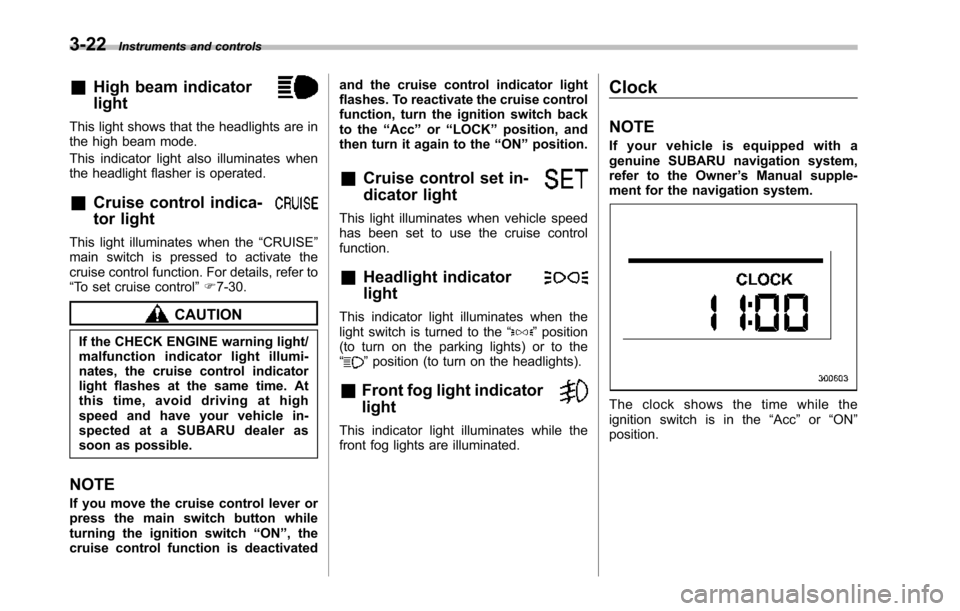
Clock
NOTE
If your vehicle is equipped with agenuine SUBARU navigation system,refer to the Owner’s Manual supple-ment for the navigation system.
The clock shows the time while theignition switch is in the“Acc”or“ON”position.
Page 160 of 426
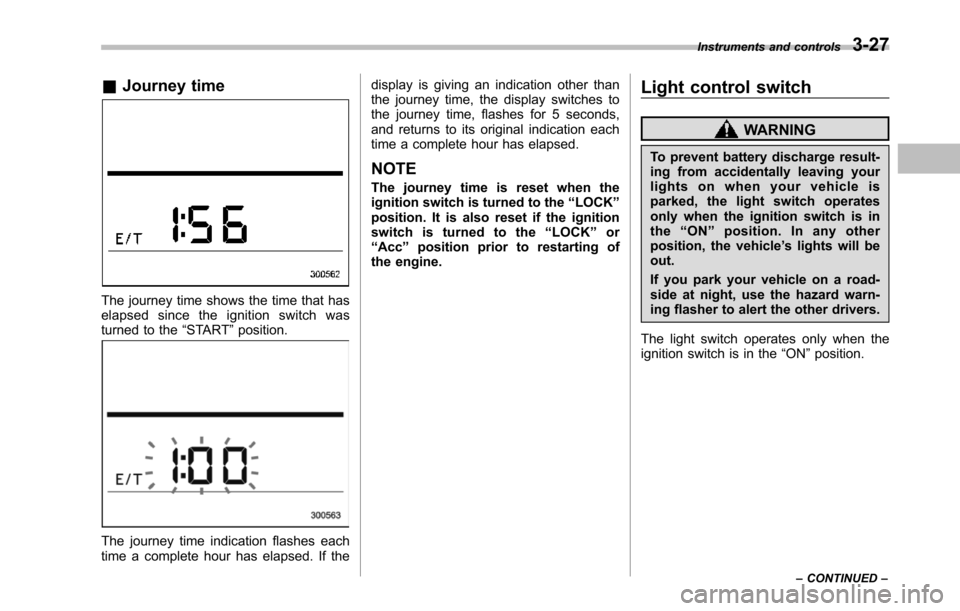
&Journey time
The journey time shows the time that haselapsed since the ignition switch wasturned to the“START”position.
The journey time indication flashes eachtime a complete hour has elapsed. If the
display is giving an indication other thanthe journey time, the display switches tothe journey time, flashes for 5 seconds,and returns to its original indication eachtime a complete hour has elapsed.
NOTE
The journey time is reset when theignition switch is turned to the“LOCK”position. It is also reset if the ignitionswitch is turned to the“LOCK”or“Acc”position prior to restarting ofthe engine.
Light control switch
WARNING
To prevent battery discharge result-ing from accidentally leaving yourlights on when your vehicle isparked, the light switch operatesonly when the ignition switch is inthe“ON”position. In any otherposition, the vehicle’s lights will beout.
If you park your vehicle on a road-side at night, use the hazard warn-ing flasher to alert the other drivers.
The light switch operates only when theignition switch is in the“ON”position.
Instruments and controls3-27
–CONTINUED–
Page 161 of 426
3-28Instruments and controls
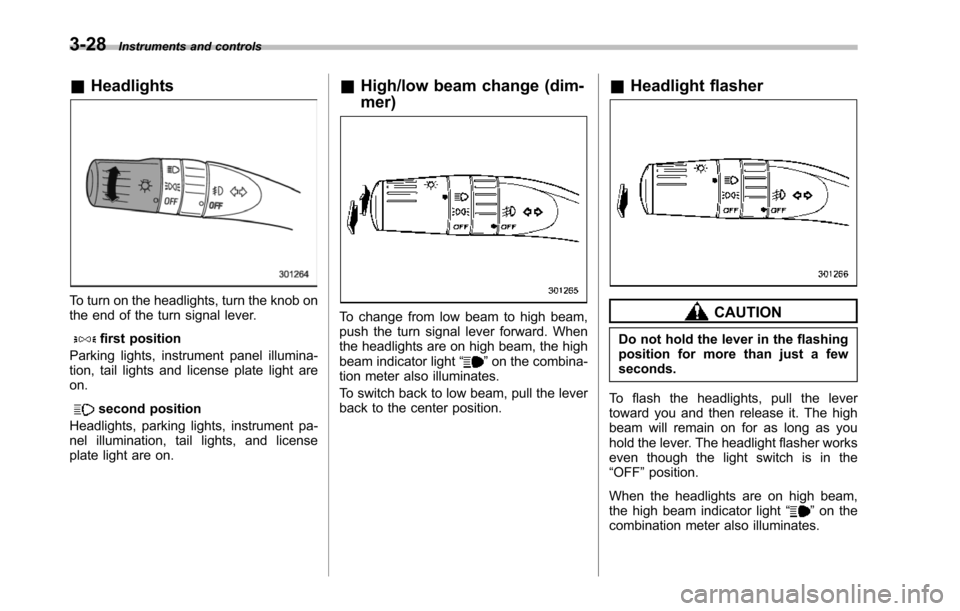
&Headlights
To turn on the headlights, turn the knob onthe end of the turn signal lever.
first position
Parking lights, instrument panel illumina-tion, tail lights and license plate light areon.
second position
Headlights, parking lights, instrument pa-nel illumination, tail lights, and licenseplate light are on.
&High/low beam change (dim-
mer)
To change from low beam to high beam,push the turn signal lever forward. Whenthe headlights are on high beam, the highbeamindicator light“”on the combina-tion meter also illuminates.
To switch back to low beam, pull the leverback to the center position.
&Headlight flasher
CAUTION
Do not hold the lever in the flashingposition for more than just a fewseconds.
To flash the headlights, pull the levertoward you and then release it. The highbeam will remain on for as long as youhold the lever. The headlight flasher workseven though the light switch is in the“OFF”position.
When the headlights are on high beam,the high beam indicator light“”on thecombinationmeter also illuminates.
Page 162 of 426
&Daytime running light system
WARNING
The brightness of the illumination ofthe high beam headlights is reducedby the daytime running light system.The light switch must always beturned to the“”position when itis dark outside.
The high beam headlights will automati-cally illuminate at reduced brightnesswhen the engine has started, under thefollowing conditions.
.The select lever is in a position otherthan the“P”position.
.The parkingbrake is fully released.
.The light switch is in the“OFF”or“”position.
NOTE
When the light switch is in the“”position,the front side marker lights,parking lights and license plate lightsare also illuminated.
Turn signal lever
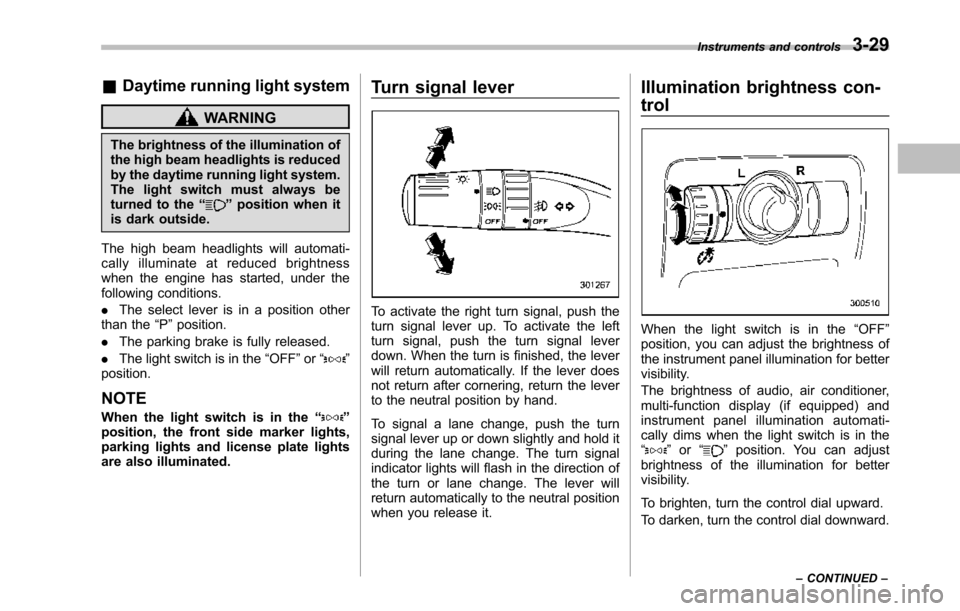
To activate the right turn signal, push theturn signal lever up. To activate the leftturn signal, push the turn signal leverdown. When the turn is finished, the leverwill return automatically. If the lever doesnot return after cornering, return the leverto the neutral position by hand.
To signal a lane change, push the turnsignal lever up or down slightly and hold itduring the lane change. The turn signalindicator lights will flash in the direction ofthe turn or lane change. The lever willreturn automatically to the neutral positionwhen you release it.
Illumination brightness con-
trol
When the light switch is in the“OFF”position, you can adjust the brightness ofthe instrument panel illumination for bettervisibility.
The brightnessof audio, air conditioner,multi-function display (if equipped) andinstrument panel illumination automati-cally dims when the light switch is in the“”or“”position. You can adjustbrightness of the illumination for bettervisibility.
To brighten, turn the control dial upward.
To darken, turn the control dial downward.
Instruments and controls3-29
–CONTINUED–
Page 165 of 426
3-32Instruments and controls
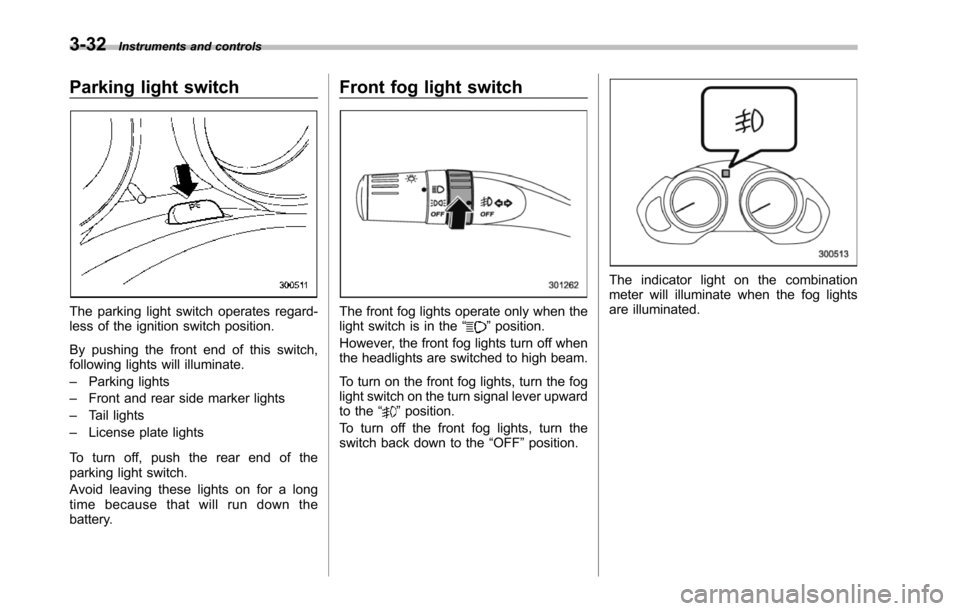
Parking light switch
The parking light switch operates regard-less of the ignition switch position.
By pushing the front end of this switch,following lights will illuminate.
–Parking lights
–Front and rear side marker lights
–Tail lights
–License plate lights
To turn off, push the rear end of theparking lightswitch.
Avoid leaving these lights on for a longtime because that will run down thebattery.
Front fog light switch
The front fog lights operate only when thelight switch is in the“”position.
However, the front fog lights turn off whenthe headlights are switched to high beam.
To turn on the front fog lights, turn the foglight switchon the turn signal lever upwardto the“”position.
To turn off the front fog lights, turn theswitch back down to the“OFF”position.
The indicator light on the combinationmeter will illuminate when the fog lightsare illuminated.
Page 171 of 426
3-38Instruments and controls
NOTE
The outside mirror defogger also oper-ates while the rear window defogger isoperating.
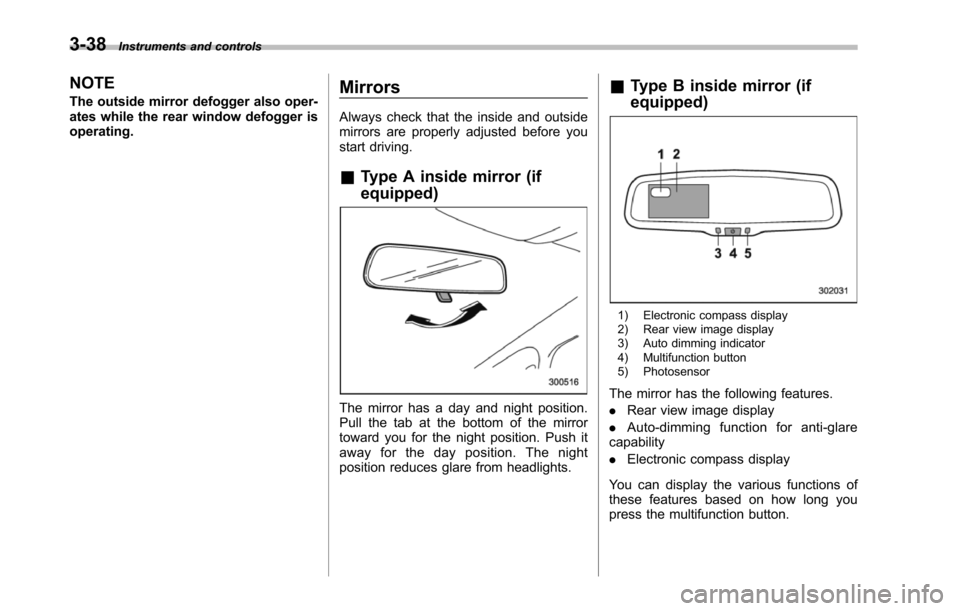
Mirrors
Always check that the inside and outsidemirrors are properly adjusted before youstart driving.
&Type A inside mirror (if
equipped)
The mirror has a day and night position.Pull the tab at the bottom of the mirrortoward you for the night position. Push itaway for the day position. The nightposition reduces glare from headlights.
&Type B inside mirror (if
equipped)
1) Electronic compass display2) Rear view image display3) Auto dimming indicator4) Multifunction button5) Photosensor
The mirror has the following features.
.Rear view image display
.Auto-dimming function for anti-glarecapability
.Electronic compass display
You can display the various functions ofthese features based on how long youpress the multifunction button.
Page 172 of 426
Gearposition
Period oftime multi-functionbutton ispressed
Functiondisplayed
R (reverse)
BrieflyRear view displayON/OFF*
More than3 secondsHelp lines indica-tion ON/OFF
ExceptR (reverse)BrieflyAuto-dimmingfunction ON/OFF*
3 to 6secondsElectronic com-pass display ON/OFF
6 to 9secondsEnterthe com-pass zone settingmode
9 to 12secondsEnter the com-passcalibrationmode
*: The setting returns to“ON”as a defaultsetting every time theignition switch is turned tothe“ON”position.
!Rear view image display
When the ignition switch is“ON”and theselect lever is set to“R”, the rear viewcamera automatically displays the rearview image behind the vehicle on theinside mirror.
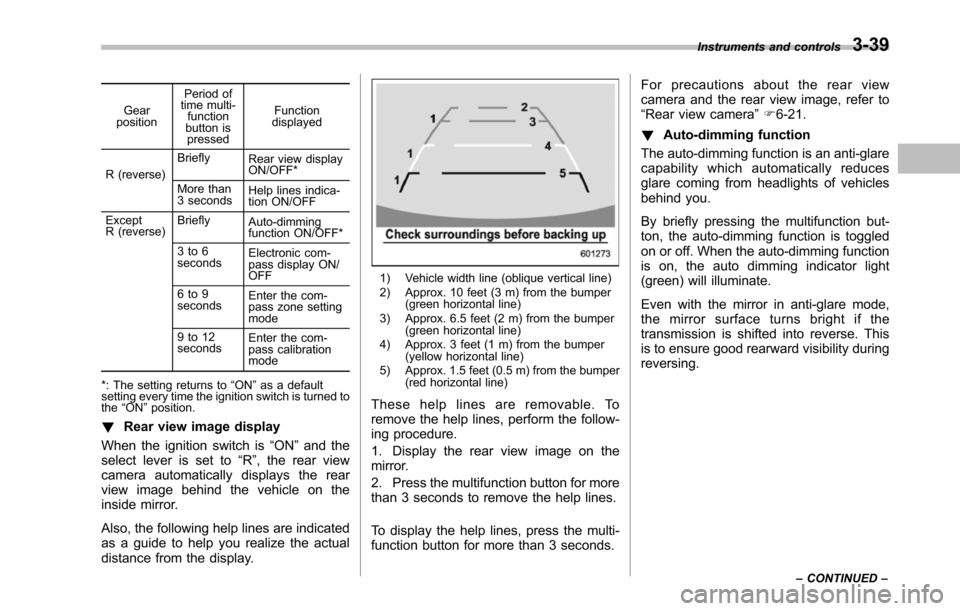
Also, the following help lines are indicatedas a guide to help you realize the actualdistance from the display.
1) Vehicle width line (oblique vertical line)2) Approx. 10 feet (3 m) from the bumper(green horizontal line)3) Approx. 6.5 feet (2 m) from the bumper(green horizontal line)4) Approx. 3 feet (1 m) from the bumper(yellow horizontal line)5) Approx. 1.5 feet (0.5 m) from the bumper(red horizontal line)
These help lines are removable. Toremove the help lines, perform the follow-ing procedure.
1. Display the rear view image on themirror.
2. Press the multifunction button for morethan 3 seconds to remove the help lines.
To display the help lines, press the multi-function button for more than 3 seconds.
For precautions about the rear viewcamera and the rear view image, refer to“Rear view camera”F6-21.
!Auto-dimming function
The auto-dimming function is an anti-glarecapability which automatically reducesglare coming from headlights of vehiclesbehind you.
By briefly pressing the multifunction but-ton, the auto-dimming function is toggledon or off. When the auto-dimming functionis on, the auto dimming indicator light(green) will illuminate.
Even with the mirror in anti-glare mode,the mirror surface turns bright if thetransmissionis shifted into reverse. Thisis to ensure good rearward visibility duringreversing.
Instruments and controls3-39
–CONTINUED–
Page 174 of 426
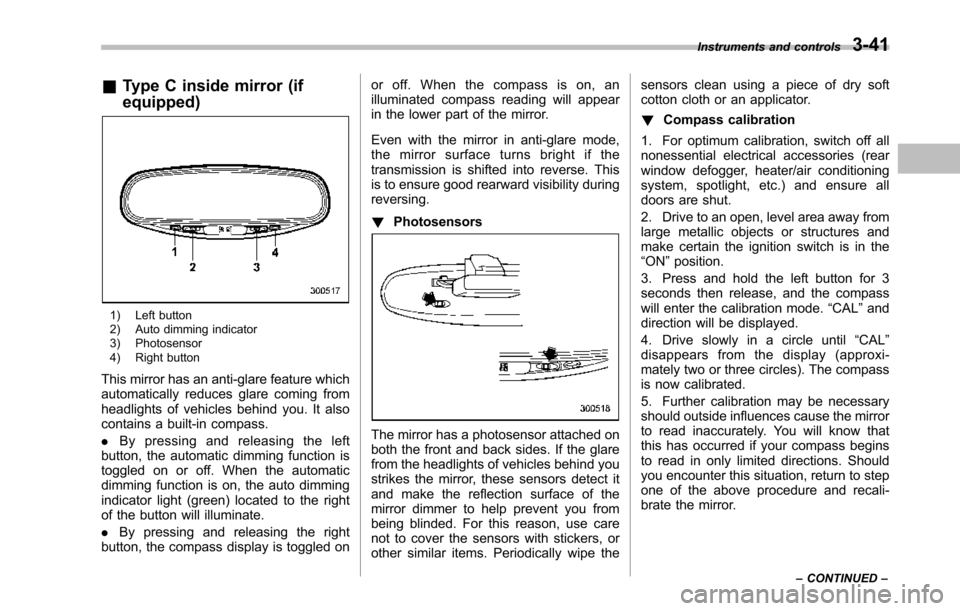
&Type C inside mirror (if
equipped)
1) Left button2) Auto dimming indicator3) Photosensor4) Right button
This mirror has an anti-glare feature whichautomatically reduces glare coming fromheadlights of vehicles behind you. It alsocontains a built-in compass.
.By pressing and releasing the leftbutton, the automatic dimming function istoggled on or off. When the automaticdimming function is on, the auto dimmingindicator light (green) located to the rightof the button will illuminate.
.By pressing and releasing the rightbutton, the compass display is toggled on
or off. When the compass is on, anilluminated compass reading will appearin the lower part of the mirror.
Even with the mirror in anti-glare mode,the mirror surface turns bright if thetransmission is shifted into reverse. Thisis to ensure good rearward visibility duringreversing.
!Photosensors
The mirror has a photosensor attached onboth the front and back sides. If the glarefrom the headlights of vehicles behind youstrikes the mirror, these sensors detect itand make the reflection surface of themirror dimmer to help prevent you frombeing blinded. For this reason, use carenot to cover the sensors with stickers, orother similar items. Periodically wipe the
sensors clean using a piece of dry softcotton cloth or an applicator.
!Compass calibration
1. For optimum calibration, switch off allnonessential electrical accessories (rearwindow defogger, heater/air conditioningsystem, spotlight, etc.) and ensure alldoors are shut.
2. Drive to an open, level area away fromlarge metallic objects or structures andmake certain the ignition switch is in the“ON”position.
3. Press and hold the left button for 3seconds then release, and the compasswill enter the calibration mode.“CAL”anddirection will be displayed.
4. Drive slowly in a circle until“CAL”disappears from the display (approxi-mately two or three circles). The compassis now calibrated.
5. Further calibration may be necessaryshould outside influences cause the mirrorto read inaccurately. You will know thatthis has occurred if your compass beginsto read in only limited directions. Shouldyou encounter this situation, return to stepone of the above procedure and recali-brate the mirror.
Instruments and controls3-41
–CONTINUED–